fuel MASERATI GHIBLI 2019 Owner's Manual
[x] Cancel search | Manufacturer: MASERATI, Model Year: 2019, Model line: GHIBLI, Model: MASERATI GHIBLI 2019Pages: 384, PDF Size: 13.33 MB
Page 205 of 384

defrost/demist vents to prevent
windows fogging.
NOTE:
Bi-Level mode is designed to let cooler
air come in the dashboard and rear
part of the central console vents and
warmer air from the floor vents.
• “Defrost” mode
Air for each zone comes from the
dashboard defrost/demist vents to
prevent windows fogging.
• “Mix” mode
Air for each zone comes from the
defrost/demist vent, the vent under
the dashboard and from floor vent.
This mode is recommended for cold
climates, to improve comfort and
prevent windows fogging.
• “Hi-Level” mode
Air for each zone comes from the
dashboard defrost/demist vents,
from the dashboard and central
console adjustable vents and the
fixed floor vents.
• “Tri-Level” mode
Air for each zone comes from all the
adjustable/fixed and defrost/demist
vents. 14. “SYNC” mode
Touch the “SYNC” soft-key on the
MTC+ to switch the Sync feature
on/off. The “SYNC” soft-key
illuminates when this feature is
selected. This function is used to
synchronise the passenger
temperature setting with the driver
temperature setting.
Changing the passenger temperature
setting while in “SYNC” will
automatically exit this feature.
Dual Zone Climate Control
Functions Air Conditioning (A/C)
The “A/C” soft-key allows to manually
activate or deactivate the air
conditioning system. When the air
conditioning system is turned on, cool
dehumidified air will flow through the
vents into the cabin. For improved fuel
economy, touch the “A/C” soft-key to
turn off the air conditioning and
manually adjust the blower and
airflow mode settings.
When the “A/C” and “AUTO”
functions are switched off it is not
possible to have air at a lower
temperature than the outside. Recirculation
and Air Quality
Sensor
When outside air contains smoke,
odours, or high humidity, or if rapid
cooling is desired, you may wish to
recirculate interior air by pressing the
recirculation control button or the
relevant soft-key to activate the two
different functionalities.
The recirculation function, that allows
to open/close the A/C air inlet by
operating the
button on the
climate control panel or the MTC+ soft
key, is integrated with the Air Quality
Sensor.
This sensor, positioned upstream of
the A/C filter, in front of the air intake
of the A/C system, detects the
presence of polluting substances and
submits an electric signal to the A/C
control unit, that closes the intake of
the external air by activating the air
recirculation.
The
button or the MTC+ soft-key
can therefore enable three operating
modes, switchable in sequence.
Starting from the outside air condition
with LED on the button off and MTC+
soft-key not highlighted, in which the
external air is aspirated by the A/C
system and treated to be introduced
into the passenger compartment,
subsequent actuations of theDashboard Instruments and Controls
4
201
Page 211 of 384
5 – Driving Normal Starting of the Engine ............................. 208
Automatic Start&Stop System ............................. 210
Automatic Transmission .................................. 214
All-Wheel Drive (AWD version only) ......................... 223
Drive Mode ........................................... 224
Active Alternator ....................................... 233
Parking Brake ......................................... 233
Parking .............................................. 236
Brake and Stability Control System ......................... 238
Using the Brakes ....................................... 241
Use of the Engine ...................................... 242
Electronic Cruise Control ................................. 244
Adaptive Cruise Control – ACC (optional) ..................... 247
Forward Collision Warning – FCW .......................... 258
Lane Keeping Assist - LKA (optional, with ACC only) ............ 261
Blind Spot Assist (without ACC) ............................ 266
Active Blind Spot Assist - ABSA (optional, with ACC only) ........ 271
Highway Assist – HAS (optional, with ACC only) ................ 274
Traffic Sign Assist – TSA (optional) .......................... 279
Tires - General Information ............................... 281
Tire Pressure Monitoring System (TPMS) ..................... 289
Fuel Requirements ...................................... 294
Refueling ............................................. 296
Driving Conditions ...................................... 298
207
Page 212 of 384
Normal Starting of the
Engine WARNING!
It is dangerous to run the engine in an
enclosed area. The engine consumes
oxygen and discharges carbon
dioxide, carbon monoxide and other
toxic gases in the atmosphere.
WARNING!
California Proposition 65
Operating, servicing and maintaining
a passenger vehicle or off-road vehicle
can expose you to chemicals including
such as, engine exhaust, carbon
monoxide, phthalates and lead, that
which are known to the State of
California to cause cancer and birth
defects or other reproductive harm. To
minimize exposure, avoid breathing
exhaust, do not idle the engine except
as necessary, service your vehicle in a
well-ventilated area and wear gloves
or wash your hands frequently when
servicing your vehicle. For more
information go to: www.P65Warnings.ca.gov/passenger-
vehicle
When doors are opened, the
instrument
cluster displays
the
Maserati Logo in the center and the
complete odometer plus the open
doors indicator
in the lower part of
the cluster.
Before starting the engine, close the
doors, adjust your seat, the inside and
outside mirrors, fasten your seat belt
and instruct all other occupants to
buckle their seat belts.
The shift lever must be in P (Park) or N
(Neutral) position before you can start
the engine. Apply the brakes before
shifting into any driving gear (see
“Automatic Transmission” in this
section). CAUTION!
• Before starting the engine, switch off
the electrical devices with a high
power consumption (air-conditioning
and heating system, heated rear
window, headlights, etc.).
• Do not start the engine if the fuel
level in the tank is low.
The keyless ignition allows the driver
to
operate the
ignition switch by
pushing the center button, as long as
the key fob RKE transmitter is within
the passenger compartment (check
“Keys” in section “Before Starting” for
further information).
By pressing the brake pedal and
pushing the START/STOP button the
engine starts. Instrument cluster
displays the initial sequence with
indicator light and analog instruments
test routine and switch-on of the
engine temperature indicators and
fuel level. This happens if option “On”
was set in screen settings for display
switch-on (see chapter “Instrument
cluster” in section “Dashboard
Instruments and Controls”).Driving
5
208
Page 214 of 384
Starting with a Cold Engine
Start-off slowly, avoiding sudden
acceleration and rev the engine up at
low medium speeds. High-
performance driving should be
avoided until the engine temperature
reaches 149-158°F (65-70°C).
Engine Turn-Off • With the shift lever in P (Park), D
(Drive) or R (Reverse) positions (see
“Automatic Transmission” in this
section) and vehicle standstill, press
and release the START/STOP button
to switch off the engine. A burst on
the accelerator pedal before turning
off the engine has no purpose and
increases fuel consumption.
• If the shift lever is in N (Neutral) and
the START/STOP button is pressed
once, the instrument cluster will
display a “Vehicle Not in Park”
message and the engine will remain
running.
WARNING!
Never leave a vehicle out of the P
(Park) position, as it could move. NOTE:
If
the ignition switch is left in the ACC
or RUN (engine not running) position
and the transmission is in P (Park), the
system will automatically time out
after 30 minutes of inactivity and the
ignition will switch to OFF position.
Engine Turn Off when in Automatic
Start&Stop
When the engine has been turned off
by the Start&Stop system, press and
release the START/STOP button. The
ignition switch will return to the OFF
position and the vehicle is off.
“Panic Stop” Strategy In panic conditions, if driver stops
engine in any non-standard manner
while driving at a speed over 2 mph
(3 km/h), the “Panic Stop” strategy can
manage the situation by checking
gearchange condition upon engine
cutting, driver’s action on brakes, road
condition (flat or slope) so as to set
gearchange to the most suitable
condition.
The “Panic Stop” strategy considers
that the driver should stop the engine
by pressing the ignition switch at least
3 times or holding it depressed for at
least 2 seconds.Automatic Start&Stop
System The Maserati Start&Stop system allows
the engine to automatically switch off
when the vehicle stops and to restart
when the driver intends to drive. This
feature helps reduce fuel
consumption. During the “Stop
(AutoStop)” phase the ignition is still
on and all security features are
available.
In order for the Start&Stop to activate,
the vehicle must be stationary and the
brake pedal adequately pressed.
NOTE:
If the brake pedal is not sufficiently
pressed the Start&Stop may not
function even if the vehicle is stopped.
When the Start&Stop switches off the
engine, the related light
illuminates on the instrument cluster.
As soon as the brake pedal is released,
the engine turns on.
While the vehicle is stopped, the
transmission can be placed in P (Park)
pressing the “P” button on the shift
lever.
In this case it is possible to release the
brake pedal and the vehicle will
remain in “AutoStop” with engine off.Driving
5
210
Page 215 of 384

Pressing the brake pedal and shifting
transmission into D (Drive) or R
(Reverse) will deactivate the
“AutoStop” condition and restart the
engine.
Start&Stop Deactivated Start&Stop function is deactivated
under the following conditions:
• When SPORT drive mode is activated.
• When
(ESC OFF) drive mode is
activated.
• If it has been disabled through the
main menu item “Start&Stop”, via
the controls located on the right side
of the steering wheel, or through
the Start & Stop hard button on the
central console (see chapter “Drive
Mode” in this section) or via the
MTC+ in the "Controls" page (see
“MTC+ “Controls” Screen” in section "Dashboard Instruments and
Controls") .
Start&Stop Not Active For keeping driving safety, interior
comfort and a correct functioning of
engine and vehicle, the Start&Stop
function does not activate under the
following conditions:
• When the driver’s seat belt is
unbuckled (see example).
• When the driver door is open.
• When the fuel level is too low.
• When the vehicle is stopped on a
very steep road.
• When the vehicle is stopped with
steered wheels (over 135° of steering
wheel angle for each part).
• When the vehicle is manoeuvring:
shift lever in R (Reverse). • When the temperature conditions
inside the vehicle do not correspond
to the air conditioning setting.
• When the front and rear “defroster”
function is activated.
• When the engine coolant and the
engine oil temperature are not on
proper functioning level.
• When the external temperature is
too cold.
• When the battery charge is below
safety value.
• When the previous stop had just
happened (few seconds) and the
minimum speed has not yet been
achieved.
• Shortly after R (Reverse) has been set
or when driving under a certain
speed level.
• When the hood is open.
• The sensors managing the
Start&Stop have been damaged.
• Start&Stop system faults are present.
• When Adaptive Cruise Control (ACC)
and/or Highway Assist (HAS) system
are engaged.
Automatic Restarting of the
Engine The engine may automatically restart,
before the brake pedal has beenDriving
5
211
Page 223 of 384
R (Reverse)
This range is used to move the vehicle
backward.
Switching to R (Reverse) starting from
N (Neutral) is only possible if the
vehicle is moving backwards.
We recommend to shift into R
(Reverse) only after the vehicle has
come to a complete stop.
• Vehicle stationary: switching
between R (Reverse) and D (Drive),
passing from N (Neutral), requires
brake pedal pressed and action on
the lever.
• Vehicle moving: the driver can switch
from R (Reverse) to N (Neutral)
acting on the shift lever without
pressing the unlock button and the
brake pedal.
N (Neutral)
• Vehicle stationary and engine
started: switching from N (Neutral)
to P (Park) requires “P” button
pressed only. Switching from N
(Neutral) to R (Reverse) and/or D
(Drive) requires brake pedal and
unlock button pressed and the
action on the shift lever.
• Vehicle moving: switching from N
(Neutral) to R (Reverse) and/or D
(Drive) requires pressing the unlock button and the action on the shift
lever. Switching to R (Reverse)
starting from N (Neutral) is only
possible if the vehicle is moving
backwards, while switching to D
(Drive) starting from N (Neutral) is
only possible if the vehicle is moving
forwards.
Set the parking brake and shift the
transmission into P (Park) if you must
leave the vehicle.
WARNING!
Do not switch to N (Neutral) and/or
never turn off the ignition to coast
downhill. These are unsafe practices
that limit driver’s response to
changing traffic or road conditions. It
is possible to lose control of the
vehicle and have a collision.
CAUTION!
Towing the vehicle, coasting, or
driving for any other reason with the
transmission in N (Neutral) can result
in severe transmission damage. See
“Towing a Disabled Vehicle” in section
“In an Emergency” for further
information. D (Drive)
This
range should
be used for most
city and highway driving. It provides
the smoothest upshifts and downshifts
and the best fuel economy. The
transmission automatically shifts up
and down through all gears. The D
(Drive) mode provides optimum
driving characteristics under all normal
operating conditions of the vehicle.
• Vehicle stationary: to switch from D
(Drive) to R (Reverse) requires brake
pedal and unlock button pressed
and the action on the shift lever: to
reach N (Neutral) starting from D
(Drive) is possible by only acting on
the shift lever.
• To enable special operations while
the car is moving at a low speed,
such as getting out of marsh or
snow, it is possible to run quickly
from D (Drive) to R (Reverse), and
vice versa, by pressing the unlock
button and acting on the shift lever
passing from N (Neutral).
• Vehicle moving: switching to N
(Neutral) from D (Drive) it is not
necessary to press brake pedal.
• From D (Drive) selected mode it is
always possible to switch to M +/-
(Manual) mode, by move the shift
lever to the left (see followingDriving
5
219
Page 225 of 384
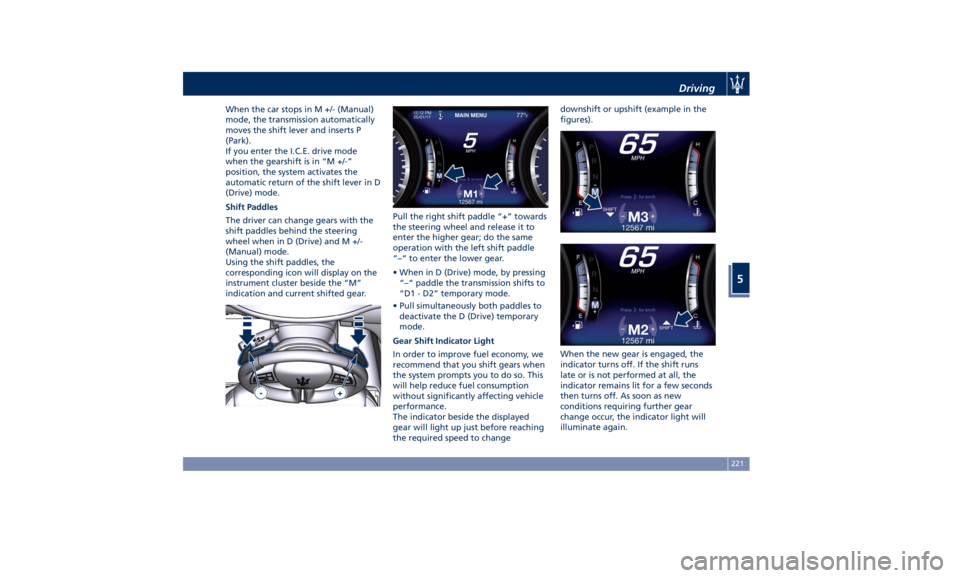
When the car stops in M +/- (Manual)
mode, the transmission automatically
moves the shift lever and inserts P
(Park).
If you enter the I.C.E. drive mode
when the gearshift is in “M +/-”
position, the system activates the
automatic return of the shift lever in D
(Drive) mode.
Shift Paddles
The driver can change gears with the
shift paddles behind the steering
wheel when in D (Drive) and M +/-
(Manual) mode.
Using the shift paddles, the
corresponding icon will display on the
instrument cluster beside the “M”
indication and current shifted gear. Pull the right shift paddle “+” towards
the steering wheel and release it to
enter the higher gear; do the same
operation with the left shift paddle
“–“ to enter the lower gear.
• When in D (Drive) mode, by pressing
“–“ paddle the transmission shifts to
“D1 - D2” temporary mode.
• Pull simultaneously both paddles to
deactivate the D (Drive) temporary
mode.
Gear Shift Indicator Light
In order to improve fuel economy, we
recommend that you shift gears when
the system prompts you to do so. This
will help reduce fuel consumption
without significantly affecting vehicle
performance.
The indicator beside the displayed
gear will light up just before reaching
the required speed to change downshift or upshift (example in the
figures).
When the new gear is engaged, the
indicator turns off. If the shift runs
late or is not performed at all, the
indicator remains lit for a few seconds
then turns off. As soon as new
conditions requiring further gear
change occur, the indicator light will
illuminate again.Driving
5
221
Page 227 of 384
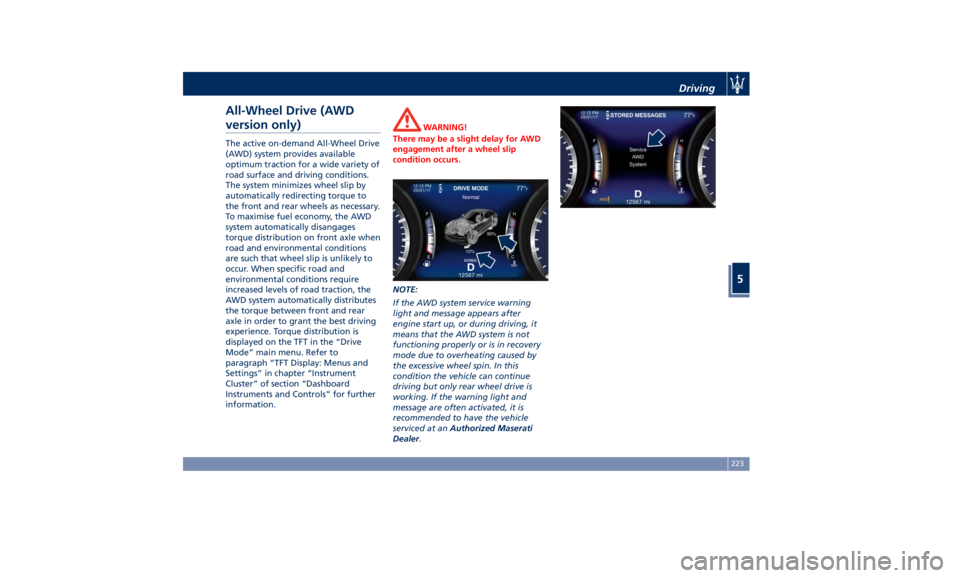
All-Wheel Drive (AWD
version only) The active on-demand All-Wheel Drive
(AWD) system provides available
optimum traction for a wide variety of
road surface and driving conditions.
The system minimizes wheel slip by
automatically redirecting torque to
the front and rear wheels as necessary.
To maximise fuel economy, the AWD
system automatically disangages
torque distribution on front axle when
road and environmental conditions
are such that wheel slip is unlikely to
occur. When specific road and
environmental conditions require
increased levels of road traction, the
AWD system automatically distributes
the torque between front and rear
axle in order to grant the best driving
experience. Torque distribution is
displayed on the TFT in the “Drive
Mode” main menu. Refer to
paragraph “TFT Display: Menus and
Settings” in chapter “Instrument
Cluster” of section “Dashboard
Instruments and Controls” for further
information. WARNING!
There may be a slight delay for AWD
engagement after a wheel slip
condition occurs.
NOTE:
If the A
WD system service warning
light and message appears after
engine start up, or during driving, it
means that the AWD system is not
functioning properly or is in recovery
mode due to overheating caused by
the excessive wheel spin. In this
condition the vehicle can continue
driving but only rear wheel drive is
working. If the warning light and
message are often activated, it is
recommended to have the vehicle
serviced at an Authorized Maserati
Dealer . Driving
5
223
Page 228 of 384
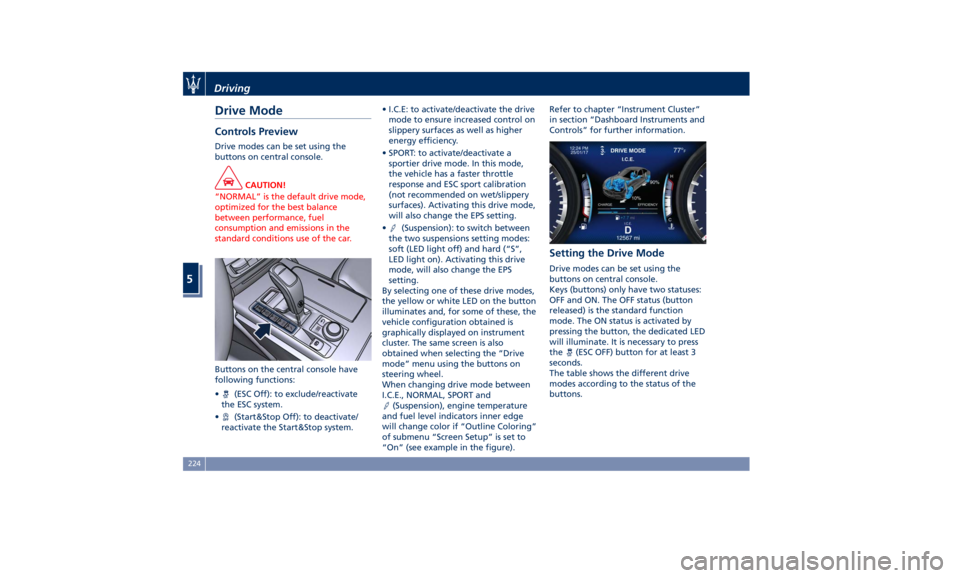
Drive Mode Controls Preview Drive modes can be set using the
buttons on central console.
CAUTION!
“NORMAL” is the default drive mode,
optimized for the best balance
between performance, fuel
consumption and emissions in the
standard conditions use of the car.
Buttons on the central console have
following
functions:
•
(ESC Off): to exclude/reactivate
the ESC system.
•
(Start&Stop Off): to deactivate/
reactivate the Start&Stop system. • I.C.E: to activate/deactivate the drive
mode to ensure increased control on
slippery surfaces as well as higher
energy efficiency.
• SPORT: to activate/deactivate a
sportier drive mode. In this mode,
the vehicle has a faster throttle
response and ESC sport calibration
(not recommended on wet/slippery
surfaces). Activating this drive mode,
will also change the EPS setting.
•
(Suspension): to switch between
the two suspensions setting modes:
soft (LED light off) and hard (“S”,
LED light on). Activating this drive
mode, will also change the EPS
setting.
By selecting one of these drive modes,
the yellow or white LED on the button
illuminates and, for some of these, the
vehicle configuration obtained is
graphically displayed on instrument
cluster. The same screen is also
obtained when selecting the “Drive
mode” menu using the buttons on
steering wheel.
When changing drive mode between
I.C.E., NORMAL, SPORT and
(Suspension), engine temperature
and fuel level indicators inner edge
will change color if “Outline Coloring”
of submenu “Screen Setup” is set to
“On” (see example in the figure). Refer to chapter “Instrument Cluster”
in section “Dashboard Instruments and
Controls” for further information.
Setting the Drive Mode Drive modes can be set using the
buttons on central console.
Keys (buttons) only have two statuses:
OFF and ON. The OFF status (button
released) is the standard function
mode. The ON status is activated by
pressing the button, the dedicated LED
will illuminate. It is necessary to press
the
(ESC OFF) button for at least 3
seconds.
The table shows the different drive
modes according to the status of the
buttons.Driving
5
224
Page 229 of 384
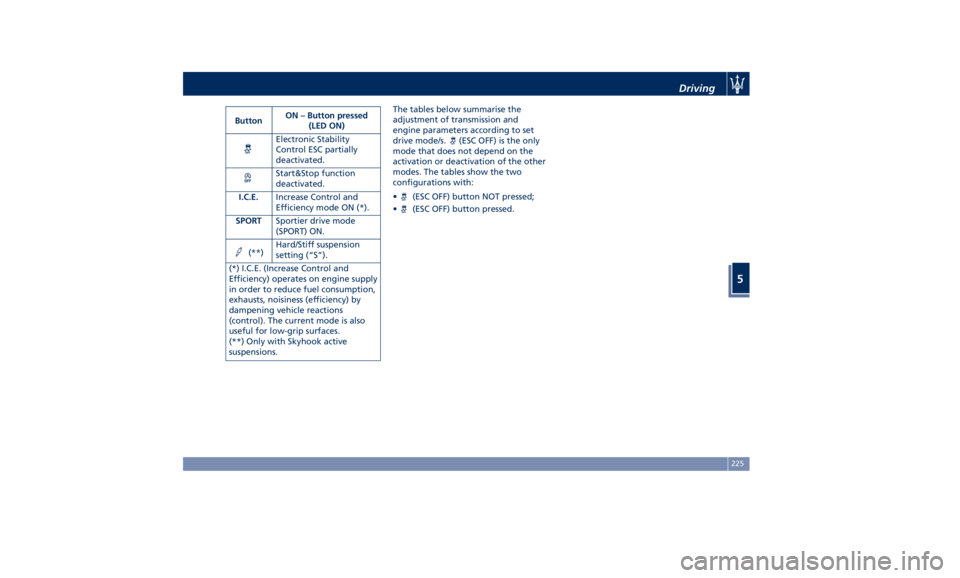
Button ON – Button pressed
(LED ON)
Electronic Stability
Control ESC partially
deactivated.
Start&Stop function
deactivated.
I.C.E. Increase Control and
Efficiency mode ON (*).
SPORT Sportier drive mode
(SPORT) ON.
(**) Hard/Stiff suspension
setting (“S”).
(*) I.C.E. (Increase Control and
Efficiency) operates on engine supply
in order to reduce fuel consumption,
exhausts, noisiness (efficiency) by
dampening vehicle reactions
(control). The current mode is also
useful for low-grip surfaces.
(**) Only with Skyhook active
suspensions. The tables below summarise the
adjustment of transmission and
engine parameters according to set
drive mode/s.
(ESC OFF) is the only
mode that does not depend on the
activation or deactivation of the other
modes. The tables show the two
configurations with:
•
(ESC OFF) button NOT pressed;
•
(ESC OFF) button pressed. Driving
5
225