snow MASERATI LEVANTE 2019 User Guide
[x] Cancel search | Manufacturer: MASERATI, Model Year: 2019, Model line: LEVANTE, Model: MASERATI LEVANTE 2019Pages: 436, PDF Size: 15.24 MB
Page 244 of 436
the smoothest upshifts and downshifts
and the best fuel economy. The
transmission automatically shifts up
and down through all gears. The D
(Drive) mode provides optimum
driving characteristics under all normal
operating conditions of the vehicle.
• Vehicle stationary: to switch from D
(Drive) to R (Reverse) requires brake
pedal and unlock button pressed and
the action on the shift lever: to reach
N (Neutral) starting from D (Drive) is
possible by only acting on the shift
lever.
• To enable special operations while
the car is moving at a low speed,
such as getting out of marsh or snow,
it is possible to run quickly from D
(Drive) to R (Reverse), and vice versa,
by pressing the unlock button and
acting on the shift lever passing from
N (Neutral).
• Vehicle moving: switching to N
(Neutral) from D (Drive) it is not
necessary to press brake pedal.
• From D (Drive) selected mode it is
always possible to switch to M +/-
(Manual) mode, by move the shift
lever to the left (see following
paragraph); to return to “D”
position, move the shift lever to the
right. It is possible to shift from D (Drive) mode to M +/- (Manual) mode
regardless of car speed.
• When in D (Drive) mode, using the
paddles behind the steering wheel (if
equipped), will cause the system to
enter a temporary function and
enable the manual shift mode. This
range is indicated with the symbols
“+/-” above and below “D” letter on
the gear range field of the display.
The system will then switch back to
automatic mode according to time
elapsed in “temporary” mode and
driving conditions.
At extremely cold temperatures (-23°F /
-30°C or below), transmission may be
affected by the low temperature of
the engine and transmission. Normal
operation will resume once the
transmission temperature has risen to
a normal level.
M +/- (Manual)
This mode is obtained by moving the
shift lever to the left in “M +/-“
position.
In this mode, the transmission interacts
with the driver in order to allow
manual shift and ensure increased
control of the vehicle. The current
mode allows the transmission system
to optimise the engine brake action,
remove undesired shifting into higher and lower gears and improve the
overall performance of the vehicle.
This mode allows you to move the shift
lever step by step forward “–“ or
backward “+” without pressing the
unlock button. The current
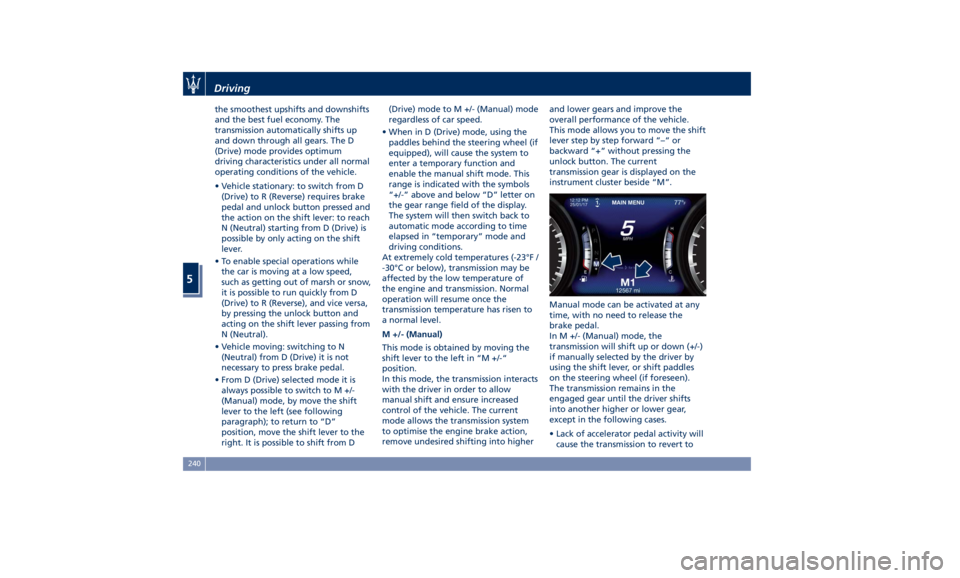
transmission gear is displayed on the
instrument cluster beside “M”.
Manual mode can be activated at any
time, with no need to release the
brake pedal.
In M +/- (Manual) mode, the
transmission will shift up or down (+/-)
if manually selected by the driver by
using the shift lever, or shift paddles
on the steering wheel (if foreseen).
The transmission remains in the
engaged gear until the driver shifts
into another higher or lower gear,
except in the following cases.
• Lack of accelerator pedal activity will
cause the transmission to revert toDriving
5
240
Page 252 of 436
Button
pressed: LED ON
Button not
pressed: LED
OFF OFF
ROAD OFF
ROAD OFF
ROAD OFF
ROAD OFF
ROAD
I.C.E. I.C.E. I.C.E. I.C.E. I.C.E.
SPORT SPORT SPORT SPORT SPORT
Automatic
downshift Normal Anti - Stall Normal Performance
(Anti - Stall,
when in M+/-) Performance
(Anti - Stall,
when in M+/-)
Shifting timing Normal Quick - Normal Comfort Sport (Quick -
Sport, when in
M+/-) Sport (Quick -
Sport, when in
M+/-)
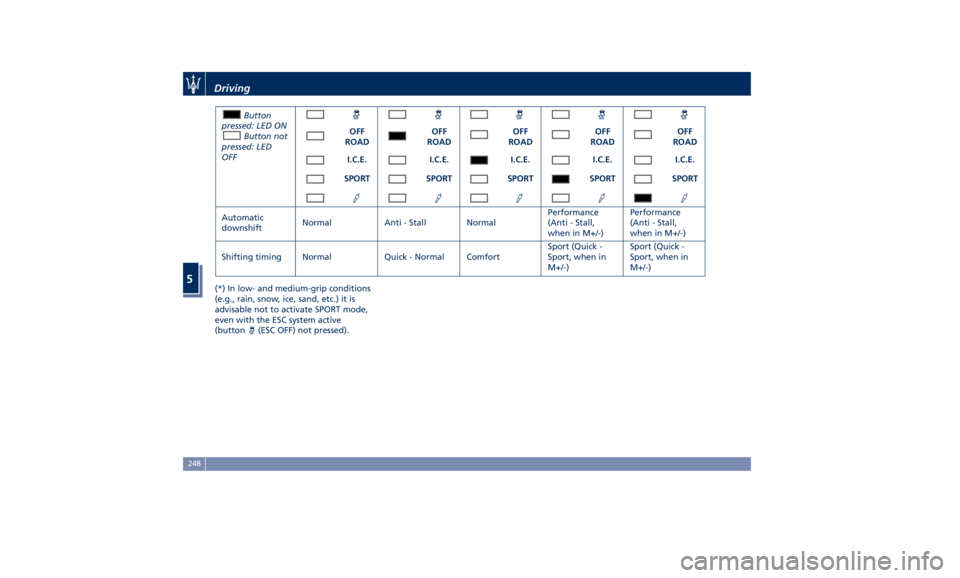
(*) In low- and medium-grip conditions
(e.g., rain, snow, ice, sand, etc.) it is
advisable not to activate SPORT mode,
even with the ESC system active
(button
(ESC OFF) not pressed).Driving
5
248
Page 256 of 436
Button
pressed: LED ON
Button not
pressed: LED
OFF OFF
ROAD OFF
ROAD OFF
ROAD OFF
ROAD OFF
ROAD OFF
ROAD
I.C.E. I.C.E. I.C.E. I.C.E. I.C.E. I.C.E.
SPORT SPORT SPORT SPORT SPORT SPORT
CORSA CORSA CORSA CORSA CORSA CORSA
Upshift rev.
limiter Ye s Ye s Ye s Yes (No, when
in M+/-) Not Yes (No, when
in M+/-)
Automatic
downshift Normal Anti - Stall Normal Performance
(Anti - Stall,
when in M+/-) Anti - Stall Performance
(Anti - Stall,
when in M+/-)
Shifting timing Normal Quick - Normal Comfort Sport (Quick -
Sport, when in
M+/-) Quick - Corsa Sport (Quick -
Sport, when in
M+/-)
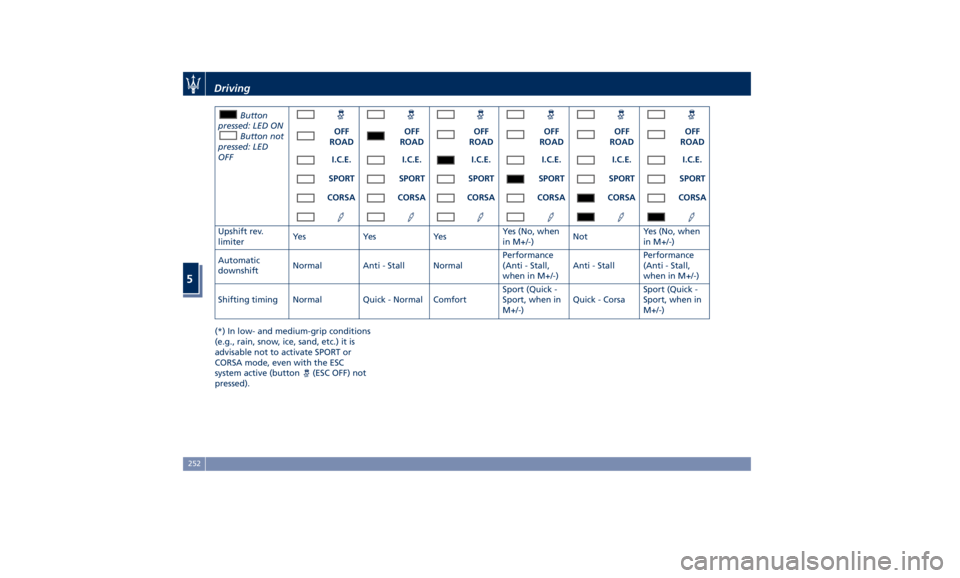
(*) In low- and medium-grip conditions
(e.g., rain, snow, ice, sand, etc.) it is
advisable not to activate SPORT or
CORSA mode, even with the ESC
system active (button
(ESC OFF) not
pressed).Driving
5
252
Page 262 of 436
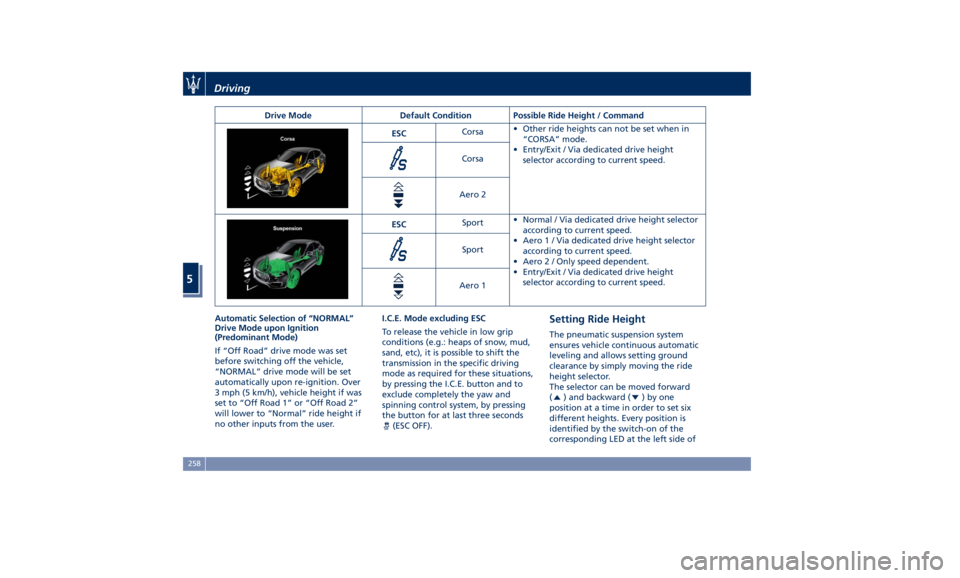
Drive Mode Default Condition Possible Ride Height / Command
ESC Corsa • Other ride heights can not be set when in
“CORSA” mode.
• Entry/Exit / Via dedicated drive height
selector according to current speed.Corsa
Aero 2
ESC Sport • Normal / Via dedicated drive height selector
according to current speed.
• Aero1/Via dedicated drive height selector
according to current speed.
• Aero 2 / Only speed dependent.
• Entry/Exit / Via dedicated drive height
selector according to current speed.Sport
Aero 1
Automatic Selection of “NORMAL”
Drive Mode upon Ignition
(Predominant Mode)
If “Off Road” drive mode was set
before switching off the vehicle,
“NORMAL” drive mode will be set
automatically upon re-ignition. Over
3 mph (5 km/h), vehicle height if was
set to “Off Road 1” or “Off Road 2”
will lower to “Normal” ride height if
no other inputs from the user. I.C.E. Mode excluding ESC
To release the vehicle in low grip
conditions (e.g.: heaps of snow, mud,
sand, etc), it is possible to shift the
transmission in the specific driving
mode as required for these situations,
by pressing the I.C.E. button and to
exclude completely the yaw and
spinning control system, by pressing
the button for at last three seconds
(ESC OFF). Setting Ride Height The pneumatic suspension system
ensures vehicle continuous automatic
leveling and allows setting ground
clearance by simply moving the ride
height selector.
The selector can be moved forward
(
) and backward ( )byone
position at a time in order to set six
different heights. Every position is
identified by the switch-on of the
corresponding LED at the left side ofDriving
5
258
Page 270 of 436
controlled speed lower than 5 mph
(8 km/h) while in water to minimize
wave effects that might cause serious
damage to all components, especially
the engine.
WARNING!
Avoid driving through flowing or
standing water. Doing so can be
highly dangerous and can be very
difficult to determine the depth of the
water you are driving through. If
driving through water cannot be
avoided, and after driving through it,
apply the brakes lightly to ensure the
brakes are operating correctly.
Flowing Water
If
the water is
swift flowing and rising
(as in storm run-off), avoid crossing
until the water level recedes and/or
the flow rate is reduced. If you must
cross flowing water avoid depths in
excess of 9 in (25 cm).
Standing Water
Do not drive in standing water deeper
than 19 in (50 cm), and reduce speed
appropriately to minimize wave
effects. Maintenance
After driving through water, have your
vehicle fluids and lubricants inspected
at an Authorized Maserati Dealer to
assure the fluids have not been
contaminated.
Driving in Snow and Wet Grass In heavy snow, when pulling a load, or
for additional control at slower speeds,
set “I.C.E.” drive mode with
transmission in M +/- (Manual) and
shift the transmission to a low gear.
See “Drive Mode” in this section for
further details. Do not shift to a lower
gear than necessary to maintain
forward motion. Over-revving the
engine can spin the wheels and
traction will be lost.
Avoid abrupt downshifts on icy or
slippery roads, because engine braking
may cause skidding and loss of control.
Follow these instructions even when
driving through a path section covered
with wet grass.
Driving in Mud and Sand In general, when driving in mud and
sand, if your wheels spin, always
reduce the throttle in order to slow
the tires and regain traction. • When driving in mud, avoid using
low gear that could cause wheel
spin. Follow the tire and vehicle
manufacturer’s advice on tire
pressure.
• When driving in sand, adopt lowest
gear possible.
Hill Climbing Before climbing a hill, determine the
conditions at the crest and/or on the
other side and shift the transmission to
a lower gear.
The vehicle is equipped with Hill Start
Assist (HSA) that helps the driver to
manage the brake intervention in
acceleration when driving uphill (for
further details, refer to “Brake and
Stability Control System” in this
section).
WARNING!
If you lose forward motion, or cannot
make it to the top of a hill or grade,
never attempt to turn around. Always
back carefully straight down a hill in R
(Reverse) gear. Never back down a hill
in N (Neutral) using only the brake.
Remember, never drive diagonally
across
a hill; always
drive straight up or
down.Driving
5
266
Page 278 of 436
threshold for ESC activation, allowing
higher wheel spin than normally
granted by the ESC system. The
(ESC
OFF) button is fitted beside the gear
shift lever: to deactivate the system see
“Drive Mode” in this section.
WARNING!
In SPORT mode the ESC control
thresholds are higher for maximum
performance on dry road surface. To
ensure maximum security of the ESC,
it is recommended not to activate
SPORT mode on surfaces with
medium- and low-grip (e.g., wet,
snow, dirt, etc..) with ESC system
active (
(ESC OFF) button not
pressed).
NOTE:
• When in “ESC of f” mode, the TCS
functionality of ESC is deactivated
(except for the limited slip feature
described in the TCS paragraph of
this chapter). All other stability
features of ESC function regularly.
• To improve the vehicle's traction
when driving with snow chains, or
when starting off in deep snow,
sand, or gravel, it may be desirable
to switch to the “ESC off” mode by pressing the
(ESC OFF) button and
remain in this operational mode no
longer than needed. Once the
situation requiring “ESC off” mode is
overcome, turn the ESC on again by
pressing the
(ESC OFF) button. This
may also be performed while in
motion.
Anti-Lock Braking System (ABS)
and Electronic Brake-force
Distribution (EBD) The Anti-Lock Braking System (ABS)
provides increased vehicle stability and
brake performance under most
braking conditions. The system
automatically “pumps” the brakes
during severe braking to prevent
wheel lock-up.
The Electronic Brake-force Distribution
(EBD) prevents the rear wheels from
over-braking and provides greater
control of available braking forces
applied to the rear axle.
WARNING!
The ABS helps prevent the wheels
from locking, but it does not increase
the physical grip limits between the
tires and the road. Therefore, always
keep a safe distance from the vehicle in front of yours and reduce your
speed when entering a curve.
NOTE:
• When
the vehicle's speed is higher
than 7 mph (11 km/h), you may hear
a slight clicking sound as well as
other motor noises. The system is
performing a self-check cycle to
ensure that the ABS is working
properly.
• This self-check occurs each time the
vehicle is started and accelerated
past 7 mph (11 km/h).
ABS is activated during braking under
certain road or stopping conditions.
ABS-inducing conditions can include
ice, snow, gravel, bumps, railroad
tracks, loose debris.
You may also experience the following
when the brake system goes into Anti-
Lock:
• The ABS motor running (it may
continue to run for a short time after
the vehicle stops).
• The clicking sound of solenoid valves.
• Brake pedal pulsations.
• A slight drop or fall away of the
brake pedal at the end of the stop.
These are all normal characteristics of
ABS functioning.Driving
5
274
Page 279 of 436
WARNING!
• The ABS contains sophisticated
electronic equipment that may be
susceptible to interference caused
by improperly installed or high
output radio transmitting
equipment. This interference can
cause possible loss of anti-lock
braking capability. Installation of
such equipment should be
performed by qualified Maserati
personnel.
• Pumping the Anti-Lock Brakes will
diminish their effectiveness.
Pumping brakes makes the stopping
distance longer. Just press firmly on
your brake pedal when you need to
slow down or stop.
• The ABS installed to this vehicle
does not control trailer braking
system. Pay utmost attention when
driving on slippery ground since the
trailer traction might get poorer.
• Do not modify the vehicle braking
system to control the trailer brakes.
The hydraulic system controlling
vehicle braking must remain
independent from trailer braking
system. Traction Control System (TCS) The current device is an integral part
of the ESC system. It operates
automatically by reducing the power
transmitted by the engine in case of
slipping, loss of grip on wet floor
(aquaplaning), acceleration on
slippery snow-covered or frozen
surfaces, etc.
Activating under slip conditions
different control systems:
• if slippage affects both drive wheels,
it reduces the power transmitted by
the engine;
• if slippage only affects one drive
wheel, it brakes the slipping wheel
automatically.
Brake Assist System (BAS) This system completes the ABS system
by optimizing the vehicle braking
capacity during emergency brake
maneuvers. The system detects an
emergency braking situation by
sensing the rate and amount of brake
application and then applies optimum
pressure to the brakes in order to help
reduce braking distances.
The quick brake coupling is optimal
for BAS performances. In order to fully
exploit the system, apply continuous
brake pedal pressure during the entire vehicle stop sequence. Do not reduce
brake pedal pressure earlier than
required. Once the brake pedal is
released, the BAS is deactivated.
Brake Throttle Override (BTO) To complete the range of systems that
assist braking, the vehicle is equipped
with BTO, which is designed to stop
the vehicle even when it is during
acceleration. If the brake pedal is
depressed together with the
accelerator, the system does not
consider as “conflict” the sequence
“brake-first-then-accelerator” of pedal
application and it will not engage the
BTO. When the system recognizes that
the accelerator pedal is stuck pressed
and the sequence “accelerator-first-
then-brake-pressed” (this sequence is
recognized as a “conflict”), the engine
power will be automatically reduced
and, if the driver continues to depress
the accelerator and the brake pedal,
the system can make the vehicle come
to a complete stop.
Additionally, if the brake pedal is
released when the accelerator is still
stuck pressed, the corresponding
engine torque increase gradually to a
safe value.
During this event, the ETC light
indicator will illuminate. The systemDriving
5
275
Page 290 of 436
below the set speed with steady light
will be displayed.
Resume Speed To resume a previously set speed, push
upward the multifunction switch (RES
+) and release. The
green light with
below the set speed will illuminate on
the instrument cluster. Resume can be
used at any speed above 18 mph
(30 km/h).
Using Electronic Cruise Control
on Hills The transmission may be downshifted
on hills to maintain the vehicle set
speed. The CC system maintains set
speed up and down hills. A slight
speed change on moderate hills is
normal. On steep slopes it is
recommended to drive without CC.
WARNING!
Electronic Cruise Control can be
dangerous where the system cannot
maintain a constant speed. Do not use
electronic Cruise Control in heavy
traffic or on winding, icy,
snow-covered or slippery roads. Adaptive Cruise Control -
ACC (optional) ADAS Equipments The Adaptive Cruise Control (ACC) is
part of ADAS equipments together
with:
• Lane Keeping Assist (LKA)
• Active Blind Spot Assist (ABSA)
• Forward Collision Warning (FCW)
• Highway Assist (HAS)
• Traffic Sign Assist (TSA).
FCW, HAS and TSA are separate
functions that may not be present in
the ADAS equipment. For more details
see “Forward Collision Warning -
FCW”, “Highway Assist - HAS" and
"Traffic Sign Assist - TSA" in this
section.
NOTE:
LKA and ABSA are described in the
relevant chapters of this section.
ACC Preview The Adaptive Cruise Control (ACC)
further increases the drive comfort
ensured by the Cruise Control when
driving on highways and freeways.
Always consider that ACC is not a safety system and is not designed to
prevent accidents.
The ACC allows driver to keep Cruise
Control active in limited or moderate
traffic conditions with no need to
constantly restore the Cruise Control.
The ACC uses a radar sensor, located
on the front grille behind the trident,
and the forward-facing camera behind
the internal rear-view mirror to detect
the presence of a vehicle ahead at a
close distance and moving in the same
direction.
This vehicle, in this chapter, will be
indicated as "target vehicle" or
"vehicle ahead".
NOTE:
• If the sensor detects no vehicle
ahead, the ACC system will maintain
set steady speed.
• If the ACC sensor detects a vehicleDriving
5
286
Page 291 of 436
ahead, the ACC system automatically
kicks in by slightly accelerating or
braking (to avoid exceeding the
initially set speed) so that the vehicle
keeps present distance, trying to
adapt to the speed of the detected
vehicle ahead.
WARNING!
• The Adaptive Cruise Control (ACC) is
designed to increase vehicle driving
comfort. It must not be considered
as a means of replacing the required
attention of the driver. The driver is
always required to drive carefully.
The driver is always required to pay
utmost attention to driving
conditions (road, traffic, weather)
and style (speed, distance from
sensed vehicle ahead, brake use).
Driver has the full responsibility of
the vehicle therefore his attention is
crucial to keeping vehicle control, in
particular when approaching curves
and situations with heavy traffic.
Failure to follow these warnings can
result in a collision and death or
serious personal injury
• In some driving scenarios, the ACC
could have detection problems. In
such cases, the ACC could kick in late or unexpectedly. The driver must be
careful since his/her intervention
could be necessary.
• It is always the driver’s responsibility
to obey speed limits and to keep
minimum legal distance to the
preceding vehicle.
• ACC system can decelerate only with
limited braking, it cannot execute
emergency braking.
The ACC system:
•
Does not activate/react in the
presence of pedestrians, bicycles,
incoming traffic from opposite
direction and steady objects such as
a vehicle stuck in a traffic jam.
• Is meant for the use on highways
and well-built roads, not for city
traffic or mountain roads.
• May not have enough time to react
and/or decelerate sufficiently on
vehicles when lane is changed too
quickly or the relative speed is too
high. In such cases the driver has to
react appropriately and without any
acoustic/visual warning.
• Cannot consider road, traffic and
weather conditions and might prove
limited when visibility is poor.
• Does not always fully recognize
complex driving conditions and this could cause an incorrect assessment
of the required safety distance.
It is recommended to disable the ACC
system in the following instances:
• When driving in the fog, heavy rain,
heavy snow, slush, heavy traffic and
similar complex situations such as
highway construction zones.
• When entering a junction lane or a
slip road to leave the highway; when
driving on narrow, icy, snowy,
slippery roads, or on uphill and
downhill roads.
• The system is designed and calibrate
for car with no trailer.
• When circumstances do not allow to
drive safely at constant speed.
Displayed information Adaptive Cruise Control (ACC)
condition, as well as the LKA and HAS
status, is displayed on instrument
cluster after selecting “Driver Assist”
menu (see paragraph “TFT Display:
Menus and Settings” under
“Instrument Cluster” in section
“Dashboard Instruments and
Controls”).
Displayed information depends on
system status: ready, set, temporarily
cancelled or override.Driving
5
287
Page 298 of 436
Display Warnings and
Maintenance of ACC and FCW
Systems Wipe Front Radar Sensor Warning
This warning will display and also a
chime will indicate when conditions
temporarily limit system performance
due to sensor poor or failed signal
reception. This most often occurs at
times of poor visibility, such as in snow
or heavy rain. The ACC and FCW
systems may also become temporarily
blinded due to obstructions, such as
mud, dirt or ice on the radar sensor. In
these cases, the system will be
disabled.
This message can sometimes be
displayed while driving in highly
reflective areas (i.e. tunnels with
reflective tiles, or ice and snow). The
ACC and FCW systems will recover
operation after the vehicle has left
these areas. Under rare conditions,
when the radar is not tracking any
vehicles or objects in its path this
warning may temporarily occur.
If weather conditions are not a factor,
the driver should examine the sensor.
It may require cleaning or removal of
an obstruction. The sensor is located in
the center of the front grille, behind
the Maserati trident. To keep the ACC System operating
properly, it is important to note the
following maintenance items:
• Always keep the sensor clean.
Carefully wipe the sensor lens with a
soft cloth. Be cautious not to damage
it.
• Do not remove any screws from the
sensor. Doing so could cause an ACC
system malfunction or failure and
require a sensor realignment.
• If the sensor or front end of the
vehicle is damaged due to a collision,
see your authorized dealer for
service.
• Do not attach or install any
accessories near the sensor, including
transparent material or aftermarket
grilles. Doing so could cause an ACC
system failure or malfunction. When
the condition that deactivated the
system is no longer present, the
system will return to the “Adaptive
Cruise Control Off” state and will
resume function by simply
reactivating it. NOTE:
If the radar sensor wipe warning
message occurs frequently (e.g. more
than once on every trip) without any
snow, rain, mud, or other obstruction,
have the radar sensor realigned at an
Authorized Maserati Dealer .
Clean Front Windshield Warning
The warning will display and a signal
will indicate when conditions
temporarily limit system performance
due to failed signal reception. This
most often occurs at times of poor
visibility, such as in snow or heavy rain
and fog. The ACC and FCW systems
may also become temporarily blinded
due to obstructions, such as mud, dirt,
or ice on windshield and fog on the
inside of glass or when driving in bad
weather. In these cases, the system will
have degraded performance.
The ACC and FCW systems will recover
operation after the vehicle has left
these areas. Under rare conditions,
when the camera is not tracking any
vehicles or objects in its path this
warning may temporarily occur.
If weather conditions are not a factor,
the driver should examine the
windshield and the camera. They may
require cleaning or removal of an
obstruction.Driving
5
294