trailer MASERATI LEVANTE 2019 User Guide
[x] Cancel search | Manufacturer: MASERATI, Model Year: 2019, Model line: LEVANTE, Model: MASERATI LEVANTE 2019Pages: 436, PDF Size: 15.24 MB
Page 291 of 436
ahead, the ACC system automatically
kicks in by slightly accelerating or
braking (to avoid exceeding the
initially set speed) so that the vehicle
keeps present distance, trying to
adapt to the speed of the detected
vehicle ahead.
WARNING!
• The Adaptive Cruise Control (ACC) is
designed to increase vehicle driving
comfort. It must not be considered
as a means of replacing the required
attention of the driver. The driver is
always required to drive carefully.
The driver is always required to pay
utmost attention to driving
conditions (road, traffic, weather)
and style (speed, distance from
sensed vehicle ahead, brake use).
Driver has the full responsibility of
the vehicle therefore his attention is
crucial to keeping vehicle control, in
particular when approaching curves
and situations with heavy traffic.
Failure to follow these warnings can
result in a collision and death or
serious personal injury
• In some driving scenarios, the ACC
could have detection problems. In
such cases, the ACC could kick in late or unexpectedly. The driver must be
careful since his/her intervention
could be necessary.
• It is always the driver’s responsibility
to obey speed limits and to keep
minimum legal distance to the
preceding vehicle.
• ACC system can decelerate only with
limited braking, it cannot execute
emergency braking.
The ACC system:
•
Does not activate/react in the
presence of pedestrians, bicycles,
incoming traffic from opposite
direction and steady objects such as
a vehicle stuck in a traffic jam.
• Is meant for the use on highways
and well-built roads, not for city
traffic or mountain roads.
• May not have enough time to react
and/or decelerate sufficiently on
vehicles when lane is changed too
quickly or the relative speed is too
high. In such cases the driver has to
react appropriately and without any
acoustic/visual warning.
• Cannot consider road, traffic and
weather conditions and might prove
limited when visibility is poor.
• Does not always fully recognize
complex driving conditions and this could cause an incorrect assessment
of the required safety distance.
It is recommended to disable the ACC
system in the following instances:
• When driving in the fog, heavy rain,
heavy snow, slush, heavy traffic and
similar complex situations such as
highway construction zones.
• When entering a junction lane or a
slip road to leave the highway; when
driving on narrow, icy, snowy,
slippery roads, or on uphill and
downhill roads.
• The system is designed and calibrate
for car with no trailer.
• When circumstances do not allow to
drive safely at constant speed.
Displayed information Adaptive Cruise Control (ACC)
condition, as well as the LKA and HAS
status, is displayed on instrument
cluster after selecting “Driver Assist”
menu (see paragraph “TFT Display:
Menus and Settings” under
“Instrument Cluster” in section
“Dashboard Instruments and
Controls”).
Displayed information depends on
system status: ready, set, temporarily
cancelled or override.Driving
5
287
Page 299 of 436
When the condition that created
limited functionality is no longer
present, the ACC and FCW systems will
return to full functionality.
NOTE:
If the windshield wiper warning
message occurs frequently (e.g. more
than once on every trip) without any
snow, rain, mud, or other obstruction,
have the windshield and
forward-facing camera inspected at an
Authorized Maserati Dealer .
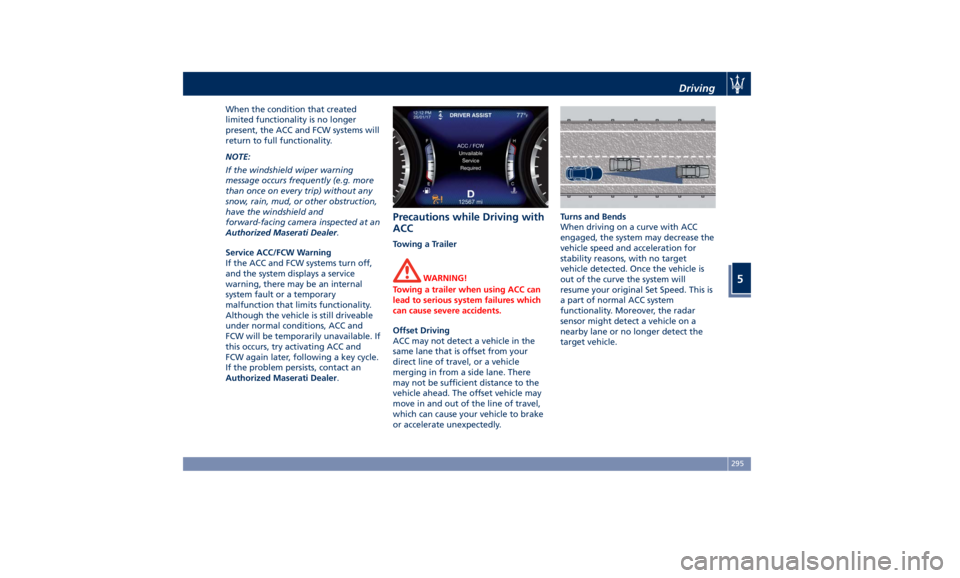
Service ACC/FCW Warning
If the ACC and FCW systems turn off,
and the system displays a service
warning, there may be an internal
system fault or a temporary
malfunction that limits functionality.
Although the vehicle is still driveable
under normal conditions, ACC and
FCW will be temporarily unavailable. If
this occurs, try activating ACC and
FCW again later, following a key cycle.
If the problem persists, contact an
Authorized Maserati Dealer .Precautions while Driving with
ACC Towing a Trailer
WARNING!
Towing a trailer when using ACC can
lead to serious system failures which
can cause severe accidents.
Offset Driving
ACC
may not detect
a vehicle in the
same lane that is offset from your
direct line of travel, or a vehicle
merging in from a side lane. There
may not be sufficient distance to the
vehicle ahead. The offset vehicle may
move in and out of the line of travel,
which can cause your vehicle to brake
or accelerate unexpectedly. Turns and Bends
When driving on a curve with ACC
engaged, the system may decrease the
vehicle speed and acceleration for
stability reasons, with no target
vehicle detected. Once the vehicle is
out of the curve the system will
resume your original Set Speed. This is
a part of normal ACC system
functionality. Moreover, the radar
sensor might detect a vehicle on a
nearby lane or no longer detect the
target vehicle.Driving
5
295
Page 306 of 436
vibration to correct the car trajectory.
The system will only show on the TFT
display when the vehicle is passing
the lane.
• "Visual & Haptic": the system will
apply steering torque when lane
departure is detected while showing
at the same time the proper cluster
indication, adding to this steering
vibration when the departure is very
imminent.
When "Visual & Haptic" is selected and
LKA is enabled then the following
menu will be used by the system.
• "LKA Sensitivity": it tunes the
distance to the lane boundary where
the system will start to apply steering
torque.
• "LKA Strength": it tunes the steering
torque value to have a stronger or
weaker trajectory correction/
deviation.
WARNING!
In rare cases, Lane Keeping Assist
(LKA) may make an inappropriate
steering torque application. LKA may
be interrupted at any time counter
steering. Lack of attention may lead to
serious injury or death. System Availability The ADAS systems (LKA, CC, ACC, FCW
and HAS) help the driver while driving.
These systems can be set and
monitored simultaneously on the
display, after opening “Driver Assist”
menu (see paragraph “TFT Display:
Menus and Settings” under
“Instrument Cluster” in section
“Dashboard Instruments and
Controls”).
LKA is designed for an attentive driver;
therefore the system is available only
when his/her hands are on the steering
wheel or with hands off only for a very
limited amount of time. When the
system is enabled it will trigger cluster
warning in case at least one hand is
not detected on the steering wheel.
The torque application as well as the
vibration are suppressed/inhibited in
case of: high driver torque in the
steering wheel, high lateral
acceleration, trailer connected to the
proper control module, hands not on
the steering wheel detected for more
than a certain time.
High dynamic driving behaviors,
driving on the lane boundary or
driving off course will prevent the
function from working. FCW braking
and stability system interventions (ESC, ABS) will also prevent the system from
operating. Changing lane results in
system inhibition for a certain time. In
addition, the driver must respect some
road characteristics such as
minimum-maximum width, lanes
clearly defined by two lane boundaries
and for a limited time, the presence of
at least one lane boundary.
NOTE:
• In case of wet road or raining
conditions the function could be
disabled by the system in order to
minimize the risks.
• With lane boundaries it is mainly
referred to painted lines,
nevertheless the system in good
conditions might properly recognize
as valid lane boundaries also other
types (for example road edges, curbs,
etc..).
Being this function used to prevent
unintentional lane change/lane drift, it
will be temporary suppressed/inhibited
by a turn indicator activation,
therefore, graphic warning, steering
torque application and vibration will
be terminated. In this condition in case
of a vehicle detected by the Blind Spot
Assist (BSA) system in the covered area
on the proper side, there can be theDriving
5
302
Page 328 of 436
Loading
The vehicle maximum load on the tire
must not exceed the load carrying
capacity of the tire on your vehicle.
You will not exceed the tire's load
carrying capacity if you adhere to the
loading conditions, tire size, and cold
tire inflation pressures specified on the
“Tire and Loading Information Label”
and in the “Features and
Specifications” section.
NOTE:
Under a maximum loaded vehicle
condition, gross axle weight ratings
(GAWRs) for the front and rear axles
must not be exceeded.
To determine the maximum loading
conditions of your vehicle, locate the
statement “The combined weight of
occupants and cargo should never
exceed XXX lbs/XXX kg” on the tire
and loading information label. The
combined weight of occupants and
cargo/luggage should never exceed
the weight referenced here.
Steps For Determining Correct Load
Limit
• Locate the statement “The combined
weight of occupants and cargo
should never exceed XXX lbs/XXX kg” on the vehicle's
label.
• Determine the combined weight of
the driver and passengers that will
be riding in the vehicle.
• Subtract the combined weight of the
driver and passengers from
XXX lbs/XXX kg.
• The resulting figure equals the
available amount of cargo and
luggage load capacity. For example,
if “XXX amount equals 1,400 lbs/635
kg and there will be five
150 lbs/68 kg passengers in your
vehicle, the amount of available
cargo and luggage load capacity is
650 lbs/295 kg (since 5 x 150/68 =
750/340, and 1,400/635– 750/340 =
650 lbs/295 kg).
• Determine the combined weight of
luggage and cargo being loaded on
the vehicle. That weight may not
safely exceed the available cargo and
luggage load capacity calculated in
previous Step.
• If your vehicle will be towing a
trailer, load from your trailer will be
transferred to your vehicle. Consult
this manual to determine how this
reduces the available cargo and
luggage load capacity of your
vehicle. Tires
Driving over rough or damaged road
surfaces, as well as debris, curbs and
other obstacles can cause serious
damage to wheels, tires, and
suspension parts.
This is more likely to occur with
low-profile tires, which provide less
cushioning between the wheel and the
road.
Be careful to avoid road hazards and
reduce your speed, especially if your
vehicle is equipped with low profile
tires.
WARNING!
Overloading of your tires is
dangerous. Overloading can cause tire
failure, affect vehicle handling, and
increase the stopping distance. Use
tires of the recommended load
capacity for your vehicle. Never
overload them.Driving
5
324
Page 345 of 436
Trailer Towing In this section you will find safety tips
and information on limits to the type
of towing you can reasonably do with
your vehicle.
NOTE:
• On the TROFEO version you can not
install the trailer tongue.
• Using original Maserati equipment
offers an advantage, compared to
aftermarket one, in terms of driving
safety and utilizing the vehicle
potential under all conditions,
especially considering that ESC and
AWD systems feature specific
settings for trailer towing. Further to
this, if vehicle use conditions so
allow, the original trailer tongue
allows use of the driver assist systems
present on-board.
• To maintain the new vehicle limited
warranty coverage, follow the
requirements and recommendations
in this chapter. Trailer Tongue Weight Maximum load of tow vehicle is
reduced by the trailer tongue weight
and the load on the same due to the
trailer. Trailer tongue weight increases
vehicle weight.
Do not exceed the maximum GVWR of
the tow vehicle, the one for each axle
(GAWR) and the mass that the vehicle
is rated to tow (GTW) specified on the
nameplate located on the rear of the
drivers door opening.
WARNING!
It is important that you do not exceed
the maximum allowed overall GVWR
and GTW. A dangerous driving
condition can result if either rating is
exceeded.
If you use aftermarket Kit for towing,
the maximum trailer load must not
exceed 6000 lb (2700 kg).
Arranging Load on Trailer Arrange load at the bottom and as
close as possible to trailer wheel axle.
In this way the trailer center of gravity
will be lower, thereby increasing the
driving safety of the vehicle-trailer
assembly. Always load a trailer with 60% of the
weight in the front of the trailer.
Loads bearing more on wheel axle, or
heavier in the rear of the trailer, can
cause the trailer to sway severely
side-to-side which could cause loss of
control of vehicle and trailer.
WARNING!
Failure to load trailers heavier in front
is the cause of many trailer accidents.
Never exceed the maximum tongue
weight stamped on your trailer hitch.
Tire Pressure Adjustment Proper tire inflation pressures of your
vehicle and trailer are essential to the
safe and satisfactory operation of your
vehicle while driving and in
maneuvers.
Check for signs of tire wear or visible
tire damage on trailer and vehicle
before towing a trailer.
For more information on vehicle tires,
see “Tires – General Information” in
this section.
When a trailer must be towed, inflate
vehicle tires to full load recommended
pressure (FLC) indicated in chapter
“Tire pressure” in section “Features
and Specifications”.Driving
5
341
Page 346 of 436
For pressure of trailer tires, follow the
instructions given by the trailer
manufacturer.
After adjusting vehicle tire pressure
and connecting and disconnecting the
trailer, initialize the Tire Pressure
Monitoring System (TPMS) following
the instructions under chapter “Tire
Pressure Monitoring System (TPMS)” in
this section.
Field of Vision of External
Rearview Mirrors Law provisions require the field of
vision of external rearview mirrors to
include the rear trailer corners.
If vehicle external rearview mirrors
cannot cover the required field of
vision, it is possible to install additional
rearview mirrors sticking further out at
the sides.
The Authorized Maserati Dealer can
provide you with information about
towing a trailer and about the
approved components available in the
"Genuine Accessories" range. Trailer Lights Law provisions require trailers to be
equipped with an electrical lighting
system that must include the following
lights:
• Turn signals;
• Position lights;
• Stop lights;
• Rear fog lights;
• Reverse lights;
• License plate lights;
• Side marker lights (for trailer width
over 6.8 ft/2.1 m).
The power input of the trailer lights
must not exceed the values in the
following list.
• Position lights, side marker lights and
license plate lights :6x5Wper side.
• Rear fog lights :2x21W
• Turn signals :2x21W
• Stop lights :4x21W
• Reverse lights :2x21W
Minimum detectable current of Trailer
Tow Module (TTM): 100mA. Trailer Wiring Harness
Vehicle trailer tongue includes a 4-pin
sealed connector powered at 12VDC
for connection of the corresponding
trailer wiring connector.
In addition to the electrical branches,
the vehicle electrical system can only
be connected to the supply cable for
an electric brake and to the cable for
an internal light for the trailer, not
exceeding 15W.
CAUTION!
Do not cut or splice wiring into the
vehicle wiring harness. Do not change
cable connections on connectors. TheDriving
5
342
Page 347 of 436
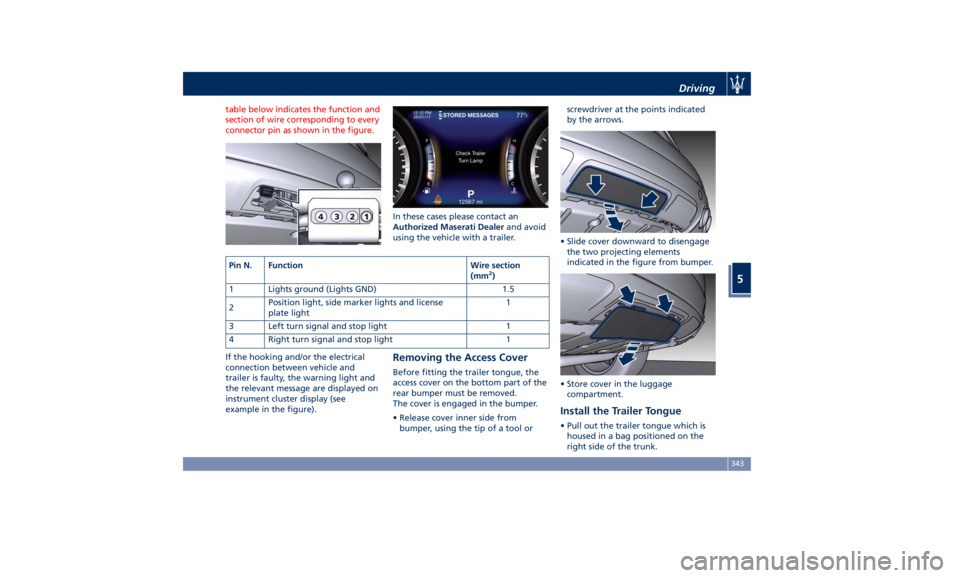
table below indicates the function and
section of wire corresponding to every
connector pin as shown in the figure.
If the hooking and/or the electrical
connection between vehicle and
trailer is faulty, the warning light and
the relevant message are displayed on
instrument cluster display (see
example in the figure). In these cases please contact an
Authorized Maserati Dealer and avoid
using the vehicle with a trailer.
Removing the Access Cover Before fitting the trailer tongue, the
access cover on the bottom part of the
rear bumper must be removed.
The cover is engaged in the bumper.
• Release cover inner side from
bumper, using the tip of a tool or screwdriver at the points indicated
by the arrows.
• Slide cover downward to disengage
the two projecting elements
indicated in the figure from bumper.
• Store cover in the luggage
compartment.
Install the Trailer Tongue • Pull out the trailer tongue which is
housed in a bag positioned on the
right side of the trunk.Pin N. Function Wire section
(mm 2
)
1 Lights ground (Lights GND) 1.5
2 Position light, side marker lights and license
plate light 1
3 Left turn signal and stop light 1
4 Right turn signal and stop light 1 Driving
5
343
Page 348 of 436
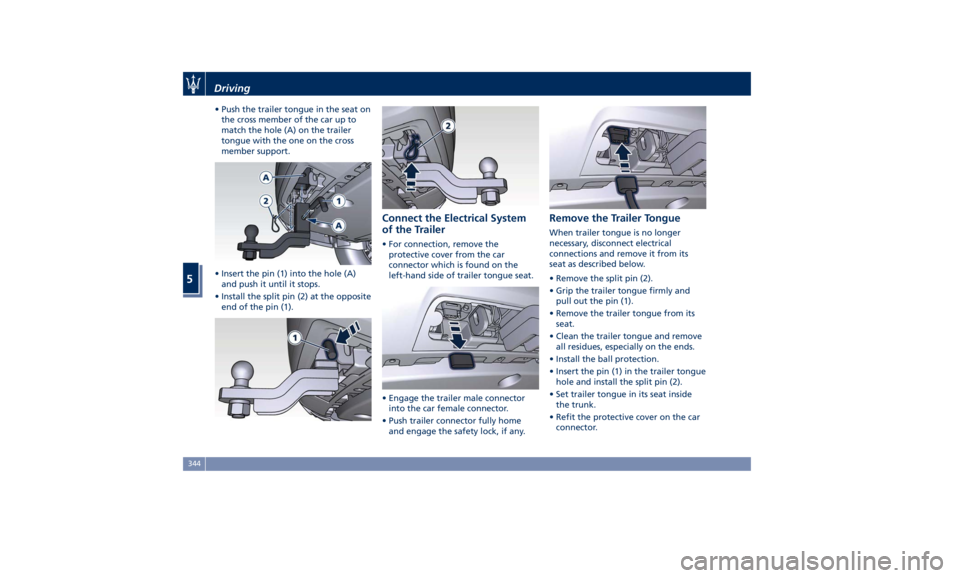
• Push the trailer tongue in the seat on
the cross member of the car up to
match the hole (A) on the trailer
tongue with the one on the cross
member support.
• Insert the pin (1) into the hole (A)
and push it until it stops.
• Install the split pin (2) at the opposite
end of the pin (1). Connect the Electrical System
of the Trailer • For connection, remove the
protective cover from the car
connector which is found on the
left-hand side of trailer tongue seat.
• Engage the trailer male connector
into the car female connector.
• Push trailer connector fully home
and engage the safety lock, if any. Remove the Trailer Tongue When trailer tongue is no longer
necessary, disconnect electrical
connections and remove it from its
seat as described below.
• Remove the split pin (2).
• Grip the trailer tongue firmly and
pull out the pin (1).
• Remove the trailer tongue from its
seat.
• Clean the trailer tongue and remove
all residues, especially on the ends.
• Install the ball protection.
• Insert the pin (1) in the trailer tongue
hole and install the split pin (2).
• Set trailer tongue in its seat inside
the trunk.
• Refit the protective cover on the car
connector.Driving
5
344
Page 349 of 436
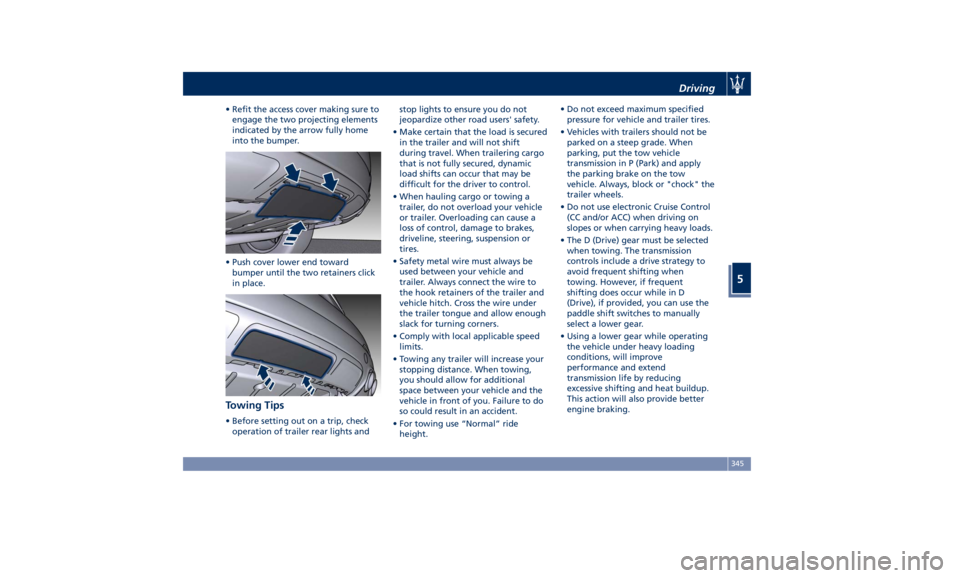
• Refit the access cover making sure to
engage the two projecting elements
indicated by the arrow fully home
into the bumper.
• Push cover lower end toward
bumper until the two retainers click
in place.
Towing Tips • Before setting out on a trip, check
operation of trailer rear lights and stop lights to ensure you do not
jeopardize other road users' safety.
• Make certain that the load is secured
in the trailer and will not shift
during travel. When trailering cargo
that is not fully secured, dynamic
load shifts can occur that may be
difficult for the driver to control.
• When hauling cargo or towing a
trailer, do not overload your vehicle
or trailer. Overloading can cause a
loss of control, damage to brakes,
driveline, steering, suspension or
tires.
• Safety metal wire must always be
used between your vehicle and
trailer. Always connect the wire to
the hook retainers of the trailer and
vehicle hitch. Cross the wire under
the trailer tongue and allow enough
slack for turning corners.
• Comply with local applicable speed
limits.
• Towing any trailer will increase your
stopping distance. When towing,
you should allow for additional
space between your vehicle and the
vehicle in front of you. Failure to do
so could result in an accident.
• For towing use “Normal” ride
height. • Do not exceed maximum specified
pressure for vehicle and trailer tires.
• Vehicles with trailers should not be
parked on a steep grade. When
parking, put the tow vehicle
transmission in P (Park) and apply
the parking brake on the tow
vehicle. Always, block or "chock" the
trailer wheels.
• Do not use electronic Cruise Control
(CC and/or ACC) when driving on
slopes or when carrying heavy loads.
• The D (Drive) gear must be selected
when towing. The transmission
controls include a drive strategy to
avoid frequent shifting when
towing. However, if frequent
shifting does occur while in D
(Drive), if provided, you can use the
paddle shift switches to manually
select a lower gear.
• Using a lower gear while operating
the vehicle under heavy loading
conditions, will improve
performance and extend
transmission life by reducing
excessive shifting and heat buildup.
This action will also provide better
engine braking.Driving
5
345
Page 353 of 436
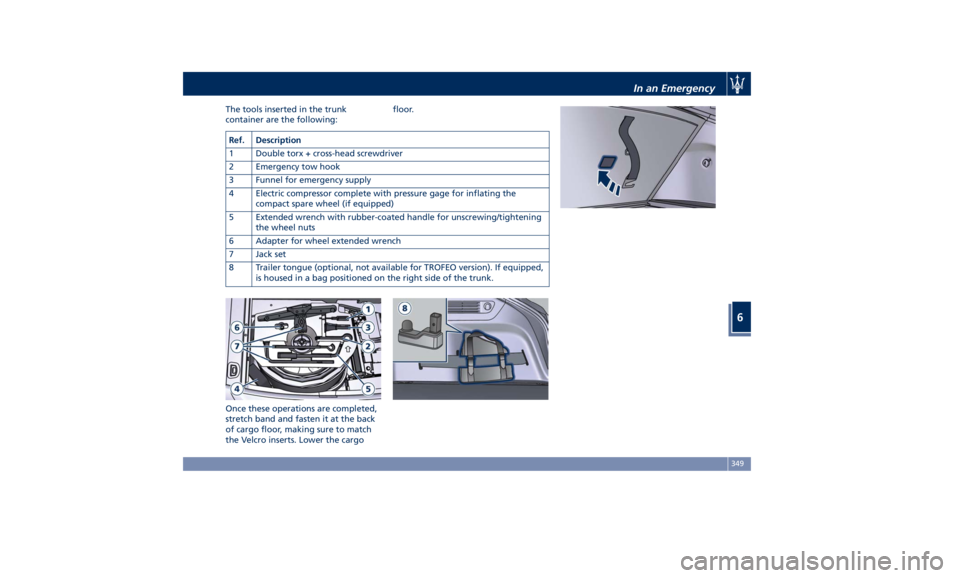
The tools inserted in the trunk
container are the following:
Once these operations are completed,
stretch band and fasten it at the back
of cargo floor, making sure to match
the Velcro inserts. Lower the cargo floor.
Ref. Description
1 Double torx + cross-head screwdriver
2 Emergency tow hook
3 Funnel for emergency supply
4 Electric compressor complete with pressure gage for inflating the
compact spare wheel (if equipped)
5 Extended wrench with rubber-coated handle for unscrewing/tightening
the wheel nuts
6 Adapter for wheel extended wrench
7 Jack set
8 Trailer tongue (optional, not available for TROFEO version). If equipped,
is housed in a bag positioned on the right side of the trunk. In an Emergency
6
349