battery MAZDA 6 2002 Suplement Repair Manual
[x] Cancel search | Manufacturer: MAZDA, Model Year: 2002, Model line: 6, Model: MAZDA 6 2002Pages: 909, PDF Size: 17.16 MB
Page 211 of 909
EMISSION SYSTEM
F2
F2–59
EGR VALVE REMOVAL/INSTALLATIONA6E4016203002011. Disconnect the negative battery cable.
2. R em ove t he a ir c le a ne r. (S ee F 2–36 IN TA K E-A IR SYS TEM RE MOVA L/I NSTA LL AT IO N.)
3 . R em ove t he co m mon r ai l. (S ee F 2–53 SUPPLY PU MP R EM OVA L/IN STA LLAT IO N.)
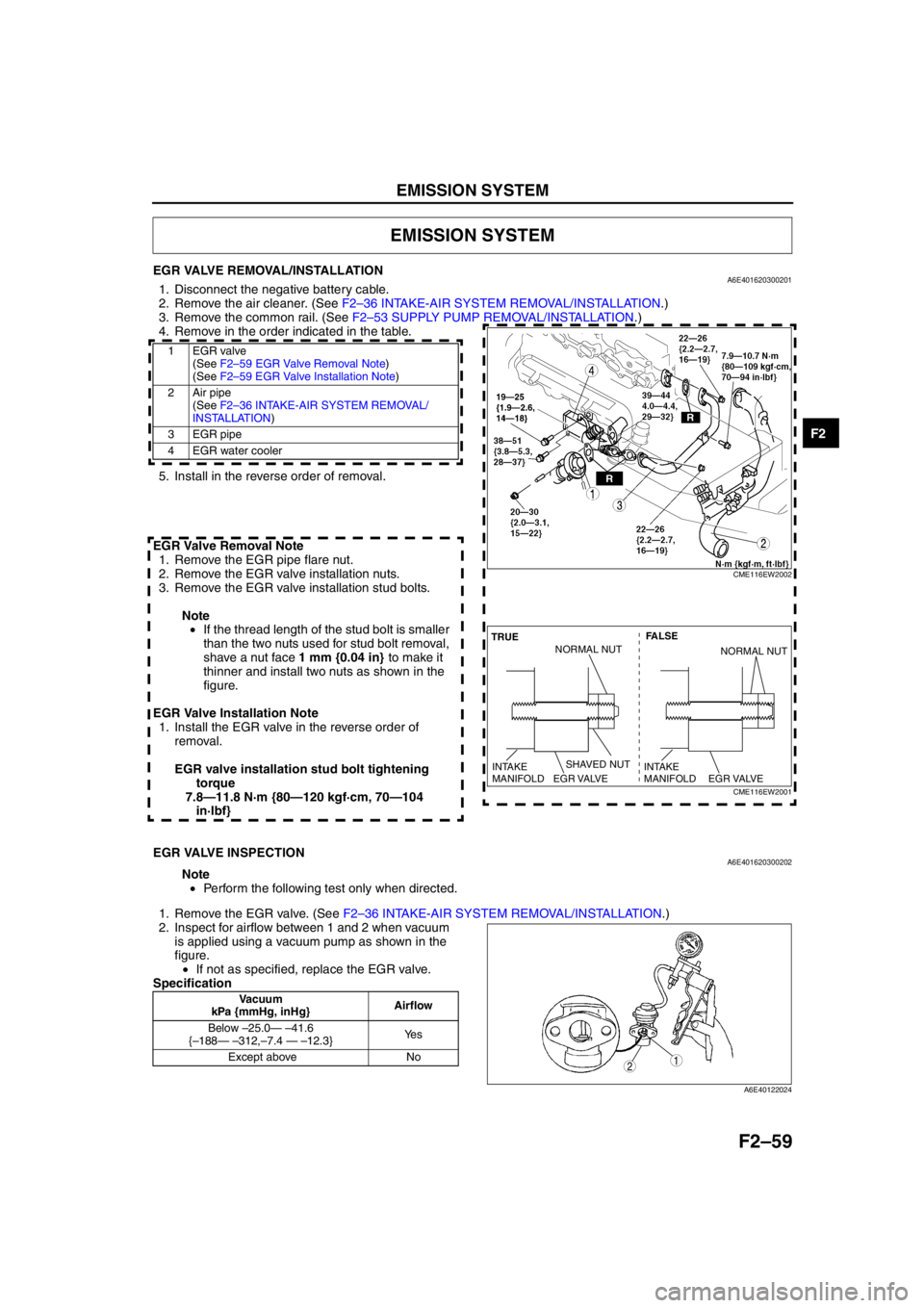
4. Remove in the order indicated in the table.
.
5. Install in the reverse order of removal.
EGR Valve Removal Note 1. Remove the EGR pipe flare nut.
2. Remove the EGR valve installation nuts.
3. Remove the EGR valve installation stud bolts.
Note• If the thread length of the stud bolt is smaller
than the two nuts used for stud bolt removal,
shave a nut face 1 mm {0.04 in} to make it
thinner and install two nuts as shown in the
figure.
EGR Valve Installation Note 1. Install the EGR valve in the reverse order of removal.
EGR valve installation stud bolt tightening torque
7.8—11.8 N·m {80—120 kgf·cm, 70—104 in·lbf}
End Of Sie
EGR VALVE INSPECTIONA6E401620300202
Note
• Perform the following test only when directed.
1 . R em ove t h e EG R va lv e . ( See F 2–36 IN TA K E-A IR SYS TEM RE MOVA L/I NSTA LL AT IO N.)
2. Inspect for airflow between 1 and 2 when vacuum is applied using a vacuum pump as shown in the
figure.• If not as specified, replace the EGR valve.
Specification
End Of Sie
EMISSION SYSTEM
1EGR valve (See F 2–5 9 EG R V alv e R em oval N ote )
(See F2 –5 9 E G R V alv e In sta llat ion Not e)
2Air pipe (See F2 –3 6 IN TAKE-AIR SYSTEM RE MOVAL/
INS TA LL ATION )
3 EGR pipe
4 EGR water cooler
CME116EW2002
SHAVED NUT FALSE
TRUE
EGR VALVE
INTAKE
MANIFOLDEGR VALVE
INTAKE
MANIFOLD
NORMAL NUTNORMAL NUT
CME116EW2001
Vacuum
kPa {mmHg, inHg} Airflow
Below –25.0 — – 41.6
{ – 188 — – 312, –7.4 — – 12.3} Ye s
Except above No
12
A6E40122024
Page 216 of 909
F2–64
CONTROL SYSTEM
PCM REMOVAL/INSTALLATIONA6E404018881207
Note
•For replace the PCM, setup the WDS and perform the following.
—“PCM configuration” (See F2–68 PCM CONFIGURATION.)
—“Correction after Parts Installation” (See F2–34 Correction after Parts Installation.)
European (L.H.D.) Specs.
1. Disconnect the negative battery cable.
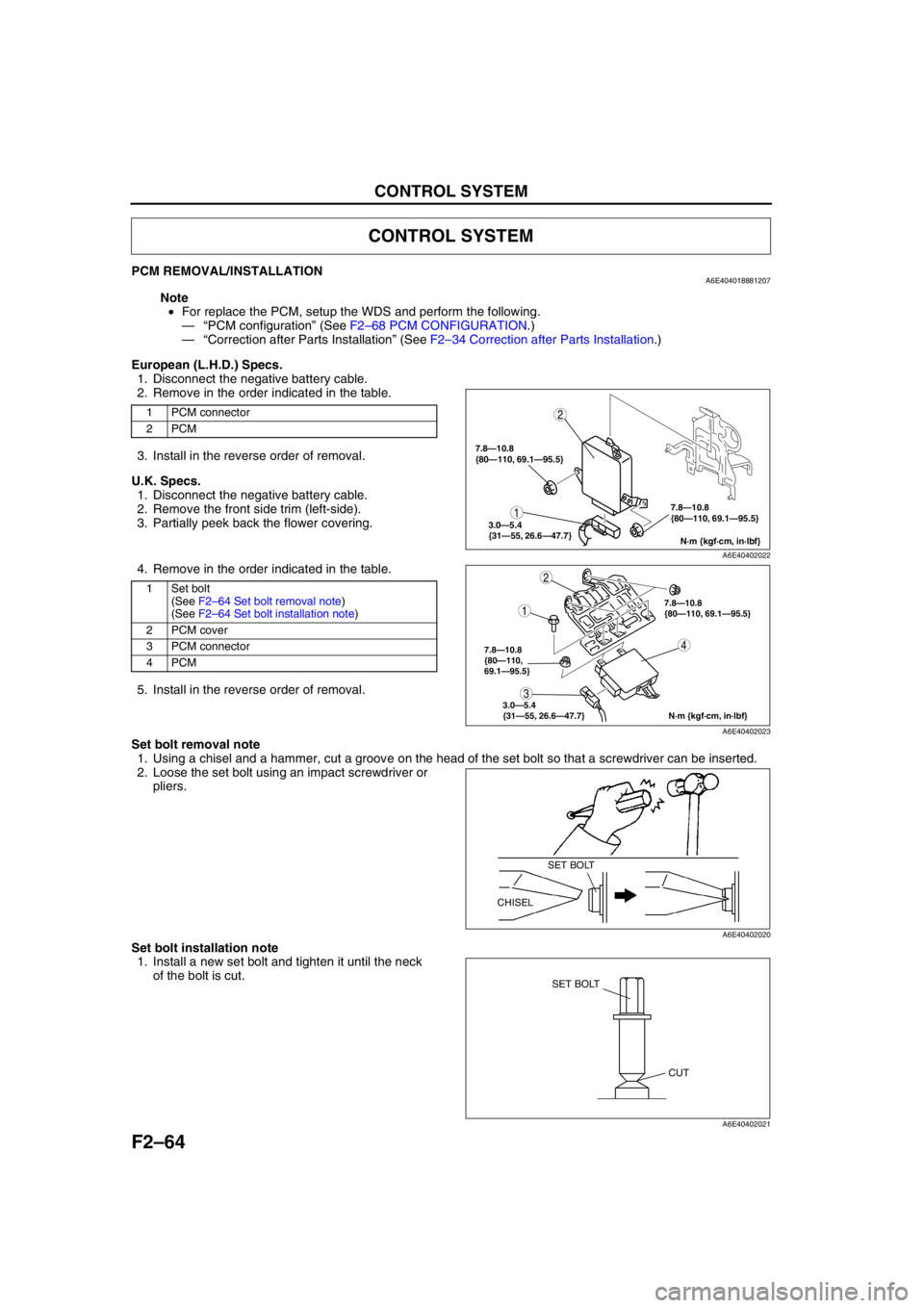
2. Remove in the order indicated in the table.
3. Install in the reverse order of removal.
U.K. Specs.
1. Disconnect the negative battery cable.
2. Remove the front side trim (left-side).
3. Partially peek back the flower covering.
4. Remove in the order indicated in the table.
5. Install in the reverse order of removal.
Set bolt removal note
1. Using a chisel and a hammer, cut a groove on the head of the set bolt so that a screwdriver can be inserted.
2. Loose the set bolt using an impact screwdriver or
pliers.
Set bolt installation note
1. Install a new set bolt and tighten it until the neck
of the bolt is cut.
CONTROL SYSTEM
1 PCM connector
2PCM
1Set bolt
(See F2–64 Set bolt removal note)
(See F2–64 Set bolt installation note)
2 PCM cover
3 PCM connector
4PCM
1
2
N·m {kgf·cm, in·lbf} 7.8—10.8
{80—110, 69.1—95.5}
3.0—5.4
{31—55, 26.6—47.7}
7.8—10.8
{80—110, 69.1—95.5}
A6E40402022
4
1
2
3
N·m {kgf·cm, in·lbf} 7.8—10.8
{80—110,
69.1—95.5}
3.0—5.4
{31—55, 26.6—47.7}
7.8—10.8
{80—110, 69.1—95.5}
A6E40402023
SET BOLT
CHISEL
A6E40402020
SET BOLT
CUT
A6E40402021
Page 218 of 909
F2–66
CONTROL SYSTEM
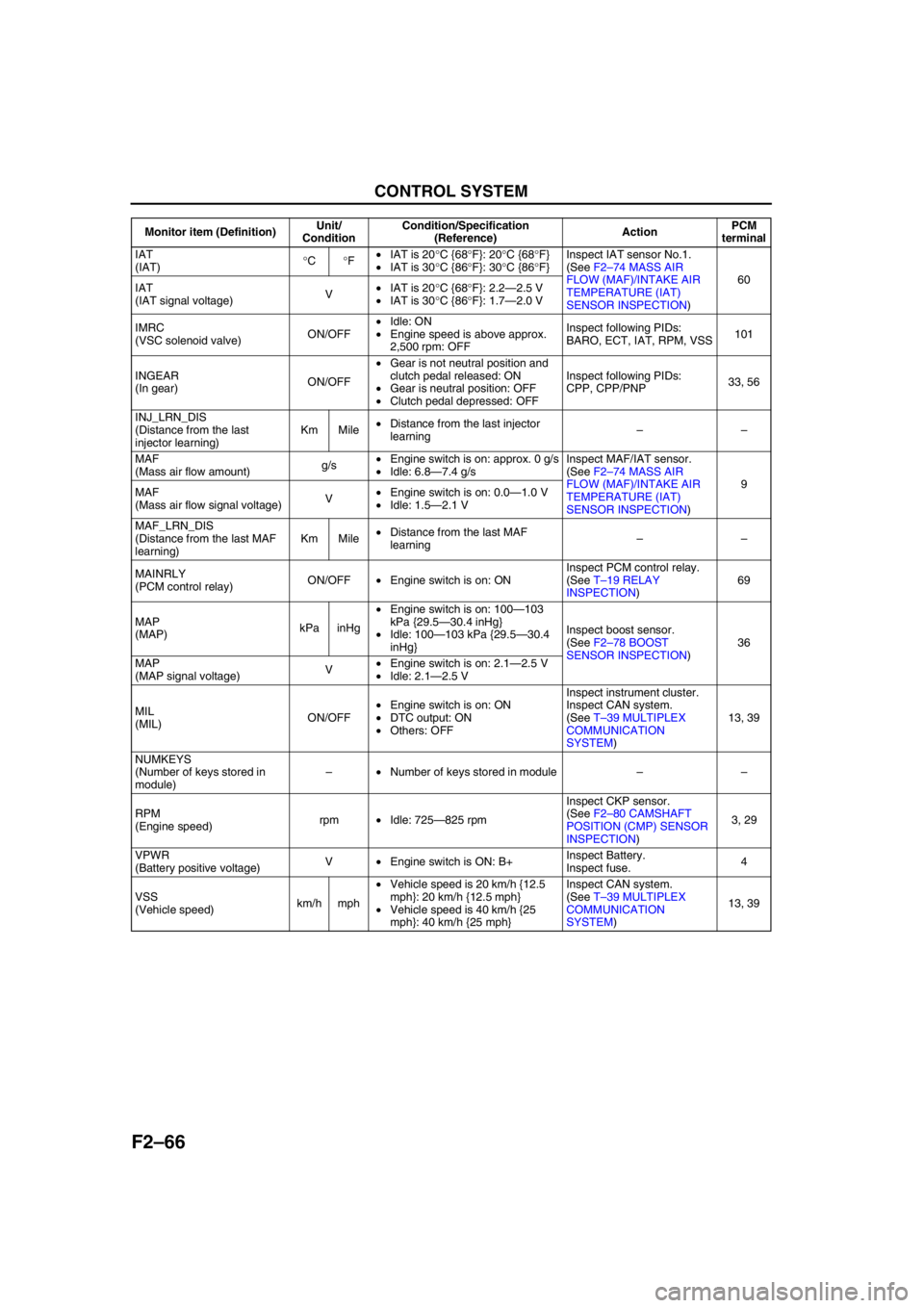
IAT
(IAT)°C°F•IAT is 20°C {68°F}: 20°C {68°F}
•IAT is 30°C {86°F}: 30°C {86°F}Inspect IAT sensor No.1.
(See F2–74 MASS AIR
FLOW (MAF)/INTAKE AIR
TEMPERATURE (IAT)
SENSOR INSPECTION)60
IAT
(IAT signal voltage)V•IAT is 20°C {68°F}: 2.2—2.5 V
•IAT is 30°C {86°F}: 1.7—2.0 V
IMRC
(VSC solenoid valve)ON/OFF•Idle: ON
•Engine speed is above approx.
2,500 rpm: OFFInspect following PIDs:
BARO, ECT, IAT, RPM, VSS101
INGEAR
(In gear)ON/OFF•Gear is not neutral position and
clutch pedal released: ON
•Gear is neutral position: OFF
•Clutch pedal depressed: OFFInspect following PIDs:
CPP, CPP/PNP33, 56
INJ_LRN_DIS
(Distance from the last
injector learning)Km Mile•Distance from the last injector
learning––
MAF
(Mass air flow amount)g/s•Engine switch is on: approx. 0 g/s
•Idle: 6.8—7.4 g/sInspect MAF/IAT sensor.
(See F2–74 MASS AIR
FLOW (MAF)/INTAKE AIR
TEMPERATURE (IAT)
SENSOR INSPECTION)9
MAF
(Mass air flow signal voltage)V•Engine switch is on: 0.0—1.0 V
•Idle: 1.5—2.1 V
MAF_LRN_DIS
(Distance from the last MAF
learning)Km Mile•Distance from the last MAF
learning––
MAINRLY
(PCM control relay)ON/OFF•Engine switch is on: ONInspect PCM control relay.
(See T–19 RELAY
INSPECTION)69
MAP
(MAP)kPa inHg•Engine switch is on: 100—103
kPa {29.5—30.4 inHg}
•Idle: 100—103 kPa {29.5—30.4
inHg}Inspect boost sensor.
(See F2–78 BOOST
SENSOR INSPECTION)36
MAP
(MAP signal voltage)V•Engine switch is on: 2.1—2.5 V
•Idle: 2.1—2.5 V
MIL
(MIL)ON/OFF•Engine switch is on: ON
•DTC output: ON
•Others: OFFInspect instrument cluster.
Inspect CAN system.
(See T–39 MULTIPLEX
COMMUNICATION
SYSTEM)13, 39
NUMKEYS
(Number of keys stored in
module)–•Number of keys stored in module––
RPM
(Engine speed)rpm•Idle: 725—825 rpmInspect CKP sensor.
(See F2–80 CAMSHAFT
POSITION (CMP) SENSOR
INSPECTION)3, 29
VPWR
(Battery positive voltage)V•Engine switch is ON: B+Inspect Battery.
Inspect fuse.4
VSS
(Vehicle speed)km/h mph•Vehicle speed is 20 km/h {12.5
mph}: 20 km/h {12.5 mph}
•Vehicle speed is 40 km/h {25
mph}: 40 km/h {25 mph}Inspect CAN system.
(See T–39 MULTIPLEX
COMMUNICATION
SYSTEM)13, 39 Monitor item (Definition)Unit/
ConditionCondition/Specification
(Reference)ActionPCM
terminal
Page 219 of 909
CONTROL SYSTEM
F2–67
F2
Not Using WDS or Equivalent
Constant voltage terminal inspection
1. Turn the engine switch to ON.
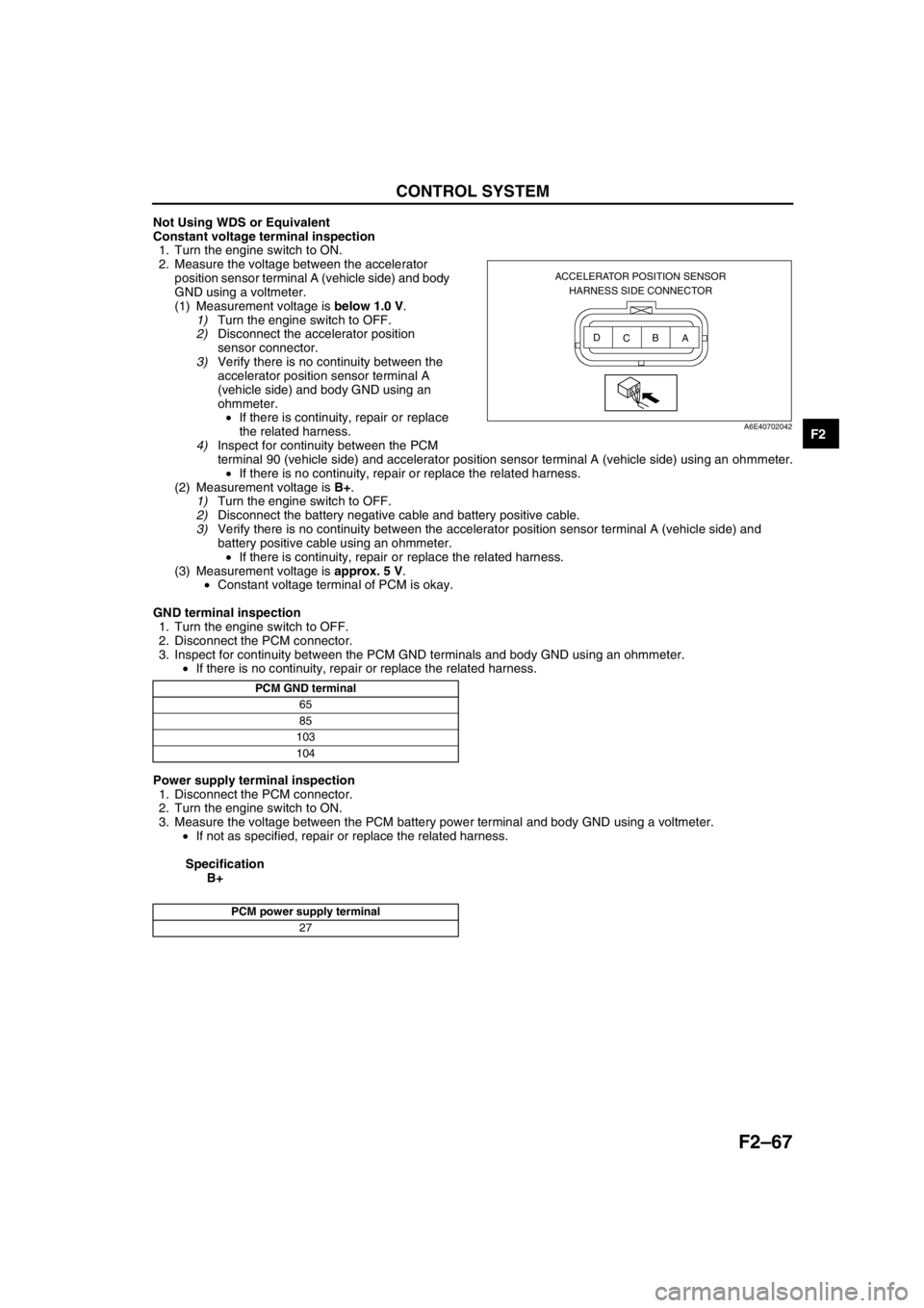
2. Measure the voltage between the accelerator
position sensor terminal A (vehicle side) and body
GND using a voltmeter.
(1) Measurement voltage is below 1.0 V.
1)Turn the engine switch to OFF.
2)Disconnect the accelerator position
sensor connector.
3)Verify there is no continuity between the
accelerator position sensor terminal A
(vehicle side) and body GND using an
ohmmeter.
•If there is continuity, repair or replace
the related harness.
4)Inspect for continuity between the PCM
terminal 90 (vehicle side) and accelerator position sensor terminal A (vehicle side) using an ohmmeter.
•If there is no continuity, repair or replace the related harness.
(2) Measurement voltage is B+.
1)Turn the engine switch to OFF.
2)Disconnect the battery negative cable and battery positive cable.
3)Verify there is no continuity between the accelerator position sensor terminal A (vehicle side) and
battery positive cable using an ohmmeter.
•If there is continuity, repair or replace the related harness.
(3) Measurement voltage is approx. 5 V.
•Constant voltage terminal of PCM is okay.
GND terminal inspection
1. Turn the engine switch to OFF.
2. Disconnect the PCM connector.
3. Inspect for continuity between the PCM GND terminals and body GND using an ohmmeter.
•If there is no continuity, repair or replace the related harness.
Power supply terminal inspection
1. Disconnect the PCM connector.
2. Turn the engine switch to ON.
3. Measure the voltage between the PCM battery power terminal and body GND using a voltmeter.
•If not as specified, repair or replace the related harness.
Specification
B+
End Of Sie
ACCELERATOR POSITION SENSOR
HARNESS SIDE CONNECTOR
A B
C D
A6E40702042
PCM GND terminal
65
85
103
104
PCM power supply terminal
27
Page 228 of 909
F2–76
CONTROL SYSTEM
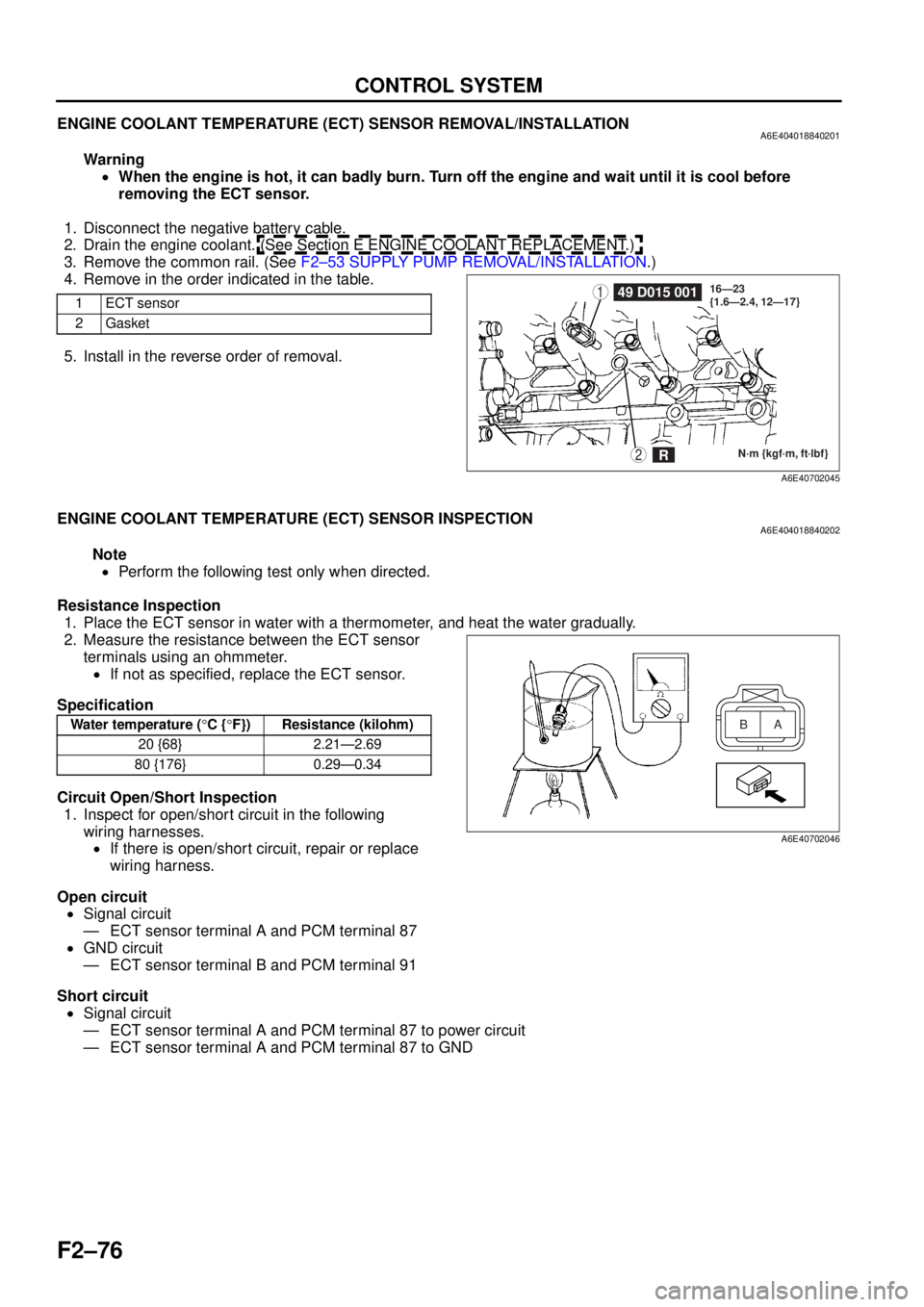
ENGINE COOLANT TEMPERATURE (ECT) SENSOR REMOVAL/INSTALLATIONA6E404018840201
Warning•When the engine is hot, it can badly burn. Turn off the engine and wait until it is cool before
removing the ECT sensor.
1. Disconnect the negative battery cable.
2. Drain the engine coolant. (See Section E ENGINE COOLANT REPLACEMENT.)
3. Remove the common rail. (See F2–53 SUPPLY PUMP REMOVAL/INSTALLATION .)
4. Remove in the order indicated in the table.
5. Install in the reverse order of removal.
End Of Sie
ENGINE COOLANT TEMPERATURE (ECT) SENSOR INSPECTIONA6E404018840202
Note
• Perform the following test only when directed.
Resistance Inspection 1. Place the ECT sensor in water with a thermometer, and heat the water gradually.
2. Measure the resistance between the ECT sensor terminals using an ohmmeter.
• If not as specified, replace the ECT sensor.
Specification
Circuit Open/Short Inspection 1. Inspect for open/short circuit in the following
wiring harnesses.• If there is open/short circuit, repair or replace
wiring harness.
Open circuit • Signal circuit
— ECT sensor terminal A and PCM terminal 87
• GND circuit
— ECT sensor terminal B and PCM terminal 91
Short circuit • Signal circuit
— ECT sensor terminal A and PCM terminal 87 to power circuit
— ECT sensor terminal A and PCM terminal 87 to GND
End Of Sie
1ECT sensor
2Gasket149 D015 001
N·m {kgf·m, ft·lbf}
16—23
{1.6—2.4, 12—17}2R
A6E40702045
Water temperature (
°C { °F}) Resistance (kilohm)
20 {68} 2.21—2.69
80 {176} 0.29—0.34A
B
A6E40702046
Page 229 of 909

CONTROL SYSTEM
F2–77
F2
FUEL TEMPERATURE SENSOR INSPECTIONA6E404013350201
Note
•Perform the following test only when directed.
Resistance Inspection
1. Disconnect the negative battery cable.
2. Remove the supply pump. (See F2–53 SUPPLY PUMP REMOVAL/INSTALLATION.)
3. Measure the resistance between the fuel
temperature sensor terminals using an
ohmmeter.
•If not as specified, repair the supply pump.
(See F2–54 SUPPLY PUMP INSPECTION.)
Specification
Circuit Open/Short Inspection
1. Inspect for open/short circuit in the following
wiring harnesses.
•If there is open/short circuit, repair or replace wiring harness.
Open circuit
•Signal circuit
—Fuel temperature sensor terminal A and PCM terminal 35
•GND circuit
—Fuel temperature sensor terminal B and PCM terminal 91
Short circuit
•Signal circuit
—Fuel temperature sensor terminal A and PCM terminal 35 to power circuit
—Fuel temperature sensor terminal A and PCM terminal 35 to GND
End Of Sie
Ambient temperature (°C
{°F})Resistance (kilohm)
20 {68} 2.0—3.0
A
B
A6E40702047
Page 232 of 909
F2–80
CONTROL SYSTEM
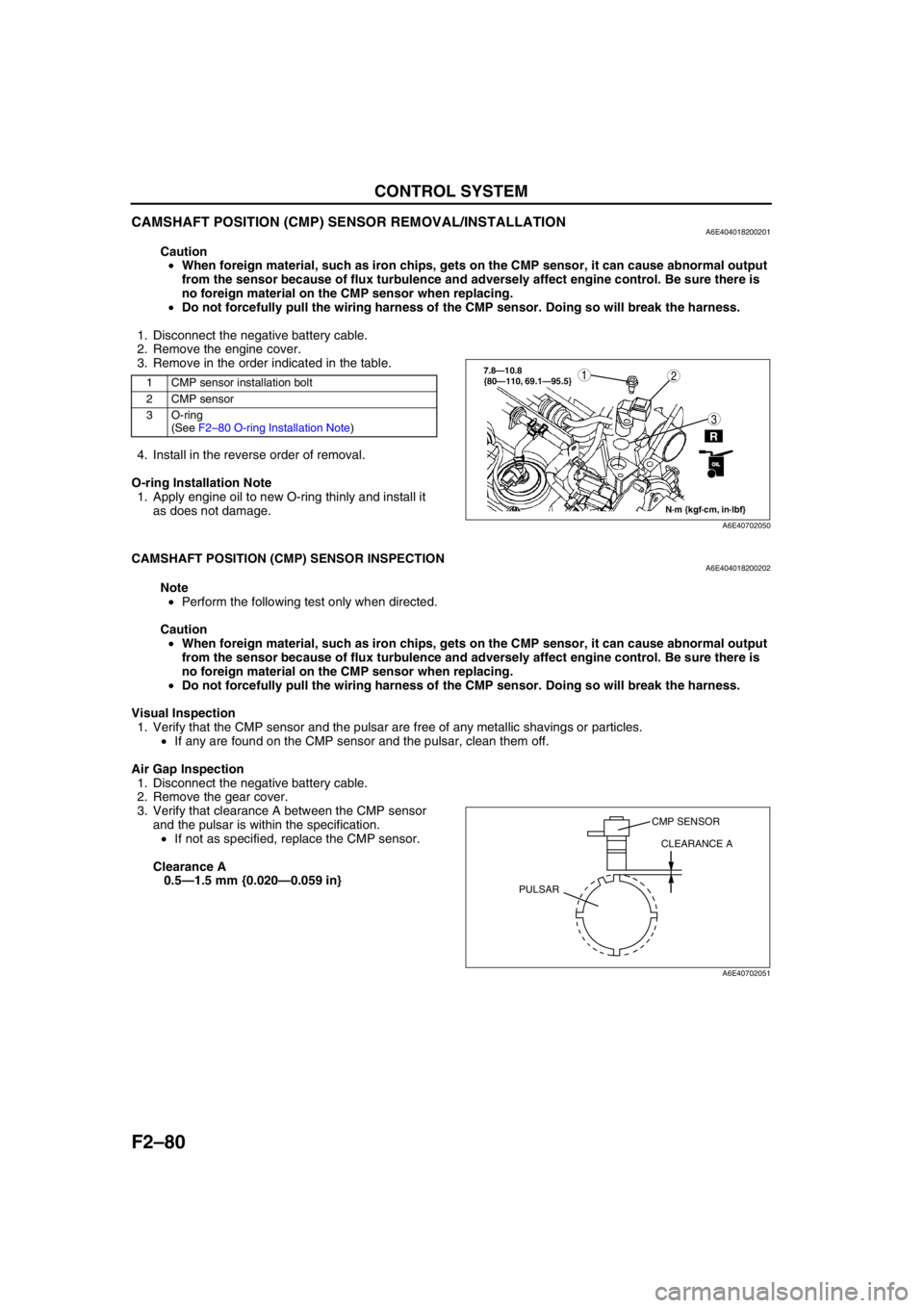
CAMSHAFT POSITION (CMP) SENSOR REMOVAL/INSTALLATIONA6E404018200201
Caution
•When foreign material, such as iron chips, gets on the CMP sensor, it can cause abnormal output
from the sensor because of flux turbulence and adversely affect engine control. Be sure there is
no foreign material on the CMP sensor when replacing.
•Do not forcefully pull the wiring harness of the CMP sensor. Doing so will break the harness.
1. Disconnect the negative battery cable.
2. Remove the engine cover.
3. Remove in the order indicated in the table.
4. Install in the reverse order of removal.
O-ring Installation Note
1. Apply engine oil to new O-ring thinly and install it
as does not damage.
End Of Sie
CAMSHAFT POSITION (CMP) SENSOR INSPECTIONA6E404018200202
Note
•Perform the following test only when directed.
Caution
•When foreign material, such as iron chips, gets on the CMP sensor, it can cause abnormal output
from the sensor because of flux turbulence and adversely affect engine control. Be sure there is
no foreign material on the CMP sensor when replacing.
•Do not forcefully pull the wiring harness of the CMP sensor. Doing so will break the harness.
Visual Inspection
1. Verify that the CMP sensor and the pulsar are free of any metallic shavings or particles.
•If any are found on the CMP sensor and the pulsar, clean them off.
Air Gap Inspection
1. Disconnect the negative battery cable.
2. Remove the gear cover.
3. Verify that clearance A between the CMP sensor
and the pulsar is within the specification.
•If not as specified, replace the CMP sensor.
Clearance A
0.5—1.5 mm {0.020—0.059 in}
1 CMP sensor installation bolt
2 CMP sensor
3 O-ring
(See F2–80 O-ring Installation Note)
N·m {kgf·cm, in·lbf}
3
127.8—10.8
{80—110, 69.1—95.5}
R
OILOIL
A6E40702050
CMP SENSOR
CLEARANCE A
PULSAR
A6E40702051
Page 233 of 909
CONTROL SYSTEM
F2–81
F2
Resistance Inspection
1. Disconnect the negative battery cable.
2. Remove the engine cover.
3. Disconnect the CMP sensor connector.
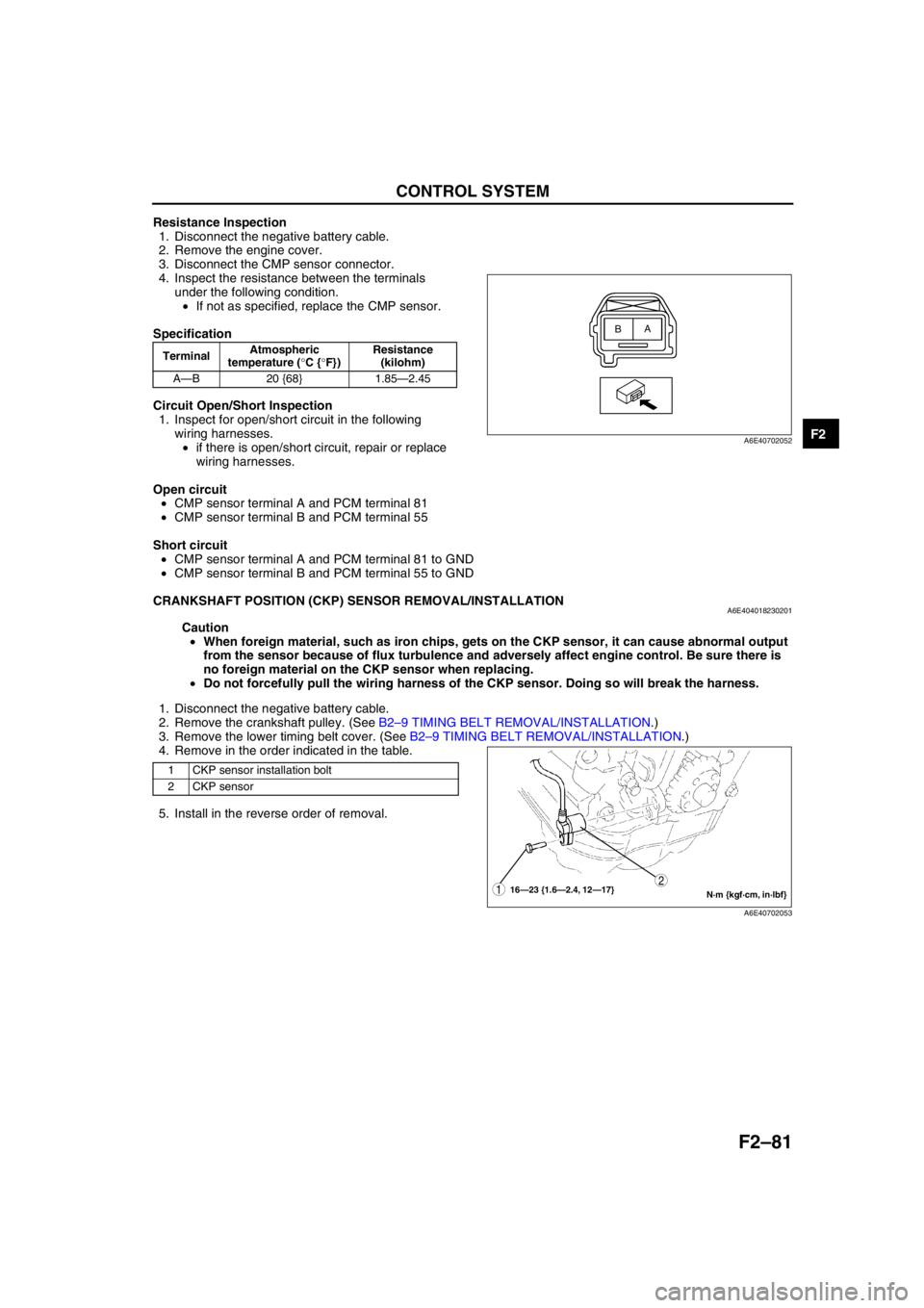
4. Inspect the resistance between the terminals
under the following condition.
•If not as specified, replace the CMP sensor.
Specification
Circuit Open/Short Inspection
1. Inspect for open/short circuit in the following
wiring harnesses.
•if there is open/short circuit, repair or replace
wiring harnesses.
Open circuit
•CMP sensor terminal A and PCM terminal 81
•CMP sensor terminal B and PCM terminal 55
Short circuit
•CMP sensor terminal A and PCM terminal 81 to GND
•CMP sensor terminal B and PCM terminal 55 to GND
End Of Sie
CRANKSHAFT POSITION (CKP) SENSOR REMOVAL/INSTALLATIONA6E404018230201
Caution
•When foreign material, such as iron chips, gets on the CKP sensor, it can cause abnormal output
from the sensor because of flux turbulence and adversely affect engine control. Be sure there is
no foreign material on the CKP sensor when replacing.
•Do not forcefully pull the wiring harness of the CKP sensor. Doing so will break the harness.
1. Disconnect the negative battery cable.
2. Remove the crankshaft pulley. (See B2–9 TIMING BELT REMOVAL/INSTALLATION.)
3. Remove the lower timing belt cover. (See B2–9 TIMING BELT REMOVAL/INSTALLATION.)
4. Remove in the order indicated in the table.
5. Install in the reverse order of removal.
End Of Sie
TerminalAtmospheric
temperature (°C {°F})Resistance
(kilohm)
A—B 20 {68} 1.85—2.45
A
B
A6E40702052
1 CKP sensor installation bolt
2 CKP sensor
N·m {kgf·cm, in·lbf} 16—23 {1.6—2.4, 12—17}12
A6E40702053
Page 234 of 909
F2–82
CONTROL SYSTEM
CRANKSHAFT POSITION (CKP) SENSOR INSPECTIONA6E404018230202
Note
•Perform the following test only when directed.
Caution
•When foreign material, such as iron chips, gets on the CKP sensor, it can cause abnormal output
from the sensor because of flux turbulence and adversely affect engine control. Be sure there is
no foreign material on the CKP sensor when replacing.
•Do not forcefully pull the wiring harness of the CKP sensor. Doing so will break the harness.
Visual Inspection
1. Verify that the CKP sensor and the pulsar are free of any metallic shavings or particles.
•If any are found on the CKP sensor and the pulsar, clean them off.
Air Gap Inspection
1. Disconnect the negative battery cable.
2. Remove the crankshaft pulley. (See B2–9 TIMING BELT REMOVAL/INSTALLATION.)
3. Remove the crankshaft pulley. (See B2–9 TIMING BELT REMOVAL/INSTALLATION.)
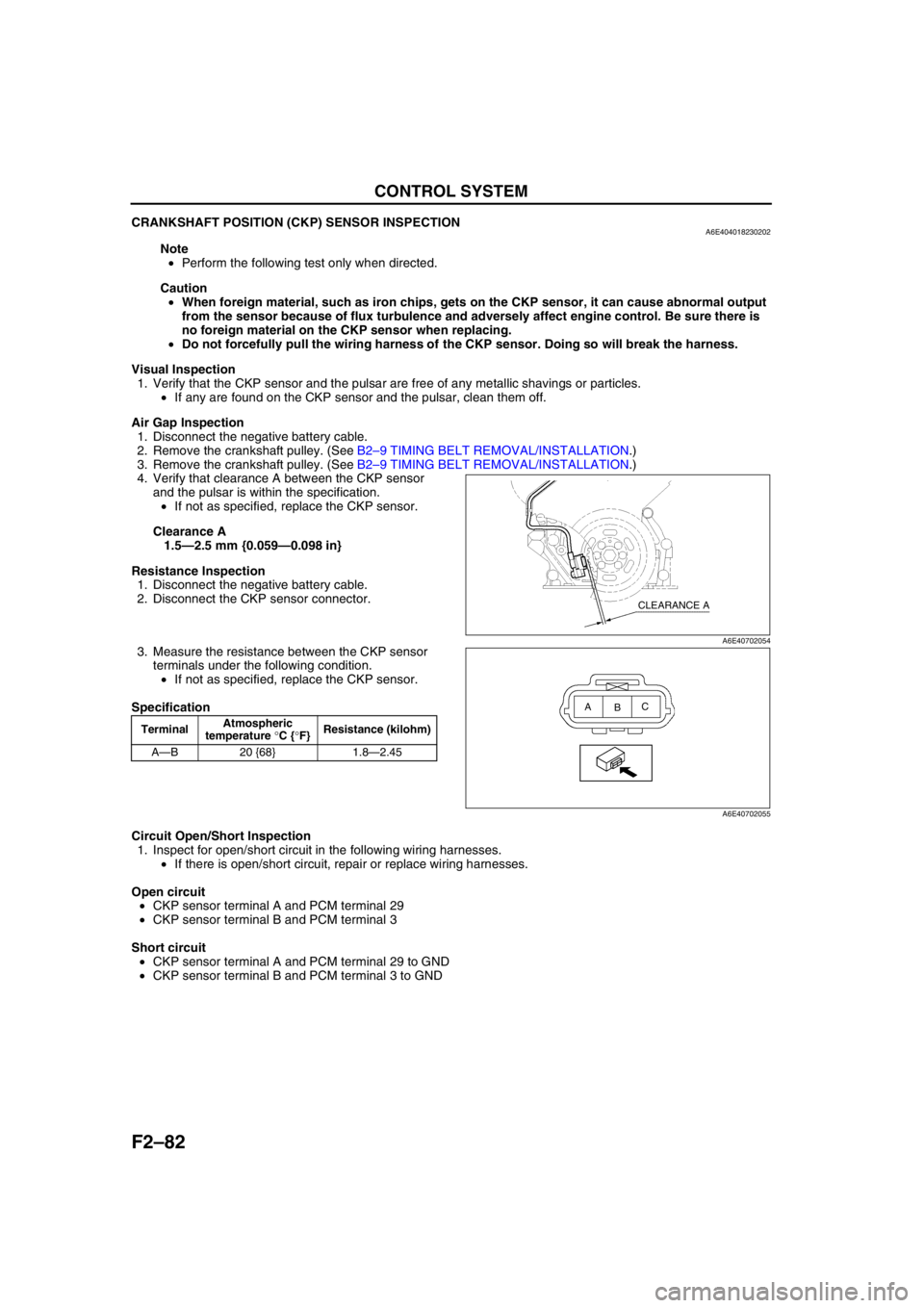
4. Verify that clearance A between the CKP sensor
and the pulsar is within the specification.
•If not as specified, replace the CKP sensor.
Clearance A
1.5—2.5 mm {0.059—0.098 in}
Resistance Inspection
1. Disconnect the negative battery cable.
2. Disconnect the CKP sensor connector.
3. Measure the resistance between the CKP sensor
terminals under the following condition.
•If not as specified, replace the CKP sensor.
Specification
Circuit Open/Short Inspection
1. Inspect for open/short circuit in the following wiring harnesses.
•If there is open/short circuit, repair or replace wiring harnesses.
Open circuit
•CKP sensor terminal A and PCM terminal 29
•CKP sensor terminal B and PCM terminal 3
Short circuit
•CKP sensor terminal A and PCM terminal 29 to GND
•CKP sensor terminal B and PCM terminal 3 to GND
End Of Sie
TerminalAtmospheric
temperature °C {°F}Resistance (kilohm)
A—B 20 {68} 1.8—2.45
CLEARANCE A
A6E40702054
A
BC
A6E40702055
Page 326 of 909
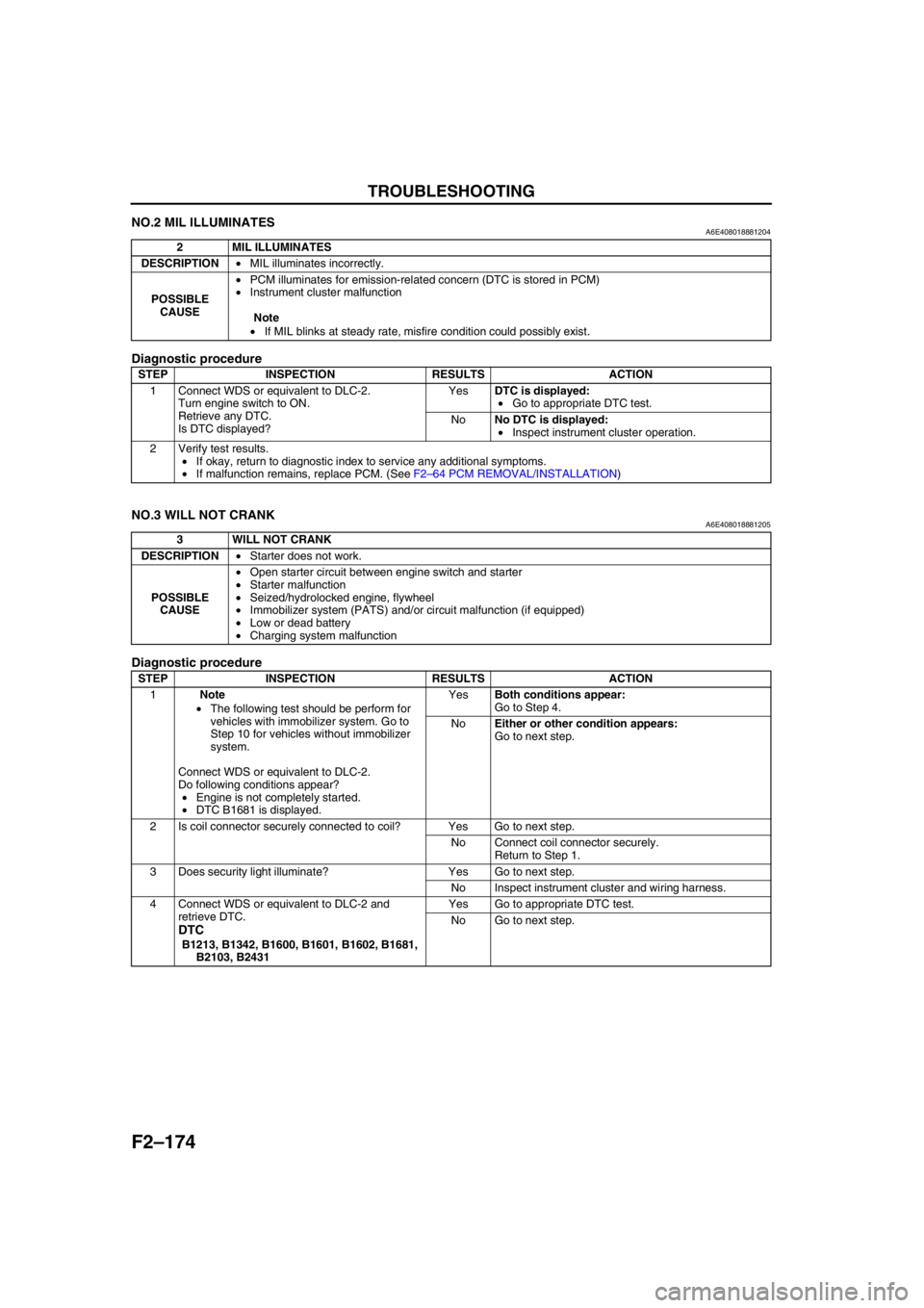
F2–174
TROUBLESHOOTING
NO.2 MIL ILLUMINATESA6E408018881204
Diagnostic procedure
End Of Sie
NO.3 WILL NOT CRANKA6E408018881205
Diagnostic procedure
2 MIL ILLUMINATES
DESCRIPTION•MIL illuminates incorrectly.
POSSIBLE
CAUSE•PCM illuminates for emission-related concern (DTC is stored in PCM)
•Instrument cluster malfunction
Note
•If MIL blinks at steady rate, misfire condition could possibly exist.
STEP INSPECTION RESULTS ACTION
1 Connect WDS or equivalent to DLC-2.
Turn engine switch to ON.
Retrieve any DTC.
Is DTC displayed?YesDTC is displayed:
•Go to appropriate DTC test.
NoNo DTC is displayed:
•Inspect instrument cluster operation.
2 Verify test results.
•If okay, return to diagnostic index to service any additional symptoms.
•If malfunction remains, replace PCM. (See F2–64 PCM REMOVAL/INSTALLATION)
3 WILL NOT CRANK
DESCRIPTION•Starter does not work.
POSSIBLE
CAUSE•Open starter circuit between engine switch and starter
•Starter malfunction
•Seized/hydrolocked engine, flywheel
•Immobilizer system (PATS) and/or circuit malfunction (if equipped)
•Low or dead battery
•Charging system malfunction
STEP INSPECTION RESULTS ACTION
1Note
•The following test should be perform for
vehicles with immobilizer system. Go to
Step 10 for vehicles without immobilizer
system.
Connect WDS or equivalent to DLC-2.
Do following conditions appear?
•Engine is not completely started.
•DTC B1681 is displayed.YesBoth conditions appear:
Go to Step 4.
NoEither or other condition appears:
Go to next step.
2 Is coil connector securely connected to coil? Yes Go to next step.
No Connect coil connector securely.
Return to Step 1.
3 Does security light illuminate? Yes Go to next step.
No Inspect instrument cluster and wiring harness.
4 Connect WDS or equivalent to DLC-2 and
retrieve DTC.
DTC
B1213, B1342, B1600, B1601, B1602, B1681,
B2103, B2431Yes Go to appropriate DTC test.
No Go to next step.