checking oil MAZDA 626 1987 User Guide
[x] Cancel search | Manufacturer: MAZDA, Model Year: 1987, Model line: 626, Model: MAZDA 626 1987Pages: 1865, PDF Size: 94.35 MB
Page 747 of 1865

STARTER (GASOLINE ENGINE, 0.85, 0.95 KW TYPE) 5
4BG05X-082
4BG05X-083
4BG05X-084
2. Vibration of the commutator
(1) Place the armature on V blocks, and measure
the vibration by using a dial gauge.
(2) If the vibration is Limit or more, repair so that
it becomes standard by using a lathe, or re-
place the armature.
Standard vibration: 0.05 mm (0.002 in)
Limit: 0.4 mm (0.018 in)
Note
Before checking, be sure that there is no play
in the bearings.
3. Outer diameter of the commutator
Replace the armature if the outer diameter of the
commutator is grind limit or less.
4. Roughness of the commutator surface
(1) If the commutator surface is dirty, wipe it with
a cloth.
(2) If it is rough, repair it by using a lathe or fine
sandpaper.
Grind limit: 31 mm (1.22 in)
5. Segment groove depth
If the depth of the mold between segments is limit
depth or less, undercut the grooves by standard
depth.
Standard depth:
0.5—0.8 mm (0.020—0.031 in)
Limit depth: 0.2 mm (0.008 in)
Field Coil
1. Wiring damage
(1) Check for continuity between the connector
and brushes by using a circuit tester.
(2) Replace the yoke assembly if there is no con-
tinuity.
4BG05X-085
5—41
Page 768 of 1865

5 STARTER (DIESEL ENGINE, 2.0 KW TYPE)
4BG05X-082
4BG05X-103
Faulty repair
Bad Good
Mica
Undercut
Segments
4BG05X-084
2. Vibration of the commutator
(1) Place the armature on V blocks, and measure
the vibration by using a dial gauge.
(2) If the vibration is Limit or more, repair so that
it becomes standard by using a lathe, or re-
place the armature.
Standard vibration: 0.05 mm (0.002 in)
Limit: 0.4 mm (0.018 in)
Note
Before checking, be sure that there is no play
in the bearings.
3. Outer diameter of the commutator
Replace the armature if the outer diameter of the
commutator is grind limit or less.
4. Roughness of the commutator surface
(1) If the commutator surface is dirty, wipe it with
a cloth.
(2) If it is rough, repair it by using a lathe or fine
sandpaper.
Grind limit: 34 mm (1.34 in)
5. Segment groove depth
If the depth of the mold between segments is limit
depth or less, undercut the grooves by standard
depth.
Standard depth:
0.5—0.8 mm (0.020—0.031 in)
Limit depth: 0.2 mm (0.008 in)
Field Coil
1. Wiring damage
(1) Check for continuity between the connector
and brushes by using a circuit tester.
(2) Replace the yoke assembly if there is no con-
tinuity.
4BG05X-085
5-62
Page 777 of 1865

STARTER (DIESEL ENGINE, 2.2 KW TYPE) 5
4BG05X-113
4BG05X-080
Adjustment of pinion gap
1. Disconnect the wiring from terminal (M).
2. Apply battery power to the terminal (S) and ground
the starter motor body, the pinion will eject outward
and then stop.
3. Measure the clearance (pinion gap) between the
pinion and the stopper.
Note
Be careful not to let electricity flow continu-
ously for more than 10 seconds.
Pinion gap: 0.5—2.0 mm (0.020—0.079 in)
4. If the pinion gap is not within the specified range,
make the adjustment by increasing or decreasing
the number of washers used between the magnetic
switch and the drive housing. The gap will become
smaller if the number of washers is increased.
Caution
Do not use the washers more than plates.
INSPECTION
Armature Coil
1. Ground of the armature coil
Check for continuity between the commutator and
the core by using a circuit tester. Replace the ar-
mature if there is continuity.
4BG05-081
2. Vibration of the commutator
Plate the armature on V blocks, and measure the
vibration by using a dial gauge. If the vibration is
Limit or more, repair so that is standard by using
a lathe, or replace the armature.
Standard vibration: 0.05 mm (0.002 in)
Limit: 0.4 mm (0.018 in)
Note
Before checking, be sure than there is no play
in the bearings.
4BG05X-Q82
5-71
Page 879 of 1865

TROUBLESHOOTING (G4A-EL) 7B
By following the above seven steps, the cause of the problem should be located.
As another guide to faster location of the causes of problems, the Quick Diagnosis Chart is included
at pages 7B—13, 14.
In this chart, a circle is used to indicate the components that might be the cause of trouble for 23
types of problems. It is only necessary to check those components indicated by circles, at each step
cf the troubleshooting process, in order to quickly locate the cause of the problem.
Quick Diagnosis Chart
The Quick Diagnosis Chart shows various problems and the relationship of various components that
might be the cause of the problem.
1. Components indicated in the "Self-Diag." column are diagnosed by the EC-AT control unit self-
diagnosis function.
The EC-AT Tester can be used for easy retrieval of these signals.
2. Components indicated in the "Adjustment" column indicate that there is a possibility that the prob-
lem may be the result of an incorrect adjustment.
Check the adjustment of each component, and readjust if necessary.
3. Input and outout signals of the EC-AT control unit for the components indicated in the "EC-AT
TESTER" column can be easily checked by using of the EC-AT Tester.
4. Components indicated in the "Stall Test" column can be checked for malfunction by the results
of the stall test.
5. Components indicated in the "Time Lag Test" column can be checked for malfunction by the results
of the time lag test.
6. Components indicated in the "Oil Pressure Test" column can be checked for malfunction by the
results of the oil pressure test.
7. Components indicated in the "Road Test" column can be checked for malfunction by the results
of the road test.
8. The checking, adjusting, repair or replacement procedures for each component is described in the
page(s) noted in the "Reference Page" column.
7B—13
Page 897 of 1865
TROUBLESHOOTING (G4A-EL) 7B
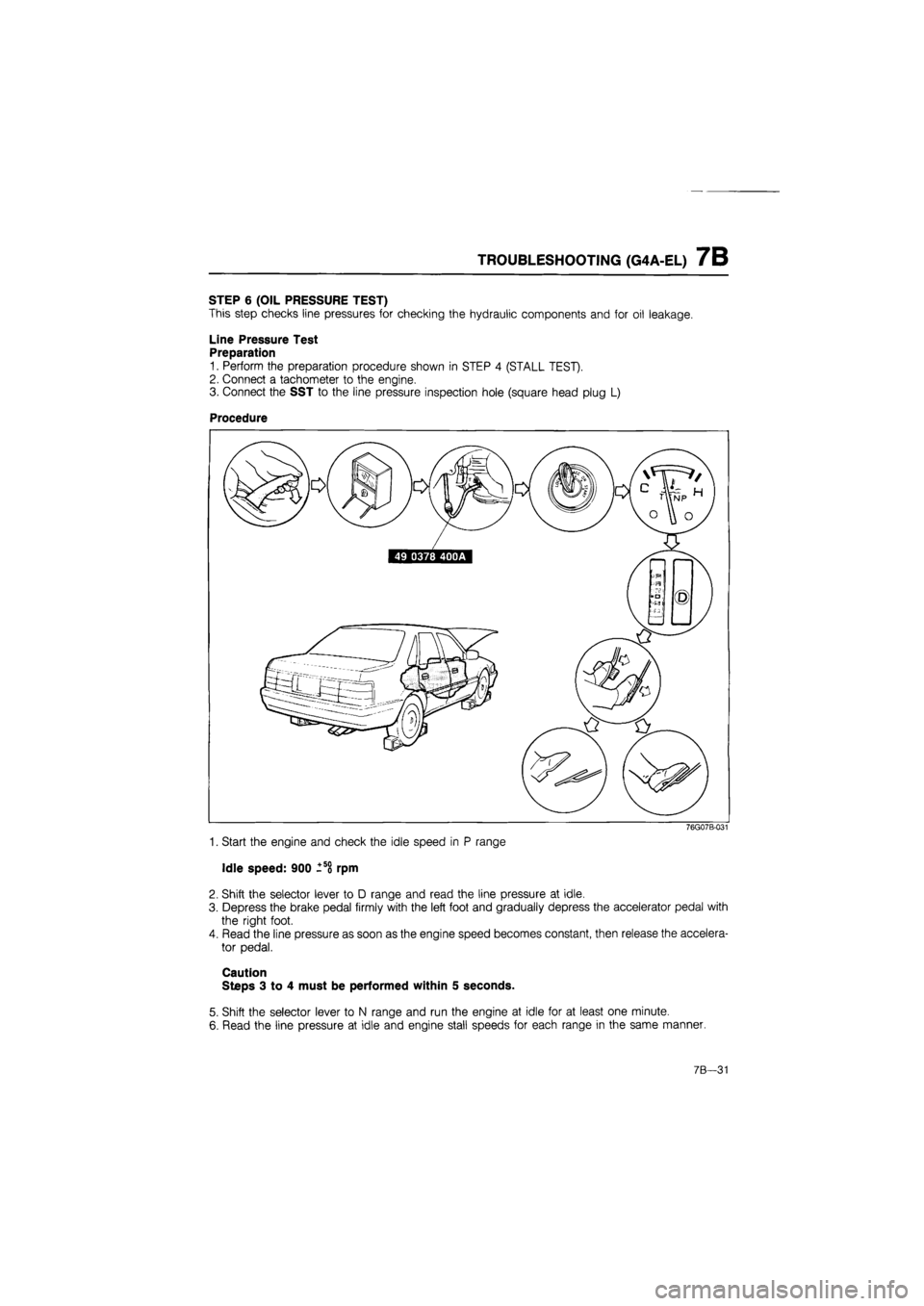
STEP 6 (OIL PRESSURE TEST)
This step checks line pressures for checking the hydraulic components and for oil leakage.
Line Pressure Test
Preparation
1. Perform the preparation procedure shown in STEP 4 (STALL TEST).
2. Connect a tachometer to the engine.
3. Connect the SST to the line pressure inspection hole (square head plug L)
Procedure
76G07B-031
1. Start the engine and check the idle speed in P range
Idle speed: 900 -so rpm
2. Shift the selector lever to D range and read the line pressure at idle.
3. Depress the brake pedal firmly with the left foot and gradually depress the accelerator pedal with
the right foot.
4. Read the line pressure as soon as the engine speed becomes constant, then release the accelera-
tor pedal.
Caution
Steps 3 to 4 must be performed within 5 seconds.
5. Shift the selector lever to N range and run the engine at idle for at least one minute.
6. Read the line pressure at idle and engine stall speeds for each range in the same manner.
7B—31
Page 908 of 1865
7B TROUBLESHOOTING (G4A-HL)
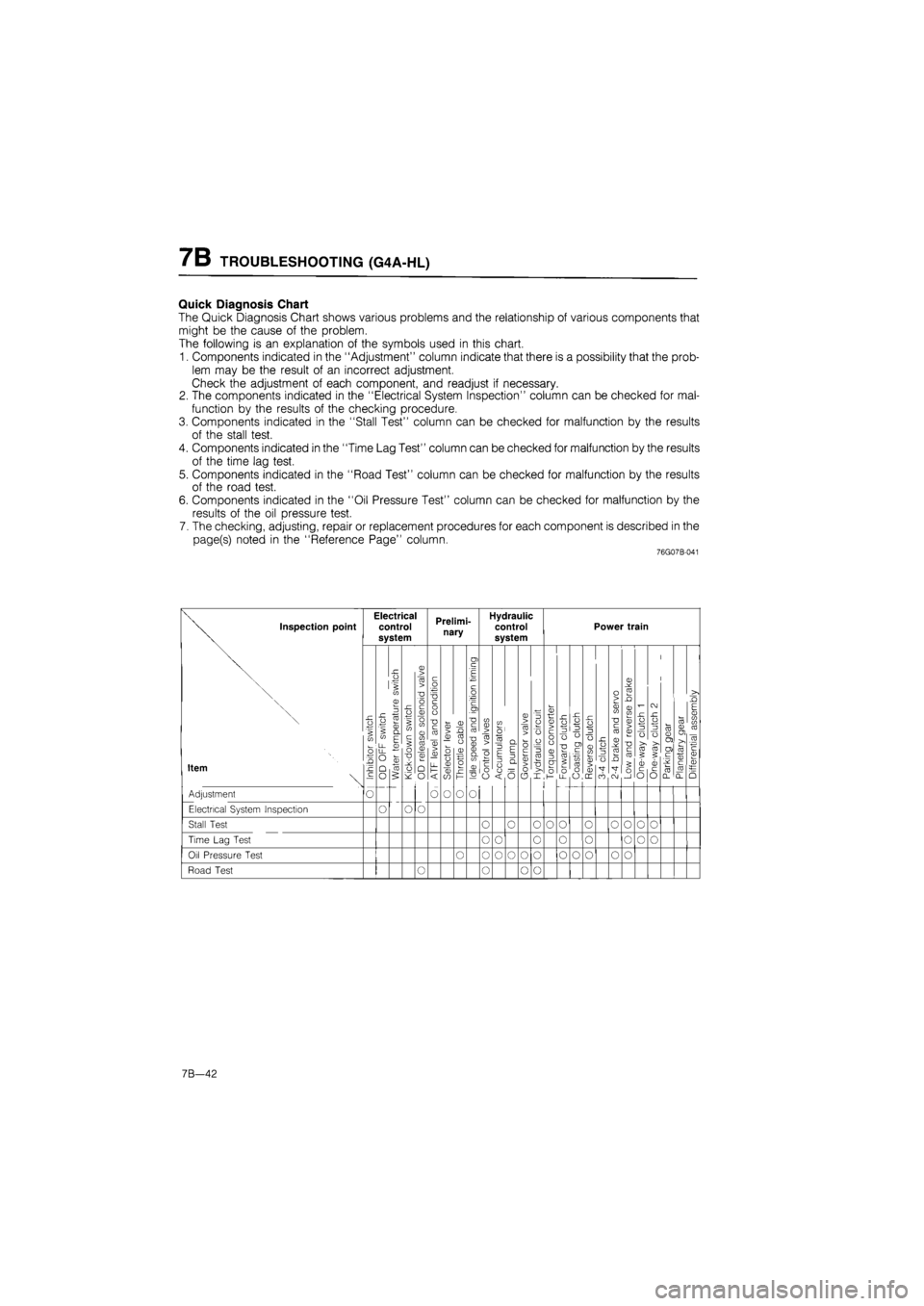
Quick Diagnosis Chart
The Quick Diagnosis Chart shows various problems and the relationship of various components that
might be the cause of the problem.
The following is an explanation of the symbols used in this chart.
1. Components indicated in the "Adjustment" column indicate that there is a possibility that the prob-
lem may be the result of an incorrect adjustment.
Check the adjustment of each component, and readjust if necessary.
2. The components indicated in the "Electrical System Inspection" column can be checked for mal-
function by the results of the checking procedure.
3. Components indicated in the "Stall Test" column can be checked for malfunction by the results
of the stall test.
4. Components indicated in the "Time Lag Test" column can be checked for malfunction by the results
of the time lag test.
5. Components indicated in the "Road Test" column can be checked for malfunction by the results
of the road test.
6. Components indicated in the "Oil Pressure Test" column can be checked for malfunction by the
results of the oil pressure test.
7. The checking, adjusting, repair or replacement procedures for each component is described in the
page(s) noted in the "Reference Page" column.
76G07B-041
Inspection point
Item
Adjustment
Electrical System Inspection
Electrical control system
JO o
II in a> ZJ i 2 : o. 5 E - £ CD _
O §
o
o
Prelimi-nary
CD t/1 ro cd
O O
o
CD ro — o o u 0) CD CO
O
Hydraulic control system
cn "o w ~ CD ro .> -a 5 CD > cl o
5 O
3 a
3 6
o
Power train
O I h
£ ro o O LL O
o > CD (fl "D c ro sz CD o JJL. "3 ro o _Q •sT co C\J
ro ro 5 ? CD CD c c O O
Stall Test
Time Lag Test
O O o o o o o o o o
o o o o o o o o
Oil Pressure Test O o o o o o o o o o o
Road Test O o o o
7B—42
Page 1226 of 1865
7C ASSEMBLY
7C-112
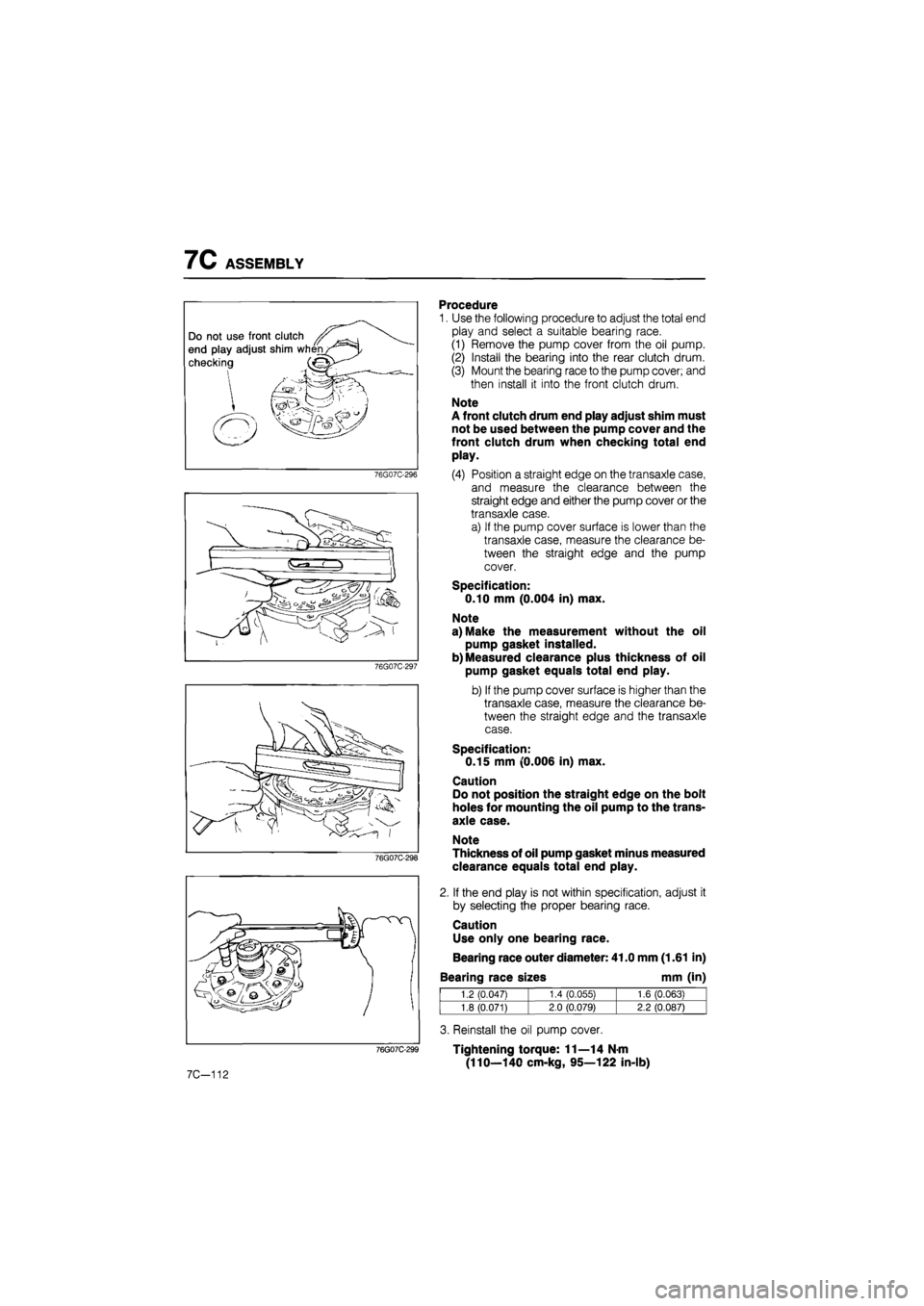
Procedure
1. Use the following procedure to adjust the total end
play and select a suitable bearing race.
(1) Remove the pump cover from the oil pump.
(2) Install the bearing into the rear clutch drum.
(3) Mount the bearing race to the pump cover; and
then install it into the front clutch drum.
Note
A front clutch drum end play adjust shim must
not be used between the pump cover and the
front clutch drum when checking total end
play.
(4) Position a straight edge on the transaxle case,
and measure the clearance between the
straight edge and either the pump cover or the
transaxle case.
a) If the pump cover surface is lower than the
transaxle case, measure the clearance be-
tween the straight edge and the pump
cover.
Specification:
0.10 mm (0.004 in) max.
Note
a) Make the measurement without the oil
pump gasket installed.
b) Measured clearance plus thickness of oil
pump gasket equals total end play.
b) If the pump cover surface is higher than the
transaxle case, measure the clearance be-
tween the straight edge and the transaxle
case.
Specification:
0.15 mm (0.006 in) max.
Caution
Do not position the straight edge on the bolt
holes for mounting the oil pump to the trans-
axle case.
Note
Thickness of oil pump gasket minus measured
clearance equals total end play.
2. If the end play is not within specification, adjust it
by selecting the proper bearing race.
Caution
Use only one bearing race.
Bearing race outer diameter: 41.0 mm (1.61 in)
Bearing race sizes mm (in)
1.2 (0.047) 1.4 CO.055) 1.6 (0.063)
1.8 (0.071) 2.0 (0.079) 2.2 (0.087)
3. Reinstall the oil pump cover.
Tightening torque: 11—14 N-m
(110—140 cm-kg, 95—122 in-lb)
Page 1695 of 1865
15 WARNING AND SENDER
86U15X-068
86U15X069
86U15X-070
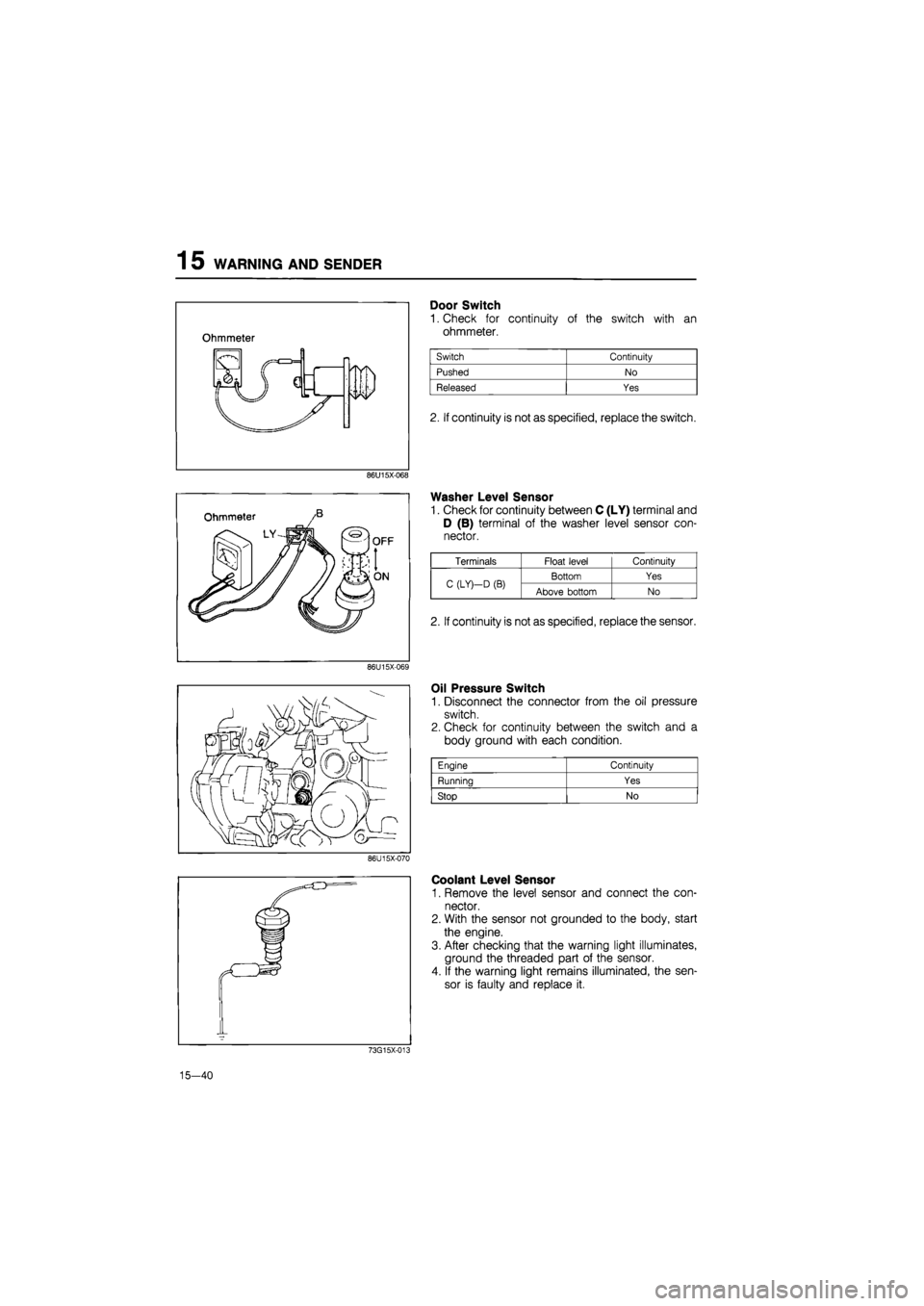
Door Switch
1. Check for continuity of the switch with an
ohmmeter.
2. If continuity is not as specified, replace the switch.
Washer Level Sensor
1. Check for continuity between C (LY) terminal and
D (B) terminal of the washer level sensor con-
nector.
Oil Pressure Switch
1. Disconnect the connector from the oil pressure
switch.
2. Check for continuity between the switch and a
body ground with each condition.
Coolant Level Sensor
1. Remove the level sensor and connect the con-
nector.
2. With the sensor not grounded to the body, start
the engine.
3. After checking that the warning light illuminates,
ground the threaded part of the sensor.
4. If the warning light remains illuminated, the sen-
sor is faulty and replace it.
73G15X-013
15—40
Engine Continuity
Running Yes
Stop No
Terminals Float level Continuity
C (LY)—D
(B)
Bottom Yes C (LY)—D
(B)
Above bottom No
2. If continuity is not as specified, replace the sensor.
Page 1739 of 1865

1 5 CRUISE CONTROL SYSTEM
ON-VEHICLE INSPECTION (USING ACC CHECKER 49 9200 010)
76G15X-072
Note:
When checking the actuator on '88 models with EC-AT using this checker, the checker
should be modified as shown below in order to avoid damage of the EC-AT control unit.
Modification Procedure
1. Cut the wire at terminal no.6 indicated on ACC
checker connector.
2. Tape exposed end of wire cut in step 1 as shown.
This modification does not affect the usage of the ACC
checker except when used on the '81 RX-7 and 626
models. When the modified ACC checker is used on
these models, use a jumper wire and jump across
terminal no.6 to 3 indicated on ACC checker connec-
tor as shown.
Function of the ACC CHECKER
A. Check lights
Each item is verified by a check light, as described below.
Check light Check items
MAIN SW.
Ignition switch, fuse, main switch and associated wiring harness terminals and con-
nectors.
ACTUATOR—VAC
VAC coil continuity
in
the actuator and associated harness.
ACTUATOR—VENT 2
VENT
2
coil continuity
in
the actuator and associated harness.
ACTUATOR—VENT 1
VENT
1
coil continuity
in
the actuator and associated harness.
CLUTCH/BRAKE SW.
Clutch switch (M/T vehicles only), brake switch and associated harness
COMBINATION/INH. SW.
"SET", "COAST" and "RESUME" positions
in
the combination switch, inhibitor
switch (A/T vehicles only), and associated harness.
GENERATOR
Speed sensor output and associated harness.
76U15X-193
15-84