wiring MAZDA 626 1987 Manual PDF
[x] Cancel search | Manufacturer: MAZDA, Model Year: 1987, Model line: 626, Model: MAZDA 626 1987Pages: 1865, PDF Size: 94.35 MB
Page 784 of 1865
QUICK START SYSTEM (QSS) 5
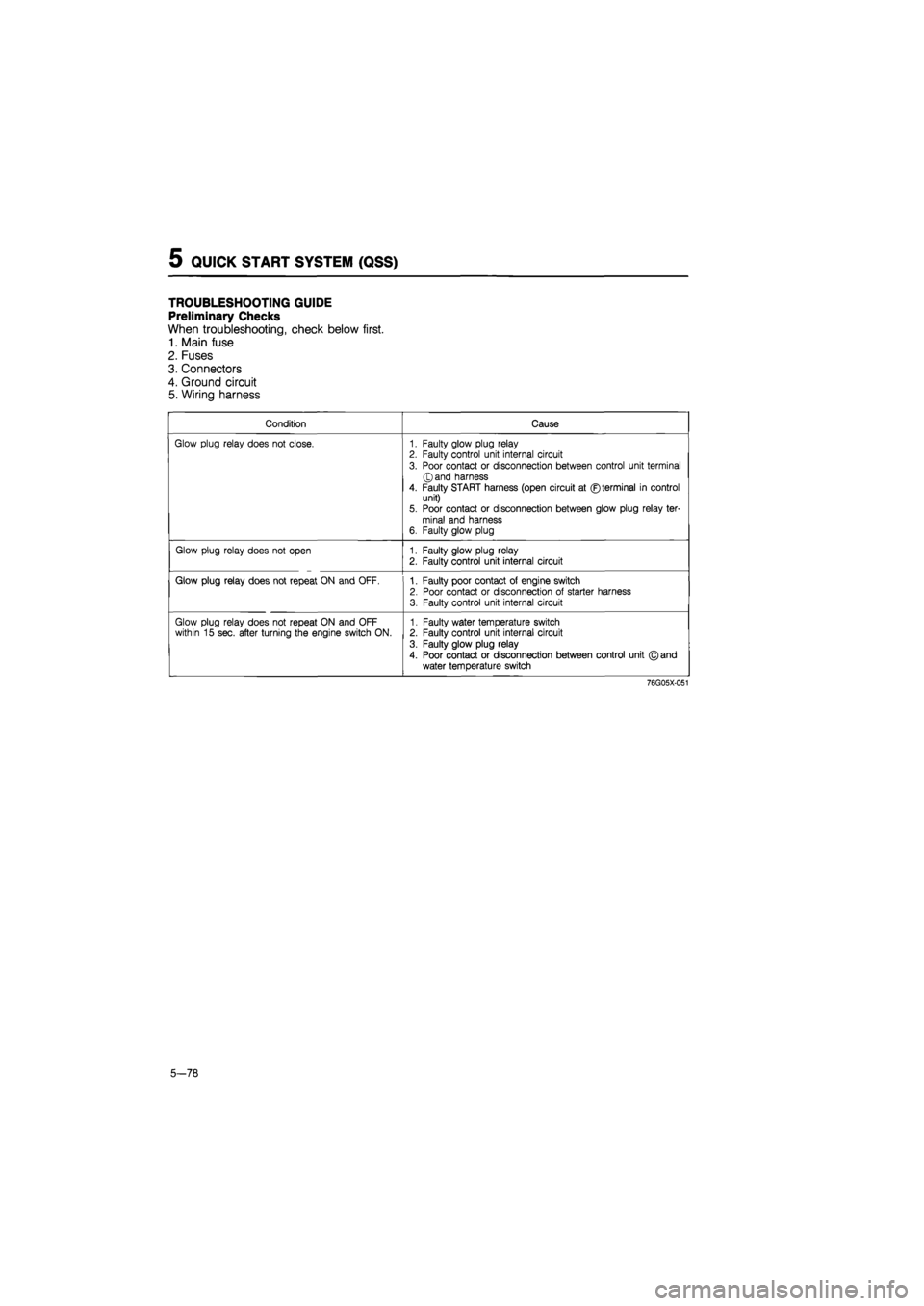
TROUBLESHOOTING GUIDE
Preliminary Checks
When troubleshooting, check below first.
1. Main fuse
2. Fuses
3. Connectors
4. Ground circuit
5. Wiring harness
Condition Cause
Glow plug relay does not close. 1. Faulty glow plug relay 2. Faulty control unit internal circuit
3. Poor contact or disconnection between control unit terminal ©and harness
4. Faulty START harness (open circuit at ©terminal in control unit) 5. Poor contact or disconnection between glow plug relay ter-minal and harness 6. Faulty glow plug
Glow plug relay does not open 1. Faulty glow plug relay 2. Faulty control unit internal circuit
Glow plug relay does not repeat ON and OFF. 1. Faulty poor contact of engine switch 2. Poor contact or disconnection of starter harness 3. Faulty control unit internal circuit
Glow plug relay does not repeat ON and OFF within 15 sec. after turning the engine switch ON. 1. Faulty water temperature switch 2. Faulty control unit internal circuit
3. Faulty glow plug relay
4. Poor contact or disconnection between control unit © and water temperature switch
76G05X-051
5-78
Page 785 of 1865
QUICK START SYSTEM (QSS) 5
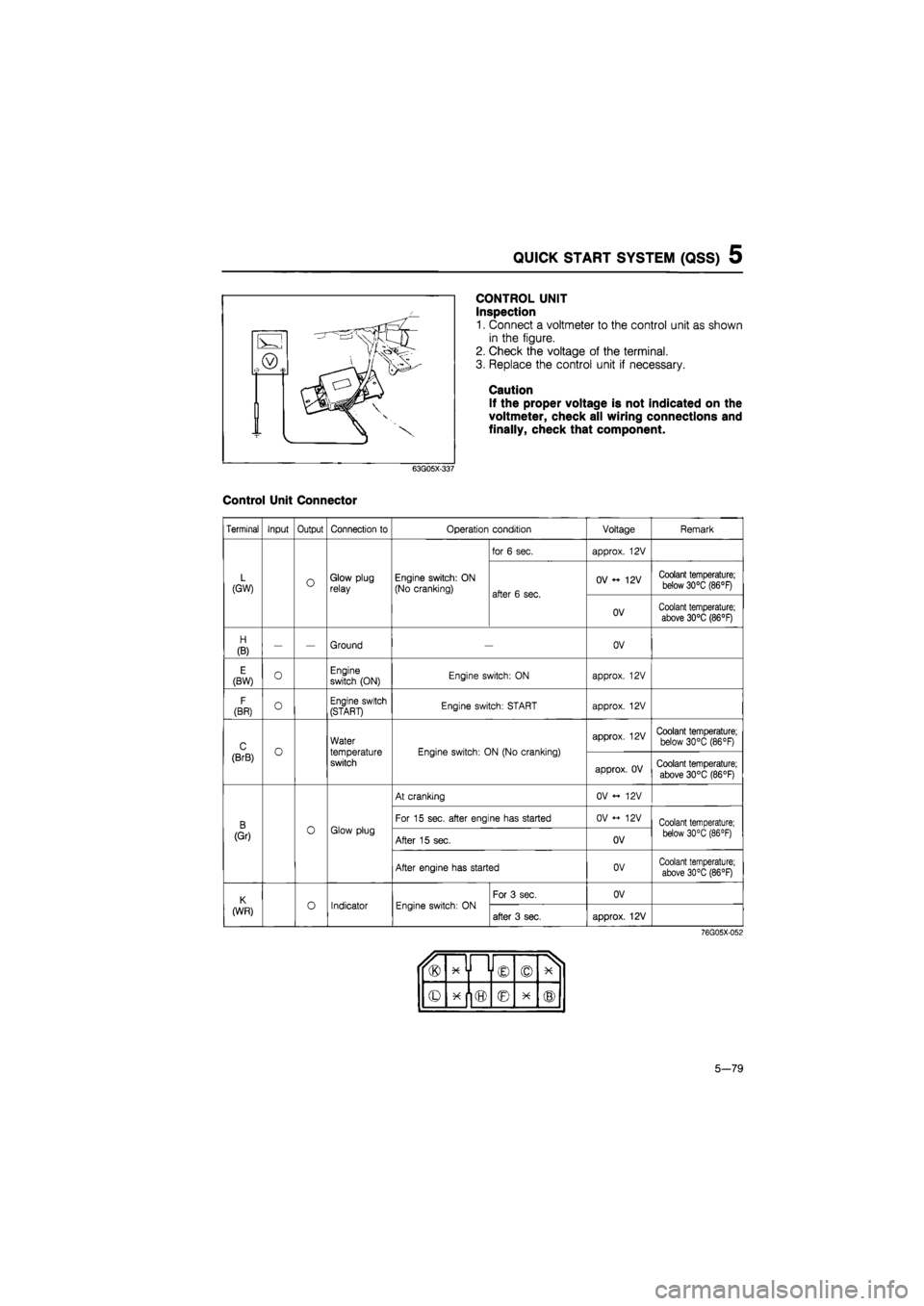
CONTROL UNIT
Inspection
1. Connect a voltmeter to the control unit as shown
in the figure.
2. Check the voltage of the terminal.
3. Replace the control unit if necessary.
Caution
If the proper voltage is not indicated on the
voltmeter, check all wiring connections and
finally, check that component.
63G05X-337
Control Unit Connector
Terminal Input Output Connection to Operation condition Voltage Remark
for 6 sec. approx. 12V
L (GW) O Glow plug relay Engine switch: ON (No cranking) after 6 sec.
OV 12V Coolant temperature; below 30°C (86°F) after 6 sec.
OV Coolant temperature; above 30°C (86°F)
H
(B) — — Ground OV
E (BW) 0 Engine switch (ON) Engine switch: ON approx. 12V
F
(BR) O Engine switch (START) Engine switch: START approx. 12V
C o
Water
temperature switch
Engine switch: ON (No cranking)
approx. 12V Coolant temperature; below 30°C (86°F)
(BrB) o
Water
temperature switch
Engine switch: ON (No cranking)
approx. OV Coolant temperature;
above 30°C (86°F)
At cranking OV <- 12V
B 0 Glow plug
For 15 sec. after engine has started OV <-> 12V Coolant temperature;
(Gr) 0 Glow plug After 15 sec. OV below 30°C (86 °F)
After engine has started OV Coolant temperature; above 30°C (86°F)
K o Indicator Engine switch: ON
For 3 sec. OV
(WR) o Indicator Engine switch: ON after 3 sec. approx. 12V
76G05X-052
u® x y i © © X 1
© © X ®
5-79
Page 884 of 1865

7B TROUBLESHOOTING (G4A-EL)
Retrieval Procedure
1. Locate the service connector.
86U07B-019
76G07B-214
11 IDLFC
5» O | || KICK DOWNS* _ If, DEPRESS
|[BRAKE UORRSW
MNMWE STF *
° M CRUISE CONTROL SW
CDS®> *• PI ^ SPEED DROPS
Gf Aft
•
OO ou
I I
w
6019 HI NOW* XIKI
CO , LTQ
MUX
IN
JAP"
76G07B-016
2. Ground the ground connector of the EC-AT
Tester.
3. Connect the 6-pin connector of the EC-AT Tester
to the service connector.
Note
The service connector is blue-colored con-
nector.
4. Ground the 1 pin service connector.
Note
The service connector is blue-colored con-
nector.
5. Turn the ignition switch ON.
6. Check that "88" flashes on the digital display and
the buzzer sounds for three seconds after turning
the ignition switch ON.
7. If "88" does not flash, check the service connec-
tor wiring.
8. If "88" flashes and the buzzer sounds continuously
for more than 20 seconds, check wiring to 2M ter-
minal of the EC-AT control unit for short-circuit then
replace the EC-AT control unit and repeat steps
3 and 4.
9. Note the code numbers and check for the causes
by referring to the Inspection Procedure shown on
pages 7B—19 to 7B—21, repair as necessary.
Note
After repairs are made, recheck for code num-
bers by performing the "After-repair
procedure."
7B—18
Page 886 of 1865

7B TROUBLESHOOTING (G4A-EL)
No. 12 code display (Throttle sensor)
76G07B-018
No. 55 code display (Pulse generator)
Is there poor connection at connector? YES Repair or replace.
NO
Does EC-AT Tester display drum speed? (Refer to STEP 3-Signal Inspection)
YES Pulse generator OK.
Cancel memory of code number.
NO
NO Is there 200—400 12 between terminals of pulse generator connector? (Refer to page 7B—68)
NO Replace pulse generator. Is there 200—400 12 between terminals of pulse generator connector? (Refer to page 7B—68)
YES YES Check for open or short-circuit in wiring. Check for open or short-circuit in wiring.
76G07B-019
No. 60, 61, 62, or 64 code display (1-2 shift, 2-3 shift, or 3-4 shift solenoid valve)
7B-20
Page 890 of 1865
7B TROUBLESHOOTING (G4A-EL)
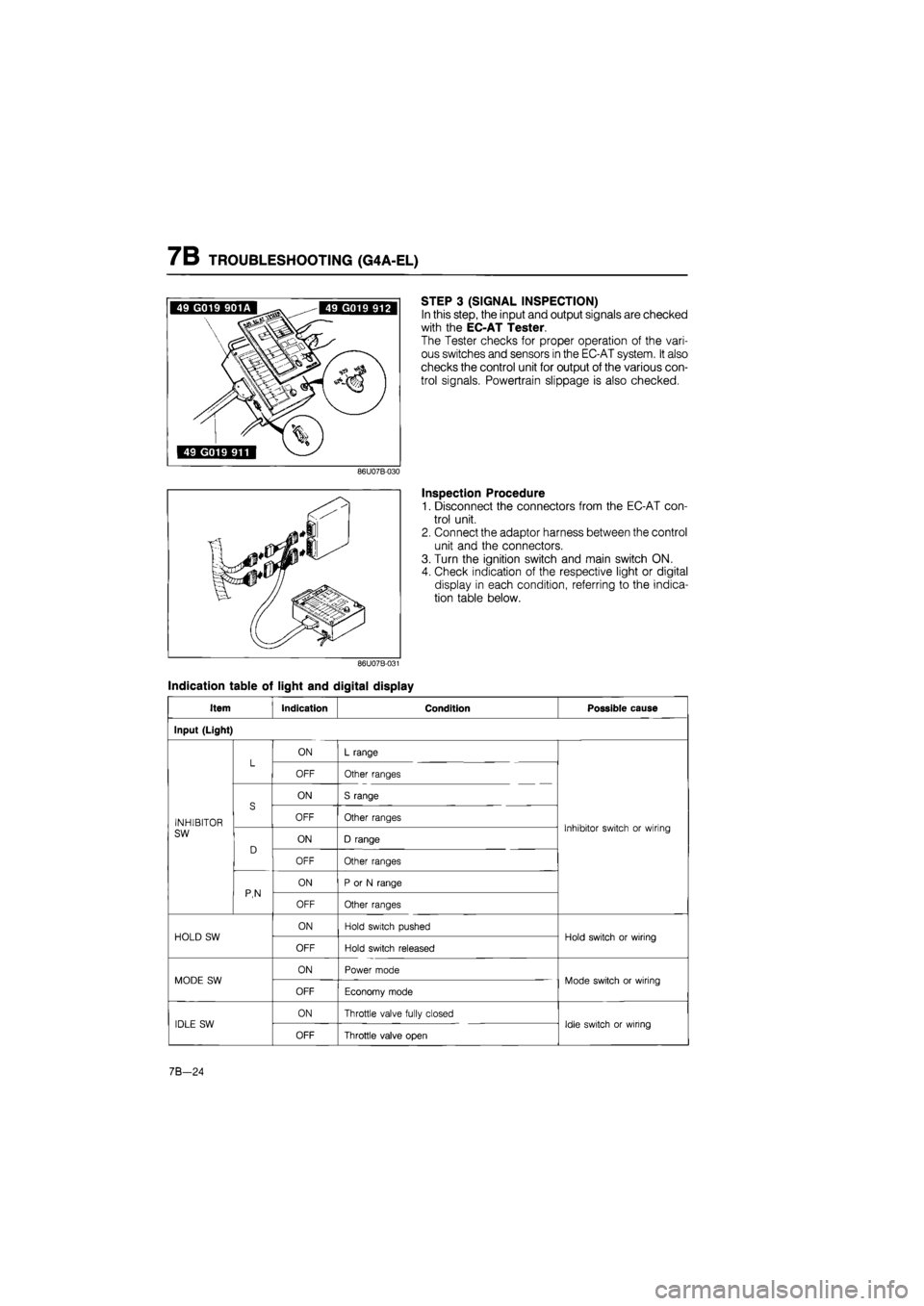
STEP 3 (SIGNAL INSPECTION)
In this step, the input and output signals are checked
with the EC-AT Tester.
The Tester checks for proper operation of the vari-
ous switches and sensors in the EC-AT system. It also
checks the control unit for output of the various con-
trol signals. Powertrain slippage is also checked.
Inspection Procedure
1. Disconnect the connectors from the EC-AT con-
trol unit.
2. Connect the adaptor harness between the control
unit and the connectors.
3. Turn the ignition switch and main switch ON.
4. Check indication of the respective light or digital
display in each condition, referring to the indica-
tion table below.
Indication table of light and digital display
Item Indication Condition Possible cause
Input (Light)
L ON L range L OFF Other ranges
S
ON S range
INHIBITOR
S OFF Other ranges Inhibitor switch or wiring SW
D ON D range
Inhibitor switch or wiring
D
OFF Other ranges
P,N
ON P or N range P,N OFF Other ranges
HOLD SW ON Hold switch pushed Hold switch or wiring HOLD SW
OFF Hold switch released
Hold switch or wiring
MODE SW ON Power mode Mode switch or wiring MODE SW
OFF Economy mode
Mode switch or wiring
IDLE SW ON Throttle valve fully closed Idle switch or wiring IDLE SW
OFF Throttle valve open
Idle switch or wiring
7B-24
Page 891 of 1865

TROUBLESHOOTING (G4A-EL) 7B
Item Indication Condition Possible cause
BRAKE LIGHT SW ON Brake pedal depressed Brake light switch or
wiring BRAKE LIGHT SW
OFF Brake pedal released
Brake light switch or
wiring
WATER TEMP SW ON Coolant temperature 72°C (162°F) or above Water temp switch or wiring WATER TEMP SW
OFF Coolant temperature lower than 65°C (149°F)
Water temp switch or wiring
ATF TEMP SW ON ATF temperature 150°C (302°F) or above Fluid temperature switch or wiring ATF TEMP SW
OFF ATF temperature lower than 143°C (289°F)
Fluid temperature switch or wiring
CRUISE CONTROL SW Not used — —
Input (Digital display)
THROTTLE SENSOR
EC-AT control unit terminal voltage All the time Throttle sensor, idle switch or wirings
VEHICLE SPEED*
Vehicle speed calculated from speed sensor signal
All the time Vehicle speed sensor, speedometer cable, or wiring
DRUM SPEED* Drum speed All the time Pulse generator or wirings
Output (Light)
1-2 SOLENOID VALVE*
ON
Refer to page 7B—26 solenoid valve operation table
Control unit, 1-2 shift sol., or wiring 1-2 SOLENOID VALVE* OFF
Refer to page 7B—26 solenoid valve operation table
Control unit, 1-2 shift sol., or wiring
2-3 SOLENOID VALVE*
ON Refer to page 7B—26 solenoid valve operation table Control unit, 2-3 shift sol., or wiring 2-3 SOLENOID VALVE* OFF
Refer to page 7B—26 solenoid valve operation table Control unit, 2-3 shift sol., or wiring
3-4 SOLENOID VALVE*
ON
Refer to page 7B—26 solenoid valve operation table
Control unit, 3-4 shift sol., or wiring 3-4 SOLENOID VALVE* OFF
Refer to page 7B—26 solenoid valve operation table
Control unit, 3-4 shift sol., or wiring
LOCK-UP SOLE-NOID VALVE*
ON Lock-up condition Control unit, lock-up sol., or wiring LOCK-UP SOLE-NOID VALVE* OFF Non-lock-up condition
Control unit, lock-up sol., or wiring
HOLD INDICATOR ON Hold mode Control unit, Hold switch, or wiring HOLD INDICATOR OFF Other modes
Control unit, Hold switch, or wiring
MODE INDICATOR ON Power or economy mode Control unit, hold switch, mode switch, or wiring MODE INDICATOR
OFF Hold mode
Control unit, hold switch, mode switch, or wiring
NO LOAD SIGNAL Not used — —
76G07B-028
7B-25
Page 906 of 1865

7B TROUBLESHOOTING (G4A-EL)
Slippage Test
This step is performed to inspect slippage of the friction elements.
Preparation 1. Perform the preparation procedure shown in STEP 4 (STALL TEST). 2. Connect a tachometer to the engine and set it in the cabin.
3. Connect the EC-AT Tester and the adaptor harness between the EC-AT control unit and wiring
harness.
Procedure
Drive the vehicle in each of the gears indicated below and check whether the vehicle speed or engine
speed is above or below specification excessively as shown by the drum speed.
Driving condition
Speed
Drum speed (rpm)
No. Gears Other condition Speed
1,000 2,000 3,000 4,000
1 1st L range, Hold mode 11 (7) 22 (14) 33 (20) 44 (27)
2 1st D range, Economy mode 11 (7) 22 (14) 33 (20) 44 (27)
3 2nd S range, Hold mode Vehicle speed km/h (mph) 20 (12) 40 (25) 60 (37) 80 (50)
4 3rd D range, Hold mode 31 (19) 61 (38) 92 (57) 123 (76)
5 OD D range, Economy
mode 44 (27) 88 (55) 131 (81) 173 (107)
6 OD D range, Economy mode, Lock-up Engine speed (rpm) 1,000 2,000 3,000 4,000
76G07B-038
Evaluation
When there is no malfunction in the electrical system or hydraulic system, but vehicle speed or engine
speed is below specification, the problem can be attributed to slippage of the friction elements.
Driving conditions below specification Possible Cause
No.1 condition only Low and reverse brake
No.2 condition only One-way clutch
No.3 condition only 2-4 brake band
No.4 condition only Coasting clutch
No.5 condition only 3-4 clutch
No.1-No,5 conditions Forward clutch
No.6 condition only Lock-up piston (in torque converter)
76G07B-039
7B—40
Page 914 of 1865

7B TROUBLESHOOTING (G4A-HL)
76G07B-052
Water Temperature Switch Inhibition Function
1. Stop the vehicle.
2. Disconnect the water temperature switch con-
nector.
3. Drive the vehicle in D range selected.
4. Check that OD and lock-up does not operate.
5. If not cancelled, check the wiring harness of the
water temperature switch.
6. Stop the vehicle and reconnect the water temper-
ature switch connector.
Kick-down Switch Inhibition Function
1. Connect the terminals of the kick-down switch con-
nector with a jumper wire.
2. Drive the vehicle in D range selected.
3. Check that the OD and lock-up do not achieve.
4. If not correct, check wiring harness of kick-down
switch.
5. Stop the vehicle and reconnect the connector to
the switch.
7B—48
Page 930 of 1865
7B ELECTRICAL SYSTEM COMPONENTS
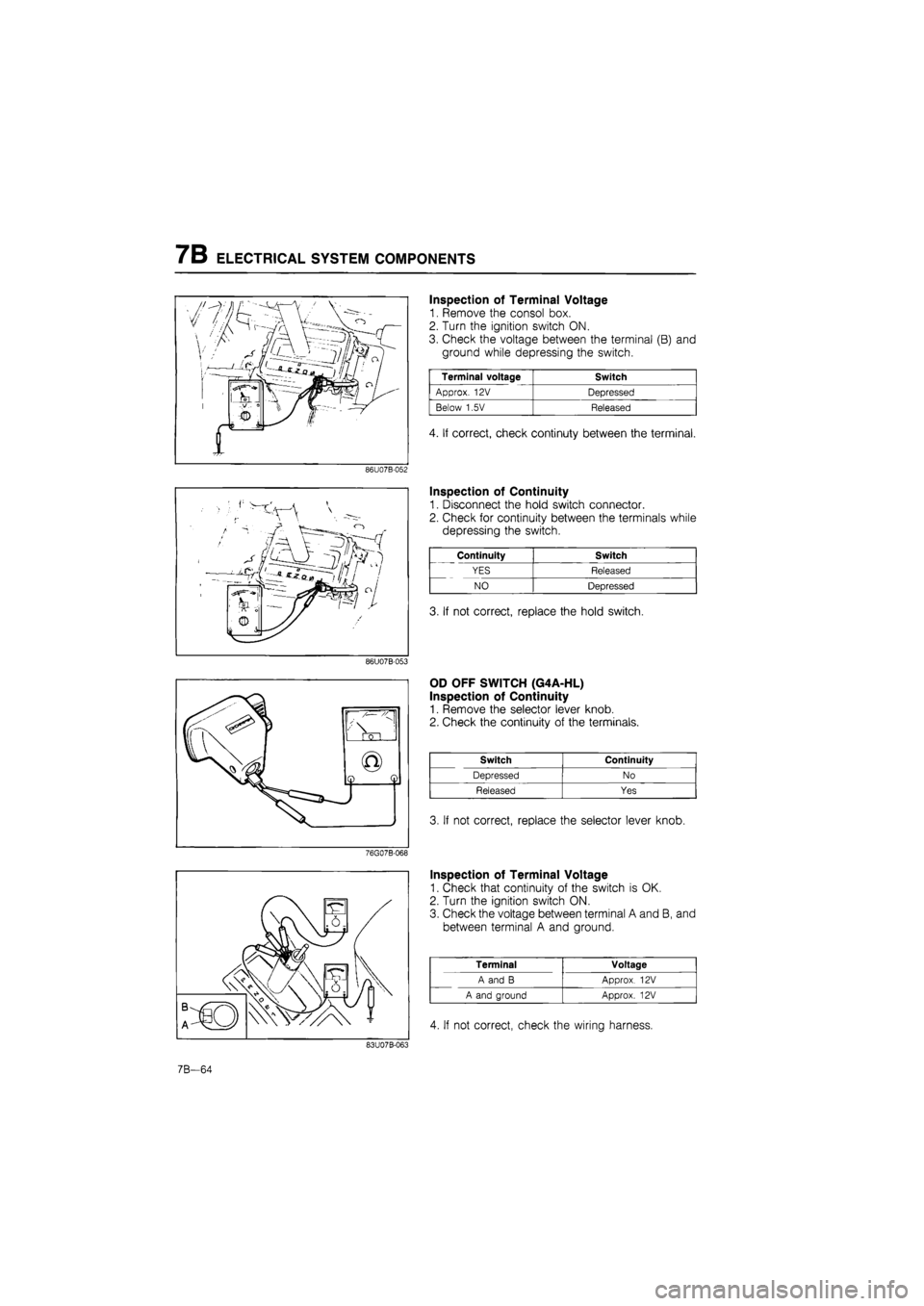
Inspection of Terminal Voltage
1. Remove the consol box.
2. Turn the ignition switch ON.
3. Check the voltage between the terminal (B) and
ground while depressing the switch.
Terminal voltage Switch
Approx. 12V Depressed
Below 1.5V Released
4. If correct, check continuty between the terminal.
86U07B-052
Inspection of Continuity
1. Disconnect the hold switch connector.
2. Check for continuity between the terminals while
depressing the switch.
Continuity Switch
YES Released
NO Depressed
3. If not correct, replace the hold switch.
86U07B-053
OD OFF SWITCH (G4A-HL)
Inspection of Continuity
1. Remove the selector lever knob.
2. Check the continuity of the terminals.
Switch Continuity
Depressed No
Released Yes
3. If not correct, replace the selector lever knob.
Inspection of Terminal Voltage
1. Check that continuity of the switch is OK.
2. Turn the ignition switch ON.
3. Check the voltage between terminal A and B, and
between terminal A and ground.
Terminal Voltage
A and B Approx. 12V
A and ground Approx. 12V
4. If not correct, check the wiring harness.
7B-64
Page 933 of 1865

ELECTRICAL SYSTEM COMPONENTS 7B
Inspection of Continuity
1. Disconnect the brake light switch connector.
2. Check for continuity between the terminals while
depressing the brake pedal.
79G07C-114
76G07B-076
KICK-DOWN SWITCH (G4A-HL)
Inspection of Terminal Voltage
1. Turn the ignition switch ON.
2. Check the voltage at terminal (V) with a voltmeter.
Depressing stroke Terminal voltage
7/8-8/8 (Full) Approx. 12V
0-7/8 Below 1,5V
3. If not correct, check the wiring harness, switch, or
adjust the switch position.
Inspection of Continuty
1. Disconnect the kick-down switch connector.
2. Check for continuity of the switch with an
ohmmeter.
Switch Continuity
Pushed Yes
Released No
3. If not correct, replace the kick-down switch.
76G07B-077
Adjustment
1. Loosen the kick-down switch locknuts.
2. Depress the accelerator pedal fully.
3. Turn the switch until the threaded case touches the
stopper.
4. Turn the switch counterclockwise by one half revo-
lution.
5. Secure the switch with the locknut.
76G07B-078
7B—67