radio MAZDA CX90 2024 User Guide
[x] Cancel search | Manufacturer: MAZDA, Model Year: 2024, Model line: CX90, Model: MAZDA CX90 2024Pages: 687, PDF Size: 15.46 MB
Page 283 of 687

Smart Brake Support (SBS) forward
drive detection
NOTE
When driving on roads with few
vehicles ahead, a message may
temporarily be displayed on the
screen indicating that the front radar
sensor is dirty.
When the vehicle is driven on roads
in which there is an elevated road on
one side, the front radar sensor
function may be restricted
temporarily.
If the lead-acid battery power is
weak, the front radar sensor
detection function may decrease and
each system may not operate
normally.
When any of the following
conditions is met, the front radar
sensor may not be able to detect
vehicles ahead or obstructions
correctly.
During inclement weather.Front visibility is reduced.The vehicle is driven near facilities
or objects emitting strong radio
waves.
The rear surface of a vehicle ahead
does not reflect radio waveseffectively.
A vehicle ahead has limited areas
that can reflect radio waves.
Your vehicle is tilted.Foreign matter is adhering to parts
near the front radar sensor.
When any of the following
conditions is met, the front radar
sensor may detect vehicles in the
adjacent lane or surrounding
obstructions, or it may not be able to
detect vehicles ahead or
obstructions.
The vehicle is entering or exiting a
curve.
The vehicle is driven on a
continuously curving road.
The vehicle is driven on roads with
repeated up and downslopes.
The vehicle is driven on roads with
narrow lanes.
The vehicle is driven on poor roads
or unpaved roads.
The vehicle ahead enters the front
radar sensor’s blind spot.
The distance to the vehicle ahead
is extremely close.
The vehicle ahead is being driven
in an unstable condition.
A vehicle suddenly comes close
such as by cutting into your lane.
Front side radar sensors
The following system utilizes front side
radar sensors.
Front Cross Traffic Alert (FCTA)Smart Brake Support (SBS) Front
Crossing
NOTE
When any of the following
conditions is met, the front side
radar sensors may not be able to
detect target objects.
During inclement weather.The vehicle is driven on a sharp
curve or on bumpy roads.
Radar sensor from an adjacent
vehicle causes radio wave
interference.
The detection range of a front side
radar sensor is obstructed by an
adjacent wall or vehicle, or the
radar is reflected.
A vehicle suddenly enters the
detection range from the front or
side of your vehicle.
Driving
Radar Sensors
5-132
CX-90_8KG7-EA-22L_Edition1_new 2022-11-17 16:05:04
Page 284 of 687

The target object is extremely
small.
The target object is extremely low/
high.
A vehicle approaches while
turning.
A vehicle that has stopped
suddenly starts to move.
Multiple objects move at the same
time.
The bumper around a front side
radar sensor is deformed.
Foreign matter is adhering to the
bumper around a front side radar
sensor.
The temperature near a front side
radar sensor is extremely hot.
The front side radar sensors may not
detect the following target objects.
Animals.Pedestrians.Bicycles and small motorcycles
moving at a low speed.
Shopping carts.Stationary objects on the road or
roadside.
Vehicles with shapes that may not
reflect radar waves.
Rear side radar sensors
The following systems utilize rear side
radar sensors.
Blind Spot Monitoring (BSM)Blind Spot Monitoring (BSM) Vehicle
Exit Warning
Rear Cross Traffic Alert (RCTA)Smart Brake Support (SBS) Rear
Crossing
Emergency Lane Keeping (ELK) Blind
Spot Assist
NOTE
When any of the following
conditions is met, the rear side radar
sensors may not be able to detect
target objects.
During inclement weather.The vehicle is driven on a sharp
curve or on bumpy roads.
Radar sensor from an adjacent
vehicle causes radio wave
interference.
The detection range of a front side
radar sensor is obstructed by an
adjacent wall or vehicle, or the
radar is reflected.
A vehicle suddenly enters the
detection range from the front or
side of your vehicle.
The target object is extremely
small.
The target object is extremely low/
high.
A vehicle approaches while
turning.
A vehicle that has stopped
suddenly starts to move.
Multiple objects move at the same
time.
The bumper around a rear side
radar sensor is deformed.
Foreign matter is adhering to the
bumper around a rear side radar
sensor.
The temperature near a rear side
radar sensor is extremely hot.
When towing a trailer.The rear side radar sensors may not
detect the following target objects.
Animals.Pe de st r ia ns .Bicycles and small motorcycles
moving at a low speed.
Shopping carts.Stationary objects on the road or
roadside.
Driving
Radar Sensors
5-133
CX-90_8KG7-EA-22L_Edition1_new 2022-11-17 16:05:04
Page 287 of 687

Target object is thin such as wire,
rope, or poles.
Target object absorbs waves easily
such as cotton or snow.
Target object has an angular shape.Target object is tall and wide at the
upper part.
Target object height is low.There are multiple target objects.Target objects are too close to the
sensors.
Ice, snow, or mud is adhering to
the sensor area.
Heavy rainfall or pressurized water
is applied to the sensor area.
The sensor areas are frozen.You cover the sensor with your
hand.
The area around the sensor has
received a strong impact.
The vehicle is excessively tilted.Under extremely hot or cold
weather.
Approached by an object that
generates ultrasonic waves, such as
the horn of another vehicle, the
engine noise of a motorcycle, the
air brake noise of a large vehicle,
or the sensor of another vehicle.
A commercially-available fender
pole or an antenna for a radio
transmitter is installed to the
vehicle.
The vehicle is moving towards a tall
or square curbstone, or a steep
grade.
The vehicle is moving towards an
uneven wall or stairs.
The vehicle is driven in a place with
low ceilings.
The vehicle is driven on bumpy
roads, inclines, gravel roads, dense
grass, or grating.
The ultrasonic sensor does not detect
target objects directly beneath the
bumper. Even if target objects which
are located at a position lower than
an ultrasonic sensor have been
detected, the ultrasonic sensor may
suddenly stop detecting as the
vehicle approaches the target object.
Front ultrasonic sensors
The following systems utilize front
ultrasonic sensors.
Pa r k i n g S e n s o r
Rear ultrasonic sensors
The following systems utilize rear
ultrasonic sensors.
Smart Brake Support (SBS) reverse
drive detection
Pa r k i n g S e n s o r
Driving
Ultrasonic Sensors
5-136
CX-90_8KG7-EA-22L_Edition1_new 2022-11-17 16:05:04
Page 299 of 687

Active driving display
NOTE
The BSM may not operate normally if
any of the following conditions is
met.
The rear side radar sensors cannot
detect an object.
Refer to Radar Sensors on page
5-131.
The road is on a steep slope.The road is extremely wide.You make a lane change 2 lanes or
more.
The BSM may operate when turning
at intersections in urban areas or
with stationary objects on the road
or the roadside (such as guardrails,
sidewalls, and parked vehicles).
If a Mazda genuine trailer hitch is
used, the BSM is automatically
turned off when the trailer's
electrical connector is connected.
When pulling a trailer other than
with a Mazda genuine trailer hitch,
or while an accessory such as a
bicycle carrier is installed to the rear
of the vehicle, turn off the BSM.
Otherwise, the radar’s radio waves
will be blocked causing the BSM to
not operate normally.
The brightness of the BSM warning
lights is linked to the panel light
control.
Refer to Dashboard Illumination on
page 5-35.
When the Vehicle Exit Warning
operates*
The Vehicle Exit Warning operates
when all of the following conditions
are met.
The vehicle is stopped.Within 3 minutes after the vehicle
power is switched OFF or the vehicle
power is switched ON.
The system detects an approaching
vehicle.
When the Vehicle Exit Warning
operates, the driver is notified of the
presence of an approaching vehicle
using the warning lights and the
instrument cluster screen display
(white)
*1.
BSM warning light
Instrument cluster
*1 The instrument cluster screen display (white)
is displayed only when the instrument
cluster is set to the i-ACTIVSENSE display.
However, when the vehicle power is OFF,
Driving
Blind Spot Monitoring (BSM)
5-148*Some models.
CX-90_8KG7-EA-22L_Edition1_new 2022-11-17 16:05:04
Page 315 of 687

How to Use the Rear
Cross Traffic Alert (RCTA)
Operating the RCTA
The RCTA operates when all of the
following conditions are met.
The vehicle is about to be driven in
reverse.
The system detects an approaching
vehicle.
When the RCTA operates, the driver is
notified of the danger by flashing of
the BSM warning lights, a warning
indication, and a warning sound.
NOTE
The system may operate even if a
vehicle is not approaching
depending on the conditions around
your vehicle.
The RCTA may not operate normally
if any of the following conditions is
met.
The rear side radar sensors cannot
detect an object.
Refer to Radar Sensors on page
5-131.
The vehicle speed when reversing
is about 15 km/h (9 mph) or
faster.
A vehicle is approaching directly
from the rear of your vehicle.
A vehicle is approaching at an
angle from the rear of your vehicle.
If a Mazda genuine trailer hitch is
used, the RCTA is automatically
turned off when the trailer's
electrical connector is connected.
When pulling a trailer other than
with a Mazda genuine trailer hitch,
or while an accessory such as a
bicycle carrier is installed to the rear
of the vehicle, turn off the RCTA.
Otherwise, the radar’s radio waves
will be blocked causing the RCTA to
not operate normally.
The brightness of the BSM warning
lights is linked to the panel light
control.
Refer to Dashboard Illumination on
page 5-35.
Turning off the RCTA
There are 2 ways to turn off the RCTA.
Turn off the RCTA using Mazda
Connect.
Refer to the Settings section in the
Mazda Connect Owner's Manual.
Turn off the RCTA using the
i-ACTIVSENSE OFF switch.
Refer to How to Use the
i-ACTIVSENSE OFF switch on page
5-126.
Driving
Rear Cross Tra ffi c Alert (RCTA)
5-164
CX-90_8KG7-EA-22L_Edition1_new
2022-11-17 16:05:04
Page 431 of 687
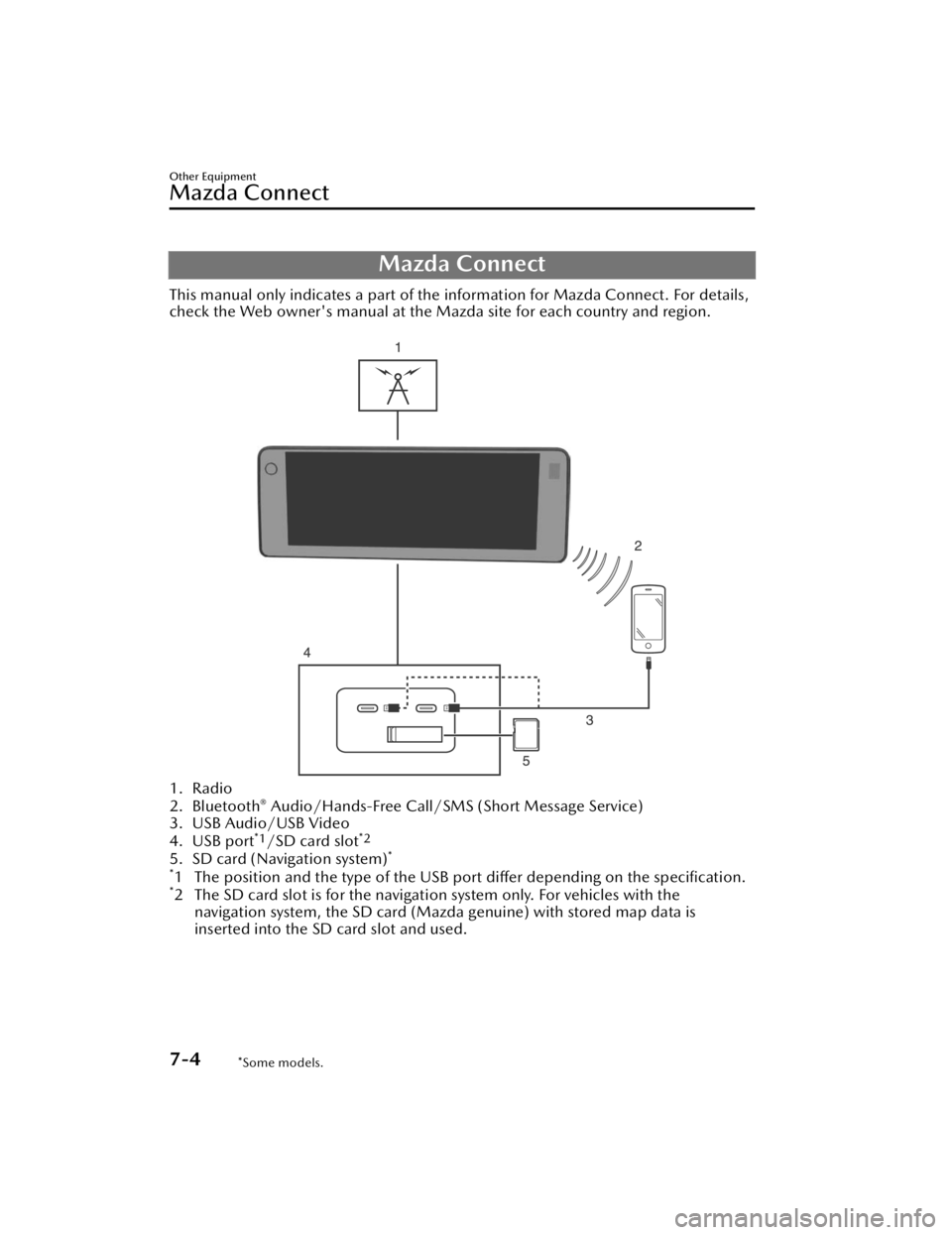
Mazda Connect
This manual only indicates a part of the information for Mazda Connect. For details,
check the Web owner's manual at the Mazda site for each country and region.
1. Radio
2. Bluetooth® Audio/Hands-Free Call/SMS (Short Message Service)
3. USB Audio/USB Video
4. USB port
*1/SD card slot*2
5. SD card (Navigation system)*
*
1 The position and the type of the USB po rt differ depending on the specification.*2 The SD card slot is for the navigation system only. For vehicles with the
navigation system, the SD card (Mazda genuine) with stored map data is
inserted into the SD card slot and used.
Other Equipment
Mazda Connect
7-4*Some models.
CX-90_8KG7-EA-22L_Edition1_new 2022-11-17 16:05:04
Page 437 of 687

(During Apple CarPlay™ or Android Auto™ music playback)
Displays the Apple CarPlay™ or Android Auto™ now playing screen.
Vo l u m e k n o b
Vo l u m e a d j u s t m e n t
Adjust the volume by turning the volume knob.
If you adjust the volume during voice guidance, the volume of the voice guidance
will change.
If you adjust the volume during a hands-free call, the conversation volume will
change.
Press the volume knob to mute/pause the audio. Press the knob again to resume.
Powe r o ff /o n
Press and hold to turn off the Mazda Connect power and turn off the screen.
Press again to turn on the Mazda Connect power.
NOTE
If you press the volume knob to mute an audio source which can be paused, such
as Apple CarPlay™, USB audio, or Bluetooth® audio, while it is playing, the song
playback pauses. Press the volume knob again to cancel the mute and the pause
at the same time.
When the Mazda Connect power is turned off and the commander switch is
pressed, the Mazda Co nnect power turns on.
Selecting a radio station
Radio stations saved to your Favorites ca n be selected by sliding the volume knob
left (SEEK DOWN)/right (SEEK UP) while listening to FM/AM/SiriusXM
®*. The
station will change each time you slide the volume knob.
If you want to manually tune to the next available station before or after the
currently selected station, slide and hold the volume knob left (SEEK DOWN) or
right (SEEK UP) until you hear a beep and the tuner will select the next available
station.
Playback Control
Music and video files can be cued when listening to stored content via USB,
Bluetooth
®, and SiriusXM®*, audio, or video.
Other Equipment
Mazda Connect
7-10*Some models.
CX-90_8KG7-EA-22L_Edition1_new 2022-11-17 16:05:04
Page 440 of 687

How to Use the Audio Remote Control Switch
The audio remote control switch is on the left side of the steering wheel. You can
operate basic audio functions, pick up/hang up the phone, or activate voice
control using the switch.
The shape of the switches may differ depending on the specifications.
Volume adjustment button
/
Press the (+) or (-) button to adjust the volume.
If you adjust the volume during voice guidance, the volume of the voice guidance
will change.
If you adjust the volume during a hands-free call, the conversation volume will
change.
Seek Switch
(SEEK UP)/(SEEK DOWN)
Selecting a radio station
Radio stations saved to your Favorites can be selected by pressing the seek
switch while listening to FM/AM radio. The station will change to the previous or
next favorite station each time you press the seek switch. If you want to manually
tune to the next available station before or after the currently selected station, press
and hold the seek switch until it beeps and the tuner will select the next available
station.
Playback Control
Music and video files can be cued when listening to stored content via USB,
Bluetooth
®, and SiriusXM®*, audio, or video.
Other Equipment
Mazda Connect
*Some models.7-13
CX-90_8KG7-EA-22L_Edition1_new 2022-11-17 16:05:04
Page 444 of 687

Voice commands other than those specified, cannot be recognized. Speak in the
wording specified by the voice commands.
It is not necessary to face the microphone or approach it. Speak the voice
commands while maintaining a safe driving position.
Close the windows and the moonroof*/panorama sunroof* to reduce loud noises
from outside the vehicle and to prevent th e airflow of the air-conditioning system
from being a disturbance when using Bluetooth
® Hands-Free.Make sure that the air flow from the air conditioner is not blowing on the
microphone.
If the voice recognition is poor with th e guidance volume set to high, set the
Barge-In to OFF.
Examples of available voice commands
The specified name and number are put into the {}.
Common
BackHelp (You can listen to help guidance at each screen.){Line Number} (You can select the line number on the screen.)Next PagePrevious PageCancel
Menu
AllNavigationEntertainmentCommunication
Setting
Voice Recognition SettingsDisplay Off
Music
Play Artist (You can also use “Play Artist {Artist name}”.)Play Album (You can also us e “Play Album {Album Name}”.)Play Playlist (You can also use “Play Playlist {Playlist Name}”.)Play Song (You can also use “Play Song {Song Name}”.)Play Audiobook (You can also use “Play Audiobook {Audiobook Name}”.)Play Podcast (You can also use “Play Podcast {Podcast Name}”.)
Radio
Tu n e t o { F re q u e n c y } A MTu n e t o { F re q u e n c y } F MTune to {Frequency} HD {Sub Channel}SiriusXM Channel {Channel Number}
Other Equipment
Mazda Connect
*Some models.7-17
CX-90_8KG7-EA-22L_Edition1_new 2022-11-17 16:05:04
Page 448 of 687

Appendix
Gracenote® Database
When connecting a USB audio device or Bluetooth® audio device to this unit and
playing audio, the unit searches the database stored in the vehicle for the album art.
If there is a match in the vehicle's database compilation to the music being played,
the album art is displayed. The database information stored in this device uses
database information in the Gracenote
® music recognitions service.
SiriusXM Travel Link
®*
CAUTION
ADVISORY ONLY
The weather information is subject to service interruptions and may contain errors or
inaccuracies and consequently should not be relied upon exclusively. You are urged
to check alternate weather information sources prior to making safety related
decisions. You acknowledge and agree that you shall be solely responsible for use of
the information and all decisions taken with respect thereto. By using this weather
service, you release and waive any claims against Sirius XM Radio Inc. and Mazda
Motor Corporation and all of their respective affiliates with regard to this service.
SiriusXM
® Satellite Radio*
Products/applications shall display “Call [Appropriate Phone Number] to Enable
Services” for any unsubscribed SiriusXM Data Service(s).
This shall be shown on the same screen as the Radio ID and the service subscription
status:
Contact your SiriusXM Representative for the appropriate call center phone number.
U.S.A.: 1-877-447-0011Canada: 1-877-438-9677
SiriusXM
® All Access Subscription
Hopefully, you're already loving SiriusXM in your new Mazda. But don't stop there
— you can also listen on the app and online. All Access is the very best subscription
package – with the most channels and the most flexibility. With All Access, you get
every channel available on your vehicle, plus you can listen on the app, online, and
in your home on a variety of connected devices. — so you can enjoy SiriusXM
wherever you are. Here's what's included:
Over 150 satellite channels to enjoy in your car, coast-to-coast, 24/7.All kinds of commercial-free music, plus every major sport, world-class news and
the biggest names in talk & entertainment.
Other Equipment
Mazda Connect
*Some models.7-21
CX-90_8KG7-EA-22L_Edition1_new 2022-11-17 16:05:04