change time MAZDA CX90 2024 Owner's Guide
[x] Cancel search | Manufacturer: MAZDA, Model Year: 2024, Model line: CX90, Model: MAZDA CX90 2024Pages: 687, PDF Size: 15.46 MB
Page 406 of 687

During the cabin preconditioning
operation, the cooling fan, the
compressor, and the cabin fans
operate, but this does not indicate a
problem.
The climate control system functions
you can use
differ depending on the
vehicle power position.
Function Vehicle power position
OFF ACC ON
(Hy- brid sys-
tem off) ON
(Hy- brid sys-
tem on)
Air circulation — — X X
Cooling/heating — — X
*1X
Climate Control
Timer X———
Remote climate
control X———
X: Available
—: Not available
*1 The cooling/heating function can
be used only while charging.
NOTE
The recommended set temperature
is 22 °C (72 °F). If you set an
extremely high or low temperature,
power consumption will increase
and the charging time will take
longer.
If you operate the cabin
preconditioning while the charge
connector is connected, you can
reduce the electric power
consumption of the high voltage
battery.
While the cabin preconditioning is
operating , the indicator light for the
climate control power switch turns
on.
The cabin preconditioning operates
for 20 minutes. If you set the
departure time using the climate
control timer, set it 20 minutes or
later from the current time and if you
want to make several settings, space
them out at intervals of 30 minutes
or longer.
How to set the Climate Control Timer
1. Select “Settings” from the Mazda Connect home screen.
2. Select “EV Settings”.
3. Select “Climate Control Timer”.
4. Select the item setting you would like to change from the displayed
content.
5. Switch the vehicle power OFF.
Climate Control Timer
Allows climate control to adjust cabin
temperature before driving.
Function Available setting changes
1 ---
Enable,
Disable
*1Edit,
Delete*2
2 ---
3 ---
4 ---
5 ---
6 ---
7 ---
*1 If an item selected using the cursor has been set, the item can be
enabled or disabled.
*2 Settings can be “Edit”/“Delete” bysliding an item selected using the
cursor to the right.
Equipment to Make Cabin More Comfortable
Fully Automatic Climate Control (Front)
6-13
CX-90_8KG7-EA-22L_Edition1_new 2022-11-17 16:05:04
Page 407 of 687
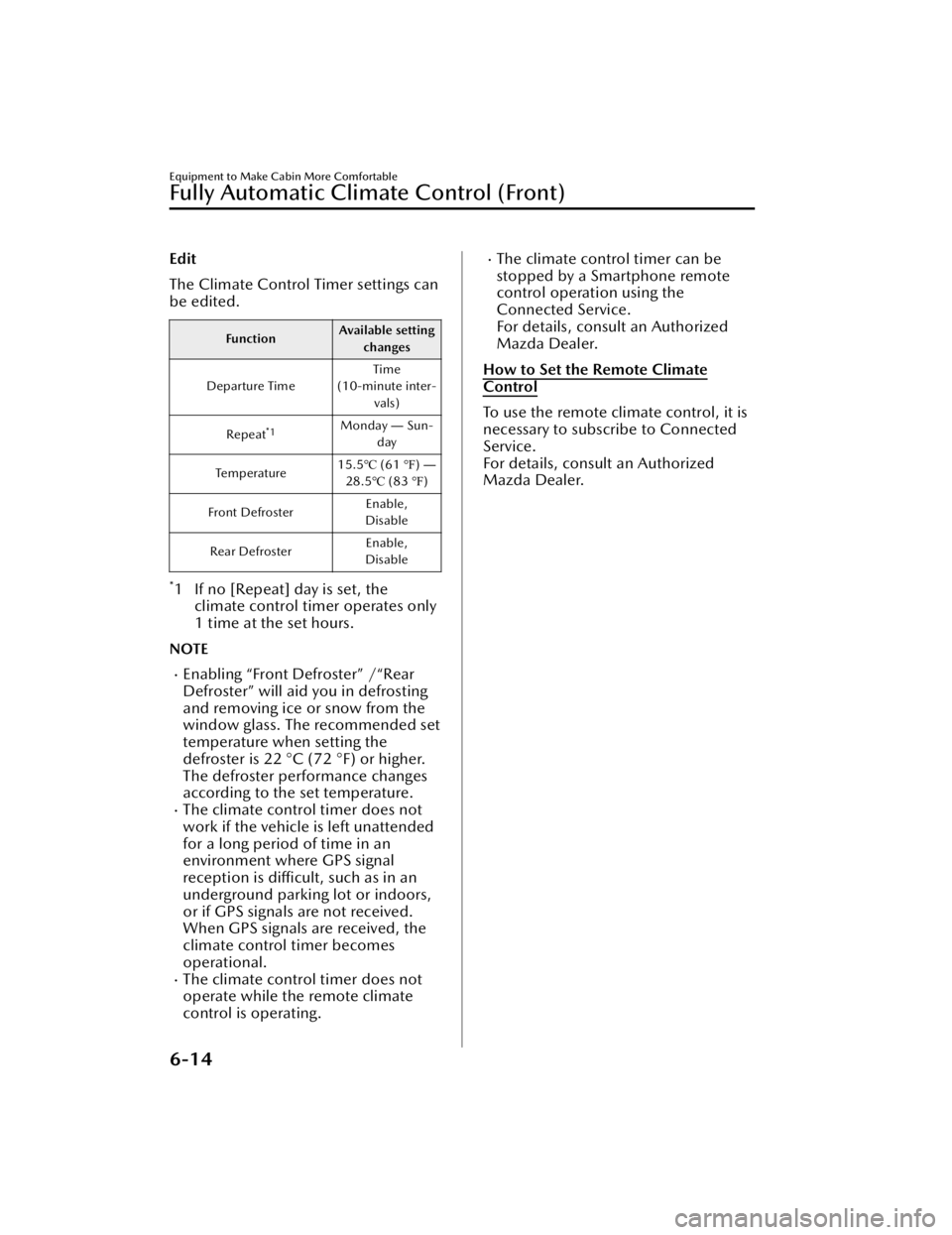
Edit
The Climate Control Timer settings can
be edited.
FunctionAvailable setting
changes
Departure Time Time
(10-minute inter- vals)
Repeat
*1Monday ― Sun-
day
Te m p e ra t u r e 15.5
℃ (61 ℉) ―
28.5℃ (83 ℉)
Front Defroster Enable,
Disable
Rear Defroster Enable,
Disable
*1 If no [Repeat] day is set, the climate control timer operates only
1 time at the set hours.
NOTE
Enabling “Front Defroster” /“Rear
Defroster” will aid you in defrosting
and removing ice or snow from the
window glass. The recommended set
temperature when setting the
defroster is 22 °C (72 °F) or higher.
The defroster performance changes
according to the set temperature.
The climate control timer does not
work if the vehicle is left unattended
for a long period of time in an
environment where GPS signal
reception is difficult, such as in an
underground parking lot or indoors,
or if GPS signals are not received.
When GPS signals are received, the
climate control timer becomes
operational.
The climate control timer does not
operate while the remote climate
control is operating.
The climate control timer can be
stopped by a Smartphone remote
control operation using the
Connected Service.
For details, consult an Authorized
Mazda Dealer.
How to Set the Remote Climate
Control
To use the remote climate control, it is
necessary to subscribe to Connected
Service.
For details, consult an Authorized
Mazda Dealer.
Equipment to Make Cabin More Comfortable
Fully Automatic Climate Control (Front)
6-14
CX-90_8KG7-EA-22L_Edition1_new 2022-11-17 16:05:04
Page 414 of 687

The set temperature can be quickly
adjusted by pressing and holding the
temperature setting switch.
When the temperature is set to the
lower or upper limit, “Lo” or “Hi” is
displayed.
Mode selector switch
The desired airflow mode can be
selected.
The mode changes each time the
switch is pressed. The selected mode is
indicated on the display.
Fan control switch
How to increase the airflow amount
How to decrease the airflow amount
The
airflow amount changes each time
the switch is pressed. The airflow
amount is indicated on the display.
The airflow amount can be adjusted to
5 levels.
Climate control system power switch
(system on/off)
Switches the air conditioner on and
off.
The indicator light turns on while the
function is operating.
Equipment to Make Cabin More Comfortable
Fully Automatic Climate Control (Rear)
6-21
CX-90_8KG7-EA-22L_Edition1_new 2022-11-17 16:05:04
Page 416 of 687

CAUTION
Do not use organic solvents to clean
the seat. It may damage the seat
surface and the heater.
(second-row)
Before folding a second-row
seatback, make sure that the
second-row seat warmer switch is
off. If a second-row seatback is
folded while the second-row seat
warmer is in operation, it may heat
the seat excessively and damage the
seat surface.
How to Use the Seat
Warmer
1. Start the hybrid system.
2.Front
1. OFF
2. High
3. Mid
4. Low
Second-row seat
*
1. OFF
2. High
3. Mid
4. Low
The indicator light in the seat
warmer switch turns on according
to the set temperature.
The set temperature changes each
time the seat warmer switch is
pressed.
Equipment to Make Cabin More Comfortable
Seat Warmer
*Some models.6-23
CX-90_8KG7-EA-22L_Edition1_new 2022-11-17 16:05:04
Page 434 of 687

Navigation
The navigation system (vehicles with navigation system) can be used when the SD
card for the navigation system is inserted.
If the SD card for the navigation system is not inserted, the compass indicating the
direction in which the vehicle is moving is displayed. The compass may not indicate
the correct bearing when the vehicle is stopped or traveling at a slow speed.
For the navigation system operation, refer to the navigation system manual.
Settings
You can change the settings for the Mazd a Connect screen, sound settings, and the
vehicle functions.
EV Settings
:
Configures charging schedule, climate control timer, and more.
In-Vehicle Displays
:
Configures settings and content for all in-vehicle displays.
Sound Settings
:
Configures the in-vehicle listening experience.
Safety Settings
:
Configures safety and driver assistance features.
Ve h i c l e S e t t i n g s
:
Configures vehicle convenience features.
Connectivity Settings
:
Configures Bluetooth and other device connectivity settings.
Driver Personalization System
:
Registers a driver or edits the driver information.
System Settings
:
Configures language, time, an d other general settings.
Apple CarPlay
You can use Apple CarPlay™ by connecting an iPhone® compatible with Apple
CarPlay™.
Android Auto
You can use Android Auto™ by connecting an Android™ Smartphone compatible
with Android Auto™.
NOTE
The explanation of functions described in this manual may differ from the actual
operation, and the shapes of screens and buttons and the letters and characters
displayed may also differ from the actual appearance.
Other Equipment
Mazda Connect
7-7
CX-90_8KG7-EA-22L_Edition1_new 2022-11-17 16:05:04
Page 437 of 687

(During Apple CarPlay™ or Android Auto™ music playback)
Displays the Apple CarPlay™ or Android Auto™ now playing screen.
Vo l u m e k n o b
Vo l u m e a d j u s t m e n t
Adjust the volume by turning the volume knob.
If you adjust the volume during voice guidance, the volume of the voice guidance
will change.
If you adjust the volume during a hands-free call, the conversation volume will
change.
Press the volume knob to mute/pause the audio. Press the knob again to resume.
Powe r o ff /o n
Press and hold to turn off the Mazda Connect power and turn off the screen.
Press again to turn on the Mazda Connect power.
NOTE
If you press the volume knob to mute an audio source which can be paused, such
as Apple CarPlay™, USB audio, or Bluetooth® audio, while it is playing, the song
playback pauses. Press the volume knob again to cancel the mute and the pause
at the same time.
When the Mazda Connect power is turned off and the commander switch is
pressed, the Mazda Co nnect power turns on.
Selecting a radio station
Radio stations saved to your Favorites ca n be selected by sliding the volume knob
left (SEEK DOWN)/right (SEEK UP) while listening to FM/AM/SiriusXM
®*. The
station will change each time you slide the volume knob.
If you want to manually tune to the next available station before or after the
currently selected station, slide and hold the volume knob left (SEEK DOWN) or
right (SEEK UP) until you hear a beep and the tuner will select the next available
station.
Playback Control
Music and video files can be cued when listening to stored content via USB,
Bluetooth
®, and SiriusXM®*, audio, or video.
Other Equipment
Mazda Connect
7-10*Some models.
CX-90_8KG7-EA-22L_Edition1_new 2022-11-17 16:05:04
Page 440 of 687

How to Use the Audio Remote Control Switch
The audio remote control switch is on the left side of the steering wheel. You can
operate basic audio functions, pick up/hang up the phone, or activate voice
control using the switch.
The shape of the switches may differ depending on the specifications.
Volume adjustment button
/
Press the (+) or (-) button to adjust the volume.
If you adjust the volume during voice guidance, the volume of the voice guidance
will change.
If you adjust the volume during a hands-free call, the conversation volume will
change.
Seek Switch
(SEEK UP)/(SEEK DOWN)
Selecting a radio station
Radio stations saved to your Favorites can be selected by pressing the seek
switch while listening to FM/AM radio. The station will change to the previous or
next favorite station each time you press the seek switch. If you want to manually
tune to the next available station before or after the currently selected station, press
and hold the seek switch until it beeps and the tuner will select the next available
station.
Playback Control
Music and video files can be cued when listening to stored content via USB,
Bluetooth
®, and SiriusXM®*, audio, or video.
Other Equipment
Mazda Connect
*Some models.7-13
CX-90_8KG7-EA-22L_Edition1_new 2022-11-17 16:05:04
Page 452 of 687

AS EXAMPLES, AND WITHOUT LIMITATION, MAZDA DISCLAIMS ANY
WARRANTY REGARDING THE ACCURACY OF DATA PROVIDED BY THE
APPLICATION, SUCH AS THE ACCURACY OF DIRECTIONS, ESTIMATED TRAVEL
TIME, SPEED LIMITS, ROAD CONDITIONS, NEWS, WEATHER, TRAFFIC, OR
OTHER CONTENT PROVIDED BY GOOGLE, ITS AFFILIATES, OR THIRD PARTY
PROVIDERS; MAZDA DOES NOT GUARANTEE AGAINST LOSS OF APPLICATION
DATA, WHICH MAY BE LOST AT ANY TIME; MAZDA DOES NOT GUARANTEE
THAT THE APPLICATION OR ANY SERVICES PROVIDED THROUGH THEM WILL
BE PROVIDED AT ALL TIMES OR THAT ANY OR ALL SERVICES WILL BE AVAILABLE
AT ANY PARTICULAR TIME OR LOCATION. FOR EXAMPLE, SERVICES MAY BE
SUSPENDED OR INTERRUPTED WITHOUT NOTICE FOR REPAIR, MAINTENANCE,
SECURITY FIXES, UPDATES, ETC., SERVICES MAY BE UNAVAILABLE IN YOUR AREA
OR LOCATION, ETC.
IN ADDITION, YOU UNDERSTAND THAT CHANGES IN THIRD PARTY
TECHNOLOGY OR GOVERNMENT REGULATION MAY RENDER THE SERVICES
AND/OR APPLICATIONS OBSOLETE AND/OR UNUSABLE. TO THE EXTENT NOT
PROHIBITED BY LAW, IN NO EVENT SHALL MAZDA OR ITS AFFILIATES BE LIABLE
FOR PERSONAL INJURY, OR ANY INCIDENTAL, SPECIAL, INDIRECT OR
CONSEQUENTIAL DAMAGES WHATSOEVER, INCLUDING, WITHOUT
LIMITATION, DAMAGES FOR LOSS OF PROFITS, CORRUPTION OR LOSS OF
DATA, FAILURE TO TRANSMIT OR RECEIVE ANY DATA, BUSINESS INTERRUPTION
OR ANY OTHER COMMERCIAL DAMAGES OR LOSSES, ARISING OUT OF OR
RELATED TO THE APPLICATION OR YOUR USE OF OR INABILITY TO USE THE
APPLICATION OR INFORMATION ON THE APPLICATION.
When using Android Auto™, please avoid distraction and use Android Auto™
responsibly.
Stay fully aware of driving conditions and always obey applicable laws.
NOTE
Android Auto™ is provided by Google and its use is subject to your agreement to
the Android Auto™ terms of use.
When using Android Auto™, location, speed, and other vehicle data is transferred
to your smart phone. For further details, refer to Google Privacy Policy.
Trademark
Pa n d o ra®, the Pandora® logo, and the Pandora® trade dress are trademarks or
registered trademarks of Pandora Media, Inc., used with permission.
HD Radio Technology manufactured under license from iBiquity Digital
Corporation. U.S. and Foreign Patents. For patents see http://dts.com/patents.
HD Radio, Artist Experience, and the HD, HD Radio, and “ARC” logos are
Other Equipment
Mazda Connect
7-25
CX-90_8KG7-EA-22L_Edition1_new 2022-11-17 16:05:04
Page 468 of 687

Illuminated Entry System
The interior lights turn on/off in
conjunction with the opening/closing
of the doors and the position of the
vehicle power (ON/OFF).
How to Use the
Illuminated Entry System
The overhead lights turn on when any
of the following operations is done
with the overhead light switch in the
DOOR-linked position.
The driver's door is unlocked with
the vehicle power switched OFF.
The vehicle power is switched OFF
with all doors closed.
The overhead lights turns off when any
of the following operations is done.
The driver's door is locked.The vehicle power is switched ON.
When the vehicle power is switched
OFF and the interior lights remain on,
they turn off after a certain period of
time has passed.
NOTE
The amount of time until the
illuminated entry system turns off can
be changed.
Refer to Mazda Connect Owner's
Manual or consult an Authorized
Mazda Dealer.
The illuminated entry system does
not operate when the overhead
lights are turned on by operating the
overhead light ON/OFF switch.
Other Equipment
Interior Lights
7-41
CX-90_8KG7-EA-22L_Edition1_new 2022-11-17 16:05:04
Page 492 of 687

Trailer tire size, load rating, and inflation pressures should conform to tire
manufacturer specifications.
Do not exceed 100 km/h (62 mph) with a trailer in tow. If the local legal
maximum speed with a trailer in tow is less than 100 km/h (62 mph), do not
exceed the legal speed.
Safety chains
Safety chains must be used as a precautionary measure should the trailer become
unintentionally unhitched. They should cross under the trailer tongue and attach to
the hitch. Leave enough slack to allow full turns. Consult literature published by your
trailer or hitch manufacturer for more details.
Tra i l e r l i g h t s
Trailer lights must comply with all federal, state, and local regulations. Equip your
trailer as required before towing it day or night.
Trailer brakes
If the total trailer weight exceeds 450 kg (1,000 lb), trailer brakes are required. If
your trailer has brakes, make sure they comply with all federal, state, and local
regulations.
Driving
Your Mazda will handle differently with a trailer in tow, so practice turning ,
backing , and stopping in a traffic-free area.
Take time to get accustomed to the extra weight and length.Allow more room between your vehicle and the one in front because braking
distance increases with a trailer. For each 16 km/h (10 mph) of speed, allow at
least one vehicle and trailer length between your Mazda and the vehicle ahead.
Avoid jerky starts or sudden acceleration.Avoid sudden braking. It may cause loss of control and result in
jackknifing,
especially so on wet or slippery roads.
Shift the selector lever to the D position when towing a trailer in hilly terrain or
when heavily loaded.
The D position will allow operating the vehicle without frequent shifting.
Lane changes and turning
Avoid quick lane changes, sudden turns, and tight turns. Slow down before turning
to avoid the need of sudden braking.
A turning trailer will make a tighter arc than the tow vehicle. Compensate with turns
that are larger than normal.
Pa s s i n g
Plan well ahead to pass other vehicles, and provide plenty of room before changing
lanes. Crosswinds from passing vehicles, especially larger ones, and the effects of
rough roads will affect handling.
Other Equipment
Towing (U.S.A. and Canada)
7-65
CX-90_8KG7-EA-22L_Edition1_new
2022-11-17 16:05:04