mount MAZDA MODEL 3 4-DOOR 2006 User Guide
[x] Cancel search | Manufacturer: MAZDA, Model Year: 2006, Model line: MODEL 3 4-DOOR, Model: MAZDA MODEL 3 4-DOOR 2006Pages: 372, PDF Size: 4.12 MB
Page 191 of 372
Black plate (191,1)
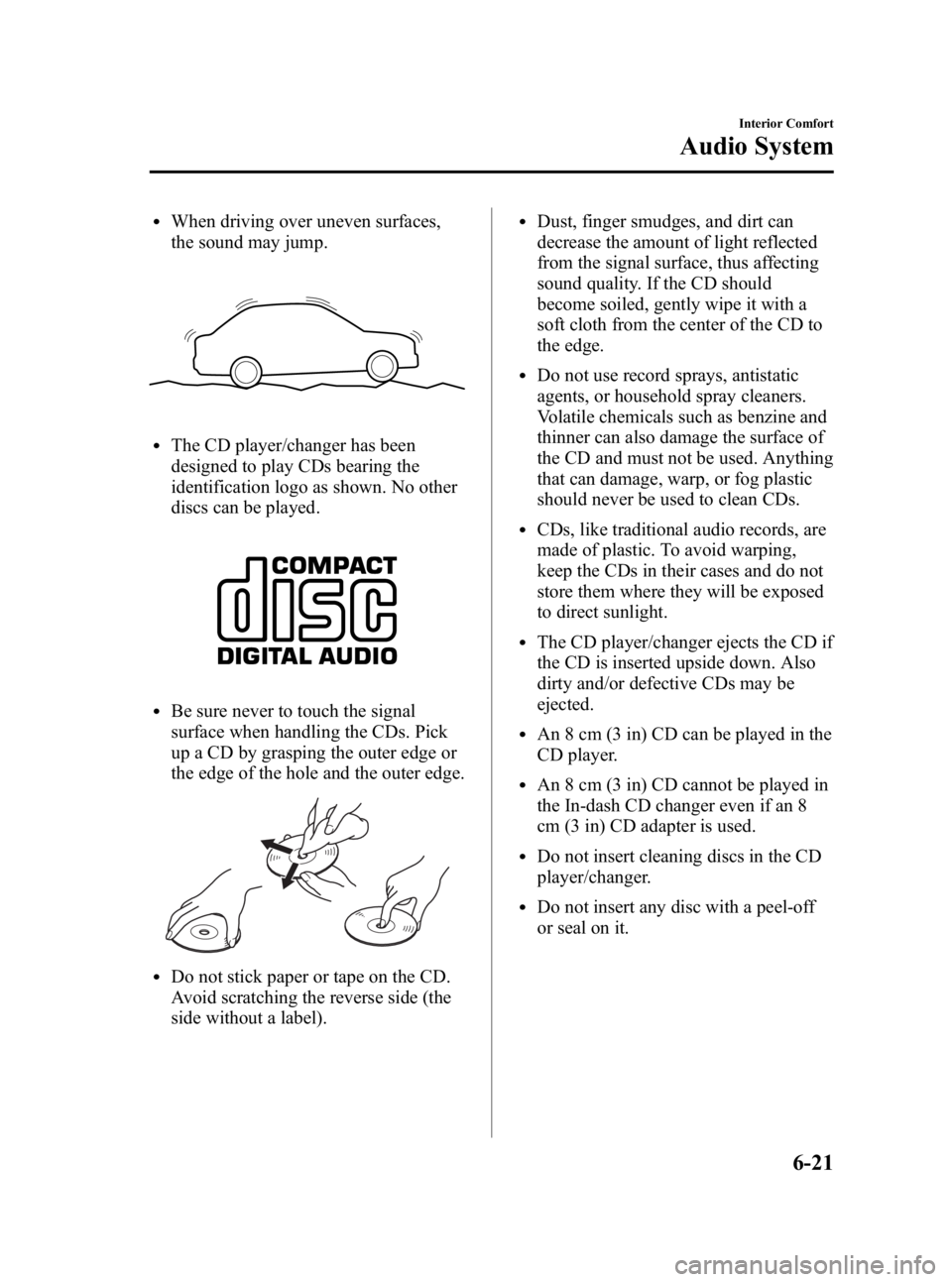
lWhen driving over uneven surfaces,
the sound may jump.
lThe CD player/changer has been
designed to play CDs bearing the
identification logo as shown. No other
discs can be played.
lBe sure never to touch the signal
surface when handling the CDs. Pick
up a CD by grasping the outer edge or
the edge of the hole and the outer edge.
lDo not stick paper or tape on the CD.
Avoid scratching the reverse side (the
side without a label).
lDust, finger smudges, and dirt can
decrease the amount of light reflected
from the signal surface, thus affecting
sound quality. If the CD should
become soiled, gently wipe it with a
soft cloth from the center of the CD to
the edge.
lDo not use record sprays, antistatic
agents, or household spray cleaners.
Volatile chemicals such as benzine and
thinner can also damage the surface of
the CD and must not be used. Anything
that can damage, warp, or fog plastic
should never be used to clean CDs.
lCDs, like traditional audio records, are
made of plastic. To avoid warping,
keep the CDs in their cases and do not
store them where they will be exposed
to direct sunlight.
lThe CD player/changer ejects the CD if
the CD is inserted upside down. Also
dirty and/or defective CDs may be
ejected.
lAn 8 cm (3 in) CD can be played in the
CD player.
lAn 8 cm (3 in) CD cannot be played in
the In-dash CD changer even if an 8
cm (3 in) CD adapter is used.
lDo not insert cleaning discs in the CD
player/changer.
lDo not insert any disc with a peel-off
or seal on it.
Interior Comfort
Audio System
6-21
Mazda3_8U55-EA-05G_Edition3 Page191
Tuesday, September 13 2005 10:42 AM
Form No.8U55-EA-05G
Page 217 of 372
Black plate (217,1)
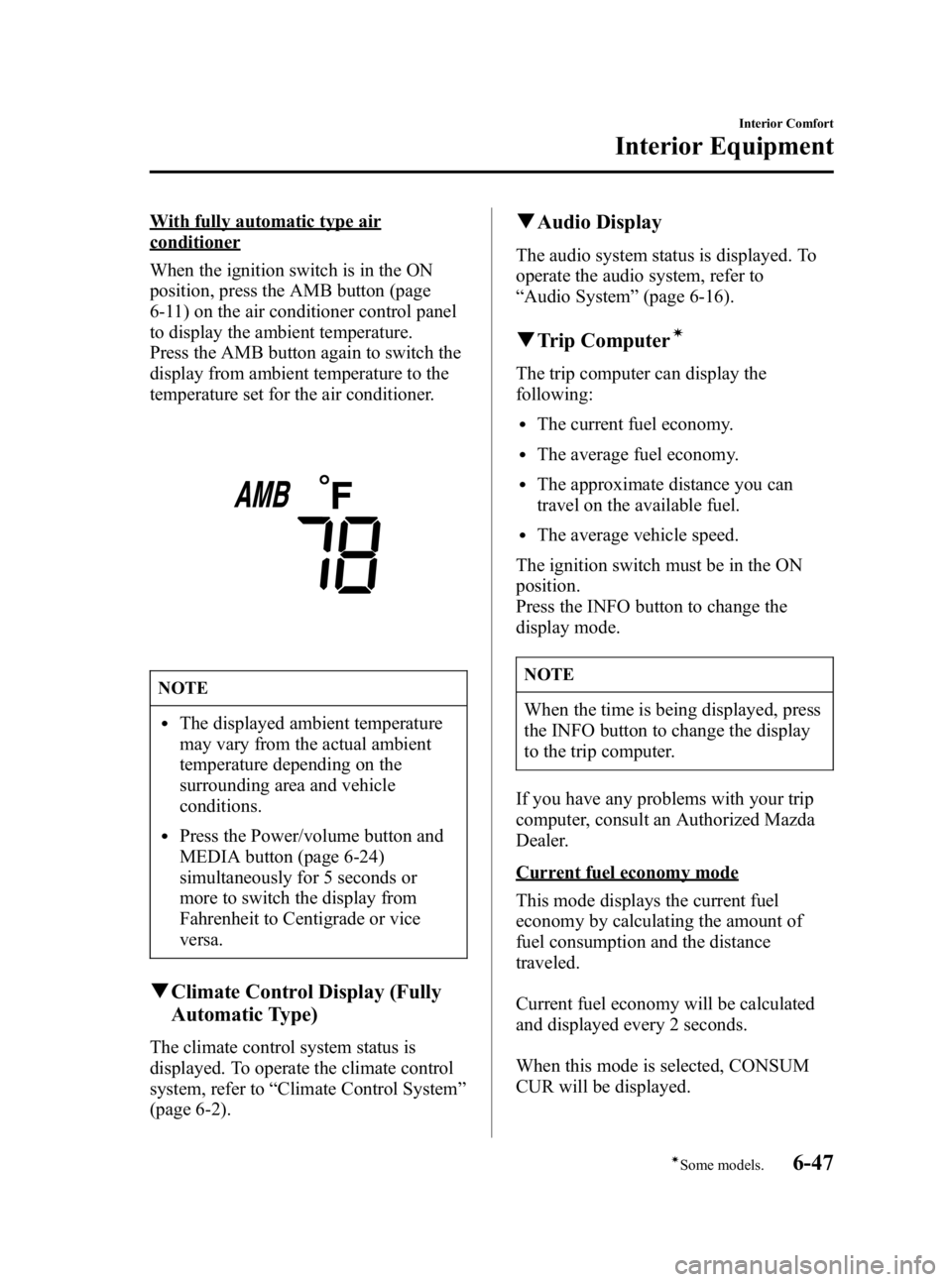
With fully automatic type air
conditioner
When the ignition switch is in the ON
position, press the AMB button (page
6-11) on the air conditioner control panel
to display the ambient temperature.
Press the AMB button again to switch the
display from ambient temperature to the
temperature set for the air conditioner.
NOTE
lThe displayed ambient temperature
may vary from the actual ambient
temperature depending on the
surrounding area and vehicle
conditions.
lPress the Power/volume button and
MEDIA button (page 6-24)
simultaneously for 5 seconds or
more to switch the display from
Fahrenheit to Centigrade or vice
versa.
qClimate Control Display (Fully
Automatic Type)
The climate control system status is
displayed. To operate the climate control
system, refer to “Climate Control System ”
(page 6-2).
q Audio Display
The audio system status is displayed. To
operate the audio system, refer to
“Audio System ”(page 6-16).
q Trip Computerí
The trip computer can display the
following:
lThe current fuel economy.
lThe average fuel economy.
lThe approximate distance you can
travel on the available fuel.
lThe average vehicle speed.
The ignition switch must be in the ON
position.
Press the INFO button to change the
display mode.
NOTE
When the time is being displayed, press
the INFO button to change the display
to the trip computer.
If you have any problems with your trip
computer, consult an Authorized Mazda
Dealer.
Current fuel economy mode
This mode displays the current fuel
economy by calculating the amount of
fuel consumption and the distance
traveled.
Current fuel economy will be calculated
and displayed every 2 seconds.
When this mode is selected, CONSUM
CUR will be displayed.
Interior Comfort
Interior Equipment
6-47íSome models.
Mazda3_8U55-EA-05G_Edition3 Page217
Tuesday, September 13 2005 10:43 AM
Form No.8U55-EA-05G
Page 219 of 372

Black plate (219,1)
U.S.A.
CANADA
NOTE
lEven though the distance-to-empty
display may indicate a sufficient
amount of remaining mileage before
refueling is required, refuel as soon
as possible if the fuel gauge needle
nears E or the low fuel warning light
illuminates.
lThe display won't change unless you
add more than approximately 20 L
(5.3 gal) of fuel.
Average vehicle speed mode
This mode displays the average vehicle
speed by calculating the distance and the
time traveled since connecting the battery
or resetting the data.
Average vehicle speed will be calculated
and displayed every 10 seconds.
When this mode is selected, AV will be
displayed.
U.S.A.
CANADA
To clear the data being displayed, press
the INFO button for more than 1 second.
After pressing the INFO button,——
km/h ( ——mile/h) will be displayed for
about 1 minute before the vehicle speed is
recalculated and displayed.
Interior Comfort
Interior Equipment
6-49
Mazda3_8U55-EA-05G_Edition3 Page219
Tuesday, September 13 2005 10:43 AM
Form No.8U55-EA-05G
Page 235 of 372
Black plate (235,1)
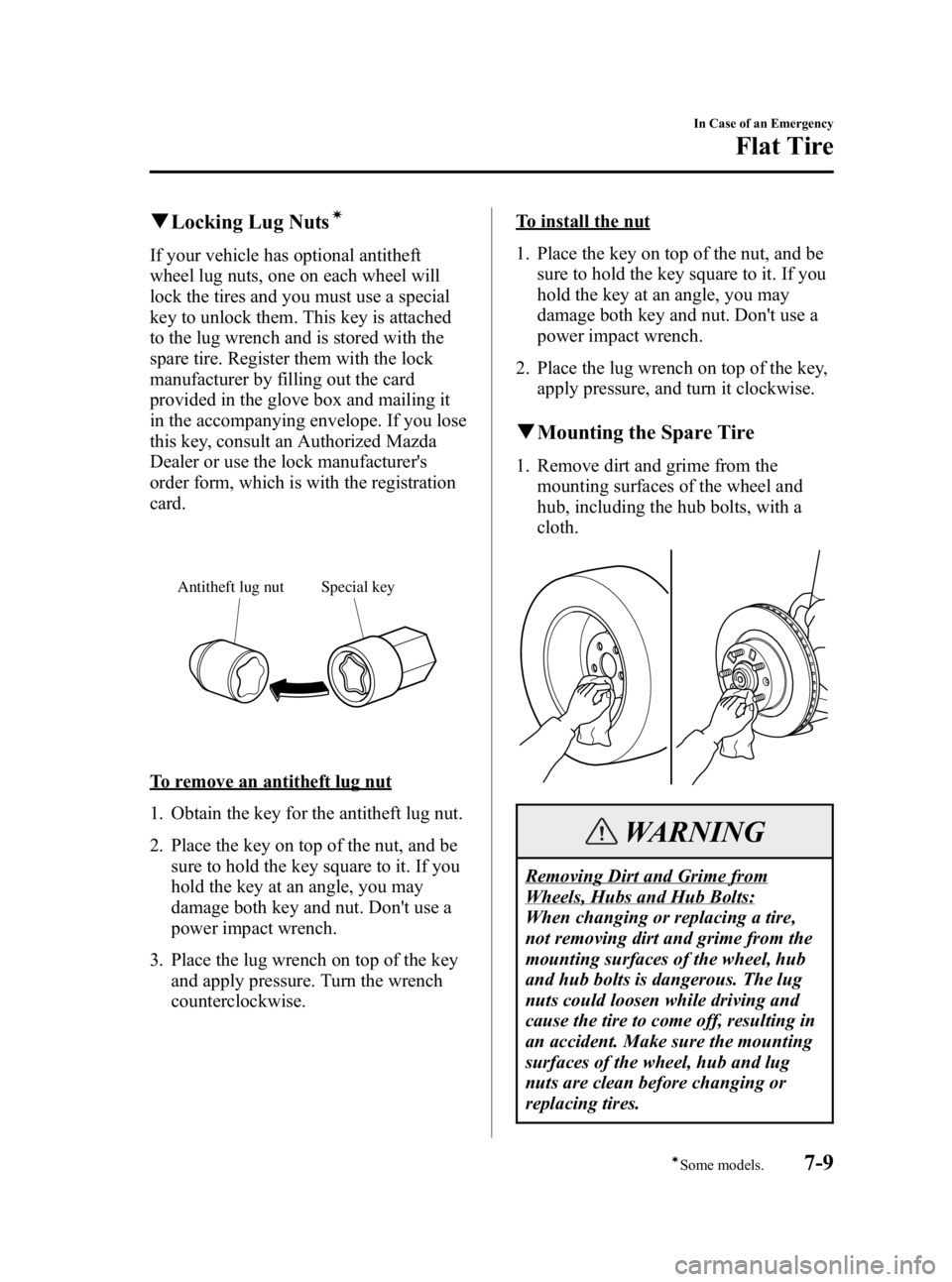
qLocking Lug Nutsí
If your vehicle has optional antitheft
wheel lug nuts, one on each wheel will
lock the tires and you must use a special
key to unlock them. This key is attached
to the lug wrench and is stored with the
spare tire. Register them with the lock
manufacturer by filling out the card
provided in the glove box and mailing it
in the accompanying envelope. If you lose
this key, consult an Authorized Mazda
Dealer or use the lock manufacturer's
order form, which is with the registration
card.
Special key
Antitheft lug nut
To remove an antitheft lug nut
1. Obtain the key for the antitheft lug nut.
2. Place the key on top of the nut, and be
sure to hold the key square to it. If you
hold the key at an angle, you may
damage both key and nut. Don't use a
power impact wrench.
3. Place the lug wrench on top of the key and apply pressure. Turn the wrench
counterclockwise.
To install the nut
1. Place the key on top of the nut, and besure to hold the key square to it. If you
hold the key at an angle, you may
damage both key and nut. Don't use a
power impact wrench.
2. Place the lug wrench on top of the key, apply pressure, and turn it clockwise.
qMounting the Spare Tire
1. Remove dirt and grime from the
mounting surfaces of the wheel and
hub, including the hub bolts, with a
cloth.
WARNING
Removing Dirt and Grime from
Wheels, Hubs and Hub Bolts:
When changing or replacing a tire,
not removing dirt and grime from the
mounting surfaces of the wheel, hub
and hub bolts is dangerous. The lug
nuts could loosen while driving and
cause the tire to come off, resulting in
an accident. Make sure the mounting
surfaces of the wheel, hub and lug
nuts are clean before changing or
replacing tires.
In Case of an Emergency
Flat Tire
7-9íSome models.
Mazda3_8U55-EA-05G_Edition3 Page235
Tuesday, September 13 2005 10:43 AM
Form No.8U55-EA-05G
Page 236 of 372
Black plate (236,1)
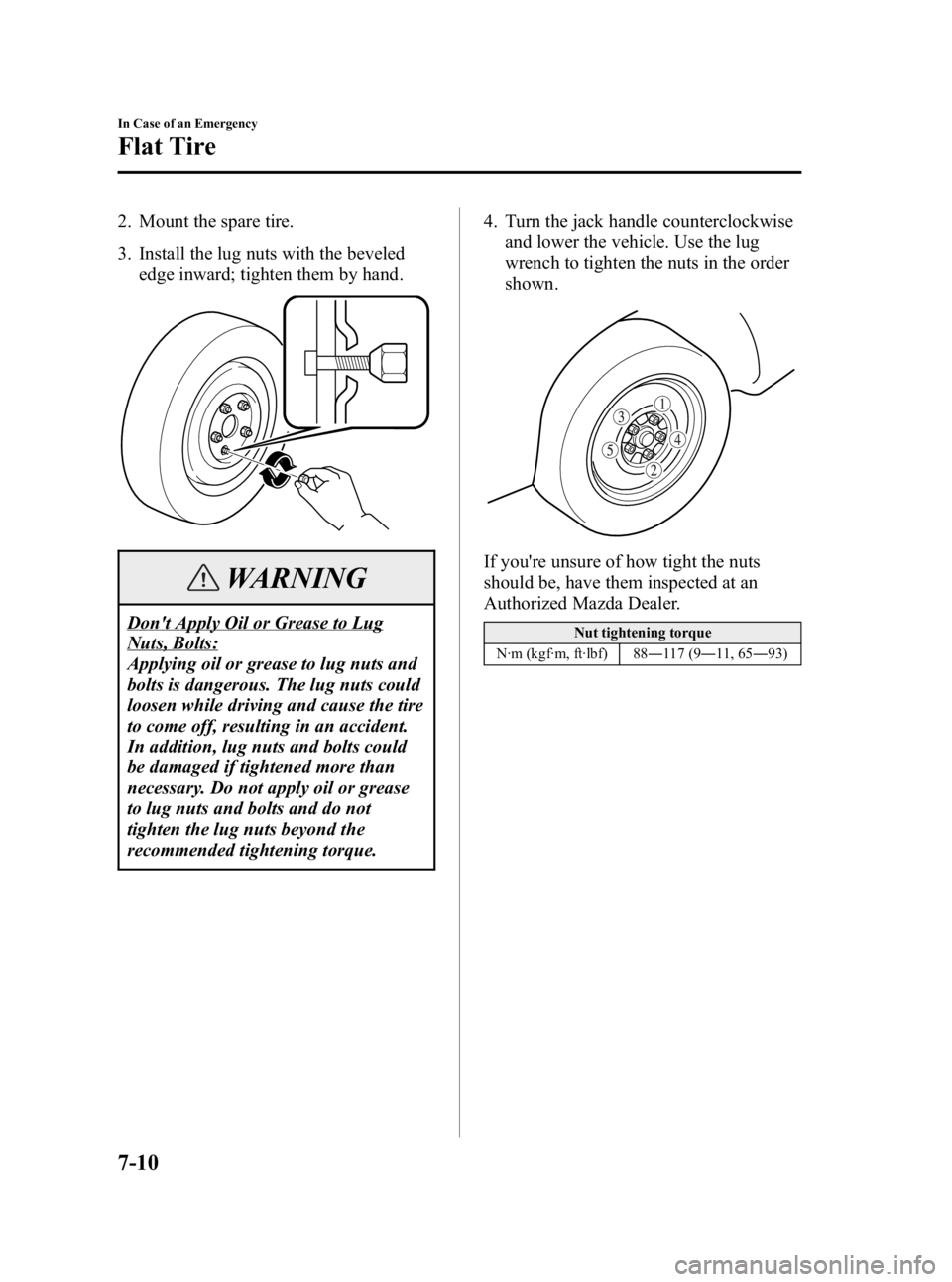
2. Mount the spare tire.
3. Install the lug nuts with the bevelededge inward; tighten them by hand.
WARNING
Don't Apply Oil or Grease to Lug
Nuts, Bolts:
Applying oil or grease to lug nuts and
bolts is dangerous. The lug nuts could
loosen while driving and cause the tire
to come off, resulting in an accident.
In addition, lug nuts and bolts could
be damaged if tightened more than
necessary. Do not apply oil or grease
to lug nuts and bolts and do not
tighten the lug nuts beyond the
recommended tightening torque. 4. Turn the jack handle counterclockwise
and lower the vehicle. Use the lug
wrench to tighten the nuts in the order
shown.
If you're unsure of how tight the nuts
should be, have them inspected at an
Authorized Mazda Dealer.
Nut tightening torque
N·m (kgf·m, ft·lbf) 88 ―117 (9 ―11, 65 ―93)
7-10
In Case of an Emergency
Flat Tire
Mazda3_8U55-EA-05G_Edition3 Page236
Tuesday, September 13 2005 10:43 AM
Form No.8U55-EA-05G
Page 243 of 372

Black plate (243,1)
Discharged
battery
Jumper cables
Connect cables in numerical order and disconnect in reverse order.
Booster battery
1. Remove the battery cover from its frontside.
Battery cover
2. Make sure the booster battery is 12 Vand that its negative terminal is
grounded.
3. If the booster battery is in another vehicle, don't allow both vehicles to
touch. Turn off the engine of the
vehicle with the booster battery and all
unnecessary electrical loads in both
vehicles. 4. Connect the jumper cables in the exact
sequence as in the illustration.
lConnect one end of a cable to the
positive terminal on the discharged
battery (1).
lAttach the other end to the positive
terminal on the booster battery (2).
lConnect one end of the other cable
to the negative terminal of the
booster battery (3).
lConnect the other end to a solid,
stationary, exposed metallic point
(for example, the right hand side
engine mounting bolt) away from
the discharged battery (4).
5. Start the engine of the booster vehicle and run it a few minutes. Then start the
engine of the other vehicle.
6. When finished, carefully disconnect the cables in the reverse order described in
the illustration.
In Case of an Emergency
Emergency Starting
7-17
Mazda3_8U55-EA-05G_Edition3 Page243
Tuesday, September 13 2005 10:44 AM
Form No.8U55-EA-05G
Page 266 of 372
Black plate (266,1)
Engine Oil
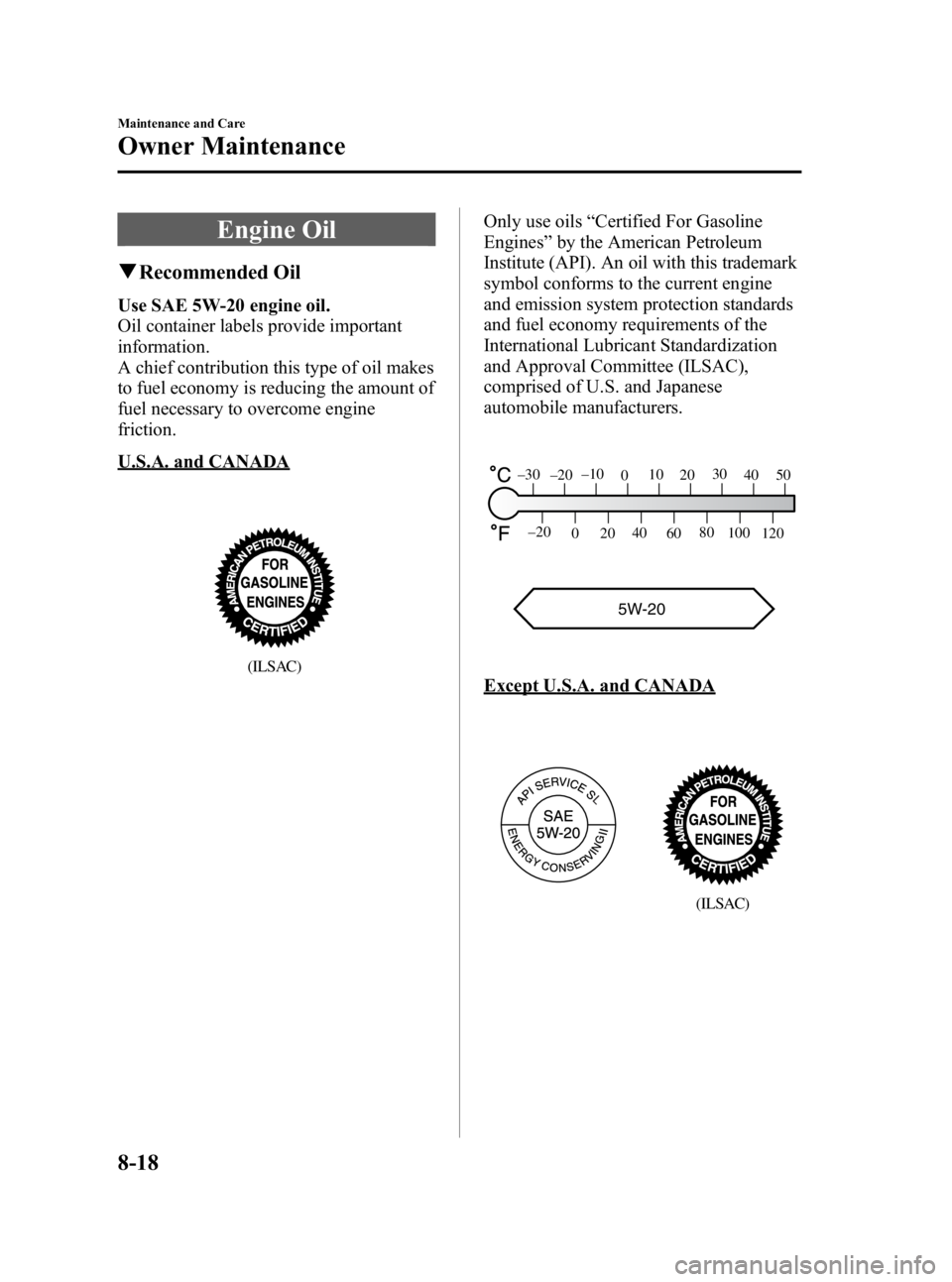
qRecommended Oil
Use SAE 5W-20 engine oil.
Oil container labels provide important
information.
A chief contribution this type of oil makes
to fuel economy is reducing the amount of
fuel necessary to overcome engine
friction.
U.S.A. and CANADA
(ILSAC)
Only use oils “Certified For Gasoline
Engines ”by the American Petroleum
Institute (API). An oil with this trademark
symbol conforms to the current engine
and emission system protection standards
and fuel economy requirements of the
International Lubricant Standardization
and Approval Committee (ILSAC),
comprised of U.S. and Japanese
automobile manufacturers.
5W-20
120
100
80
60
40
20
0
–20
5040
30
20
10
0
–10
–20
–30
Except U.S.A. and CANADA
(ILSAC)
8-18
Maintenance and Care
Owner Maintenance
Mazda3_8U55-EA-05G_Edition3 Page266
Tuesday, September 13 2005 10:44 AM
Form No.8U55-EA-05G
Page 284 of 372

Black plate (284,1)
NOTE
Remove the battery cover before
performing battery maintenance.
qBattery Maintenance
To get the best service from a battery:
lKeep it securely mounted.
lKeep the top clean and dry.
lKeep terminals and connections clean,
tight, and coated with petroleum jelly
or terminal grease.
lRinse off spilled electrolyte
immediately with a solution of water
and baking soda.
lIf the vehicle will not be used for an
extended time, disconnect the battery
cables.
qInspecting Electrolyte Level
A low level of electrolyte fluid will cause
the battery to discharge quickly.
Upper level
Lower level
Inspect the electrolyte level at least once a
week. If it's low, remove the cap and add
enough distilled water to bring the level
between the upper and lower level
(illustration).
Don't overfill.
Examine the specific gravity of the
electrolyte with a hydrometer, especially
during cold weather. If it's low, recharge
the battery.
8-36
Maintenance and Care
Owner Maintenance
Mazda3_8U55-EA-05G_Edition3 Page284
Tuesday, September 13 2005 10:45 AM
Form No.8U55-EA-05G
Page 290 of 372
Black plate (290,1)
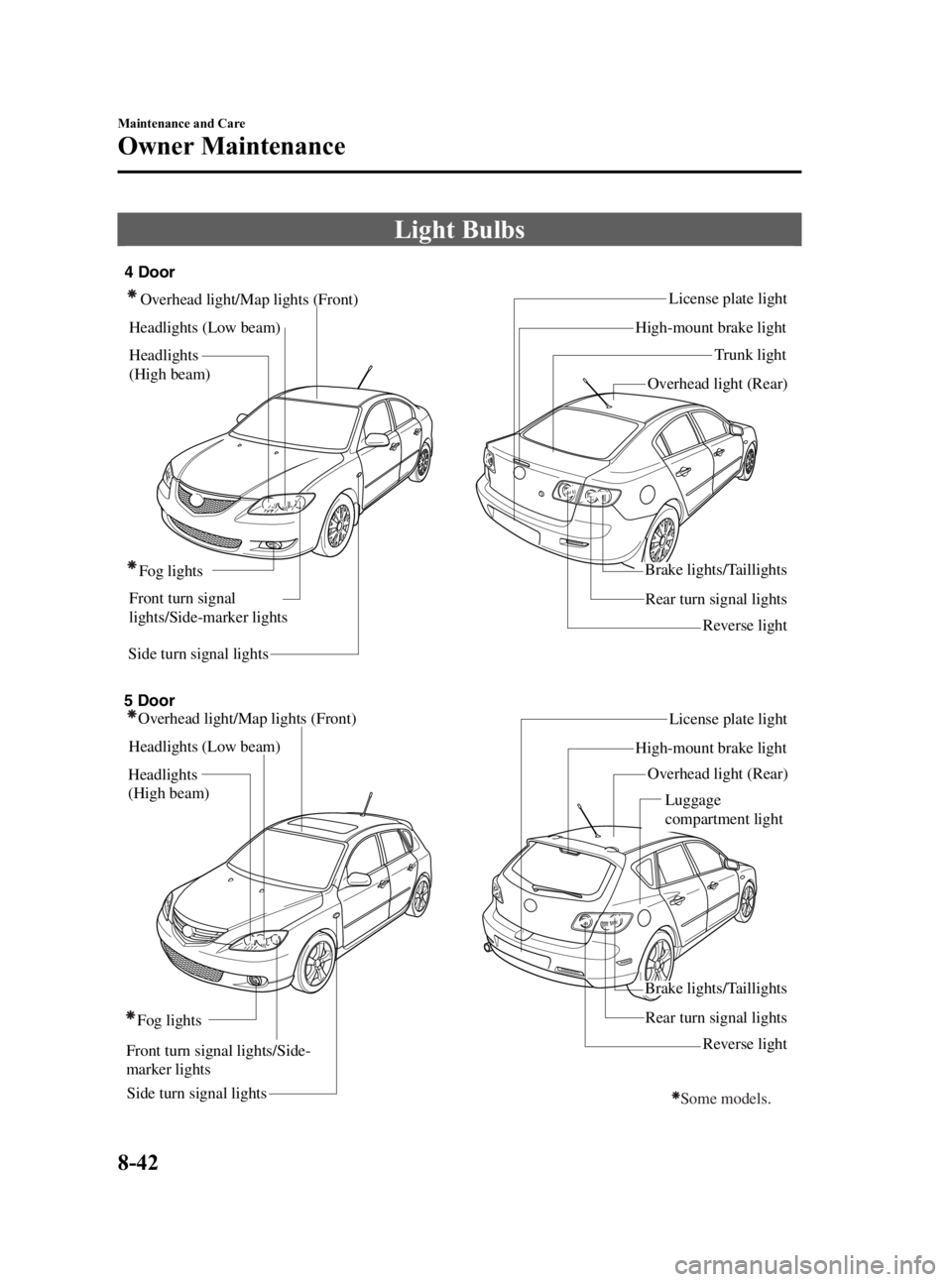
Light Bulbs
Side turn signal lightsRear turn signal lightsLicense plate light
Overhead light/Map lights (Front)
Headlights (Low beam)
Fog lights Brake lights/Taillights
Reverse light
High-mount brake light
Trunk light
4 Door
5 Door Overhead light (Rear)
Overhead light/Map lights (Front)
Headlights (Low beam)
Side turn signal lights Fog lights
License plate light
High-mount brake light Overhead light (Rear)
Rear turn signal lights
Brake lights/Taillights
Reverse light
Some models.
Front turn signal lights/Side-
marker lightsHeadlights
(High beam)
Front turn signal
lights/Side-marker lights
Headlights
(High beam) Luggage
compartment light
8-42
Maintenance and Care
Owner Maintenance
Mazda3_8U55-EA-05G_Edition3 Page290
Tuesday, September 13 2005 10:45 AM
Form No.8U55-EA-05G
Page 297 of 372

Black plate (297,1)
5 Door
1. Remove the cover.
2. Turn the socket and bulb assemblycounterclockwise and remove it.
3. Disconnect the bulb from the socket.
4. Install the new bulb in the reverse order of removal.
NOTE
To replace the bulb, contact an
Authorized Mazda Dealer.
High-mount brake light
4 Door
1. Pull the center of each plastic retainer
and remove the retainers and the trunk
rear trim.
Removal
Installation
2. Disconnect the electrical connector from the socket.
3. Turn the socket and bulb assembly counterclockwise and remove it.
4. Disconnect the bulb from the socket.
5. Install the new bulb in the reverse order of removal.
NOTE
To replace the bulb, contact an
Authorized Mazda Dealer.
Maintenance and Care
Owner Maintenance
8-49
Mazda3_8U55-EA-05G_Edition3 Page297
Tuesday, September 13 2005 10:45 AM
Form No.8U55-EA-05G