dashboard MAZDA MODEL 3 4-DOOR 2017 User Guide
[x] Cancel search | Manufacturer: MAZDA, Model Year: 2017, Model line: MODEL 3 4-DOOR, Model: MAZDA MODEL 3 4-DOOR 2017Pages: 612
Page 143 of 612

4–13
When Driving
Instrument Cluster and Display
Speedometer ........................................................................\
..................................page 4-14
Odometer, Trip Meter and Trip Meter Selector ....................................................page 4-14
Tachometer ........................................................................\
....................................page 4-16
Fuel Gauge ........................................................................\
....................................page 4-17
Dashboard Illumination........................................................................\
.................page 4-18
Outside Temperature Display ........................................................................\
........page 4-19
Cruise Control Set Vehicle Speed Display ............................................................page 4-19
Active Driving Display ........................................................................\
.................page 4-21
Trip Computer and INFO Switch ........................................................................\
..page 4-19
Speed Unit Selector ........................................................................\
.......................page 4-14
Mazda3_8FL6-EA-16F_Edition2.indb 132016/08/10 17:35:46
Page 148 of 612
4–18
When Driving
Instrument Cluster and Display
Dashboard Illumination
When the position lights are turned
on with the ignition switched ON,
the brightness of the instrument panel
illumination is dimmed.
NOTE
When the position lights are turned on,
the position lights indicator light in the
instrument cluster turns on.
Refer to Headlights on page
4-43.
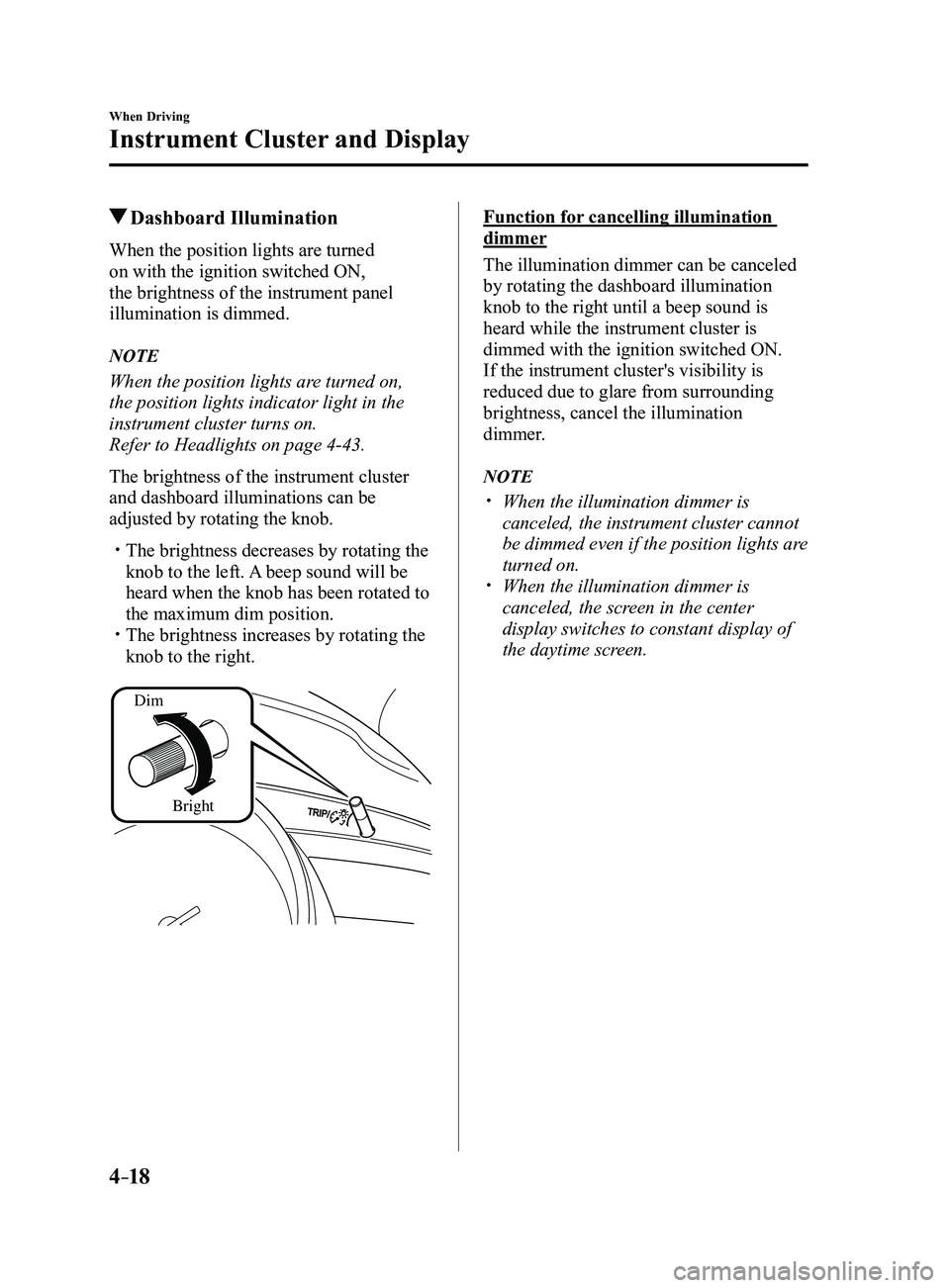
The brightness of the instrument cluster
and dashboard illuminations can be
adjusted by rotating the knob.
The brightness decreases by rotating the
knob to the left. A beep sound will be
heard when the knob has been rotated to
the maximum dim position.
The brightness increases by rotating the
knob to the right.
Dim
Bright
Function for cancelling illumination
dimmer
The illumination dimmer can be canceled
by rotating the dashboard illumination
knob to the right until a beep sound is
heard while the instrument cluster is
dimmed with the ignition switched ON.
If the instrument cluster's visibility is
reduced due to glare from surrounding
brightness, cancel the illumination
dimmer.
NOTE
When the illumination dimmer is
canceled, the instrument cluster cannot
be dimmed even if the position lights are
turned on.
When the illumination dimmer is
canceled, the screen in the center
display switches to constant display of
the daytime screen.
Mazda3_8FL6-EA-16F_Edition2.indb 182016/08/10 17:35:49
Page 153 of 612
4–23
When Driving
Instrument Cluster and Display
Warning/Indicator Lights
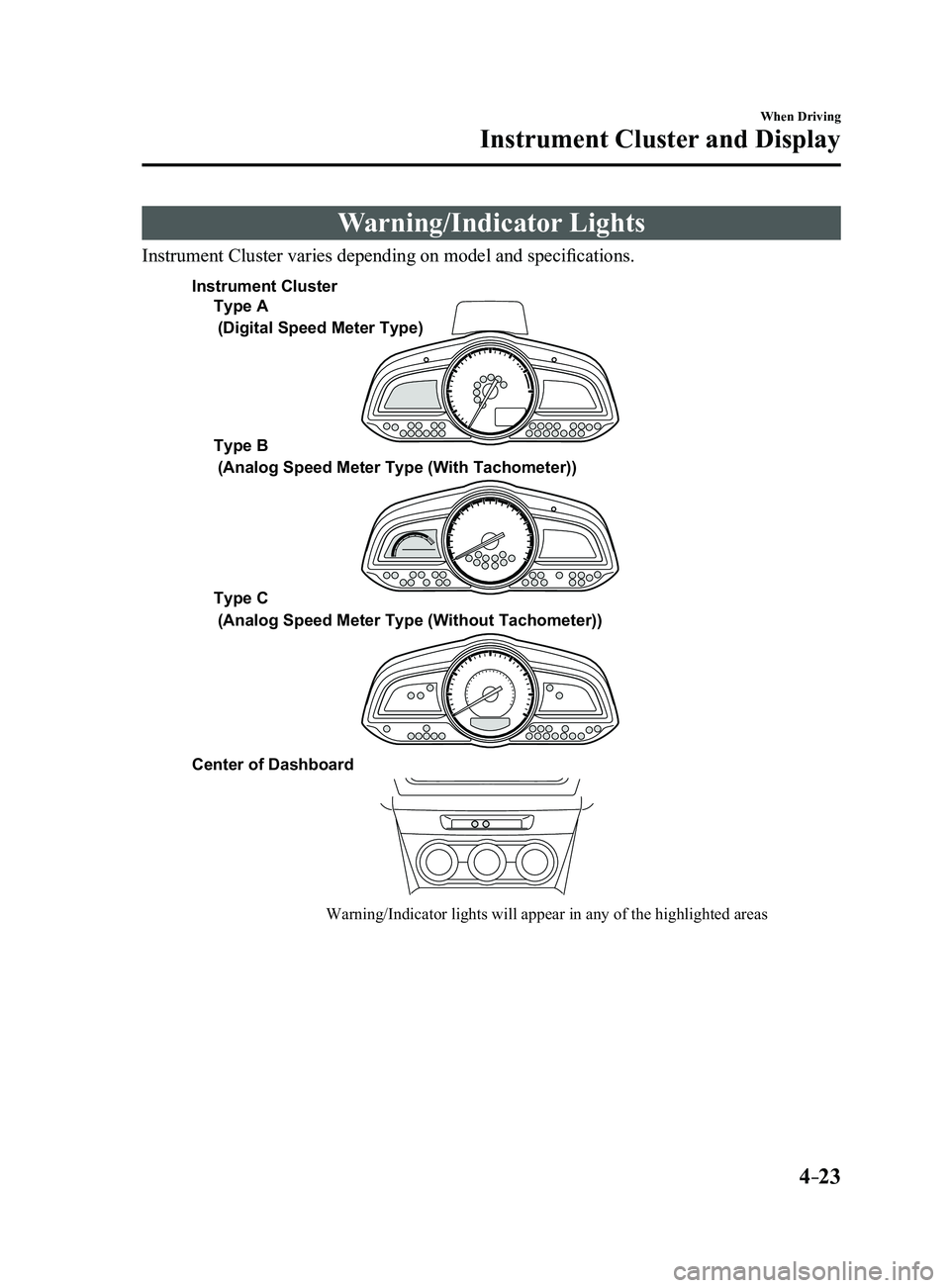
Instrument Cluster varies depending on model and specifications.
Warning/Indicator lights will appear in any of the highlighted areas
Type A
Type B
Type C
Center of Dashboard
(Digital Speed Meter Type)
(Analog Speed Meter Type (With Tachometer))
(Analog Speed Meter Type (Without Tachometer))
Instrument Cluster
Mazda3_8FL6-EA-16F_Edition2.indb 232016/08/10 17:35:52
Page 178 of 612
4–48
When Driving
Switches and Controls
*Some models.
Headlight Leveling*
The number of passengers and weight of
cargo in the luggage compartment change
the angle of the headlights.
The angle of the headlights will be
automatically adjusted when turning on
the headlights.
Daytime Running Lights
Some countries require moving vehicles
to have their lights on (daytime running
lights) during the daytime.
The daytime running lights turn on
automatically when the vehicle starts
moving.
They turn off when the parking brake is
operated or the shift lever is shifted to the
P position (automatic transaxle vehicle).
NOTE
(Except Canada)
The daytime running lights can be
deactivated.
Refer to Personalization Features on page
9-12.
Fog Lights*
The fog lights can be used when the
ignition is switched ON.
Use this switch to turn on the fog lights.
The fog lights will improve visibility at
night and during foggy conditions.
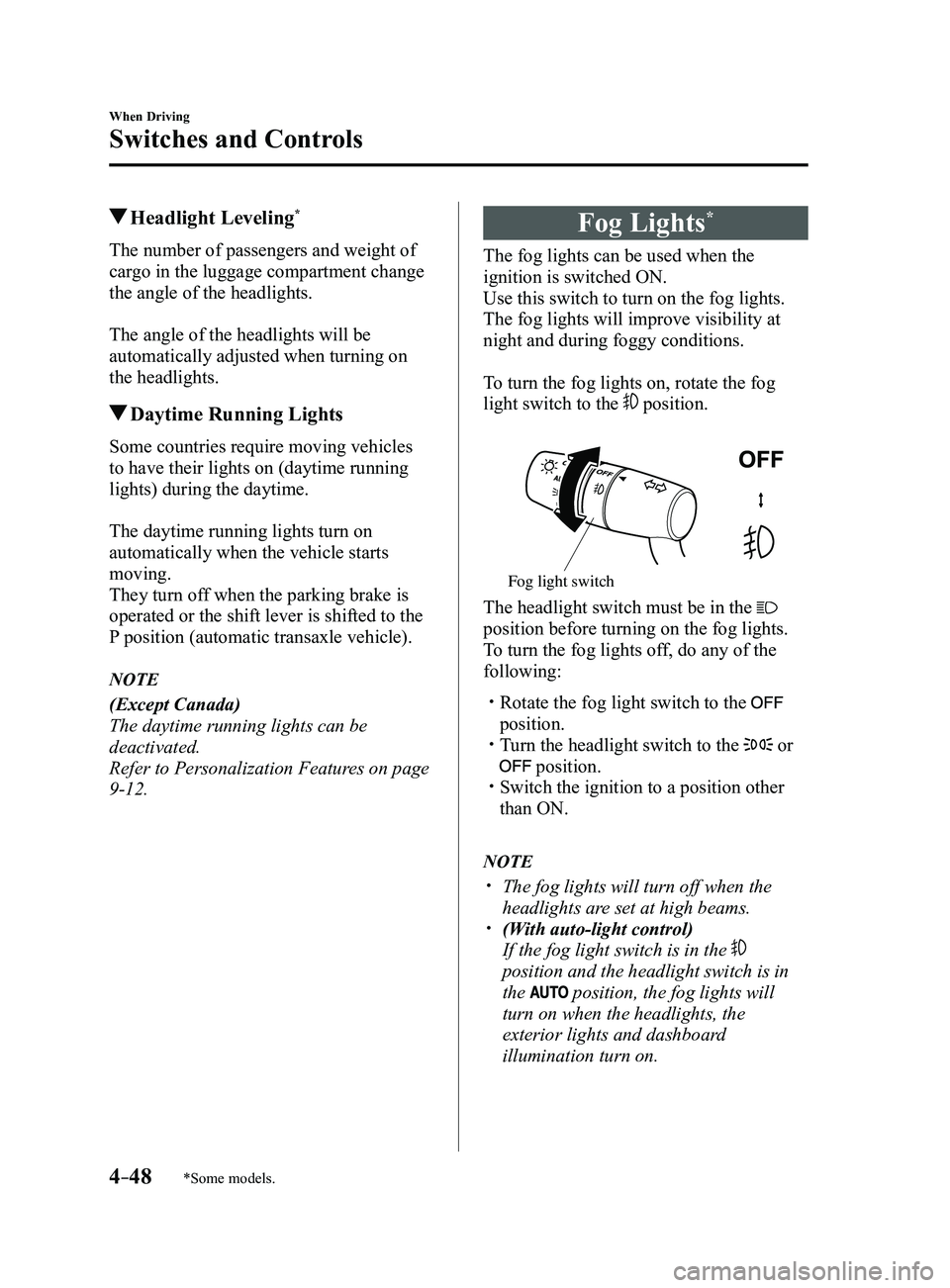
To turn the fog lights on, rotate the fog
light switch to the
position.
Fog light switch
The headlight switch must be in the
position before turning on the fog lights.
To turn the fog lights off, do any of the
following:
Rotate the fog light switch to the
position. Turn the headlight switch to the or
position. Switch the ignition to a position other
than ON.
NOTE
The fog lights will turn off when the
headlights are set at high beams. (With auto-light control)
If the fog light switch is in the
position and the headlight switch is in
the
position, the fog lights will
turn on when the headlights, the
exterior lights and dashboard
illumination turn on.
Mazda3_8FL6-EA-16F_Edition2.indb 482016/08/10 17:36:18
Page 222 of 612
4–92
When Driving
i-ACTIVSENSE
Forward driving (Blind Spot Monitoring (BSM) operation)
The Blind Spot Monitoring (BSM) detects vehicles approaching from the rear and turns on
the Blind Spot Monitoring (BSM) warning indicator lights equipped on the door mirrors
according to the conditions. Additionally, while a Blind Spot Monitoring (BSM) warning
indicator light is illuminated, if the turn signal lever is operated to \
signal a turn in the
direction in which the Blind Spot Monitoring (BSM) warning indicator light is illuminated,
the Blind Spot Monitoring (BSM) warning indicator light flashes.
Reverse driving (Rear Cross Traffic Alert (RCTA) system operation)
The Rear Cross Traffic Alert (RCTA) system detects vehicles approaching from the left and
right of your vehicle and flashes the Blind Spot Monitoring (BSM) warning indicator lights.
Function for cancelling illumination dimmer
If the Blind Spot Monitoring (BSM) warning indicator lights turn on when the parking lights
are turned on, the brightness of the Blind Spot Monitoring (BSM) warning indicator lights is
dimmed.
If the Blind Spot Monitoring (BSM) warning indicator lights are difficult to see due to
glare from surrounding brightness when traveling on snow-covered roads o\
r under foggy
conditions, press the dimmer cancellation button to cancel the dimmer an\
d increase the
brightness of Blind Spot Monitoring (BSM) warning indicator lights when they turn on.
Refer to Dashboard Illumination on page
4-18.
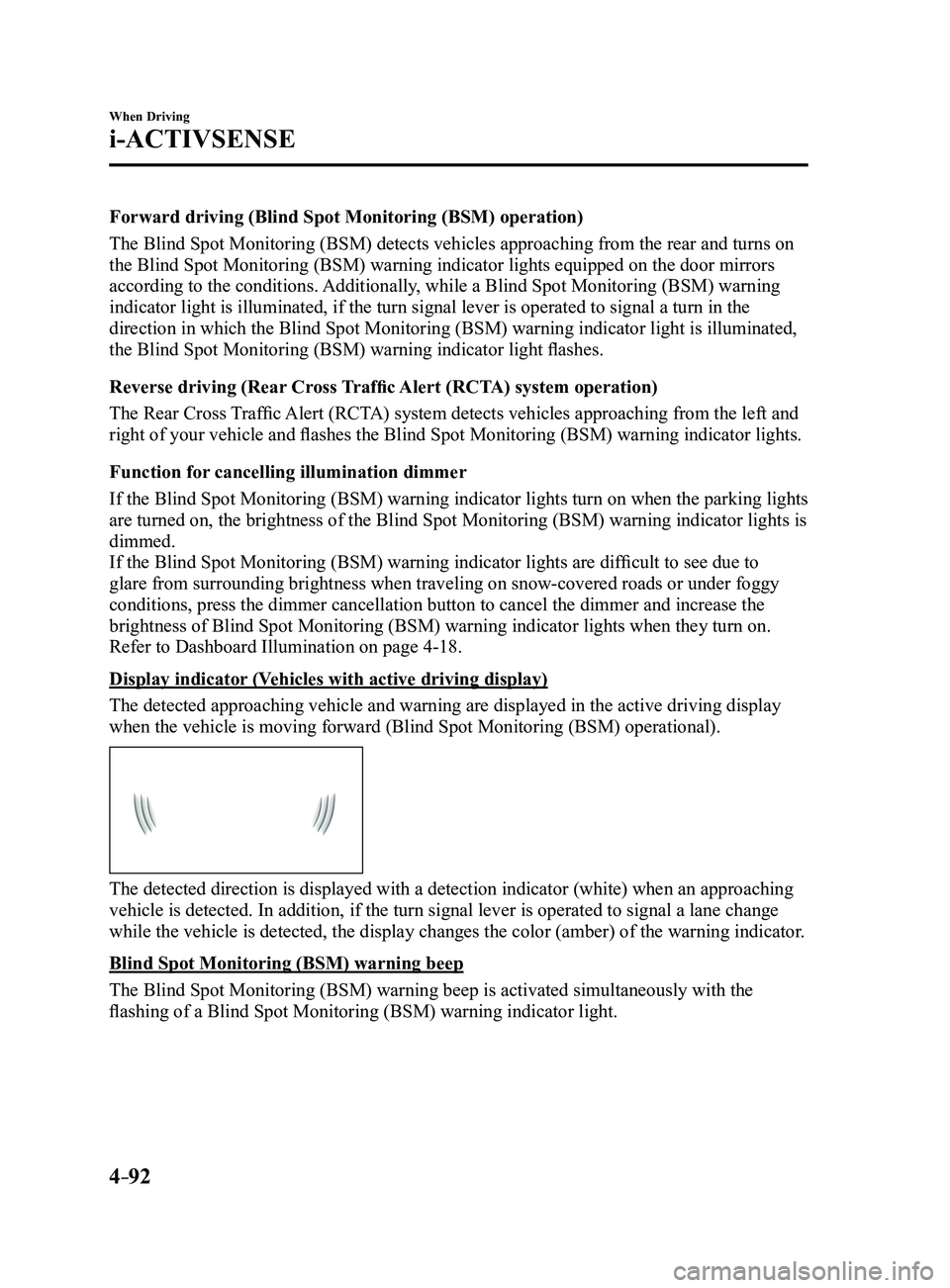
Display indicator (Vehicles with active driving display)
The detected approaching vehicle and warning are displayed in the active\
driving display
when the vehicle is moving forward (Blind Spot Monitoring (BSM) operational).
The detected direction is displayed with a detection indicator (white)\
when an approaching
vehicle is detected. In addition, if the turn signal lever is operated t\
o signal a lane change
while the vehicle is detected, the display changes the color (amber) o\
f the warning indicator.
Blind Spot Monitoring (BSM) warning beep
The Blind Spot Monitoring (BSM) warning beep is activated simultaneously with the
flashing of a Blind Spot Monitoring (BSM) warning indicator light.
Mazda3_8FL6-EA-16F_Edition2.indb 922016/08/10 17:36:39
Page 226 of 612
4–96
When Driving
i-ACTIVSENSE
NOTE
The Traffic Sign Recognition System (TSR) does not operate if there is a malfunction in
the Forward Sensing Camera (FSC). Under the following conditions, the Traffic Sign Recognition System (TSR) may not
operate normally.
An object placed on the dashboard is reflected in the windshield and picked up by the
camera. Heavy luggage is loaded in the luggage compartment or on the r ear seat and the
vehicle is tilted. The tire pressures are not adjusted to the specified pressure. Tires other than standard tires are equipped. The vehicle is driven on the ramp and surrounding area to or from a rest area or a
tollgate on a highway. When surrounding brightness suddenly changes such as when entering or exiting a
tunnel. The illumination of the headlights is weakened because of dirt or the op\
tical axis is
deviated. The windshield is dirty or foggy. The windshield and camera are fogged (water droplets). Strong light is directed at the front of the vehicle (such as backlight or high-beam
headlights of on-coming vehicles). The vehicle is making a sharp turn. Strong light reflects off the road. A traffic sign is in a position which makes it difficult to reflect the light from the
vehicle's headlights, such as when the vehicle is driven at night or in \
a tunnel. The vehicle is driven under weather conditions such as rain, fog, or sno\
w . The stored map data for the navigation system is not current. The camera cannot capture a traffic sign's image. A traffic sign is obscured by mud or snow. A traffic sign is concealed by trees or a vehicle. A traffic sign is partially shaded. A traffic sign is bent or warped. A traffic sign is too low or too high. A traffic sign is too bright or too dark (including electronic traffic signs). A traffic sign is too big or too small. There is an object similar to the traffic sign being read (such as another traffic sign or
other signs resembling it).
The Traffic Sign Recognition System (TSR) does not operate if the active driving display
is set to non-display. The Traffic Sign Recognition System (TSR) can be set to inoperable.
Refer to Personalization Featur es on page 9-12.
Mazda3_8FL6-EA-16F_Edition2.indb 962016/08/10 17:36:41
Page 249 of 612
 line, the system determines that")
4–119
When Driving
i-ACTIVSENSE
If the steering wheel, accelerator pedal, or brake pedal is operated abr\
uptly and the vehicle
moves close to a white (yellow) line, the system determines that the d\
river is making a lane
change and the Lane-keep Assist System (LAS) & Lane Departure Warning System (LDWS)
operation is temporarily canceled. The Lane-keep Assist System (LAS) & Lane Departure
Warning System (LDWS) becomes operational again when the system detects\
white (yellow)
lane lines while the vehicle is being driven normally within its vehicle\
lane.
If the vehicle deviates from its lane repeatedly within a short period of time, the Lane-
keep Assist System (LAS) & Lane Departure Warning System (LDWS) may not operate. When white (yellow) lane lines ar e not detected, the Lane-keep Assist System (LAS) &
Lane Departure Warning System (LDWS) does not operate. Under the following conditions, the Lane-keep Assist System (LAS) & Lane Departure
Warning System (LDWS) may not be able to detect white (yellow) lane l\
ines correctly and
it may not operate normally.
If an object placed on the dashboard is reflected in the windshield and picked up by the
camera. Heavy luggage is loaded in the luggage compartment or on the r ear seat and the
vehicle is tilted. The tire pressures are not adjusted to the specified pressure. Tires other than conventional tires are equipped. When the vehicle is driven on the guiding branch to or from the rest area or tollgate of
a highway. The white (yellow) lane lines are less visible because of dirt or fading/patchiness. A vehicle in front of your vehicle is running near a white (yellow) lane line making \
it
less visible. A white (yellow) lane line is less visible because of bad weather (rai\
n, fog, or snow). The vehicle is driven on a temporary lane or section with a closed lane \
resulting from
construction where there may be multiple white (yellow) lane lines or they are interrupted.
A misleading line is picked up on the road such as a temporary line for construction,
or because of shade, lingering snow, or grooves filled with water. The surrounding brightness suddenly changes such as when entering or exiting a t\
unnel. The illumination of the headlights is weakened because of dirt or the op\
tical axis is
deviated. The windshield is dirty or foggy . The windshield, camera is fogged (water dr oplets). Back-light is reflected off the road surface. The road surface is wet and shiny after rain, or there are puddles on the road. The shade of a guar drail parallel to a white (yellow) lane line is cast on the road. The width of the driving lane is narr ow (less than about 2.5 m (98 in)) or wide (more
than about 4.5 m (178 in)) Driving on roads with tight curves. The road is excessively uneven. The vehicle is shaken after hitting a r oad bump. There are two or more adjacent white (yellow) lane lines. There are various road markings or lane markings of various shapes near an intersection.
Mazda3_8FL6-EA-16F_Edition2.indb 1192016/08/10 17:36:52
Page 267 of 612
4–137
When Driving
i-ACTIVSENSE
Heed the following cautions to assure the correct operation of the Forward Sensing Camera
(FSC).
Be careful not to scratch the Forward Sensing Camera (FSC) lens or allow it to get dirty. Do not remove the Forward Sensing Camera (FSC) cover. Do not place objects on the dashboard which reflect light. Always keep the windshield glass around the camera clean by removing dirt or fogging.
Use the windshield defroster to remove fogging on the windshield. Consult an Authorized Mazda Dealer regarding cleaning the interior side of the
windshield around the Forward Sensing Camera (FSC). Consult an Authorized Mazda Dealer before performing repairs around the Forward
Sensing Camera (FSC). The Forward Sensing Camera (FSC) is installed to the windshield. Consult an Authorized
Mazda Dealer for windshield repair and replacement. When cleaning the windshield, do not allow glass cleaners or similar cleaning fluids to
get on the Forward Sensing Camera (FSC) lens. In addition, do not touch the Forward
Sensing Camera (FSC) lens.
When performing repairs around the rearview mirror, consult an Authorized Mazda Dealer. Consult an Authorized Mazda Dealer regarding cleaning of the camera lens. Do not hit or apply strong force to the Forward Sensing Camera (FSC) or the area around
it. If the Forward Sensing Camera (FSC) is severely hit or if there are cracks or damage
caused by flying gravel or debris in the area around it, stop using the following systems
and consult an Authorized Mazda Dealer.
High Beam Control System (HBC) Lane-keep Assist System (LAS) & Lane Departure Warning System (LDWS) Traffic Sign Recognition System (TSR) Smart City Brake Support (SCBS) Smart Brake Support (SBS)
The direction in which the Forward Sensing Camera (FSC) is pointed has been finely
adjusted. Do not change the installation position of the Forward Sensing Camera (FSC)
or remove it. Otherwise, it could result in damage or malfunction.
Always use tires for all wheels that are of the specified size, and the same manufacturer,
brand, and tread pattern. In addition, do not use tires with significantly different wear
patterns on the same vehicle as the system may not operate normally.
The Forward Sensing Camera (FSC) includes a function for detecting a soiled windshield
and informing the driver, however, depending on the conditions, it may not detect plastic
shopping bags, ice or snow on the windshield. In such cases, the system cannot accurately
determine a vehicle ahead and may not be able to operate normally. Always drive carefully
and pay attention to the road ahead.
Mazda3_8FL6-EA-16F_Edition2.indb 1372016/08/10 17:36:59
Page 296 of 612
5–4
Interior Features
Climate Control System
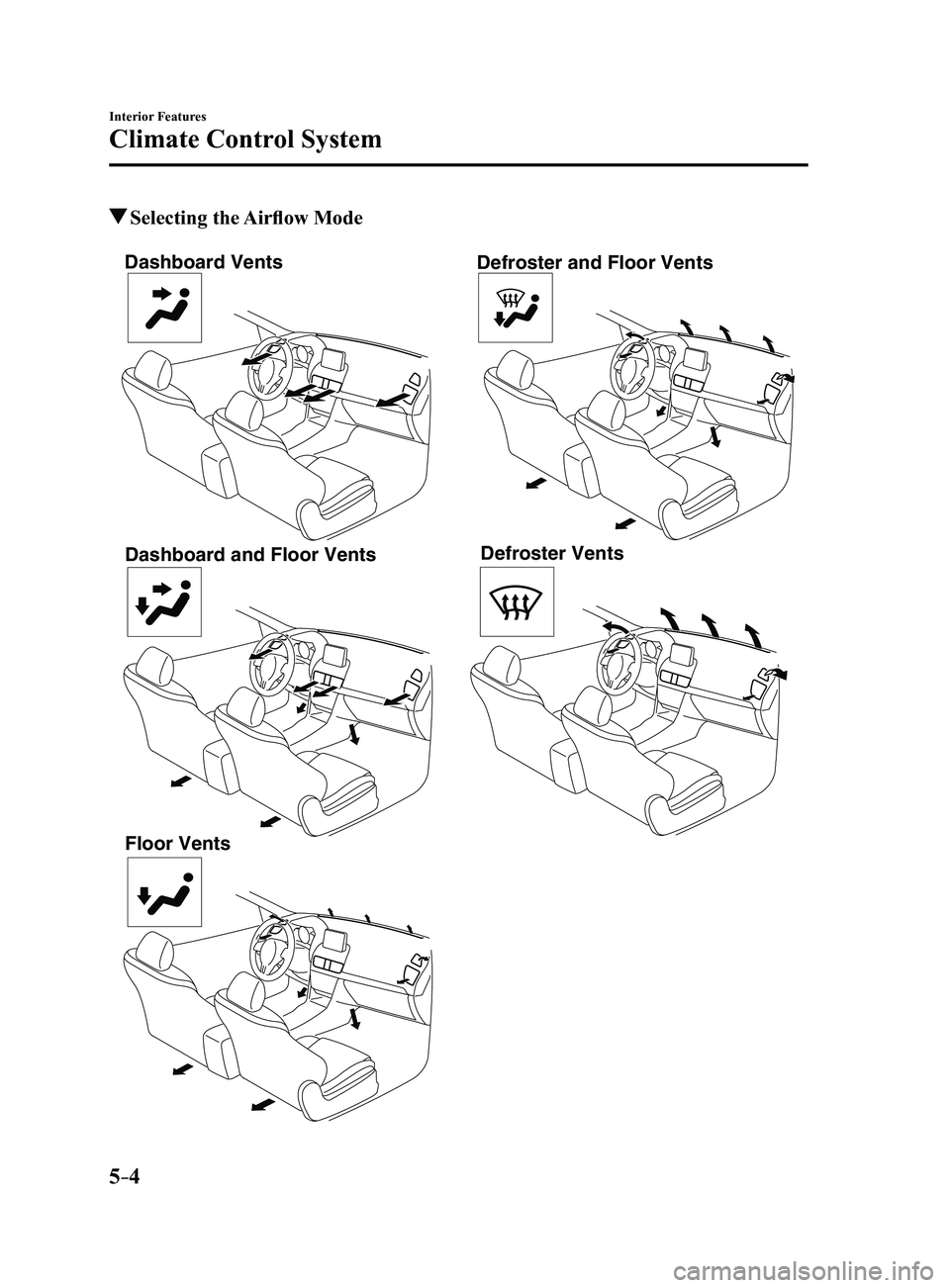
Selecting the Airflow Mode
Dashboard Vents
Dashboard and Floor Vents
Floor Vents Defroster and Floor Vents
Defroster Vents
Mazda3_8FL6-EA-16F_Edition2.indb 42016/08/10 17:37:11
Page 430 of 612
6–18
Maintenance and Care
Scheduled Maintenance
Maintenance Monitor
Maintenance Monitor (Type A audio)
Based on the engine operating conditions, the onboard computer in your vehicle calculates
the remaining oil life in the United States and Puerto Rico. The wrench indicator light in the
instrument cluster will be illuminated when remaining oil life becomes l\
ess than 1,000 km
(600 mile), or remaining days are less than 15 (whichever comes first).
The system must be reset whenever replacing the engine oil.
Reset method
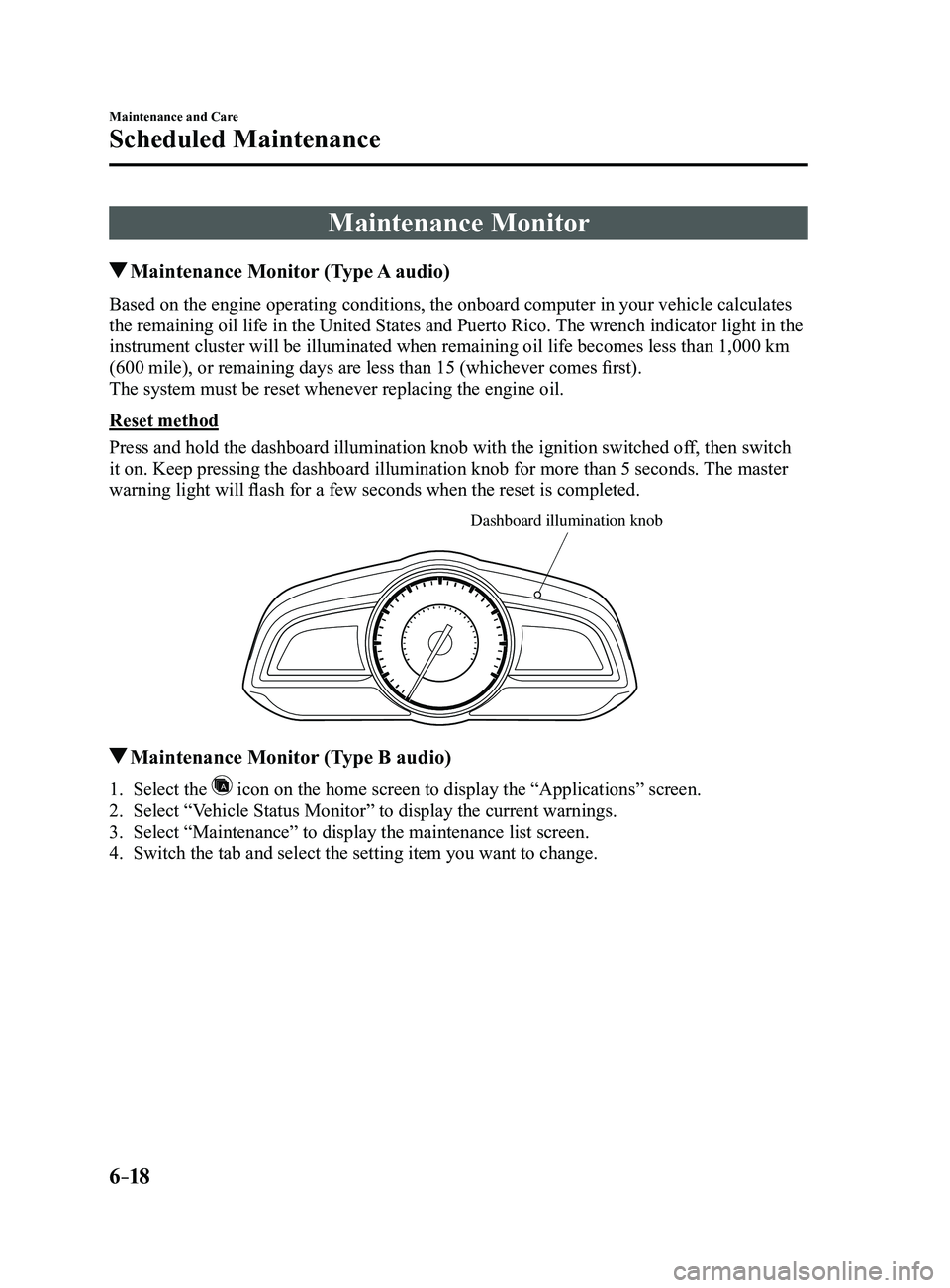
Press and hold the dashboard illumination knob with the ignition switche\
d off, then switch
it on. Keep pressing the dashboard illumination knob for more than 5 sec\
onds. The master
warning light will flash for a few seconds when the reset is completed.
Dashboard illumination knob
Maintenance Monitor (Type B audio)
1. Select the icon on the home screen to display the “Applications” screen.
2. Select “Vehicle Status Monitor” to display the current warnings.
3. Select “Maintenance” to display the maintenance list screen.
4. Switch the tab and select the setting item you want to change.
Mazda3_8FL6-EA-16F_Edition2.indb 182016/08/10 17:38:34