height MAZDA MODEL 3 4-DOOR 2017 User Guide
[x] Cancel search | Manufacturer: MAZDA, Model Year: 2017, Model line: MODEL 3 4-DOOR, Model: MAZDA MODEL 3 4-DOOR 2017Pages: 612
Page 275 of 612
4–14 5
When Driving
i-ACTIVSENSE
NOTE
The detection ability of the radar sensors (rear) has limitations. In the following cases,
the detection ability may lower and the system may not operate normally.
The rear bumper near the radar sensors (rear) has become deformed. Snow, ice or mud adheres to the radar sensors (rear) on the rear bumper. Under bad weather conditions such as rain, snow and fog.
Under the following conditions, the radar sensors (r ear) cannot detect target objects or it
may be difficult to detect them.
Stationary objects on a road or a road side such as small, two-wheeled vehicles,
bicycles, pedestrians, animals, and shopping carts. Vehicle shapes which do not reflect radar waves well such as empty trailers with a low
vehicle height and sports cars.
Vehicles are shipped with the direction of the radar sensors (rear) adjusted for each
vehicle to a loaded vehicle condition so that the radar sensors (rear) detect approaching
vehicles correctly. If the direction of the radar sensors (rear) has deviated for some
reason, have the vehicle inspected at an Authorized Mazda Dealer.
For repairs or replacement of the radar sensors (rear), or bumper repairs, paintwork,
and replacement near the radar sensors, consult an Authorized Mazda Dealer. Turn off the system while pulling a trailer or while an accessory such as\
a bicycle carrier
is installed to the rear of the vehicle. Otherwise, the radio waves emitted by the radar will\
be blocked causing the system to not operate normally.
The radar sensors are regulated by the relevant radio wave laws of the country in which
the vehicle is driven. If the vehicle is driven abroad, authorization from the country in
which the vehicle is driven may be required.
Mazda3_8FL6-EA-16F_Edition2.indb 1452016/08/10 17:37:01
Page 345 of 612
5–53
Interior Features
Audio System
Settings
NOTE
Depending on the grade and specification, the screen display may differ.
Select the
icon on the home screen and display the Settings screen.
Switch the tab and select the setting item you want to change.
You can customize settings in the setup display as follows:
Ta bItem Function
AD-Disp Height
Brightness Control
Other Refer to Active Driving Display on page
4-21.
Display Refer to Volume/Display/Sound Controls on page
5-40.
Safety Smart City Brake Support
Blind Spot Monitoring Volume
Other Refer to Personalization Features on page
9-12.
Sound Refer to Volume/Display/Sound Controls on page
5-40.
Clock Adjust Time
Displays the currently set time is displayed.
Press
to advance the hour/minute, and select to move the hour/minute back.
AM/PM can only be selected with the 12-hour
clock display.
GPS Sync Synchronizes with GPS when turned on.
When turned off, the time can be changed from
“Adjust Time”.
Time Format Changes the display between 12 and 24-hour
clock time.
Time Zone Select When it's not synchronized with GPS, select
the region you want to specify.
Daylight Savings Time Turns the daylight saving time setting on/off.
When ON, the time advances 1 hour. When
OFF, it returns to normal time.
Vehicle Rain Sensing Wiper
Door Locks
Other Refer to Personalization Features on page
9-12.
Devices Bluetooth
®Refer to Bluetooth® Preparation (Type B) on
page 5-77.
Mazda3_8FL6-EA-16F_Edition2.indb 532016/08/10 17:37:46
Page 435 of 612
6–23
Maintenance and Care
Owner Maintenance
Closing the Hood
1. Check under the hood area to make
certain all filler caps are in place and all
loose items (e.g. tools, oil containers,
etc.) have been removed.
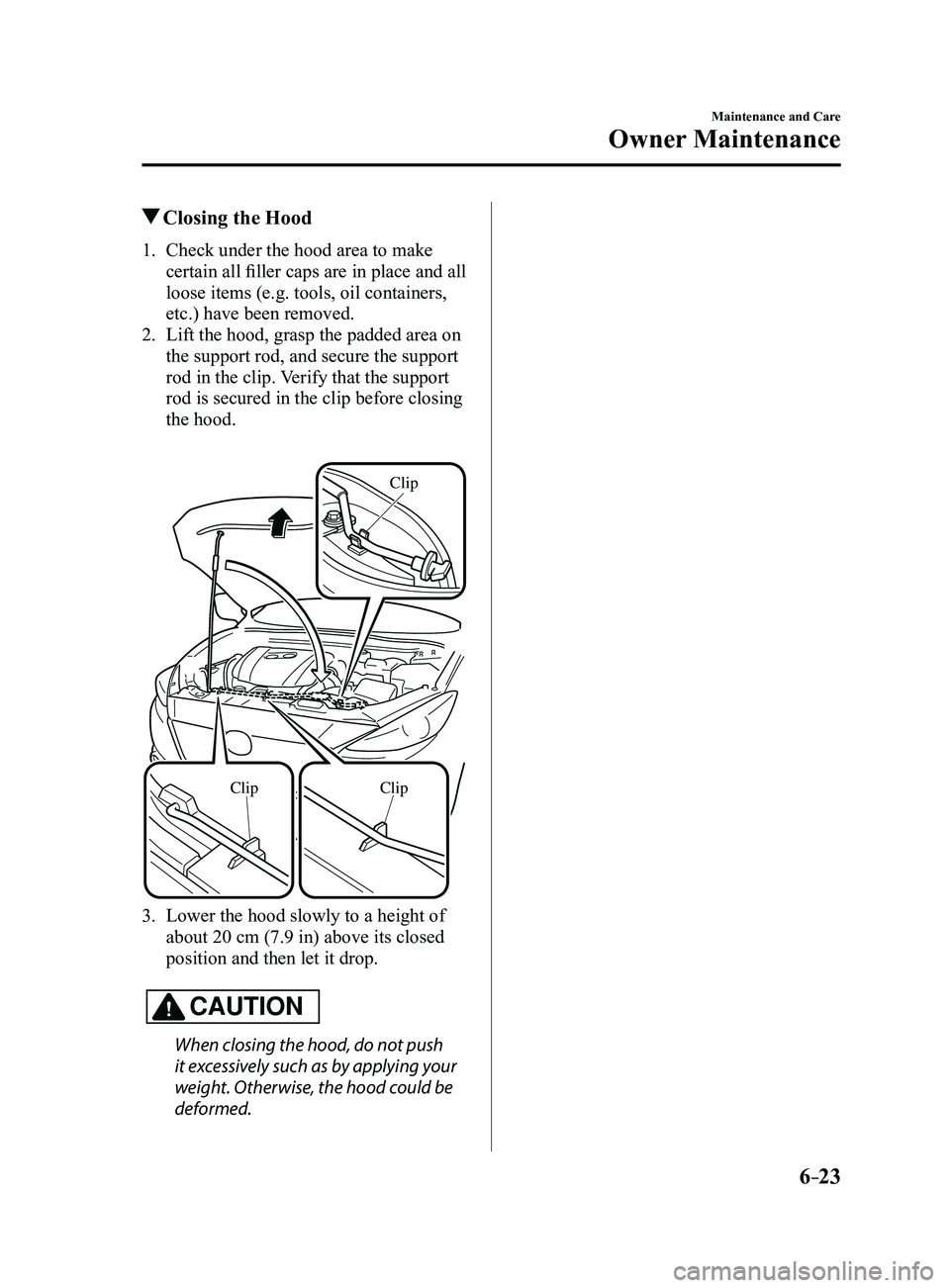
2. Lift the hood, grasp the padded area on
the support rod, and secure the support
rod in the clip. Verify that the support
rod is secured in the clip before closing
the hood.
ClipClip
Clip
3. Lower the hood slowly to a height of
about 20 cm (7.9 in) above its closed
position and then let it drop.
CAUTION
When closing the hood, do not push
it excessively such as by applying your
weight. Otherwise, the hood could be
deformed.
Mazda3_8FL6-EA-16F_Edition2.indb 232016/08/10 17:38:36
Page 456 of 612
6–44
Maintenance and Care
Owner Maintenance
*Some models.
CAUTION
Do not use your temporary spare tire
rim with a snow tire or a conventional
tire. Neither will properly fit and could
damage both tire and rim.
The temporary spare tire has a tread life
of less than 5,000 km (3,000 miles). The
tread life may be shorter depending on
driving conditions.
The temporary spare tire is for limited
use, however, if the tread wear solid-
band indicator appears, replace the tire
with the same type of temporary spare
(page
6-43).
NOTE
Tires degrade over time, even when
they are not being used on the road. It
is recommended that tires generally be
replaced when they are 6 years or older.
Heat caused by hot climates or frequent
high loading conditions can accelerate
the aging process. You should replace the
spare tire when you replace the other road
tires due to the aging of the spare tire. The
period in which the tire was manufactured
(both week and year) is indicated by a
4-digit number.
Refer to Tire Labeling on page
8-25.
Replacing a Wheel
WARNING
Always use wheels of the correct size on
your vehicle:Using a wrong-sized wheel is
dangerous. Braking and handling
could be affected, leading to loss of
control and an accident.
CAUTION
A wrong-sized wheel may adversely
affect:
Tire fit Wheel and bearing life Ground clearance Snow-chain clearance Speedometer calibration Headlight aim Bumper height Tire Pressure Monitoring System*
NOTE
When replacing a wheel, make sure
the new one is the same as the original
factory wheel in diameter, rim width,
and offset (inset/outset).
For details, contact an Authorized
Mazda Dealer.
Proper tire balancing provides the best
riding comfort and helps reduce tread
wear. Out-of-balance tires can cause
vibration and uneven wear, such as
cupping and flat spots.
Mazda3_8FL6-EA-16F_Edition2.indb 442016/08/10 17:38:49
Page 559 of 612
8–25
Customer Information and Reporting Safety Defects
Tire Information (U.S.A.)
Tire Labeling
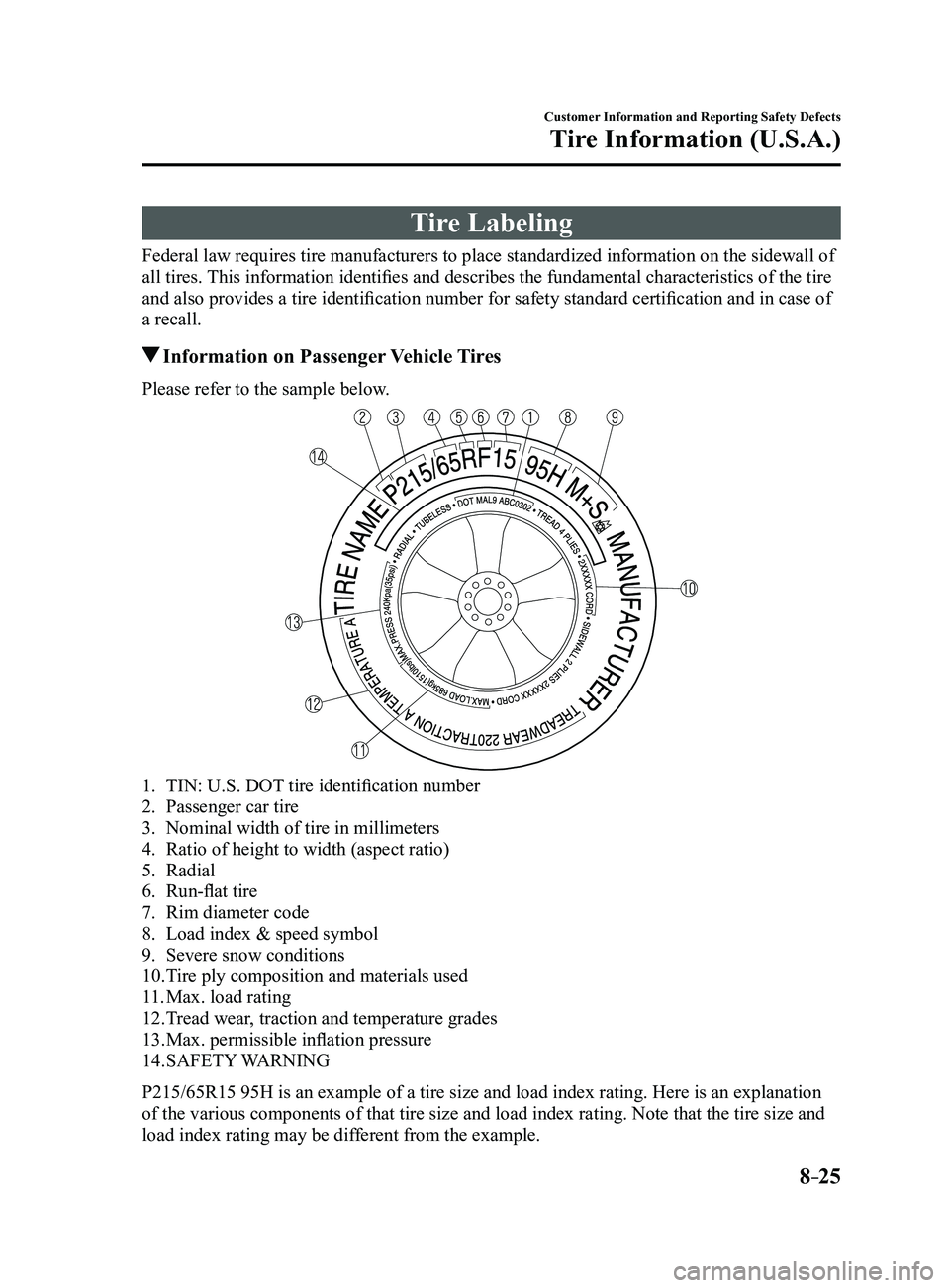
Federal law requires tire manufacturers to place standardized information on the sidewall of
all tires. This information identifies and describes the fundamental characteristics of the tire
and also provides a tire identification number for safety standard certification and in case of
a recall.
Information on Passenger Vehicle Tires
Please refer to the sample below.
1. TIN: U.S. DOT tire identification number
2. Passenger car tire
3. Nominal width of tire in millimeters
4. Ratio of height to width (aspect ratio)
5. Radial
6. Run-flat tire
7. Rim diameter code
8. Load index & speed symbol
9. Severe snow conditions
10. Tire ply composition and materials used
11. Max. load rating
12. Tread wear, traction and temperature grades
13. Max. permissible inflation pressure
14. SAFETY WARNING
P215/65R15 95H is an example of a tire size and load index rating. Here is an explanation
of the various components of that tire size and load index rating. Note that the tire size and
load index rating may be different from the example.
Mazda3_8FL6-EA-16F_Edition2.indb 252016/08/10 17:39:40
Page 560 of 612
8–26
Customer Information and Reporting Safety Defects
Tire Information (U.S.A.)
P
Indicates a tire that may be installed on cars, SUVs, minivans and light trucks as designated
by the Tire and Rim Association (T&RA).
NOTE
If your tire size does not begin with a letter this may mean it is designated by ei\
ther ETRTO
(European Tire and Rim Technical Organization) or JATMA (Japan Tire Manufacturing
Association).
215
“215” is the nominal width of the tire in millimeters. This three-digit number gives the
width in millimeters of the tire from sidewall edge to sidewall edge. In\
general, the larger
the number, the wider the tire.
65
“65” is the aspect ratio. This two-digit number indicates the tire's ratio of height to width.
R
“R” is the tire construction symbol. R indicates “Radial ply construction”.
15
“15” is the wheel rim diameter in inches.
95
“95” is the Load Index. This two-or three-digit number indicates how much weight each tire
can support.
H
“H” is the speed rating. The speed rating denotes the maximum speed for which the use of
the tire is rated.
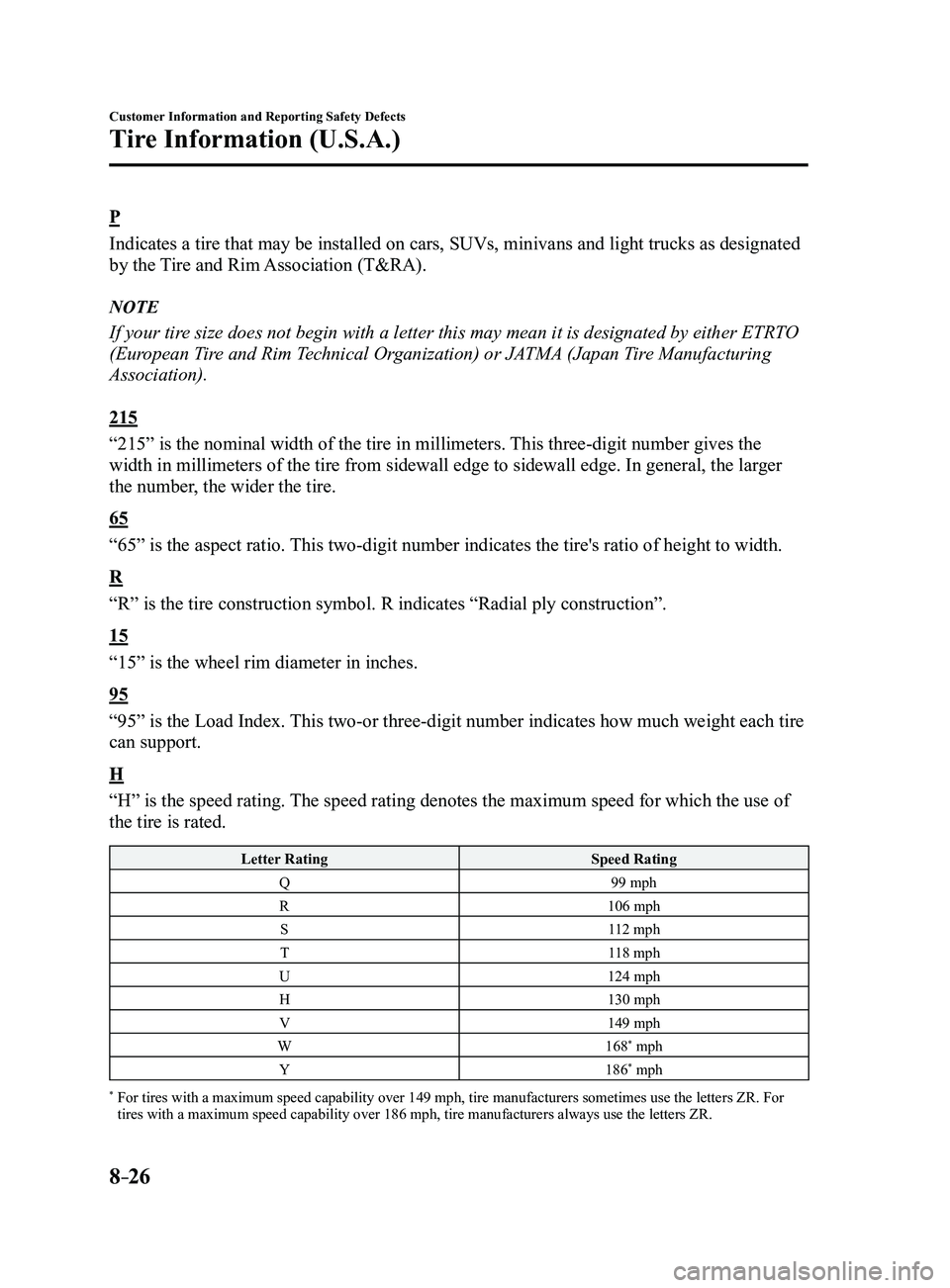
Letter RatingSpeed Rating
Q 99 mph
R 106 mph
S 112 mph
T 118 mph
U 124 mph
H 130 mph
V 149 mph
W 168
* mph
Y 186* mph
* For tires with a maximum speed capability over 149 mph, tire ma nufacturers sometimes use the letters ZR. For tires with a maximum speed capability over 186 mph, tire manufacturers always use the letters ZR.
Mazda3_8FL6-EA-16F_Edition2.indb 262016/08/10 17:39:41
Page 562 of 612
8–28
Customer Information and Reporting Safety Defects
Tire Information (U.S.A.)
Snow Tires
In some heavy snow areas, local governments may require true snow tires, those with very
deeply cut tread. These tires should only be used in pairs or placed on all four wheels. M\
ake
sure you purchase snow tires that are the same size and construction typ\
e as the other tires
on your vehicle.
SAFETY WARNING
The following safety warning appears on the tire's sidewall.
SERIOUS INJURY MAY RESULT FROM:
EXPLOSION OF TIRE/RIM ASSEMBLY DUE TO IMPROPER MOUNTING-MATCH
TIRE DIAMETER TO RIM DIAMETER; NEVER EXCEED 40 psi (275 kPa) TO SEAT
BEADS-ONLY SPECIALLY TRAINED PERSONS SHOULD MOUNT TIRES.
TIRE FAILURE DUE TO UNDER-INFLATION/OVERLOADING/DAMAGE-
FOLLOW OWNER'S MANUAL AND PLACARD IN VEHICLE-FREQUENTLY
CHECK INFLATION PRESSURE AND INSPECT FOR DAMAGE.
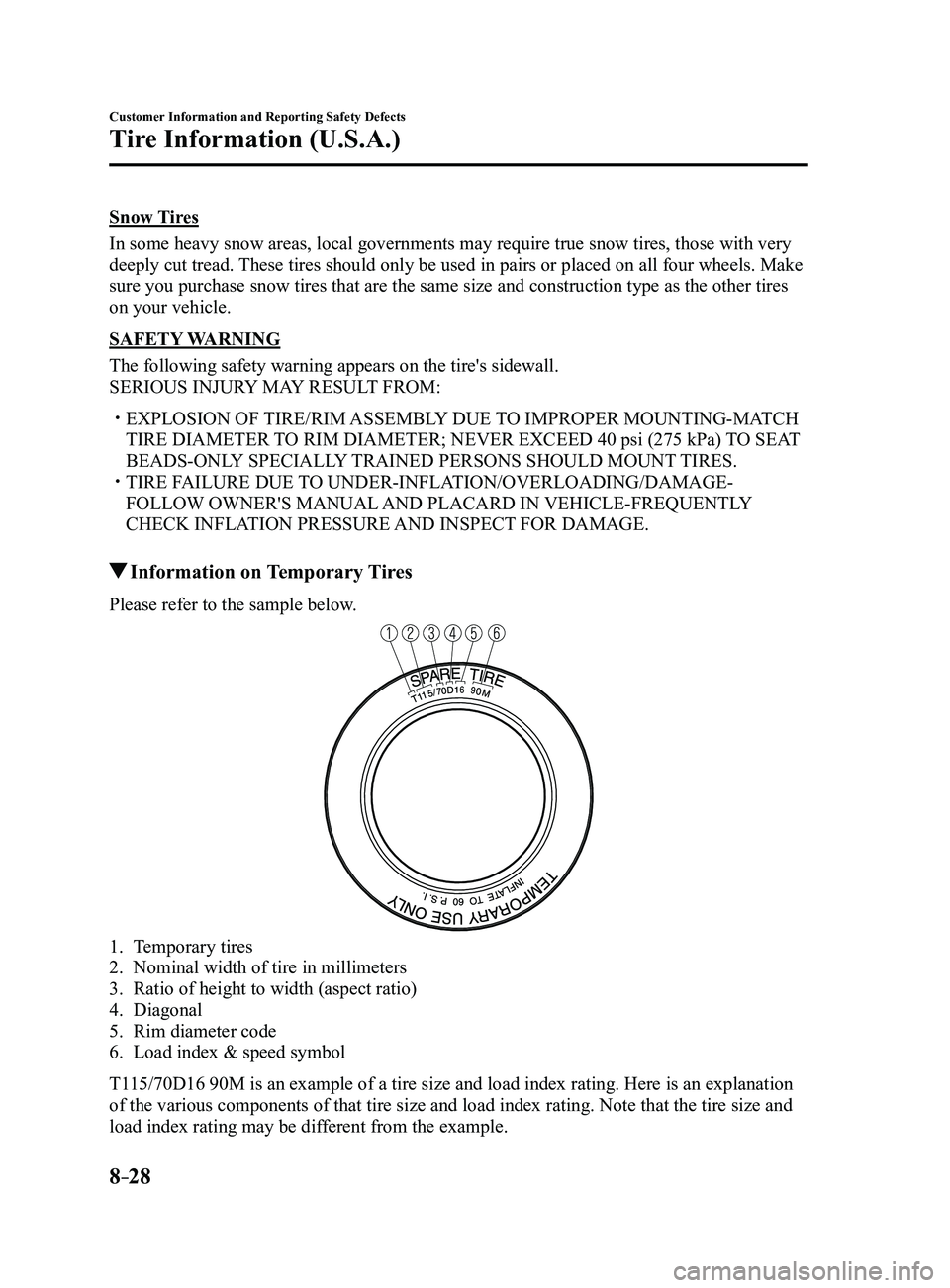
Information on Temporary Tires
Please refer to the sample below.
1. Temporary tires
2. Nominal width of tire in millimeters
3. Ratio of height to width (aspect ratio)
4. Diagonal
5. Rim diameter code
6. Load index & speed symbol
T115/70D16 90M is an example of a tire size and load index rating. Here is\
an explanation
of the various components of that tire size and load index rating. Note that the tire size and
load index rating may be different from the example.
Mazda3_8FL6-EA-16F_Edition2.indb 282016/08/10 17:39:41
Page 563 of 612
8–29
Customer Information and Reporting Safety Defects
Tire Information (U.S.A.)
T
Indicates a tire that may be installed on cars, SUVs, minivans and light trucks as designated
by the Tire and Rim Association (T&RA).
11 5
“115” is the nominal width of the tire in millimeters. This three-digit number gives the width
in millimeters of the tire from sidewall edge to sidewall edge. In gener\
al, the larger the
number, the wider the tire.
70
“70” is the aspect ratio. This two-digit number indicates the tire's ratio of height to width.
D
“D” is the tire construction symbol. D indicates “diagonal ply construction”.
16
“16” is the wheel rim diameter in inches.
90
“90” is the Load Index. This two-or three-digit number indicates how much weight each tire
can support.
M
“M” is the speed rating. The speed rating denotes the maximum speed for which the use of
the tire is rated.
Letter RatingSpeed Rating
M 81 mph
Mazda3_8FL6-EA-16F_Edition2.indb 292016/08/10 17:39:41
Page 590 of 612
9–6
Specifications
Specifications
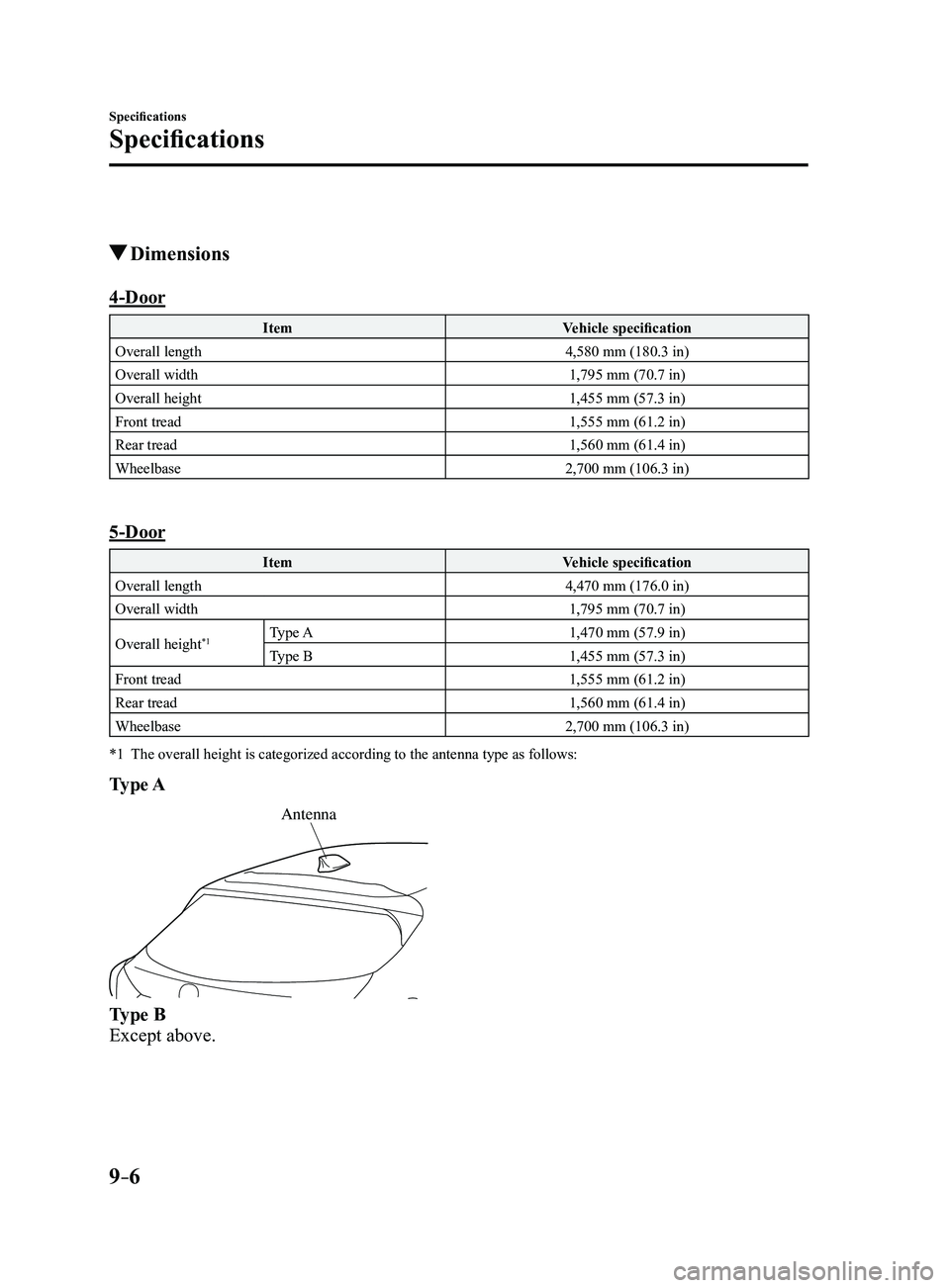
Dimensions
4-Door
ItemVehicle specification
Overall length 4,580 mm (180.3 in)
Overall width 1,795 mm (70.7 in)
Overall height 1,455 mm (57.3 in)
Front tread 1,555 mm (61.2 in)
Rear tread 1,560 mm (61.4 in)
Wheelbase 2,700 mm (106.3 in)
5-Door
ItemVehicle specification
Overall length 4,470 mm (176.0 in)
Overall width 1,795 mm (70.7 in)
Overall height
*1Type A 1,470 mm (57.9 in)
Type B 1,455 mm (57.3 in)
Front tread 1,555 mm (61.2 in)
Rear tread 1,560 mm (61.4 in)
Wheelbase 2,700 mm (106.3 in)
*1 The overall height is categorized according to the antenna type as follo\
ws:
Type A
Antenna
Type B
Except above.
Mazda3_8FL6-EA-16F_Edition2.indb 62016/08/10 17:39:53
Page 602 of 612
9–18
Specifications
Personalization Features
ItemFeatureFactory
Setting Available
Settings Settings
Change
Method
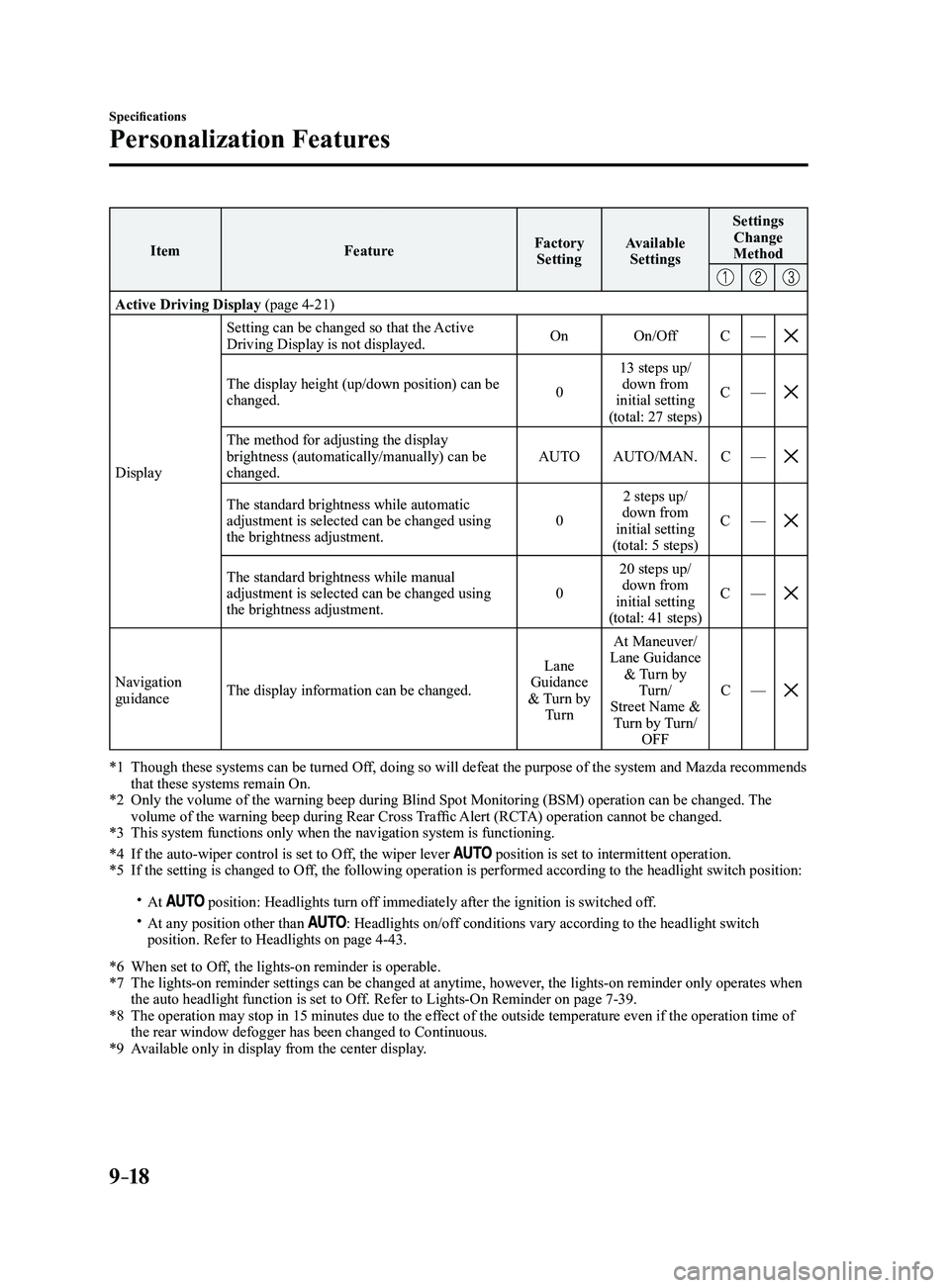
Active Driving Display (page 4-21)
Display Setting can be changed so that the Active
Driving Display is not displayed.
On
On/Off C—
The display height (up/down position) can be changed. 013 steps up/
down from
initial setting
(total: 27 steps) C
—
The method for adjusting the display brightness (automatically/manually) can be
changed. AUTO
AUTO/MAN. C—
The standard brightness while automatic adjustment is selected can be changed using
the brightness adjustment. 02 steps up/
down from
initial setting
(total: 5 steps) C
—
The standard brightness while manual adjustment is selected can be changed using
the brightness adjustment. 020 steps up/
down from
initial setting
(total: 41 steps) C
—
Navigation guidance The display information can be changed. Lane
Guidance
& Turn by Turn At Maneuver/
Lane Guidance & Turn by Turn/
Street Name & Turn by Turn/ OFF C
—
*1 Though these systems can be turned Of f, doing so will defeat the purpose of the system and Mazda recommends that these systems remain On.*2 Only the volume of the warning beep during Blind Spot Monitorin g (BSM) operation can be changed. The volume of the warning beep during Rear Cross Traffic Alert (RCTA) operation cannot be changed.*3 This system functions only when the navigation system is functioning.
*4 If the auto-wiper control is set to Off, the wiper lever position is set to intermittent operation.*5 If the setting is changed to Off, the following operation is performed according to the headlight switc\
h position:
At position: Headlights turn off immediately after the ignition is switched off. At any position other than : Headlights on/off conditions vary according to the headlight switch
position. Refer to Headlights on page 4-43.
*6 When set to Of f, the lights-on reminder is operable.*7 The lights-on reminder settings can be changed at anytime, however , the lights-on reminder only operates when the auto headlight function is set to Off. Refer to Lights-On Reminder on page 7-39.*8 The operation may stop in 15 minutes due to the effect of the outside temperature even if the operation time of the rear window defogger has been changed to Continuous.*9 Available only in display from the center display.
Mazda3_8FL6-EA-16F_Edition2.indb 182016/08/10 17:39:57