trunk MAZDA MODEL 3 4-DOOR 2017 Owner's Guide
[x] Cancel search | Manufacturer: MAZDA, Model Year: 2017, Model line: MODEL 3 4-DOOR, Model: MAZDA MODEL 3 4-DOOR 2017Pages: 612
Page 273 of 612
4–14 3
When Driving
i-ACTIVSENSE
NOTE
Under the following conditions, the radar sensor (front) may not be able to detect
vehicles ahead or obstructions correctly and each system may not operate normally.
The rear surface of a vehicle ahead does not reflect radio waves effectively, such as
an unloaded trailer or an automobile with a loading platform covered by a soft top,
vehicles with a hard plastic tailgate, and round-shaped vehicles.
Vehicles ahead with low vehicle height and thus less area for reflecting radio waves. Visibility is reduced due to a vehicle ahead casting off water, snow, or sand from its
tires and onto your windshield. The trunk/luggage compartment is loaded with heavy objects or the r ear passenger
seats are occupied. Ice, snow, or soiling is on the front surface of the front emblem. During inclement weather such as rain, snow, or sand storms. When driving near facilities or objects emitting str ong radio waves.
Under the following conditions, the radar sensor (fr ont) may not be able to detect
vehicles ahead or obstructions.
The beginning and end of a curve. Roads with continuous curves. Narrow lane roads due to road construction or lane closures. The vehicle ahead enters the radar sensor's blind spot. The vehicle ahead is running abnormally due to accident or vehicle damag\
e. Roads with repeated up and down slopes Driving on poor r oads or unpaved roads. The distance between your vehicle and the vehicle ahead is extr emely short. A vehicle suddenly comes close such as by cutting into the lane.
To prevent incorrect operation of the system, use tires of the same specified size,
manufacturer, brand, and tread pattern on all four wheels. In addition, do not use tires
with significantly different wear patterns or tire pressures on the same vehicle (Including
the temporary spare tire).
If the battery power is weak, the system may not operate correctly. If the vehicle is driven on a road with little traffic and few vehicles ahead or obstructions
for the radar sensor (front) to detect, the sensor detects that the radar sensor (front) is
dirty and the Smart Brake Support/Smart City Brake Support (SBS/SCBS) \
Warning Light
(amber) may be temporarily turned on. However, it does not indicate a malfunction.
Mazda3_8FL6-EA-16F_Edition2.indb 1432016/08/10 17:37:00
Page 285 of 612

4–155
When Driving
Rear View Monitor
*Some models.
Rear View Monitor*
The rear view monitor provides visual images of the rear of the vehicle \
when reversing.
WARNING
Always drive carefully confirming the safety of the rear and the surrounding conditions
by looking directly with your eyes:Reversing the vehicle by only looking at the screen is dangerous as it may cause an
accident or a collision with an object. The rear view monitor is only a visual assist device
when reversing the vehicle. The images on the screen may be different from the actual
conditions.
CAUTION
Do not use the rear view monitor under the following conditions: Using the rear view
monitor under the following conditions is dangerous and could result in injury or vehicle
damage or both.
Icy or snow-covered roads. Tire chains or a temporary spare tire is installed. The liftgate/trunk lid is not fully closed. The vehicle is on a road incline.
When the display is cold, images may course across the monitor or the screen and may be
dimmer than usual, which could cause difficulty in confirming the surrounding conditions
of the vehicle. Always drive carefully confirming the safety of the rear and the surrounding
conditions by looking directly with your eyes.
Do not apply excessive force to the camera. The camera position and angle may deviate. Do not disassemble, modify, or remove it as it may no longer be waterproof. The camera cover is made of plastic. Do not apply degreasing agents, organic solvents,
wax, or glass coating agents to the camera cover. If any are spilled on the cover, wipe off
with a soft cloth immediately.
Do not rub the camera cover forcefully with an abrasive or hard brush. The camera cover or
lens may be scratched which might affect the images.
Mazda3_8FL6-EA-16F_Edition2.indb 1552016/08/10 17:37:05
Page 287 of 612
4–157
When Driving
Rear View Monitor
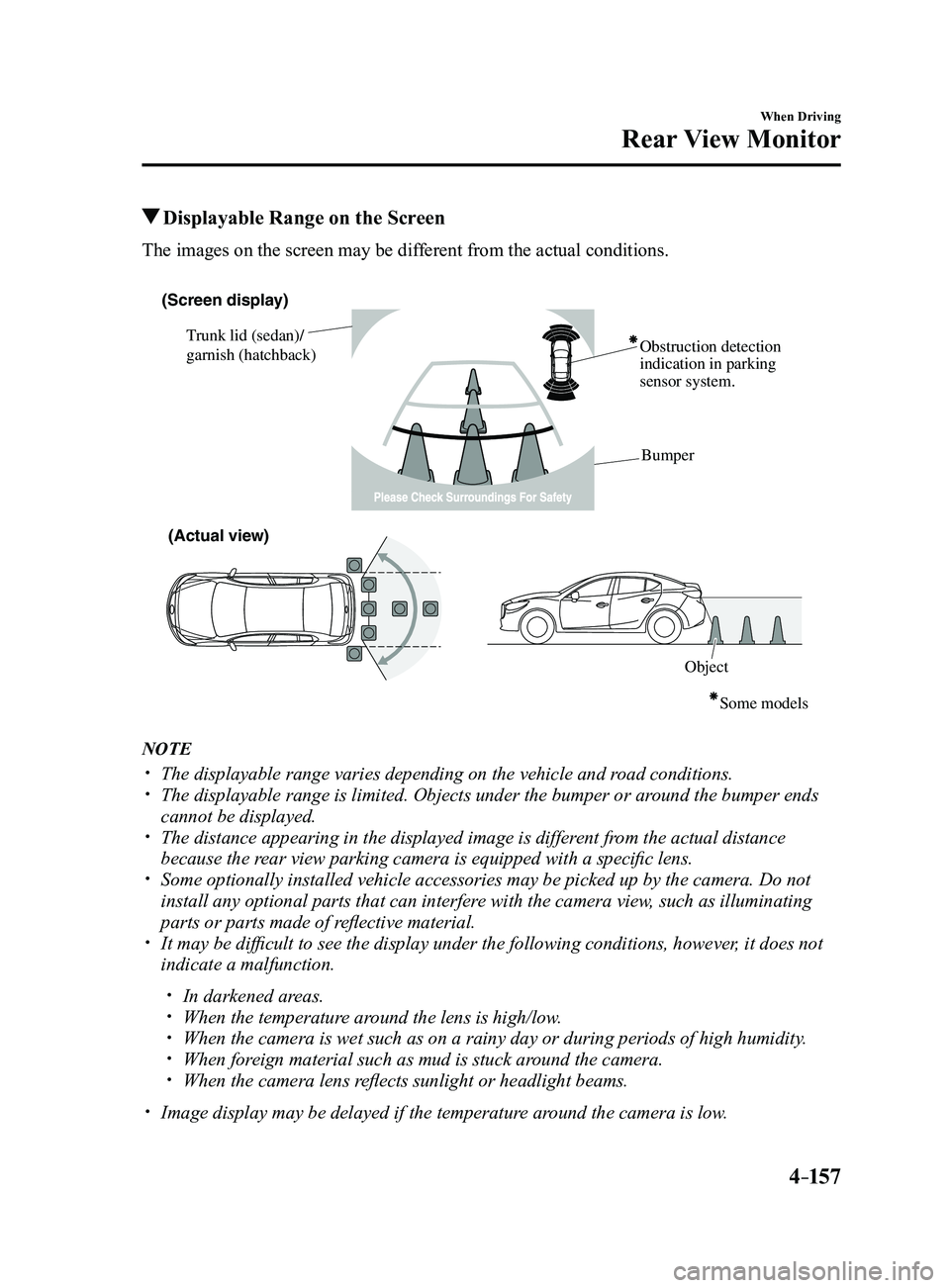
Displayable Range on the Screen
The images on the screen may be different from the actual conditions.
(Screen display)
Trunk lid (sedan)/
garnish (hatchback) Obstruction detection
indication in parking
sensor system.
Bumper
ObjectSome models
(Actual view)
NOTE
The displayable range varies depending on the vehicle and r
oad conditions. The displayable range is limited. Objects under the bumper or ar ound the bumper ends
cannot be displayed. The distance appearing in the displayed image is different from the actual distance
because the rear view parking camera is equipped with a specific lens. Some optionally installed vehicle accessories may be picked up by the ca\
mera. Do not
install any optional parts that can interfere with the camera view, such as illuminating
parts or parts made of reflective material.
It may be difficult to see the display under the following condi tions, however, it does not
indicate a malfunction.
In darkened areas. When the temperatur e around the lens is high/low. When the camera is wet such as on a rainy day or during periods of high \
humidity . When foreign material such as mud is stuck around the camera. When the camera lens reflects sunlight or headlight beams.
Image display may be delayed if the temperatur e around the camera is low.
Mazda3_8FL6-EA-16F_Edition2.indb 1572016/08/10 17:37:06
Page 404 of 612
5–112
Interior Features
Interior Equipment
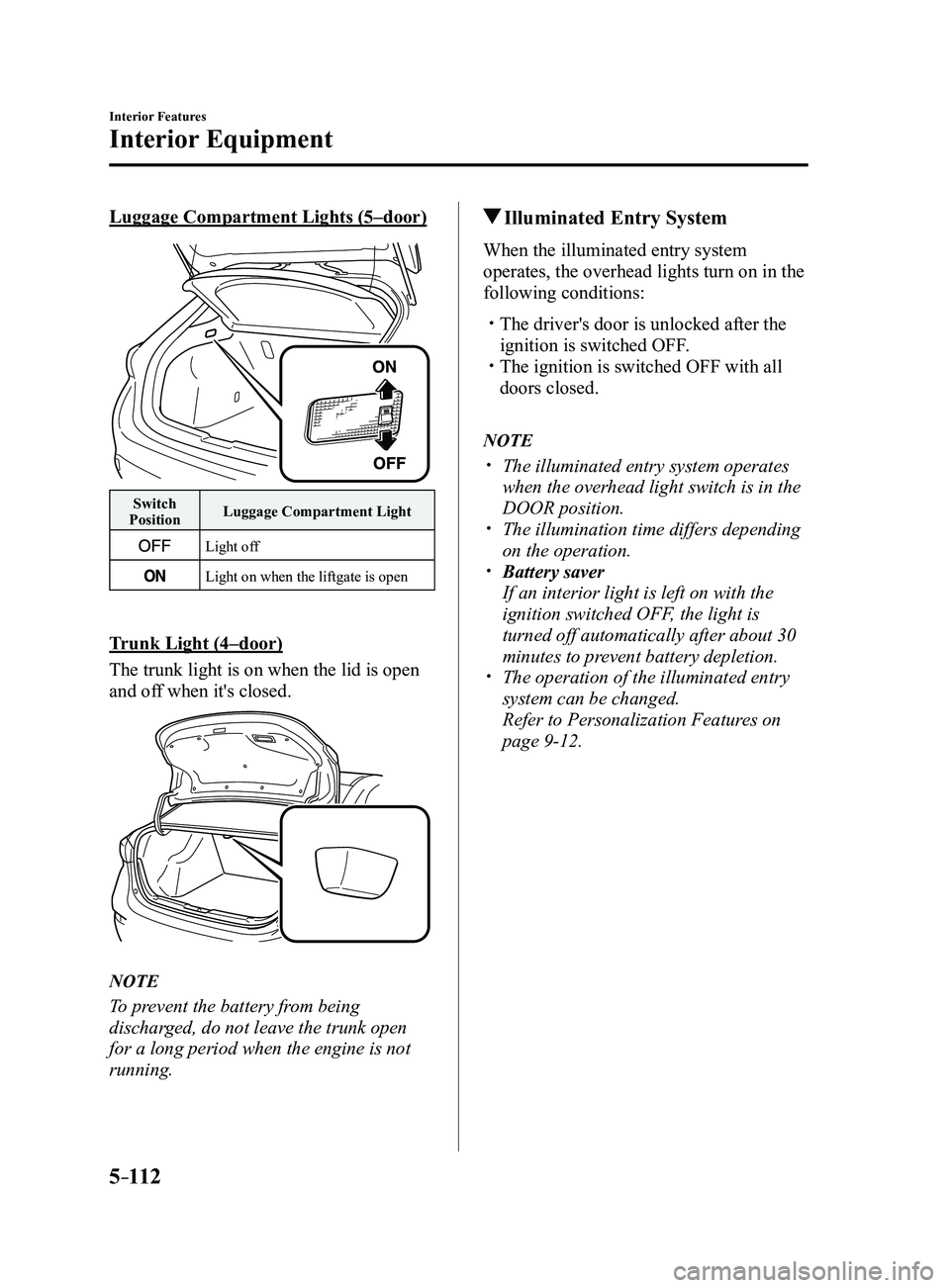
Luggage Compartment Lights (5–door)
Switch
Position Luggage Compartment Light
Light off
Light on when the liftgate is open
Trunk Light (4–door)
The trunk light is on when the lid is open
and off when it's closed.
NOTE
To prevent the battery from being
discharged, do not leave the trunk open
for a long period when the engine is not
running.
Illuminated Entry System
When the illuminated entry system
operates, the overhead lights turn on in the
following conditions:
The driver's door is unlocked after the
ignition is switched OFF. The ignition is switched OFF with all
doors closed.
NOTE
The illuminated entry system operates
when the overhead light switch is in the
DOOR position.
The illumination time differs depending
on the operation. Battery saver
If an interior light is left on with the
ignition switched OFF, the light is
turned off automatically after about 30
minutes to prevent battery depletion.
The operation of the illuminated entry
system can be changed.
Refer to Personalization Featur
es on
page 9-12.
Mazda3_8FL6-EA-16F_Edition2.indb 1122016/08/10 17:38:23
Page 457 of 612
6–45
Maintenance and Care
Owner Maintenance
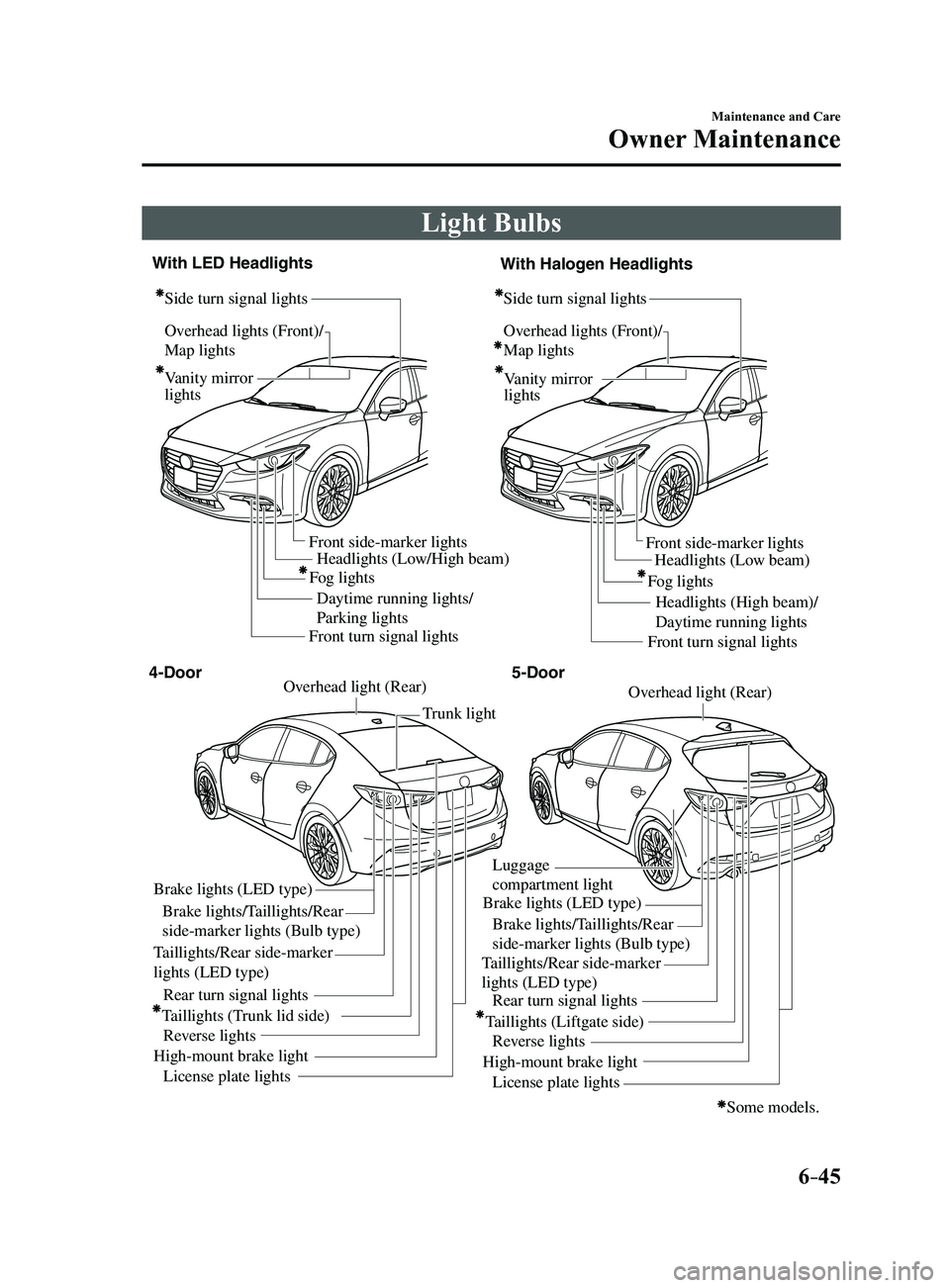
Light Bulbs
Overhead lights (Front)/
Map lights
Vanity mirror
lightsHeadlights (Low/High beam)
Daytime running lights/
Parking lights Headlights (Low beam)
Headlights (High beam)/
Daytime running lights
Fog lights
Front side-marker lights
Front side-marker lights
Side turn signal lights
Side turn signal lightsOverhead lights (Front)/
Map lights
Vanity mirror
lights
Some models.
Front turn signal lights Front turn signal lights
Brake lights (LED type)
Brake lights/Taillights/Rear
side-marker lights (Bulb type)
Taillights/Rear side-marker
lights (LED type) Taillights/Rear side-marker
lights (LED type)
Rear turn signal lights
Taillights (Trunk lid side) Reverse lights
High-mount brake light License plate lights Trunk light
Overhead light (Rear)Overhead light (Rear)
Brake lights (LED type)
Luggage
compartment light
Brake lights/Taillights/Rear
side-marker lights (Bulb type)
Rear turn signal lights
Taillights (Liftgate side) Reverse lights
High-mount brake light License plate lights
4-Door 5-Door
With LED Headlights
With Halogen Headlights
Fog lights
Mazda3_8FL6-EA-16F_Edition2.indb 452016/08/10 17:38:49
Page 462 of 612
6–50
Maintenance and Care
Owner Maintenance
*Some models.
Side turn signal lights*, Brake lights
(LED type), Taillights/Rear side-marker
lights (LED type), Taillights (Trunk lid
side/Liftgate side), High-mount brake
light
The LED bulb cannot be replaced as a
single unit because it is an integrated unit.
The LED bulb has to be replaced with the
unit. We recommend an Authorized Mazda
Dealer when the replacement is necessary.
Rear turn signal lights, Brake lights/
Taillights/Rear side-marker lights (Bulb
type)
4–Door
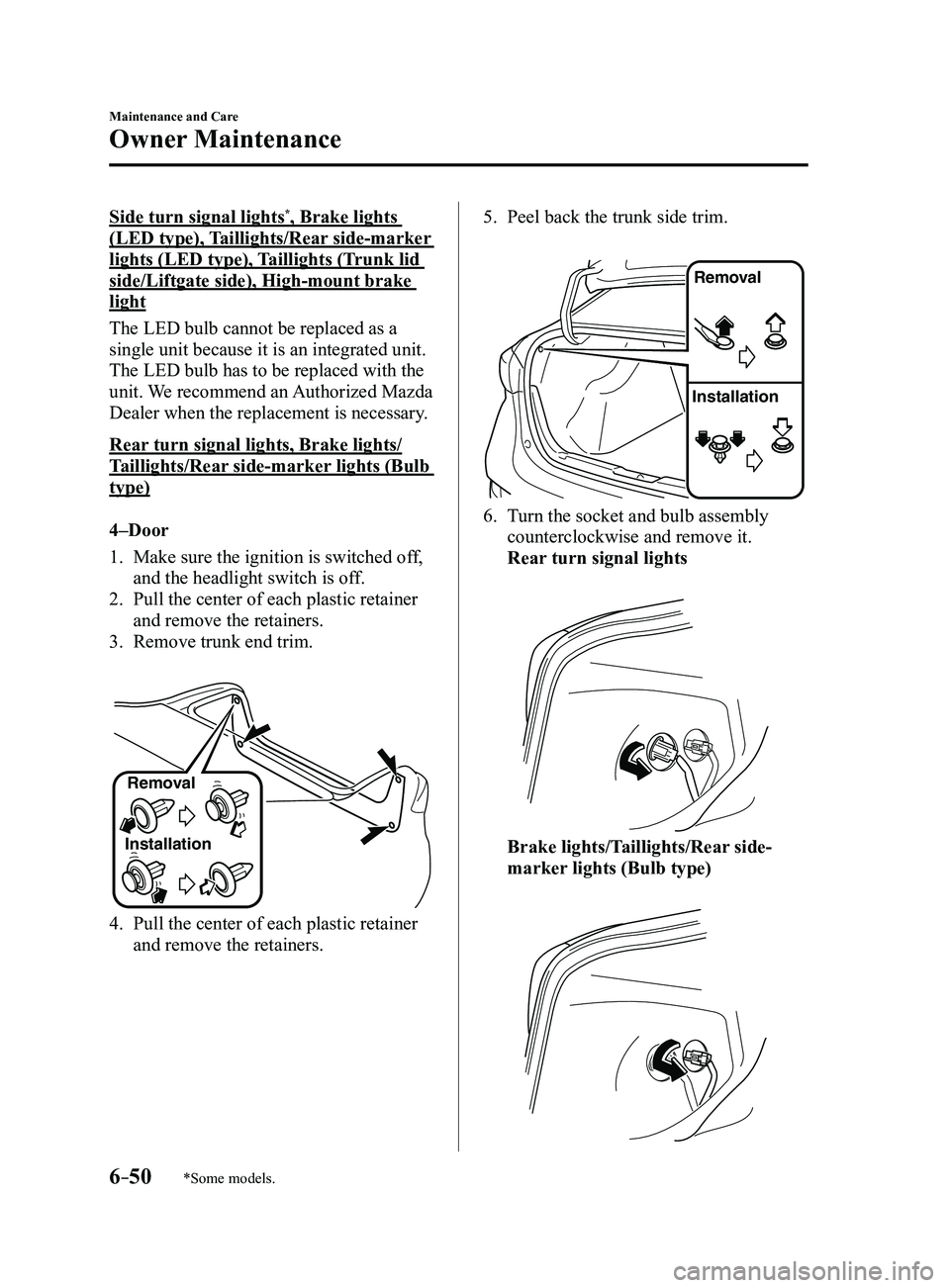
1. Make sure the ignition is switched of f,
and the headlight switch is off.
2. Pull the center of each plastic retainer
and remove the retainers.
3. Remove trunk end trim.
InstallationRemoval
4. Pull the center of each plastic retainer
and remove the retainers.
5. Peel back the trunk side trim.
Remova
l
Installation
6. Turn the socket and bulb assembly
counterclockwise and remove it.
Rear turn signal lights
Brake lights/Taillights/Rear side-
marker lights (Bulb type)
Mazda3_8FL6-EA-16F_Edition2.indb 502016/08/10 17:38:53
Page 467 of 612
6–55
Maintenance and Care
Owner Maintenance
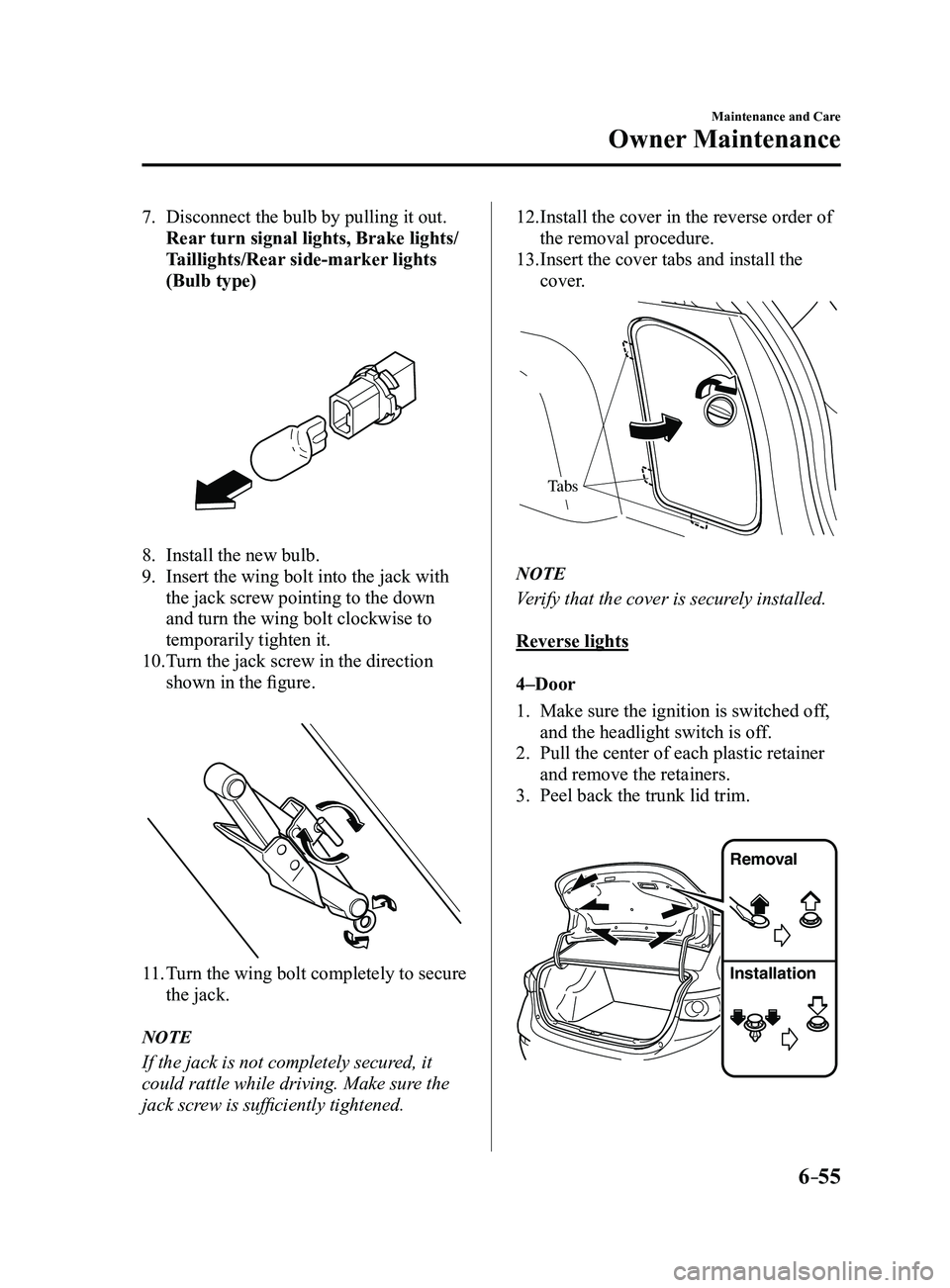
7. Disconnect the bulb by pulling it out.
Rear turn signal lights, Brake lights/
Taillights/Rear side-marker lights
(Bulb type)
8. Install the new bulb.
9. Insert the wing bolt into the jack with
the jack screw pointing to the down
and turn the wing bolt clockwise to
temporarily tighten it.
10. Turn the jack screw in the direction
shown in the figure.
11. Turn the wing bolt completely to secure
the jack.
NOTE
If the jack is not completely secured, it
could rattle while driving. Make sure the
jack screw is sufficiently tightened.
12. Install the cover in the reverse order of
the removal procedure.
13. Insert the cover tabs and install the
cover.
Tabs
NOTE
Verify that the cover is securely installed.
Reverse lights
4–Door
1. Make sure the ignition is switched off,
and the headlight switch is off.
2. Pull the center of each plastic retainer
and remove the retainers.
3. Peel back the trunk lid trim.
Removal
Installation
Mazda3_8FL6-EA-16F_Edition2.indb 552016/08/10 17:38:56
Page 469 of 612
6–57
Maintenance and Care
Owner Maintenance
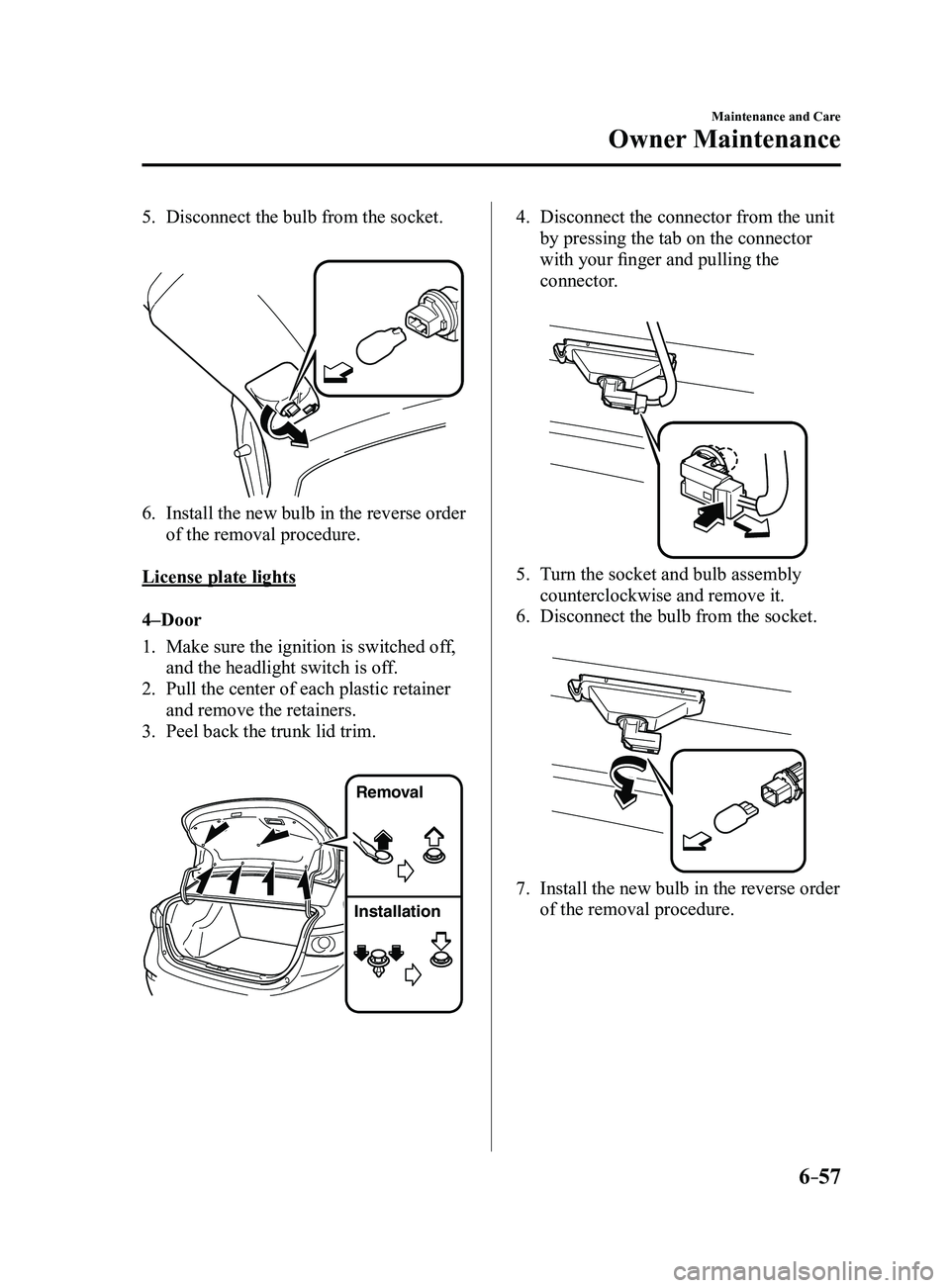
5. Disconnect the bulb from the socket.
6. Install the new bulb in the reverse order
of the removal procedure.
License plate lights
4–Door
1. Make sure the ignition is switched of f,
and the headlight switch is off.
2. Pull the center of each plastic retainer
and remove the retainers.
3. Peel back the trunk lid trim.
Removal
Installation
4. Disconnect the connector from the unit
by pressing the tab on the connector
with your finger and pulling the
connector.
5. Turn the socket and bulb assembly
counterclockwise and remove it.
6. Disconnect the bulb from the socket.
7. Install the new bulb in the reverse order
of the removal procedure.
Mazda3_8FL6-EA-16F_Edition2.indb 572016/08/10 17:38:58
Page 471 of 612
6–59
Maintenance and Care
Owner Maintenance
*Some models.
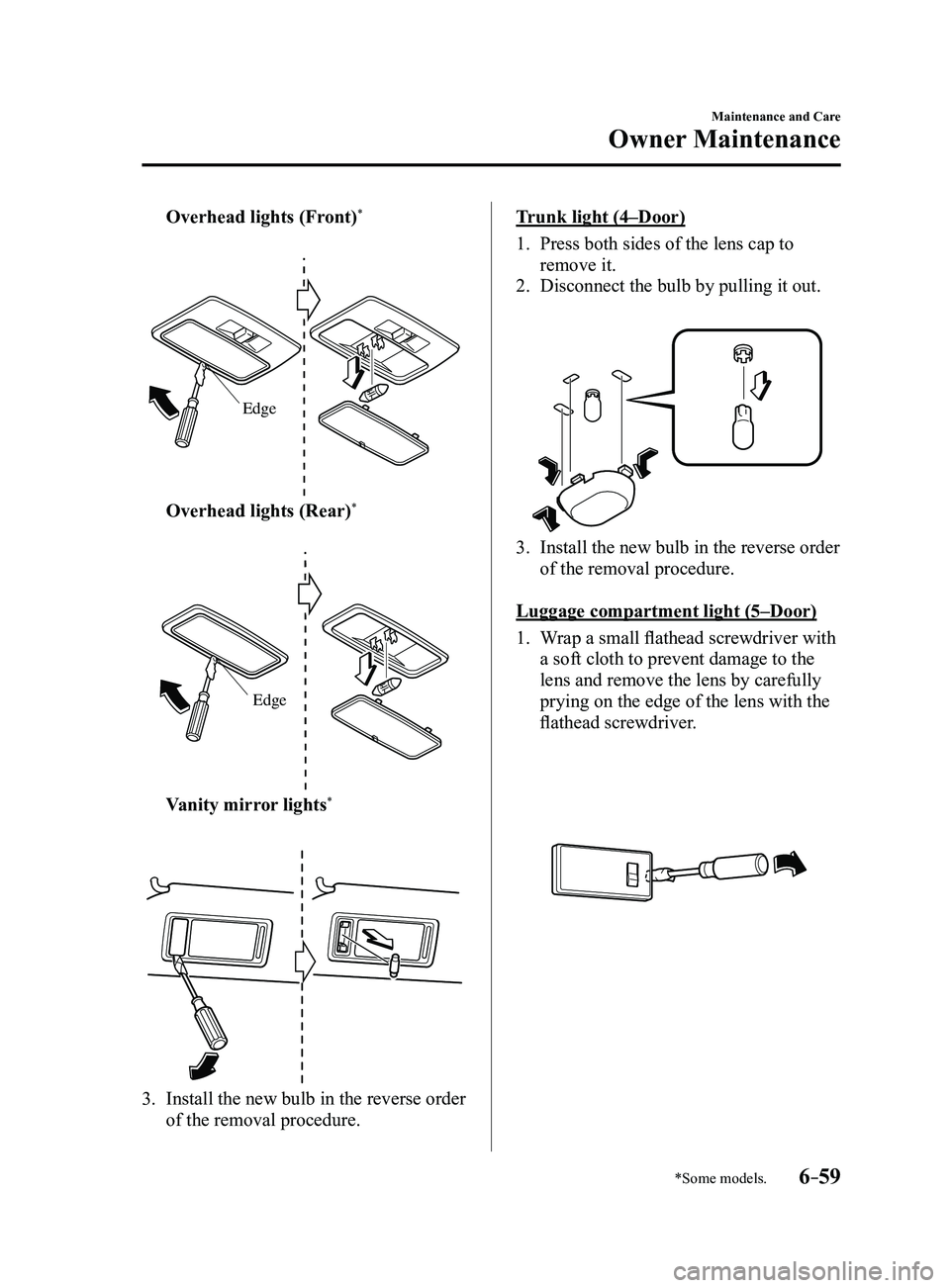
Overhead lights (Front)*
Edge
Overhead lights (Rear)*
Edge
Vanity mirror lights*
3. Install the new bulb in the reverse order
of the removal procedure.
Trunk light (4–Door)
1. Press both sides of the lens cap to
remove it.
2. Disconnect the bulb by pulling it out.
3. Install the new bulb in the reverse order
of the removal procedure.
Luggage compartment light (5–Door)
1. Wrap a small flathead screwdriver with
a soft cloth to prevent damage to the
lens and remove the lens by carefully
prying on the edge of the lens with the
flathead screwdriver.
Mazda3_8FL6-EA-16F_Edition2.indb 592016/08/10 17:39:00
Page 489 of 612
7–1
*Some models.
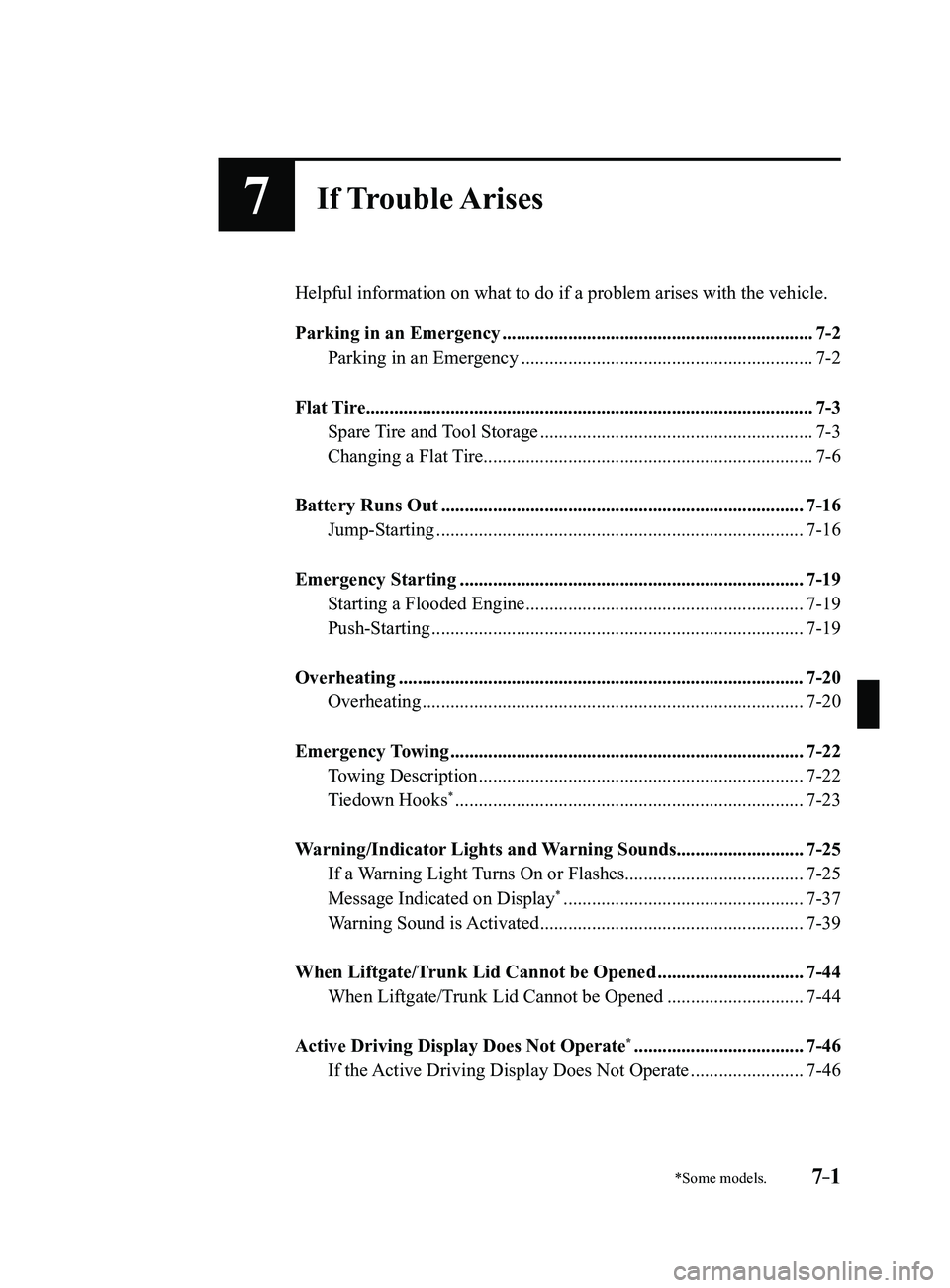
7If Trouble Arises
Helpful information on what to do if a problem arises with the vehicle.
Parking in an Emergency
..................................................................7-2
Parking in an Emergency ..............................................................7-2
Flat Tire........................................................................\
.......................7-3
Spare Tire and Tool Storage ..........................................................7-3
Changing a Flat Tire ......................................................................7-6
Battery Runs Out ........................................................................\
.....7-16
Jump-Starting ........................................................................\
......7-16
Emergency Starting ........................................................................\
.7-19
Starting a Flooded Engine ...........................................................7-19
Push-Starting ........................................................................\
.......7-19
Overheating ........................................................................\
..............7-20
Overheating ........................................................................\
.........7-20
Emergency Towing ........................................................................\
...7-22
Towing Description .....................................................................7-22
Tiedown Hooks* ........................................................................\
..7-23
Warning/Indicator Lights and Warning Sounds ...........................7-25
If a Warning Light Turns On or Flashes ......................................7-25
Message Indicated on Display* ...................................................7-37
Warning Sound is Activated ........................................................7-39
When Liftgate/Trunk Lid Cannot be Opened ...............................7-44
When Liftgate/Trunk Lid Cannot be Opened .............................7-44
Active Driving Display Does Not Operate* ....................................7-46
If the Active Driving Display Does Not Operate ........................7-46
Mazda3_8FL6-EA-16F_Edition2.indb 12016/08/10 17:39:07