key MAZDA MODEL 3 4-DOOR 2017 Service Manual
[x] Cancel search | Manufacturer: MAZDA, Model Year: 2017, Model line: MODEL 3 4-DOOR, Model: MAZDA MODEL 3 4-DOOR 2017Pages: 612
Page 156 of 612
4–26
When Driving
Instrument Cluster and Display
*Some models.
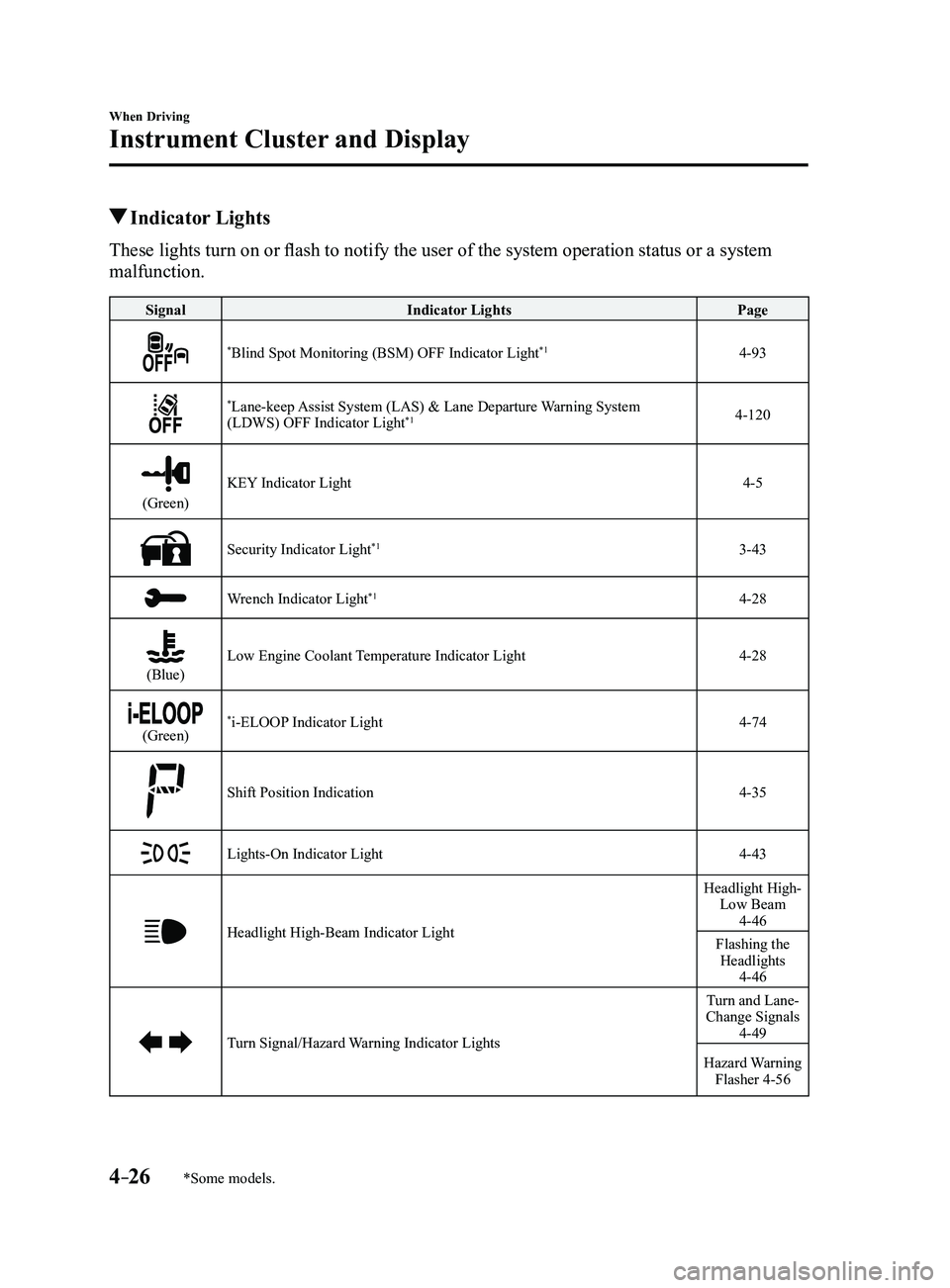
Indicator Lights
These lights turn on or flash to notify the user of the system operation status or a system
malfunction.
SignalIndicator Lights Page
*Blind Spot Monitoring (BSM) OFF Indicator Light*14-93
*Lane-keep Assist System (LAS) & Lane Departure Warning System
(LDWS) OFF Indicator Light*14-120
(Green)
KEY Indicator Light4-5
Security Indicator Light*13-43
Wrench Indicator Light*14-28
(Blue)Low Engine Coolant Temperature Indicator Light4-28
(Green)*i-ELOOP Indicator Light4-74
Shift Position Indication4-35
Lights-On Indicator Light4-43
Headlight High-Beam Indicator Light
Headlight High- Low Beam
4-46
Flashing the Headlights
4-46
Turn Signal/Hazard Warning Indicator Lights
Turn and Lane-
Change Signals
4-49
Hazard Warning Flasher 4-56
Mazda3_8FL6-EA-16F_Edition2.indb 262016/08/10 17:36:01
Page 376 of 612
5–84
Interior Features
Bluetooth®
Favorites Contacts
A maximum of 50 contacts can be
registered. It will take less time to make a
call after registering the telephone number.
In addition, you do not have to look for the
person you want to call in the phonebook.
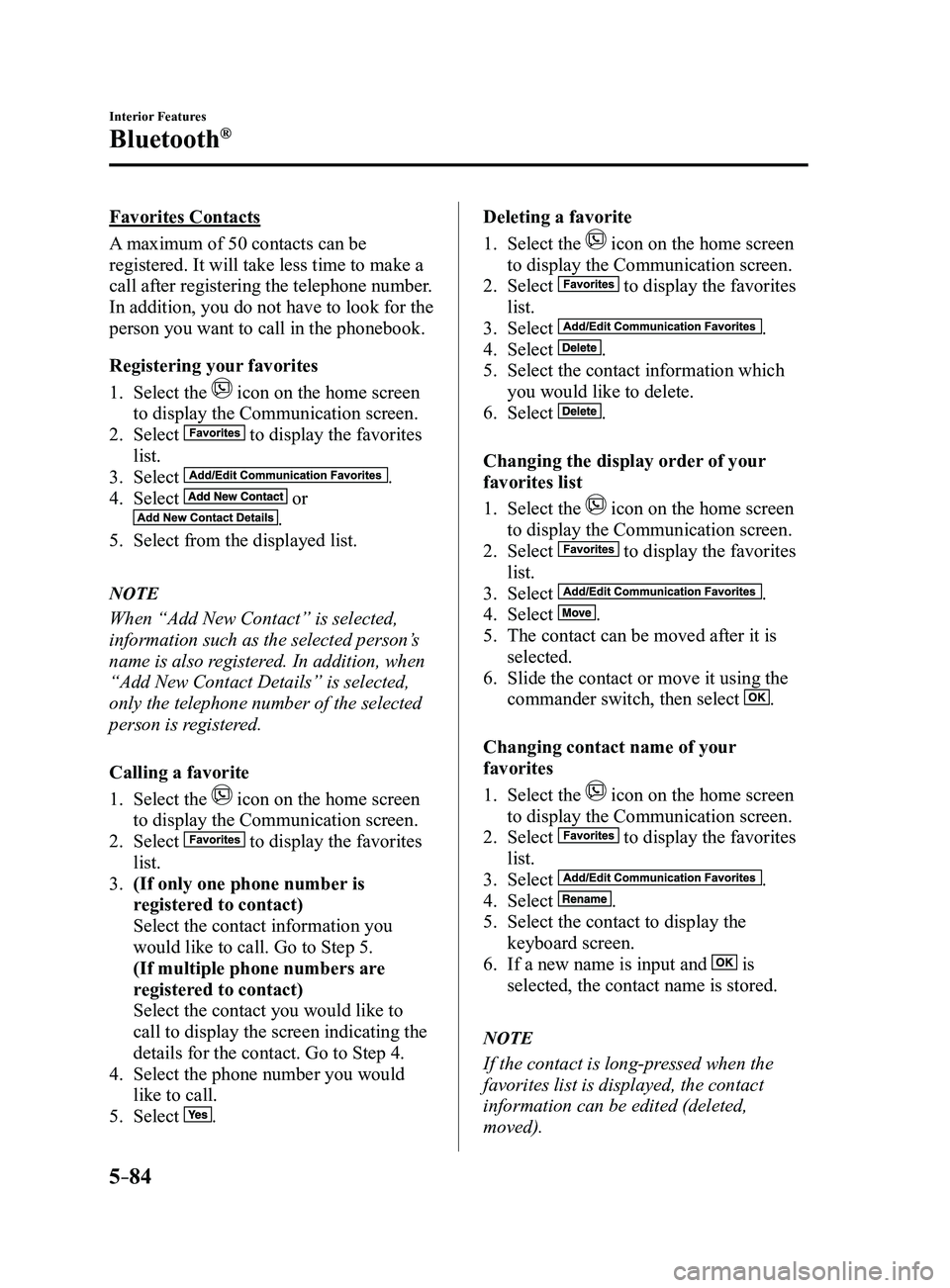
Registering your favorites
1. Select the icon on the home screen
to display the Communication screen.
2. Select to display the favorites
list.
3. Select .
4. Select or
.
5. Select from the displayed list.
NOTE
When “Add New Contact” is selected,
information such as the selected person’s
name is also registered. In addition, when
“Add New Contact Details” is selected,
only the telephone number of the selected
person is registered.
Calling a favorite
1. Select the icon on the home screen
to display the Communication screen.
2. Select to display the favorites
list.
3. (If only one phone number is
registered to contact)
Select the contact information you
would like to call. Go to Step 5.
(If multiple phone numbers are
registered to contact)
Select the contact you would like to
call to display the screen indicating the
details for the contact. Go to Step 4.
4. Select the phone number you would
like to call.
5. Select .
Deleting a favorite
1. Select the icon on the home screen
to display the Communication screen.
2. Select to display the favorites
list.
3. Select .
4. Select .
5. Select the contact information which
you would like to delete.
6. Select .
Changing the display order of your
favorites list
1. Select the icon on the home screen
to display the Communication screen.
2. Select to display the favorites
list.
3. Select .
4. Select .
5. The contact can be moved after it is
selected.
6. Slide the contact or move it using the
commander switch, then select .
Changing contact name of your
favorites
1. Select the icon on the home screen
to display the Communication screen.
2. Select to display the favorites
list.
3. Select .
4. Select .
5. Select the contact to display the
keyboard screen.
6. If a new name is input and is
selected, the contact name is stored.
NOTE
If the contact is long-pressed when the
favorites list is displayed, the contact
information can be edited (deleted,
moved).
Mazda3_8FL6-EA-16F_Edition2.indb 842016/08/10 17:38:04
Page 382 of 612
5–90
Interior Features
Bluetooth®
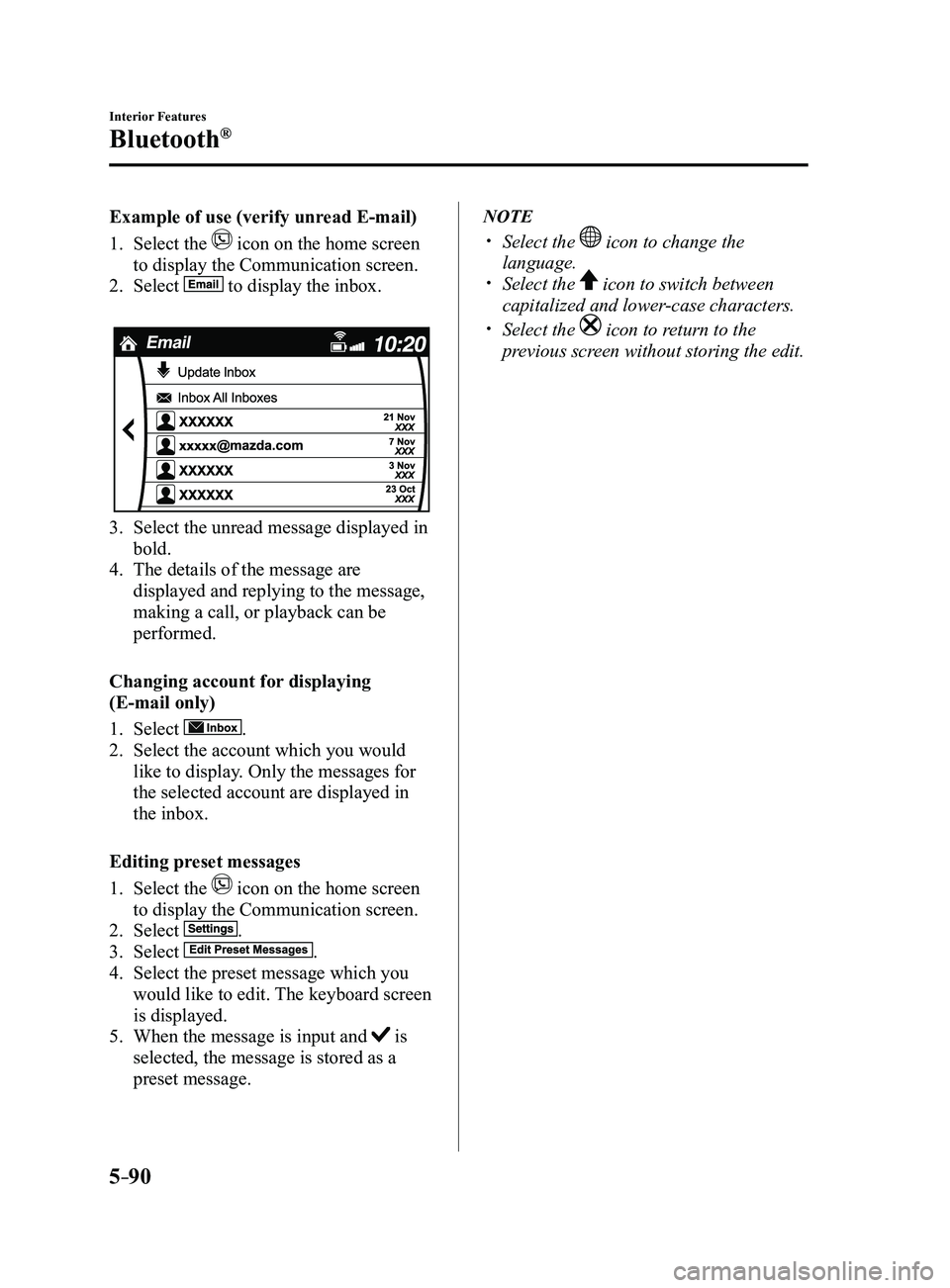
Example of use (verify unread E-mail)
1. Select the icon on the home screen
to display the Communication screen.
2. Select to display the inbox.
3. Select the unread message displayed in
bold.
4. The details of the message are
displayed and replying to the message,
making a call, or playback can be
performed.
Changing account for displaying
(E-mail only)
1. Select .
2. Select the account which you would
like to display. Only the messages for
the selected account are displayed in
the inbox.
Editing preset messages
1. Select the icon on the home screen
to display the Communication screen.
2. Select .
3. Select .
4. Select the preset message which you
would like to edit. The keyboard screen
is displayed.
5. When the message is input and is
selected, the message is stored as a
preset message.
NOTE
Select the icon to change the
language. Select the icon to switch between
capitalized and lower-case characters.
Select the icon to return to the
previous screen without storing the edit.
Mazda3_8FL6-EA-16F_Edition2.indb 902016/08/10 17:38:12
Page 413 of 612

6–1
6Maintenance and Care
How to keep your Mazda in top condition.
Essential Information
........................................................................\
6-2
Introduction ........................................................................\
...........6-2
Scheduled Maintenance .....................................................................6-4
Scheduled Maintenance (U.S.A., Canada, and Puerto Rico) ........6-4
Scheduled Maintenance (Mexico) ..............................................6-11
Maintenance Monitor ..................................................................6-18
Owner Maintenance ........................................................................\
.6-20
Owner Maintenance Precautions ................................................6-20
Hood ........................................................................\
....................6-22
Engine Compartment Overview .................................................6-24
Engine Oil ........................................................................\
...........6-25
Engine Coolant ........................................................................\
....6-28
Brake/Clutch Fluid ......................................................................6-30
Washer Fluid ........................................................................\
.......6-30
Body Lubrication ........................................................................\
6-31
Wiper Blades ........................................................................\
.......6-32
Battery ........................................................................\
.................6-36
Key Battery Replacement ...........................................................6-38
Tires........................................................................\
.....................6-41
Light Bulbs ........................................................................\
..........6-45
Fuses ........................................................................\
...................6-60
Appearance Care ........................................................................\
......6-66
Exterior Care ........................................................................\
.......6-66
Interior Care ........................................................................\
........6-72
Mazda3_8FL6-EA-16F_Edition2.indb 12016/08/10 17:38:29
Page 450 of 612
6–38
Maintenance and Care
Owner Maintenance
Battery Maintenance
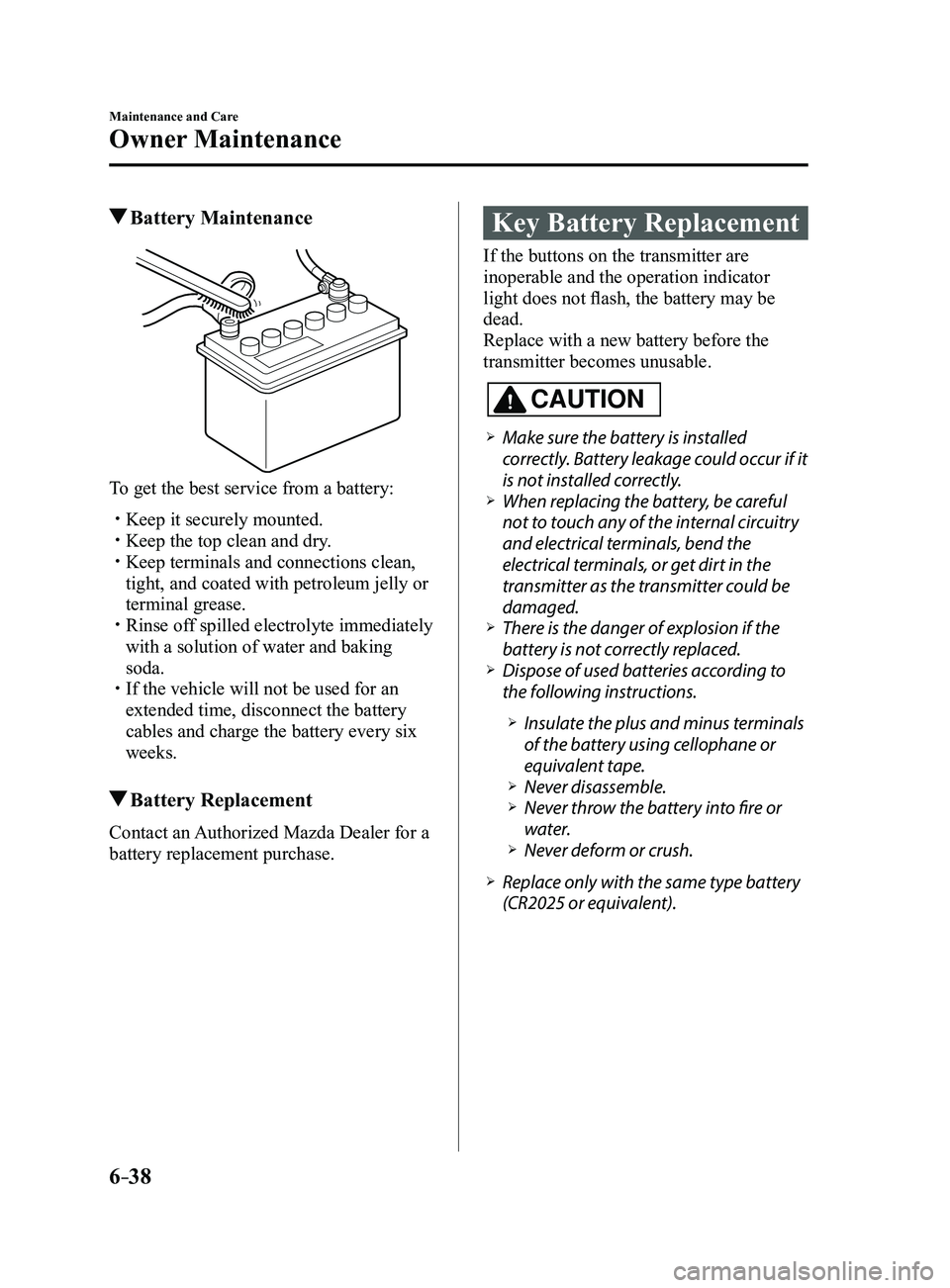
To get the best service from a battery:
Keep it securely mounted. Keep the top clean and dry. Keep terminals and connections clean,
tight, and coated with petroleum jelly or
terminal grease.
Rinse off spilled electrolyte immediately
with a solution of water and baking
soda.
If the vehicle will not be used for an
extended time, disconnect the battery
cables and charge the battery every six
weeks.
Battery Replacement
Contact an Authorized Mazda Dealer for a
battery replacement purchase.
Key Battery Replacement
If the buttons on the transmitter are
inoperable and the operation indicator
light does not flash, the battery may be
dead.
Replace with a new battery before the
transmitter becomes unusable.
CAUTION
Make sure the battery is installed
correctly. Battery leakage could occur if it
is not installed correctly.
When replacing the battery, be careful
not to touch any of the internal circuitry
and electrical terminals, bend the
electrical terminals, or get dirt in the
transmitter as the transmitter could be
damaged.
There is the danger of explosion if the
battery is not correctly replaced. Dispose of used batteries according to
the following instructions.
Insulate the plus and minus terminals
of the battery using cellophane or
equivalent tape.
Never disassemble. Never throw the battery into fire or
water. Never deform or crush.
Replace only with the same type battery
(CR2025 or equivalent).
Mazda3_8FL6-EA-16F_Edition2.indb 382016/08/10 17:38:45
Page 451 of 612
6–39
Maintenance and Care
Owner Maintenance
The following conditions indicate that the
battery power is low:
The KEY indicator light (green) flashes
in the instrument cluster for about 30
seconds after the engine is turned off.
The system does not operate and
the operation indicator light on the
transmitter does not flash when the
buttons are pressed.
The system's operational range is
reduced.
Replacing the battery at an Authorized
Mazda Dealer is recommended to prevent
damage to the key. If replacing the battery
by yourself, follow the instruction.
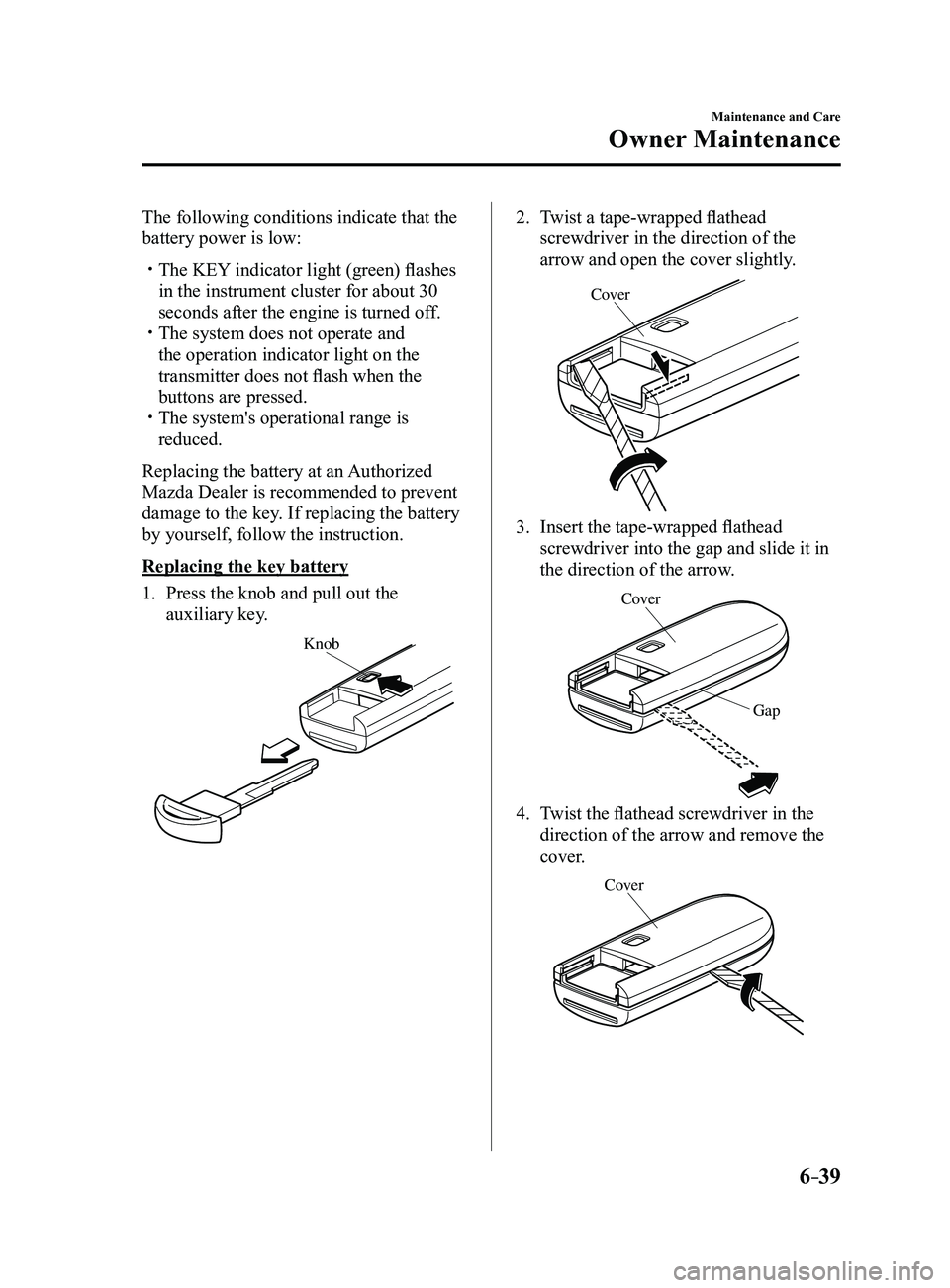
Replacing the key battery
1. Press the knob and pull out the
auxiliary key.
Knob
2. Twist a tape-wrapped flathead
screwdriver in the direction of the
arrow and open the cover slightly.
Cove r
3. Insert the tape-wrapped flathead
screwdriver into the gap and slide it in
the direction of the arrow.
Cover
Gap
4. Twist the flathead screwdriver in the
direction of the arrow and remove the
cover.
Cover
Mazda3_8FL6-EA-16F_Edition2.indb 392016/08/10 17:38:46
Page 452 of 612
6–40
Maintenance and Care
Owner Maintenance
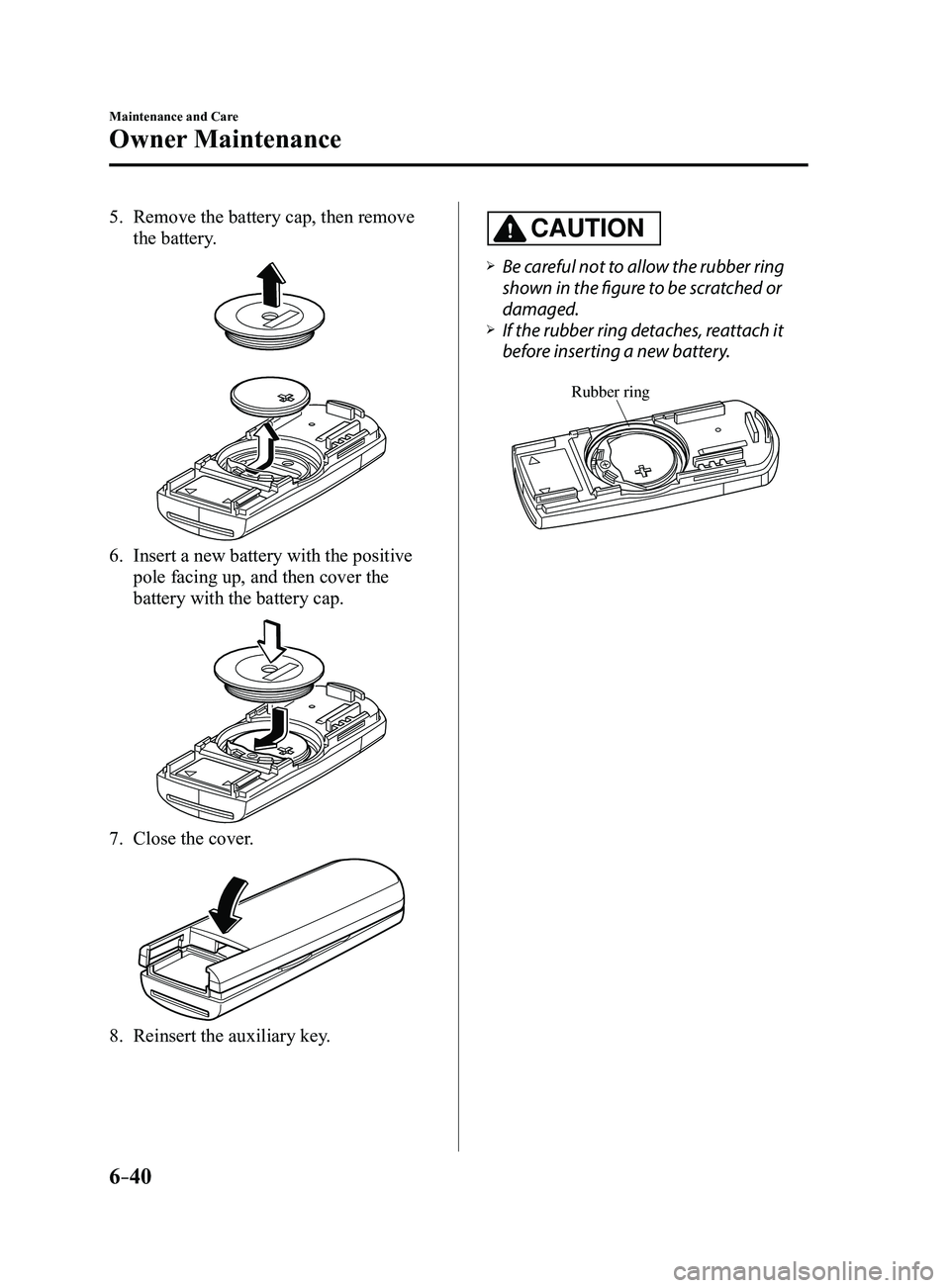
5. Remove the battery cap, then remove
the battery.
6. Insert a new battery with the positive
pole facing up, and then cover the
battery with the battery cap.
7. Close the cover.
8. Reinsert the auxiliary key .
CAUTION
Be careful not to allow the rubber ring
shown in the figure to be scratched or
damaged.
If the rubber ring detaches, reattach it
before inserting a new battery.
Rubber ring
Mazda3_8FL6-EA-16F_Edition2.indb 402016/08/10 17:38:47
Page 498 of 612
7–10
If Trouble Arises
Flat Tire
*Some models.
WARNING
Do not jack up the vehicle higher than is
necessary:Jacking up the vehicle higher than
is necessary is dangerous as it could
destabilize the vehicle resulting in an
accident.
Do not start the engine or shake the
vehicle while it is jacked up: Starting the engine or shaking
the vehicle while it is jacked up is
dangerous as it could cause the vehicle
to fall off the jack resulting in an
accident.
Never go under the vehicle while it is
jacked up: Going under the vehicle while it is
jacked up is dangerous as it could
result in death or serious injury if the
vehicle were to fall off the jack.
9. Remove the lug nuts by turning them
counterclockwise; then remove the
wheel and center cap.
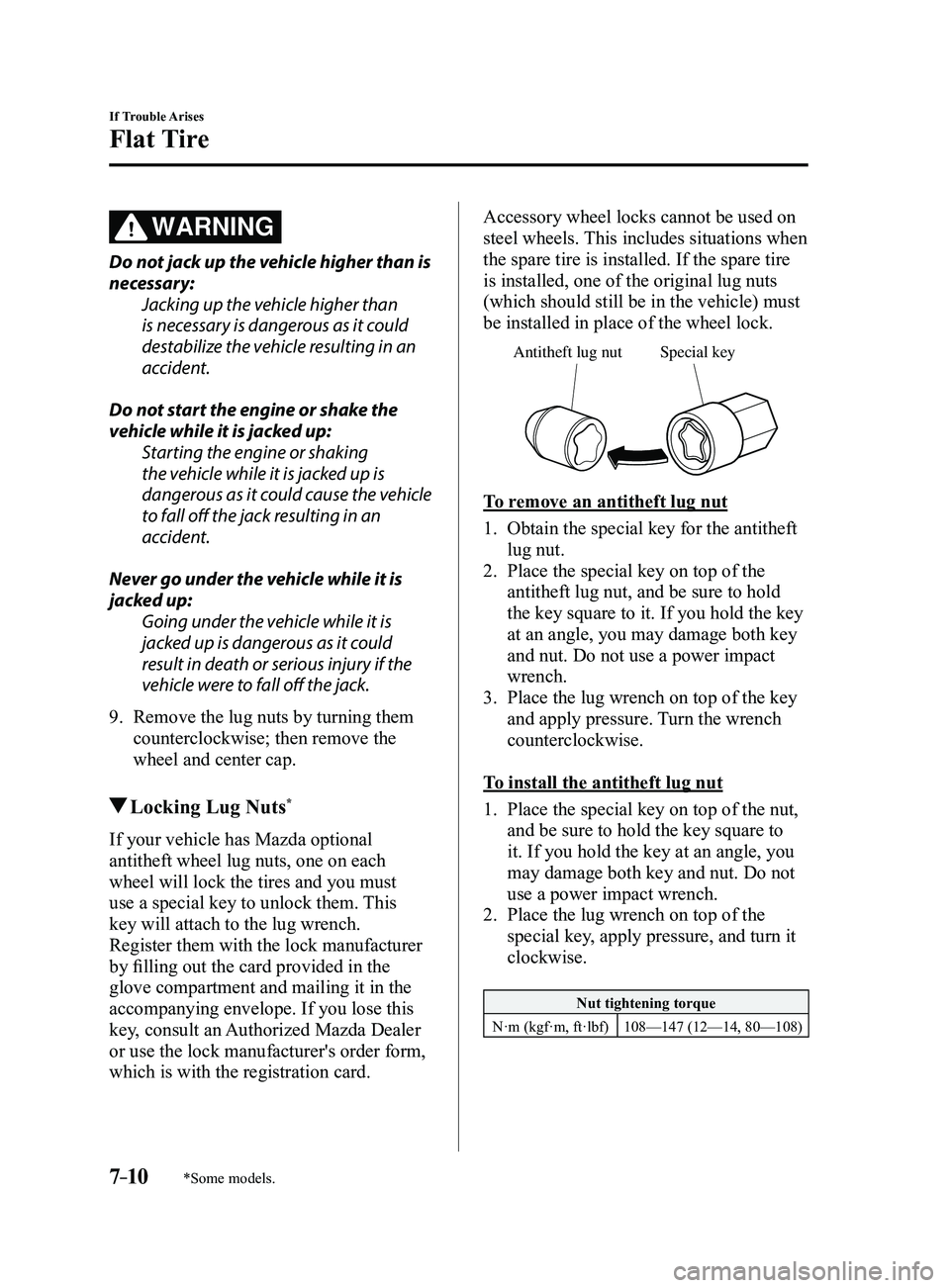
Locking Lug Nuts*
If your vehicle has Mazda optional
antitheft wheel lug nuts, one on each
wheel will lock the tires and you must
use a special key to unlock them. This
key will attach to the lug wrench.
Register them with the lock manufacturer
by filling out the card provided in the
glove compartment and mailing it in the
accompanying envelope. If you lose this
key, consult an Authorized Mazda Dealer
or use the lock manufacturer's order form,
which is with the registration card.
Accessory wheel locks cannot be used on
steel wheels. This includes situations when
the spare tire is installed. If the spare tire
is installed, one of the original lug nuts
(which should still be in the vehicle) must
be installed in place of the wheel lock.
Special ke y
Antitheft lug nut
To remove an antitheft lug nut
1. Obtain the special key for the antitheft
lug nut.
2. Place the special key on top of the
antitheft lug nut, and be sure to hold
the key square to it. If you hold the key
at an angle, you may damage both key
and nut. Do not use a power impact
wrench.
3. Place the lug wrench on top of the key
and apply pressure. Turn the wrench
counterclockwise.
To install the antitheft lug nut
1. Place the special key on top of the nut,
and be sure to hold the key square to
it. If you hold the key at an angle, you
may damage both key and nut. Do not
use a power impact wrench.
2. Place the lug wrench on top of the
special key, apply pressure, and turn it
clockwise.
Nut tightening torque
N·m (kgf·m, ft·lbf) 108—147 (12—14, 80—108)
Mazda3_8FL6-EA-16F_Edition2.indb 102016/08/10 17:39:13
Page 519 of 612
7–31
If Trouble Arises
Warning/Indicator Lights and Warning Sounds
*Some models.
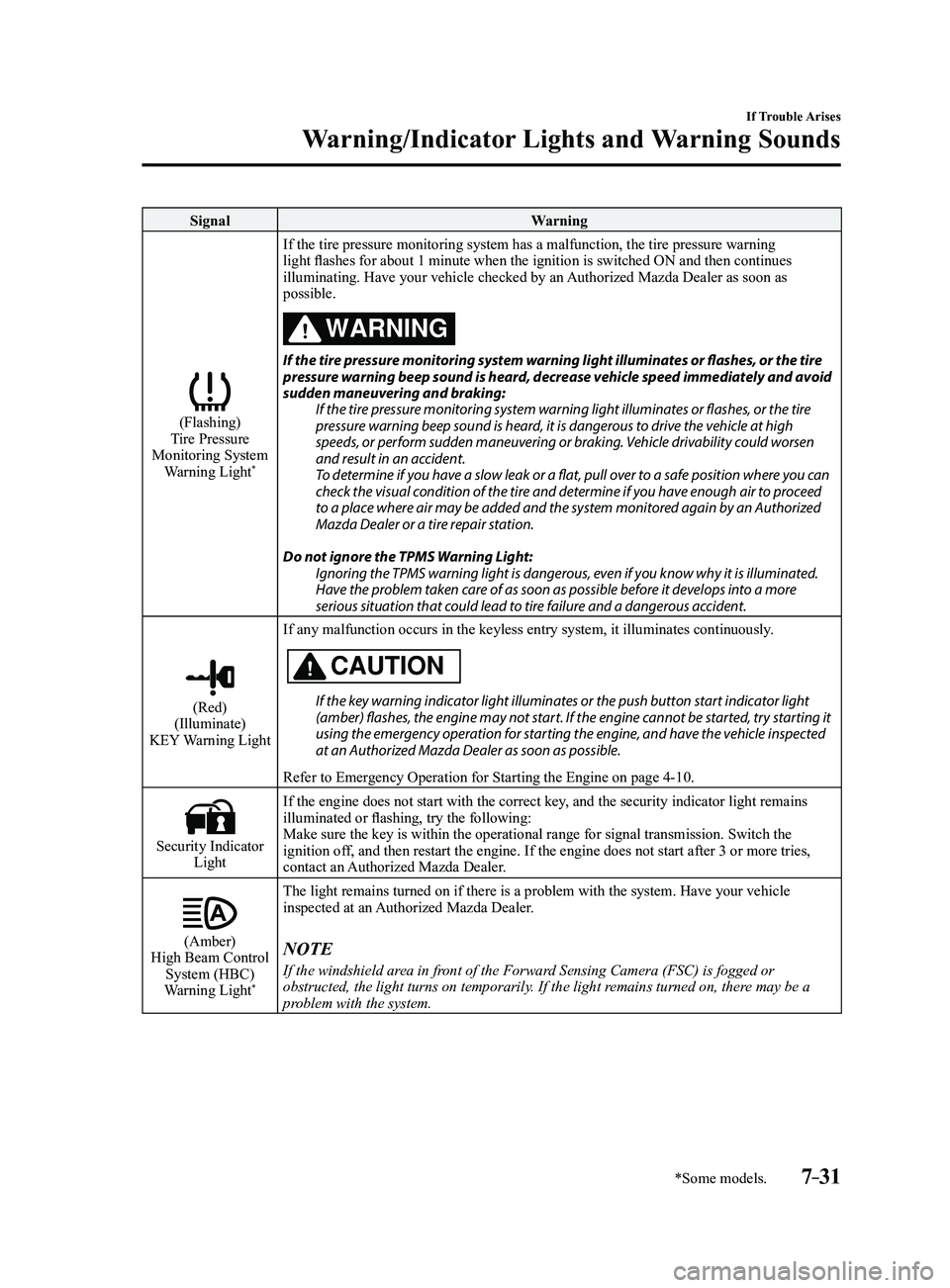
SignalWarning
(Flashing)Tire Pressure
Monitoring System Warning Light
*
If the tire pressure monitoring system has a malfunction, the tire press\
ure warning
light flashes for about 1 minute when the ignition is switched ON and then continues
illuminating. Have your vehicle checked by an Authorized Mazda Dealer as soon as
possible.
WARNING
If the tire pressure monitoring system warning light illuminates or flashes, or the tire pressure warning beep sound is heard, decrease vehicle speed immediately and avoid
sudden maneuvering and braking: If the tire pressure monitoring system warning light illuminates or flashes, or the tire
pressure warning beep sound is heard, it is dangerous to drive the vehicle at high
speeds, or perform sudden maneuvering or braking. Vehicle drivability could worsen
and result in an accident.
To determine if you have a slow leak or a flat, pull over to a safe position where you can
check the visual condition of the tire and determine if you have enough air to proceed
to a place where air may be added and the system monitored again by an Authorized
Mazda Dealer or a tire repair station.
Do not ignore the TPMS Warning Light: Ignoring the TPMS warning light is dangerous, even if you know why it is illuminated.
Have the problem taken care of as soon as possible before it develops into a more
serious situation that could lead to tire failure and a dangerous accident.
(Red)(Illuminate)
KEY Warning Light If any malfunction occurs in the keyless entry system, it illuminates co\
ntinuously.
CAUTION
If the key warning indicator light illuminates or the push button start indicator light (amber) flashes, the engine may not start. If the engine cannot be started, try starting it
using the emergency operation for starting the engine, and have the vehicle inspected
at an Authorized Mazda Dealer as soon as possible.
Refer to Emergency Operation for Starting the Engine on page
4-10.
Security Indicator Light If the engine does not start with the correct key, and the security indicator light remains
illuminated or flashing, try the following:
Make sure the key is within the operational range for signal transmissio\
n. Switch the
ignition off, and then restart the engine. If the engine does not start after 3 or \
more tries,
contact an Authorized Mazda Dealer.
(Amber)High Beam Control
System (HBC)
Warning Light
*
The light remains turned on if there is a problem with the system. Have \
your vehicle
inspected at an Authorized Mazda Dealer.
NOTE
If the windshield area in front of the Forward Sensing Camera (FSC) is fogged or
obstructed, the light turns on temporarily. If the light remains turned on, there may be a
problem with the system.
Mazda3_8FL6-EA-16F_Edition2.indb 312016/08/10 17:39:28
Page 524 of 612
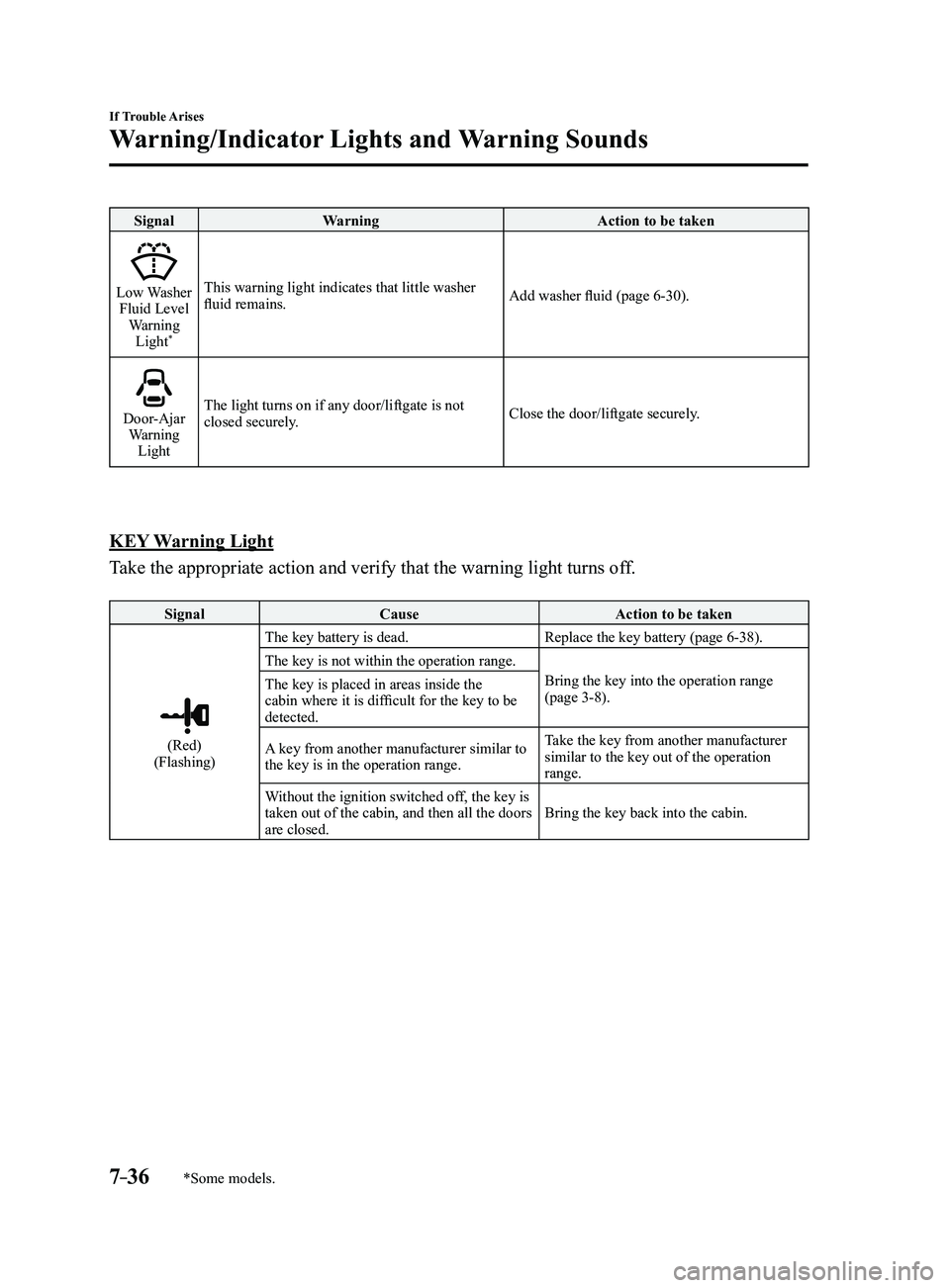
7–36
If Trouble Arises
Warning/Indicator Lights and Warning Sounds
*Some models.
SignalWarning Action to be taken
Low Washer Fluid Level
Warning Light
*
This warning light indicates that little washer
fluid remains. Add washer fluid (page 6-30).
Door-Ajar Warning
Light The light turns on if any door/liftgate is not
closed securely.
Close the door/liftgate securely.
KEY Warning Light
Take the appropriate action and verify that the warning light turns off.
Signal
Cause Action to be taken
(Red)(Flashing)The key battery is dead.
Replace the key battery (page
6-38).
The key is not within the operation range. Bring the key into the operation range
(page
3-8).
The key is placed in areas inside the
cabin where it is difficult for the key to be
detected.
A key from another manufacturer similar to
the key is in the operation range. Take the key from another manufacturer
similar to the key out of the operation
range.
Without the ignition switched off, the key is
taken out of the cabin, and then all the doors
are closed. Bring the key back into the cabin.
Mazda3_8FL6-EA-16F_Edition2.indb 362016/08/10 17:39:31