phone MAZDA MODEL 3 4-DOOR 2017 Owners Manual
[x] Cancel search | Manufacturer: MAZDA, Model Year: 2017, Model line: MODEL 3 4-DOOR, Model: MAZDA MODEL 3 4-DOOR 2017Pages: 612
Page 78 of 612
3–2
Before Driving
Keys
Keys
WARNING
Do not leave the key in your vehicle with
children and keep them in a place where
your children will not find or play with
them:Leaving children in a vehicle with the
key is dangerous. This could result in
someone being badly injured or even
killed. Children may find these keys to
be an interesting toy to play with and
could cause the power windows or
other controls to operate, or even make
the vehicle move.
CAUTION
Because the key (transmitter) uses
low-intensity radio waves, it may not
function correctly under the following
conditions:
The key is carried with
communication devices such as
cellular phones.
The key contacts or is covered by a
metal object. The key is near electronic devices such
as personal computers. Non-Mazda genuine electronic
equipment is installed in the vehicle. There is equipment which discharges
radio waves near the vehicle.
The key (transmitter) may consume
battery power excessively if it receives
high-intensity radio waves. Do not place
the key near electronic devices such as
televisions or personal computers.
To avoid damage to the key
(transmitter), DO NOT:
Drop the key. Get the key wet. Disassemble the key. Expose the key to high temperatures
on places such as the dashboard or
hood, under direct sunlight.
Expose the key to any kind of
magnetic field. Place heavy objects on the key. Put the key in an ultrasonic cleaner. Put any magnetized objects close to
the key.
Mazda3_8FL6-EA-16F_Edition2.indb 22016/08/10 17:35:15
Page 87 of 612
3–11
Before Driving
Advanced Keyless Entry System
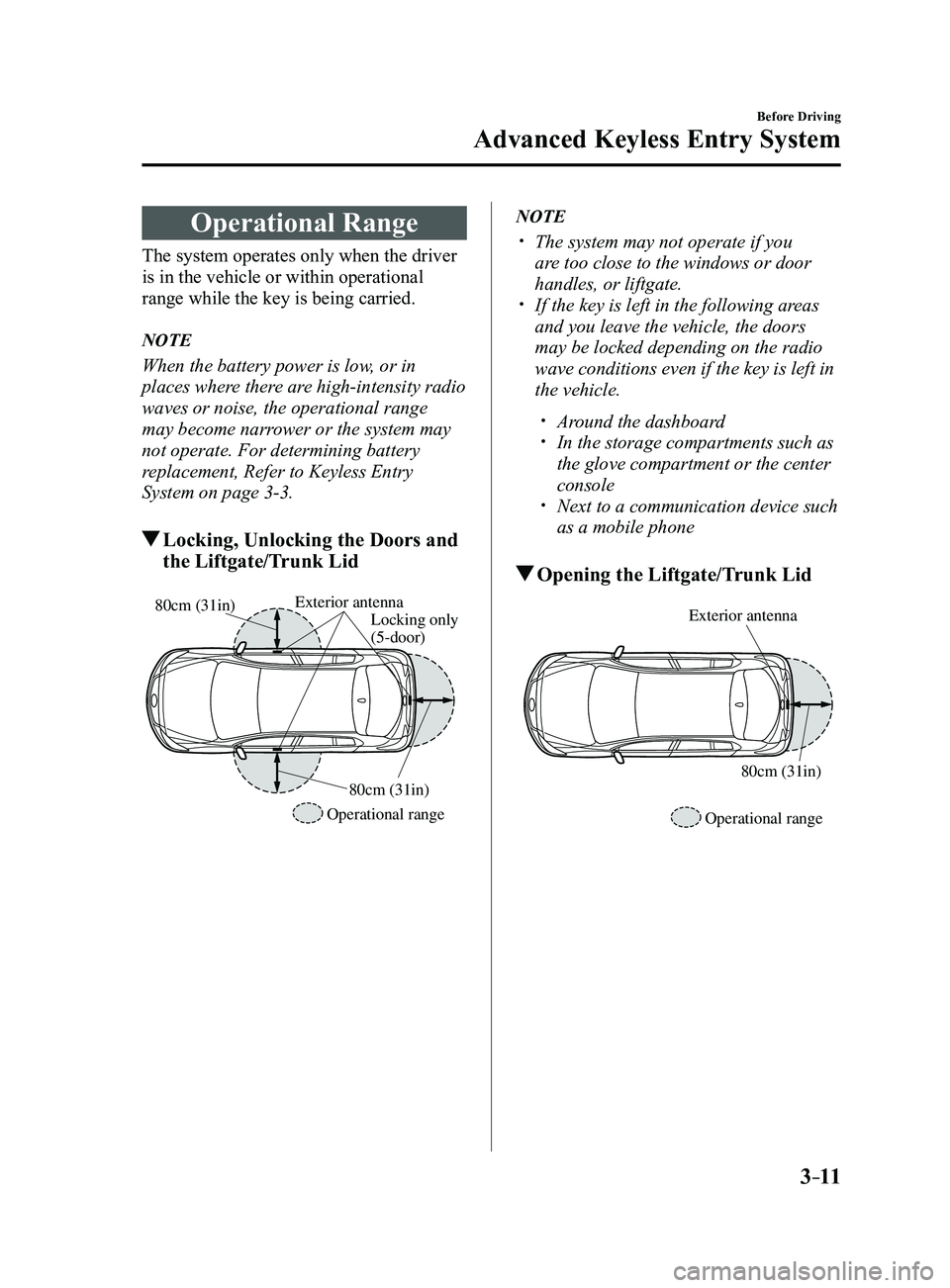
Operational Range
The system operates only when the driver
is in the vehicle or within operational
range while the key is being carried.
NOTE
When the battery power is low, or in
places where there are high-intensity radio
waves or noise, the operational range
may become narrower or the system may
not operate. For determining battery
replacement, Refer to Keyless Entry
System on page
3-3.
Locking, Unlocking the Doors and
the Liftgate/Trunk Lid
Exterior antennaLocking only
(5-door)
Operational range 80cm (31in)
80cm (31in)
NOTE
The system may not operate if you
are too close to the windows or door
handles, or liftgate.
If the key is left in the following ar
eas
and you leave the vehicle, the doors
may be locked depending on the radio
wave conditions even if the key is left in
the vehicle.
Around the dashboard In the storage compartments such as
the glove compartment or the center
console
Next to a communication device such
as a mobile phone
Opening the Liftgate/Trunk Lid
Exterior antenna
Operational range80cm (31in)
Mazda3_8FL6-EA-16F_Edition2.indb 112016/08/10 17:35:19
Page 89 of 612
3–13
Before Driving
Doors and Locks
NOTE
Always stop the engine and lock the
doors. In addition, to prevent theft of
valuables, do not leave them inside the
cabin.
If the key is left in the following areas
and you leave the vehicle, the doors
may be locked depending on the radio
wave conditions even if the key is left in
the vehicle.
Around the dashboard In the storage compartments such as
the glove compartment or the center
console
Next to a communication device such
as a mobile phone
When the ignition is switched to ACC
or ON, the vehicle lock-out prevention
feature prevents you from locking
yourself out of the vehicle.
All doors and the liftgate/trunk lid will
automatically unlock if they are locked
using the power door locks with any
door open.
The vehicle lock-out prevention feature
does not operate while the ignition is
switched off.
When any door is opened fr om the
outside while the key is inside the
vehicle, the closed doors are locked. All
the doors are automatically unlocked by
closing the open door.
(With the advanced keyless function)
The beep sound is heard for about 10
seconds to notify the driver that the key
has been left in the vehicle.
(Without the advanced keyless
function)
The horn sound is hear d twice to notify
the driver that the key has been left in
the vehicle.
(Door unlock (control) system with
collision detection)
This system automatically unlocks
the doors and the liftgate/trunk lid in
the event the vehicle is involved in an
accident to allow passengers to get
out of the vehicle immediately and
prevent being trapped inside. While
the ignition is switched ON and in the
event the vehicle receives an impact
strong enough to inflate the air bags,
all the doors and the liftgate/trunk lid
are automatically unlocked after about
6 seconds have elapsed from the time of
the accident.
The doors and the liftgate/trunk lid may
not unlock depending on how an impact
is applied, the force of the impact, and
other conditions of the accident.
If door-related systems or the battery
is malfunctioning, the doors and the
liftgate/trunk lid will not unlock.
Mazda3_8FL6-EA-16F_Edition2.indb 132016/08/10 17:35:19
Page 119 of 612
3–43
Before Driving
Security System
NOTE
The keys carry a unique electronic code.
For this reason, and to assure your
safety, obtaining a replacement key
requires some waiting time. They are
only available through an Authorized
Mazda Dealer.
Always keep a spare key in case one
is lost. If a key is lost, consult an
Authorized Mazda Dealer as soon as
possible.
If you lose a key, an Authorized Mazda
Dealer will reset the electronic codes of
your remaining keys and immobilizer
system. Bring all the remaining keys to
an Authorized Mazda Dealer to reset.
Starting the vehicle with a key that has
not been reset is not possible.
Operation
NOTE
The engine may not start and security
indicator light may illuminate or flash
if the key is placed in an area where it
is difficult for the system to detect the
signal, such as on the dashboard or in
the glove compartment. Move the key
to a location within the signal range,
switch the ignition off, and then restart
the engine.
Signals from a TV or radio station, or
from a transceiver or mobile telephone
could interfere with your immobilizer
system. If you are using the proper key
and the engine fails to start, check the
security indicator light.
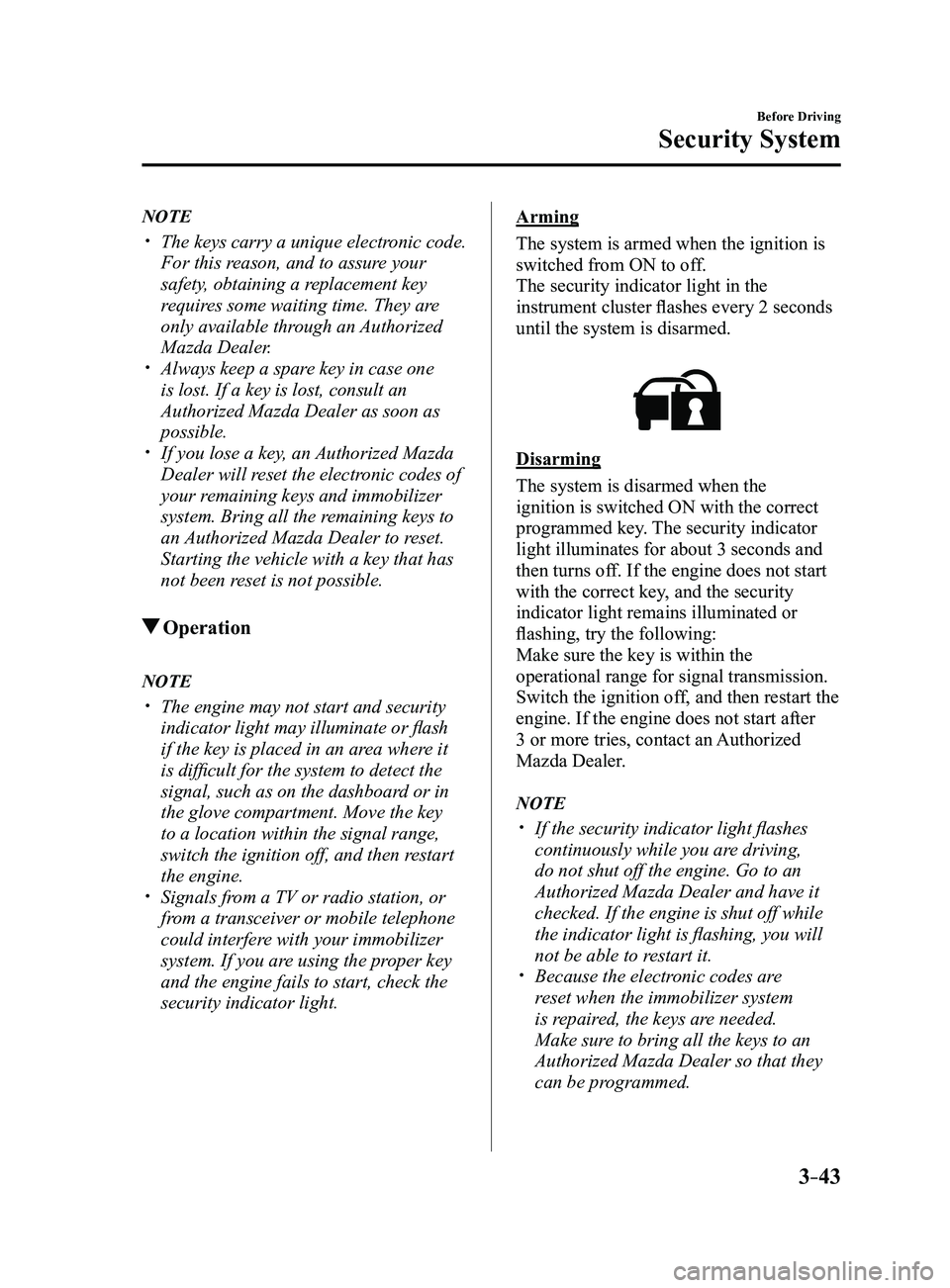
Arming
The system is armed when the ignition is
switched from ON to off.
The security indicator light in the
instrument cluster flashes every 2 seconds
until the system is disarmed.
Disarming
The system is disarmed when the
ignition is switched ON with the correct
programmed key. The security indicator
light illuminates for about 3 seconds and
then turns off. If the engine does not start
with the correct key, and the security
indicator light remains illuminated or
flashing, try the following:
Make sure the key is within the
operational range for signal transmission.
Switch the ignition off, and then restart the
engine. If the engine does not start after
3 or more tries, contact an Authorized
Mazda Dealer.
NOTE
If the security indicator light flashes
continuously while you are driving,
do not shut off the engine. Go to an
Authorized Mazda Dealer and have it
checked. If the engine is shut off while
the indicator light is flashing, you will
not be able to restart it.
Because the electr onic codes are
reset when the immobilizer system
is repaired, the keys are needed.
Make sure to bring all the keys to an
Authorized Mazda Dealer so that they
can be programmed.
Mazda3_8FL6-EA-16F_Edition2.indb 432016/08/10 17:35:37
Page 309 of 612
5–17
Interior Features
Audio System
*Some models.
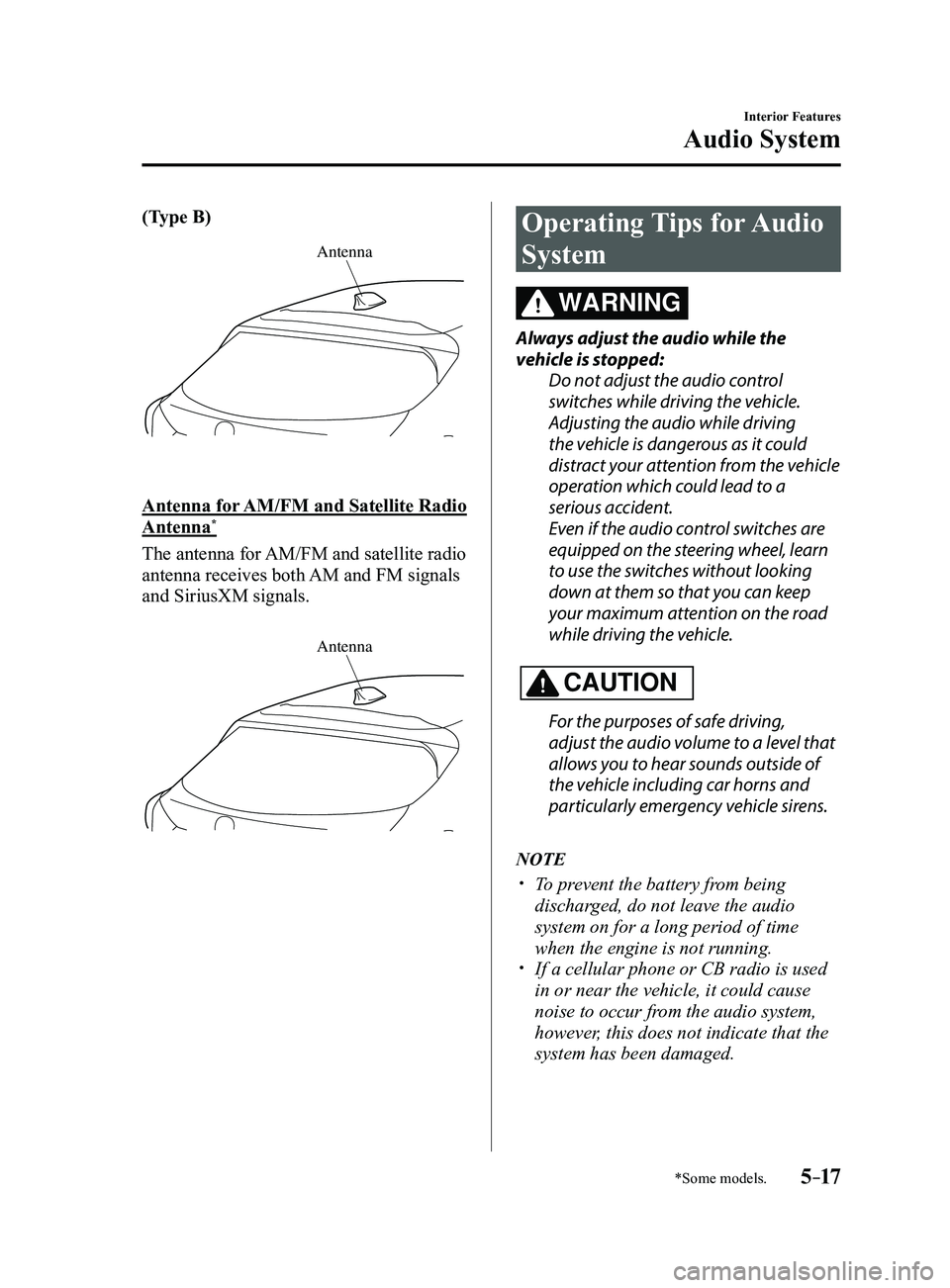
(Type B)
Antenna
Antenna for AM/FM and Satellite Radio
Antenna*
The antenna for AM/FM and satellite radio
antenna receives both AM and FM signals
and SiriusXM signals.
Antenna
Operating Tips for Audio
System
WARNING
Always adjust the audio while the
vehicle is stopped:Do not adjust the audio control
switches while driving the vehicle.
Adjusting the audio while driving
the vehicle is dangerous as it could
distract your attention from the vehicle
operation which could lead to a
serious accident.
Even if the audio control switches are
equipped on the steering wheel, learn
to use the switches without looking
down at them so that you can keep
your maximum attention on the road
while driving the vehicle.
CAUTION
For the purposes of safe driving,
adjust the audio volume to a level that
allows you to hear sounds outside of
the vehicle including car horns and
particularly emergency vehicle sirens.
NOTE
To prevent the battery from being
discharged, do not leave the audio
system on for a long period of time
when the engine is not running.
If a cellular phone or CB radio is used
in or near the vehicle, it could cause
noise to occur from the audio system,
however, this does not indicate that the
system has been damaged.
Mazda3_8FL6-EA-16F_Edition2.indb 172016/08/10 17:37:19
Page 326 of 612
![MAZDA MODEL 3 4-DOOR 2017 Owners Manual 5–34
Interior Features
Audio System
Audio set [Type B (touchscreen)]
NOTE
The explanation of functions described in this manual may differ from the actual
operation, and the shapes of screens and b](/img/28/40993/w960_40993-325.png "MAZDA MODEL 3 4-DOOR 2017 Owners Manual 5–34
Interior Features
Audio System
Audio set [Type B (touchscreen)]
NOTE
The explanation of functions described in this manual may differ from the actual
operation, and the shapes of screens and b")
5–34
Interior Features
Audio System
Audio set [Type B (touchscreen)]
NOTE
The explanation of functions described in this manual may differ from the actual
operation, and the shapes of screens and buttons and the letters and cha\
racters displayed
may also differ from the actual appearance.
Additionally, depending on future software updates, the content may successively cha\
nge
without notice.
Audio Set (Type B) has three different human interfaces.
Commander switch Touch panel Voice recognition with steering switch and microphone
Commander switch operation
NOTE
For safety reasons, some operations are disabled while the vehicle is being driven.
Volume dial operation
Volume dial
Press the volume dial to switch the audio MUTE on and off.
Turn the volume dial to adjust the volume. The volume increases by turning the dial
clockwise, and decreases by turning it counterclockwise.
Mazda3_8FL6-EA-16F_Edition2.indb 342016/08/10 17:37:29
Page 327 of 612

5–35
Interior Features
Audio System
Switches around commander knob
The following operations can be done by pressing the switches around the\
commander knob.
: Displays the home screen.
: Displays the Entertainment screen.
: Displays the Navigation screen (Only navigation-equipped vehicles). For operation
of the Navigation screen, refer to the navigation system manual. If the SD card for the
navigation system is not inserted, the compass indicating the direction \
in which the vehicle
is moving is displayed.
: Displays the Favorites screen. Long-press to store particular items in Favorites. (Radio,
phonebook and destination of the navigation system can be programmed.)
: Returns to previous screen.
Commander knob operation
(Selection of icons on screen)
1. Tilt or turn the commander knob and move the cursor to the desired icon.
2. Press the commander knob and select the icon.
NOTE
Long-press operation of the commander knob is also possible for some functions.\
Mazda3_8FL6-EA-16F_Edition2.indb 352016/08/10 17:37:30
Page 354 of 612
5–62
Interior Features
Audio System
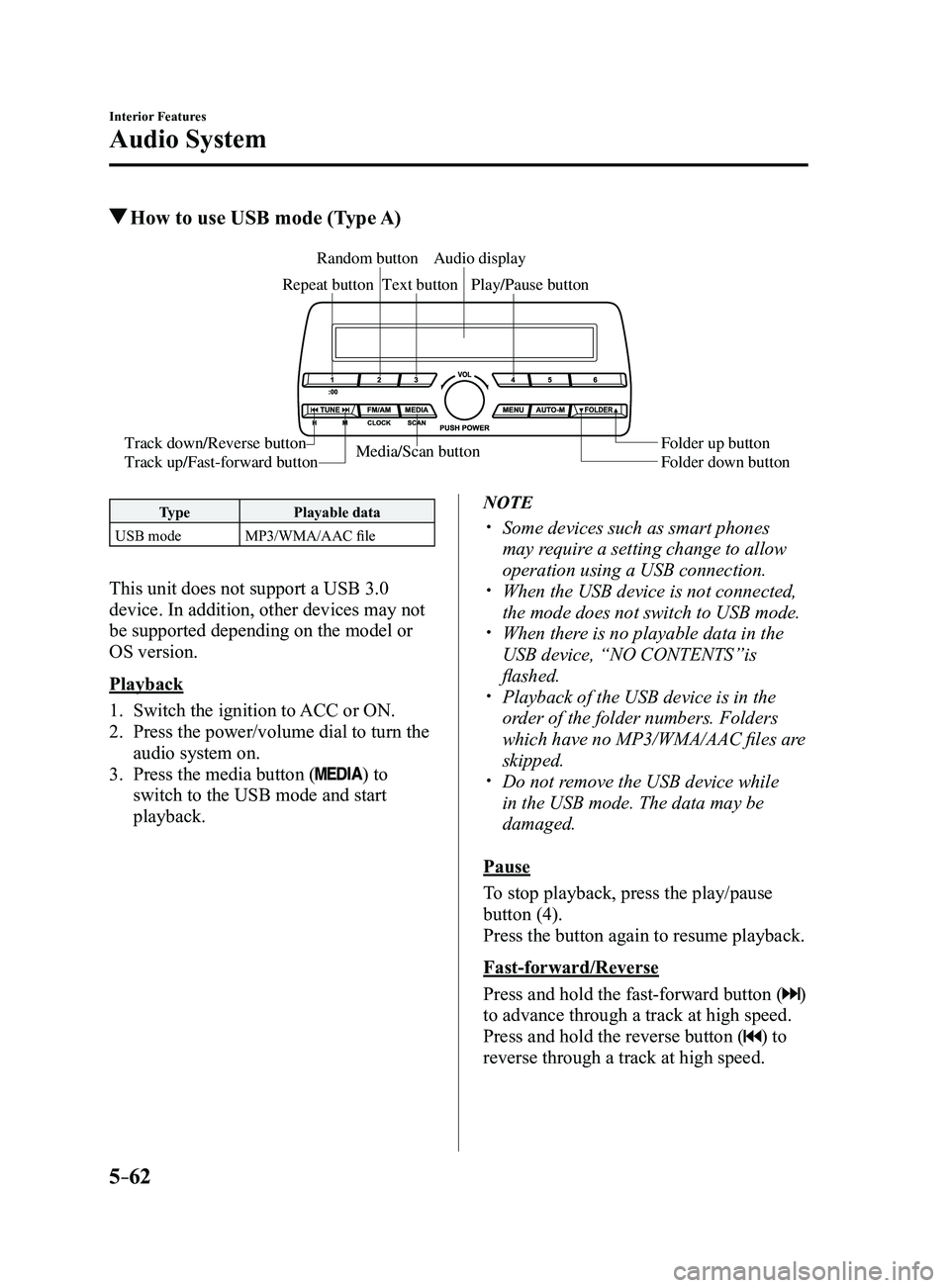
How to use USB mode (Type A)
Media/Scan button
Folder down button Folder up button
Play/Pause button
Random button
Repeat button
Audio display
Text button
Track down/Reverse button
Track up/Fast-forward button
Type
Playable data
USB mode MP3/WMA/AAC file
This unit does not support a USB 3.0
device. In addition, other devices may not
be supported depending on the model or
OS version.
Playback
1. Switch the ignition to ACC or ON.
2. Press the power/volume dial to turn the
audio system on.
3. Press the media button () to
switch to the USB mode and start
playback.
NOTE
Some devices such as smart phones
may require a setting change to allow
operation using a USB connection.
When the USB device is not connected,
the mode does not switch to USB mode. When there is no playable data in the
USB device, “NO CONTENTS”is
flashed.
Playback of the USB device is in the
order of the folder numbers. Folders
which have no MP3/WMA/AAC files are
skipped.
Do not remove the USB device while
in the USB mode. The data may be
damaged.
Pause
To stop playback, press the play/pause
button (4).
Press the button again to resume playback.
Fast-forward/Reverse
Press and hold the fast-forward button (
)
to advance through a track at high speed.
Press and hold the reverse button (
) to
reverse through a track at high speed.
Mazda3_8FL6-EA-16F_Edition2.indb 622016/08/10 17:37:51
Page 366 of 612
5–74
Interior Features
Bluetooth®
*Some models.
Bluetooth®*
Bluetooth® Hands-Free outline
When a Bluetooth
® device (mobile phone) is connected to the vehicle's Bluetooth® unit via
radio wave transmission, a call can be made or received by pressing the \
talk button, pick-
up button, or hang-up button on the audio remote control switch, or by o\
perating the center
display. For example, even if a device (mobile phone) is in your coat pocket,\
a call can be
made without taking the device (mobile phone) out and operating it dir\
ectly.
Bluetooth
® audio outline
When a portable audio unit equipped with the Bluetooth
® communication function is paired
to the vehicle, you can listen to music stored on the paired portable au\
dio device from the
vehicle's speakers. It is not necessary to connect the portable audio de\
vice to the vehicle's
external input terminal. After programming, operate the vehicle audio control panel to play/
stop the audio.
NOTE
For your safety , a device can be paired only when the vehicle is parked. If the vehicle
starts to move, the pairing procedure will end. Park the vehicle in a safe place before
pairing.
The communication range of a Bluetooth® equipped device is about 10 meters (32 ft) or
less.
Basic audio operation is available using voice commands even if Bluetoot\
h® is not
connected.
For safety r easons, operation of the center display is disabled while the vehicle is\
being
driven. However, items not displayed in gray can be operated using the commander
switch while the vehicle is being driven.
Mazda3_8FL6-EA-16F_Edition2.indb 742016/08/10 17:37:57
Page 367 of 612
5–75
Interior Features
Bluetooth®
CAUTION
Some Bluetooth® mobile devices are not compatible with the vehicle. Consult an
Authorized Mazda Dealer, Mazda's call center or Web support center for information
regarding Bluetooth
® mobile device compatibility:
U.S.A.
Phone: 800-430-0153
Web: www.mazdausa.com/mazdaconnect Canada
Phone: 800-430-0153
Web: www.mazdahandsfree.ca Mexico
Center of Attention to Client (CAC)
Phone: 01-800-01-MAZDA
Web: www.mazdamexico.com.mx
Applicable Bluetooth® specification (Recommended)
Ver. 1.1/1.2/2.0
EDR/2.1 EDR/3.0 (conformity)
Mazda3_8FL6-EA-16F_Edition2.indb 752016/08/10 17:37:57