display MAZDA MODEL 3 5-DOOR 2017 Owners Manual
[x] Cancel search | Manufacturer: MAZDA, Model Year: 2017, Model line: MODEL 3 5-DOOR, Model: MAZDA MODEL 3 5-DOOR 2017Pages: 612
Page 389 of 612
5–97
Interior Features
Bluetooth®
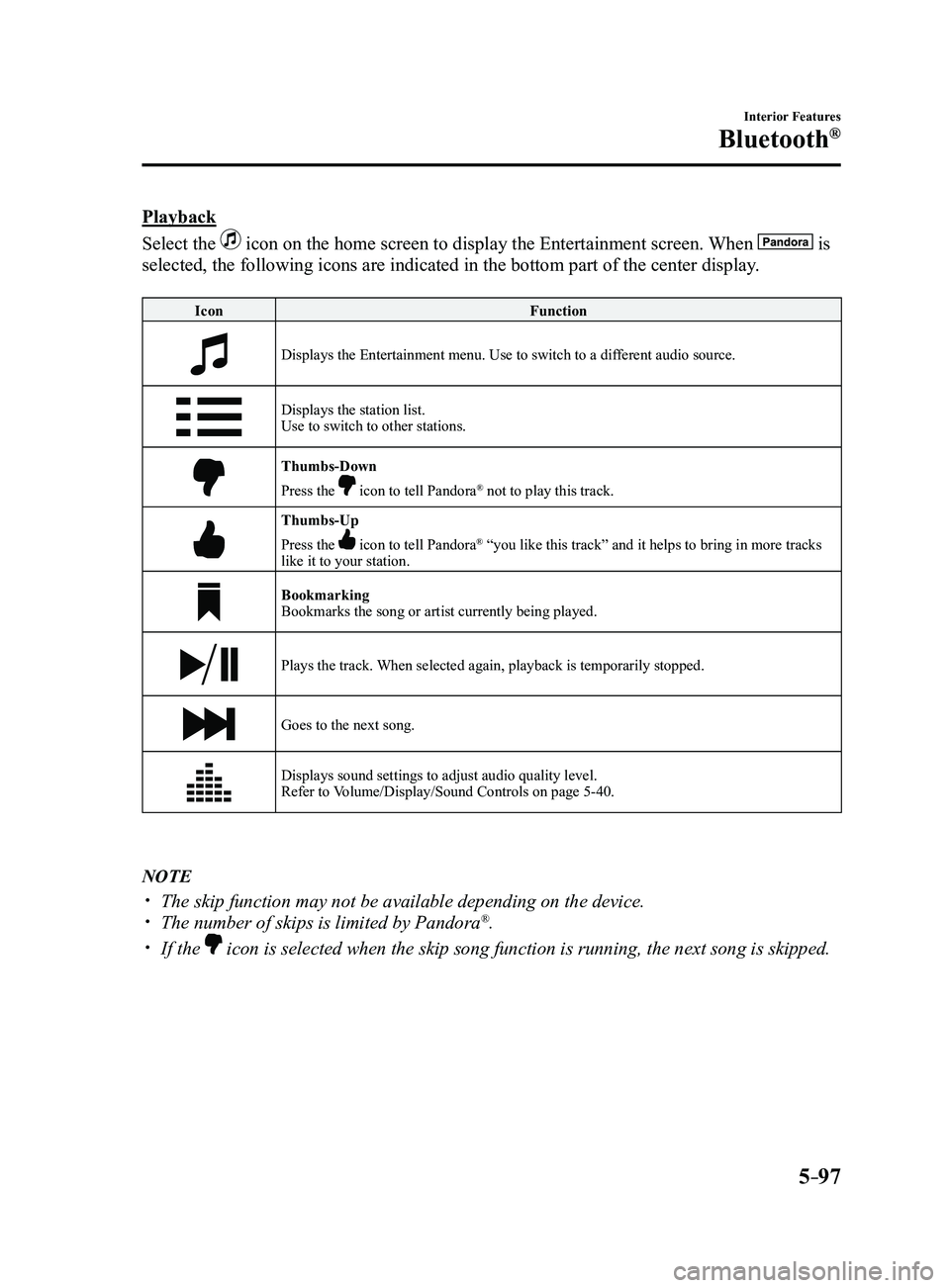
Playback
Select the
icon on the home screen to display the Entertainment screen. When is
selected, the following icons are indicated in the bottom part of the ce\
nter display.
IconFunction
Displays the Entertainment menu. Use to switch to a different audio source.
Displays the station list.
Use to switch to other stations.
Thumbs-Down
Press the icon to tell Pandora® not to play this track.
Thumbs-Up
Press the icon to tell Pandora® “you like this track” and it helps to bring in more tracks
like it to your station.
Bookmarking
Bookmarks the song or artist currently being played.
Plays the track. When selected again, playback is temporarily stopped.
Goes to the next song.
Displays sound settings to adjust audio quality level.
Refer to Volume/Display/Sound Controls on page 5-40.
NOTE
The skip function may not be available depending on the device. The number of skips is limited by Pandora®.
If the icon is selected when the skip song function is running, the next song \
is skipped.
Mazda3_8FL6-EA-16F_Edition2.indb 972016/08/10 17:38:14
Page 390 of 612
5–98
Interior Features
Bluetooth®
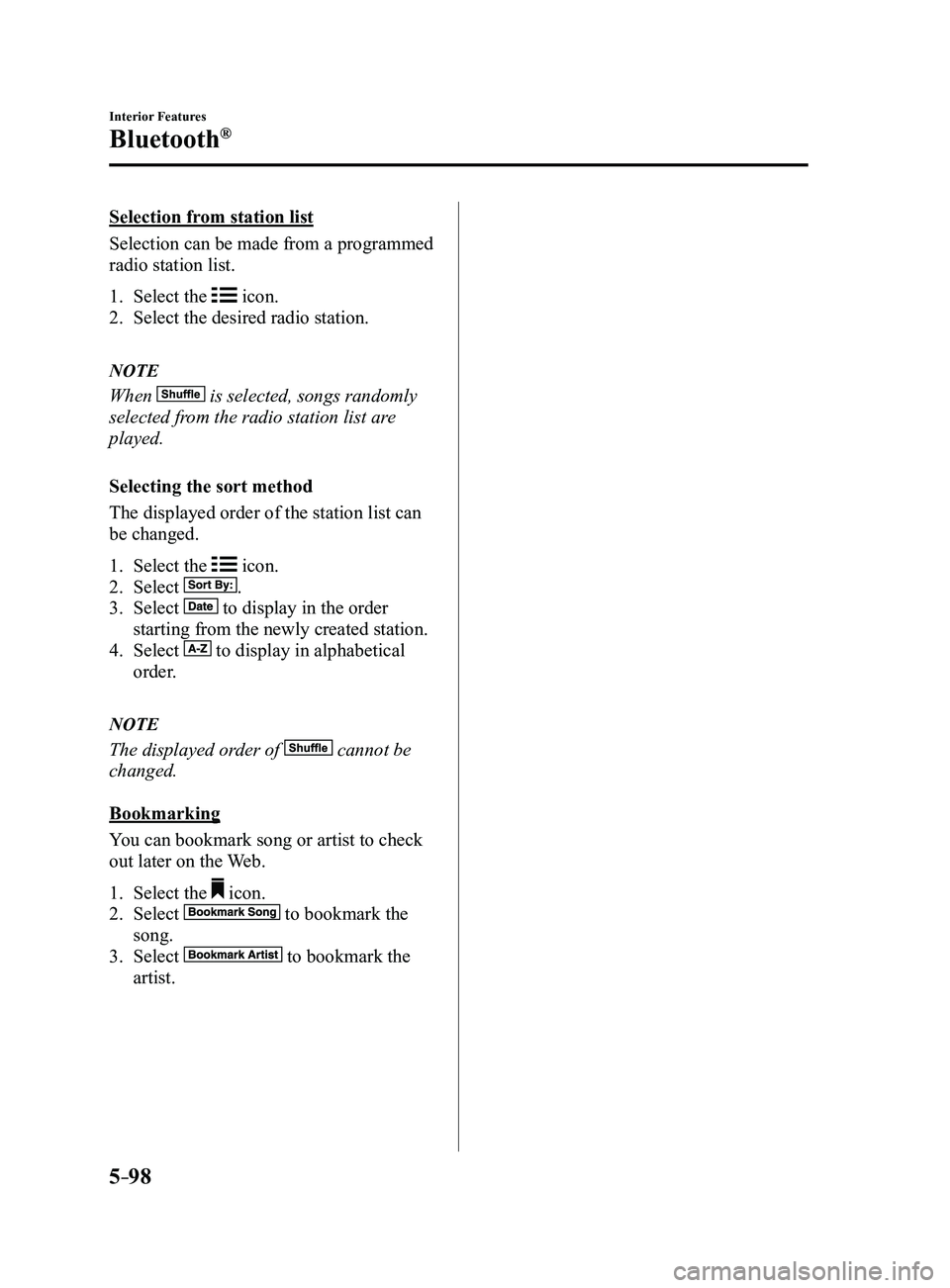
Selection from station list
Selection can be made from a programmed
radio station list.
1. Select the icon.
2. Select the desired radio station.
NOTE
When is selected, songs randomly
selected from the radio station list are
played.
Selecting the sort method
The displayed order of the station list can
be changed.
1. Select the icon.
2. Select .
3. Select to display in the order
starting from the newly created station.
4. Select to display in alphabetical
order.
NOTE
The displayed order of cannot be
changed.
Bookmarking
You can bookmark song or artist to check
out later on the Web.
1. Select the icon.
2. Select to bookmark the
song.
3. Select to bookmark the
artist.
Mazda3_8FL6-EA-16F_Edition2.indb 982016/08/10 17:38:16
Page 391 of 612

5–99
Interior Features
Bluetooth®
How to Use Aha™
What is Aha™?
Aha
*1 is an application which can be used to enjoy various Internet content s\
uch as Internet
radio and podcasts.
Stay connected to your friends activities by getting updates from Facebo\
ok and Twitter.
Using the location-based service, nearby services and destinations can b\
e searched or real-
time local information can be obtained.
For details on Aha, refer to “http://www.aharadio.com/”.
*1 Aha, the Aha logo, and the Aha trade dress are trademarks or registered trademarks of
Harman International Industries, Inc., used with permission.
NOTE
The service content pr ovided by Aha varies depending on the country in which the user
resides. In addition, the service is not available in some countries. To operate Aha from your Bluetooth® device, perform the following in advance:
Install the Aha application to your device. Create an Aha account for your device. Log onto Aha using your device. Select the preset station on your device.
Playback
Select the
icon on the home screen to display the Entertainment screen. When is
selected, the following icons are displayed at the bottom of the center \
display. The displayed
icon differs depending on the selected station.
In addition, icons other than the following icons may be displayed.
Icon Function
Displays the Entertainment menu. Use to switch to a different audio source.
Displays the main menu.
Use to switch to other stations.
Displays the content list.Use to switch to other desired content on the station.
ShoutRecords voice.
Records voice and posts it as playable audio to Facebook and other social stations.
Mazda3_8FL6-EA-16F_Edition2.indb 992016/08/10 17:38:16
Page 392 of 612
5–10 0
Interior Features
Bluetooth®
IconFunction
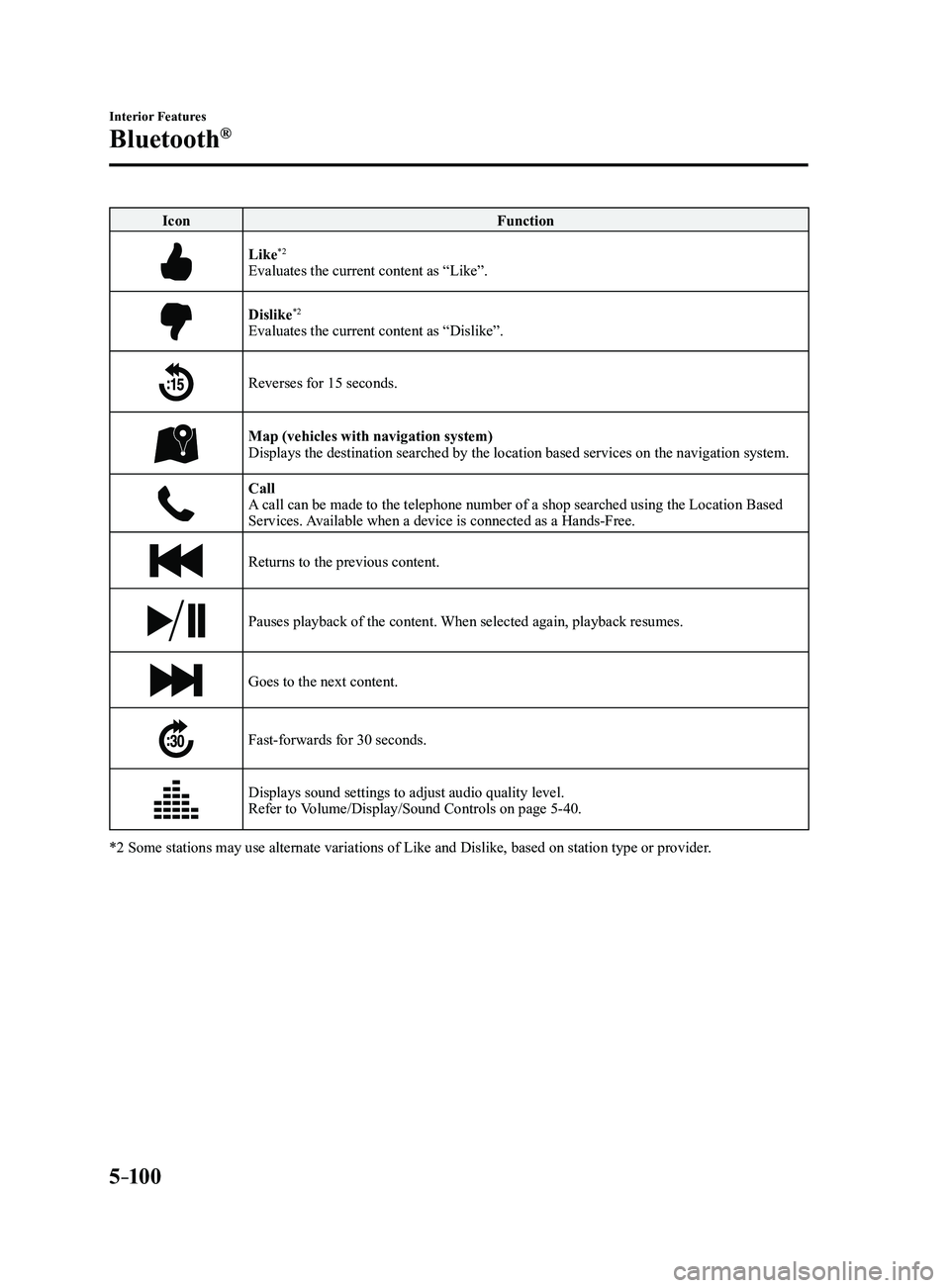
Like*2
Evaluates the current content as “Like”.
Dislike*2
Evaluates the current content as “Dislike”.
Reverses for 15 seconds.
Map (vehicles with navigation system)Displays the destination searched by the location based services on the \
navigation system.
CallA call can be made to the telephone number of a shop searched using the Location Based
Services. Available when a device is connected as a Hands-Free.
Returns to the previous content.
Pauses playback of the content. When selected again, playback resumes.
Goes to the next content.
Fast-forwards for 30 seconds.
Displays sound settings to adjust audio quality level.
Refer to Volume/Display/Sound Controls on page 5-40.
*2 Some stations may use alternate variations of Like and Dislike, based\
on station type or provider.
Mazda3_8FL6-EA-16F_Edition2.indb 1002016/08/10 17:38:17
Page 393 of 612
5–101
Interior Features
Bluetooth®
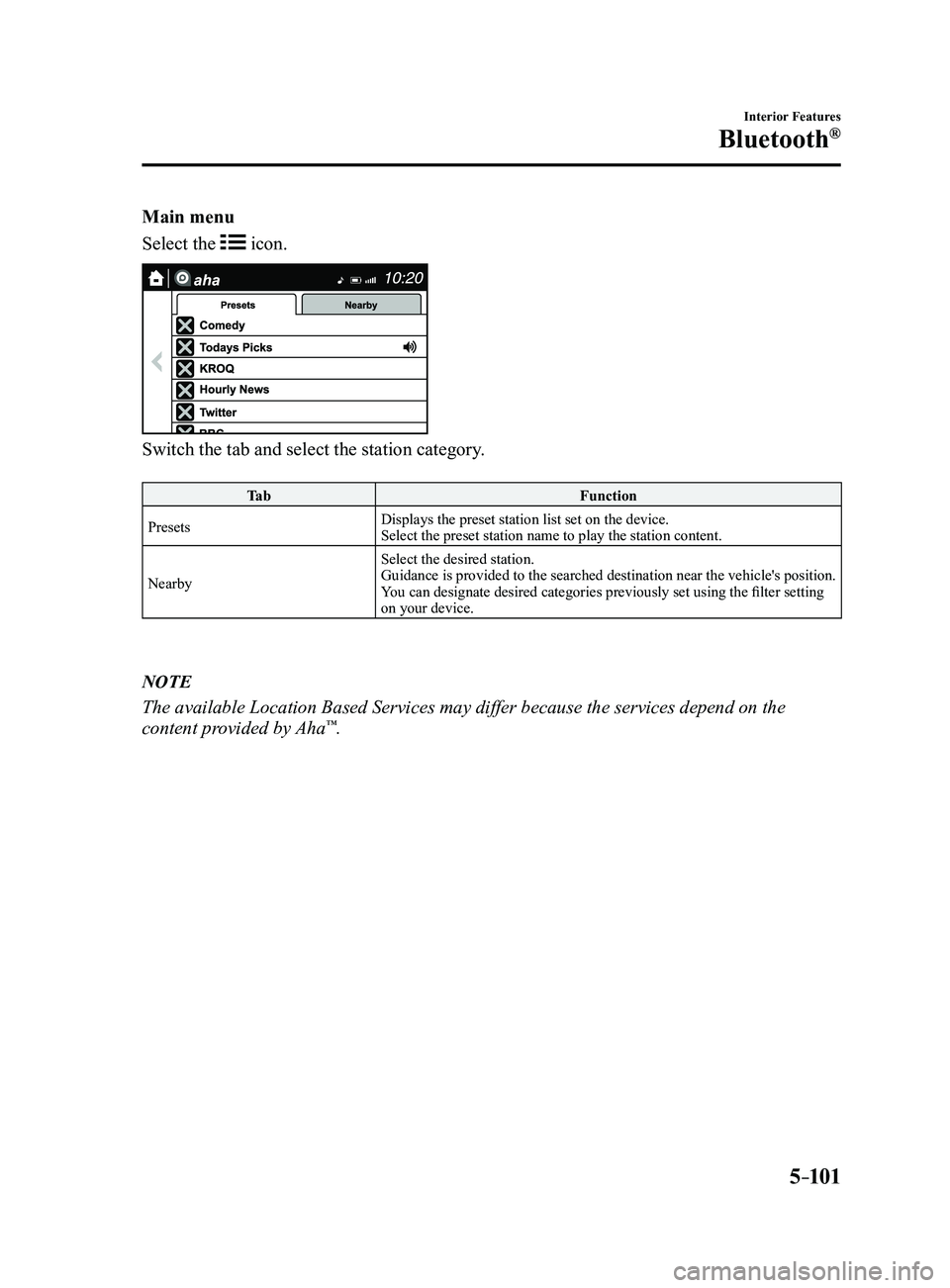
Main menu
Select the
icon.
Switch the tab and select the station category.
Ta bFunction
Presets Displays the preset station list set on the device.
Select the preset station name to play the station content.
Nearby Select the desired station.
Guidance is provided to the searched destination near the vehicle's position.
You can designate desired categories previously set using the filter setting
on your device.
NOTE
The available Location Based Services may differ because the services de\
pend on the
content provided by Aha™.
Mazda3_8FL6-EA-16F_Edition2.indb 1012016/08/10 17:38:17
Page 394 of 612
5–102
Interior Features
Bluetooth®
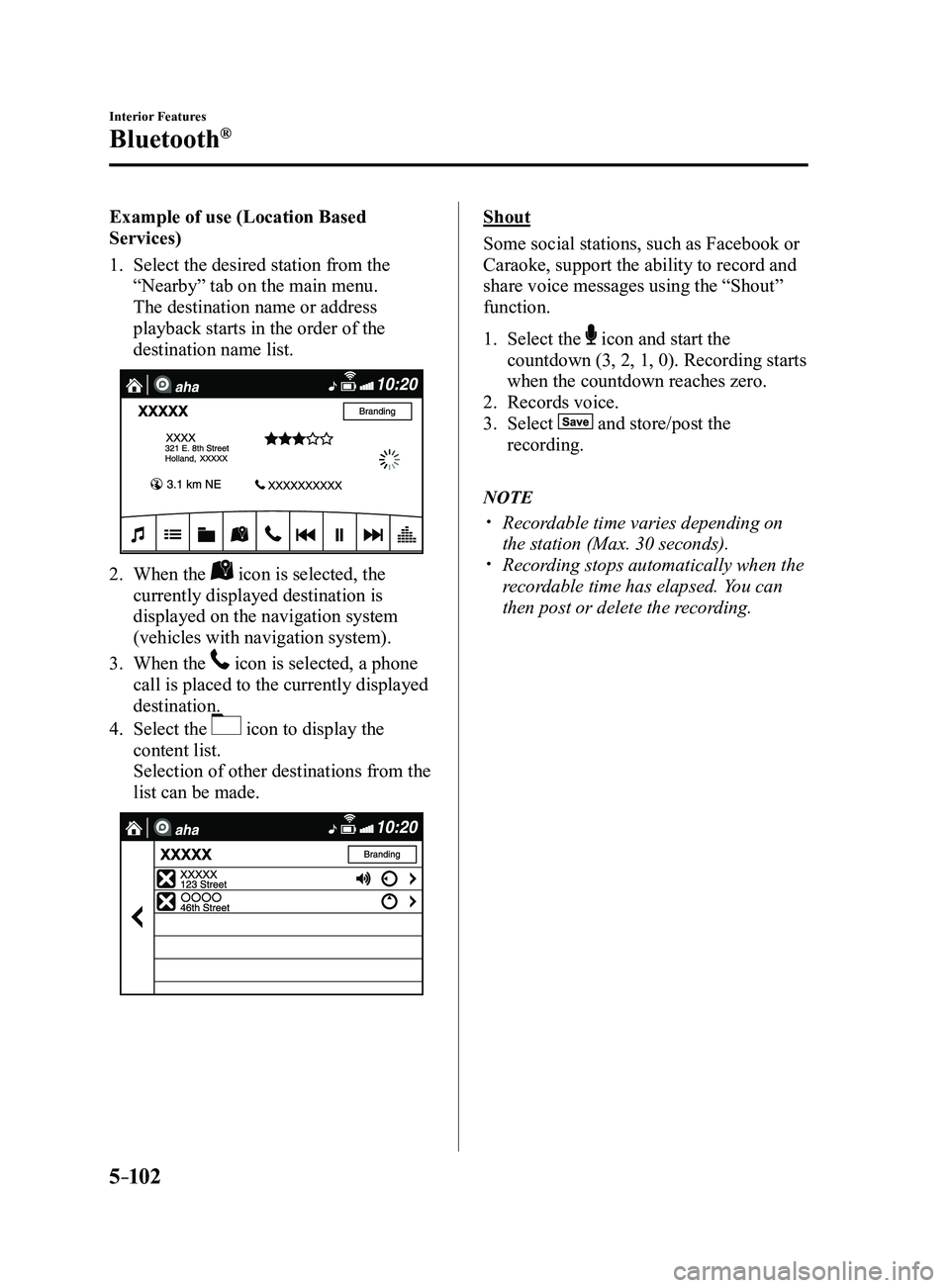
Example of use (Location Based
Services)
1. Select the desired station from the
“Nearby” tab on the main menu.
The destination name or address
playback starts in the order of the
destination name list.
2. When the icon is selected, the
currently displayed destination is
displayed on the navigation system
(vehicles with navigation system).
3. When the icon is selected, a phone
call is placed to the currently displayed
destination.
4. Select the icon to display the
content list.
Selection of other destinations from the
list can be made.
Shout
Some social stations, such as Facebook or
Caraoke, support the ability to record and
share voice messages using the “Shout”
function.
1. Select the icon and start the
countdown (3, 2, 1, 0). Recording starts
when the countdown reaches zero.
2. Records voice.
3. Select and store/post the
recording.
NOTE
Recordable time varies depending on
the station (Max. 30 seconds). Recording stops automatically when the
recordable time has elapsed. You can
then post or delete the recording.
Mazda3_8FL6-EA-16F_Edition2.indb 1022016/08/10 17:38:19
Page 395 of 612

5–103
Interior Features
Bluetooth®
How to Use Stitcher™ Radio
What is Stitcher™ Radio?
Stitcher
™*1 radio is an application which can be used to listen to Internet radio o\
r stream
podcasts.
Recommended content is automatically selected by registering content which you put into
your favorites, or by pressing the Like or Dislike button.
For details on Stitcher
™ Radio, refer to “http://stitcher.com/”.
*1 Stitcher™, the Stitcher™ logo, and the Stitcher™ trade dress are trademarks or registered
trademarks of Stitcher, Inc., used with permission.
NOTE
To operate Stitcher™ Radio from your Bluetooth® device, perform the following in advance:
Install the Stitcher™ Radio application to your device. Create a Stitcher™ Radio account for your device. Log onto Stitcher™ Radio using your device.
Playback
Select the
icon on the home screen to display the Entertainment screen. When is
selected, the following icons are indicated in the bottom part of the ce\
nter display.
Icon Function
Displays the Entertainment menu. Use to switch to a different audio source.
Displays the station list.
Use to switch to other stations.
DislikeEvaluates the current program as “Dislike”.
LikeEvaluates the current program as “Like”.
Adds the current station to your favorites or deletes the current statio\
n from your favorites.
Reverses for 30 seconds.
Mazda3_8FL6-EA-16F_Edition2.indb 1032016/08/10 17:38:19
Page 396 of 612
5–104
Interior Features
Bluetooth®
IconFunction
Plays the station. Select it again to pause playback.
Goes to the next station.
Displays sound settings to adjust audio quality level.
Refer to Volume/Display/Sound Controls on page 5-40.
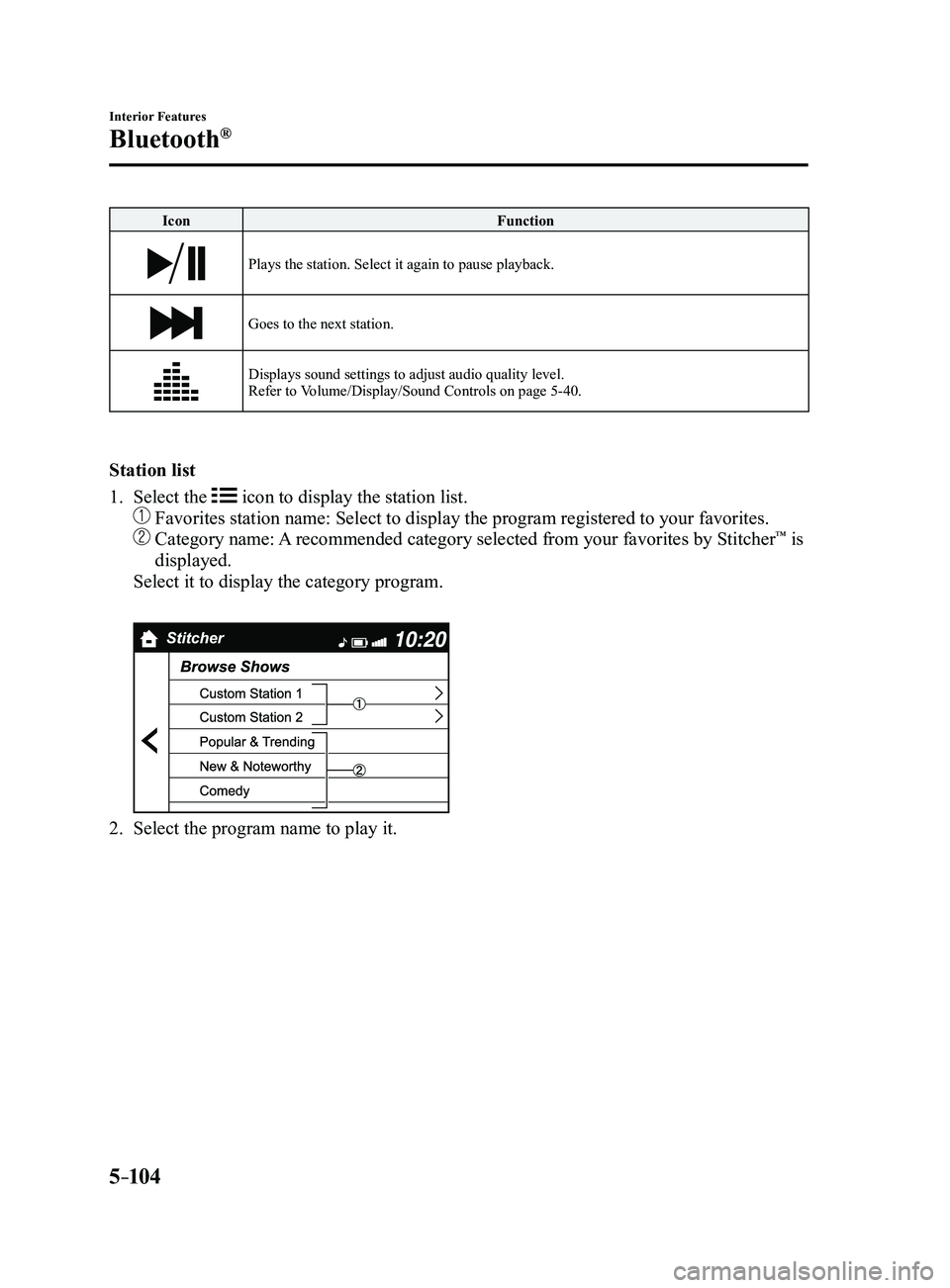
Station list
1. Select the icon to display the station list.
Favorites station name: Select to display the program registered to you\
r favorites.
Category name: A recommended category selected from your favorites by Stitcher™ is
displayed.
Select it to display the category program.
2. Select the program name to play it.
Mazda3_8FL6-EA-16F_Edition2.indb 1042016/08/10 17:38:20
Page 397 of 612
5–105
Interior Features
Bluetooth®
Add to your favorites
If the current program has not been
registered to your favorites, it can be
registered to your favorites.
1. Select the icon to display the
favorites station which the registration
can be added.
2. Select the station name which you want
to register.
3. Select to add the program to the
selected favorites station.
NOTE
Multiple favorites stations can be
selected and registered. Favorites stations r egistered by
oneself as well those set by default are
displayed.
Delete from your favorites
If the current program has already been
registered to your favorites, the program
can be deleted from your favorites.
1. Select the icon.
2. The program is automatically deleted
from the favorites station.
Mazda3_8FL6-EA-16F_Edition2.indb 1052016/08/10 17:38:20
Page 399 of 612

5–107
Interior Features
Bluetooth®
NOTE
When the OS of the device is updated, the pairing information may be del\
eted. If this
happens, reprogram the pairing information to the Bluetooth® unit. If you pair your phone which has already been paired to your vehicle more than once in
the past, you need to delete “Mazda” on your mobile device. Then, \
execute the Bluetooth®
search on your mobile device once again, and pair to a newly detected “Ma\
zda”.
Before you pair your device, make sure that Bluetooth® is “ON”, both on your phone and
on the vehicle.
If Bluetooth®-enabled devices are used in the following locations or conditions,
connection via Bluetooth® may not be possible.
The device is in a location hidden fr om the center display such as behind or under a
seat, or inside the glove compartment. The device contacts or is covered by a metal object or body. The device is set to power-saving mode.
Different Bluetooth®-enabled devices can be used for Bluetooth® Hands-Free and
Bluetooth® audio. For example, device A can be connected as a Bluetooth® Hands-
Free device and device B can be connected as a Bluetooth® audio device. However, the
following may occur when they are used at the same time.
The Bluetooth® connection of the device is disconnected. Noise occurs in the Hands-Fr ee audio. Hands-Free operates slowly.
Mazda3_8FL6-EA-16F_Edition2.indb 1072016/08/10 17:38:20