light MAZDA MODEL 3 5-DOOR 2017 Owners Manual
[x] Cancel search | Manufacturer: MAZDA, Model Year: 2017, Model line: MODEL 3 5-DOOR, Model: MAZDA MODEL 3 5-DOOR 2017Pages: 612
Page 277 of 612
4–147
When Driving
Cruise Control
Cruise Main Indication (White),
Cruise Set Indication (white)/
Indicator Light (Green)
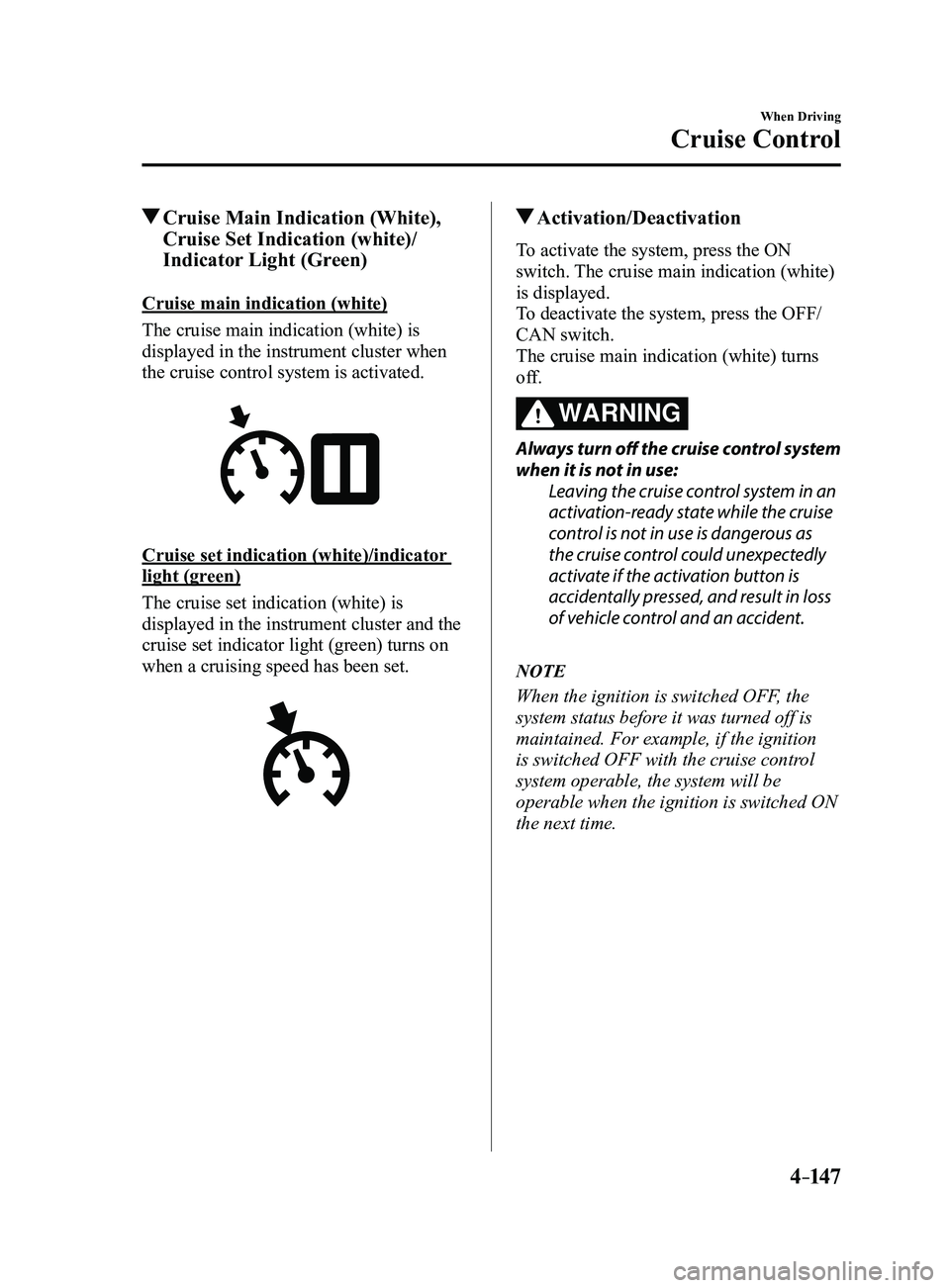
Cruise main indication (white)
The cruise main indication (white) is
displayed in the instrument cluster when
the cruise control system is activated.
Cruise set indication (white)/indicator
light (green)
The cruise set indication (white) is
displayed in the instrument cluster and the
cruise set indicator light (green) turns on
when a cruising speed has been set.
Activation/Deactivation
To activate the system, press the ON
switch. The cruise main indication (white)
is displayed.
To deactivate the system, press the OFF/
CAN switch.
The cruise main indication (white) turns
off.
WARNING
Always turn off the cruise control system
when it is not in use:Leaving the cruise control system in an
activation-ready state while the cruise
control is not in use is dangerous as
the cruise control could unexpectedly
activate if the activation button is
accidentally pressed, and result in loss
of vehicle control and an accident.
NOTE
When the ignition is switched OFF, the
system status before it was turned off is
maintained. For example, if the ignition
is switched OFF with the cruise control
system operable, the system will be
operable when the ignition is switched ON
the next time.
Mazda3_8FL6-EA-16F_Edition2.indb 1472016/08/10 17:37:02
Page 278 of 612
4–14 8
When Driving
Cruise Control
To Set Speed
1. Activate the cruise control system by
pressing the ON switch. The cruise
main indication (white) is displayed.
2. Accelerate to the desired speed, which
must be more than 25 km/h (16 mph).
3. Set the cruise control by pressing the
SET switch at the desired speed. The
cruise control is set at the moment the
SET
switch is pressed. Release the
accelerator pedal simultaneously. The
cruise set indication (white) is
displayed and the cruise set indicator
light (green) turns on.
NOTE
The cruise contr ol speed setting cannot
be performed under the following
conditions:
(Automatic transaxle)
The selector lever is in the P or N
position. (Manual transaxle)
The shift lever is in the neutral
position. The parking brake is applied.
Release the SET or RES/ switch at
the desired speed, otherwise the speed
will continue increasing while the
RES/
switch is pressed and held, and
continue decreasing while the SET
switch is pressed and held (except when
the accelerator pedal is depressed).
On a steep grade, the vehicle may
momentarily slow down while
ascending, or speed up while
descending.
The cruise contr ol will cancel if the
vehicle speed decreases below 21 km/h
(13 mph) when climbing a steep grade.
The cruise control may cancel at about
15 km/h (9 mph) below the preset speed
such as when climbing a long, steep
grade.
Mazda3_8FL6-EA-16F_Edition2.indb 1482016/08/10 17:37:02
Page 279 of 612
4–149
When Driving
Cruise Control
To Increase Cruising Speed
Follow either of these procedures.
To increase speed using cruise control
switch
Press the RES/
switch and hold it. Your
vehicle will accelerate. Release the switch
at the desired speed.
Press the RES/
switch and release it
immediately to adjust the preset speed.
Multiple operations will increase the
preset speed according to the number of
times it is operated.
Increasing speed with a single RES/
switch operation
Instrument cluster display for vehicle
speed indicated in km/h: 1 km/h (0.6 mph)
Instrument cluster display for vehicle
speed indicated in mph: 1 mph (1.6 km/h)
To increase speed using accelerator
pedal
Depress the accelerator pedal to accelerate
to the desired speed. Press the SET
switch and release it immediately.
NOTE
Accelerate if you want to speed up
temporarily when the cruise control is on.
Greater speed will not interfere with or
change the set speed. Take your foot off the
accelerator to return to the set speed.
To Decrease Cruising Speed
Press the SET switch and hold it. The
vehicle will gradually slow.
Release the switch at the desired speed.
Press the SET
switch and release it
immediately to adjust the preset speed.
Multiple operations will decrease the
preset speed according to the number of
times it is operated.
Decreasing speed with a single SET
switch operation
Instrument cluster display for vehicle
speed indicated in km/h: 1 km/h (0.6 mph)
Instrument cluster display for vehicle
speed indicated in mph: 1 mph (1.6 km/h)
To Resume Cruising Speed at
More Than 25 km/h (16 mph)
If some other method besides the OFF/
CAN switch was used to cancel cruising
speed (such as applying the brake pedal)
and the system is still activated, the most
recent set speed will automatically resume
when the RES/
switch is pressed.
If vehicle speed is below 25 km/h (16
mph), increase the vehicle speed up to 25
km/h (16 mph) or more and press the
RES/
switch.
To Temporarily Cancel
To temporarily cancel the system, use one
of these methods:
Slightly depress the brake pedal. (Manual transaxle)
Depress the clutch pedal. Press the OFF/CAN switch.
If the RES/ switch is pressed when the
vehicle speed is 25 km/h (16 mph) or
higher, the system reverts to the previously
set speed.
Mazda3_8FL6-EA-16F_Edition2.indb 1492016/08/10 17:37:03
Page 280 of 612
4–150
When Driving
Cruise Control
NOTE
If any of the following conditions occur,
the cruise control system is temporarily
canceled.
The parking brake is applied. (Automatic transaxle)
The selector lever is in the P or N
position. (Manual transaxle)
The shift lever is in the neutral
position.
When the cruise control system is
temporarily canceled by even one of the
applicable cancel conditions, the speed
cannot be re-set.
(Automatic transaxle)
The cruise control cannot be cancelled
while driving in manual mode (selector
lever shifted from D to M position).
Therefore, engine braking will not be
applied even if the transaxle is shifted
down to a lower gear. If deceleration is
required, lower the set speed or depress
the brake pedal.
To Deactivate
When a cruising speed has been
set (cruise set indication (white) is
displayed/cruise set indicator light
(green) turns on)
Long-press the OFF/CAN switch or press
the OFF/CAN switch 2 times.
When a cruising speed has not been
set (cruise main indication (white) is
displayed)
Press the OFF/CAN switch.
Mazda3_8FL6-EA-16F_Edition2.indb 1502016/08/10 17:37:03
Page 281 of 612
 monitors the air pressure of all\
four tires. If
the ai")
4–151
When Driving
Tire Pressure Monitoring System
*Some models.
Tire Pressure Monitoring System*
The Tire Pressure Monitoring System (TPMS) monitors the air pressure of all\
four tires. If
the air pressure of one or more tires is too low, the system warns the driver by indicating the
tire pressure monitoring system warning light in the instrument cluster \
and operating a beep
sound. The system monitors the tire pressures indirectly using the data sent from the ABS
wheel speed sensors.
To allow the system to operate correctly, the system needs to be initialized with the specified
tire pressure (value on the tire pressure label). Follow the procedure\
and perform the
initialization.
Refer to Tire Pressure Monitoring System Initialization on page
4-154.
The warning light flashes when the system has a malfunction.
Refer to Warning Lights on page
4-24.
ABS wheel speed sensor
Mazda3_8FL6-EA-16F_Edition2.indb 1512016/08/10 17:37:03
Page 283 of 612
4–153
When Driving
Tire Pressure Monitoring System
NOTE
Because this system detects slight changes in tire conditions, the timing of the warning may
be faster or slower in the following cases:
The size, manufacturer, or the type of tires is different from the specification. The size, manufacturer, or the type of a tire is different from the others, or the level of tire
wear is excessively different between them. A run-flat tire, studless tire, snow tire, or tire chains are used. An emergency tire is used (The tire pressure monitoring system warning light may flash
and then continue illuminating). A tire is repaired using the emergency flat tire repair kit. The tire pressure is excessively higher than the specified pressure, or the tire pressure is
suddenly lowered for some reason such as a tire burst during driving. The vehicle speed is lower than about 15 km/h (9.3 mph) (including wh\
en the vehicle is
stopped), or the drive period is shorter than 5 minutes. The vehicle is driven on an extr emely rough road or a slippery, icy road. Hard steering and rapid acceleration/deceleration are repeated such as during aggressive
driving on a winding road. Load on the vehicle is applied to a tir e such as by loading heavy luggage to one side of
the vehicle. System initialization has not been implemented with the specifie d tire pressure.
Mazda3_8FL6-EA-16F_Edition2.indb 1532016/08/10 17:37:04
Page 284 of 612
4–154
When Driving
Tire Pressure Monitoring System
Tire Pressure Monitoring System
Initialization
In the following cases, system
initialization must be performed so that the
system operates normally.
A tire pressure is adjusted. Tire rotation is performed. A tire or wheel is replaced. The battery is replaced or completely
drained. The tire pressure monitoring system
warning light is illuminated.
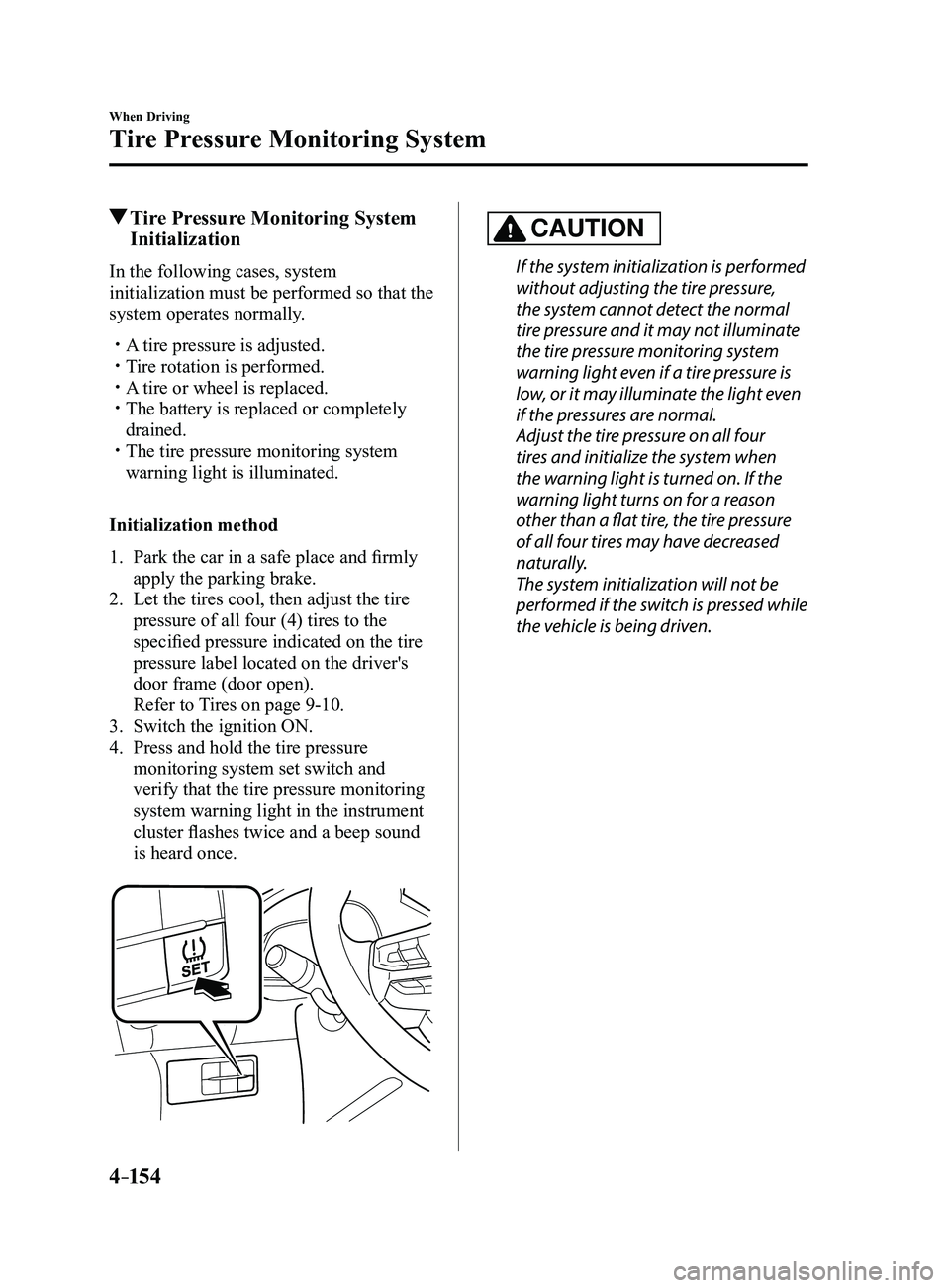
Initialization method
1. Park the car in a safe place and firmly
apply the parking brake.
2. Let the tires cool, then adjust the tire
pressure of all four (4) tires to the
specified pressure indicated on the tire
pressure label located on the driver's
door frame (door open).
Refer to Tires on page 9-10.
3. Switch the ignition ON.
4. Press and hold the tire pressure
monitoring system set switch and
verify that the tire pressure monitoring
system warning light in the instrument
cluster flashes twice and a beep sound
is heard once.
CAUTION
If the system initialization is performed
without adjusting the tire pressure,
the system cannot detect the normal
tire pressure and it may not illuminate
the tire pressure monitoring system
warning light even if a tire pressure is
low, or it may illuminate the light even
if the pressures are normal.
Adjust the tire pressure on all four
tires and initialize the system when
the warning light is turned on. If the
warning light turns on for a reason
other than a flat tire, the tire pressure
of all four tires may have decreased
naturally.
The system initialization will not be
performed if the switch is pressed while
the vehicle is being driven.
Mazda3_8FL6-EA-16F_Edition2.indb 1542016/08/10 17:37:04
Page 287 of 612
4–157
When Driving
Rear View Monitor
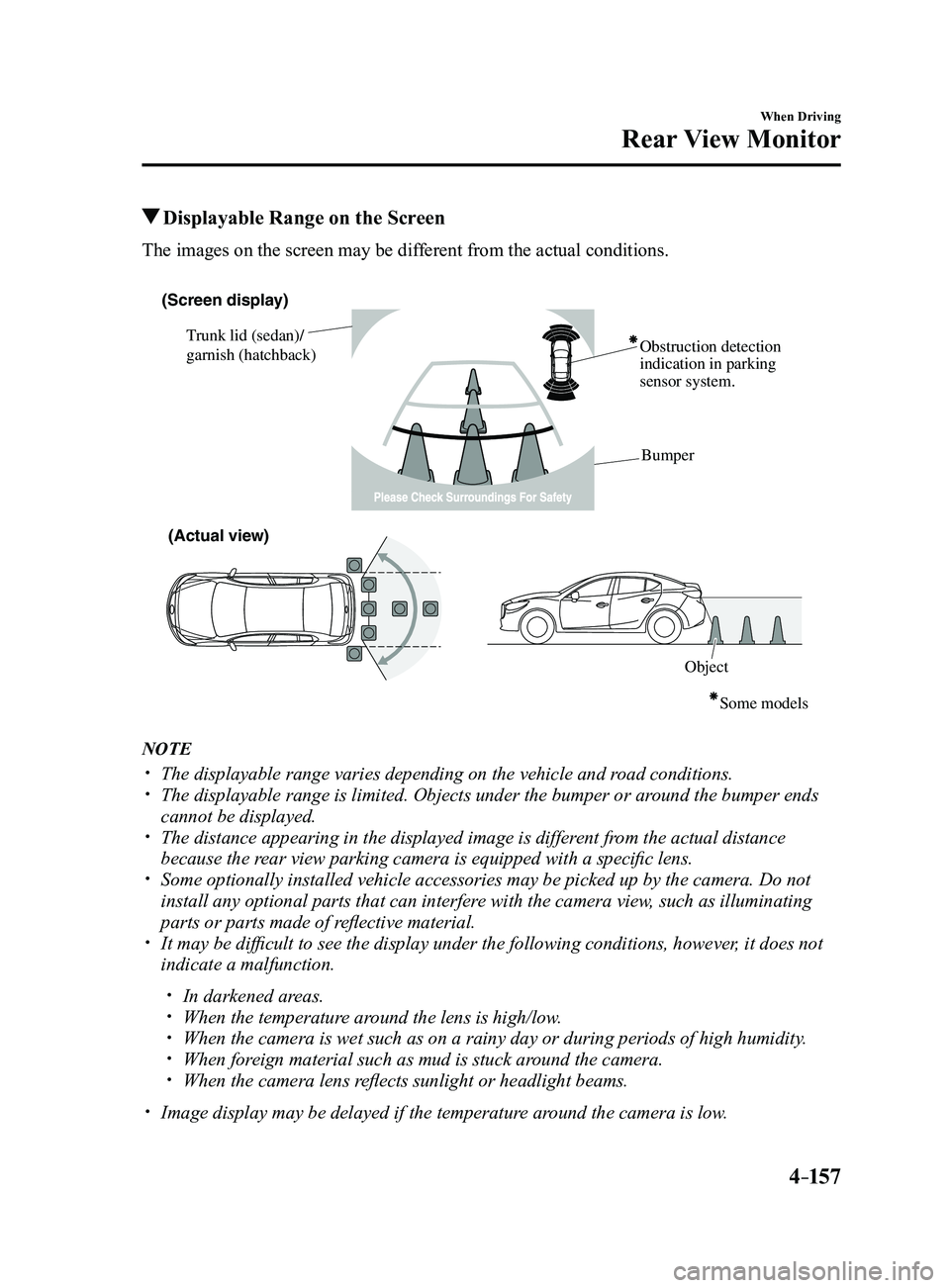
Displayable Range on the Screen
The images on the screen may be different from the actual conditions.
(Screen display)
Trunk lid (sedan)/
garnish (hatchback) Obstruction detection
indication in parking
sensor system.
Bumper
ObjectSome models
(Actual view)
NOTE
The displayable range varies depending on the vehicle and r
oad conditions. The displayable range is limited. Objects under the bumper or ar ound the bumper ends
cannot be displayed. The distance appearing in the displayed image is different from the actual distance
because the rear view parking camera is equipped with a specific lens. Some optionally installed vehicle accessories may be picked up by the ca\
mera. Do not
install any optional parts that can interfere with the camera view, such as illuminating
parts or parts made of reflective material.
It may be difficult to see the display under the following condi tions, however, it does not
indicate a malfunction.
In darkened areas. When the temperatur e around the lens is high/low. When the camera is wet such as on a rainy day or during periods of high \
humidity . When foreign material such as mud is stuck around the camera. When the camera lens reflects sunlight or headlight beams.
Image display may be delayed if the temperatur e around the camera is low.
Mazda3_8FL6-EA-16F_Edition2.indb 1572016/08/10 17:37:06
Page 293 of 612
5–1
*Some models.
5Interior Features
Use of various features for ride comfort, including air-conditioning and
audio system.
Climate Control System.....................................................................
5-2
Operating Tips ........................................................................\
.......5-2
Vent Operation ........................................................................\
......5-3
Manual Climate Control ...............................................................5-5
Automatic Climate Control ...........................................................5-9
Dual-Zone Automatic Climate Control .......................................5-12
Audio System ........................................................................\
............5-16
Antenna ........................................................................\
...............5-16
Operating Tips for Audio System ...............................................5-17
Audio set [Type A (non-touchscreen)] ........................................5-26
Audio set [Type B (touchscreen)] ...............................................5-34
Audio Control Switch Operation* ...............................................5-55
AUX/USB mode ........................................................................\
.5-57
Bluetooth® ........................................................................\
.................5-74
Bluetooth®* ........................................................................\
..........5-74
Bluetooth® Hands-Free* ..............................................................5-83
Bluetooth® Audio* .......................................................................5-92
Troubleshooting* .......................................................................5-106
Interior Equipment ........................................................................\
5-110
Sunvisors ........................................................................\
...........5-110
Interior Lights ........................................................................\
...5-111
Accessory Sockets ....................................................................5-113
Cup Holder ........................................................................\
........5-115
Bottle Holder ........................................................................\
.....5-116
Storage Compartments ..............................................................5-117
Mazda3_8FL6-EA-16F_Edition2.indb 12016/08/10 17:37:09
Page 294 of 612
5–2
Interior Features
Climate Control System
Operating Tips
Operate the climate control system with
the engine running. To prevent the battery from being
discharged, do not leave the fan control
dial/switch on for a long period of time
with the ignition switched ON when the
engine is not running.
Clear all obstructions such as leaves,
snow and ice from the hood and the air
inlet in the cowl grille to improve the
system efficiency.
Use the climate control system to defog
the windows and dehumidify the air. The recirculate mode should be used
when driving through tunnels or while in
a traffic jam, or when you would like to
shut off outside air for quick cooling of
the interior.
Use the outside air position for
ventilation or windshield defrosting. If the vehicle has been parked in direct
sunlight during hot weather, open the
windows to let warm air escape, then
run the climate control system.
(With A/C switch)
Run the air conditioner about 10 minutes
at least once a month to keep internal
parts lubricated.
Have the air conditioner checked before
the weather gets hot. Lack of refrigerant
may make the air conditioner less
efficient.
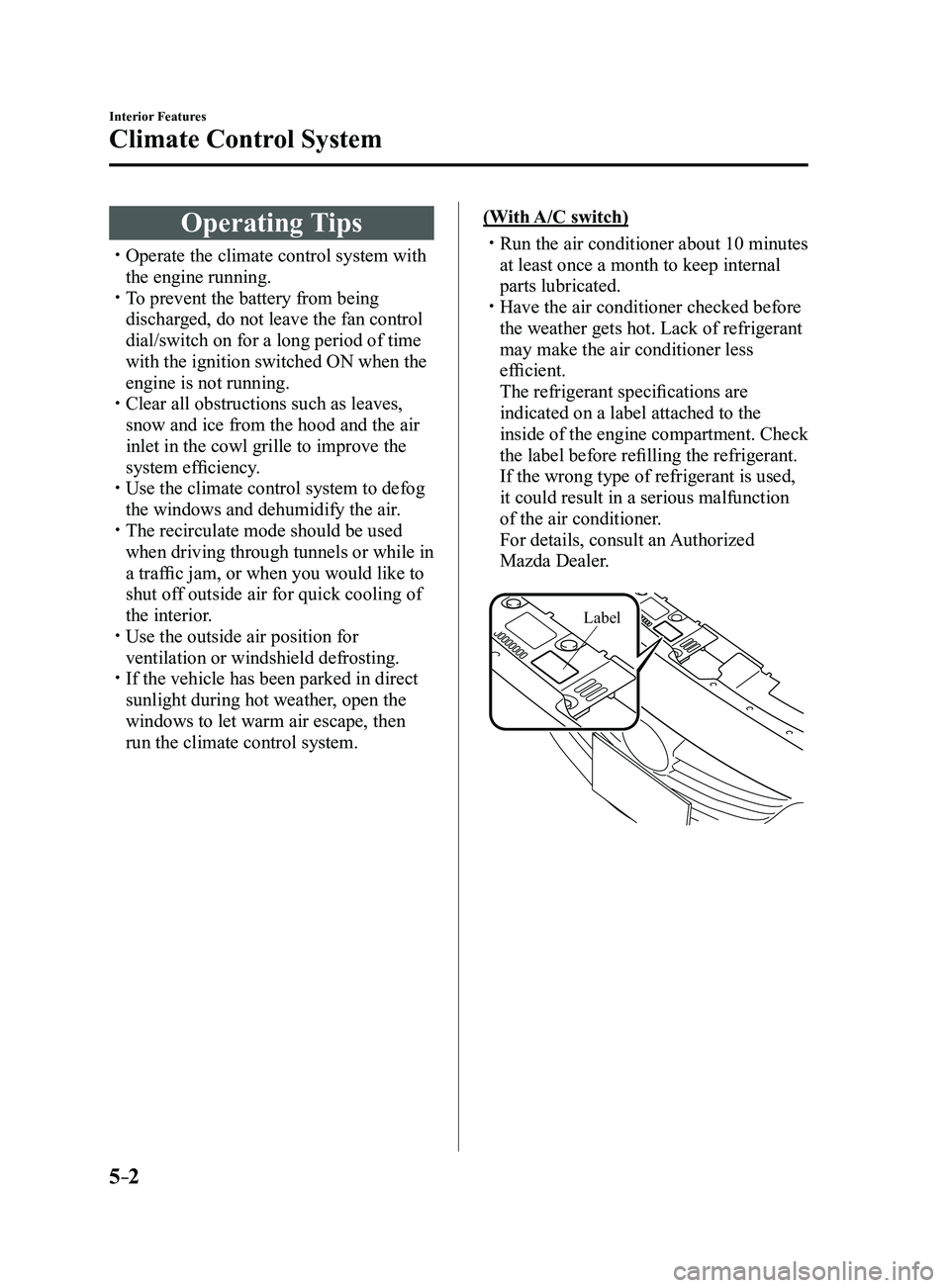
The refrigerant specifications are
indicated on a label attached to the
inside of the engine compartment. Check
the label before refilling the refrigerant.
If the wrong type of refrigerant is used,
it could result in a serious malfunction
of the air conditioner.
For details, consult an Authorized
Mazda Dealer.
Label
Mazda3_8FL6-EA-16F_Edition2.indb 22016/08/10 17:37:10