ECO mode MAZDA MODEL 3 5-DOOR 2017 User Guide
[x] Cancel search | Manufacturer: MAZDA, Model Year: 2017, Model line: MODEL 3 5-DOOR, Model: MAZDA MODEL 3 5-DOOR 2017Pages: 612
Page 132 of 612
4–2*Some models.
i-ACTIVSENSE.................................4-81
i-ACTIVSENSE ...........................4-81
Adaptive Front Lighting
System (AFS)* ..............................4-84
High Beam Control System
(HBC)*..........................................4-85
Blind Spot Monitoring (BSM)* ....4-88
Traffic Sign Recognition System
(TSR)* ..........................................4-94
Distance Recognition Support
System (DRSS)* .........................4-101
Rear Cross Traffic Alert
(RCTA)* .....................................4-103
Mazda Radar Cruise Control
(MRCC)* ....................................4-107
Lane-keep Assist System (LAS) &
Lane Departure Warning System
(LDWS)
* ....................................4-117
Smart City Brake Support
(SCBS)* ......................................4-128
Smart Brake Support (SBS)* ......4-133
Forward Sensing Camera
(FSC)
..........................................4-136
Radar Sensor (Front) ..................4-141
Radar Sensors (Rear) .................4-144
Cruise Control .................................4-146
Cruise Control* ...........................4-146
Tire Pressure Monitoring System ...4-151
Tire Pressure Monitoring
System* .......................................4-151
Rear View Monitor ..........................4-155
Rear View Monitor* ...................4-155
Mazda3_8FL6-EA-16F_Edition2.indb 22016/08/10 17:35:40
Page 144 of 612
4–14
When Driving
Instrument Cluster and Display
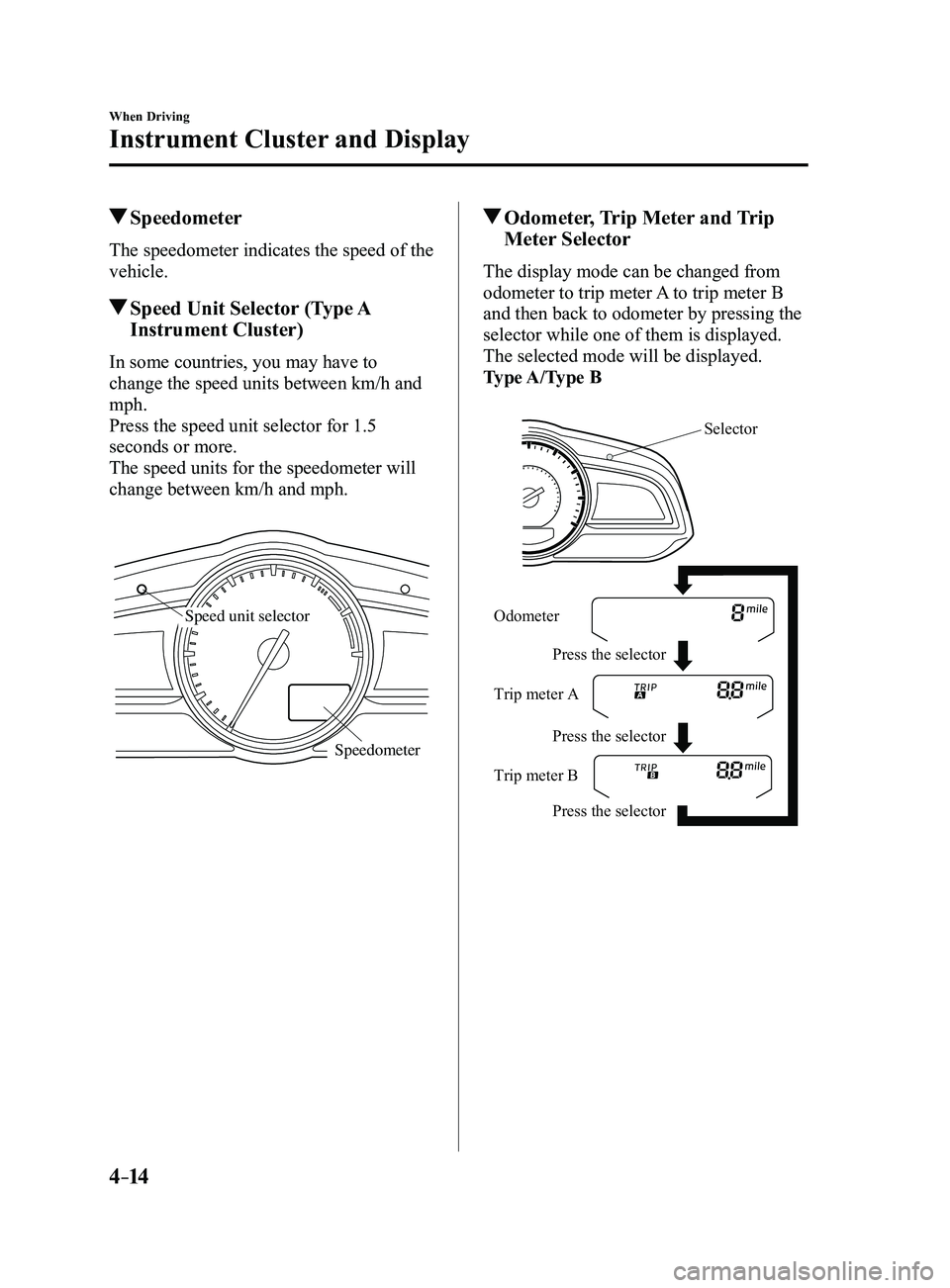
Speedometer
The speedometer indicates the speed of the
vehicle.
Speed Unit Selector (Type A
Instrument Cluster)
In some countries, you may have to
change the speed units between km/h and
mph.
Press the speed unit selector for 1.5
seconds or more.
The speed units for the speedometer will
change between km/h and mph.
Speedometer
Speed unit selector
Odometer, Trip Meter and Trip
Meter Selector
The display mode can be changed from
odometer to trip meter A to trip meter B
and then back to odometer by pressing the
selector while one of them is displayed.
The selected mode will be displayed.
Type A/Type B
Selector
Press the selector Press the selector
Press the selector
Odometer
Trip meter
A
Trip meter B
Mazda3_8FL6-EA-16F_Edition2.indb 142016/08/10 17:35:47
Page 145 of 612
4–15
When Driving
Instrument Cluster and Display
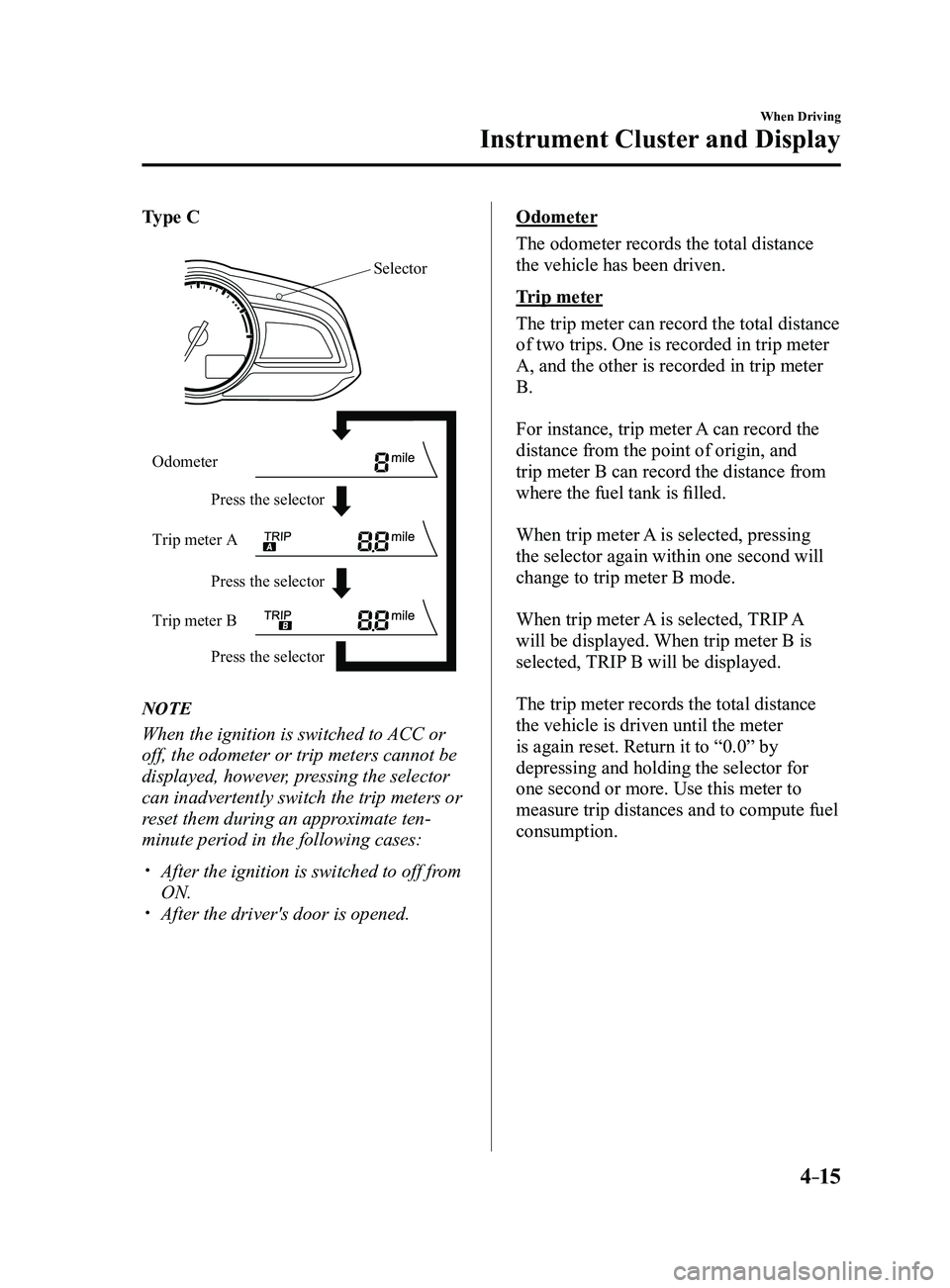
Type C
Press the selector Press the selector
Press the selector
Odometer
Trip meter A
Trip meter B
Selector
NOTE
When the ignition is switched to ACC or
off, the odometer or trip meters cannot be
displayed, however, pressing the selector
can inadvertently switch the trip meters or
reset them during an approximate ten-
minute period in the following cases:
After the ignition is switched to off fr
om
ON. After the driver's door is opened.
Odometer
The odometer records the total distance
the vehicle has been driven.
Trip meter
The trip meter can record the total distance
of two trips. One is recorded in trip meter
A, and the other is recorded in trip meter
B.
For instance, trip meter A can record the
distance from the point of origin, and
trip meter B can record the distance from
where the fuel tank is filled.
When trip meter A is selected, pressing
the selector again within one second will
change to trip meter B mode.
When trip meter A is selected, TRIP A
will be displayed. When trip meter B is
selected, TRIP B will be displayed.
The trip meter records the total distance
the vehicle is driven until the meter
is again reset. Return it to “0.0” by
depressing and holding the selector for
one second or more. Use this meter to
measure trip distances and to compute fuel
consumption.
Mazda3_8FL6-EA-16F_Edition2.indb 152016/08/10 17:35:47
Page 146 of 612
4–16
When Driving
Instrument Cluster and Display
*Some models.
NOTE
(Vehicles with type B audio)
If the fuel economy data is reset using
the fuel economy monitor, or trip A
is reset using the trip meter when the
function which synchronizes the fuel
economy monitor and the trip meter is
on, the fuel economy data and trip A are
reset simultaneously.
Refer to Fuel Economy Monitor on page
4-75. Only the trip meters record tenths of
kilometers (miles). The trip record will be erased when:
The power supply is interrupted
(blown fuse or the battery is
disconnected).
The vehicle is driven over 9999.9 km
(mile).
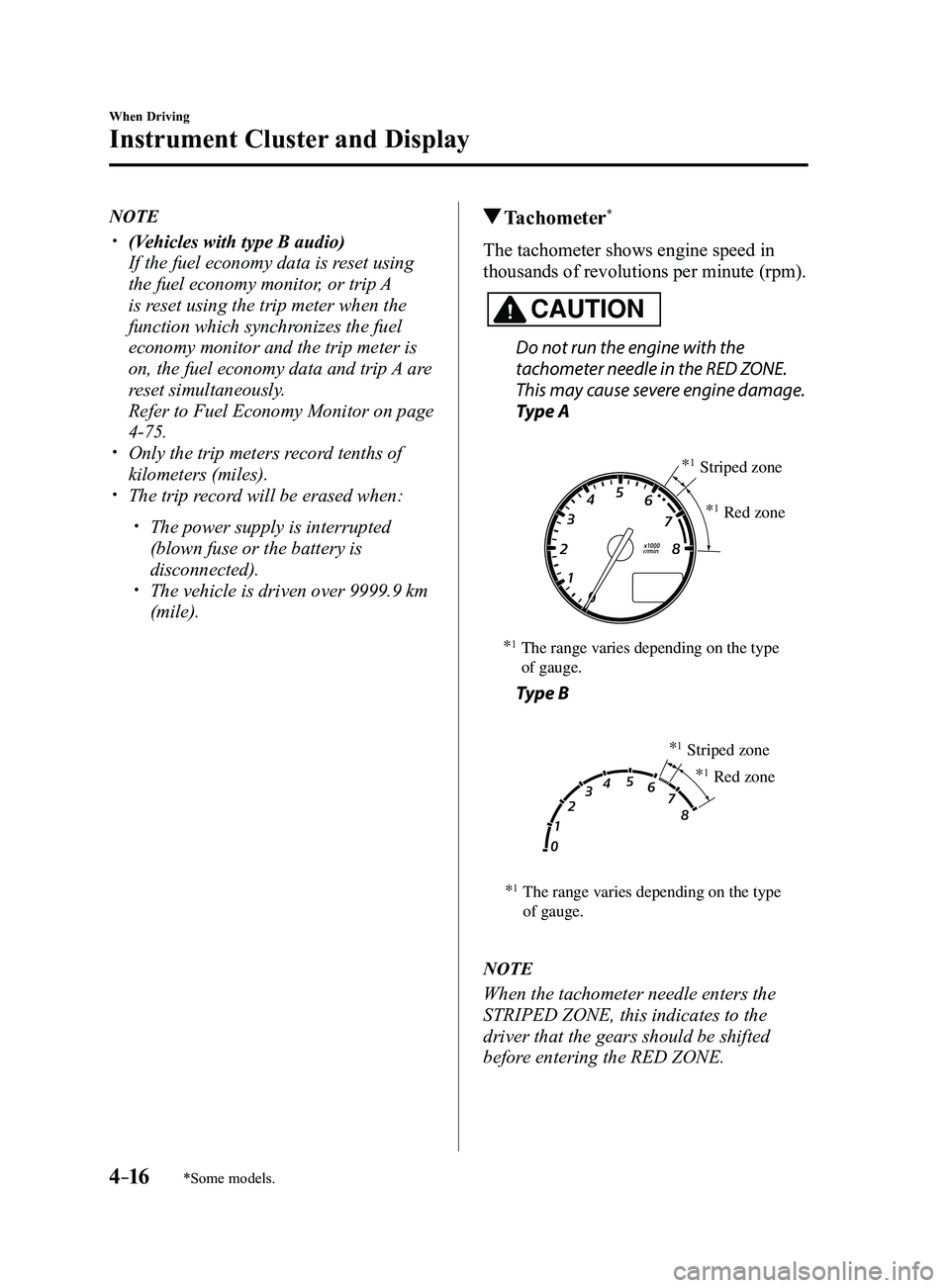
Tachometer*
The tachometer shows engine speed in
thousands of revolutions per minute (rpm).
CAUTION
Do not run the engine with the
tachometer needle in the RED ZONE.
This may cause severe engine damage.
Type A
*1The range varies depending on the type
of gauge. *
1Striped zone
*
1Red zone
Type B
*1The range varies depending on the type
of gauge. *
1Striped zone
*
1Red zone
NOTE
When the tachometer needle enters the
STRIPED ZONE, this indicates to the
driver that the gears should be shifted
before entering the RED ZONE.
Mazda3_8FL6-EA-16F_Edition2.indb 162016/08/10 17:35:48
Page 149 of 612
4–19
When Driving
Instrument Cluster and Display
*Some models.
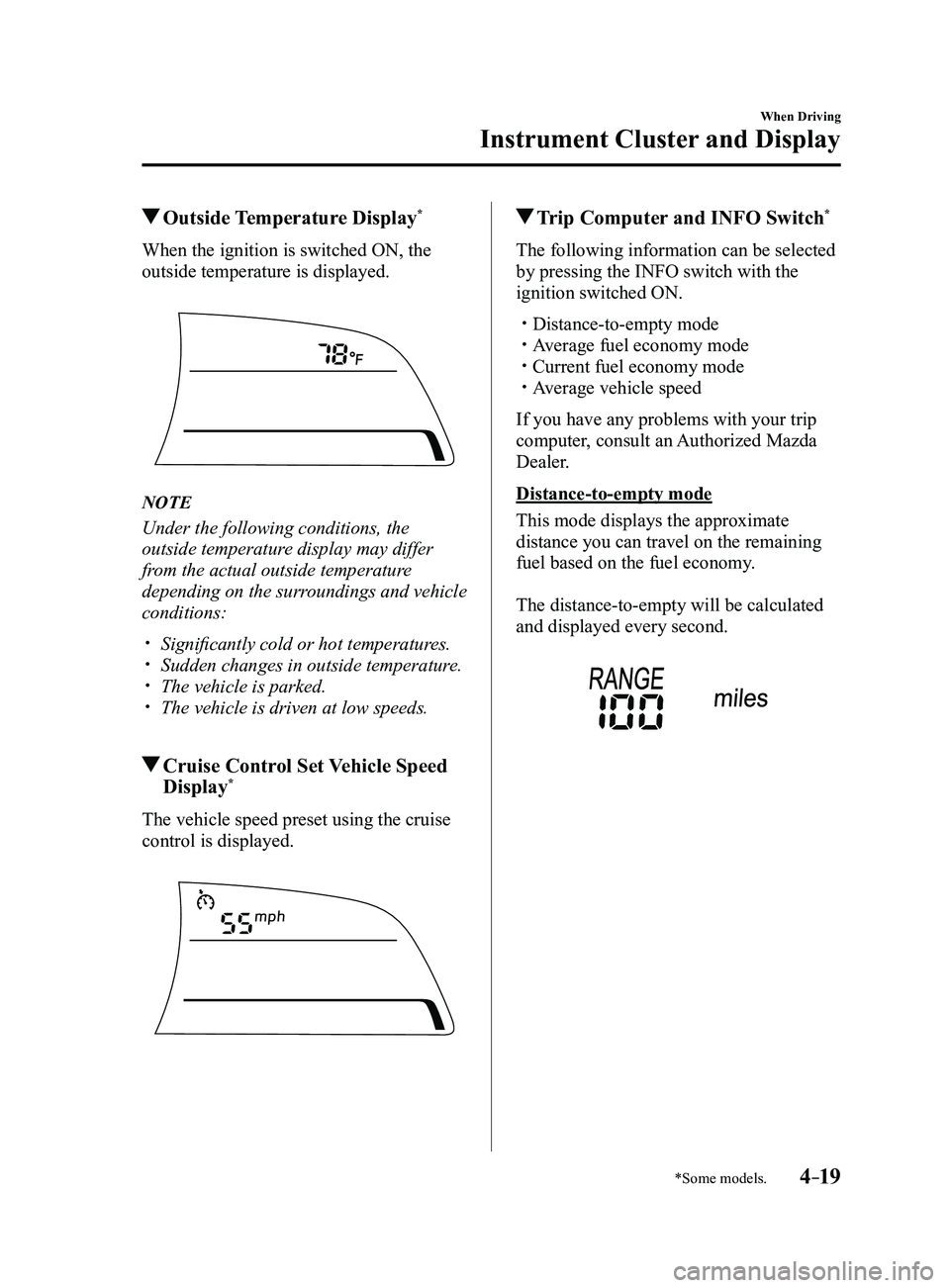
Outside Temperature Display*
When the ignition is switched ON, the
outside temperature is displayed.
NOTE
Under the following conditions, the
outside temperature display may differ
from the actual outside temperature
depending on the surroundings and vehicle
conditions:
Significantly cold or hot temperatures. Sudden changes in outside temperatur e. The vehicle is parked. The vehicle is driven at low speeds.
Cruise Control Set Vehicle Speed
Display*
The vehicle speed preset using the cruise
control is displayed.
Trip Computer and INFO Switch*
The following information can be selected
by pressing the INFO switch with the
ignition switched ON.
Distance-to-empty mode Average fuel economy mode Current fuel economy mode Average vehicle speed
If you have any problems with your trip
computer, consult an Authorized Mazda
Dealer.
Distance-to-empty mode
This mode displays the approximate
distance you can travel on the remaining
fuel based on the fuel economy.
The distance-to-empty will be calculated
and displayed every second.
Mazda3_8FL6-EA-16F_Edition2.indb 192016/08/10 17:35:50
Page 150 of 612
4–20
When Driving
Instrument Cluster and Display
NOTE
Even though the distance-to-empty
display may indicate a sufficient amount
of remaining driving distance before
refueling is required, refuel as soon as
possible if the fuel level is very low or
the low fuel warning light illuminates.
The display may not change unless you
add more than approximately 9 L
(2.3 US gal, 1.9 Imp gal) of fuel.
The distance-to-empty is the
approximate remaining distance the
vehicle can be driven until all the
graduation marks in the fuel gauge
(indicating the remaining fuel supply)
disappear.
If there is no past fuel economy
information such as after first
purchasing your vehicle or the
information is deleted when the battery
cables are disconnected, the actual
distance-to empty/range may differ from
the amount indicated.
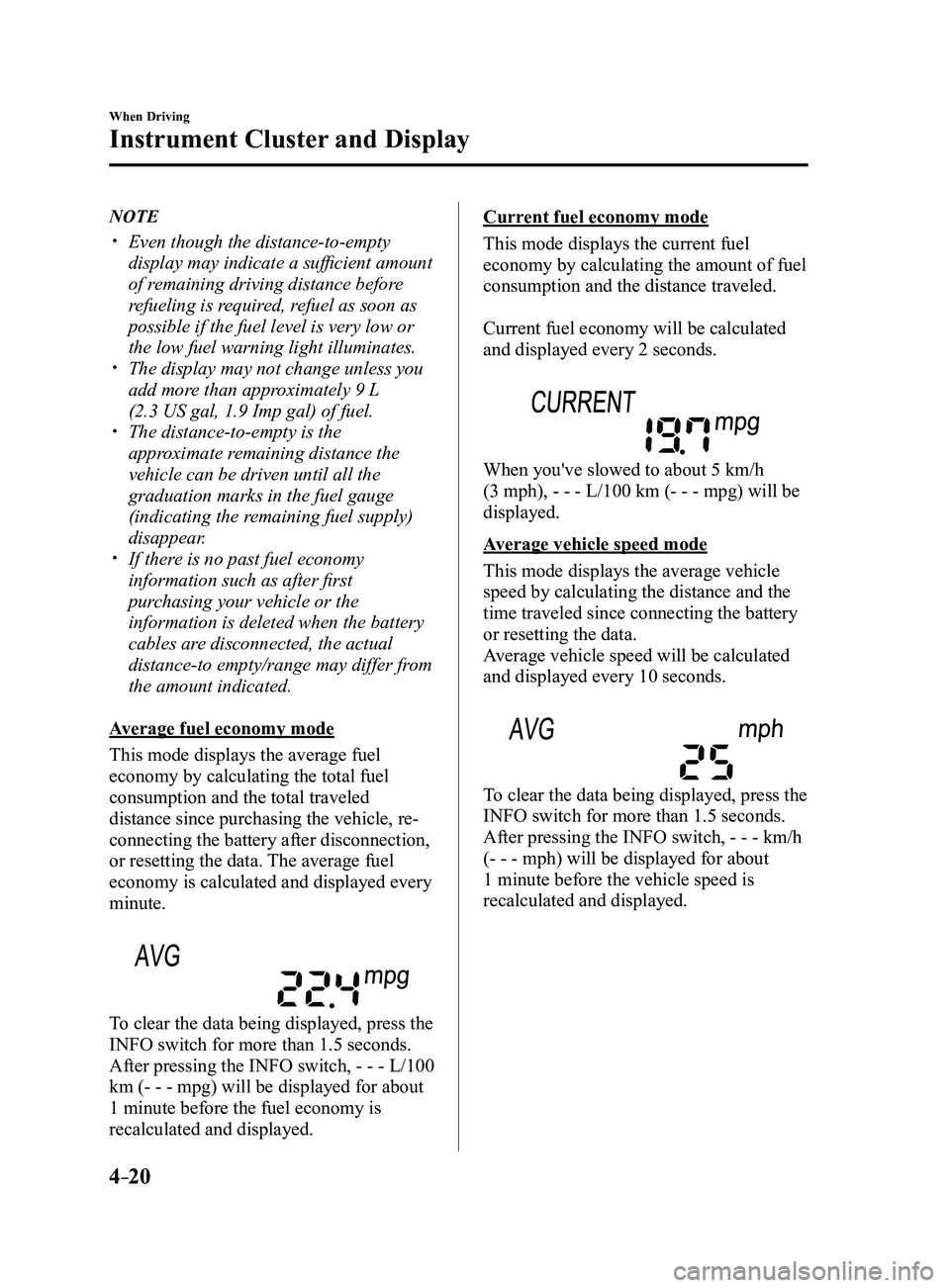
Average fuel economy mode
This mode displays the average fuel
economy by calculating the total fuel
consumption and the total traveled
distance since purchasing the vehicle, re-
connecting the battery after disconnection,
or resetting the data. The average fuel
economy is calculated and displayed every
minute.
To clear the data being displayed, press the
INFO switch for more than 1.5 seconds.
After pressing the INFO switch, - - - L/100
km (- - - mpg) will be displayed for about
1 minute before the fuel economy is
recalculated and displayed.
Current fuel economy mode
This mode displays the current fuel
economy by calculating the amount of fuel
consumption and the distance traveled.
Current fuel economy will be calculated
and displayed every 2 seconds.
When you've slowed to about 5 km/h
(3 mph), - - - L/100 km (- - - mpg) will be
displayed.
Average vehicle speed mode
This mode displays the average vehicle
speed by calculating the distance and the
time traveled since connecting the battery
or resetting the data.
Average vehicle speed will be calculated
and displayed every 10 seconds.
To clear the data being displayed, press the
INFO switch for more than 1.5 seconds.
After pressing the INFO switch, - - - km/h
(- - - mph) will be displayed for about
1 minute before the vehicle speed is
recalculated and displayed.
Mazda3_8FL6-EA-16F_Edition2.indb 202016/08/10 17:35:51
Page 155 of 612
4–25
When Driving
Instrument Cluster and Display
*Some models.
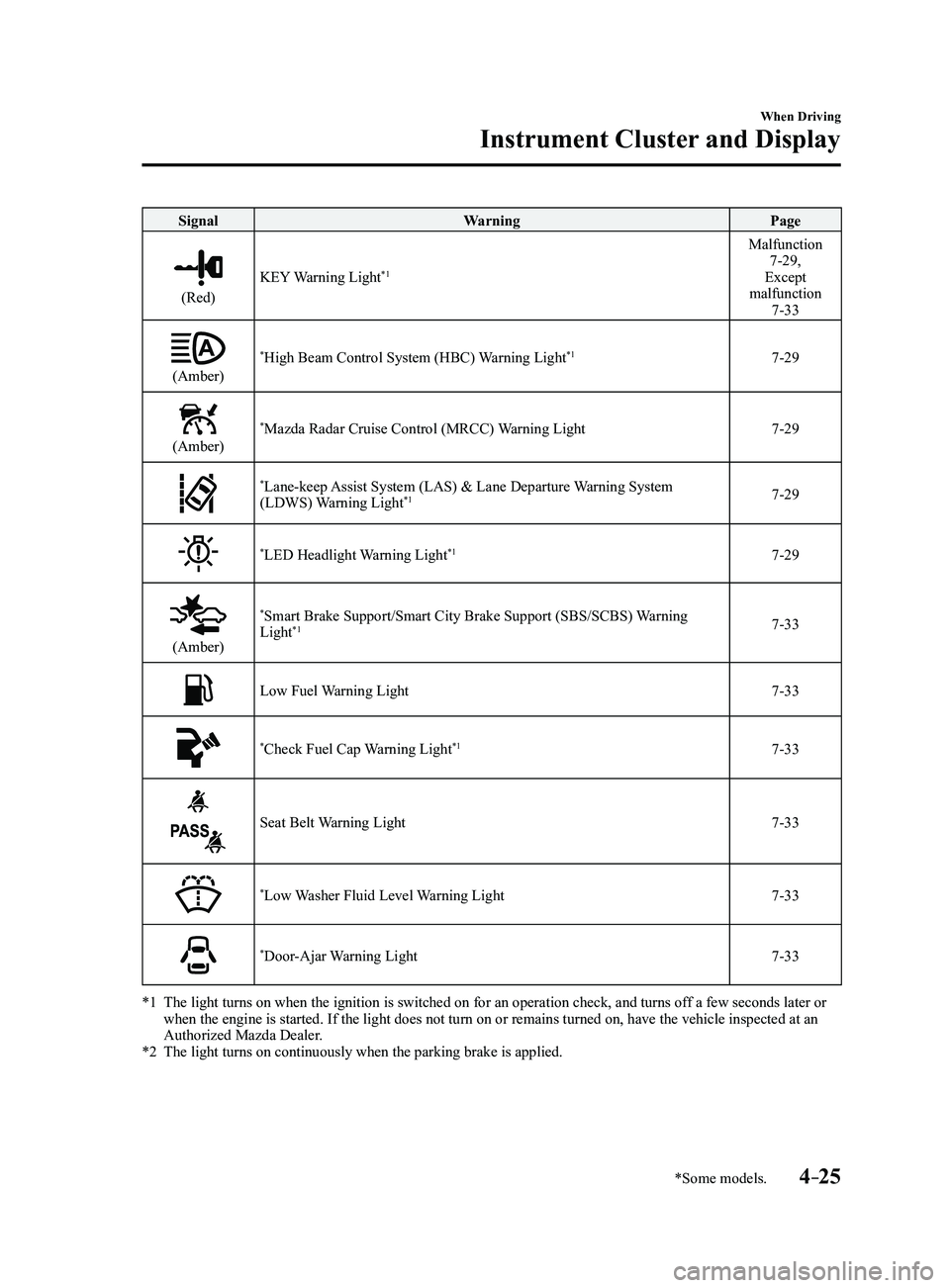
SignalWarning Page
(Red)
KEY Warning Light*1
Malfunction 7-29,
Except
malfunction
7-33
(Amber)
*High Beam Control System (HBC) Warning Light*17-29
(Amber)
*Mazda Radar Cruise Control (MRCC) Warning Light7-29
*Lane-keep Assist System (LAS) & Lane Departure Warning System
(LDWS) Warning Light*17-29
*LED Headlight Warning Light*17-29
(Amber)
*Smart Brake Support/Smart City Brake Support (SBS/SCBS) Warning
Light*17-33
Low Fuel Warning Light7-33
*Check Fuel Cap Warning Light*17-33
Seat Belt Warning Light7-33
*Low Washer Fluid Level Warning Light7-33
*Door-Ajar Warning Light7-33
*1 The light turns on when the ignition is switched on for an operation che\
ck, and turns of f a few seconds later or when the engine is started. If the light does not turn on or remains tur\
ned on, have the vehicle inspected at an
Authorized Mazda Dealer.
*2 The light turns on continuously when the parking brake is applied.
Mazda3_8FL6-EA-16F_Edition2.indb 252016/08/10 17:35:58
Page 157 of 612
4–27
When Driving
Instrument Cluster and Display
*Some models.
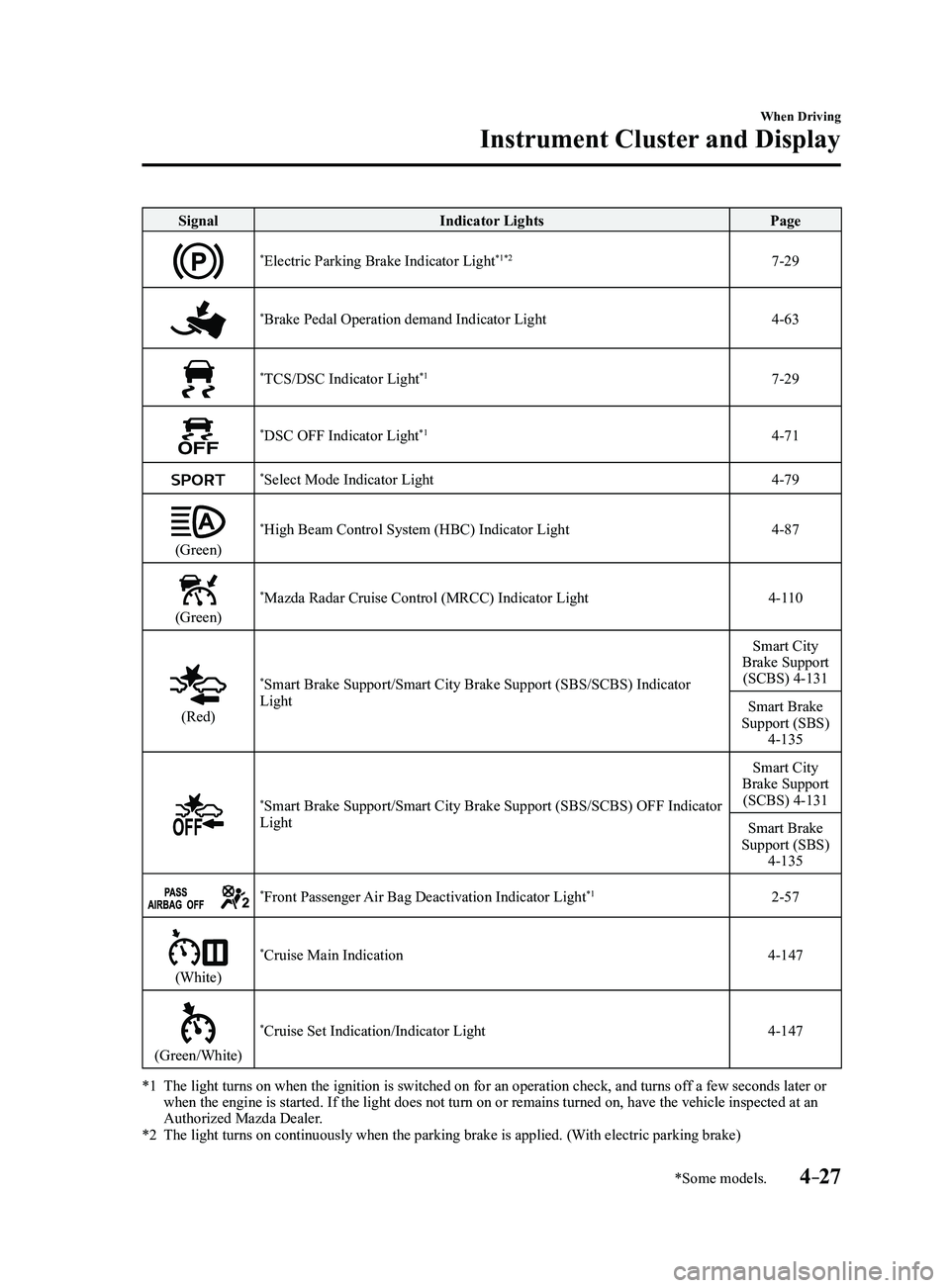
SignalIndicator Lights Page
*Electric Parking Brake Indicator Light*1*27-29
*Brake Pedal Operation demand Indicator Light4-63
*TCS/DSC Indicator Light*17-29
*DSC OFF Indicator Light*14-71
*Select Mode Indicator Light4-79
(Green)
*High Beam Control System (HBC) Indicator Light4-87
(Green)
*Mazda Radar Cruise Control (MRCC) Indicator Light4-110
(Red)
*Smart Brake Support/Smart City Brake Support (SBS/SCBS) Indicator
Light Smart City
Brake Support (SCBS) 4-131
Smart Brake
Support (SBS)
4-135
*Smart Brake Support/Smart City Brake Support (SBS/SCBS) OFF Indicator
Light Smart City
Brake Support (SCBS) 4-131
Smart Brake
Support (SBS)
4-135
*Front Passenger Air Bag Deactivation Indicator Light*12-57
(White)
*Cruise Main Indication4-147
(Green/White)
*Cruise Set Indication/Indicator Light4-147
*1 The light turns on when the ignition is switched on for an operation che\
ck, and turns of f a few seconds later or when the engine is started. If the light does not turn on or remains tur\
ned on, have the vehicle inspected at an
Authorized Mazda Dealer.
*2 The light turns on continuously when the parking brake is applied. (With electric parking brake)
Mazda3_8FL6-EA-16F_Edition2.indb 272016/08/10 17:36:04
Page 160 of 612
4–30
When Driving
Manual Transaxle Operation
*Some models.
NOTE
(For vehicles with type C instrument
cluster*1)
If the engine speed is about to exceed
the permissible engine speed, the buzzer
sounds.
Refer to Over Rev. Buzzer on page
7-43.
*1 To determine which instrument
cluster is equipped on your Mazda,
Refer to Meters and Gauges on page
4-12.
If shifting to R is difficult, shift back into
neutral, release the clutch pedal, and try
again.
Gear Shift Indicator (GSI)*
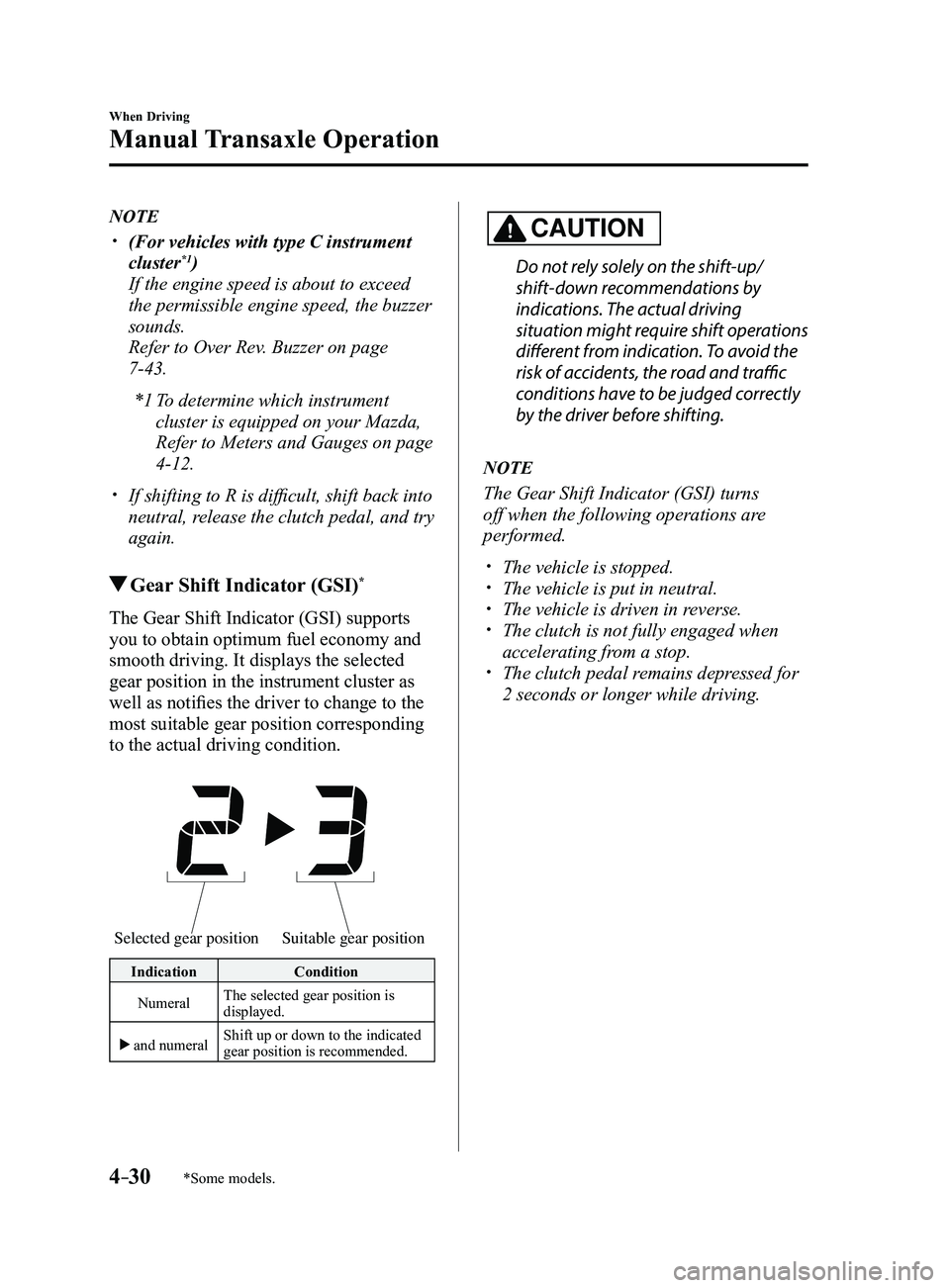
The Gear Shift Indicator (GSI) supports
you to obtain optimum fuel economy and
smooth driving. It displays the selected
gear position in the instrument cluster as
well as notifies the driver to change to the
most suitable gear position corresponding
to the actual driving condition.
Selected gear positionSuitable gear position
Indication Condition
Numeral The selected gear position is
displayed.
and numeral Shift up or down to the indicated
gear position is recommended.
CAUTION
Do not rely solely on the shift-up/
shift-down recommendations by
indications. The actual driving
situation might require shift operations
different from indication. To avoid the
risk of accidents, the road and traffic
conditions have to be judged correctly
by the driver before shifting.
NOTE
The Gear Shift Indicator (GSI) turns
off when the following operations are
performed.
The vehicle is stopped. The vehicle is put in neutral. The vehicle is driven in r
everse. The clutch is not fully engaged when
accelerating from a stop. The clutch pedal remains depressed for
2 seconds or longer while driving.
Mazda3_8FL6-EA-16F_Edition2.indb 302016/08/10 17:36:07
Page 166 of 612
4–36
When Driving
Automatic Transaxle
Indicators
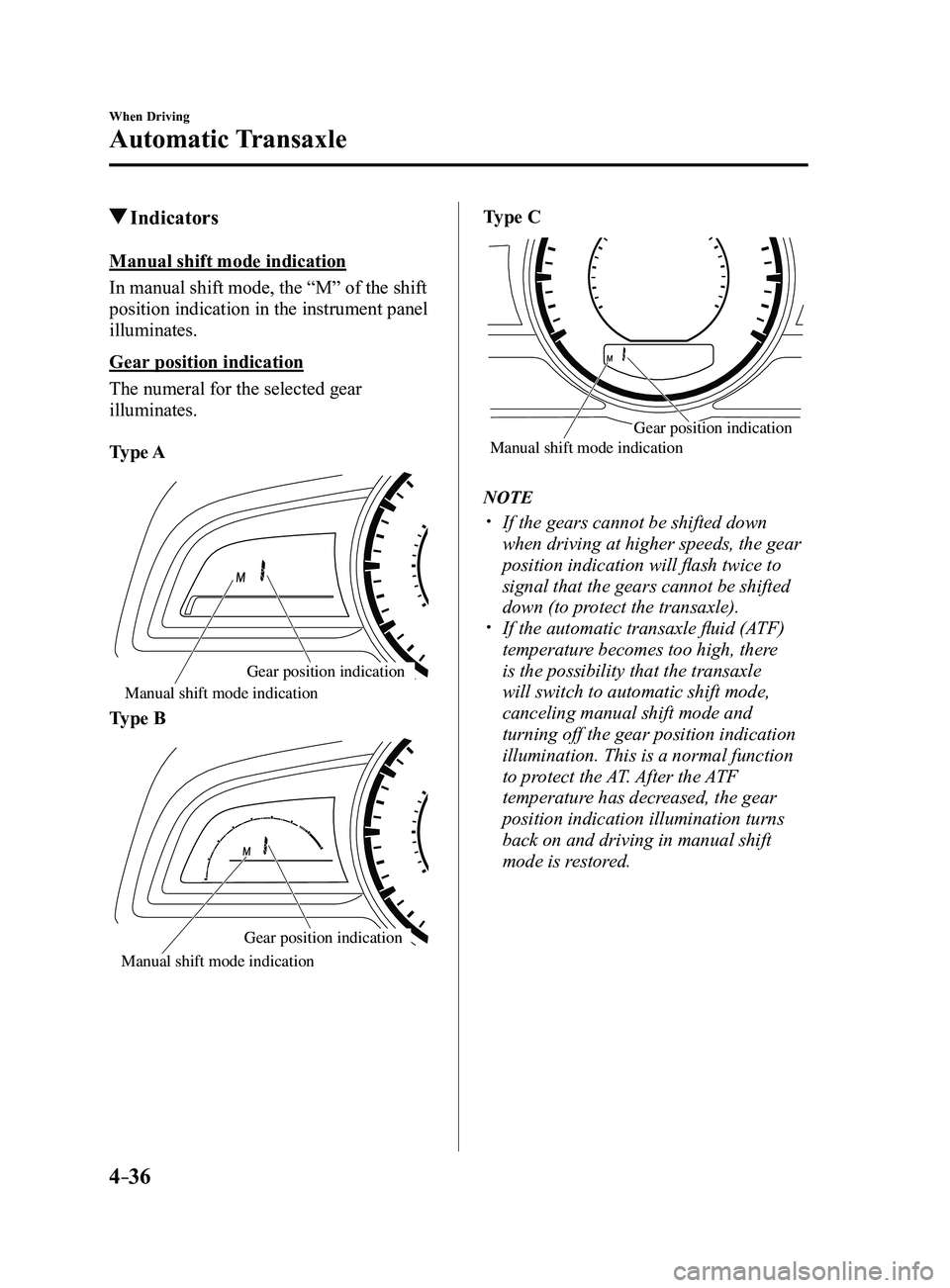
Manual shift mode indication
In manual shift mode, the “M” of the shift
position indication in the instrument panel
illuminates.
Gear position indication
The numeral for the selected gear
illuminates.
Type A
Manual shift mode indication
Gear position indication
Type B
Gear position indication
Manual shift mode indication
Type C
Manual shift mode indication Gear position indication
NOTE
If the gears cannot be shifted down
when driving at higher speeds, the gear
position indication will flash twice to
signal that the gears cannot be shifted
down (to protect the transaxle).
If the automatic transaxle fluid (A
TF)
temperature becomes too high, there
is the possibility that the transaxle
will switch to automatic shift mode,
canceling manual shift mode and
turning off the gear position indication
illumination. This is a normal function
to protect the AT. After the ATF
temperature has decreased, the gear
position indication illumination turns
back on and driving in manual shift
mode is restored.
Mazda3_8FL6-EA-16F_Edition2.indb 362016/08/10 17:36:10