Trans MAZDA MODEL 3 HATCHBACK 2020 (in English) Manual Online
[x] Cancel search | Manufacturer: MAZDA, Model Year: 2020, Model line: MODEL 3 HATCHBACK, Model: MAZDA MODEL 3 HATCHBACK 2020Pages: 598, PDF Size: 89.37 MB
Page 372 of 598

5. Once they are parallel, straighten the wheels and back your vehicle slowly into the
parking space. Continue checking the vehicle's surroundings and then stop the vehicle in
the best possible position. (If the parking space has division lines, check whether the
vehicle width guide lines are parallel to them.)
1. (Display condition)
2. (Vehicle condition)
6. When the shift lever (manual transmission) or the selector lever (automatic transmission)
is shifted from reverse (R) posi tion to another shift lever (manual transmission) or the
selector lever (automatic transm ission) position, the screen returns to the previous
display.
NOTE
Because there may be a difference between the displayed image, such as indicated below,
and the actual conditions when parking, always verify the safety at the rear of the vehicle
and the surrounding area directly with your eyes.
In the image of the parking space (or garage) displayed on the screen, the back end and
distance guide lines may appear aligned in the monitor, but they may not actually be
aligned on the ground.
When Driving
Rear View Monitor
4-228
Mazda3_8HZ1-EA-19G_Edition1_old 2019-5-17 13:49:03
Page 373 of 598

When parking in a space with a division line on only one side of the parking space, the
division line and the vehicle width guide line appear aligned in the monitor, but they may
not actually be aligned on the ground.
Fixed assist lines display type
NOTE
Images displayed on the monitor from the rear view parking camera are reversed images
(mirror images).
1. Shift the shift lever (manual t ransmission) or the selector lever (automatic transmission)
to reverse (R) position to switc h the display to the rear view monitor display.
When Driving
Rear View Monitor
4-229
Mazda3_8HZ1-EA-19G_Edition1_old 2019-5-17 13:49:03
Page 375 of 598

5. Once they are parallel, straighten the wheels and back your vehicle slowly into the
parking space. Continue checkin g the vehicle's surroundings and then stop the vehicle in
the best possible position. (If the parking space has division lines, check whether the
vehicle width guide lines are parallel to them.)
1. (Display condition)
2. (Vehicle condition)
6. When the shift lever (manual transmission) or the selector lever (automatic transmission)
is shifted from reverse (R) pos ition to another shift lever (manual transmission) or the
selector lever (automatic transmission) position, the screen re turns to the previous
display.
NOTE
Because there may be a difference between the displayed image, such as indicated below,
and the actual conditions when parking, always verify the safety at the rear of the vehicle
and the surrounding area directly with your eyes.
In the image of the parking space (or garage) displayed on the screen, the back end and
distance guide lines may appear aligned in the monitor, but they may not actually be
aligned on the ground.
When Driving
Rear View Monitor
4-231
Mazda3_8HZ1-EA-19G_Edition1_old 2019-5-17 13:49:03
Page 380 of 598
CAUTION
Do not install any accessories within the detection ranges of the sensors. It may
affect the
system operation.
Depending on the type of obstruction and th e surrounding conditions, the detection range
of a sensor may narrow, or the sensors may not be able to detect obstructions.
NOTE
The system may not operate norma lly under the following conditions:
Mud, ice, or snow is adhering to the sensor area (Returns to normal operation when
removed).
The sensor area is frozen (Returns to normal operation when the ice is thawed).
The sensor is covered by a hand.
The sensor is excessively shocked.
The vehicle is excessively tilted.
Under extremely hot or cold weather conditions.
The vehicle is driven on bumps, inclines, gravel, grating, or grass covered roads.
Anything which generates ultrasonic waves such as another vehicle's horn, the engine
sound of a motorcycle, the air brake sound of a large-sized vehicle, or another vehicle's
sensors approaches the vehicle.
The vehicle is driven in heavy rain or in road conditions causing water-splash.
A commercially-available fender pole or an antenna for a radio transmitter is installed
to the vehicle.
The vehicle is moving towards a tall or square curbstone, or a steep grade.
An obstruction is too close to the sensor.
The vehicle is moving towards an uneven wall or stairs.
There are multiple obstructions.
The vehicle is driven in a place with low ceilings.
Obstructions under the bumper cannot be detected. Obstructions which are lower than the
sensor or thin may not be detected even though they were detected once.
The following types of obstructions may not be detected:
Thin objects such as wire, rope or poles
Things which absorb sonic waves easily such as cotton or snow
Angular shaped objects
Very tall objects, and those which are wide at the top
Small, short objects
Always have the system inspected at an Aut horized Mazda Dealer if any shock is applied
to the bumpers, even in a minor accident. If the sensors are deviated, they cannot detect
obstructions.
When Driving
Parking Sensor System
4-236
Mazda3_8HZ1-EA-19G_Edition1_old 2019-5-17 13:49:03
Page 404 of 598
WA R N I N G
Always adjust the audio while the vehicle is stopped:
Do not adjust the audio remote control switch while driving the vehicle. Adjusting the audio
while driving the vehicle is dangerous as it co uld distract your attention from the vehicle
operation which could lead to a serious accident.
Even if the audio control switches are equipped on the steering wheel, learn to use the
switches without looking down at them so that you can keep your maximum attention on the
road while driving the vehicle.
Do not allow the connection plug cord to get tangled with the shift lever (manual
transmission)/selector lever (automatic transmission):
Allowing the plug cord to become tangled with the shift lever (manual transmission)/selector
lever (automatic transmission) is dangerous as it could interfere with driving, resulting in an
accident.
Do not adjust the portable audio unit or a similar product while driving the vehicle:
Adjusting the portable audio unit or a similar product while driving the vehicle is dangerous
as it could distract your attention from the vehicle operation which could lead to a serious
accident. Always adjust the portable audio un it or a similar product while the vehicle is
stopped.
CAUTION
For the purposes of safe driving, adjust the au dio volume to a level that allows you to hear
sounds outside of the vehicle including car horns and particul arly emergency vehicle sirens.
NOTE
Do not use Mazda Connect for a long time with the engine stopped. Otherwise, the battery
power could be depleted.
If a mobile phone or CB radio is used in or near the vehicle, it could cause noise to occur
from the audio system. However, this does not indicate a problem.
Interior Features
Mazda Connect
5-16
Mazda3_8HZ1-EA-19G_Edition1_old 2019-5-17 13:49:03
Page 416 of 598

AS EXAMPLES, AND WITHOUT LIMITATION, MAZDA DISCLAIMS ANY WARRANTY
REGARDING THE ACCURACY OF DATA PROVIDED BY THE APPLICATION, SUCH AS THE
ACCURACY OF DIRECTIONS, ESTIMATED TRAVEL TIME, SPEED LIMITS, ROAD CONDITIONS,
NEWS, WEATHER, TRAFFIC, OR OTHER CONTEN T PROVIDED BY APPLE, ITS AFFILIATES, OR
THIRD PARTY PROVIDERS; MAZDA DOES NOT GUARANTEE AGAINST LOSS OF APPLICATION
DATA, WHICH MAY BE LOST AT ANY TIME; MAZDA DOES NOT GUARANTEE THAT THE
APPLICATION OR ANY SERVICES PROVIDED TH ROUGH THEM WILL BE PROVIDED AT ALL
TIMES OR THAT ANY OR ALL SERVICES WILL BE AVAILABLE AT ANY PARTICULAR TIME OR
LOCATION. FOR EXAMPLE, SERVICES MAY BE SUSPENDED OR INTERRUPTED WITHOUT
NOTICE FOR REPAIR, MAINTENANCE, SECURITY FIXES, UPDATES, ETC., SERVICES MAY BE
UNAVAILABLE IN YOUR AREA OR LOCATION, ETC.
IN ADDITION, YOU UNDERSTAND THAT CH ANGES IN THIRD PARTY TECHNOLOGY OR
GOVERNMENT REGULATION MAY RENDER THE SERVICES AND/OR APPLICATIONS
OBSOLETE AND/OR UNUSABLE. TO THE EXTENT NOT PROHIBITED BY LAW, IN NO EVENT
SHALL MAZDA OR ITS AFFILIATES BE LIABLE FOR PERSONAL INJURY, OR ANY INCIDENTAL,
SPECIAL, INDIRECT OR CONSEQUENTIAL DAMAGES WHATSOEVER, INCLUDING, WITHOUT
LIMITATION, DAMAGES FOR LOSS OF PROFITS, CORRUPTION OR LOSS OF DATA, FAILURE
TO TRANSMIT OR RECEIVE ANY DATA, BUSINESS INTERRUPTION OR ANY OTHER
COMMERCIAL DAMAGES OR LOSSES, ARISING OU T OF OR RELATED TO THE APPLICATION
OR YOUR USE OF OR INABILITY TO USE THE APPLICATION OR INFORMATION ON THE
APPLICATION.
When using Apple CarPlay™, please avoid distraction and use Apple CarPlay™ responsibly.
Stay fully aware of driving conditions and always obey applicable laws.
NOTE
Apple CarPlay™ is provided by Apple® and its use is subject to your agreement to the
Apple CarPlay™ terms of use, which are included as part of the Apple iOS terms of use.
When using Apple CarPlay™, location, speed, and other vehicle data is transferred to
your iPhone
®. For further details, refer to Apple®’s Privacy Policy.
Interior Features
Mazda Connect
5-28
Mazda3_8HZ1-EA-19G_Edition1_old 2019-5-17 13:49:03
Page 417 of 598

Android Auto™
CAUTION
YOU EXPRESSLY ACKNOWLEDGE AND AGREE THAT USE OF ANDROID AUTO™ (“THE
APPLICATION”) IS AT YOUR SOLE RISK AND THAT THE ENTIRE RISK AS TO SATISFACTORY
QUALITY, PERFORMANCE, ACCURACY AND EFFO RT IS WITH YOU TO THE MAXIMUM EXTENT
PERMITTED BY APPLICABLE LAW, AND THAT THE APPLICATION AND INFORMATION ON THE
APPLICATION IS PROVIDED “AS IS” AND “AS AVAILABLE,” WITH ALL FAULTS AND WITHOUT
WARRANTY OF ANY KIND, AND MAZDA HERE BY DISCLAIMS ALL WARRANTIES AND
CONDITIONS WITH RESPECT TO THE APPLICATION AND INFORMATION ON THE
APPLICATION, EITHER EXPRESS, IMPLIED OR STATUTORY, INCLUDING, BUT NOT LIMITED TO,
THE IMPLIED WARRANTIES AND/OR CONDITIONS OF MERCHANTABIL ITY, SATISFACTORY
QUALITY, FITNESS FOR A PARTICULAR PURP OSE, ACCURACY, QUIET ENJOYMENT, AND
NONINFRINGEMENT OF THIRD PARTY RIGHTS.
AS EXAMPLES, AND WITHOUT LIMITATI ON, MAZDA DISCLAIMS ANY WARRANTY
REGARDING THE ACCURACY OF DATA PROVIDED BY THE APPLICATION, SUCH AS THE
ACCURACY OF DIRECTIONS, ESTIMATED TRAVEL TIME, SPEED LIMITS, ROAD CONDITIONS,
NEWS, WEATHER, TRAFFIC, OR OTHER CONTEN T PROVIDED BY GOOGLE, ITS AFFILIATES, OR
THIRD PARTY PROVIDERS; MAZDA DOES NOT GUARANTEE AGAINST LOSS OF APPLICATION
DATA, WHICH MAY BE LOST AT ANY TIME; MAZDA DOES NOT GUARANTEE THAT THE
APPLICATION OR ANY SERVICES PROVIDED THROUGH THEM WILL BE PROVIDED AT ALL
TIMES OR THAT ANY OR ALL SERVICES WILL BE AVAILABLE AT ANY PARTICULAR TIME OR
LOCATION. FOR EXAMPLE, SERVICES MAY BE SUSPENDED OR INTERRUPTED WITHOUT
NOTICE FOR REPAIR, MAINTENANCE, SECURITY FIXES, UPDATES, ETC., SERVICES MAY BE
UNAVAILABLE IN YOUR AREA OR LOCATION, ETC.
IN ADDITION, YOU UNDERSTAND THAT CHANGES IN THIRD PARTY TECHNOLOGY OR
GOVERNMENT REGULATION MAY RENDER THE SERVICES AND/OR APPLICATIONS
OBSOLETE AND/OR UNUSABLE. TO THE EXTENT NOT PROHIBITED BY LAW, IN NO EVENT
SHALL MAZDA OR ITS AFFILIATES BE LIABLE FOR PERSONAL INJURY, OR ANY INCIDENTAL,
SPECIAL, INDIRECT OR CONSEQUENTIAL DAMAGES WHATSOEVER, INCLUDING, WITHOUT
LIMITATION, DAMAGES FOR LOSS OF PROFITS, CORRUPTION OR LOSS OF DATA, FAILURE
TO TRANSMIT OR RECEIVE ANY DATA, BUSINESS INTERRUPTION OR ANY OTHER
COMMERCIAL DAMAGES OR LOSSES, ARISING OU T OF OR RELATED TO THE APPLICATION
OR YOUR USE OF OR INABILITY TO USE THE APPLICATION OR INFORMATION ON THE
APPLICATION.
When using Android Auto™, please avoid di straction and use Android Auto™ responsibly.
Stay fully aware of driving conditions and always obey applicable laws.
Interior Features
Mazda Connect
5-29
Mazda3_8HZ1-EA-19G_Edition1_old 2019-5-17 13:49:03
Page 418 of 598

NOTE
Android Auto™ is provided by Google and its use is subject to your agreement to the
Android Auto™ terms of use.
When using Android Auto™, location, speed, and other vehicle data is transferred to your
smart phone. For further details, refer to Google Privacy Policy.
Tr a d e m a r k
Pandora®, the Pandora® logo, and the Pandora® trade dress are trademarks or registered
trademarks of Pandora Media, Inc., used with permission.
HD Radio™ and the HD, HD Radio, a nd “Arc” logos are proprietary trademarks of
iBiquity Digital Corp.
iPhone, iPod touch, iPod nano, Siri and Apple Music are registe red trademarks of Apple
Inc.
Apple CarPlay is trademarks of Apple Inc.
iOS is a trademark or registered trademark of Cisco in the U.S. and other countries and is
used under license.
“Made for iPhone” and “Made for iPod” mean that an accessory has been designed to
connect specifically to iPhone or iPod, and has been certified by the developer to meet
Apple performance standards. Apple is not responsible for the o peration of this device or
its compliance with safety and regulatory standards.
Please note that the use of this accessory with iPhone or iPod may affect wireless
performance.
Made for
iPhone 7 Plus
iPhone 7
iPhone SE
iPhone 6s Plus
iPhone 6s
iPhone 6 Plus
iPhone 6
iPhone 5s
iPhone 5c
iPhone 5
iPhone 4s
iPod touch (6th generation)
iPod touch (5th generation)
Interior Features
Mazda Connect
5-30
Mazda3_8HZ1-EA-19G_Edition1_old 2019-5-17 13:49:03
Page 421 of 598

Connected Service (U.S.A only)
▼Connected Service Overview
There are several types of connected services available via Maz
da Connect. Some services
may require you to download the MyMazda app to your smartphone and subscribe to the
services, while others may require you to pair your smartphone to the vehicle via
Bluetooth
®. In addition, on a regular basis and unless you opt-out, your vehicle will
automatically transmit certain geo-location, driving behavior data, and vehicle health
information to Mazda for product quality, data analysis, resear ch, and product development.
Using the QR codes or URLs below, refer to the Connected Servic e Owner's Manual and
Privacy Policy for more details and opt-out options.
Connected Service Owner's Manual
https://www.mazdausa.com/static/manuals/mazda-connected-service /index.html
Privacy
Mazda maintains a Privacy Statement which describes how we collect, use, share, store and
secure data from your vehicle equipped with connected services.
We provide you with connected services by collecting and using your personal information
and vehicle location, health and driving data.
To learn more about our Privacy Statement, please visit: https: //www.mazdausa.com/site/
privacy-connectedservices
Interior Features
Mazda Connect
5-33
Mazda3_8HZ1-EA-19G_Edition1_old 2019-5-17 13:49:03
Page 437 of 598
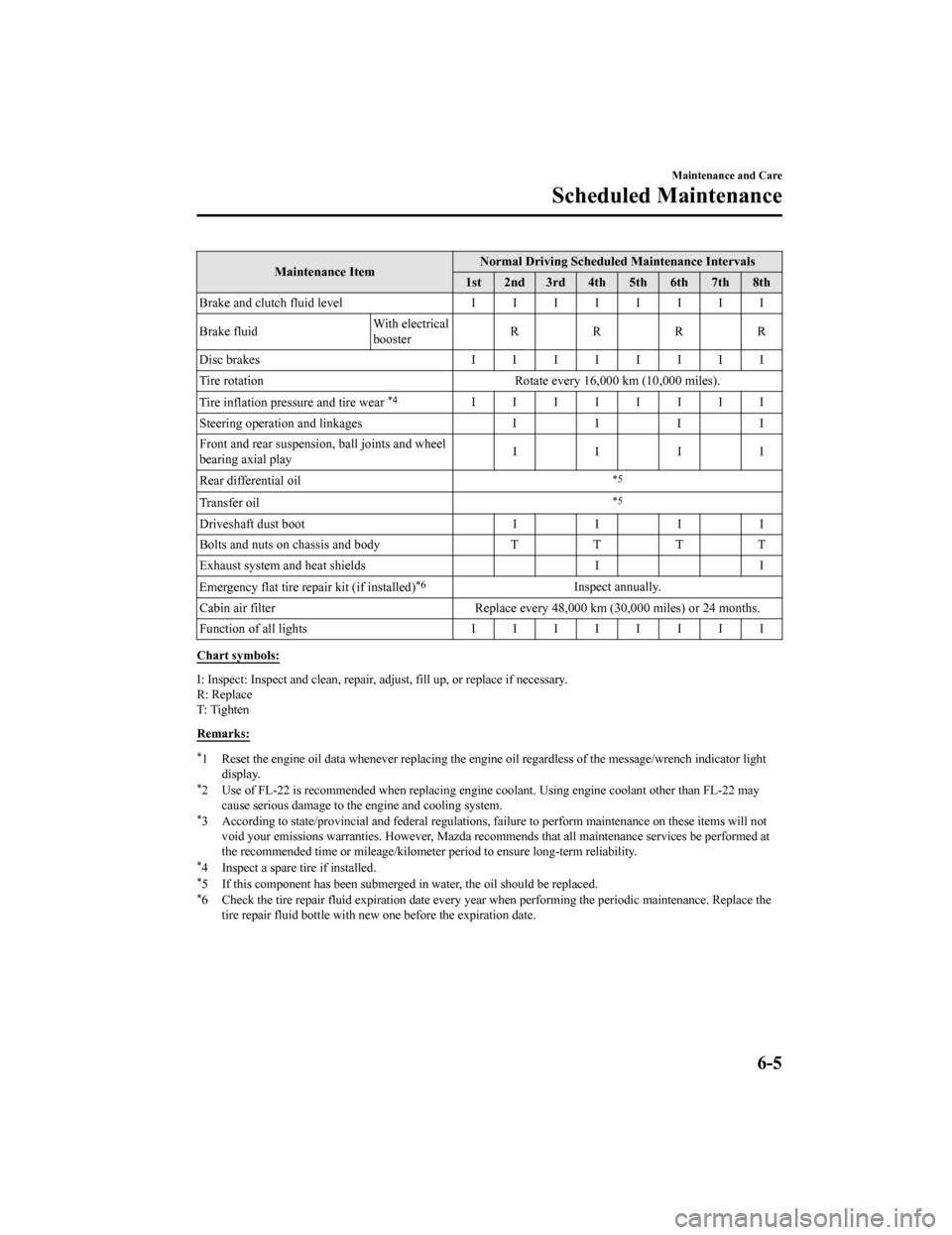
Maintenance ItemNormal Driving Scheduled Maintenance Intervals
1st 2nd 3rd 4th 5th 6th 7th 8th
Brake and clutch fluid level IIIIIIII
Brake fluid With electrical
boosterRRRR
Disc brakes IIIIIIII
Tire rotation Rotate every 16,000 km (10,000 miles).
Tire inflation pressure and tire wear
*4IIIIIIII
Steering operation and linkages I I I I
Front and rear suspension, ball joints and wheel
bearing axial play IIII
Rear differential oil
*5
Transfer oil*5
Driveshaft dust boot II II
Bolts and nuts on chassis and body TTTT
Exhaust system and heat shields II
Emergency flat tire repair kit (if installed)
*6Inspect annually.
Cabin air filter Replace every 48 ,000 km (30,000 miles) or 24 months.
Function of all lights IIIIIIII
Chart symbols:
I: Inspect: Inspect and clean, repair, adjust, fill up, or replace if necessary.
R: Replace
T: Ti g h t e n
Remarks:
*1 Reset the engine oil data whene ver replacing the engine oil regardless of the message/wrench indicator light
display.
*2 Use of FL-22 is recommended wh en replacing engine coolant. Using engine coolant other than FL-22 may
cause serious damage to the engine and cooling system.
*3 According to state/provincial and federal regulations, failure to perform maintenance on these items will not void your emissions warranties. However, Mazda recommends that all maintenance services be performed at
the recommended time or mileage/ kilometer period to ensure long-term reliability.
*4 Inspect a spare tire if installed.*5 If this component has been subm erged in water, the oil should be replaced.*6 Check the tire repair fluid exp iration date every year when performing the periodic maintenance. Replace the
tire repair fluid bottle with new one before the expiration date.
Maintenance and Care
Scheduled Maintenance
6-5
Mazda3_8HZ1-EA-19G_Edition1_old 2019-5-17 13:49:03