wheel MAZDA MODEL 6 2014 (in English) Owner's Manual
[x] Cancel search | Manufacturer: MAZDA, Model Year: 2014, Model line: MODEL 6, Model: MAZDA MODEL 6 2014Pages: 576, PDF Size: 8.58 MB
Page 178 of 576
Black plate (178,1)
Manually Shifting down
(M6→M5→M4→M3→M2→M1)
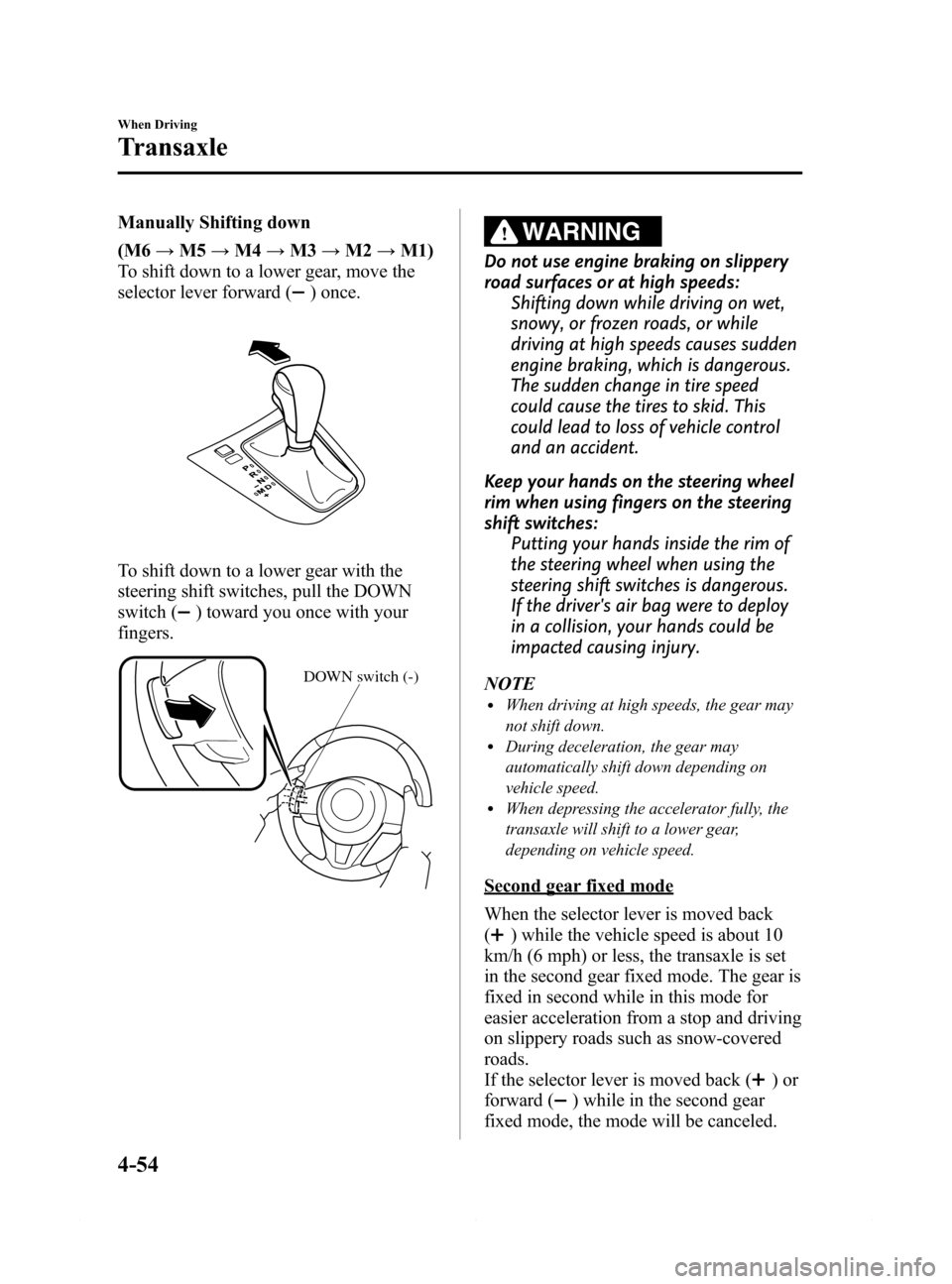
To shift down to a lower gear, move the
selector lever forward (
) once.
To shift down to a lower gear with the
steering shift switches, pull the DOWN
switch (
) toward you once with your
fingers.
DOWN switch (-)
WARNING
Do not use engine braking on slippery
road surfaces or at high speeds:
Shifting down while driving on wet,
snowy, or frozen roads, or while
driving at high speeds causes sudden
engine braking, which is dangerous.
The sudden change in tire speed
could cause the tires to skid. This
could lead to loss of vehicle control
and an accident.
Keep your hands on the steering wheel
rim when using fingers on the steering
shift switches:
Putting your hands inside the rim of
the steering wheel when using the
steering shift switches is dangerous.
If the driver's air bag were to deploy
in a collision, your hands could be
impacted causing injury.
NOTE
lWhen driving at high speeds, the gear may
not shift down.
lDuring deceleration, the gear may
automatically shift down depending on
vehicle speed.
lWhen depressing the accelerator fully, the
transaxle will shift to a lower gear,
depending on vehicle speed.
Second gear fixed mode
When the selector lever is moved back
(
) while the vehicle speed is about 10
km/h (6 mph) or less, the transaxle is set
in the second gear fixed mode. The gear is
fixed in second while in this mode for
easier acceleration from a stop and driving
on slippery roads such as snow-covered
roads.
If the selector lever is moved back (
)or
forward (
) while in the second gear
fixed mode, the mode will be canceled.
4-54
When Driving
Transaxle
Mazda6_8DQ8-EA-13L_Edition3 Page178
Friday, June 13 2014 6:21 PM
Form No.8DQ8-EA-13L
Page 186 of 576

Black plate (186,1)
qHeadlight Levelingí
The number of passengers and weight of
cargo in the luggage compartment change
the angle of the headlights.
The angle of the headlights will be
automatically adjusted when turning on
the headlights.
A system malfunction or operation
conditions are indicated by a warning.
Refer to Warning/Indicator Lights on page
4-23.
qAdaptive Front Lighting System
(AFS)í
The adaptive front lighting system (AFS)
automatically adjusts the headlight beams
to the left or right in conjunction with the
operation of the steering wheel after the
headlights have been turned on.
A system malfunction or operation
conditions are indicated by a warning.
Refer to Warning/Indicator Lights on page
4-23.
AFS OFF switch
Pressing the AFS OFF switch turns off the
AFS. The AFS OFF indicator light in the
instrument cluster illuminates.
Pressing the AFS OFF switch again turns
off the switch illumination and turns on
the AFS operation. The AFS OFF
indicator light turns off.
qDaytime Running Lightsí
Some countries require moving vehicles
to have their lights on (daytime running
lights) during the daytime.
Daytime running lights turn on
automatically when the ignition is
switched ON.
They turn off when the parking brake is
operated or the shift lever is shifted to the
P position (automatic transaxle vehicle).
NOTE
(Except Canada)
The daytime running lights can be deactivated.
Refer to Personalization Features on page 9-9.
4-62
When Driving
íSome models.
Switches and Controls
Mazda6_8DQ8-EA-13L_Edition3 Page186
Friday, June 13 2014 6:21 PM
Form No.8DQ8-EA-13L
Page 197 of 576
Black plate (197,1)
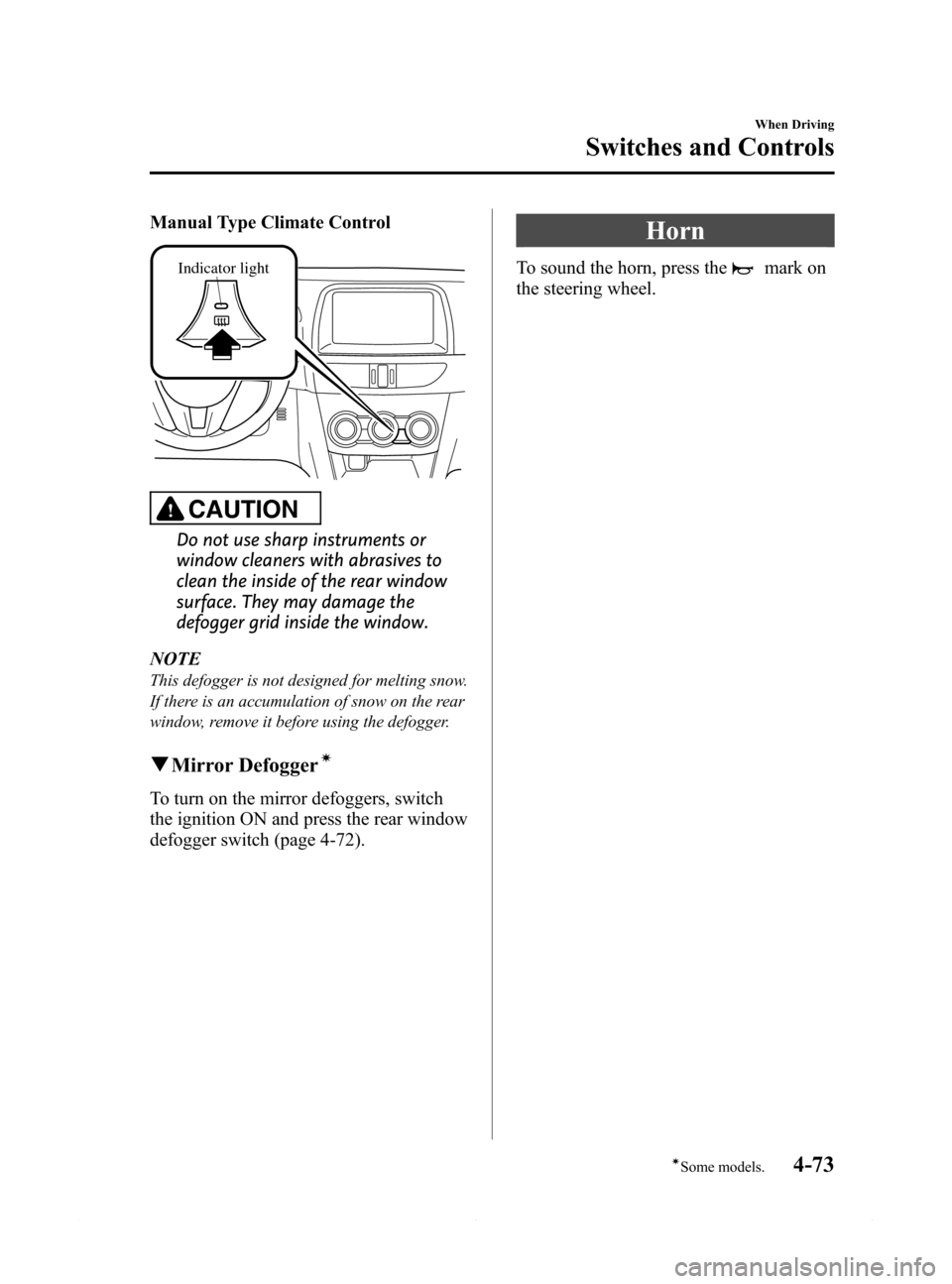
Manual Type Climate Control
Indicator light
CAUTION
Do not use sharp instruments or
window cleaners with abrasives to
clean the inside of the rear window
surface. They may damage the
defogger grid inside the window.
NOTE
This defogger is not designed for melting snow.
If there is an accumulation of snow on the rear
window, remove it before using the defogger.
qMirror Defoggerí
To turn on the mirror defoggers, switch
the ignition ON and press the rear window
defogger switch (page 4-72).
Horn
To sound the horn, press themark on
the steering wheel.
When Driving
Switches and Controls
4-73íSome models. Mazda6_8DQ8-EA-13L_Edition3 Page197
Friday, June 13 2014 6:21 PM
Form No.8DQ8-EA-13L
Page 204 of 576
Black plate (204,1)
NOTElIn the following cases, the radar sensor may not be able to detect vehicles ahead or obstructions.lThe rear surface of a vehicle ahead does not reflect radio waves effectively, such as an
unloaded trailer or an automobile with a loading platform covered by a soft top, vehicles with
a hard plastic tailgate, and round-shaped vehicles.
lVehicles ahead with low vehicle height and thus less area for reflecting radio waves.lVisibility is reduced due to a vehicle ahead casting off water, snow, or sand from its tires and
onto your windshield.
lThe trunk/luggage compartment is loaded with heavy objects or the rear passenger seats are
occupied.
lIce, snow, or soiling is on the front surface of the front emblem.lDuring inclement weather such as rain, snow, or sand storms.lWhen driving near facilities or objects emitting strong radio waves.lIn the following cases, the radar sensor may detect vehicles in the opposite lane or surrounding
obstructions, or it may not be able to detect vehicles ahead or obstructions.
lThe beginning and end of a curve.lRoads with continuous curves.lNarrow lane roads due to road construction or lane closures.lThe vehicle ahead enters the radar sensor's blind spot.lThe vehicle ahead is running abnormally due to accident or vehicle damage.lRoads with repeated up and down slopeslDriving on poor roads or unpaved roads.lThe distance between your vehicle and the vehicle ahead is extremely short.lA vehicle suddenly comes close such as by cutting into the lane.lTo prevent incorrect operation of the system, use tires of the same specified size, manufacturer,
brand, and tread pattern on all four wheels. In addition, do not use tires with significantly
different wear patterns or tire pressures on the same vehicle. (Including the temporary spare tire)
lIf the battery power is weak, the system may not operate correctly.lWhen driving on roads with little traffic and few vehicles ahead or obstructions for the radar
sensor to detect,“Radar blocked”may be temporarily displayed, however, this does not indicate a
problem.
4-80
When Driving
Radar Sensor
Mazda6_8DQ8-EA-13L_Edition3 Page204
Friday, June 13 2014 6:21 PM
Form No.8DQ8-EA-13L
Page 211 of 576
Black plate (211,1)
Do not rely completely on the Smart City Brake Support (SCBS) system:
ØThe Smart City Brake Support (SCBS) system is only designed to reduce damage in
the event of a collision. Over reliance on the system leading to the accelerator
pedal or brake pedal being mistakenly operated could result in an accident.
ØThe Smart City Brake Support (SCBS) is a system which operates in response to a
vehicle ahead. The system may not be able to detect or react to 2-wheeled vehicles
or pedestrians.
ØThe laser sensor for the Smart City Brake Support (SCBS) system is installed near
the rearview mirror. To assure the correct operation of the Smart City Brake
Support (SCBS), heed the following cautions.
ØDo not apply stickers to the surface of the windshield near the laser sensor
(including transparent stickers). Otherwise, the laser sensor may not be able to
detect vehicles ahead which could result in an accident.
ØDo not disassemble the laser sensor.
ØIf cracks or damage caused by flying gravel or debris is visible near the laser
sensor, stop using the Smart City Brake Support (SCBS) system immediately
and have your vehicle inspected by an Authorized Mazda Dealer. If the vehicle
continues to be driven with cracks or scratch marks left on the windshield near
the laser sensor, the system may operate unnecessarily and cause an
unexpected accident.
Refer to Stopping The Smart City Brake Support (SCBS) System Operation on
page 4-91.
ØWhen replacing the windshield wipers or windshield, consult an Authorized
Mazda Dealer.
Do not modify the suspension:
If the vehicle height or inclination is changed, the system will not be able to correctly
detect vehicles ahead. This will result in the Smart City Brake Support (SCBS) system
not operating normally or mistakenly operating, which could cause a serious
accident.
Turn off the Smart City Brake Support (SCBS) when the vehicle is running on a chassis
roller or being towed:
Turn off the Smart City Brake Support (SCBS) system to prevent mistaken operation
when the vehicle is running on a chassis roller or being towed. See the next page on
how to turn off the Smart City Brake Support (SCBS).
Refer to Stopping The Smart City Brake Support (SCBS) System Operation on page
4-91.
When Driving
Brake
4-87
Mazda6_8DQ8-EA-13L_Edition3 Page211
Friday, June 13 2014 6:21 PM
Form No.8DQ8-EA-13L
Page 212 of 576

Black plate (212,1)
CAUTION
ØWhen driving off-road in areas where there is grass or forage, it is recommended
that the Smart City Brake Support (SCBS) system be turned off.
ØAlways use tires for all wheels that are of the specified size, and the same
manufacture, brand, and tread pattern. In addition, do not use tires with
significantly different wear patterns on the same vehicle. Do not use tires with
significantly different wear patterns on the same vehicle as the Smart City Brake
Support (SCBS) system may not operate normally.
ØThe laser sensor includes a function for detecting a soiled windshield and
informing the driver, however, depending on the conditions, it may not detect
plastic shopping bags, ice or snow on the windshield. In such cases, the system
cannot accurately determine a vehicle ahead and may not be able to operate
normally. Always drive carefully and pay attention to the road ahead.
4-88
When Driving
Brake
Mazda6_8DQ8-EA-13L_Edition3 Page212
Friday, June 13 2014 6:21 PM
Form No.8DQ8-EA-13L
Page 213 of 576

Black plate (213,1)
NOTElThe Smart City Brake Support (SCBS) system will not operate if the driver is deliberately
performing driving operations (accelerator pedal and steering wheel).
lThe Smart City Brake Support (SCBS) system will operate under the following conditions.lThe engine is running.lThe display in the instrument cluster does not indicate that the system requires inspection or it
cannot be used.
lThe vehicle speed is between about 4 to 30 km/h (2 to 18 mph).lThe Smart City Brake Support (SCBS) system is not turned off.lThe DSC operation is not turned off using the DSC OFF switch.lThe DSC is not malfunctioning.lThe Smart City Brake Support (SCBS) detects a vehicle ahead by emitting a near-infrared laser
beam and receiving the beam reflected off the reflector of the vehicle ahead, and then using it for
the measurement. Consequently, the Smart City Brake Support (SCBS) may not operate under the
following conditions:
lReflection of the laser is poor due to the shape of the vehicle ahead.lThe vehicle ahead is significantly dirty.lUnder bad weather condition, such as rain, fog and snow.lThe window washer is being used or the windshield wipers are not used when it's raining.lThe windshield is dirty.lThe steering wheel is turned completely left or right, or the vehicle is accelerated rapidly and
comes close to the vehicle ahead.
lTrucks with low loading platforms and vehicles with an extremely low or high profile.lVehicles with certain shapes such as a vehicle carrier.lUnder the following conditions, the Smart City Brake Support (SCBS) system may not operate
normally.
lHeavy luggage is loaded in the luggage compartment or on the rear seat.lIf there is the possibility of partial contact with a vehicle ahead.lWhen driving on continuously curving roads, and entering and exiting exits.lElongated luggage or cargo is loaded onto installed roof rails and covers the laser sensor.lExhaust gas from the vehicle in front, sand, snow, and water vapor rising from manholes and
grating, and water splashed into the air.
lWhen towing a malfunctioning vehicle.lIn the following cases, the laser sensor may inadvertently determine that there is a vehicle ahead
and the Smart City Brake Support (SCBS) system may operate.
lObjects on the road at the entrance to a curve.lVehicles passing in the opposite lane while making a curve.lMetal objects, bumps, or protruding objects on the road.lWhen passing through a toll gate.lWhen passing under a vinyl curtain or flag.lPlastic objects such as pylons.lTwo-wheeled vehicles, pedestrians, animals or standing trees.lVehicle is driven with some of the tires having significant wear.
When Driving
Brake
4-89
Mazda6_8DQ8-EA-13L_Edition3 Page213
Friday, June 13 2014 6:21 PM
Form No.8DQ8-EA-13L
Page 216 of 576

Black plate (216,1)
Antilock Brake System (ABS)
The ABS control unit continuously
monitors the speed of each wheel. If one
wheel is about to lock up, the ABS
responds by automatically releasing and
reapplying that wheel's brake.
The driver will feel a slight vibration in
the brake pedal and may hear a chattering
noise from the brake system. This is
normal ABS system operation. Continue
to depress the brake pedal without
pumping the brakes.
A system malfunction or operation
conditions are indicated by a warning.
Refer to Warning/Indicator Lights on page
4-23.
WARNING
Do not rely on ABS as a substitute for
safe driving:
The ABS cannot compensate for
unsafe and reckless driving, excessive
speed, tailgating (following another
vehicle too closely), driving on ice and
snow, and hydroplaning (reduced tire
friction and road contact because of
water on the road surface). You can
still have an accident.NOTE
lBraking distances may be longer on loose
surfaces (snow or gravel, for example)
which usually have a hard foundation. A
vehicle with a normal braking system may
require less distance to stop under these
conditions because the tires will build up a
wedge of surface layer when the wheels
skid.
lThe sound of the ABS operating may be
heard when starting the engine or
immediately after starting the vehicle,
however, it does not indicate a malfunction.
4-92
When Driving
ABS/TCS/DSC
Mazda6_8DQ8-EA-13L_Edition3 Page216
Friday, June 13 2014 6:21 PM
Form No.8DQ8-EA-13L
Page 217 of 576

Black plate (217,1)
Traction Control System
(TCS)
The Traction Control System (TCS)
enhances traction and safety by
controlling engine torque and braking.
When the TCS detects driving wheel
slippage, it lowers engine torque and
operates the brakes to prevent loss of
traction.
This means that on a slick surface, the
engine adjusts automatically to provide
optimum power to the drive wheels,
limiting wheel spin and loss of traction.
A system malfunction or operation
conditions are indicated by a warning.
Refer to Warning/Indicator Lights on page
4-23.
WARNING
Do not rely on the Traction Control
System (TCS) as a substitute for safe
driving:
The Traction Control System (TCS)
cannot compensate for unsafe and
reckless driving, excessive speed,
tailgating (following another vehicle
too closely), and hydroplaning
(reduced tire friction and road
contact because of water on the road
surface). You can still have an
accident.
Use snow tires or tire chains and drive
at reduced speeds when roads are
covered with ice and/or snow:
Driving without proper traction
devices on snow and/or ice-covered
roads is dangerous. The Traction
Control System (TCS) alone cannot
provide adequate traction and you
could still have an accident.
NOTE
To turn off the TCS, press the DSC OFF switch
(page 4-94).
When Driving
ABS/TCS/DSC
4-93
Mazda6_8DQ8-EA-13L_Edition3 Page217
Friday, June 13 2014 6:21 PM
Form No.8DQ8-EA-13L
Page 218 of 576

Black plate (218,1)
Dynamic Stability Control
(DSC)
The Dynamic Stability Control (DSC)
automatically controls braking and engine
torque in conjunction with systems such
as ABS and TCS to help control side slip
when driving on slippery surfaces, or
during sudden or evasive maneuvering,
enhancing vehicle safety.
Refer to ABS (page 4-92) and TCS (page
4-93).
DSC operation is possible at speeds
greater than 20 km/h (12 mph).
A system malfunction or operation
conditions are indicated by a warning.
Refer to Warning/Indicator Lights on page
4-23.
WARNING
Do not rely on the Dynamic Stability
Control as a substitute for safe driving:
The Dynamic Stability Control (DSC)
cannot compensate for unsafe and
reckless driving, excessive speed,
tailgating (following another vehicle
too closely), and hydroplaning
(reduced tire friction and road
contact because of water on the road
surface). You can still have an
accident.
CAUTION
ØThe DSC may not operate correctly
unless the following are observed:
ØUse tires of the correct size
specified for your Mazda on all
four wheels.
ØUse tires of the same
manufacturer, brand and tread
pattern on all four wheels.
ØDo not mix worn tires.
ØThe DSC may not operate correctly
when tire chains are used or a
temporary spare tire is installed
because the tire diameter changes.
qDSC OFF Switch
Press the DSC OFF switch to turn off the
TCS/DSC. The DSC OFF indicator light
in the instrument cluster will illuminate.
Press the switch again to turn the TCS/
DSC back on. The DSC OFF indicator
light will turn off.
4-94
When Driving
ABS/TCS/DSC
Mazda6_8DQ8-EA-13L_Edition3 Page218
Friday, June 13 2014 6:21 PM
Form No.8DQ8-EA-13L