reset MAZDA MODEL 6 2016 (in English) User Guide
[x] Cancel search | Manufacturer: MAZDA, Model Year: 2016, Model line: MODEL 6, Model: MAZDA MODEL 6 2016Pages: 614, PDF Size: 12.82 MB
Page 211 of 614
Black plate (211,1)
Fuel Economy Monitor
For vehicles with type B audio, the Control Status and Fuel Consumption are switched and
displayed by operating each icon in the display.
In addition, after completing a trip, the total energy efficiency to date is displayed in the
ending display when the ending display is turned on.
1. Select the
icon on the home screen to display the applications screen.
2. Select the“Fuel Economy Monitor”.
3. Operate the commander switch or touch the screen and display the menu.
NOTE
When the menu is displayed by touching the screen, the display is hidden automatically after 6
seconds.
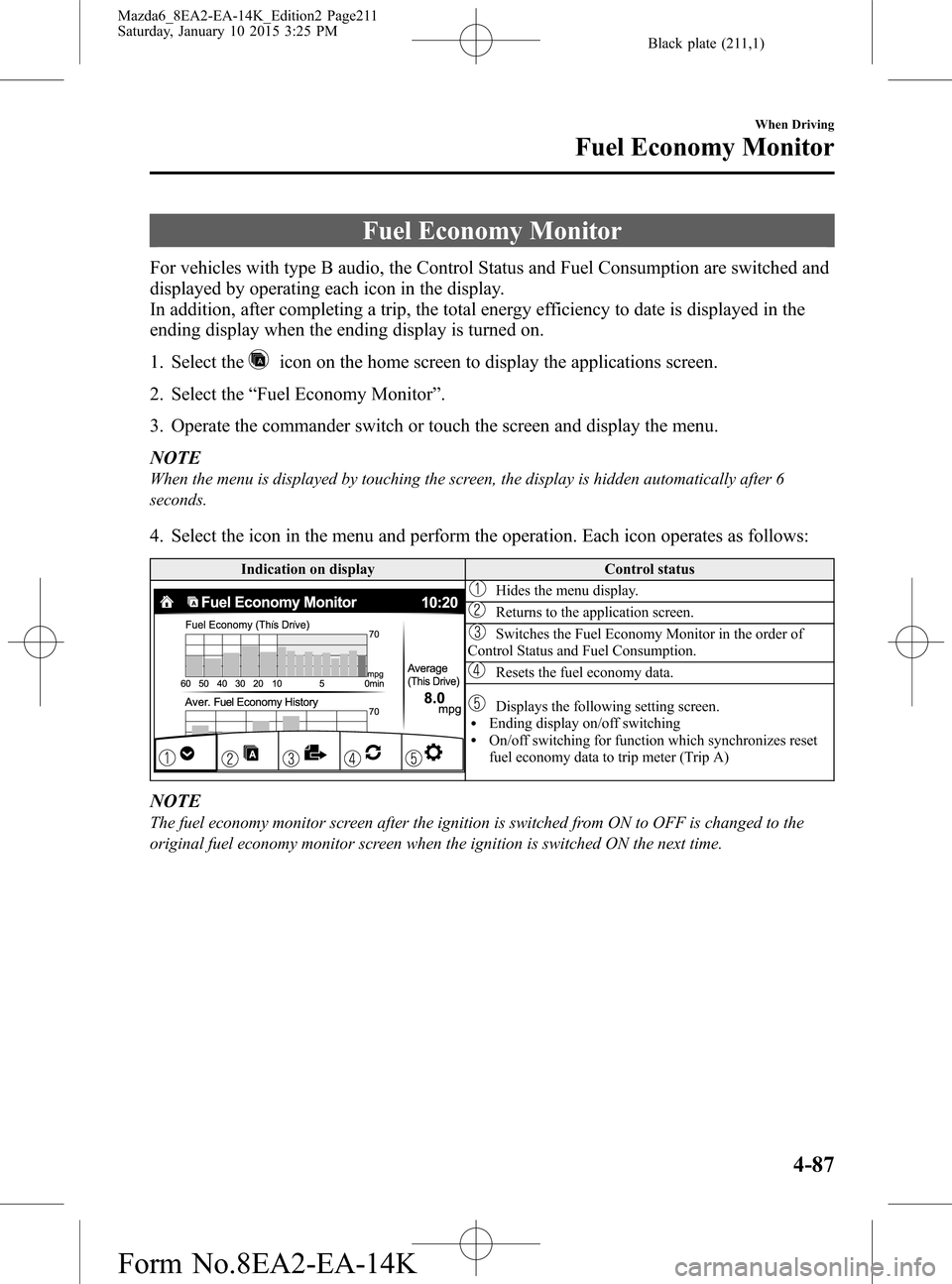
4. Select the icon in the menu and perform the operation. Each icon operates as follows:
Indication on display Control status
Hides the menu display.
Returns to the application screen.
Switches the Fuel Economy Monitor in the order of
Control Status and Fuel Consumption.
Resets the fuel economy data.
Displays the following setting screen.lEnding display on/off switchinglOn/off switching for function which synchronizes reset
fuel economy data to trip meter (Trip A)
NOTE
The fuel economy monitor screen after the ignition is switched from ON to OFF is changed to the
original fuel economy monitor screen when the ignition is switched ON the next time.
When Driving
Fuel Economy Monitor
4-87
Mazda6_8EA2-EA-14K_Edition2 Page211
Saturday, January 10 2015 3:25 PM
Form No.8EA2-EA-14K
Page 212 of 614
Black plate (212,1)
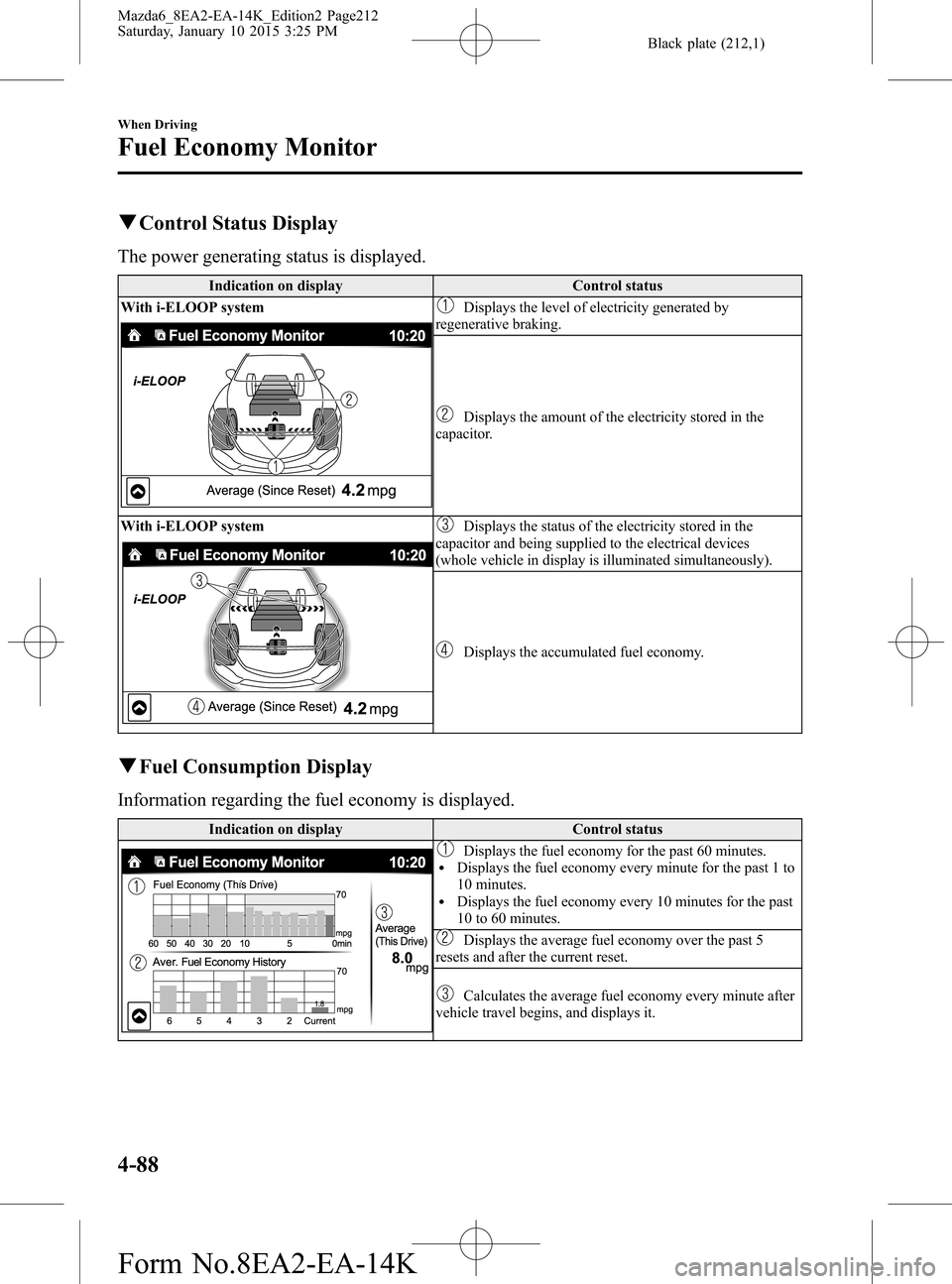
qControl Status Display
The power generating status is displayed.
Indication on display Control status
With i-ELOOP system
Displays the level of electricity generated by
regenerative braking.
Displays the amount of the electricity stored in the
capacitor.
With i-ELOOP system
Displays the status of the electricity stored in the
capacitor and being supplied to the electrical devices
(whole vehicle in display is illuminated simultaneously).
Displays the accumulated fuel economy.
qFuel Consumption Display
Information regarding the fuel economy is displayed.
Indication on display Control status
Displays the fuel economy for the past 60 minutes.lDisplays the fuel economy every minute for the past 1 to
10 minutes.
lDisplays the fuel economy every 10 minutes for the past
10 to 60 minutes.
Displays the average fuel economy over the past 5
resets and after the current reset.
Calculates the average fuel economy every minute after
vehicle travel begins, and displays it.
4-88
When Driving
Fuel Economy Monitor
Mazda6_8EA2-EA-14K_Edition2 Page212
Saturday, January 10 2015 3:25 PM
Form No.8EA2-EA-14K
Page 213 of 614
Black plate (213,1)
NOTElThe fuel economy data can be reset by doing the following operation:lPress the reset switch from the menu screen.lWhen the function which synchronizes the fuel economy monitor and the trip meter is on, reset
trip A of the trip meter.
lDelete the average fuel economy information displayed in the trip computer.lAfter resetting the fuel economy data,“–-”is displayed while the average fuel economy is
calculated.
qEnding Screen Display
If the ending display on the fuel economy monitor is on when the ignition is switched from
ON to OFF, the information regarding the fuel economy is displayed.
When Driving
Fuel Economy Monitor
4-89
Mazda6_8EA2-EA-14K_Edition2 Page213
Saturday, January 10 2015 3:25 PM
Form No.8EA2-EA-14K
Page 241 of 614

Black plate (241,1)
Mazda Radar Cruise Control (MRCC)í
The Mazda Radar Cruise Control (MRCC) system is designed to maintain headway
control*1 according to the vehicle speed using a radar sensor to detect the distance to a
vehicle ahead, and by presetting the vehicle speed between 30 km/h (19 mph) and 145
km/h (90 mph), the driver is freed from having to constantly use the accelerator or brake
pedals.
*1 Headway Control: Control of the distance between your vehicle and the vehicle ahead
detected by the Mazda Radar Cruise Control (MRCC) system.
Additionally, if your vehicle starts closing in on the vehicle ahead because, for example,
the vehicle ahead brakes suddenly, a warning sound and a warning indication in the display
are activated simultaneously to alert you to maintain a sufficient distance between the
vehicles.
Use the Mazda Radar Cruise Control (MRCC) system on expressways and other highways
which do not require a lot of repeated acceleration and deceleration.
When Driving
i-ACTIVSENSE
4-117íSome models. Mazda6_8EA2-EA-14K_Edition2 Page241
Saturday, January 10 2015 3:25 PM
Form No.8EA2-EA-14K
Page 250 of 614

Black plate (250,1)
NOTElIf the vehicle speed decreases by about 15
km/h (9.4 mph) or more than the set speed,
the cruise control function may be
canceled.
lWhen the vehicle speed is less than 21 km/h
(13 mph), the cruise control function is
canceled. In this case, the vehicle speed will
not return to the original set speed even if
the vehicle is accelerated to 25 km/h (16
mph) or higher and the RES switch is
pressed. Reset the cruise control function.
4-126
When Driving
i-ACTIVSENSE
Mazda6_8EA2-EA-14K_Edition2 Page250
Saturday, January 10 2015 3:25 PM
Form No.8EA2-EA-14K
Page 270 of 614

Black plate (270,1)
qActivation/Deactivation
To activate the system, press the ON
switch.
The cruise main indicator light (Amber)
illuminates.
Refer to Warning/Indicator Lights on page
4-22.
To deactivate the system, press the OFF
switch.
The cruise main indicator light (Amber)
turns off.
WARNING
Always turn off the cruise control
system when it is not in use:
Leaving the cruise control system in
an activation-ready state while the
cruise control is not in use is
dangerous as the cruise control could
unexpectedly activate if the
activation button is accidentally
pressed, and result in loss of vehicle
control and an accident.
NOTE
When the ignition is switched OFF, the system
status before it was turned off is maintained.
For example, if the ignition is switched OFF
with the cruise control system operable, the
system will be operable when the ignition is
switched ON the next time.
qTo Set Speed
1. Activate the cruise control system by
pressing the ON switch.
The cruise main indicator light
(Amber) illuminates. Refer to Warning/
Indicator Lights on page 4-22.
2. Accelerate to the desired speed, which
must be more than 25 km/h (16 mph).3. Set the cruise control by pressing the
SET
or SET - switch at the desired
speed. The cruise control is set at the
moment the SET
or SET - switch is
pressed. Release the accelerator pedal
simultaneously. The cruise set indicator
light (Green) illuminates.
NOTE
lThe cruise control speed setting cannot be
performed under the following conditions:
l(Automatic transaxle)
The selector lever is in the P or N
position.
l(Manual transaxle)
The shift lever is in the neutral position.
lThe parking brake is applied.lRelease the SETor SET - switch at the
desired speed, otherwise the speed will
continue increasing while the SET
switch is pressed and held, and continue
decreasing while the SET - switch is pressed
and held (except when the accelerator
pedal is depressed).
lOn a steep grade, the vehicle may
momentarily slow down while ascending,
or speed up while descending.
lCruise control will cancel if the vehicle
speed decreases below 21 km/h (13 mph)
when cruise is activated, such as when
climbing a steep grade.
lCruise control may cancel at about 15 km/h
(9 mph) below the preset speed (such as
may happen when climbing a long, steep
grade).
4-146
When Driving
Cruise Control
Mazda6_8EA2-EA-14K_Edition2 Page270
Saturday, January 10 2015 3:25 PM
Form No.8EA2-EA-14K
Page 271 of 614

Black plate (271,1)
For the Type A instrument cluster, the
vehicle speed preset using the cruise
control is displayed in the instrument
cluster.
qTo Increase Cruising Speed
Follow either of these procedures.
To increase speed using cruise control
switch
Press the SET
switch and hold it. Your
vehicle will accelerate.
Release the switch at the speed you want.
Press the SET
and release it
immediately to adjust the preset speed.
Multiple operations will increase the
preset speed according to the number of
times it is operated.
Increasing speed with a single SET
operation
Meter display for vehicle speed indicated
in km/h: 1 km/h (0.6 mph)
Meter display for vehicle speed indicated
in mph: 1 mph (1.6 km/h)
To increase speed using accelerator
pedal
Depress the accelerator pedal to accelerate
to the desired speed. Press the SET
or
SET - switch and release it immediately.NOTE
Accelerate if you want to speed up temporarily
when the cruise control is on. Greater speed
will not interfere with or change the set speed.
Take your foot off the accelerator to return to
the set speed.
qTo Decrease Cruising Speed
Press the SET - switch and hold it. The
vehicle will gradually slow.
Release the switch at the speed you want.
Press the SET- switch and release it
immediately to adjust the preset speed.
Multiple operations will decrease the
preset speed according to the number of
times it is operated.
Decreasing speed with a single SET-
operation
Meter display for vehicle speed indicated
in km/h: 1 km/h (0.6 mph)
Meter display for vehicle speed indicated
in mph: 1 mph (1.6 km/h)
qTo Resume Cruising Speed at
More Than 25 km/h (16 mph)
If some other method besides the OFF
switch was used to cancel cruising speed
(such as applying the brake pedal) and the
system is still activated, the most recent
set speed will automatically resume when
the RES switch is pressed.
If vehicle speed is below 25 km/h (16
mph), increase the vehicle speed up to 25
km/h (16 mph) or more and press the RES
switch.
When Driving
Cruise Control
4-147
Mazda6_8EA2-EA-14K_Edition2 Page271
Saturday, January 10 2015 3:25 PM
Form No.8EA2-EA-14K
Page 286 of 614

Black plate (286,1)
Three-dimensional object on vehicle rear
Because the distance guide lines are displayed based on a flat surface, the distance to the
three-dimensional object displayed on the screen is different from the actual distance.
A
A
C B
CB
(Actual distance) B>C=A
Sensed distance on screen A>B>C(Screen display)
(Actual condition)
qPicture Quality Adjustment
WARNING
Always adjust the picture quality of the rear view monitor while the vehicle is
stopped:
Do not adjust the picture quality of the rear view monitor while driving the vehicle.
Adjusting the picture quality of the rear view monitor such as brightness, contrast,
color, and tint while driving the vehicle is dangerous as it could distract your
attention from the vehicle operation which could lead to an accident.
Picture quality adjustment can be done while the shift lever is in reverse (R).
There are four settings which can be adjusted including brightness, contrast, color, and tint.
When adjusting, pay sufficient attention to the vehicle surroundings.
1. Select the
icon on the screen to display the tabs.
2. Select the desired tab item.
3. Adjust the brightness, contrast, tint, and color using the slider.
If you need to reset, press the reset button.
4. Select the
icon on the screen to close the tab.
4-162
When Driving
Rear View Monitor
Mazda6_8EA2-EA-14K_Edition2 Page286
Saturday, January 10 2015 3:25 PM
Form No.8EA2-EA-14K
Page 309 of 614

Black plate (309,1)
NOTE
If not operated for several seconds, the display
returns to the previous display. To reset bass,
treble, fade, and balance, press the menu
button (
) for 2 seconds. The unit will
beep and“CLEAR”will be displayed.
ALC (Automatic volume adjustment)
The automatic level control (ALC)
changes the audio volume automatically
according to the vehicle speed. The faster
the vehicle speed, the higher the volume
increases. ALC has ALC OFF and ALC
LEVEL 1 to 7 modes. At ALC LEVEL 7,
the amount that the volume can increase is
at the maximum. Select the mode
according to the driving conditions.
BEEP (Audio operation sound)
The setting for the operation sound when
pressing and holding a button can be
changed. The initial setting is ON. Set to
OFF to mute the operation sound.
BT SETUP mode
Music and other audio such as voice data
recorded on portable audio devices and
mobile phones available on the market
which are equipped with the Bluetooth
®
transmission function can be listened to
via wireless transmission over the
vehicle's speakers. Using the BT SETUP
mode, these devices can be programmed
to the Bluetooth
®unit or changed.
Refer to Bluetooth® Preparation (Type A)
on page 5-71.
12Hr
24Hr (12 Hr/24 Hr time
adjustment)
Rotating the audio control dial switches
the display between 12 and 24-hour clock
time.
Refer to Clock on page 5-24.
Interior Features
Audio System
5-23
Mazda6_8EA2-EA-14K_Edition2 Page309
Saturday, January 10 2015 3:25 PM
Form No.8EA2-EA-14K
Page 310 of 614
Black plate (310,1)
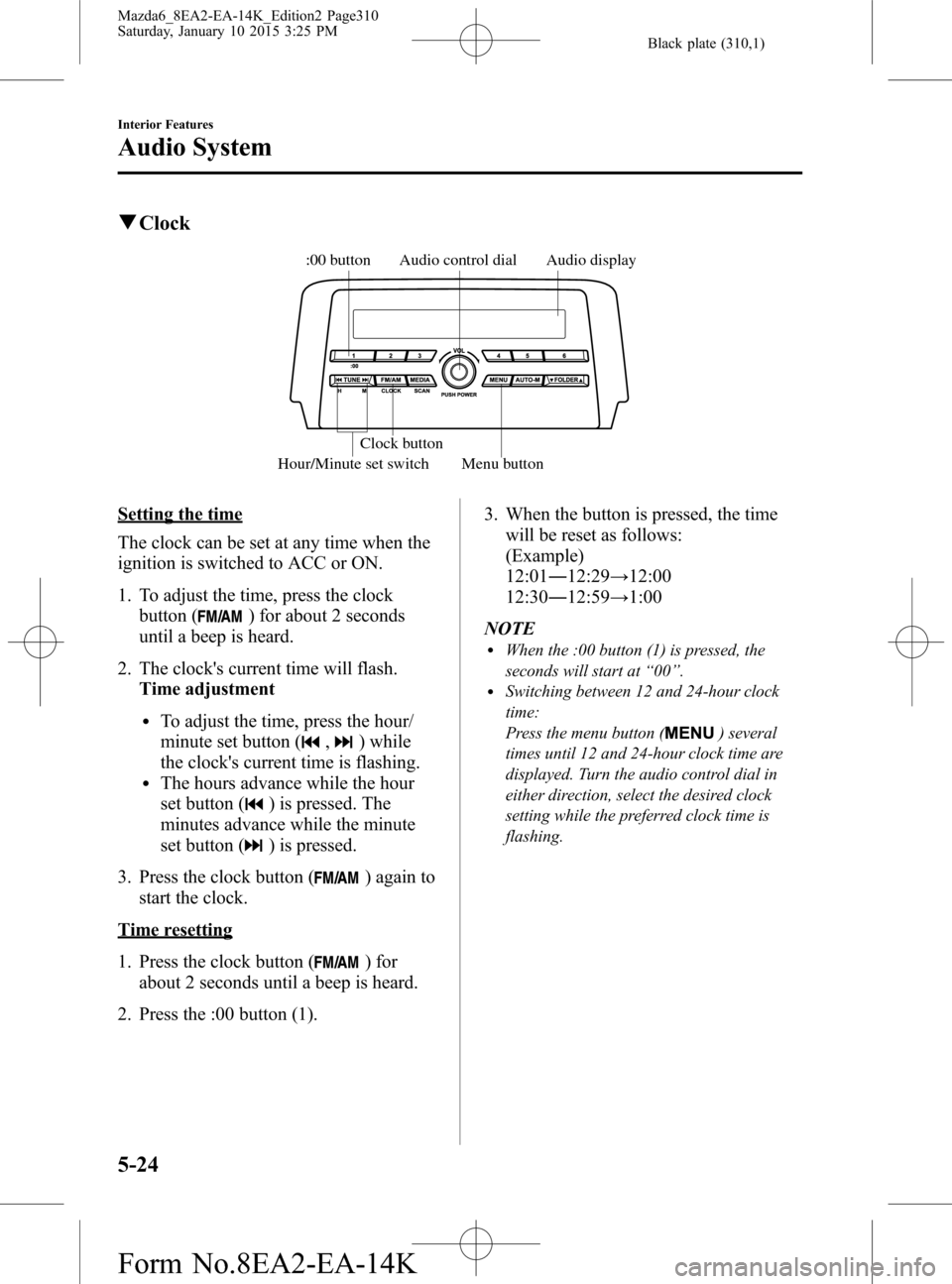
qClock
Audio display Audio control dial
Hour/Minute set switch:00 button
Menu button Clock button
Setting the time
The clock can be set at any time when the
ignition is switched to ACC or ON.
1. To adjust the time, press the clock
button (
) for about 2 seconds
until a beep is heard.
2. The clock's current time will flash.
Time adjustment
lTo adjust the time, press the hour/
minute set button (
,) while
the clock's current time is flashing.
lThe hours advance while the hour
set button (
) is pressed. The
minutes advance while the minute
set button (
) is pressed.
3. Press the clock button (
) again to
start the clock.
Time resetting
1. Press the clock button (
) for
about 2 seconds until a beep is heard.
2. Press the :00 button (1).3. When the button is pressed, the time
will be reset as follows:
(Example)
12:01―12:29→12:00
12:30―12:59→1:00
NOTE
lWhen the :00 button (1) is pressed, the
seconds will start at“00”.
lSwitching between 12 and 24-hour clock
time:
Press the menu button (
) several
times until 12 and 24-hour clock time are
displayed. Turn the audio control dial in
either direction, select the desired clock
setting while the preferred clock time is
flashing.
5-24
Interior Features
Audio System
Mazda6_8EA2-EA-14K_Edition2 Page310
Saturday, January 10 2015 3:25 PM
Form No.8EA2-EA-14K