oil temperature MAZDA MODEL 6 2016 Owners Manual (in English)
[x] Cancel search | Manufacturer: MAZDA, Model Year: 2016, Model line: MODEL 6, Model: MAZDA MODEL 6 2016Pages: 614, PDF Size: 12.82 MB
Page 119 of 614
Black plate (119,1)
Rocking the Vehicle
WARNING
Do not spin the wheels at more than 56
km/h (35 mph), and do not allow
anyone to stand behind a wheel when
pushing the vehicle:
When the vehicle is stuck, spinning
the wheels at high speed is
dangerous. The spinning tire could
overheat and explode. This could
cause serious injuries.
CAUTION
Too much rocking may cause engine
overheating, transaxle failure, and
tire damage.
If you must rock the vehicle to free it from
snow, sand or mud, depress the
accelerator slightly and slowly move the
shift lever from 1 (D) to R.
Winter Driving
Carry emergency gear, including tire
chains, window scraper, flares, a small
shovel, jumper cables, and a small bag of
sand or salt.
Ask an Authorized Mazda Dealer to
perform the following precautions:
lHave the proper ratio of antifreeze in
the radiator.
Refer to Engine Coolant on page 6-29.
lInspect the battery and its cables. Cold
reduces battery capacity.
lUse an engine oil appropriate for the
lowest ambient temperatures that the
vehicle will be driven in (page 6-27).
lInspect the ignition system for damage
and loose connections.
lUse washer fluid made with
antifreeze―but do not use engine
coolant antifreeze for washer fluid
(page 6-31).
lSnow left on the windshield is
dangerous as it could obstruct vision.
Remove snow before driving.
lDo not apply excessive force to a
window scraper when removing ice or
frozen snow on the mirror glass and
windshield.
lNever use warm or hot water for
removing snow or ice from windows
and mirrors as it could result in the
glass cracking.
lBraking performance can be adversely
affected if snow or ice adheres to the
brake components. If this situation
occurs, drive the vehicle slowly,
releasing the accelerator pedal and
lightly applying the brakes several
times until the brake performance
returns to normal.
Before Driving
Driving Tips
3-45
Mazda6_8EA2-EA-14K_Edition2 Page119
Saturday, January 10 2015 3:24 PM
Form No.8EA2-EA-14K
Page 139 of 614
Black plate (139,1)
(Vehicles with type A audio)
The outside temperature unit can be
switched between Celsius and Fahrenheit
using the following procedure.
1. Press the INFO button with the ignition
switched off and continue pressing the
INFO button for 5 seconds or longer
while switching the ignition ON. The
outside temperature display flashes.
2. Press the up
or downpart of the
INFO switch to change the outside
temperature unit.
3. Press and hold the INFO button for 3
seconds or longer while the outside
temperature display is flashing. The
outside temperature display
illuminates.
qCruise Control Set Vehicle Speed
Display (Type A instrument cluster)
The vehicle speed preset using the cruise
control is displayed.
qMaintenance Monitor (Type A
instrument cluster)
The following maintenance period
notifications can be displayed by turning
the Maintenance Monitor on.
lScheduled Maintenance
lTire RotationlOil Change
For the setting method and indications for
the maintenance monitor, refer to the
Maintenance Monitor.
Refer to Maintenance Monitor on page
6-20.
The maintenance monitor displays the
information when the ignition is switched
ON.
NOTE
This function is inoperable while the vehicle is
being driven.
Message display
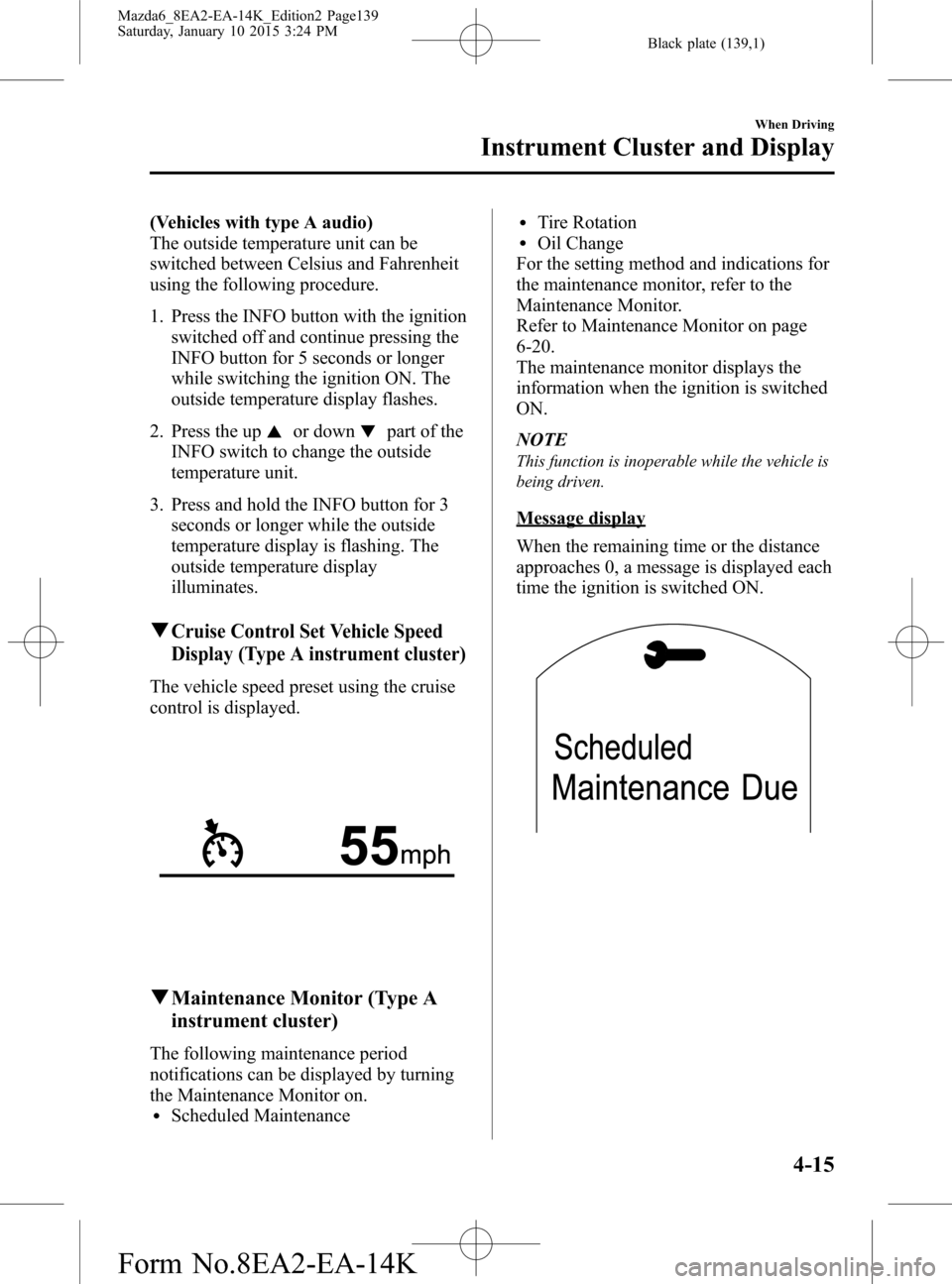
When the remaining time or the distance
approaches 0, a message is displayed each
time the ignition is switched ON.
When Driving
Instrument Cluster and Display
4-15
Mazda6_8EA2-EA-14K_Edition2 Page139
Saturday, January 10 2015 3:24 PM
Form No.8EA2-EA-14K
Page 148 of 614
Black plate (148,1)
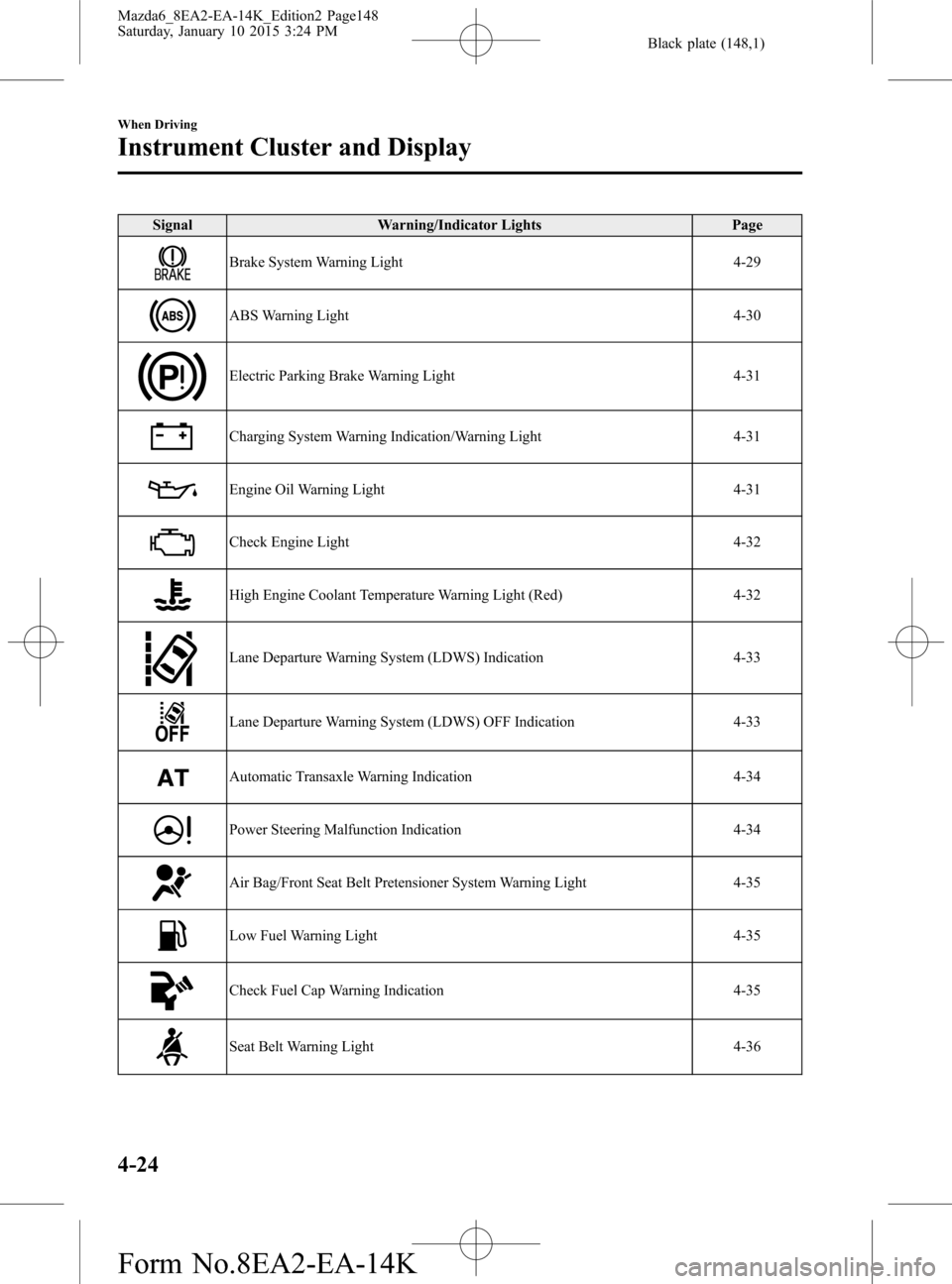
Signal Warning/Indicator Lights Page
Brake System Warning Light 4-29
ABS Warning Light 4-30
Electric Parking Brake Warning Light 4-31
Charging System Warning Indication/Warning Light 4-31
Engine Oil Warning Light 4-31
Check Engine Light 4-32
High Engine Coolant Temperature Warning Light (Red) 4-32
Lane Departure Warning System (LDWS) Indication 4-33
Lane Departure Warning System (LDWS) OFF Indication 4-33
Automatic Transaxle Warning Indication 4-34
Power Steering Malfunction Indication 4-34
Air Bag/Front Seat Belt Pretensioner System Warning Light 4-35
Low Fuel Warning Light 4-35
Check Fuel Cap Warning Indication 4-35
Seat Belt Warning Light 4-36
4-24
When Driving
Instrument Cluster and Display
Mazda6_8EA2-EA-14K_Edition2 Page148
Saturday, January 10 2015 3:24 PM
Form No.8EA2-EA-14K
Page 151 of 614
Black plate (151,1)
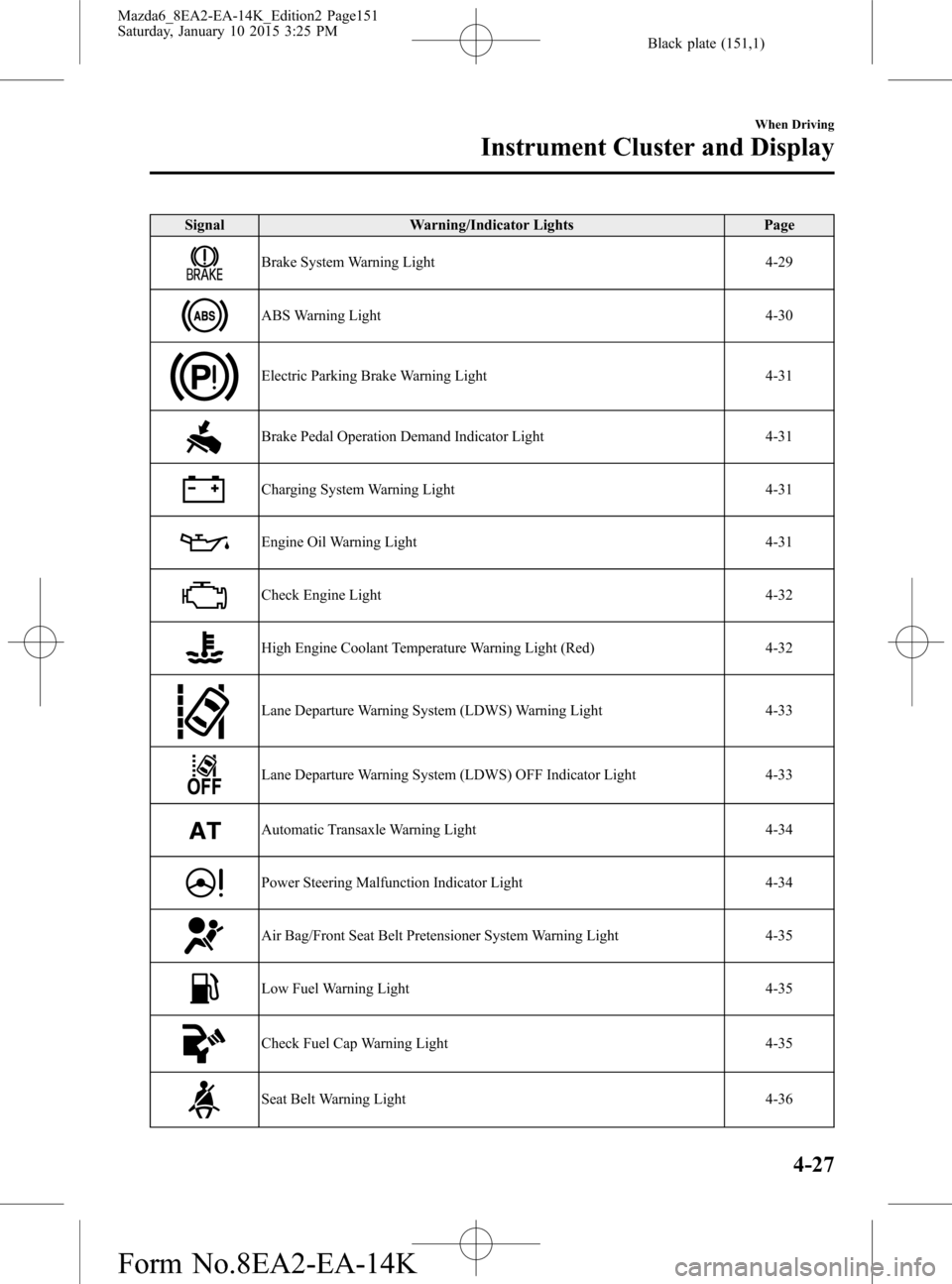
Signal Warning/Indicator Lights Page
Brake System Warning Light 4-29
ABS Warning Light 4-30
Electric Parking Brake Warning Light 4-31
Brake Pedal Operation Demand Indicator Light 4-31
Charging System Warning Light 4-31
Engine Oil Warning Light 4-31
Check Engine Light 4-32
High Engine Coolant Temperature Warning Light (Red) 4-32
Lane Departure Warning System (LDWS) Warning Light 4-33
Lane Departure Warning System (LDWS) OFF Indicator Light 4-33
Automatic Transaxle Warning Light 4-34
Power Steering Malfunction Indicator Light 4-34
Air Bag/Front Seat Belt Pretensioner System Warning Light 4-35
Low Fuel Warning Light 4-35
Check Fuel Cap Warning Light 4-35
Seat Belt Warning Light 4-36
When Driving
Instrument Cluster and Display
4-27
Mazda6_8EA2-EA-14K_Edition2 Page151
Saturday, January 10 2015 3:25 PM
Form No.8EA2-EA-14K
Page 156 of 614

Black plate (156,1)
CAUTION
Do not run the engine if the oil
pressure is low. Otherwise, it could
result in extensive engine damage.
If the light illuminates while driving:
1. Drive to the side of the road and park
off the right-of-way on level ground.
2. Turn off the engine and wait 5 minutes
for the oil to drain back into the oil
pan.
3. Inspect the engine oil level (page 6-28).
If it's low, add the appropriate amount
of engine oil while being careful not to
overfill.
CAUTION
Do not run the engine if the oil level
is low. Otherwise, it could result in
extensive engine damage.
4. Start the engine and check the warning
light.
If the light remains illuminated even
though the oil level is normal or after
adding oil, stop the engine immediately
and have your vehicle towed to an
Authorized Mazda Dealer.
qCheck Engine Light
This indicator light illuminates when the
ignition is switched ON and turns off
when the engine is started.If this light illuminates while driving, the
vehicle may have a problem. It is
important to note the driving conditions
when the light illuminated and consult an
Authorized Mazda Dealer.
The check engine light may illuminate in
the following cases:
lThe fuel tank level being very low or
approaching empty.
lThe engine's electrical system has a
problem.
lThe emission control system has a
problem.
l(U.S.A. and Canada)
The fuel-filler cap is missing or not
tightened securely.
If the check engine light remains on, do
not drive at high speeds and consult an
Authorized Mazda Dealer as soon as
possible.
qHigh Engine Coolant Temperature
Warning Light (Red)
When the ignition is switched ON, the
light illuminates momentarily and then
turns off.
The light flashes when the engine coolant
temperature is extremely high, and
illuminates when the engine coolant
temperature increases further.
4-32
When Driving
Instrument Cluster and Display
Mazda6_8EA2-EA-14K_Edition2 Page156
Saturday, January 10 2015 3:25 PM
Form No.8EA2-EA-14K
Page 303 of 614

Black plate (303,1)
lCDs bearing the logo shown in the
illustration can be played. No other
discs can be played.
lUse discs that have been legitimately
produced. If illegally-copied discs such
as pirated discs are used, the system
may not operate properly.
lBe sure never to touch the signal
surface when handling the CDs. Pick
up a CD by grasping the outer edge or
the edge of the hole and the outer edge.
lDo not stick paper or tape on the CD.
Avoid scratching the reverse side (the
side without a label). The disc may not
eject resulting in a malfunction.
lDust, finger smudges, and dirt can
decrease the amount of light reflected
from the signal surface, thus affecting
sound quality. If the CD should
become soiled, gently wipe it with a
soft cloth from the center of the CD to
the edge.
lDo not use record sprays, antistatic
agents, or household spray cleaners.
Volatile chemicals such as benzine and
thinner can also damage the surface of
the CD and must not be used. Anything
that can damage, warp, or fog plastic
should never be used to clean CDs.
lThe CD player ejects the CD if the CD
is inserted upside down. Also dirty
and/or defective CDs may be ejected.
lDo not insert cleaning discs in the CD
player.
lDo not insert any disc with a peel-off
seal affixed to it.
lThis unit may not be able to play
certain CD-R/CD-RWs made using a
computer or music CD recorder due to
disc characteristics, scratches,
smudges, dirt, etc., or due to dust or
condensation on the lens inside the
unit.
lStoring CDs in the vehicle exposed to
direct sunlight or high temperature may
damage the CD-R/CD-RWs, and make
them unplayable.
lCD-R/CD-RW exceeding 700 MB
cannot be played.
lThis unit may not be able to play
certain discs made using a computer
due to the application (writing
software) setting used. (For details,
consult the store where the application
was purchased.)
lIt is possible that certain text data, such
as titles, recorded on a CD-R/CD-RW
may not be displayed when musical
data (CD-DA) is playing.
lThe period from when a CD-RW is
inserted to when it begins playing is
longer than a normal CD or CD-R.
lCompletely read the instruction manual
and cautions for CD-R/CD-RWs.
Interior Features
Audio System
5-17
Mazda6_8EA2-EA-14K_Edition2 Page303
Saturday, January 10 2015 3:25 PM
Form No.8EA2-EA-14K
Page 336 of 614
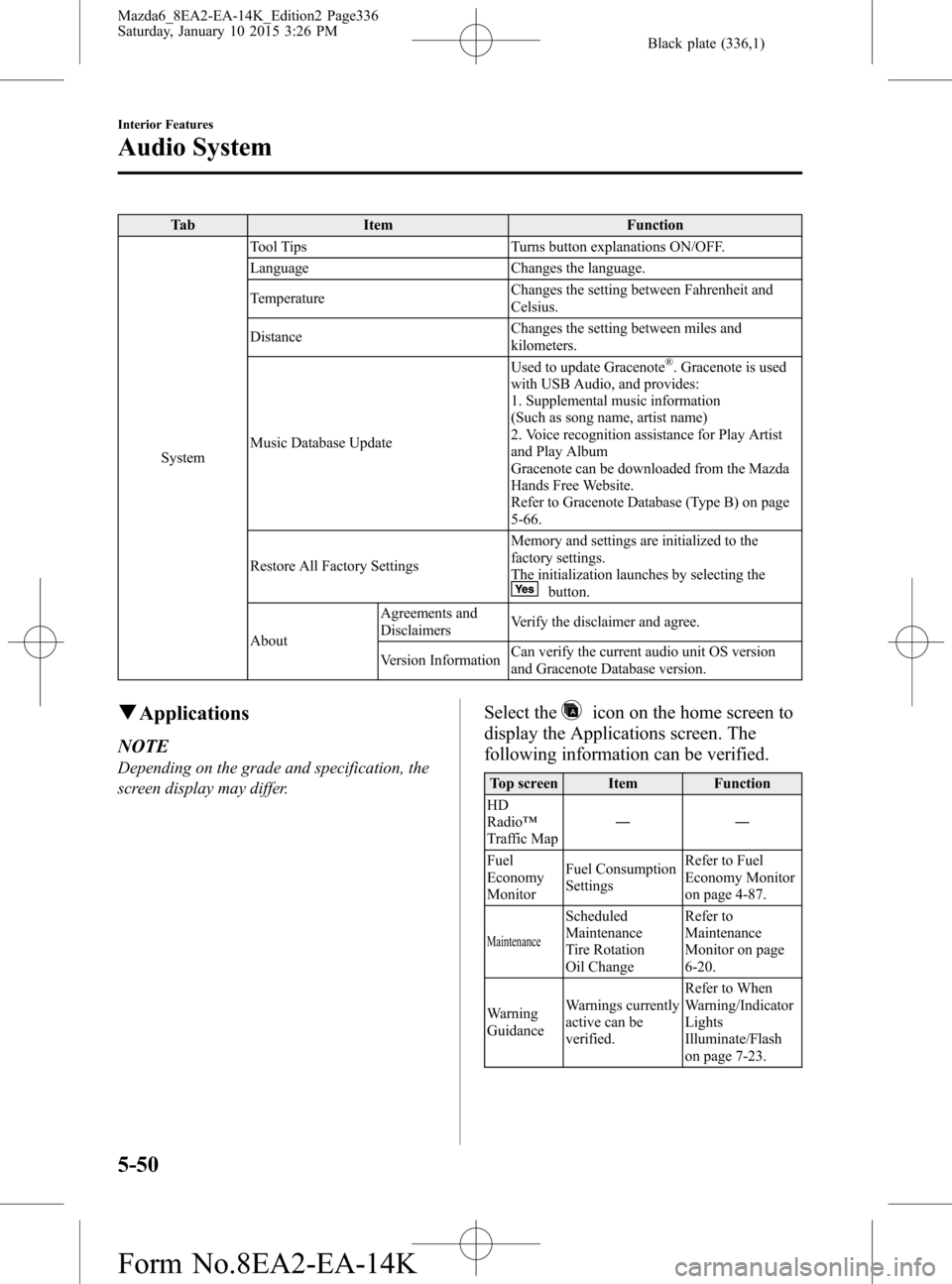
Black plate (336,1)
Tab Item Function
SystemTool Tips Turns button explanations ON/OFF.
Language Changes the language.
TemperatureChanges the setting between Fahrenheit and
Celsius.
DistanceChanges the setting between miles and
kilometers.
Music Database UpdateUsed to update Gracenote
®. Gracenote is used
with USB Audio, and provides:
1. Supplemental music information
(Such as song name, artist name)
2. Voice recognition assistance for Play Artist
and Play Album
Gracenote can be downloaded from the Mazda
Hands Free Website.
Refer to Gracenote Database (Type B) on page
5-66.
Restore All Factory SettingsMemory and settings are initialized to the
factory settings.
The initialization launches by selecting the
button.
AboutAgreements and
DisclaimersVerify the disclaimer and agree.
Version InformationCan verify the current audio unit OS version
and Gracenote Database version.
qApplications
NOTE
Depending on the grade and specification, the
screen display may differ.
Select theicon on the home screen to
display the Applications screen. The
following information can be verified.
Top screen Item Function
HD
Radio™
Traffic Map――
Fuel
Economy
MonitorFuel Consumption
SettingsRefer to Fuel
Economy Monitor
on page 4-87.
Maintenance
Scheduled
Maintenance
Tire Rotation
Oil ChangeRefer to
Maintenance
Monitor on page
6-20.
Warning
GuidanceWarnings currently
active can be
verified.Refer to When
Warning/Indicator
Lights
Illuminate/Flash
on page 7-23.
5-50
Interior Features
Audio System
Mazda6_8EA2-EA-14K_Edition2 Page336
Saturday, January 10 2015 3:26 PM
Form No.8EA2-EA-14K
Page 424 of 614

Black plate (424,1)
Scheduled Maintenance (U.S.A., Canada, and Puerto Rico)
Follow Schedule 1 if the vehicle is operated mainly where none of the following conditions
(severe driving conditions) apply.
lRepeated short-distance drivinglDriving in dusty conditionslDriving with extended use of brakeslDriving in areas where salt or other corrosive materials are usedlDriving on rough or muddy roadslExtended periods of idling or low-speed operationlDriving for long periods in cold temperatures or extremely humid climateslDriving in extremely hot conditionslDriving in mountainous conditions continually
If any do apply, follow Schedule 2. (Puerto Rico and Canada residents follow Schedule 2.)
Engine oil flexible maintenance is available for U.S.A. and Puerto Rico residents whose
vehicle is operated mainly where none of the following conditions apply.
lExtended periods of idling or low-speed operation such as police car, taxi or driving
school car
lDriving in dusty conditions
If any do apply, follow Schedule 2 with engine oil fixed maintenance.
The onboard computer in your vehicle calculates the remaining oil life based on engine
operating conditions when selecting flexible maintenance. Mazda Genuine 0W-20 Oil and
Castrol
®0W-20 Oil are required to achieve optimum calculation performance.
NOTE
After the prescribed period, continue to follow the described maintenance at the recommended
intervals.
6-4
Maintenance and Care
Scheduled Maintenance
Mazda6_8EA2-EA-14K_Edition2 Page424
Saturday, January 10 2015 3:26 PM
Form No.8EA2-EA-14K
Page 448 of 614

Black plate (448,1)
(ILSAC)
(Mexico)
Use SAE 5W-30 engine oil. If SAE 5W-
30 engine oil is not available, use SAE
5W-20 engine oil.
The quality designation SM, or ILSAC
must be on the label.
80
60
40 20
0 –40 –20
30
100
40 20
10 0
–10 –20
–30 –40
qInspecting Engine Oil Level
1. Be sure the vehicle is on a level
surface.
2. Warm up the engine to normal
operating temperature.
3. Turn it off and wait at least 5 minutes
for the oil to return to the oil pan.4. Pull out the dipstick, wipe it clean, and
reinsert it fully.
Full
OK
Low
5. Pull it out again and examine the level.
The level is normal if it is between
Low and Full.
If it is near or below Low, add enough
oil to bring the level to Full.
CAUTION
Do not add engine oil over Full. This
may cause engine damage.
6. Make sure the O-ring on the dipstick is
positioned properly before reinserting
the dipstick.
7. Reinsert the dipstick fully.
6-28
Maintenance and Care
Owner Maintenance
Mazda6_8EA2-EA-14K_Edition2 Page448
Saturday, January 10 2015 3:27 PM
Form No.8EA2-EA-14K
Page 485 of 614

Black plate (485,1)
WARNING
Dry off brakes that have become wet
by driving slowly, releasing the
accelerator pedal and lightly applying
the brakes several times until the brake
performance returns to normal:
Driving with wet brakes is
dangerous. Increased stopping
distance or the vehicle pulling to one
side when braking could result in a
serious accident. Light braking will
indicate whether the brakes have
been affected.
When using an automatic car wash
lRetract the door mirrors.lThe automatic car wash brushes could
reduce the paint lustre or hasten paint
deterioration.
When using a high water pressure car
wash
High water temperature and high water
pressure car washers are available
depending on the type of car wash
machine. If the car washer nozzle is put
too close to the vehicle, the force of the
spray could damage or deform the
molding, affect the sealability of parts,
and allow water to penetrate the interior.
Keep a sufficient space (30 cm (12 in) or
more) between the nozzle and the vehicle.
In addition, do not spend too much time
spraying the same area of the vehicle, and
be very careful when spraying between
gaps in doors and around windows.
Waxing
Your vehicle needs to be waxed when
water no longer beads on the finish.Always wash and dry the vehicle before
waxing it. In addition to the vehicle body,
wax the metal trim to maintain its luster.
1. Use wax which contains no abrasives.
Waxes containing abrasive will remove
paint and could damage bright metal
parts.
2. Use a good grade of natural wax for
metallic, mica, and solid colors.
3. When waxing, coat evenly with the
sponge supplied or a soft cloth.
4. Wipe off the wax with a soft cloth.
NOTE
A spot remover to remove oil, tar, and similar
materials will usually also take off the wax.
Rewax these areas even if the rest of the
vehicle does not need it.
qRepairing Damage to the Finish
Deep scratches or chips on the finish
should be repaired promptly. Exposed
metal quickly rusts and can lead to major
repairs.
CAUTION
If your Mazda is damaged and needs
metal parts repaired or replaced,
make sure the body shop applies
anti-corrosion materials to all parts,
both repaired and new. This will
prevent them from rusting.
qBright-Metal Maintenance
lUse tar remover to remove road tar and
insects. Never do this with a knife or
similar tool.
lTo prevent corrosion on bright-metal
surfaces, apply wax or chrome
preservative and rub it to a high luster.
Maintenance and Care
Appearance Care
6-65
Mazda6_8EA2-EA-14K_Edition2 Page485
Saturday, January 10 2015 3:27 PM
Form No.8EA2-EA-14K