change MAZDA MODEL 6 2017 Owners Manual (in English)
[x] Cancel search | Manufacturer: MAZDA, Model Year: 2017, Model line: MODEL 6, Model: MAZDA MODEL 6 2017Pages: 578, PDF Size: 54.72 MB
Page 467 of 578
7–7
If Trouble Arises
Flat Tire
Removing a Flat Tire
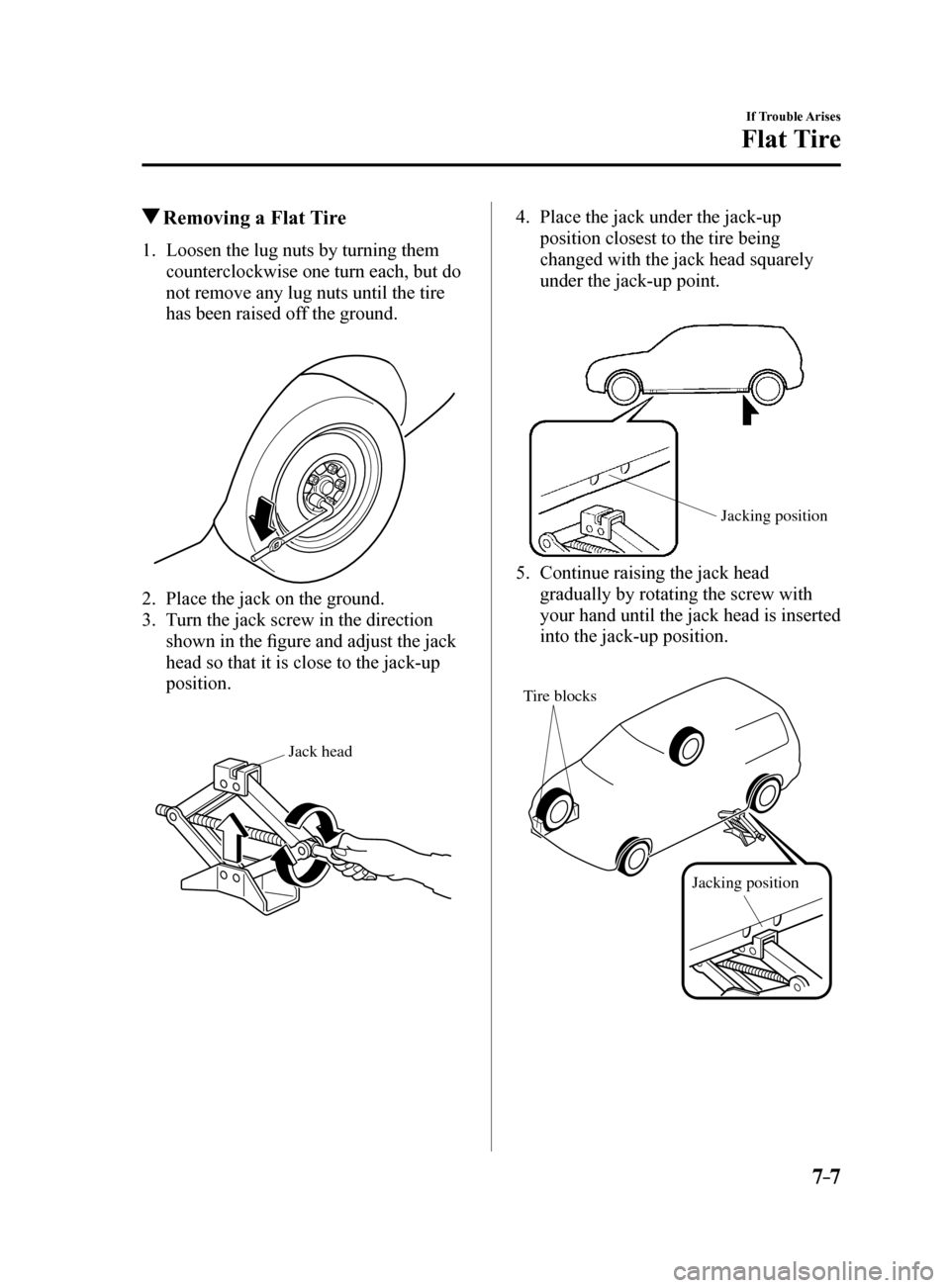
1. Loosen the lug nuts by turning them
counterclockwise one turn each, but do
not remove any lug nuts until the tire
has been raised off the ground.
2. Place the jack on the ground.
3. Turn the jack screw in the direction
shown in the figure and adjust the jack
head so that it is close to the jack-up
position.
Jack head
4. Place the jack under the jack-up
position closest to the tire being
changed with the jack head squarely
under the jack-up point.
Jacking position
5. Continue raising the jack head
gradually by rotating the screw with
your hand until the jack head is inserted
into the jack-up position.
Tire blocks
Jacking position
Mazda6_8FH2-EA-16F_Edition2.indb 72016/07/07 13:46:26
Page 496 of 578
7–36
If Trouble Arises
Warning/Indicator Lights and Warning Sounds
Warning Sound is
Activated
Lights-On Reminder
The lights-on reminder is operable when
the time setting*1 of the auto headlight off
function is off.
If lights are on and the ignition is switched
to ACC or off, a continuous beep sound
will be heard when the driver's door is
opened.
*1 If the light switch is left on, the auto
headlight off function automatically
turns off the lights about 30 seconds
after switching the ignition off. The
time setting can be changed.
Refer to Personalization Features on
page 9-10.
NOTE
When the ignition is switched to ACC,
the “Ignition Not Switched Off (STOP)
Warning Beep” (page 7-37) overrides
the lights-on reminder.
A personalized function is available to
change the sound volume for the lights-
on reminder.
Refer to Personalization Features on
page 9-10.
Air Bag/Seat Belt Pretensioner
System Warning Beep
If there is a problem with the air bag/seat
belt pretensioner systems and the warning
light illumination, a warning beep sound
will be heard for about 5 seconds every
minute.
The air bag and seat belt pretensioner
system warning beep sound will continue
to be heard for approximately 35
minutes. Have your vehicle inspected at
an Authorized Mazda Dealer as soon as
possible.
WARNING
Do not drive the vehicle with the air
bag/seat belt pretensioner system
warning beep sounding:
Driving the vehicle with the air bag/
seat belt pretensioner system warning
beep sounding is dangerous. In a
collision, the air bags and the seat belt
pretensioner system will not deploy
and this could result in death or serious
injury. Contact an Authorized Mazda
Dealer to have the vehicle inspected as
soon as possible.
Seat Belt Warning Beep
Except Mexico
If the driver's seat belt is not fastened
when the ignition is switched ON, a beep
sound will be heard for about 6 seconds. If
the driver or the front passenger's seat belt
is not fastened and the vehicle is driven
at a speed faster than about 20 km/h (12
mph), a beep sound will be heard again for
a specified period of time.
Until a seat belt is fastened or a given
period of time has elapsed, the beep sound
will not stop even if the vehicle speed falls
below 20 km/h (12 mph).
Mazda6_8FH2-EA-16F_Edition2.indb 362016/07/07 13:46:37
Page 498 of 578
7–38
If Trouble Arises
Warning/Indicator Lights and Warning Sounds
*Some models.
Request Switch Inoperable
Warning Beep (With the advanced
keyless function)
If the request switch is pressed with the
door open or ajar, or the ignition is not
switched OFF with a key being carried,
a beep will be heard outside for about 2
seconds to notify the driver that the door
or trunk lid cannot be locked.
Key Left-in-trunk Compartment
Warning Beep (With the advanced
keyless function)
If the key is left in the trunk with all the
doors locked and the trunk lid closed, a
beep will be heard outside for about 10
seconds to notify the driver that the key is
in the trunk. In this case, take out the key
by pressing the electric trunk lid opener
and opening the trunk lid. The key taken
out of the trunk may not operate because
its functions have been temporarily
stopped. To restore the key's functions,
perform the applicable procedure (page
3-9).
Key Left-in-vehicle Warning Beep
(With the advanced keyless
function)
If all the doors and trunk are locked using
another key while the key is left in the
cabin, the beep which sounds outside of
the vehicle will be heard for about 10
seconds to notify the driver that the key
is in the cabin. In this case, take out the
key by opening the door. A key taken
out of the vehicle using this method may
not operate because its functions have
been temporarily stopped. To restore the
key's functions, perform the applicable
procedure (page 3-9).
i-ELOOP Warning Beep*
If the vehicle is driven while “i-ELOOP
Charging Please don't Drive” is displayed,
a beep sound is heard. Make sure the
message is no longer displayed before
driving.
Tire Inflation Pressure Warning
Beep
The warning beep sound will be heard
for about 3 seconds when there is any
abnormality in tire inflation pressures
(page 4-159).
Blind Spot Monitoring (BSM)
System Warning Beep*
Driving forward
The warning beep operates when the turn
signal lever is operated to the side where
the Blind Spot Monitoring (BSM) warning
light is illuminated.
NOTE
A personalized function is available to
change the Blind Spot Monitoring (BSM)
warning beep sound volume.
Refer to Personalization Features on page
9-10.
Reversing
If a moving object such as a vehicle or
two-wheeled vehicle approaches on the
left or right from behind your vehicle, the
Blind Spot Monitoring (BSM) warning
sound is activated.
Mazda6_8FH2-EA-16F_Edition2.indb 382016/07/07 13:46:37
Page 499 of 578
7–39
If Trouble Arises
Warning/Indicator Lights and Warning Sounds
*Some models.
Mazda Radar Cruise Control
(MRCC) System Warnings*
The Mazda Radar Cruise Control (MRCC)
system warnings notify the driver of
system malfunctions and cautions on use
when required.
Check based on the beep sound.
Cautions What to check
The beep sounds 1 time
while the Mazda Radar
Cruise Control (MRCC)
is operating The vehicle speed is
slower than 25 km/h (16
mph) and the Mazda
Radar Cruise Control
(MRCC) system has
been canceled.
The beep sounds
continuously while
driving The distance between
your vehicle and the
vehicle ahead is too
close. Verify the safety
of the surrounding area
and reduce vehicle
speed.
While the Mazda Radar
Cruise Control (MRCC)
is operating, the beep
sounds and the multi-
information display
indicates a problem
with the Mazda Radar
Cruise Control (MRCC)
system. A malfunction in
the system may be
indicated. Have your
vehicle inspected at
an Authorized Mazda
Dealer.
Lane Departure Warning Sound*
While the system is operating, if the
system determines that the vehicle may
depart from the lane, it sounds a warning
sound.
NOTE
The volume of the Lane-keep Assist
System (LAS) & Lane Departure
Warning System (LDWS) warning sound
can be changed.
Refer to Personalization Features on
page 9-10.
The type of the Lane-keep Assist System
(LAS) & Lane Departure Warning
System (LDWS) warning sound can be
changed.
Refer to Personalization Features on
page 9-10.
Collision warning*
If there is a possibility of a collision
with a vehicle ahead, a warning sound is
activated at the same time as the warning
indications are displayed in the instrument
cluster or active driving display.
Power Steering Warning Buzzer
If the power steering system has
a malfunction, the power steering
malfunction light turns on or flashes and
the buzzer operates at the same time.
Refer to Warning Indication/Warning
Lights on page 4-33.
Electric Parking Brake Warning
Beep
The warning buzzer is activated under the
following conditions:
The vehicle is driven with the electric
parking brake applied.
The electric parking brake switch is
pulled while the vehicle is driven.
Mazda6_8FH2-EA-16F_Edition2.indb 392016/07/07 13:46:37
Page 547 of 578
8–45
Customer Information and Reporting Safety Defects
Declaration of Conformity
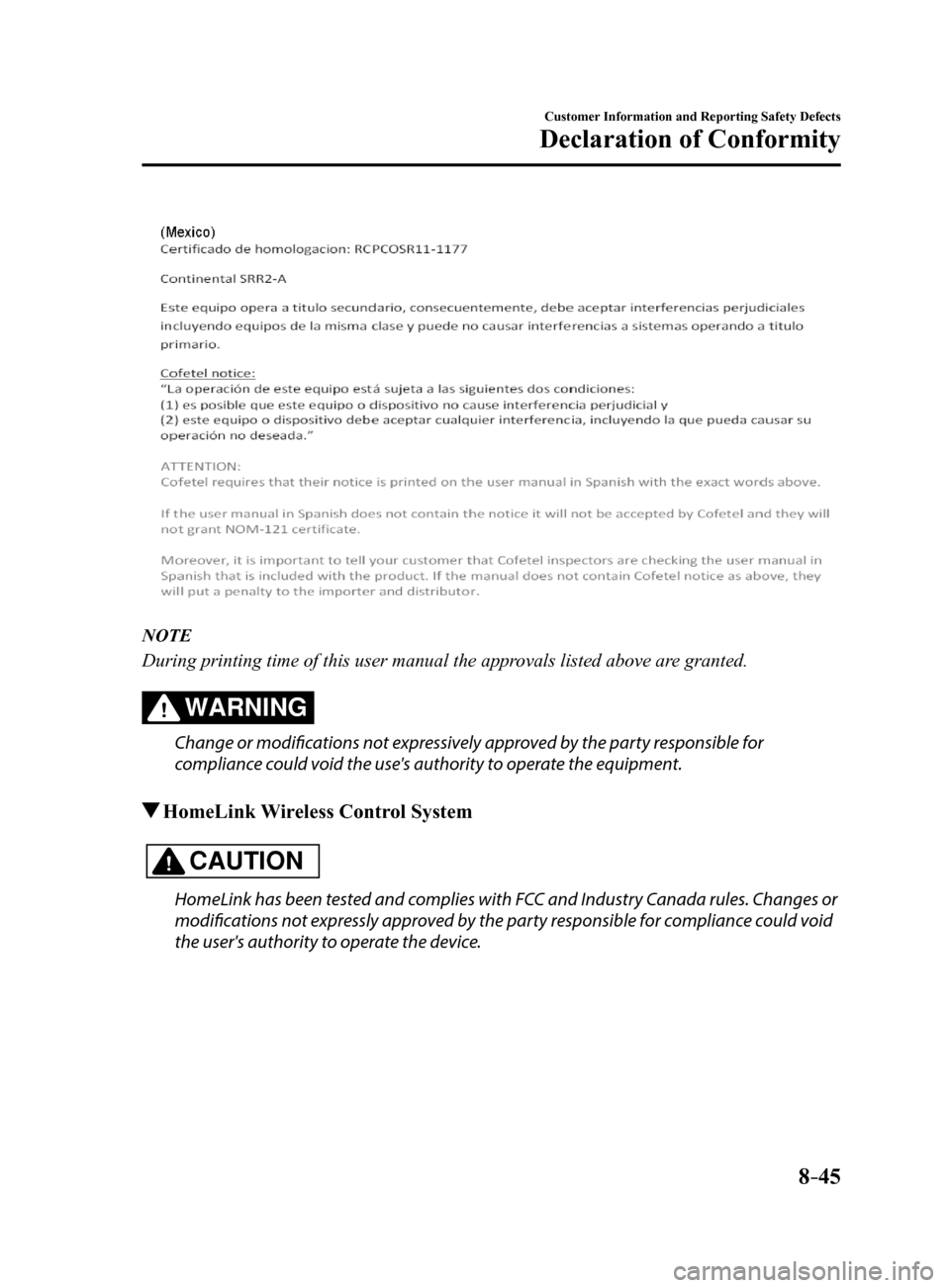
NOTE
During printing time of this user manual the approvals listed above are granted.
WARNING
Change or modifications not expressively approved by the party responsible for
compliance could void the use's authority to operate the equipment.
HomeLink Wireless Control System
CAUTION
HomeLink has been tested and complies with FCC and Industry Canada rules. Changes or
modifications not expressly approved by the party responsible for compliance could void
the user's authority to operate the device.
Mazda6_8FH2-EA-16F_Edition2.indb 452016/07/07 13:46:44
Page 548 of 578
 8–46
Customer Information and Reporting Safety Defects
Declaration of Conformity
NOTE
FCC ID: NZLMOBHL4
CANADA:4112A-MOBHL4
This device complies with part 15 of the FCC Rules. Operation is subject\")
8–46
Customer Information and Reporting Safety Defects
Declaration of Conformity
NOTE
FCC ID: NZLMOBHL4
CANADA:4112A-MOBHL4
This device complies with part 15 of the FCC Rules. Operation is subject\
to the following
two conditions:
1- This device may not cause harmful interference, and
2- This device must accept any interference received, including interference that may cause
undesired operation.
Bluetooth® Hands-Free
Type A
U.S.A. and Canada
FCC ID: CB2MBLUEC09 IC:279B-MBLUEC09
This device complies with Part 15 of the FCC Rules and with RSS-210 of Industry Canada.
Operation is subject to the following two conditions:
(1) This device may not cause harmful interference, and
(2) This device must accept any interference received, including interferenc\
e that may cause
undesired operation.
WARNING
Changes or modifications not expressly approved by the party responsible for compliance
could void the user's authority to operate the equipment.
The term “IC: ” before the radio certification number only signifies that Industry Canada
technical specifications were met.
The antenna used for this transmitter must not be co-located or operatin\
g in conjunction
with any other antenna or transmitter. End-users and installers must be provided with
installation instructions and transmitter operating conditions for satisfying RF exposure
compliance.
Mazda6_8FH2-EA-16F_Edition2.indb 462016/07/07 13:46:45
Page 562 of 578
 9–10
Specifications
Personalization Features
Personalization Features
The following personalization features can be set or changed by the cust\
omer or an
Authorized Mazda Dealer. Consult an Author")
9–10
Specifications
Personalization Features
Personalization Features
The following personalization features can be set or changed by the cust\
omer or an
Authorized Mazda Dealer. Consult an Authorized Mazda Dealer for details.
Additionally, some of the personalization features can be changed by the customer
depending on the feature.
Personalization features and settings which can be changed differ depending on the market
and specification.
Settings Change Method
Settings can be changed by operating the center display screen.
A: Refer to Settings on page 5-39.
B: Refer to Fuel Economy Monitor on page 4-83.
C: Refer to Active Driving Display on page 4-29.
Settings can be changed by operating the vehicle switches.
D: Refer to Auto Lock/Unlock Function on page 3-17.
E: Refer to Transmitter on page 3-5.
F: Refer to Locking, Unlocking with Request Switch (With the advanced keyless function)
on page 3-14.
Settings can be changed by an Authorized Mazda Dealer.
Item FeatureFactory
Setting Available
Settings Settings
Change
Method
Safety
Smart City Brake
Support (SCBS)
(page 4-138)
Smart Brake
Support (SBS) (page
4-143) The system can be changed so that Smart
City Brake Support (SCBS)/Smart Brake
Support (SBS) does not operate.
*1On
On/OffA—
The distance at which the collision warning
activates can be changed. Mid
Near/Mid/Far A—
The volume of the collision warning can
be changed. High
High/Low/Off A—
Mazda6_8FH2-EA-16F_Edition2.indb 102016/07/07 13:46:49
Page 563 of 578

9–11
Specifications
Personalization Features
ItemFeatureFactory
Setting Available
Settings Settings
Change
Method
Lane-keep Assist
System (LAS) &
Lane Departure
Warning System
(LDWS) (page
4-125) The system can be changed so that the
steering wheel assist does not operate.
On
On/OffA—
When the steering
wheel operation
assistance is
turned on The cancel sensitivity
of the steering
assistance for the
Lane-keep Assist
System (LAS) & Lane
Departure Warning
System (LDWS) can
be changed.
High
High/Low A—
The system can be
changed so that the
Lane Departure
Warning does not
activate. On
On/OffA—
When the steering
wheel operation
assistance is
turned off The warning timing
in which the Lane-
keep Assist System
(LAS) & Lane
Departure Warning
System (LDWS)
system determines that
the vehicle may be
deviating from its lane
can be changed.
Before
At/BeforeA—
The sensitivity of
the warning for the
Lane-keep Assist
System (LAS) & Lane
Departure Warning
System (LDWS) can
be changed. Rare
High/Rare A—
The type of Lane-keep Assist System
(LAS) & Lane Departure Warning System
(LDWS) warning can be changed. Vibration
Vibration/Beep/
Rumble A
—
The warning
intensity/volume
of the Lane-keep
Assist System
(LAS) & Lane
Departure
Warning System
(LDWS) system
can be changed. Vibration
LowHigh/Low A—
Rumble LowHigh/Mid/Low A—
Beep LowHigh/Low A—
Mazda6_8FH2-EA-16F_Edition2.indb 112016/07/07 13:46:49
Page 564 of 578
9–12
Specifications
Personalization Features
ItemFeatureFactory
Setting Available
Settings Settings
Change
Method
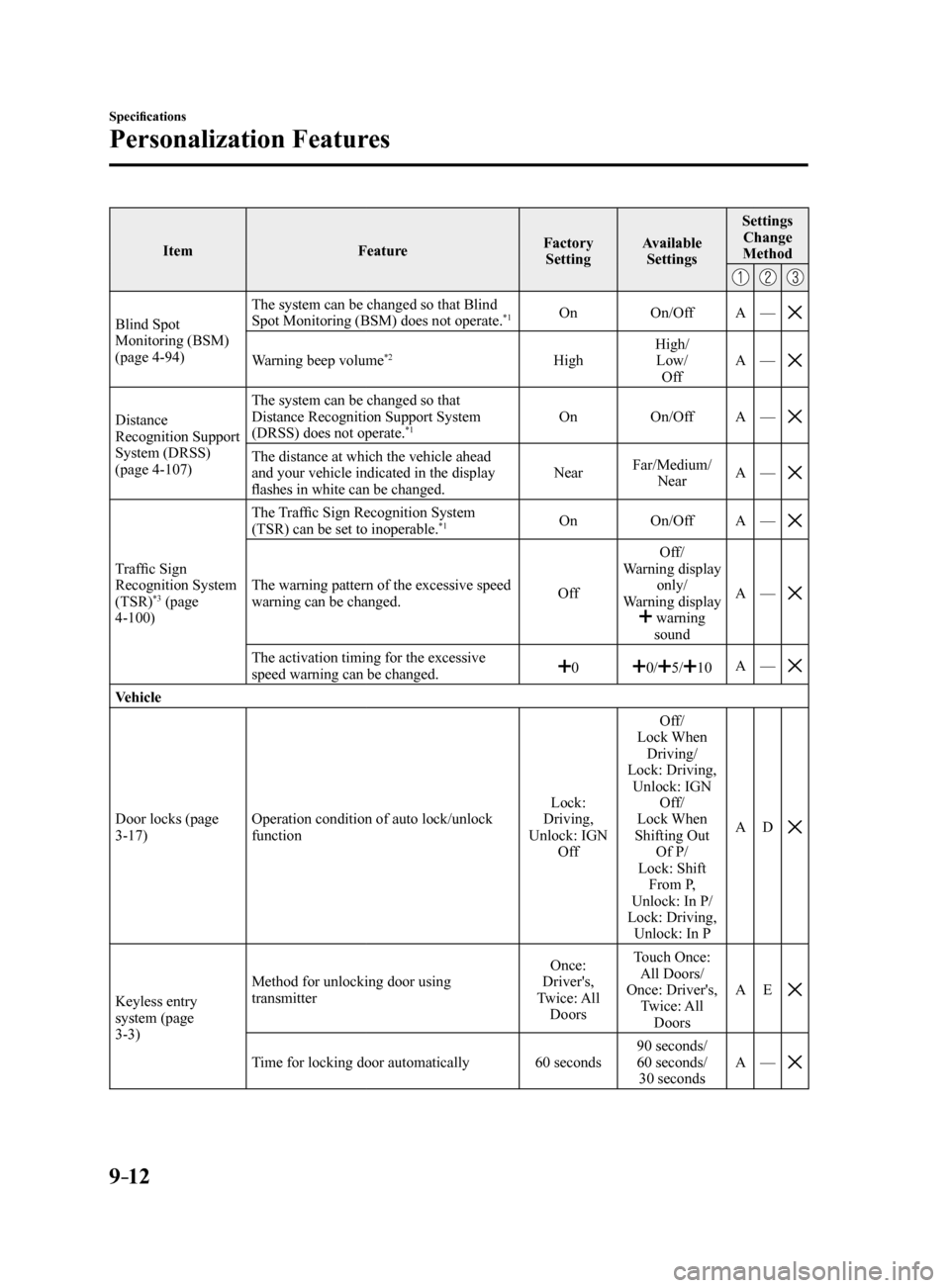
Blind Spot
Monitoring (BSM)
(page 4-94) The system can be changed so that Blind
Spot Monitoring (BSM) does not operate.*1On
On/OffA—
Warning beep volume*2High High/
Low/ Off A
—
Distance
Recognition Support
System (DRSS)
(page 4-107) The system can be changed so that
Distance Recognition Support System
(DRSS) does not operate.*1On
On/OffA—
The distance at which the vehicle ahead
and your vehicle indicated in the display
flashes in white can be changed. Near
Far/Medium/
Near A
—
Traffic Sign
Recognition System
(TSR)
*3 (page
4-100) The Traffic Sign Recognition System
(TSR) can be set to inoperable.
*1On
On/OffA—
The warning pattern of the excessive speed
warning can be changed. OffOff/
Warning display only/
Warning display
warning sound A
—
The activation timing for the excessive
speed warning can be changed.00/5/10 A
—
Vehicle
Door locks (page
3-17) Operation condition of auto lock/unlock
function Lock:
Driving,
Unlock: IGN Off Off/
Lock When Driving/
Lock: Driving, Unlock: IGN Off/
Lock When
Shifting Out Of P/
Lock: Shift From P,
Unlock: In P/
Lock: Driving, Unlock: In P A
D
Keyless entry
system (page
3-3) Method for unlocking door using
transmitter
Once:
Driver's,
Twice: All Doors Touch Once:
All Doors/
Once: Driver's, Twice: All Doors A
E
Time for locking door automatically 60 seconds90 seconds/
60 seconds/
30 seconds A
—
Mazda6_8FH2-EA-16F_Edition2.indb 122016/07/07 13:46:49
Page 565 of 578
9–13
Specifications
Personalization Features
ItemFeatureFactory
Setting Available
Settings Settings
Change
Method
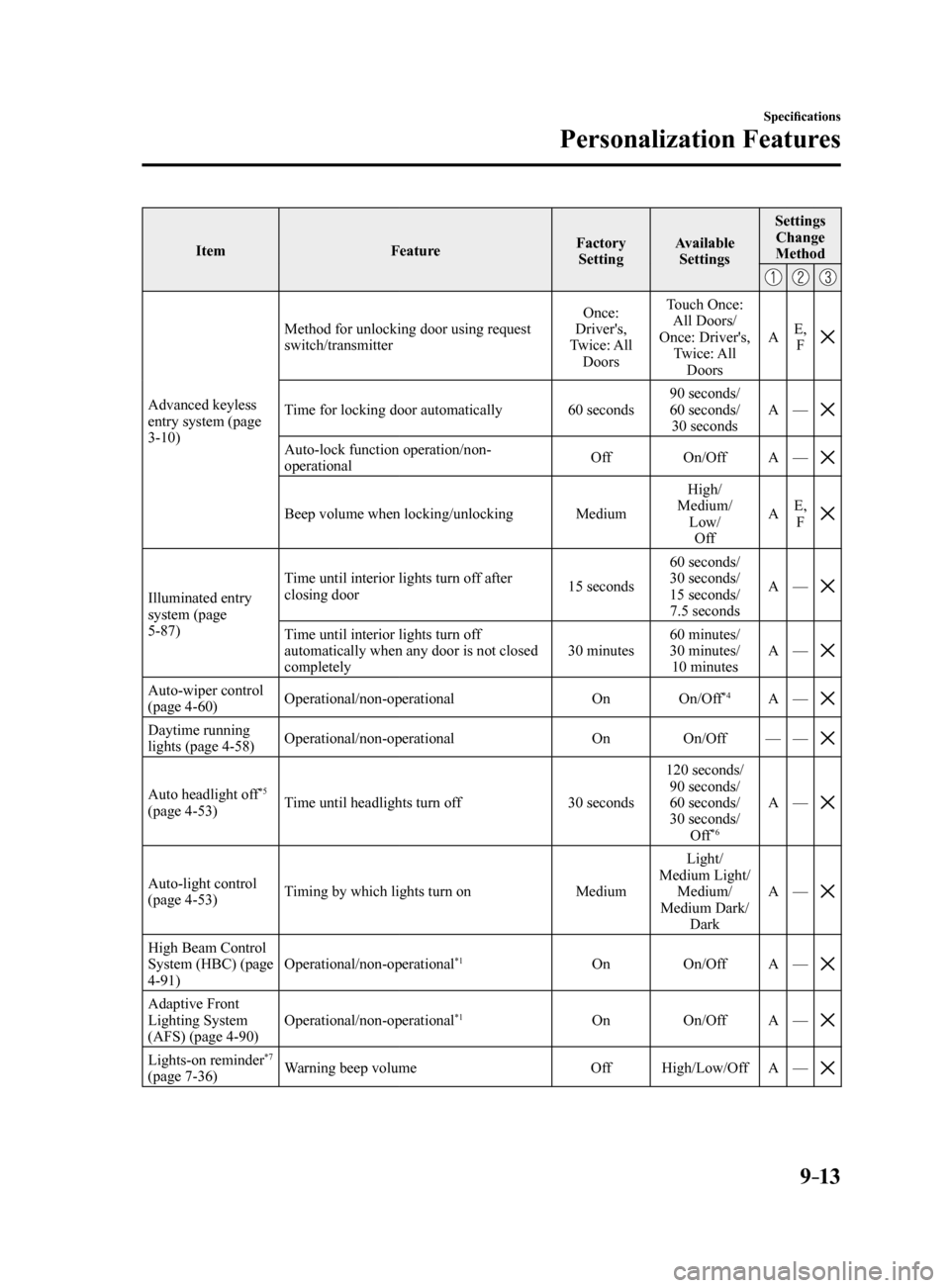
Advanced keyless
entry system (page
3-10) Method for unlocking door using request
switch/transmitter
Once:
Driver's,
Twice: All Doors Touch Once:
All Doors/
Once: Driver's, Twice: All Doors A
E,
FTime for locking door automatically 60 seconds90 seconds/
60 seconds/
30 seconds A
—
Auto-lock function operation/non-
operational Off
On/OffA—
Beep volume when locking/unlocking MediumHigh/
Medium/ Low/Off A
E,
F
Illuminated entry
system (page
5-87) Time until interior lights turn off after
closing door
15 seconds60 seconds/
30 seconds/
15 seconds/
7.5 seconds A
—
Time until interior lights turn off
automatically when any door is not closed
completely 30 minutes60 minutes/
30 minutes/
10 minutes A
—
Auto-wiper control
(page 4-60) Operational/non-operational
OnOn/Off*4A—
Daytime running
lights (page 4-58) Operational/non-operational
OnOn/Off——
Auto headlight off*5
(page 4-53) Time until headlights turn off
30 seconds120 seconds/
90 seconds/
60 seconds/
30 seconds/ Off
*6
A —
Auto-light control
(page 4-53) Timing by which lights turn on
MediumLight/
Medium Light/ Medium/
Medium Dark/ Dark A
—
High Beam Control
System (HBC) (page
4-91) Operational/non-operational*1On
On/OffA—
Adaptive Front
Lighting System
(AFS) (page 4-90) Operational/non-operational*1On
On/OffA—
Lights-on reminder*7
(page 7-36) Warning beep volume
OffHigh/Low/Off A—
Mazda6_8FH2-EA-16F_Edition2.indb 132016/07/07 13:46:49