change MAZDA MODEL 6 2017 (in English) Manual Online
[x] Cancel search | Manufacturer: MAZDA, Model Year: 2017, Model line: MODEL 6, Model: MAZDA MODEL 6 2017Pages: 578, PDF Size: 54.72 MB
Page 313 of 578
5–19
Interior Features
Audio System
Operating Tips for AAC
AAC stands for Advanced Audio Coding,
which is standardized voice compression
established by the ISO
*1 working group
(MPEG). Audio data can be created and
stored at a higher compression ratio than
MP3.
This unit plays files with the extensions
(.aac/.m4a/.wav) as the AAC files.
*1 International Organization for
Standardization
CAUTION
Do not use an audio file extension on
files other than audio files. In addition,
do not change the audio file extension.
Otherwise, the unit will not recognize
the file correctly resulting in noise or a
malfunction.
AAC files written under specifications
other than the indicated specification
may not play normally or files or folder
names may not display correctly.
The file extension may not be provided
depending on the computer operating
system, version, software, or settings. In
this case, add the file extension “.aac ”,
“.m4a”, or “.wav” to the end of the file
name, and then write it to the memory.
Operating Tips for OGG
OGG is the audio compression format for
Xiph. Org Foundation.
Audio data can be created and stored at a
higher compression ratio than MP3.
This unit plays files with the extension
(.ogg) as OGG files.
CAUTION
Do not use an audio file extension on
files other than audio files. In addition,
do not change the audio file extension.
Otherwise, the unit will not recognize
the file correctly resulting in noise or a
malfunction.
OGG files written under specifications
other than the indicated specification
may not play normally or files or folder
names may not display correctly.
The file extension may not be provided
depending on the computer operating
system, version, software, or settings. In
this case, add the file extension “.ogg” to
the end of the file name, and then write
it to the disc/memory.
Mazda6_8FH2-EA-16F_Edition2.indb 192016/07/07 13:45:32
Page 314 of 578
5–20
Interior Features
Audio System
Operating Tips for USB device
This unit plays audio files as follows:
Extension Playback with this unit
.mp3 MP3
.wma WMA
.aac AAC
.m4a
.wav WAV
.ogg OGG
CAUTION
Do not use an audio file extension on
files other than audio files. In addition,
do not change the audio file extension.
Otherwise, the unit will not recognize
the file correctly resulting in noise or a
malfunction.
NOTE
Playback may not be possible
depending on the type and condition of
the USB flash memory even if the audio
file complies with the standard above.
A copyright protected WMA/AAC file
cannot be played in this unit.
The order of the music data stored in
the device may differ from the playback
order.
To prevent loss or damage of stored
data, we recommend that you always
back up your data.
If a device exceeds the maximum
electric current value of 1,000 mA,
it may not operate or recharge when
connected.
Do not pull out the USB device while in
the USB mode (only pull it out while in
FM/AM radio or CD mode).
The device will not operate if the data is
password protected.
MP3/WMA/AAC/OGG files written under
specifications other than the indicated
specification may not play normally
or files/folder names may not display
correctly.
Mazda6_8FH2-EA-16F_Edition2.indb 202016/07/07 13:45:32
Page 319 of 578
5–25
Interior Features
Audio System
Return to previous screen
1. Touch the
.
Displaying the home screen
1. Touch the
.
Home screen
Icon Function
Applications
Information such as average fuel economy, maintenance, and warnings can be verified.
Depending on the grade and specification, the screen display may differ.
Entertainment
Operates audio such as the radio and CDs. The audio source most recently used is
displayed. An audio source which cannot be used at that time is skipped and the pre\
vious
audio source is displayed.
To change the audio source, select the
icon displayed at the bottom of the screen.
Communication
Bluetooth® related functions are available.
Navigation
Navigation screen is displayed (vehicles with navigation system).
If the SD card for the navigation system is not inserted, the compass in\
dicating the direction
in which the vehicle is moving is displayed.
The compass may not indicate the correct bearing when the vehicle is sto\
pped or traveling
at a slow speed.
Settings
Overall setting menu (Such as display, sound, Bluetooth® and Language).
Depending on the grade and specification, the screen display may differ.
Mazda6_8FH2-EA-16F_Edition2.indb 252016/07/07 13:45:34
Page 320 of 578
5–26
Interior Features
Audio System
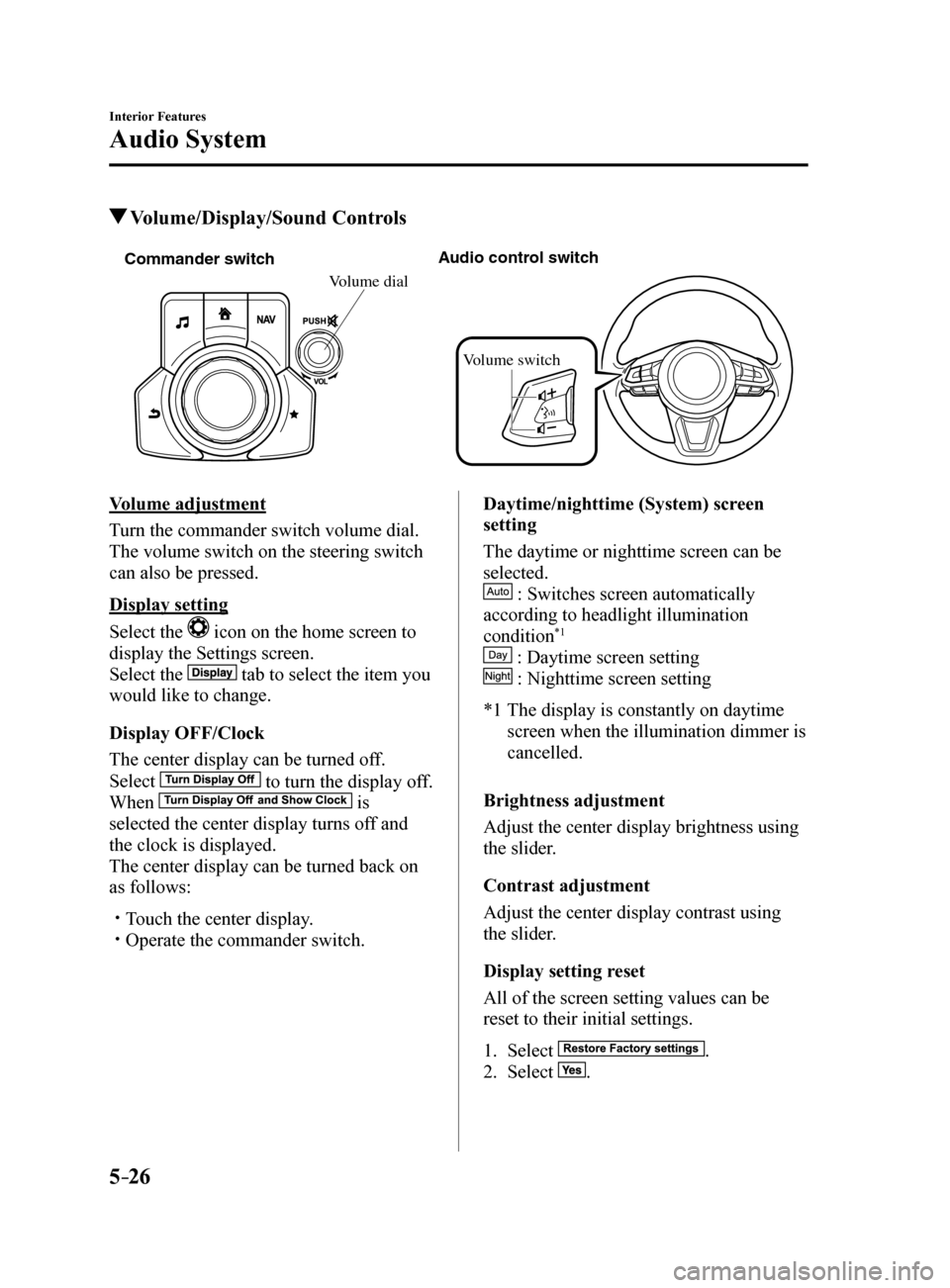
Volume/Display/Sound Controls
Commander switch A
udio contr ol switc h
Volume switch
Volume dial
Volume adjustment
Turn the commander switch volume dial.
The volume switch on the steering switch
can also be pressed.
Display setting
Select the
icon on the home screen to
display the Settings screen.
Select the
tab to select the item you
would like to change.
Display OFF/Clock
The center display can be turned off.
Select
to turn the display off.
When
is
selected the center display turns off and
the clock is displayed.
The center display can be turned back on
as follows:
Touch the center display. Operate the commander switch. Daytime/nighttime (System) screen
setting
The daytime or nighttime screen can be
selected.
: Switches screen automatically
according to headlight illumination
condition
*1
: Daytime screen setting
: Nighttime screen setting
*1 The display is constantly on daytime
screen when the illumination dimmer is
cancelled.
Brightness adjustment
Adjust the center display brightness using
the slider.
Contrast adjustment
Adjust the center display contrast using
the slider.
Display setting reset
All of the screen setting values can be
reset to their initial settings.
1. Select
.
2. Select
.
Mazda6_8FH2-EA-16F_Edition2.indb 262016/07/07 13:45:36
Page 321 of 578
5–27
Interior Features
Audio System
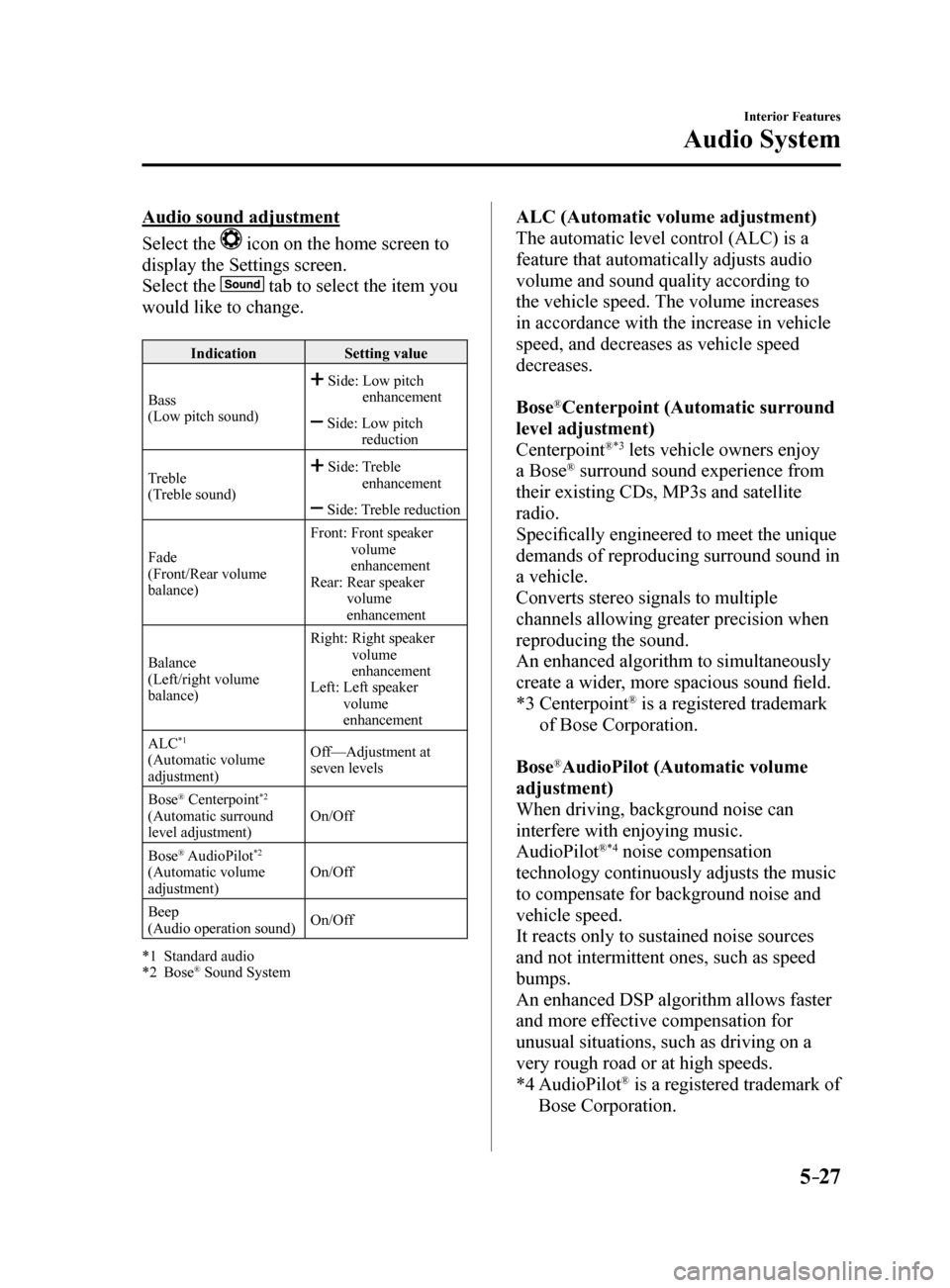
Audio sound adjustment
Select the
icon on the home screen to
display the Settings screen.
Select the
tab to select the item you
would like to change.
Indication Setting value
Bass
(Low pitch sound)
Side: Low pitch
enhancement
Side: Low pitch
reduction
Treble
(Treble sound)
Side: Treble
enhancement
Side: Treble reduction
Fade
(Front/Rear volume
balance) Front:
Front speaker
volume
enhancement
Rear: Rear speaker
volume
enhancement
Balance
(Left/right volume
balance) Right:
Right speaker
volume
enhancement
Left: Left speaker
volume
enhancement
ALC
*1
(Automatic volume
adjustment) Off—Adjustment at
seven levels
Bose
® Centerpoint*2
(Automatic surround
level adjustment) On/Off
Bose
® AudioPilot*2
(Automatic volume
adjustment) On/Off
Beep
(Audio operation sound) On/Off
*1 Standard audio
*2 Bose
® Sound System
ALC (Automatic volume adjustment)
The automatic level control (ALC) is a
feature that automatically adjusts audio
volume and sound quality according to
the vehicle speed. The volume increases
in accordance with the increase in vehicle
speed, and decreases as vehicle speed
decreases.
Bose
®Centerpoint (Automatic surround
level adjustment)
Centerpoint
®*3 lets vehicle owners enjoy
a Bose® surround sound experience from
their existing CDs, MP3s and satellite
radio.
Specifically engineered to meet the unique
demands of reproducing surround sound in
a vehicle.
Converts stereo signals to multiple
channels allowing greater precision when
reproducing the sound.
An enhanced algorithm to simultaneously
create a wider, more spacious sound field.
*3 Centerpoint
® is a registered trademark
of Bose Corporation.
Bose
®AudioPilot (Automatic volume
adjustment)
When driving, background noise can
interfere with enjoying music.
AudioPilot
®*4 noise compensation
technology continuously adjusts the music
to compensate for background noise and
vehicle speed.
It reacts only to sustained noise sources
and not intermittent ones, such as speed
bumps.
An enhanced DSP algorithm allows faster
and more effective compensation for
unusual situations, such as driving on a
very rough road or at high speeds.
*4 AudioPilot
® is a registered trademark of
Bose Corporation.
Mazda6_8FH2-EA-16F_Edition2.indb 272016/07/07 13:45:36
Page 322 of 578
5–28
Interior Features
Audio System
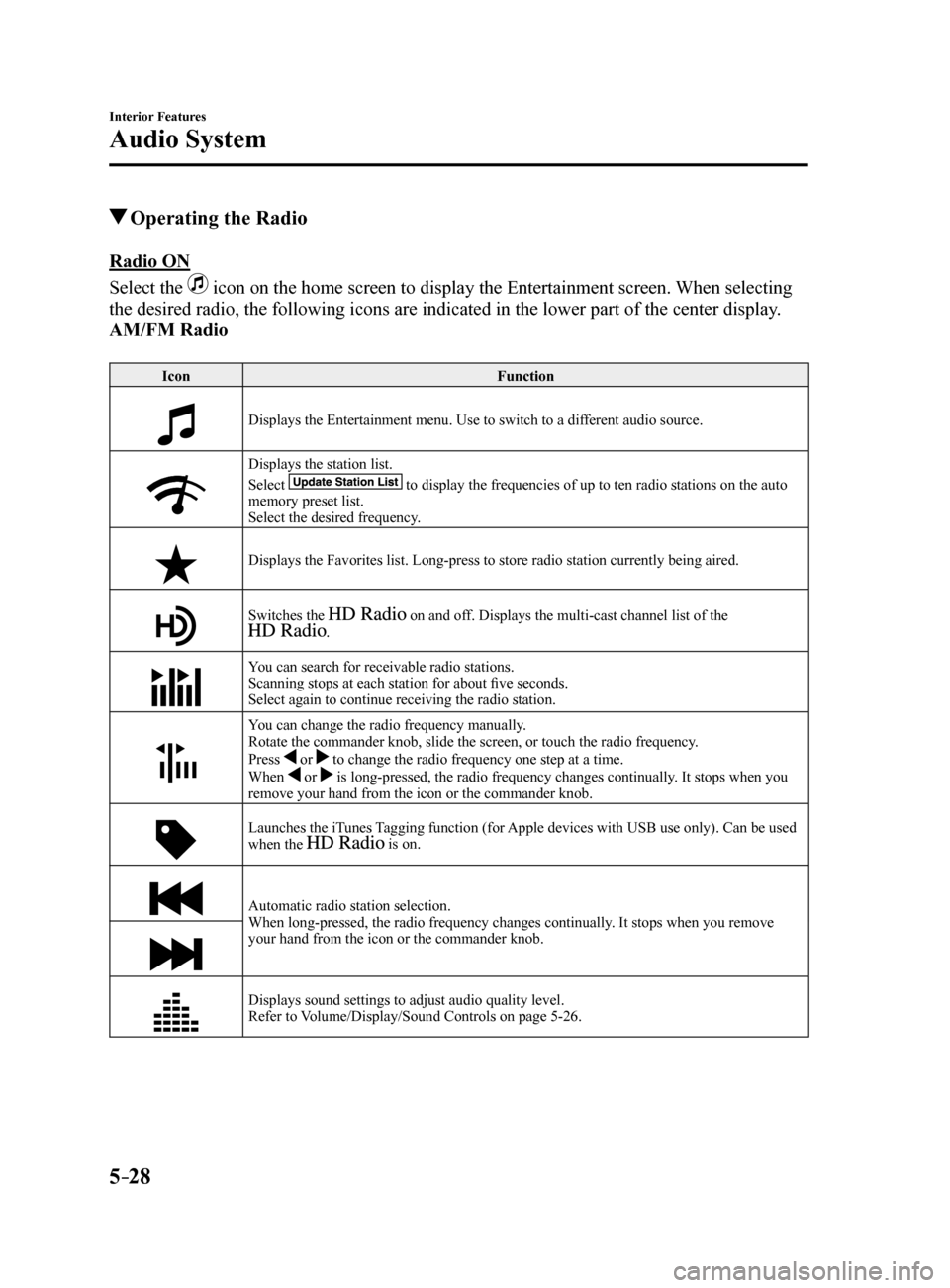
Operating the Radio
Radio ON
Select the
icon on the home screen to display the Entertainment screen. When selecting
the desired radio, the following icons are indicated in the lower part o\
f the center display.
AM/FM Radio
Icon Function
Displays the Entertainment menu. Use to switch to a different audio source.
Displays the station list.
Select
to display the frequencies of up to ten radio stations on the auto
memory preset list.
Select the desired frequency.
Displays the Favorites list. Long-press to store radio station currently\
being aired.
Switches the on and off. Displays the multi-cast channel list of the .
You can search for receivable radio stations.
Scanning stops at each station for about five seconds.
Select again to continue receiving the radio station.
You can change the radio frequency manually.
Rotate the commander knob, slide the screen, or touch the radio frequency.
Press
or to change the radio frequency one step at a time.
When or is long-pressed, the radio frequency changes continually. It stops when you
remove your hand from the icon or the commander knob.
Launches the iTunes Tagging function (for Apple devices with USB use only). Can be used
when the is on.
Automatic radio station selection.
When long-pressed, the radio frequency changes continually. It stops when you remove
your hand from the icon or the commander knob.
Displays sound settings to adjust audio quality level.
Refer to Volume/Display/Sound Controls on page 5-26.
Mazda6_8FH2-EA-16F_Edition2.indb 282016/07/07 13:45:38
Page 324 of 578
5–30
Interior Features
Audio System
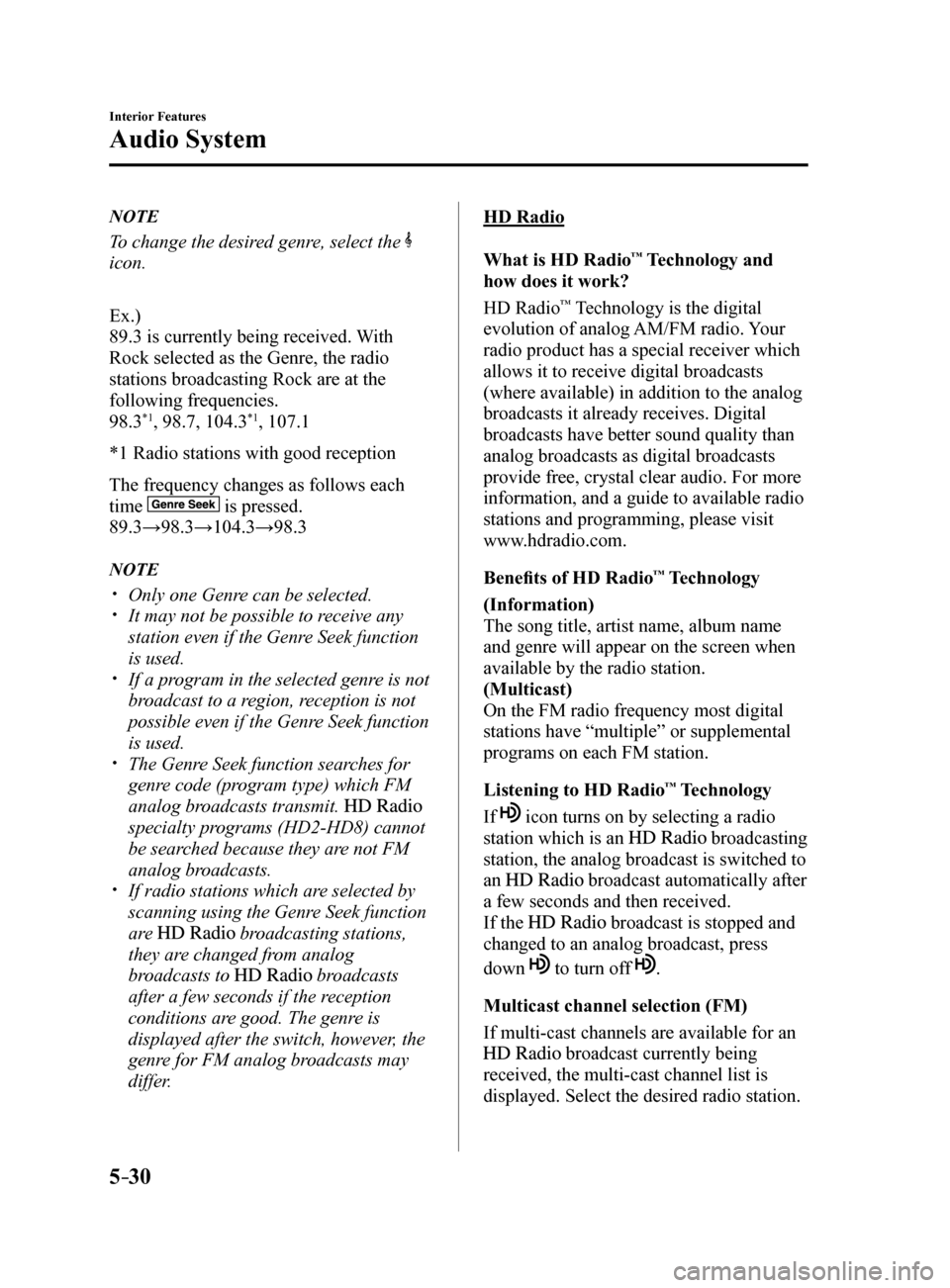
NOTE
To change the desired genre, select the
icon.
Ex.)
89.3 is currently being received. With
Rock selected as the Genre, the radio
stations broadcasting Rock are at the
following frequencies.
98.3
*1, 98.7, 104.3*1, 107.1
*1 Radio stations with good reception
The frequency changes as follows each
time
is pressed.
89.3→98.3→104.3→98.3
NOTE
Only one Genre can be selected. It may not be possible to receive any
station even if the Genre Seek function
is used.
If a program in the selected genre is not
broadcast to a region, reception is not
possible even if the Genre Seek function
is used.
The Genre Seek function searches for
genre code (program type) which FM
analog broadcasts transmit.
specialty programs (HD2-HD8) cannot
be searched because they are not FM
analog broadcasts.
If radio stations which are selected by
scanning using the Genre Seek function
are
broadcasting stations,
they are changed from analog
broadcasts to
broadcasts
after a few seconds if the reception
conditions are good. The genre is
displayed after the switch, however, the
genre for FM analog broadcasts may
differ.
HD Radio
What is HD Radio
™ Technology and
how does it work?
HD Radio
™ Technology is the digital
evolution of analog AM/FM radio. Your
radio product has a special receiver which
allows it to receive digital broadcasts
(where available) in addition to the analog
broadcasts it already receives. Digital
broadcasts have better sound quality than
analog broadcasts as digital broadcasts
provide free, crystal clear audio. For more
information, and a guide to available radio
stations and programming, please visit
www.hdradio.com.
Benefits of HD Radio
™ Technology
(Information)
The song title, artist name, album name
and genre will appear on the screen when
available by the radio station.
(Multicast)
On the FM radio frequency most digital
stations have “multiple” or supplemental
programs on each FM station.
Listening to HD Radio
™ Technology
If
icon turns on by selecting a radio
station which is an
broadcasting
station, the analog broadcast is switched to
an
broadcast automatically after
a few seconds and then received.
If the
broadcast is stopped and
changed to an analog broadcast, press
down
to turn off .
Multicast channel selection (FM)
If multi-cast channels are available for an
broadcast currently being
received, the multi-cast channel list is
displayed. Select the desired radio station.
Mazda6_8FH2-EA-16F_Edition2.indb 302016/07/07 13:45:40
Page 325 of 578
5–31
Interior Features
Audio System
NOTE
If an analog broadcast is received once
and
is received while HD1 is
selected, the audio unit switches to the
station automatically.
When the icon is illuminated, there
could be a noticeable difference in
sound quality and volume when a
change from digital to analog signals
occurs. If the sound quality and volume
become noticeably diminished or cut
off, select the
icon to turn off
( icon is not illuminated). Once an analog broadcast is received
when HD1 is selected from the Favorite
channels, it is switched to
automatically. If the radio reception
conditions are poor, or HD is off,
switching to
broadcasts is
not possible.
When an HD specialty channel (HD2 to
HD8) is selected from the Favorite
channels, “Signal Lost” is displayed
and no audio is output until
is received. If the radio reception
conditions are poor, “Signal Lost”
continues to be displayed.
If the icon is not illuminated,
information such as song titles of the
station are received,
however, the audio output is analog. iTunes Tagging (for Apple devices with
USB use only)
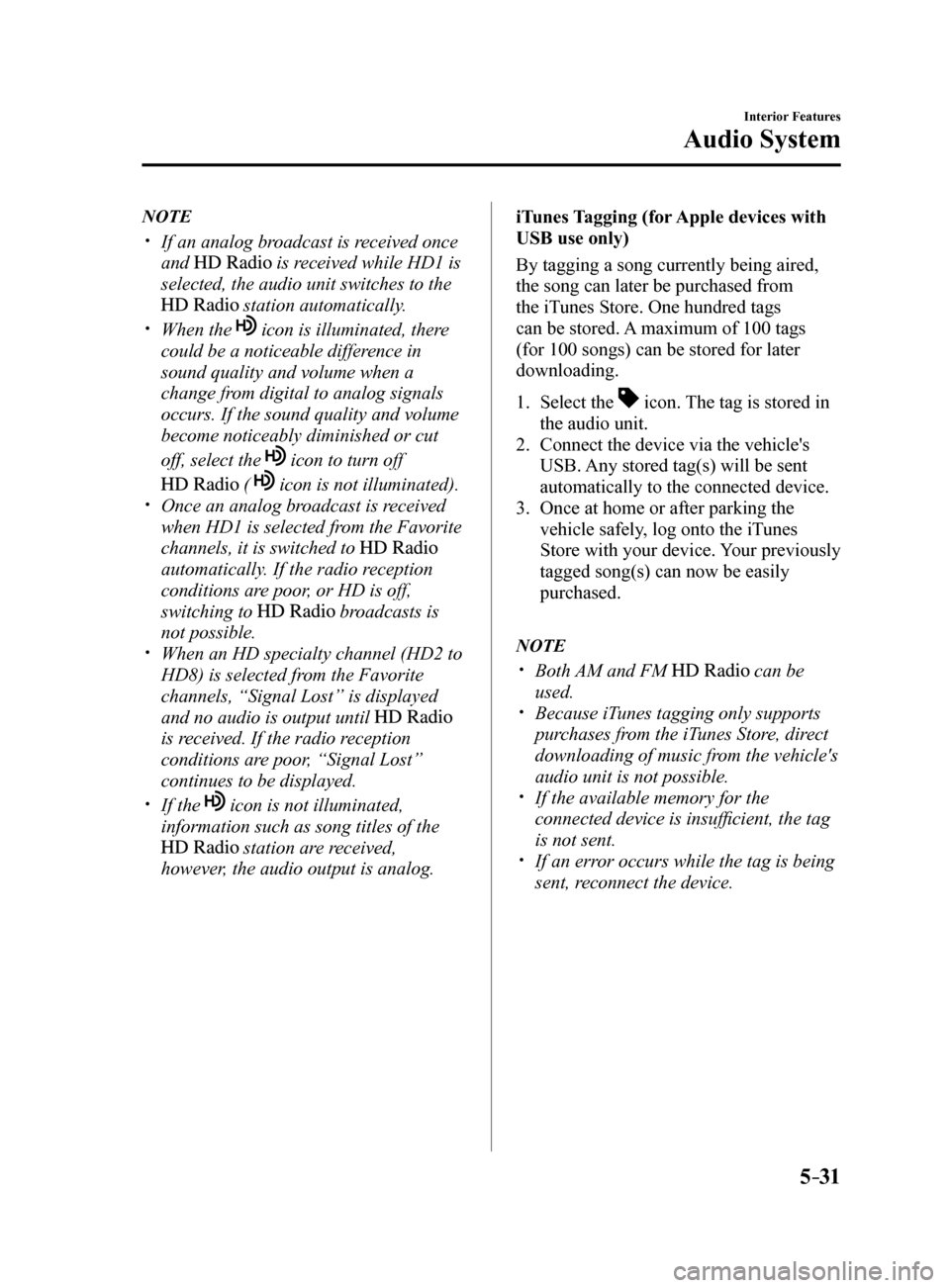
By tagging a song currently being aired,
the song can later be purchased from
the iTunes Store. One hundred tags
can be stored. A maximum of 100 tags
(for 100 songs) can be stored for later
downloading.
1.
Select the
icon. The tag is stored in
the audio unit.
2. Connect the device via the vehicle's
USB. Any stored tag(s) will be sent
automatically to the connected device.
3. Once at home or after parking the
vehicle safely, log onto the iTunes
Store with your device. Your previously
tagged song(s) can now be easily
purchased.
NOTE
Both AM and FM can be
used.
Because iTunes tagging only supports
purchases from the iTunes Store, direct
downloading of music from the vehicle's
audio unit is not possible.
If the available memory for the
connected device is insufficient, the tag
is not sent.
If an error occurs while the tag is being
sent, reconnect the device.
Mazda6_8FH2-EA-16F_Edition2.indb 312016/07/07 13:45:40
Page 327 of 578
5–33
Interior Features
Audio System
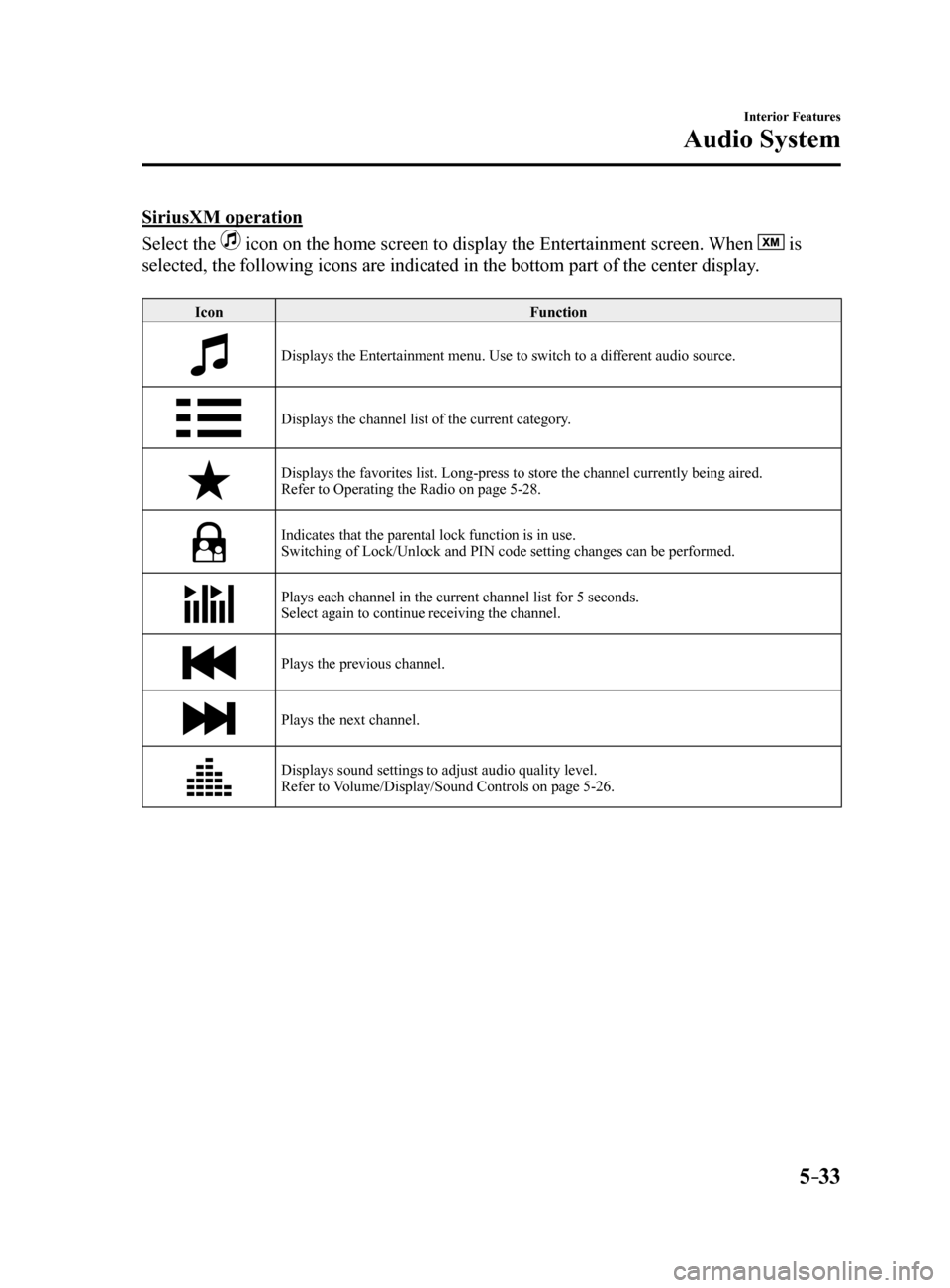
SiriusXM operation
Select the
icon on the home screen to display the Entertainment screen. When is
selected, the following icons are indicated in the bottom part of the ce\
nter display.
Icon Function
Displays the Entertainment menu. Use to switch to a different audio source.
Displays the channel list of the current category.
Displays the favorites list. Long-press to store the channel currently b\
eing aired.
Refer to Operating the Radio on page 5-28.
Indicates that the parental lock function is in use.
Switching of Lock/Unlock and PIN code setting changes can be performed.
Plays each channel in the current channel list for 5 seconds.
Select again to continue receiving the channel.
Plays the previous channel.
Plays the next channel.
Displays sound settings to adjust audio quality level.
Refer to Volume/Display/Sound Controls on page 5-26.
Mazda6_8FH2-EA-16F_Edition2.indb 332016/07/07 13:45:41
Page 332 of 578
5–38
Interior Features
Audio System
IconFunction
Plays a CD. When selected again, playback is temporarily stopped.
Advances to the beginning of the next song.
Long-press to fast forward. It stops when you remove your hand from the \
icon or the
commander knob.
Displays sound settings to adjust audio quality level.
Refer to Volume/Display/Sound Controls on page 5-26.
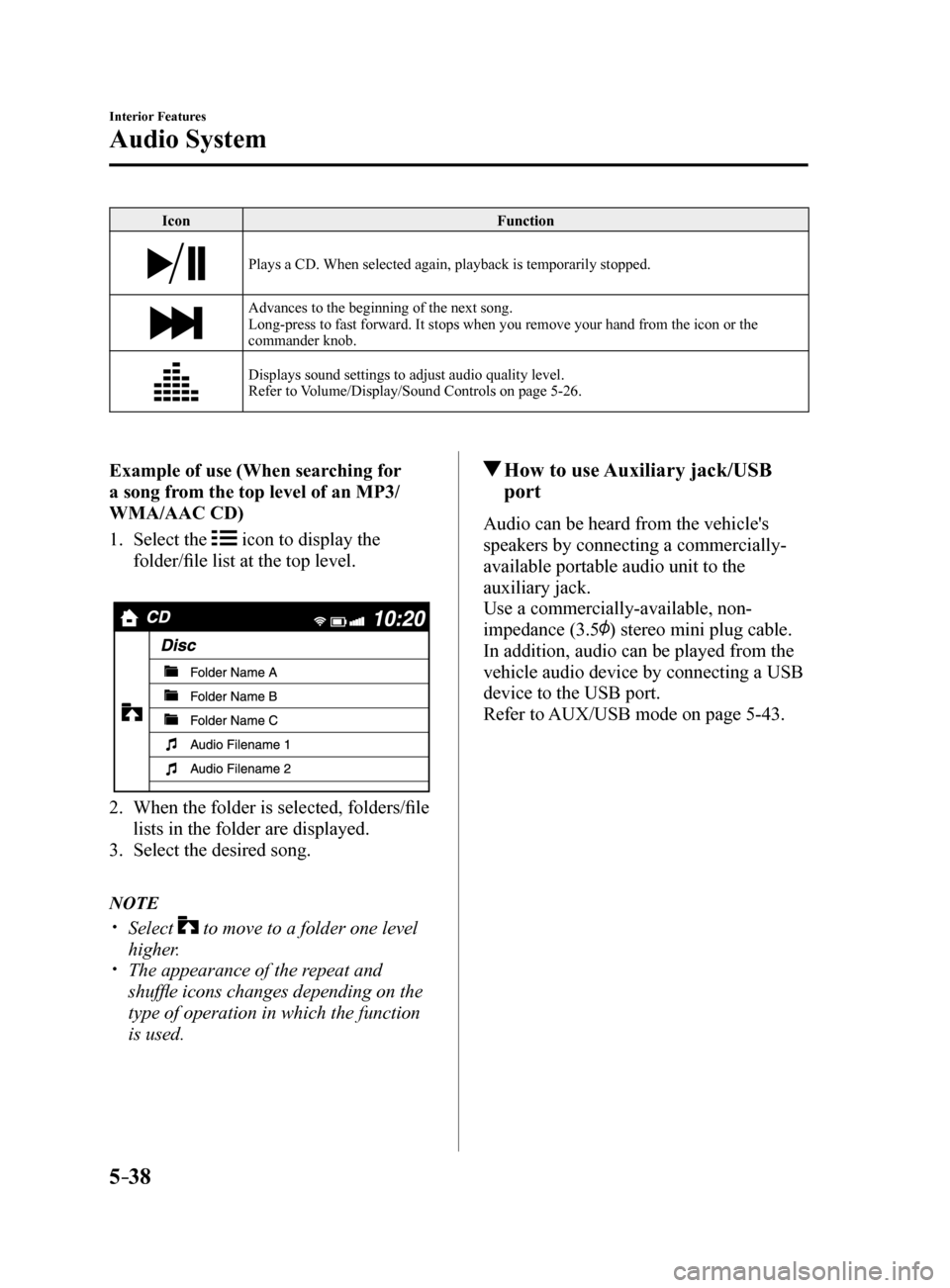
Example of use (When searching for
a song from the top level of an MP3/
WMA/AAC CD)
1. Select the
icon to display the
folder/file list at the top level.
2. When the folder is selected, folders/file
lists in the folder are displayed.
3. Select the desired song.
NOTE
Select to move to a folder one level
higher.
The appearance of the repeat and
shuffle icons changes depending on the
type of operation in which the function
is used.
How to use Auxiliary jack/USB
port
Audio can be heard from the vehicle's
speakers by connecting a commercially-
available portable audio unit to the
auxiliary jack.
Use a commercially-available, non-
impedance (3.5
) stereo mini plug cable.
In addition, audio can be played from the
vehicle audio device by connecting a USB
device to the USB port.
Refer to AUX/USB mode on page 5-43.
Mazda6_8FH2-EA-16F_Edition2.indb 382016/07/07 13:45:43