change wheel MAZDA MODEL 6 2021 User Guide
[x] Cancel search | Manufacturer: MAZDA, Model Year: 2021, Model line: MODEL 6, Model: MAZDA MODEL 6 2021Pages: 634, PDF Size: 71.37 MB
Page 310 of 634

(Auto cancel of warnings)
When the following operations are
performed, the LAS & LDWS determines
that the driver intends to make a lane
change and the system operation is
canceled automa tically. The LAS &
LDWS resumes automatically after the
operation.
The steering wheel is operated abruptly.
The brake pedal is depressed.
The accelerator pedal is depressed.
(To cancel the automatic sensitivity
cancel function, deselect “Warning
sensitivity” in the personalization
features setting.)
The turn signal lever is operated.
The vehicle crosses a lane line.
▼ System Canceling
When the LAS & LDWS is turned off,
press the LAS & LDWS OFF switch.
The LAS & LDWS OFF indicator light
turns on.
NOTE
In the following cases, the LAS & LDWS
is canceled automatically and the LAS
& LDWS OFF indicator light turns on.
Have your vehicle inspected at an
Authorized Mazda Dealer.
There is a malfunction in the power
steering.
There is a malfunction in the DSC.
There is a malfunction in the Forward
Sensing Camera (FSC).
When the ignition is switched OFF, the
system status before
it was turned off is
maintained. For example, if the ignition
is switched OFF with the lane-keep
system operable, the system will be
operable when the ignition is switched
ON the next time.
When the LAS & LDWS is turned off, the
vehicle lane line indication in the
multi-information di splay and the active
driving display turn off.
When Driving
i-ACTIVSENSE
4-172
Mazda6_8JN3-EA-20H_Edition1_old 2020-6-18 17:31:27
Page 311 of 634

▼Lane Departure Warning
If the system determines that the vehicle may deviate from its
lane, the lane departure
warning (beep sound, rumble sound
*1, or steering wheel vibration) is activated and the
direction in which the system de termines that the vehicle may d eviate is indicated in the
multi-information display and the active driving display.
If the system determines that the vehicle may deviate from its lane, the color of the lane line
on the side being detected by the system changes from white to amber, and flashes.
Multi-information Display Active Driving Display
NOTE
If you have set the lane departure warning sound to the beep sound/rumble sound*1
setting, the warning sound may not be heard depending on the surrounding noise
conditions.
If you have set the lane departure warning system to the steering wheel vibrations setting,
the vibration may not be felt depending on the road surface conditions.
When the setting for the steering operation assist is changed to operational, the warnings
can be set to activate/not activate. (When the setting for the steering operation assist is
changed to non-operational, the warnings cannot be set to not activate.)
Refer to the Settings section in the Mazda Connect Owner's Manual.
The LAS & LDWS can be changed to the following settings regardless of whether the
steering operation assist has been set to operational/non-operational. Always check the
setting status when driving the vehicle and make setting changes if necessary.
Refer to the Settings section in the Mazda Connect Owner's Manual.
Steering wheel vibration: Strong/weak
Warning sound volume
Types of warnings (steering wheel vibration/beep sound/rumble sound*1)
*1 A rumble strip is a series of grooves in the road pavement surface positioned at specific
intervals, and when the vehicle passes over it a vibration and rumble sound is produced
which alerts the driver that the vehicle is departing from the lane.
When Driving
i-ACTIVSENSE
4-173
Mazda6_8JN3-EA-20H_Edition1_old 2020-6-18 17:31:27
Page 318 of 634

When passing through a toll gate.
When passing through low gates, narrow gates, car washing machines, or tunnels.
If you suddenly come close to a vehicle ahead.
2-wheeled vehicles, pedestrians, animals or standing trees.
Vehicle is driven with some of the tires having significant wear.
▼Smart City Brake Support (SCBS)
Indicator Light (Red)*
If the Smart City Brake Support (SCBS) is
operating, the indicator light (red) flashes.
▼
Collision Warning*
If there is the possibil
ity of a collision with
a vehicle ahead, the beep sounds
continuously and a warning is indicated in
the multi-information d isplay or the active
driving display.
NOTE
The operation distance and volume of the
collision warning can be changed. Refer
to the Settings section in the Mazda
Connect Owner's Manual.
▼ Automatic Brake Operation
Display*
The automatic b
rake operation display is
indicated on the multi-information display
after the SCBS F is operated.
NOTE
The collision warning beep sounds
intermittently while the SCBS F brake or
brake assist (SCBS F brake assist) is
operating.
If the vehicle is stopped by the SCBS F
operation and the brake pedal is not
depressed, the warning beep sounds 1
time after about 2 seconds and the SCBS
F brake is automatically released.
When Driving
i-ACTIVSENSE
4-180*Some models.
Mazda6_8JN3-EA-20H_Edition1_old 2020-6-18 17:31:27
Page 321 of 634

Do not apply a strong force to an ultrasonic sensor (rear):
When washing the vehicle, do not spray highly pressurized water against an ultrasonic sensor
(rear), or rub it strongly. In addition, do no t hit the rear bumper forcefully when loading and
unloading cargo Otherwise, the sensors may no t detect obstructions correctly which could
cause the SCBS R system to not operate normally, or it could operate unnecessarily.
CAUTION
When driving off-road in areas where there is gr ass or foliage, it is recommended that the
SCBS R system be turned off.
Always use tires of the specified size and the same manufacturer, brand, and tread pattern
on all 4 wheels. In addition, do not use tires wi th significantly different wear patterns on the
same vehicle. Otherwise, the SCBS R system may not operate normally.
If ice or snow is stuck on the ultrasonic sensors (rear) they may not be able to detect
obstructions correctly depending on the condit ions. In such cases, the system may not be
able to perform controls correctly. Always dr ive carefully and pay attention to the rear of
the vehicle.
NOTE
The vehicle posture changes depending on the accelerator pedal, brake pedal and
steering wheel operations, which could make it difficult for the system to recognize an
obstruction, or it could facilitate unnecessary detection. In such cases, the SCBS R may or
may not operate.
The SCBS R system will operate under the following conditions.
The engine is running.
The selector lever is in the R (reverse) position.
“Smart City Brake Support Reverse Malfunction” is not displayed in the
multi-information display.
The vehicle speed is between about 2 to 8 km/h (2 to 4 mph).
The SCBS R is not turned off.
The DSC is not malfunctioning.
The SCBS R operates using ultrasonic sensors (rear) which detect obstructions at the rear
by emitting ultrasonic waves and then receiving the returning waves reflected off the
obstructions.
In the following cases, the ultrasonic sensors (rear) cannot detect obstructions and the
SCBS R may not operate.
The height of the obstruction is low such as low walls or trucks with low loading
platforms.
The height of the obstruction is high such as trucks with high loading platforms.
When Driving
i-ACTIVSENSE
4-183
Mazda6_8JN3-EA-20H_Edition1_old 2020-6-18 17:31:27
Page 339 of 634
CAUTION
The parking sensor detection range has limitations. For example, obstructions closing in from
the side and objects short in height may not be detected. Always confirm the safety around
the vehicle visually when driving.
For details, refer to the parking sensor obstruction detection indication and warning sound.
Refer to Parking Sensor System on page 4-248.
NOTE
The setting can be changed so that the projected vehicle path lines are not displayed.
Refer to the Settings section in the Mazda Connect Owner's Manual.
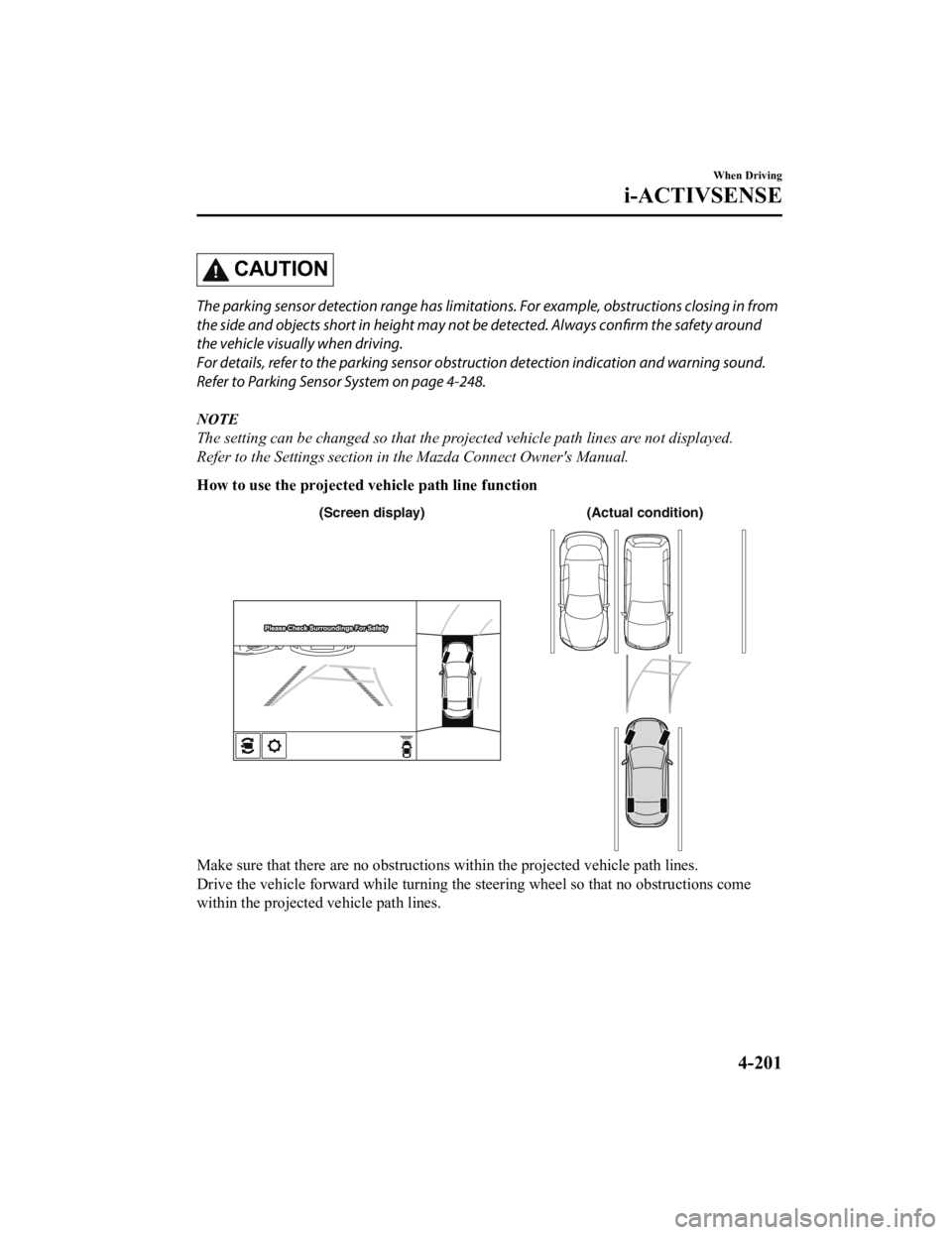
How to use the projected v ehicle path line function
(Actual condition)
(Screen display)
Make sure that there are no obstructions within the projected v ehicle path lines.
Drive the vehicle forward while turning the steering wheel so t hat no obstructions come
within the projected vehicle path lines.
When Driving
i-ACTIVSENSE
4-201
Mazda6_8JN3-EA-20H_Edition1_old 2020-6-18 17:31:27
Page 342 of 634

Display/IconContent
Projected vehicle path lines (amber) Indicates the approximate p rojected path of the vehicle.
Moves in conjunction with t he steering wheel operation.
The projected vehicle path lines (amber) indicate the path the
inner side of the vehicle is expected to travel.
Vehicle parallel guide lines (bl ue) Indicates the approximate ve hicle width including the door
mirrors.
Vehicle front end guide lines ( blue) Indicates the point about 0 .25 m (9.8 in) from the front edge
of the vehicle (front edge of the bumper).
NOTE
The setting can be changed so that the projected vehicle path lines are not displayed.
Refer to the Settings section in the Mazda Connect Owner's Manual.
How to use the projected v ehicle path line function
AB
AB
C
C (Actual condition)
(Screen display)
Make sure that there are no obstructions within the projected v ehicle path lines.
Turn the steering wheel so that t he projected vehicle path lines travel inside of the
obstruction (A), and drive the ve hicle forward until it passes the obstruction.
If the projected vehicle path lines are on an obstruction (B) o r outside of the obstruction (C),
the vehicle may contact the obstruction when turning the vehicl e sharply.
CAUTION
The parking sensor detection range has limitat ions. For example, obstructions closing in
from the side and objects short in height ma y not be detected. Always confirm the safety
around the vehicle visually when driving.
For details, refer to the parking sensor obstru ction detection indication and warning sound.
Refer to Parking Sensor System on page 4-248.
When Driving
i-ACTIVSENSE
4-204
Mazda6_8JN3-EA-20H_Edition1_old 2020-6-18 17:31:27
Page 344 of 634

If an image containing an object with a conspicuous color is picked up by any of the
cameras, the whole screen may be affected and it may display in that color.
Obstructions displayed in the rear view may not display on the top view screen.
If the position or angle of each camera changes due to tilting of the vehicle, the image
may appear distorted.
Lines on the road may appear distorted at the seams where each of the camera images
merge.
The entire screen may appear bright/dark depending on the illumination level around
any of the cameras.
Viewing the screen
-a
-b
(When the projected vehicle
path line display is on) (When the projected vehicle
path line display is off)
Display/Icon
Content
Parking sensor viewDisplays the parking sensor detection condition when the
parking sensor is activated.
For details, refer to the parking sensor obstruction detection
indication and warning sound.
Refer to Parking Sensor System on page 4-248.
Tire icon Indicates the tire direction. Moves in conjunction wit h the
steering wheel operation.
Projected vehicle path lines (a mber) Indicates the approximate p rojected path of the vehicle.
Moves in conjunction with t he steering wheel operation.
a) Indicates the path where th e rear wheels are expected to
travel.
b) Indicates the path where the outer side of the vehicle is ex ‐
pected to travel.
Extended vehicle wid th lines and dis‐
tance guide lines (red/blue) These guide lines indicate the
approximate width of the vehi‐
cle and distance to a point measured from the rear of the vehi‐
cle (from the end of the bumper).
The red lines indicate the points up to about 0.5 m (19 in)
from the rear end of the bumper.
The blue lines indicate the po ints from about 0.5 m (19 in)
and up to 2 m (78 in) from the rear end of the bumper.
When Driving
i-ACTIVSENSE
4-206
Mazda6_8JN3-EA-20H_Edition1_old 2020-6-18 17:31:27
Page 345 of 634

Display/IconContent
Projected vehicle path distance guide
lines (red/amber)These guide lines indicate the
approximate distance to a point
measured from the rear of the vehicle (from the end of the
bumper).
The red line indicates the point about 0.5 m (19 in) from the
rear end of the bumper.
The amber lines indicate the po ints about 1 m (39 in) and 2
m (78 in) from the rear end of the bumper.
Blind Spot Monitoring (BSM) warning
lights Indicates when the Rear Cross Tr
affic Alert (RCTA) has oper‐
ated.
For details, refer to Rear Cross Traffic Alert (RCTA).
Refer to Rear Cross Traffic Alert (RCTA) on page 4-146.
NOTE
The setting can be changed so that the projected vehicle path lines are not displayed.
Refer to the Settings section in the Mazda Connect Owner's Manual.
How to use the projected v ehicle path line function
CAUTION
The front of the vehicle swings out wide wh en turning the steering wheel while reversing.
Maintain sufficient distance betwee n the vehicle and an obstruction.
The parking sensor detection range has limita tions. For example, obstructions closing in
from the side and objects short in height may not be detected. Always confirm the safety
around the vehicle vi sually when driving.
For details, refer to the parking sensor obstruction detection indication and warning sound.
Refer to Parking Sensor System on page 4-248.
NOTE
Because there might be a difference between the image displayed on the screen, such as
indicated in the following, and the actual conditions when parking, always check the
safety at the rear of the vehicle and the surrounding area directly with your eyes.
Even though the back end of the parking space (or garage) displayed on the screen and
distance guide lines appear parallel, they may not actually be parallel.
When parking in a space with a division line on only one side of the parking space, even
though the division line and the vehicle widt h guide line appear parallel, they may not
actually be parallel.
The following shows an example of vehicle parking with the steering wheel turned to the
left while backing up the vehicle. When backing into a parking space from the opposite
direction, the steering operation is reversed.
When Driving
i-ACTIVSENSE
4-207
Mazda6_8JN3-EA-20H_Edition1_old 2020-6-18 17:31:27
Page 359 of 634

Do not remove, disassemble, or mo dify the radar sensor (front).
For repairs, replacement or paint work ar ound the radar sensor (front), consult an
Authorized Mazda Dealer.
Do not modify the suspension. If the suspensi on are modified, the vehicle's posture could
change and the radar sensor (front) may not be able to correctly detect a vehicle ahead or
an obstruction.
NOTE
Under the following conditions, the radar sensor (front) may not be able to detect vehicles
ahead or obstructions correctly and each system may not operate normally.
The rear surface of a vehicle ahead does not reflect radio waves effectively, such as an
unloaded trailer or an automobile with a loading platform covered by a soft top,
vehicles with a hard plastic tailgate, and round-shaped vehicles.
Vehicles ahead with low vehicle height and thus less area for reflecting radio waves.
Visibility is reduced due to a vehicle ahead casting off water, snow, or sand from its tires
and onto your windshield.
The trunk compartment is loaded with heavy objects or the rear passenger seats are
occupied.
Ice, snow, or soiling is on the front surface of the front emblem.
During inclement weather such as rain, snow, or sand storms.
When driving near facilities or objects emitting strong radio waves.
Under the following conditions, the radar sensor (front) may not be able to detect vehicles
ahead or obstructions.
The beginning and end of a curve.
Roads with continuous curves.
Narrow lane roads due to road construction or lane closures.
The vehicle ahead enters the radar sensor's blind spot.
The vehicle ahead is running abnormally due to accident or vehicle damage.
Roads with repeated up and down slopes
Driving on poor roads or unpaved roads.
The distance between your vehicle and the vehicle ahead is extremely short.
A vehicle suddenly comes close such as by cutting into the lane.
To prevent incorrect operation of the system, use tires of the same specified size,
manufacturer, brand, and tread pattern on all four wheels. In addition, do not use tires
with significantly different wear patterns or tire pressures on the same vehicle (Including
the temporary spare tire).
If the battery power is weak, the system may not operate correctly.
When driving on roads with little traffic and few vehicles ahead or obstructions for the
radar sensor (front) to detect, “Front Radar Sensor Blocked” may be temporarily
displayed, however, this does not indicate a problem.
When Driving
i-ACTIVSENSE
4-221
Mazda6_8JN3-EA-20H_Edition1_old 2020-6-18 17:31:27
Page 370 of 634

Tire Pressure Monitoring System
The Tire Pressure Monitoring System (TPMS) monitors the pressure for each tire.
If tire pressure is to o low in one or more tires, the system will inform the driver via the
warning light in the instrument cluster and by the warning beep sound.
Refer to Contact Authorized Mazda Dealer and Have Vehicle Inspected on page 7-28.
Refer to Taking Action on page 7-35.
Refer to Tire Inflation Pressu re Warning Beep on page 7-48.
The tire pressure sensors installed on each wheel send tire pre ssure data by radio signal to
the receiver unit in the vehicle.
Tire pressure sensors
NOTE
When the ambient temperature is low due to seasonal changes, tire temperatures are also
lower. When the tire temperature decreases, the air pressure decreases as well. The TPMS
warning light may illumina te more frequently. Visually inspect the tires daily before driving,
and check tire pressures monthly with a tire pressure gauge. When checking tire pressures,
use of a digital tire pressure gauge is recommended.
TPMS does not alleviate your need to check the pressure and con dition of all four tires
regularly.
CAUTION
Each tire, including the spare (if provided), should be checked monthly when cold and
inflated to the
inflation pressure recommended by the vehi
cle manufacturer on the vehicle
placard or tire inflation pressure label. (If your vehicle has tires of a different size than the
size indicated on the vehicle placard or tire inflation pressure label, you should determine
the proper tire inflation pressure for those tires.)
When Driving
Tire Pressure Monitoring System
4-232
Mazda6_8JN3-EA-20H_Edition1_old 2020-6-18 17:31:27