lane assist MAZDA MODEL 6 2021 User Guide
[x] Cancel search | Manufacturer: MAZDA, Model Year: 2021, Model line: MODEL 6, Model: MAZDA MODEL 6 2021Pages: 634, PDF Size: 71.37 MB
Page 186 of 634

SignalIndicator Page
Blind Spot Monitoring (BSM) OFF Indicator Light*1
Malfunction
7-28
Except malfunc‐ tion
4-131
(White)
*Mazda Radar Cruise Control with Stop & Go func tion (MRCC with Stop
& Go function) Main Indication 4-155
(Green)
*Mazda Radar Cruise Control with Stop & Go func
tion (MRCC with Stop
& Go function) Set Indication 4-155
*Lane-keep Assist System (LAS) &
Lane Departure Warning System
(LDWS) Indication 4-167
*Lane-keep Assist System (LAS) &
Lane Departure Warning System
(LDWS) OFF Indicator Light*14-172
*Smart City Brake Support (SCBS) Indication Advanced Smart
City Brake Sup‐ port (Advanced
SCBS)4-177
Smart City
Brake Support (SCBS)4-180
*Smart Brake Support/Sma rt City Brake Support (SBS/SCBS) OFF Ind ica‐
tor Light*1
Advanced Smart City Brake Sup‐ port (Advanced SCBS)4-177
Smart City
Brake Support (SCBS)
4-181
Smart Brake
Support (SBS) System4-187
(White)
*Cruise Main Indication 4-228
(Green)
*Cruise Set Indication4-228
When Driving
Instrument Cluster and Display
4-48*Some models.
Mazda6_8JN3-EA-20H_Edition1_old
2020-6-18 17:31:27
Page 203 of 634

The active driving display indicates the following information:
Blind Spot Monitoring (BSM) Operation Conditions and Warnings
Refer to Blind Spot Monitoring (BSM) on page 4-126.
Distance Recognition Support System (DRSS) Operation Conditions and Warnings
Refer to Distance Recognition Support System (DRSS) on page 4-1 40.
Traffic Sign Recognition System (TSR) traffic signs and Warnings
Refer to Traffic Sign Recognition System (TSR) on page 4-132.
Mazda Radar Cruise Control with Stop & Go function (MRCC with S top & Go function)
Operation Conditions and Warnings
Refer to Mazda Radar Cruise Contr ol with Stop & Go function (MRCC with Stop & Go
function) on page 4-150.
Lane-keep Assist System (LAS) & Lane Departure Warning System ( LDWS) Operation
Conditions and Warnings
Refer to Lane-keep Assist System (LAS) & Lane Departure Warning System (LDWS) on
page 4-164.
Advanced Smart City Brake Support (Advanced SCBS) Warnings
Refer to Advanced Smart City Brake Support (Advanced SCBS) on p age 4-175.
Smart City Brake Support [Forward] (SCBS F) Warnings
Refer to Smart City Brake Support [Forward] (SCBS F) on page 4- 178.
Smart City Brake Support [Reverse] (SCBS R) Operation Conditions
Refer to Smart City Brake Support [Reverse] (SCBS R) on page 4- 182.
Smart Brake Support (SBS) Warnings
Refer to Smart Brake Support (SBS) on page 4-186.
Cruise Control Operation Conditions
Refer to Cruise Control on page 4-227.
Navigation Guidance (vehicles with navigation system)
Speed limit indicator (vehicles with navigation system)
Vehicle Speed
When Driving
Instrument Cluster and Display
4-65
Mazda6_8JN3-EA-20H_Edition1_old 2020-6-18 17:31:27
Page 257 of 634

i-ACTIVSENSE
i-ACTIVSENSE is a collective term covering a series of advanced safety and driver support
systems which make use of a Forward Sensing Camera (FSC) and radar sensors. These
systems consist of active safety and pre-crash safety systems.
These systems are designed to assist the driver in safer drivin g by reducing the load on the
driver and helping to avert collisions or reduce their severity . However, because each system
has its limitations, always drive carefully and do not rely sol ely on the systems.
▼Active Safety Technology
Active Safety Technology supports safer driving by helping the
driver to recognize potential
hazards and avert accidents.
Driver awareness support systems
Nighttime visibility
Adaptive Front Lighting Sy stem (AFS)...................................................................page 4-122
High Beam Control System (HBC)................................. ........................................ page 4-123
Left/right side and rear side detection
Lane Departure Warning System (LDWS)........................... ................................... page 4-164
Blind Spot Monitoring (BSM)................................................................................. page 4-126
Road sign recognition
Traffic Sign Recognition Sys tem (TSR).................................................................. page 4-132
Inter-vehicle distance recognition
Distance Recognition Support System (DRSS)....................................................... page 4-140
Driver fatigue detection
Driver Attention Alert (DAA)................................... .............................................. page 4-144
Rear obstruction detection wh en leaving a parking space
Rear Cross Traffic Alert (RCTA)................................ .............................................page 4-146
Full-surround recognition
360°View Monitor............................................... .................................................... page 4-188
When Driving
i-ACTIVSENSE
4-119
Mazda6_8JN3-EA-20H_Edition1_old 2020-6-18 17:31:27
Page 258 of 634

Driver support systems
Inter-vehicle distance
Mazda Radar Cruise Control with Stop & Go function (MRCC with Stop & Go
function)...................................................... ............................................................. page 4-150
Lane departure
Lane-keep Assist System (LAS).................................. ............................................ page 4-164
▼Pre-Crash Safety Technology
Pre-crash safety technology is designed to assist the driver in
averting collisions or reduce
their severity in situations where they cannot be avoided.
Collision damage reduction in low vehicle speed range
Forward driving
Smart City Brake Support [Forward] (SCBS F).................... ..................................page 4-178
Advanced Smart City Brake S upport (Advanced SCBS).............. .......................... page 4-175
Reverse driving
Smart City Brake Support [Reverse] (SCBS R).................... .................................. page 4-182
Collision damage reduction in medium/high speed range
Smart Brake Support (SBS)..................................................................................... page 4-186
▼Camera and Sensors
Forward Sensing Camera (FSC)
The Forward Sensing Camera (FSC) detects lane indications and r
ecognizes headlights,
taillights and city lights during nighttime driving. In addition, it also detects the vehicle
ahead, pedestrians, or obstructions. The following systems also use the Forward Sensing
Camera (FSC).
High Beam Control System (HBC)
Lane-keep Assist System (LAS) & Lane Departure Warning System ( LDWS)
Traffic Sign Recognition System (TSR)
Advanced Smart City Brake Support (Advanced SCBS)
Smart City Brake Support [Forward] (SCBS F)
Smart Brake Support (SBS)
Mazda Radar Cruise Control with S top & Go function (MRCC with Stop & Go function)
The Forward Sensing Camera (FSC) is installed at the top of the windshield near the
rearview mirror.
Refer to Forward Sensing Camera (FSC) on page 4-215.
When Driving
i-ACTIVSENSE
4-120
Mazda6_8JN3-EA-20H_Edition1_old 2020-6-18 17:31:27
Page 264 of 634

Blind Spot Monitoring (BSM)
The BSM is designed to assist the driver in checking the area to the rear of the vehicle on
both sides during lane changes b y notifying the driver of the presence of vehicles
approaching from the rear in an adjacent lane.
The BSM detects vehicles approaching from the rear while traveling in the forward
direction at a speed of 10 km/h (6.3 mph) or faster and notifie s the driver by turning on the
BSM warning indicator light and displaying the vehicle detectio n screen (vehicles with
multi-information display and active driving display).
If the turn signal lever is operated to signal a turn in the di rection in which the BSM
warning indicator light is illuminated while the approaching ve hicle is detected, the BSM
notifies the driver of possible danger by turning on the BSM wa rning indicator light, and by
activating the warning sound and the warning screen indicator d isplay (vehicles with
multi-information display and active driving display).
The detection area on this system covers the driving lanes on b oth sides of the vehicle and
from the rear part of the front doors to about 50 m (164 ft) behind the vehicle.
Detection areas
Your vehicle
WA R N I N G
Always check the surrounding area visually before making an actual lane change:
The system is only designed to assist you in checking for vehicles at your rear when making a
lane change. Due to certain limitations with the operation of this system, the BSM warning
indicator light, the warning sound and the warn ing screen indicator display may not activate
or they might be delayed even though a vehicle is in an adjacent driving lane. Always make it
your responsibility as a driver to check the rear.
When Driving
i-ACTIVSENSE
4-126
Mazda6_8JN3-EA-20H_Edition1_old 2020-6-18 17:31:27
Page 302 of 634
Lane-keep Assist System (LAS) & Lane Departure
Warning System (LDWS)
*
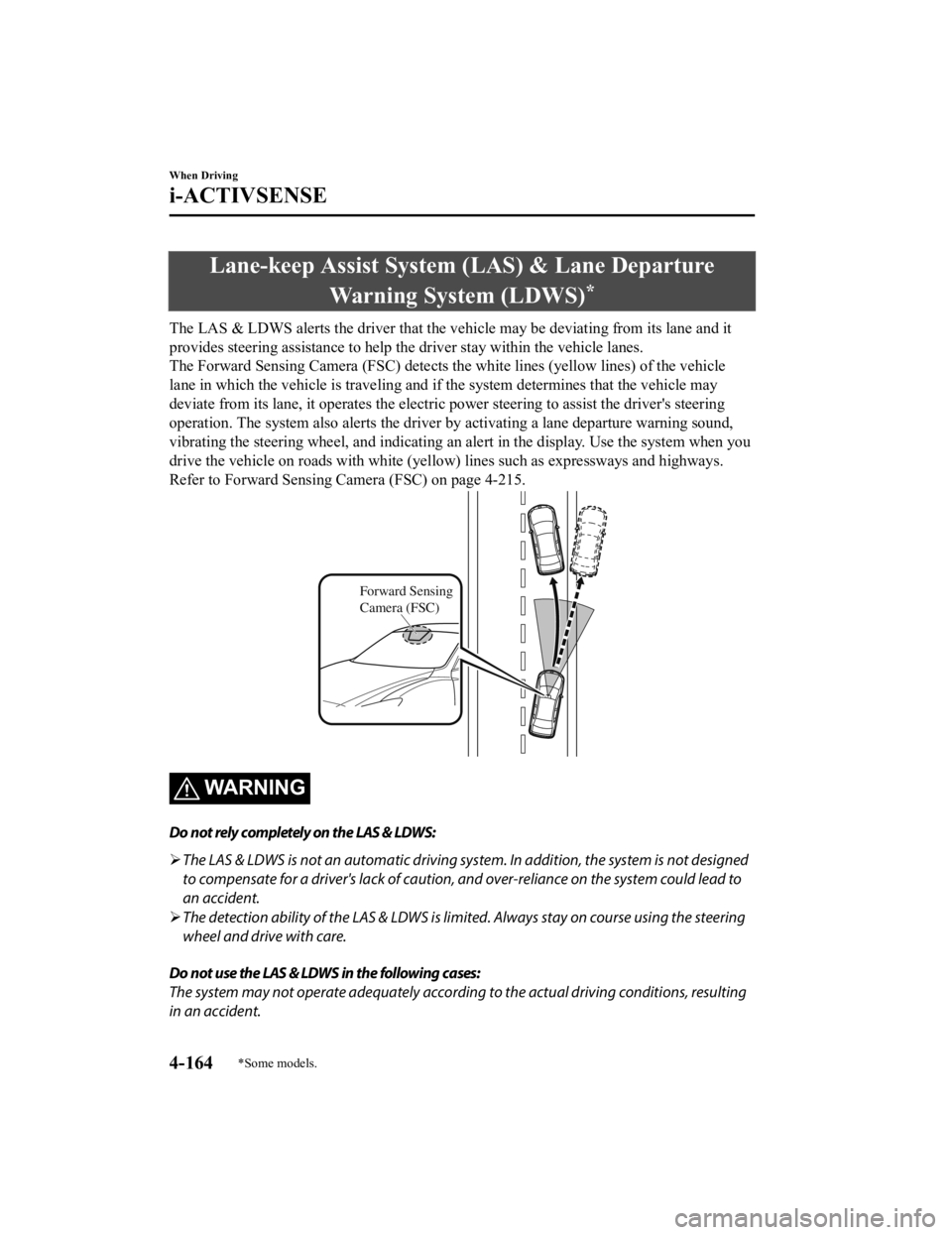
The LAS & LDWS alerts the driver that the vehicle may be deviating from its lane and it
provides steering assistance to he lp the driver stay within the vehicle lanes.
The Forward Sensing Camera (FSC) detects the white lines (yellow lines) of the vehicle
lane in which the vehicle is tra veling and if the system determines that the vehicle may
deviate from its lane, it operates the electric power steering to assist the driver's steering
operation. The system also alerts the driver by activating a lane departure warning sound,
vibrating the steering wheel, and indicating an alert in the display. Use the system when you
drive the vehicle on roads with white (yellow) lines such as expressways and highways.
Refer to Forward Sensing Camera (FSC) on page 4-215.
Forward Sensing
Camera (FSC)
WA R N I N G
Do not rely completely on the LAS & LDWS:
The LAS & LDWS is not an automatic driving system. In addition, the system is not designed
to compensate for a driver's lack of caution, and over-reliance on the system could lead to
an accident.
The detection ability of the LAS & LDWS is limited. Always stay on course using the steering
wheel and drive with care.
Do not use the LAS & LDWS in the following cases:
The system may not operate adequately accordin g to the actual driving conditions, resulting
in an accident.
When Driving
i-ACTIVSENSE
4-164*Some models.
Mazda6_8JN3-EA-20H_Edition1_old 2020-6-18 17:31:27
Page 306 of 634

NOTE
When only a vehicle lane line (yellow) on
either the left or right is detected, the LAS
& LDWS indication on the active driving
display turns off.
Detection only on
either left or rightDetects on both
left and right sides
Detection only on
either left or rightDetects on both
left and right sides
(Gray) (White)
No indication
Active Driving Display
Multi-information Display
If the indication on the active driving
display has been turned off using the
personalization features, the LAS & LDWS
indication on the multi-information
display is displayed in gray and the system
goes on standby.
The LAS & LDWS goes on stand-by
status in the following cases:
The system cannot detect white (yellow)
lane lines.
The vehicle speed is less than about 60
km/h (37 mph).
The ABS/TCS/DSC is operating.
The DSC is turned off.
(If the DSC is turned off while the
system is operational, a warning beep is
heard and the system goes on standby.)
The vehicle is making a sharp curve.
The brake pedal is depressed.
The steering wheel is operated abruptly.
The width of a lane is excessively
narrow or wide.
NOTE
The LAS & LDWS does not operate until
the system detects white (yellow) lane
lines on either the left or right.
When the system detects a white
(yellow) lane line on one side only, the
system will not operate the steering
wheel operation assist and the warning
for the lane line on the side that is not
being detected. The steering wheel
operation assist and the warning is only
for a lane deviation on the side that is
being detected.
If the driver takes his or her hands off
the steering wheel (not holding the
steering wheel), the warning sound is
activated and an alert is indicated in the
multi-information display or the active
driving display.
Active Driving Display Multi-information Display
If the steering wheel is held lightly, or
depending on the road conditions, the
system may detect that you have
released the steering wheel (not holding
the steering wheel) even if you are
holding it, and display a message in the
multi-information display or the active
driving display.
When Driving
i-ACTIVSENSE
4-168
Mazda6_8JN3-EA-20H_Edition1_old
2020-6-18 17:31:27
Page 307 of 634
The timing at which the lane departure
warning is activated and the steering
wheel operation assist is performed
varies.
The following settings for the LAS &
LDWS can be changed. Refer to the
Settings section in the Mazda Connect
Owner's Manual.
Steering operation assist operational/
non-operational
Cancel sensitivity (likelihood of
steering assist)
Vehicle lane line display
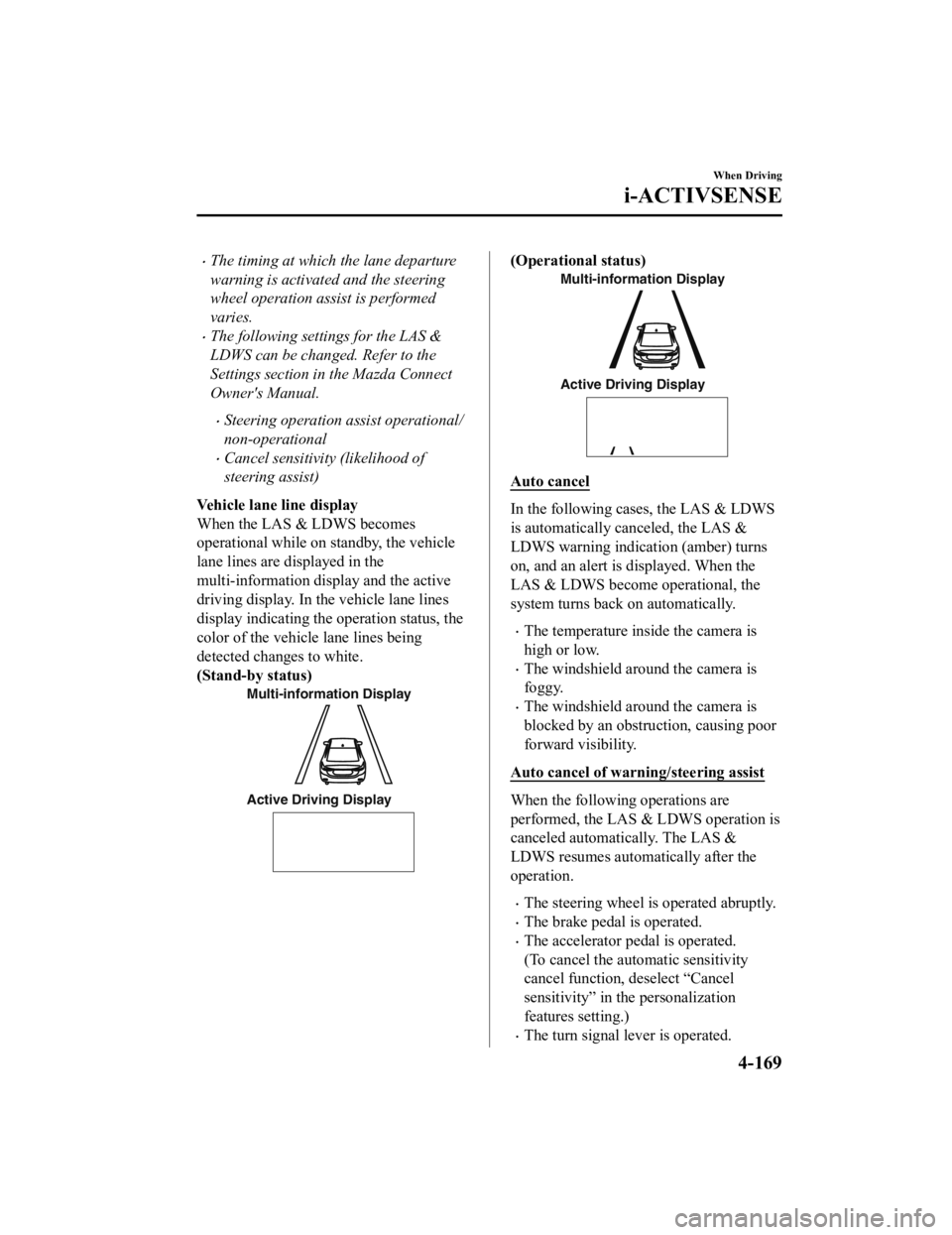
When the LAS & LDWS becomes
operational while on standby, the vehicle
lane lines are displayed in the
multi-information display and the active
driving display. In the vehicle lane lines
display indicating th e operation status, the
color of the vehicle lane lines being
detected changes to white.
(Stand-by status)
Multi-information Display
Active Driving Display
(Operational status)
Multi-information Display
Active Driving Display
Auto cancel
In the following cases, the LAS & LDWS
is automatically canceled, the LAS &
LDWS warning indicat ion (amber) turns
on, and an alert is displayed. When the
LAS & LDWS become operational, the
system turns back on automatically.
The temperature inside the camera is
high or low.
The windshield around the camera is
foggy.
The windshield around the camera is
blocked by an obstruction, causing poor
forward visibility.
Auto cancel of warning/steering assist
When the following operations are
performed, the LAS & LDWS operation is
canceled automatically. The LAS &
LDWS resumes automatically after the
operation.
The steering wheel is operated abruptly.
The brake pedal is operated.
The accelerator pedal is operated.
(To cancel the automatic sensitivity
cancel function, deselect “Cancel
sensitivity” in the personalization
features setting.)
The turn signal lever is operated.
When Driving
i-ACTIVSENSE
4-169
Mazda6_8JN3-EA-20H_Edition1_old 2020-6-18 17:31:27
Page 308 of 634

The vehicle crosses a lane line.
NOTE
After the operation, the LAS & LDWS
operation may not operate for a period
of 5 seconds at the most until the lane
lines are detected.
Under the following conditions, the LAS
& LDWS cancels the warning/steering
assist automatically.
The driver takes his/her hands off the
steering wheel.
(The LAS & LDWS is designed to
assist the driver's steering operation
and it will resume operation
automatically when the driver holds
the steering wheel.)
The DSC OFF switch is pressed to
cancel the DSC.
Steering operation assist OFF
(non-ope rational)
The steering operation assist for the LAS
& LDWS can be changed to
non-operational (OFF).
Refer to the Settings section in the Mazda
Connect Owner's Manual.
When the steering operation assist has
been changed to inoperable (OFF), only
the lane departure warning is operational.
System operation
Make sure that the LAS & LDWS OFF
indicator light in the instrument cluster is
turned off. When the LAS & LDWS OFF
indicator light turns on, press the switch
and make sure that the indicator light turns
off.
Drive the vehicle in the center of the
driving lane while t he LAS & LDWS OFF
indicator light in the instrument cluster is
turned off.
The system becomes operational when all
of the following conditions are met.
The system detects w hite (yellow) lane
lines on both the right and left sides or
on either side.
The vehicle speed is about 60 km/h (37
mph) or faster.
The vehicle is driven on a straight road
or road with gentle curves.
The engine is running.
The LAS & LDWS goes on stand-by
status in the following cases:
The system cannot detect white (yellow)
lane lines.
The vehicle speed is less than about 60
km/h (37 mph).
The vehicle is making a sharp curve.
The vehicle is making a curve at an
inappropriate speed.
When Driving
i-ACTIVSENSE
4-170
Mazda6_8JN3-EA-20H_Edition1_old 2020-6-18 17:31:27
Page 311 of 634

▼Lane Departure Warning
If the system determines that the vehicle may deviate from its
lane, the lane departure
warning (beep sound, rumble sound
*1, or steering wheel vibration) is activated and the
direction in which the system de termines that the vehicle may d eviate is indicated in the
multi-information display and the active driving display.
If the system determines that the vehicle may deviate from its lane, the color of the lane line
on the side being detected by the system changes from white to amber, and flashes.
Multi-information Display Active Driving Display
NOTE
If you have set the lane departure warning sound to the beep sound/rumble sound*1
setting, the warning sound may not be heard depending on the surrounding noise
conditions.
If you have set the lane departure warning system to the steering wheel vibrations setting,
the vibration may not be felt depending on the road surface conditions.
When the setting for the steering operation assist is changed to operational, the warnings
can be set to activate/not activate. (When the setting for the steering operation assist is
changed to non-operational, the warnings cannot be set to not activate.)
Refer to the Settings section in the Mazda Connect Owner's Manual.
The LAS & LDWS can be changed to the following settings regardless of whether the
steering operation assist has been set to operational/non-operational. Always check the
setting status when driving the vehicle and make setting changes if necessary.
Refer to the Settings section in the Mazda Connect Owner's Manual.
Steering wheel vibration: Strong/weak
Warning sound volume
Types of warnings (steering wheel vibration/beep sound/rumble sound*1)
*1 A rumble strip is a series of grooves in the road pavement surface positioned at specific
intervals, and when the vehicle passes over it a vibration and rumble sound is produced
which alerts the driver that the vehicle is departing from the lane.
When Driving
i-ACTIVSENSE
4-173
Mazda6_8JN3-EA-20H_Edition1_old 2020-6-18 17:31:27