ECO mode MAZDA MODEL CX-5 2013 (in English) User Guide
[x] Cancel search | Manufacturer: MAZDA, Model Year: 2013, Model line: MODEL CX-5, Model: MAZDA MODEL CX-5 2013Pages: 488, PDF Size: 8.75 MB
Page 146 of 488

Black plate (146,1)
qPower Steering Malfunction
Indicator Light
This indicator light illuminates when the
ignition is switched ON, and turns off
when the engine is started.
The power steering malfunction indicator
light illuminates if there is a malfunction
with the power steering while the engine
is running.
If the indicator light illuminates, park the
vehicle in a safe place immediately and
stop the engine.
If the indicator light does not turn off even
if the engine is restarted afterwards,
consult an Authorized Mazda Dealer.
NOTE
lIf the indicator light illuminates, the power
steering will not operate normally. If this
happens, the steering wheel can still be
operated, however, the operation may feel
heavy compared to normal, and the
steering wheel could vibrate when turning.
lRepeatedly jerking the steering wheel left
and right while the vehicle is stopped or
moving extremely slowly will cause the
power steering system to go into protective
mode which will make the steering feel
heavy, but this does not indicate a problem.
If this occurs, park the vehicle safely and
wait a few seconds for the system to return
to normal.
qAir Bag/Front Seat Belt
Pretensioner System Warning Light
If the air bag/front seat belt pretensioner
system is working properly, the warning
light illuminates when the ignition is
switched ON or after the engine is
cranked. The warning light turns off after
a specified period of time.
A system malfunction is indicated if the
warning light constantly flashes,
constantly illuminates or does not
illuminate at all when the ignition is
switched ON. If any of these occur,
consult an Authorized Mazda Dealer as
soon as possible. The system may not
operate in an accident.
WARNING
Never tamper with the air bag/
pretensioner systems and always have
an Authorized Mazda Dealer perform
all servicing and repairs:
Self-servicing or tampering with the
systems is dangerous. An air bag/
pretensioner could accidentally
activate or become disabled causing
serious injury or death.
4-22
When Driving
Instrument Cluster and Display
CX-5_8CA5-EA-11L_Edition3 Page146
Friday, June 22 2012 3:45 PM
Form No.8CA5-EA-11L
Page 147 of 488

Black plate (147,1)
qLow Fuel Warning Light
This warning light signals that the fuel
tank will soon be empty.
Refuel as soon as possible.
qCheck Fuel Cap Warning Lightí
This warning light illuminates for a few
seconds when the ignition is switched
ON.
If the check fuel cap warning light
illuminates while driving, the fuel-filler
cap may not be installed properly. Stop
the engine and reinstall the fuel-filler cap.
Refer to Fuel-Filler Cap on page 3-24.
qSeat Belt Warning Light
Driver's seat
Front passenger's seatí
With warning light for front
passenger's seat
The seat belt warning light illuminates if
the driver or front passenger's seat is
occupied and the seat belt is not fastened
with the ignition switched ON.
Without warning light for front
passenger's seat
The seat belt warning light illuminates if
the driver's seat is occupied and the seat
belt is not fastened with the ignition
switched ON.
When Driving
Instrument Cluster and Display
4-23íSome models. CX-5_8CA5-EA-11L_Edition3 Page147
Friday, June 22 2012 3:45 PM
Form No.8CA5-EA-11L
Page 148 of 488

Black plate (148,1)
Seat belt reminder
NOTE
Consult an Authorized Mazda Dealer to
deactivate or restore the belt reminder. Though
the belt reminder can be deactivated, doing so
will defeat the purpose of the system to warn
the driver and the front passenger in the event
that their seat belts are not fastened. For the
safety of the driver and front passenger, Mazda
recommends not deactivating the belt
reminder.
Front seat
If the vehicle is driven with the driver or
front passenger's seat belt unfastened, the
seat belt warning light illuminates and a
warning beep sounds.
NOTE
Some models do not have the seat belt
reminder function for the front passenger's
seat.
If the driver or front passenger's seat belt
is unfastened (only when the front
passenger seat is occupied) and the
vehicle is driven at a speed faster than
about 20 km/h (12 mph), the warning
light will flash and a beep sound will be
heard. After a short time, the warning
light stops flashing, but remains
illuminated, and the beep sound stops.
Until a seat belt is fastened or a given
period of time has elapsed, the beep sound
will not stop even if the vehicle speed
falls below 20 km/h (12 mph).NOTE
lThe warning light flashes and a beep sound
will be heard for about 6 seconds if the
driver's seat belt is not fastened when the
ignition is switched ON.
lIf a driver or front passenger's seat belt is
unfastened after the beep sound turns off
(warning light remains illuminated), and
the vehicle speed exceeds 20 km/h (12
mph), the warning light flashes and beep
sound activates again.
lPlacing heavy items on the front passenger
seat may cause the front passenger seat belt
warning function to operate depending on
the weight of the item.
lTo allow the front passenger seat weight
sensor to function properly, do not place
and sit on an additional seat cushion on the
front passenger seat. The sensor may not
function properly because the additional
seat cushion could cause sensor
interference.
lWhen a small child sits on the front
passenger seat, it is possible that the
warning light will not operate.
qDoor-Ajar Warning Light
This warning light illuminates when any
door or the liftgate is not securely closed.
Close the door or the liftgate securely
before driving the vehicle.
4-24
When Driving
Instrument Cluster and Display
CX-5_8CA5-EA-11L_Edition3 Page148
Friday, June 22 2012 3:45 PM
Form No.8CA5-EA-11L
Page 149 of 488

Black plate (149,1)
qLow Washer Fluid Level
Warning Lightí
This warning light indicates that little
washer fluid remains. Add fluid (page
6-26).
qTire Pressure Monitoring System
Warning Light
This warning light illuminates for a few
seconds when the ignition is switched
ON.
The warning light illuminates and a beep
is heard when tire pressure is too low in
one or more tires, and flashes when there
is a system malfunction.
WARNING
If the tire pressure monitoring system
warning light illuminates or flashes, or
the tire pressure warning beep sound is
heard, decrease vehicle speed
immediately and avoid sudden
maneuvering and braking:
If the tire pressure monitoring system
warning light illuminates or flashes,
or the tire pressure warning beep
sound is heard, it is dangerous to
drive the vehicle at high speeds, or
perform sudden maneuvering or
braking. Vehicle drivability could
worsen and result in an accident.
To determine if you have a slow leak
or a flat, pull over to a safe position
where you can check the visual
condition of the tire and determine if
you have enough air to proceed to a
place where air may be added and
the system monitored again by an
Authorized Mazda Dealer or a tire
repair station.
Do not ignore the TPMS Warning Light:
Ignoring the TPMS warning light is
dangerous, even if you know why it is
illuminated. Have the problem taken
care of as soon as possible before it
develops into a more serious
situation that could lead to tire
failure and a dangerous accident.
Warning light illuminates/Warning
beep sounds
When the warning light illuminates, and
the warning beep sound is heard (about 3
seconds), tire pressure is too low in one or
more tires.
When Driving
Instrument Cluster and Display
4-25íSome models. CX-5_8CA5-EA-11L_Edition3 Page149
Friday, June 22 2012 3:45 PM
Form No.8CA5-EA-11L
Page 152 of 488

Black plate (152,1)
qTCS OFF Indicator Light
This indicator light stays on for a few
seconds when the ignition is switched
ON.
It also illuminates when the TCS OFF
switch is pressed and TCS is switched off.
Refer to TCS OFF Switch on page 4-63.
If the light remains illuminated and the
TCS is not switched off, take your vehicle
to an Authorized Mazda Dealer. The DSC
may have a malfunction.
qAFS OFF Indicator Lightí
When illuminated
This indicator light illuminates briefly
when the ignition is switched ON, and
then turns off.
Pressing the AFS OFF switch cancels the
AFS function and illuminates the
indicator light.
When flashing
The indicator light flashes continuously if
the system is malfunctioning. Consult an
Authorized Mazda Dealer.NOTE
lEven if the AFS is not operating due to
some malfunction, the normal headlight
function is still operable.
lIf there is a malfunction with the headlight
auto-leveling function, the indicator light
flashes.
qLow Engine Coolant Temperature
Indicator Light (Blue)
The light illuminates continuously when
the engine coolant temperature is low and
turns off after the engine is warm.
If the low engine coolant temperature
indicator light remains illuminated after
the engine has been sufficiently warmed
up, the temperature sensor could have a
malfunction. Consult an Authorized
Mazda Dealer.
qShift Position Indicator Light
This indicates the selected shift position.
Gear position indicator
In manual shift mode, the“M”of the shift
position indicator illuminates and the
numeral for the selected gear displays.
4-28
When Driving
íSome models.
Instrument Cluster and Display
CX-5_8CA5-EA-11L_Edition3 Page152
Friday, June 22 2012 3:45 PM
Form No.8CA5-EA-11L
Page 154 of 488

Black plate (154,1)
Cruise Set Indicator Light (Green)
The indicator light illuminates green when
a cruising speed has been set.
qBSM OFF Indicator Lightí
This indicator light illuminates for a few
seconds when the ignition is switched
ON.
The BSM OFF indicator light illuminates
when the BSM system is turned off by
pressing the BSM OFF switch.
The indicator light flashes if the BSM
system has a malfunction. Consult an
Authorized Mazda Dealer.
NOTE
If the vehicle is driven on a road with less
traffic and few vehicles that the radar sensors
can detect, the system may pause (The BSM
OFF indicator light in the instrument panel
flashes). However, it does not indicate a
malfunction.
qLights-On Indicator Light
This indicator light illuminates when the
exterior lights and dashboard illumination
are on.The light continues to flash if the lighting
system has a malfunction. Consult an
Authorized Mazda Dealer.
4-30
When Driving
íSome models.
Instrument Cluster and Display
CX-5_8CA5-EA-11L_Edition3 Page154
Friday, June 22 2012 3:45 PM
Form No.8CA5-EA-11L
Page 160 of 488
Black plate (160,1)
qManual Shift Mode
This mode gives you the feel of driving a
manual transaxle vehicle by operating the
shift lever and allows you to control
engine rpm and torque to the drive wheels
much like a manual transaxle when more
control is desired.
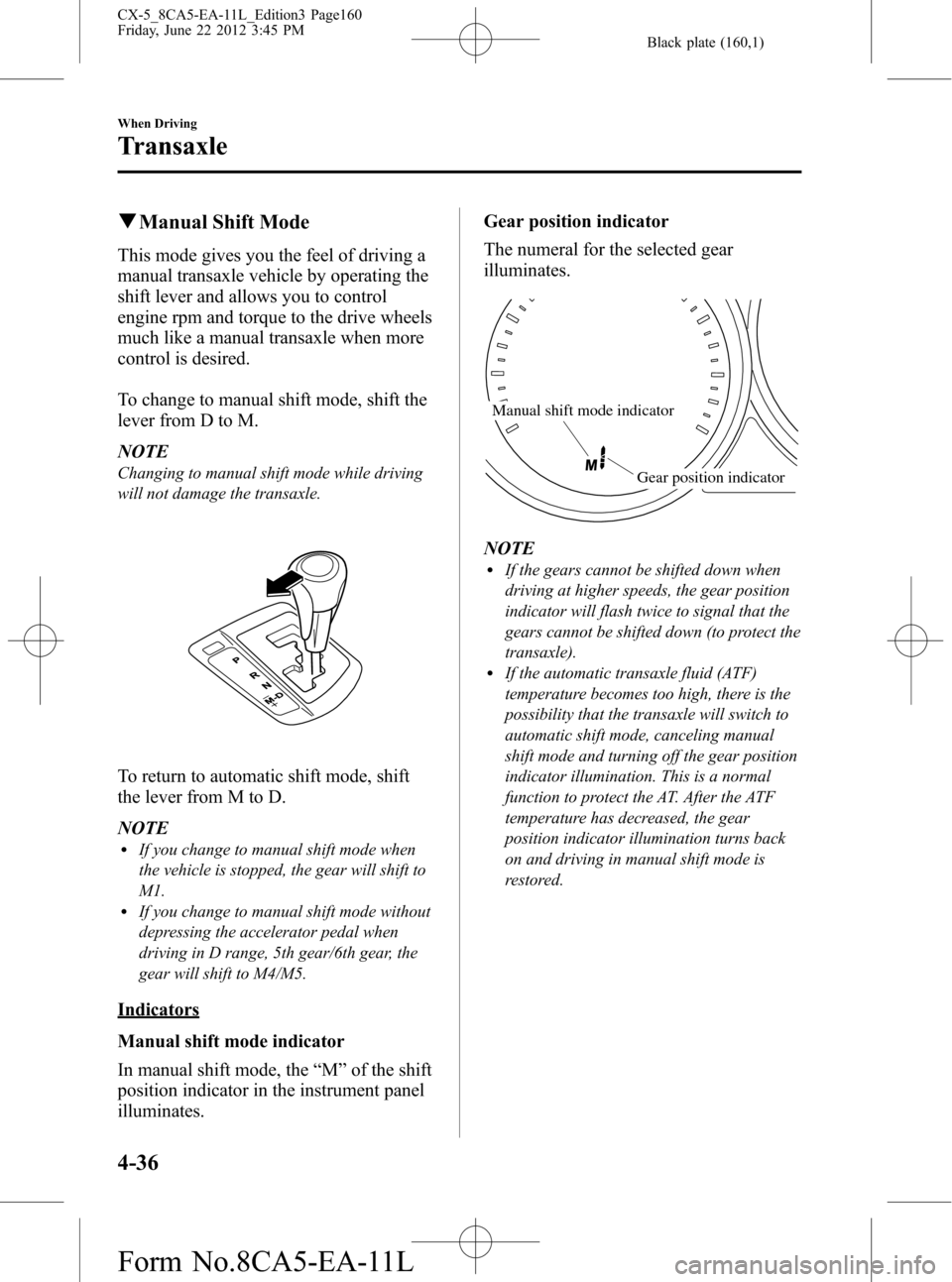
To change to manual shift mode, shift the
lever from D to M.
NOTE
Changing to manual shift mode while driving
will not damage the transaxle.
To return to automatic shift mode, shift
the lever from M to D.
NOTE
lIf you change to manual shift mode when
the vehicle is stopped, the gear will shift to
M1.
lIf you change to manual shift mode without
depressing the accelerator pedal when
driving in D range, 5th gear/6th gear, the
gear will shift to M4/M5.
Indicators
Manual shift mode indicator
In manual shift mode, the“M”of the shift
position indicator in the instrument panel
illuminates.Gear position indicator
The numeral for the selected gear
illuminates.
Manual shift mode indicator
Gear position indicator
NOTElIf the gears cannot be shifted down when
driving at higher speeds, the gear position
indicator will flash twice to signal that the
gears cannot be shifted down (to protect the
transaxle).
lIf the automatic transaxle fluid (ATF)
temperature becomes too high, there is the
possibility that the transaxle will switch to
automatic shift mode, canceling manual
shift mode and turning off the gear position
indicator illumination. This is a normal
function to protect the AT. After the ATF
temperature has decreased, the gear
position indicator illumination turns back
on and driving in manual shift mode is
restored.
4-36
When Driving
Transaxle
CX-5_8CA5-EA-11L_Edition3 Page160
Friday, June 22 2012 3:45 PM
Form No.8CA5-EA-11L
Page 162 of 488

Black plate (162,1)
Second gear fixed mode
When the shift lever is tapped back (
)
while the vehicle is stopped or driven at
about 9.3 km/h (5.7 mph) or less, the
transaxle is set in the second gear fixed
mode. The gear is fixed in second while in
this mode for easier starting and driving
on slippery roads. If the shift lever is
tapped back (
) or forward () while in
the second gear fixed mode, the mode will
be canceled.
Shifting specification
Shifting up
If the vehicle speed is lower than the
speed specified for each gear, the gear
cannot be shifted up to a higher gear.
Gear Vehicle speed
M1→M2 9.3 km/h (5.8 mph)
M2→M3 22.5 km/h (14.0 mph)
M3→M4 31.2 km/h (19.4 mph)
M4→M5 43.8 km/h (27.3 mph)
M5→M6 53.5 km/h (33.3 mph)
Shifting down
If the vehicle speed is higher than the
speed specified for each gear, the gear
cannot be shifted to a lower gear so as to
protect the transaxle.
Gear Vehicle speed
M6→M5 237.5 km/h (147.5 mph)
M5→M4 167.3 km/h (103.9 mph)
M4→M3 115.2 km/h (71.58 mph)
M3→M2 81.3 km/h (50.5 mph)
M2→M1 42.7 km/h (26.5 mph)
NOTE
Regarding the vehicle speed at the highest
gear indicated above, achieving this speed
may not actually be possible depending on
various driving conditions such as the wind,
upslope, and road surface.
During deceleration, the gears shift down
automatically when speed is reduced to
the following:
Gear Vehicle speed
M6→M5 47 km/h (29 mph)
M5→M4 39.8 km/h (24.7 mph)
M4→M3 28.2 km/h (17.5 mph)
M3→M2 11.9 km/h (7.39 mph)
M2→M1 6.3 km/h (3.9 mph)
NOTE
The gear does not shift down to M1
automatically while in the second gear fixed
mode.
If the vehicle is kicked down at the
following speeds or lower, the gears shift
down automatically:
Gear Vehicle speed
M6→M5 216.1 km/h (134.2 mph)
M5→M4 139.3 km/h (86.5 mph)
M4→M3 57.6 km/h (35.7 mph)
M3→M2 41.4 km/h (25.7 mph)
Recommendations for shifting (U.S.A.
and Canada)
Upshifting
For normal acceleration and cruising, we
recommend these shift points.
Gear Vehicle speed
M1 to M2 24 km/h (15 mph)
M2 to M3 40 km/h (25 mph)
M3 to M4 65 km/h (40 mph)
M4 to M5 73 km/h (45 mph)
M5 to M6 81 km/h (50 mph)
Downshifting
When you must slow down in heavy
traffic or on a steepupgrade, downshift
before the engine starts to overwork. This
gives better acceleration when you need
more speed.
4-38
When Driving
Transaxle
CX-5_8CA5-EA-11L_Edition3 Page162
Friday, June 22 2012 3:45 PM
Form No.8CA5-EA-11L
Page 167 of 488

Black plate (167,1)
NOTElThe headlights, other exterior lights and dashboard illumination may not turn off immediately
even if the surrounding area becomes well-lit because the light sensor determines that it is
nighttime if the surrounding area is continuously dark for several minutes such as inside long
tunnels, traffic jams inside tunnels, or in indoor parking lots.
In this case, the light turns off if the light switch is turned to the
position.l(Without auto headlight off function)
When the headlight switch is in the
position and the ignition is switched to ACC or the
ignition is switched off, the headlights, other exterior lights and dashboard illumination will turn
off.
lThe dashboard illumination can be adjusted by rotating the knob in the instrument cluster. Also,
the day/night mode can be changed by rotating the knob until a beep sound is heard. To adjust the
brightness of the dashboard illumination:
Refer to Dashboard Illumination on page 4-11.
lThe sensitivity of the AUTO lights may be changed by an Authorized Mazda Dealer.
Refer to Personalization Features on page 9-9.
Xenon fusion headlight bulbsí
The low-beam bulbs of the headlights have xenon fusion bulbs that produce a bright white
beam over a wide area.
WARNING
Do not replace the xenon fusion bulbs yourself
Replacing the xenon fusion bulbs yourself is dangerous. Because the xenon fusion
bulbs require high voltage, you could receive an electric shock if the bulbs are
handled incorrectly. Consult an Authorized Mazda Dealer when the replacement is
necessary.
NOTE
If the headlights flicker, or the brightness weakens, the bulb-life may be depleted and a replacement is
necessary. Consult an Authorized Mazda Dealer.
When Driving
Switches and Controls
4-43íSome models. CX-5_8CA5-EA-11L_Edition3 Page167
Friday, June 22 2012 3:45 PM
Form No.8CA5-EA-11L
Page 236 of 488
Black plate (236,1)
qOperating Tips for USB memory
This unit supports playback of MP3/
WMA/AAC files recorded to USB
memory.
NOTE
lMusic data (MP3/WMA/AAC (.m4a)
format) stored in a USB mass-storage class
compliant device (such as USB flash
memory) can be played.
lPlayback may not possible depending on
the type and condition of the USB flash
memory even if the audio file complies with
the standard above.
lA copyright protected WMA/AAC file
cannot be played in this unit.
lThe order of the music data stored in the
device may differ from the playback order.
lTo prevent loss or damage of stored data,
we recommend that you always back up
your data.
lIf a device exceeds the maximum electric
current value of 500mA, if may not operate
and recharge when connected.
lInsert or pull out the USB memory without
accessing the USB memory (while in FM/
AM radio or CD mode).
lIf access to the data in the device is
restricted because it is password protected,
the device will no operate.
Playable MP3 file specifications
Playable MP3 files are as follows:
Item Content
SpecificationMPEG1 AUDIO LAYER III
MPEG2 AUDIO LAYER III
MPEG2.5
Sampling rate44.1/48/32 kHz (MPEG1)
22.05/24/16 kHz (MPEG2)
11.025/12/8 kHz (MPEG2.5)
Bit rate32―320 kbps (MPEG1)
8―160 kbps (MPEG2)
8―160 kbps (MPEG2.5)
CAUTION
This unit plays files with the file
extension (mp3) as an MP3 file. Do
not use the MP3 file extension for
files other than MP3 files. Otherwise,
it could result in noise or a
malfunction.
lMP3 files written under specifications
other than the indicated specification
may not play normally or files or folder
names may not display correctly.
lThe file extension may not be provided
depending on the computer operating
system, version, software, or settings.
In this case, add the file extension“
.mp3”to the end of the file name, and
then write it to the memory.
Playable WMA file specification
Playable WMA files are as follows:
Item Content
Audio Type Type A Type B
SpecificationWindows
Media Audio
Version 7.0,
8.0, 9.0
(standard)Windows
Media Audio
Version 9.0
(standard)
Sampling rate8/11.025 kHz
(LOW)
16/22.05 kHz
(MID)
44.1/48/32 kHz
(HI)22.05 kHz
(MID)
44.1/48/32 kHz
(HI)
Bit rate 32―320 kbps
CAUTION
This unit plays files with the file
extension (wma) as a WMA file. Do
not use the WMA file extension for
files other than WMA files.
Otherwise, it could result in noise or
a malfunction.
5-22
Interior Features
Audio System
CX-5_8CA5-EA-11L_Edition3 Page236
Friday, June 22 2012 3:46 PM
Form No.8CA5-EA-11L