Radio MAZDA MODEL CX-5 2016 (in English) Owner's Manual
[x] Cancel search | Manufacturer: MAZDA, Model Year: 2016, Model line: MODEL CX-5, Model: MAZDA MODEL CX-5 2016Pages: 626, PDF Size: 13.81 MB
Page 309 of 626

Black plate (309,1)
Antenna
Antenna
Operating Tips for Audio
System
WARNING
Always adjust the audio while the
vehicle is stopped:
Do not adjust the audio control
switches while driving the vehicle.
Adjusting the audio while driving the
vehicle is dangerous as it could
distract your attention from the
vehicle operation which could lead to
a serious accident.
Even if the audio control switches are
equipped on the steering wheel, learn
to use the switches without looking
down at them so that you can keep
your maximum attention on the road
while driving the vehicle.
CAUTION
For the purposes of safe driving,
adjust the audio volume to a level
that allows you to hear sounds
outside of the vehicle including car
horns and particularly emergency
vehicle sirens.
NOTE
lTo prevent the battery from being
discharged, do not leave the audio system
on for a long period of time when the
engine is not running.
lIf a cellular phone or CB radio is used in
or near the vehicle, it could cause noise to
occur from the audio system, however, this
does not indicate that the system has been
damaged.
Interior Features
Audio System
5-13
CX-5_8DV2-EA-14K_Edition3 Page309
Thursday, February 26 2015 5:33 PM
Form No.8DV2-EA-14K
Page 310 of 626

Black plate (310,1)
Do not spill any liquid on the audio
system.
Do not insert any objects, other than CDs,
into the slot.
qRadio Reception
AM characteristics
AM signals bend around such things as
buildings or mountains and bounce off the
ionosphere.
Therefore, they can reach longer distances
than FM signals.
Because of this, two stations may
sometimes be picked up on the same
frequency at the same time.
Station 2 Station 1Ionosphere
FM characteristics
An FM broadcast range is usually about
40―50 km (25―30 miles) from the
source. Because of extra coding needed to
break the sound into two channels, stereo
FM has even less range than monaural
(non-stereo) FM.
FM Station
40—50km
(25—30 miles)
Signals from an FM transmitter are similar
to beams of light because they do not
bend around corners, but they do reflect.
Unlike AM signals, FM signals cannot
travel beyond the horizon. Therefore, FM
stations cannot be received at the great
distances possible with AM reception.
AM wave FM wave
FM wave
100—200 km (60—120 miles)Ionosphere
Atmospheric conditions can also affect
FM reception. High humidity will cause
poor reception. However, cloudy days
may provide better reception than clear
days.
5-14
Interior Features
Audio System
CX-5_8DV2-EA-14K_Edition3 Page310
Thursday, February 26 2015 5:33 PM
Form No.8DV2-EA-14K
Page 311 of 626

Black plate (311,1)
Multipath noise
Since FM signals can be reflected by
obstructions, it is possible to receive both
the direct signal and the reflected signal at
the same time. This causes a slight delay
in reception and may be heard as a broken
sound or a distortion. This problem may
also be encountered when in close
proximity to the transmitter.
Reflected wave
Direct
Flutter/Skip noise
Signals from an FM transmitter move in
straight lines and become weak in valleys
between tall buildings, mountains, and
other obstacles. When a vehicle passes
through such an area, the reception
conditions may change suddenly, resulting
in annoying noise.
Weak signal noise
In suburban areas, broadcast signals
become weak because of distance from
the transmitter. Reception in such fringe
areas is characterized by sound breakup.
Strong signal noise
This occurs very close to a transmitter
tower. The broadcast signals are
extremely strong, so the result is noise and
sound breakup at the radio receiver.
Station drift noise
When a vehicle reaches the area of two
strong stations broadcasting at similar
frequencies, the original station may be
temporarily lost and the second station
picked up. At this time there will be some
noise from this disturbance.
Station 2
88.3 MHz Station 1
88.1 MHz
Interior Features
Audio System
5-15
CX-5_8DV2-EA-14K_Edition3 Page311
Thursday, February 26 2015 5:33 PM
Form No.8DV2-EA-14K
Page 316 of 626
Black plate (316,1)
CAUTION
Do not use an audio file extension on
files other than audio files. In
addition, do not change the audio file
extension. Otherwise, the unit will
not recognize the file correctly
resulting in noise or a malfunction.
NOTE
lPlayback may not be possible depending on
the type and condition of the USB flash
memory even if the audio file complies with
the standard above.
lA copyright protected WMA/AAC file
cannot be played in this unit.
lThe order of the music data stored in the
device may differ from the playback order.
lTo prevent loss or damage of stored data,
we recommend that you always back up
your data.
lIf a device exceeds the maximum electric
current value of 1,000 mA, it may not
operate or recharge when connected.
lDo not pull out the USB device while in the
USB mode (only pull it out while in FM/AM
radio or CD mode).
lThe device will not operate if the data is
password protected.
lMP3/WMA/AAC/OGG*1files written
under specifications other than the
indicated specification may not play
normally or files/folder names may not
display correctly.
*1 Type B
qOperating Tips for iPod
This unit supports playback of music files
recorded to an iPod.
iPod is a trademark of Apple Inc.,
registered in the U.S. and other countries.
The iPod may not be compatible
depending on the model or OS version. In
this case, an error message is displayed.
CAUTION
ØRemove the iPod when it is not in
use. Because the iPod is not
designed to withstand excessive
changes in temperature inside the
cabin, it could be damaged or the
battery may deteriorate due to the
excessive temperature or humidity
inside the cabin if it is left in the
vehicle.
ØIf data in the iPod is lost while it is
connected to the unit, Mazda
cannot guarantee recovery of any
lost data.
ØIf the iPod battery is deteriorated,
the iPod may not recharge and
playback may not be possible
when it is connected to the unit.
ØFor details on using the iPod, refer
to the iPod instruction manual.
ØWhen connecting the iPod to a
USB port, all commands are made
from the audio unit. iPod control is
not possible.
NOTE
The audio unit cannot display images or
videos stored in an iPod.
5-20
Interior Features
Audio System
CX-5_8DV2-EA-14K_Edition3 Page316
Thursday, February 26 2015 5:33 PM
Form No.8DV2-EA-14K
Page 317 of 626
Black plate (317,1)
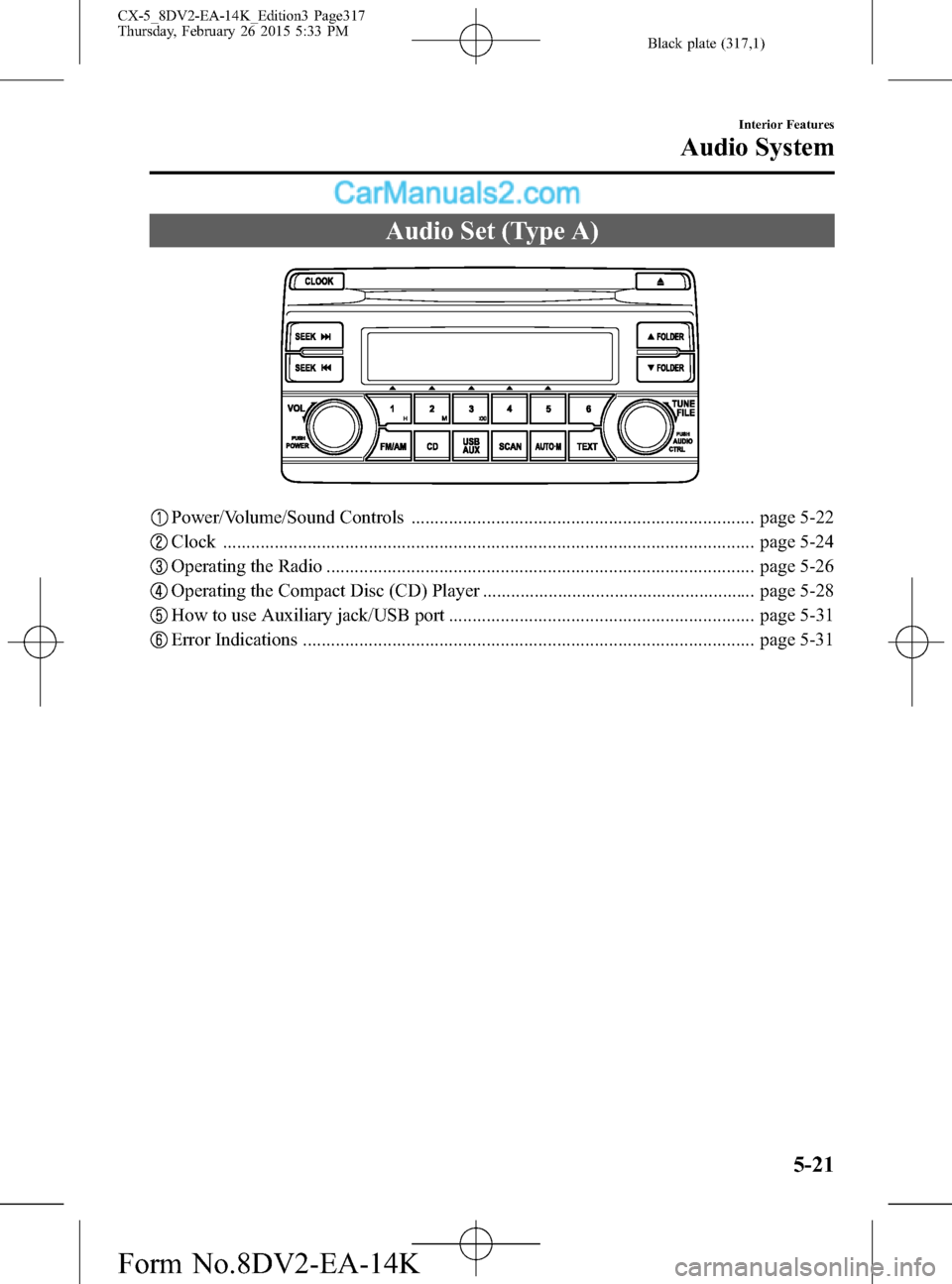
Audio Set (Type A)
Power/Volume/Sound Controls ......................................................................... page 5-22
Clock ................................................................................................................. page 5-24
Operating the Radio ........................................................................................... page 5-26
Operating the Compact Disc (CD) Player .......................................................... page 5-28
How to use Auxiliary jack/USB port ................................................................. page 5-31
Error Indications ................................................................................................ page 5-31
Interior Features
Audio System
5-21
CX-5_8DV2-EA-14K_Edition3 Page317
Thursday, February 26 2015 5:33 PM
Form No.8DV2-EA-14K
Page 322 of 626

Black plate (322,1)
qOperating the Radio
Band selector button Scan button Seek tuning buttons
Channel preset buttons
Auto memory buttonManual tuning dial Audio display
Radio ON
Press a band selector button (
)to
turn the radio on.
Band selection
Successively pressing the band selector
button (
) switches the bands as
follows: FM1→FM2→AM.
The selected mode will be indicated.
NOTE
If the FM broadcast signal becomes weak,
reception automatically changes from
STEREO to MONO for reduced noise.
Tuning
The radio has the following tuning
methods: Manual, Seek, Scan, Preset
channel, and Auto memory tuning. The
easiest way to tune stations is to set them
on preset channels.
Manual tuning
Turning the manual tuning dial will
change the frequency higher or lower.Seek tuning
Pressing the seek tuning button (
,)
will cause the tuner to seek a higher or
lower frequency automatically.
NOTE
If you continue to press and hold the button,
the frequency will continue changing without
stopping.
Scan tuning
Press the scan button (
)to
automatically sample strong stations.
Scanning stops at each station for about 5
seconds. To hold a station, press the scan
button (
) again during this interval.
Preset channel tuning
The 6 preset channels can be used to store
6 AM and 12 FM stations.
1. To set a channel first select AM, FM1,
or FM2. Tune to the desired station.
2. Press a channel preset button for about
2 seconds until a beep is heard. The
preset channel number or station
frequency will be displayed. The
station is now held in the memory.
5-26
Interior Features
Audio System
CX-5_8DV2-EA-14K_Edition3 Page322
Thursday, February 26 2015 5:33 PM
Form No.8DV2-EA-14K
Page 329 of 626

Black plate (329,1)
Switches around commander knob
The following operations can be done by pressing the switches around the commander
knob.
: Displays the home screen.
: Displays the Entertainment screen.
: Displays the Navigation screen (Only navigation-equipped vehicles). For operation
of the Navigation screen, refer to the navigation system manual. If the SD card for the
navigation system is not inserted, the compass indicating the direction in which the vehicle
is moving is displayed.
: Displays the Favorites screen. Long-press to store particular items in Favorites.
(Radio, phonebook and destination of the navigation system can be programmed.)
: Returns to previous screen.
Commander knob operation
(Selection of icons on screen)
1. Tilt or turn the commander knob and move the cursor to the desired icon.
2. Press the commander knob and select the icon.
Interior Features
Audio System
5-33
CX-5_8DV2-EA-14K_Edition3 Page329
Thursday, February 26 2015 5:33 PM
Form No.8DV2-EA-14K
Page 332 of 626

Black plate (332,1)
qHome screen
Icon Function
Applications
Information such as average fuel economy, maintenance, and warnings can be verified.
Depending on the grade and specification, the screen display may differ.
Entertainment
Operates audio such as the radio and CDs. The audio source most recently used is
displayed. An audio source which cannot be used at that time is skipped and the previous
audio source is displayed.
To change the audio source, select the
icon again.
Communication
Bluetooth®related functions are available.
Navigation
Navigation screen is displayed (vehicles with navigation system).
If the SD card for the navigation system is not inserted, the compass indicating the direction
in which the vehicle is moving is displayed.
The compass may not indicate the correct bearing when the vehicle is stopped or traveling
at a slow speed.
Settings
Overall setting menu (Such as display, sound, Bluetooth®and Language).
Depending on the grade and specification, the screen display may differ.
qVolume/Display/Sound Controls
Volume switch Commander switchAudio control switch
Volume dial
5-36
Interior Features
Audio System
CX-5_8DV2-EA-14K_Edition3 Page332
Thursday, February 26 2015 5:33 PM
Form No.8DV2-EA-14K
Page 334 of 626

Black plate (334,1)
ALC (Automatic volume adjustment)
The automatic level control (ALC) is a
feature that automatically adjusts audio
volume and sound quality according to
the vehicle speed. The volume increases
in accordance with the increase in vehicle
speed, and decreases as vehicle speed
decreases.
Centerpoint
®*4(Automatic surround
level adjustment)
Centerpoint
®lets vehicle owners enjoy a
Bose®surround sound experience from
their existing CDs, MP3s and satellite
radio.
Specifically engineered to meet the
unique demands of reproducing surround
sound in a vehicle.
Converts stereo signals to multiple
channels allowing greater precision when
reproducing the sound.
An enhanced algorithm to simultaneously
create a wider, more spacious sound field.
*4 Centerpoint
®is a registered trademark
of Bose Corporation.
AudioPilot
®*5(Automatic volume
adjustment)
When driving, background noise can
interfere with enjoying music.
AudioPilot
®noise compensation
technology continuously adjusts the music
to compensate for background noise and
vehicle speed.
It reacts only to sustained noise sources
and not intermittent ones, such as speed
bumps.
An enhanced DSP algorithm allows faster
and more effective compensation for
unusual situations, such as driving on a
very rough road or at high speeds.
*5 AudioPilot
®is a registered trademark
of Bose Corporation.
5-38
Interior Features
Audio System
CX-5_8DV2-EA-14K_Edition3 Page334
Thursday, February 26 2015 5:33 PM
Form No.8DV2-EA-14K
Page 335 of 626
Black plate (335,1)
qOperating the Radio
Radio ON
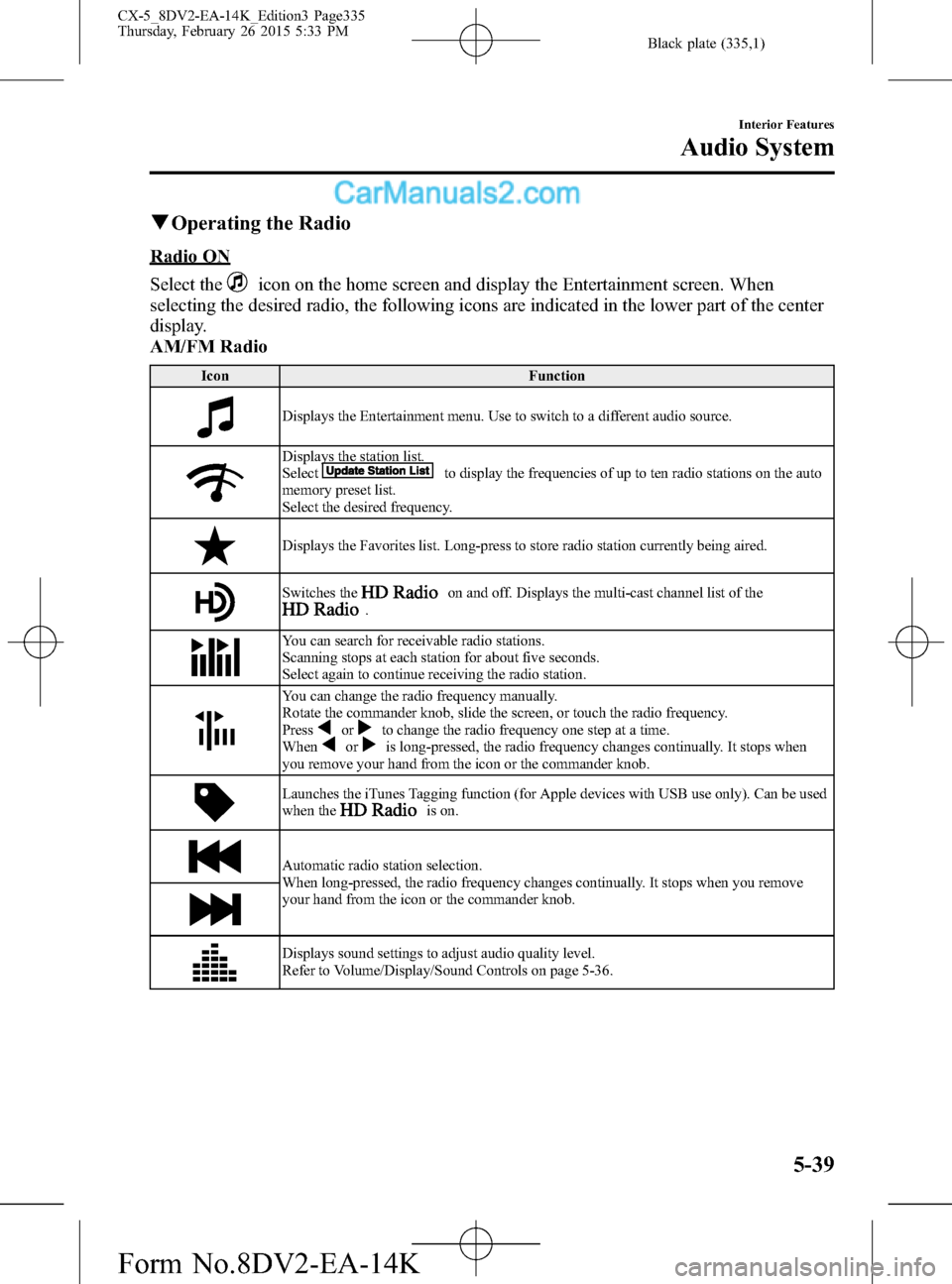
Select the
icon on the home screen and display the Entertainment screen. When
selecting the desired radio, the following icons are indicated in the lower part of the center
display.
AM/FM Radio
Icon Function
Displays the Entertainment menu. Use to switch to a different audio source.
Displays the station list.
Selectto display the frequencies of up to ten radio stations on the auto
memory preset list.
Select the desired frequency.
Displays the Favorites list. Long-press to store radio station currently being aired.
Switches theon and off. Displays the multi-cast channel list of the.
You can search for receivable radio stations.
Scanning stops at each station for about five seconds.
Select again to continue receiving the radio station.
You can change the radio frequency manually.
Rotate the commander knob, slide the screen, or touch the radio frequency.
Press
orto change the radio frequency one step at a time.
Whenoris long-pressed, the radio frequency changes continually. It stops when
you remove your hand from the icon or the commander knob.
Launches the iTunes Tagging function (for Apple devices with USB use only). Can be used
when theis on.
Automatic radio station selection.
When long-pressed, the radio frequency changes continually. It stops when you remove
your hand from the icon or the commander knob.
Displays sound settings to adjust audio quality level.
Refer to Volume/Display/Sound Controls on page 5-36.
Interior Features
Audio System
5-39
CX-5_8DV2-EA-14K_Edition3 Page335
Thursday, February 26 2015 5:33 PM
Form No.8DV2-EA-14K