mirror MAZDA MODEL CX-5 2018 (in English) User Guide
[x] Cancel search | Manufacturer: MAZDA, Model Year: 2018, Model line: MODEL CX-5, Model: MAZDA MODEL CX-5 2018Pages: 628, PDF Size: 82.38 MB
Page 194 of 628

The windshield wiper de-icer operates in
conjunction with the rear window
defogger.
To turn on the windshield wiper de-icer,
switch the ignition ON and press the rear
window defogger switch (page 4-57).
Manual Climate Control
Indicator light
Fully Automatic Climate Control
Indicator light
▼ Mirror Defogger*
The mirror defoggers defrost the outside
mirrors.
The mirror defoggers operate in
conjunction with the rear window
defogger.
To turn on the mirror defoggers, switch the
ignition ON and press the rear window
defogger switch (page 4-57).
Manual Climate Control
Indicator light
Fully Automatic Climate Control
Indicator light
When Driving
Switches and Controls
4-58*Some models.
CX-5_8GN5-EA-17J_Edition1
2017-8-18 12:58:27
Page 196 of 628

HomeLink WirelessControl System
*
NOTE
HomeLink and HomeLink house icon are
registered trademarks of Gentex
Corporation.
The HomeLink system replaces up to 3
hand-held transmitters with a single
built-in component in the auto-dimming
mirror. Pressing the HomeLink button on
the auto-dimmi ng mirror activates garage
doors, gates and other devices surrounding
your home.
HomeLink button
Indicator light
WA R N I N G
Do not use the HomeLink system with any
garage door opener that lacks the safety
stop and reverse feature:
Using the HomeLink system with any
garage door opener that lacks the safety
stop and reverse feature as required by
federal safety standards is dangerous. (This
includes garage doors manufactured
before April 1, 1982.)
Using these garage door openers can
increase the risk of serious injury or death.
For further information, contact HomeLink
at 1-800-355-3515 or www.homelink.com
or an Authorized Mazda Dealer.
Always check the areas surrounding
garage doors and gates for people or
obstructions before programming or
during operation of the HomeLink system:
Programming or operating the HomeLink
system without verifying the safety of areas
surrounding garage doors and gates is
dangerous and could result in an
unexpected accident and serious injury if
someone were to be hit.
NOTE
The programming will not be erased even
if the battery is disconnected.
▼ Pre-programming the HomeLink
System
NOTE
It is recommended that a new battery be
placed in the hand-held transmitter of the
device being programmed to HomeLink
for quicker training and accurate
transmission of the r
adio-frequency signal.
•Verify that there is a remote control
transmitter available for the device you
would like to program.
•Disconnect the power to the device.
When Driving
Switches and Controls
4-60*Some models.
CX-5_8GN5-EA-17J_Edition1 2017-8-18 12:58:27
Page 199 of 628
▼Operating the HomeLink System
Press the programmed HomeLink button
to operate a programmed device. The code
will continue being transmitted for a
maximum of 20 seconds.
▼Reprogramming the HomeLink
system
To program a device to HomeLink using a
HomeLink button previously trained,
follow these steps:
1. Press and hold the desired HomeLink
button. DO NOT release the button.
2. The indicator light will begin to flash after 20 seconds. Without releasing the
HomeLink button, proceed with
“Programming” - step 1.
▼Erasing Programmed HomeLink
Buttons
To erase the existing programming from
all three operating channels, press and
hold the two outside buttons (
, ) on
the auto-dimming mirror until the
HomeLink indicator light begins to flash
after approximately 10 seconds.
Verify that the programming has been
erased when you resell the vehicle.
When Driving
Switches and Controls
4-63
CX-5_8GN5-EA-17J_Edition1 2017-8-18 12:58:27
Page 223 of 628
▼Pre-Crash Safety Technology
Pre-crash safety technology is de
signed to assist the driver in averting collisions or reduce
their severity in situations where they cannot be avoided.
Collision damage reduction in low vehicle speed range
Forward driving
Smart City Brake Support (SCBS)................................ .......................................... page 4-140
Advanced Smart City Brake Support (Advanced SCBS).............. .......................... page 4-136
Collision damage reduction in medium/high speed range
Smart Brake Support (SBS)...................................... ............................................... page 4-144
▼Camera and Sensors
Forward Sensing Camera (FSC)
The Forward Sensing Camera (FSC) detects lane indications and recognizes headlights,
taillights and city lights during
nighttime driving. In addition, it also detects the vehicle
ahead, pedestrians, or obstructi ons. The following systems also use the Forward Sensing
Camera (FSC).
•High Beam Control system (HBC)
•Lane-keep Assist System (LAS) & Lane Departure Warning System ( LDWS)
•Traffic Sign Recognition System (TSR)
•Mazda Radar Cruise Control with Stop & Go function (MRCC with S top & Go function)
•Advanced Smart City Brake Support (Advanced SCBS)
•Smart City Brake Support (SCBS)
•Smart Brake Support (SBS)
The Forward Sensing Camera (FSC) is installed at the top of the windshield near the
rearview mirror.
Refer to Forward Sensing Camera (FSC) on page 4-147.
Radar sensor (front)
The radar sensor (front) functions by detecting the radio waves reflected off a vehicle ahead
sent from the radar sensor. The following systems also use the radar sensor (front).
•Mazda Radar Cruise Control with Stop & Go function (MRCC with S top & Go function)
•Distance Recognition Support System (DRSS)
•Smart Brake Support (SBS)
The radar sensor (front) is mount ed behind the radiator grille.
Refer to Radar Sensor (Front) on page 4-152.
When Driving
i-ACTIVSENSE
4-87
CX-5_8GN5-EA-17J_Edition1 2017-8-18 12:58:27
Page 231 of 628
•When there is a difference in the height between your driving lane and the adjacent
lane.
•Directly after the BSM system becomes operable by changing the setting.
•If the road width is extremely narrow, vehicles two lanes over may be detected. The
detection area of the radar sensors (rear) is set according to the road width of
expressways.
•The BSM warning indicator light may turn on and the vehicle detection screen may be
displayed in the display in reaction to stationary objects (guardrails, tunnels, sidewalls,
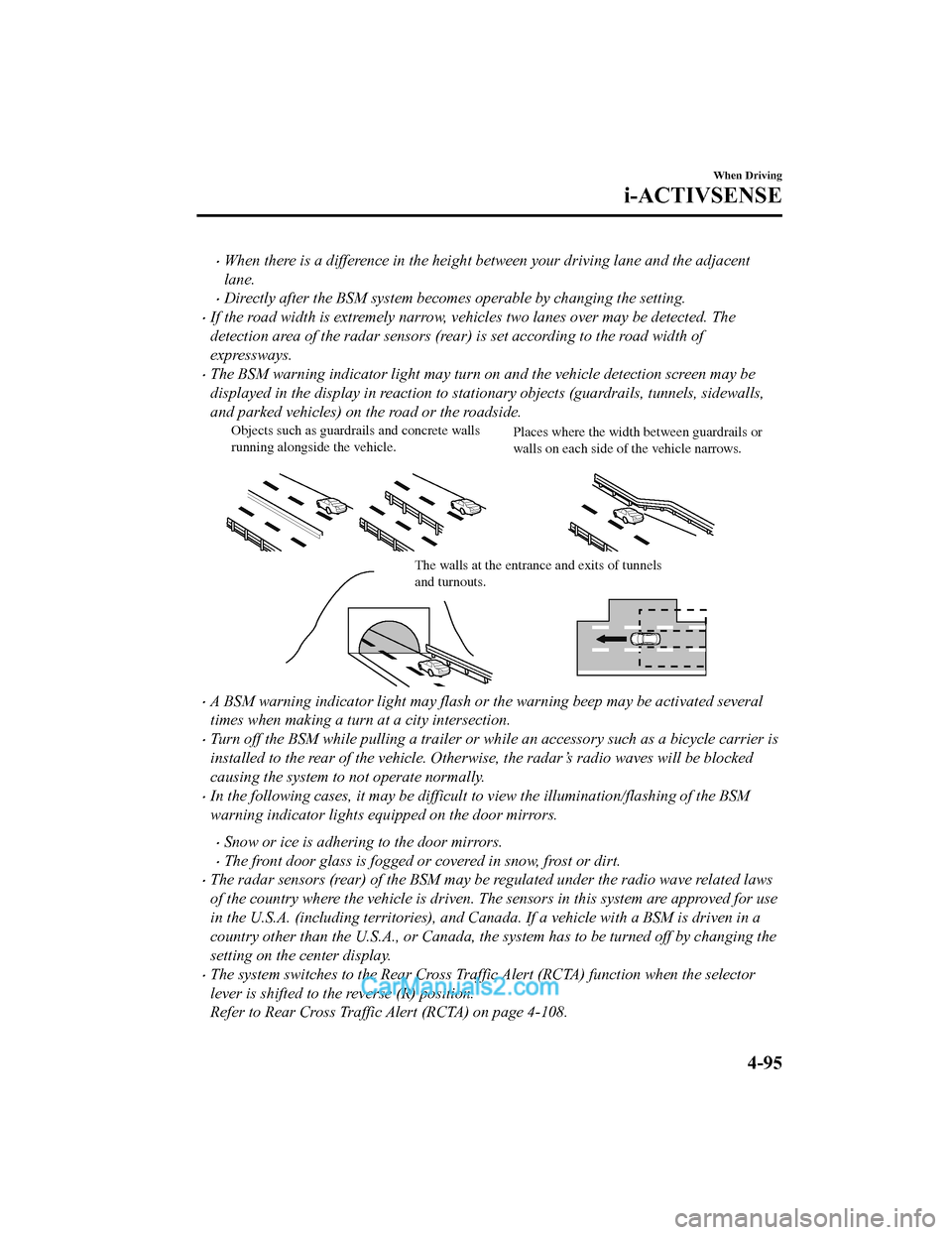
and parked vehicles) on the road or the roadside.
Objects such as guardrails and concrete walls
running alongside the vehicle. Places where the width between guardrails or
walls on each side of the vehicle narrows.
The walls at the entrance and exits of tunnels
and turnouts.
•A BSM warning indicator light may flash or the warning beep may be activated several
times when making a turn at a city intersection.
•Turn off the BSM while pulling a trailer or wh
ile an accessory such as a bicycle carrier is
installed to the rear of the vehicle. Otherwise, the radar’s radio waves will be blocked
causing the system to not operate normally.
•In the following cases, it may be difficult to view the illumination/flashing of the BSM
warning indicator lights equipped on the door mirrors.
•Snow or ice is adhering to the door mirrors.
•The front door glass is fogged or covered in snow, frost or dirt.
•The radar sensors (rear) of the BSM may be regulated under the radio wave related laws
of the country where the vehicle is driven. The sensors in this system are approved for use
in the U.S.A. (including territories), and Canada. If a vehicle with a BSM is driven in a
country other than the U.S.A., or Canada, the system has to be turned off by changing the
setting on the center display.
•The system switches to the Rear Cross Traffic Alert (RCTA) function when the selector
lever is shifted to the reverse (R) position.
Refer to Rear Cross Traffic Alert (RCTA) on page 4-108.
When Driving
i-ACTIVSENSE
4-95
CX-5_8GN5-EA-17J_Edition1 2017-8-18 12:58:27
Page 232 of 628

▼Blind Spot Monitoring (BSM) Warni
ng Indicator Light/Display Indicator/Blind
Spot Monitoring (BSM) Warning Beep
The BSM or Rear Cross Traffic Al ert (RCTA) system notifies the driver of the presence of
vehicles in adjacent lanes or at the rear of the vehicle using the BSM warning indicator
light, the warning sound and the display indicator (vehicles wi th multi-information display
and active driving display) (BSM) while the systems are operati onal.
BSM warning in dicator lights
The BSM warning indicator lights are equipped on the left and r ight door mirrors. The
warning indicator lights turn on when a vehicle approaching from the rear in an adjacent
lane is detected.
When the ignition is switched ON, the warning indicator light t urns on momentarily and
then turns off after a few seconds.
Forward driving (BSM operation)
The BSM detects vehicles approaching from the rear and turns on the BSM warning
indicator lights equipped on the door mirrors according to the conditions. Additionally,
while a BSM warning i ndicator light is illuminated, if the turn signal lever is operated to
signal a turn in the direction in which the BSM warning indicat or light is illuminated, the
BSM warning indicator light flashes.
Reverse driving (Rear Cross Traf fic Alert (RCTA) system operation)
The Rear Cross Traffic Alert (RCTA) system detects vehicles app roaching from the left and
right of your vehicle and flashes the BSM warning indicator lig hts.
When Driving
i-ACTIVSENSE
4-96
CX-5_8GN5-EA-17J_Edition1 2017-8-18 12:58:27
Page 247 of 628
•In the following cases, it may be difficult to view the illumination/flashing of the Blind
Spot Monitoring (BSM) warning indicator lights equipped on the door mirrors.
•Snow or ice adheres to the door mirrors.
•The front door glass is fogged or covered in snow, frost or dirt.
•Turn off the RCTA system while pulling a trailer or while an accessory such as a bicycle
carrier is installed to the rear of the vehic le. Otherwise, the radio waves emitted by the
radar will be blocked causing the system to not operate normally.
When Driving
i-ACTIVSENSE
4 - 111
CX-5_8GN5-EA-17J_Edition1 2017-8-18 12:58:27
Page 283 of 628
Forward Sensing Camera (FSC)*
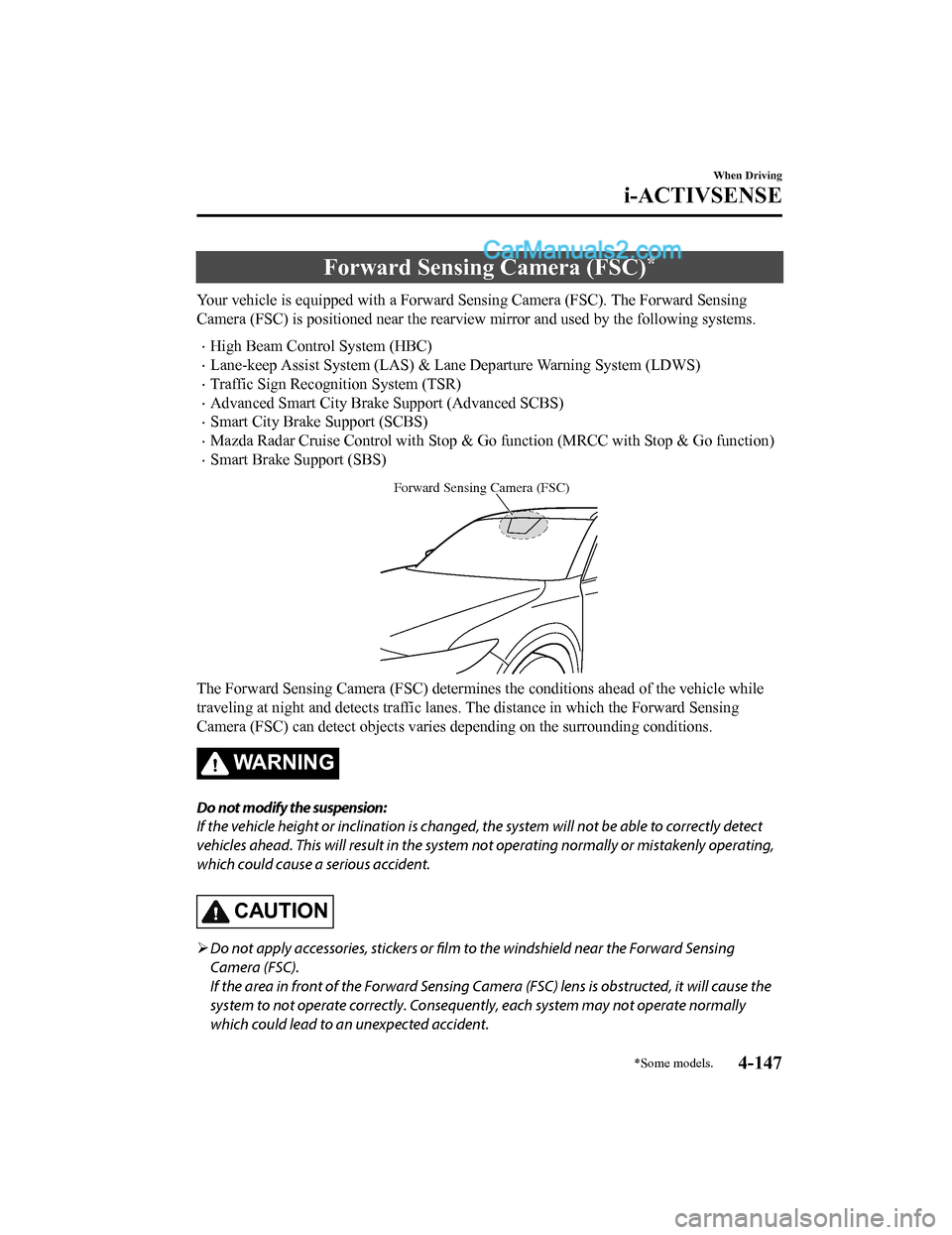
Your vehicle is equipped with a Forward Sensing Camera (FSC). The Forward Sensing
Camera (FSC) is positioned near t he rearview mirror and used by the following systems.
•High Beam Control System (HBC)
•Lane-keep Assist System (LAS) & Lane Departure Warning System ( LDWS)
•Traffic Sign Recognition System (TSR)
•Advanced Smart City Brake Support (Advanced SCBS)
•Smart City Brake Support (SCBS)
•Mazda Radar Cruise Control with Stop & Go function (MRCC with S top & Go function)
•Smart Brake Support (SBS)
Forward Sensing Camera (FSC)
The Forward Sensing Camera (FSC) determines the conditions ahead of the vehicle while
traveling at night and detects traffic lanes. The distance in w hich the Forward Sensing
Camera (FSC) can detect objects varies depending on the surroun ding conditions.
WA R N I N G
Do not modify the suspension:
If the vehicle height or inclination is changed, the system will not be able to correctly detect
vehicles ahead. This will result in the system not operating normally or mistakenly operating,
which could cause a serious accident.
CAUTION
Do not apply accessories, stickers or film to the windshield near the Forward Sensing
Camera (FSC).
If the area in front of the Forward Sensing Came ra (FSC) lens is obstructed, it will cause the
system to not operate correctly. Consequently, each system may not operate normally
which could lead to an unexpected accident.
When Driving
i-ACTIVSENSE
*Some models.4-147
CX-5_8GN5-EA-17J_Edition1 2017-8-18 12:58:27
Page 284 of 628
Do not disassemble or modify the Forward Sensing Camera (FSC).
Disassembly or modification of the Forward Sensing Camera (FSC) will cause a malfunction
or mistaken operation. Consequently, each sy stem may not operate normally which could
lead to an unexpected accident.
Heed the following cautions to assure the correct operation of the Forward Sensing Camera
(FSC).
Be careful not to scratch the Forward Sensing Camera (FSC) lens or allow it to get dirty.
Do not remove the Forward Sensing Camera (FSC) cover.
Do not place objects on the dashboard which reflect light.
Always keep the windshield glass around the camera clean by removing dirt or fogging.
Use the windshield defroster to remove fogging on the windshield.
Consult an Authorized Mazda Dealer regardi ng cleaning the interior side of the
windshield around the Forw ard Sensing Camera (FSC).
Consult an Authorized Mazda Dealer before performing repairs around the Forward
Sensing Camera (FSC).
The Forward Sensing Camera (FSC) is installe d to the windshield. Consult an Authorized
Mazda Dealer for windshield repair and replacement.
When cleaning the wind shield, do not allow glass cleaners or similar cleaning fluids to
get on the Forward Sensing Camera (FSC) le ns. In addition, do not touch the Forward
Sensing Camera (FSC) lens.
When performing repairs around the rearv iew mirror, consult an Authorized Mazda
Dealer.
Consult an Authorized Mazda Dealer regarding cleaning of the camera lens.
Do not hit or apply strong force to the Forward Sensing Camera (FSC) or the area around
it. If the Forward Sensing Camera (FSC) is severely hit or if there are cracks or damage
caused by flying gravel or debris in the area around it, stop using the following systems
and consult an Authorized Mazda Dealer.
High Beam Control System (HBC)
Lane-keep Assist System (LAS) & Lane Departure Warning System (LDWS)
Traffic Sign Recognition System (TSR)
Advanced Smart City Brak e Support (Advanced SCBS)
Smart City Brake Support (SCBS)
Mazda Radar Cruise Control with Stop & Go function (MRCC with Stop & Go function)
Smart Brake Support (SBS)
The direction in which the Forward Sensing Camera (FSC) is pointed has been
finely
adjusted. Do not change the installation posi tion of the Forward Sensing Camera (FSC) or
remove it. Otherwise, it could result in damage or malfunction.
Always use tires for all wheels that are of the specified size, and the same manufacturer,
brand, and tread pattern. In addition, do no t use tires with significantly different wear
patterns on the same vehicle as the system may not operate normally.
When Driving
i-ACTIVSENSE
4-148
CX-5_8GN5-EA-17J_Edition1 2017-8-18 12:58:27
Page 305 of 628
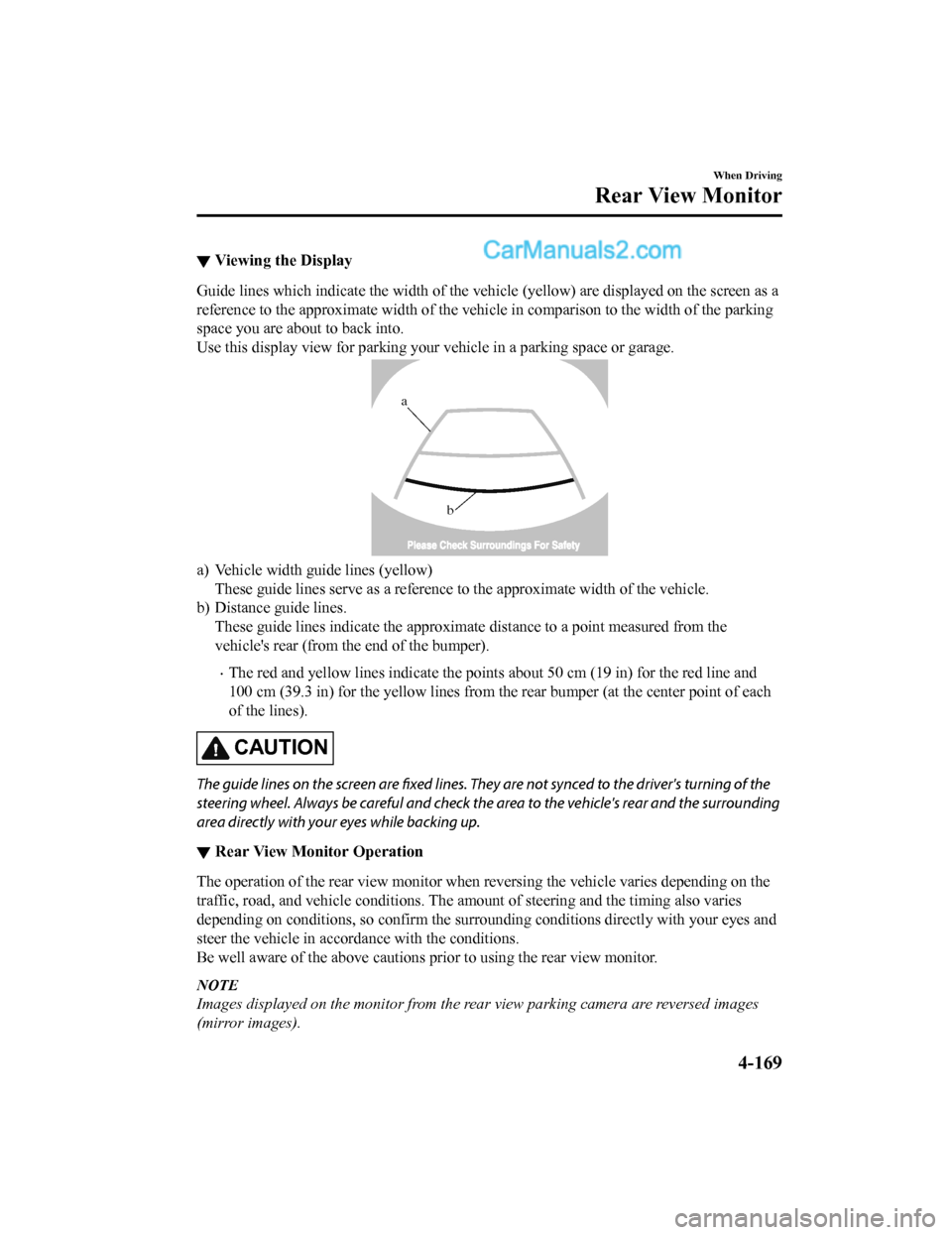
▼Viewing the Display
Guide lines which indicate the wid
th of the vehicle (yellow) are displayed on the screen as a
reference to the approximate width of the vehicle in comparison to the width of the parking
space you are about to back into.
Use this display view for parking your vehicle in a parking spa ce or garage.
b
a
a) Vehicle width guide lines (yellow)
These guide lines serve as a reference to the approximate width of the vehicle.
b) Distance guide lines. These guide lines indicate the approximate distance to a point measured from the
vehicle's rear (from the end of the bumper).
•The red and yellow lines indicate the points about 50 cm (19 in ) for the red line and
100 cm (39.3 in) for the yellow l ines from the rear bumper (at the center point of each
of the lines).
CAUTION
The guide lines on the screen are fixed lines. They are not synced to the driver's turning of the
steering wheel. Always be careful and check the area to the vehicle's rear and the surrounding
area directly with your eyes while backing up.
▼ Rear View Monitor Operation
The operation of the rear view monitor when reversing the vehic
le varies depending on the
traffic, road, and vehicle conditions. The amount of steering a nd the timing also varies
depending on conditions, so conf irm the surrounding conditions directly with your eyes and
steer the vehicle in accordance with the conditions.
Be well aware of the above cautions prior to using the rear vie w monitor.
NOTE
Images displayed on the monitor from the rear view parking camera are reversed images
(mirror images).
When Driving
Rear View Monitor
4-169
CX-5_8GN5-EA-17J_Edition1 2017-8-18 12:58:27