light MAZDA MODEL MX-30 EV 2022 Owners Manual
[x] Cancel search | Manufacturer: MAZDA, Model Year: 2022, Model line: MODEL MX-30 EV, Model: MAZDA MODEL MX-30 EV 2022Pages: 547, PDF Size: 79.35 MB
Page 335 of 547
Images displayed on the monitor from the rear view parking camera are reversed
images (mirror images).
Some optionally installed vehicle accessories may be picked up by the camera. Do
not install any optional parts that can interfere with the camera view, such as
illuminating parts or parts made of re flective material.
It may be di fficult to see the display under the following conditions, however, it
does not indicate a malfunction.
In darkened areas.When the temperature around the lens is high/low.When the camera is wet such as on a rainy day or during periods of high
humidity.
When foreign material such as mud is stuck around the camera.When the camera lens reflects sunlight or headlight beams.The surroundings are illuminated by vehicle lights,
fluorescent lights, or LED
lights (display may flicker).
Extremely small dark or white dots appear on the screen (dots may flicker).Image display may be delayed if the temperature around the camera is low.
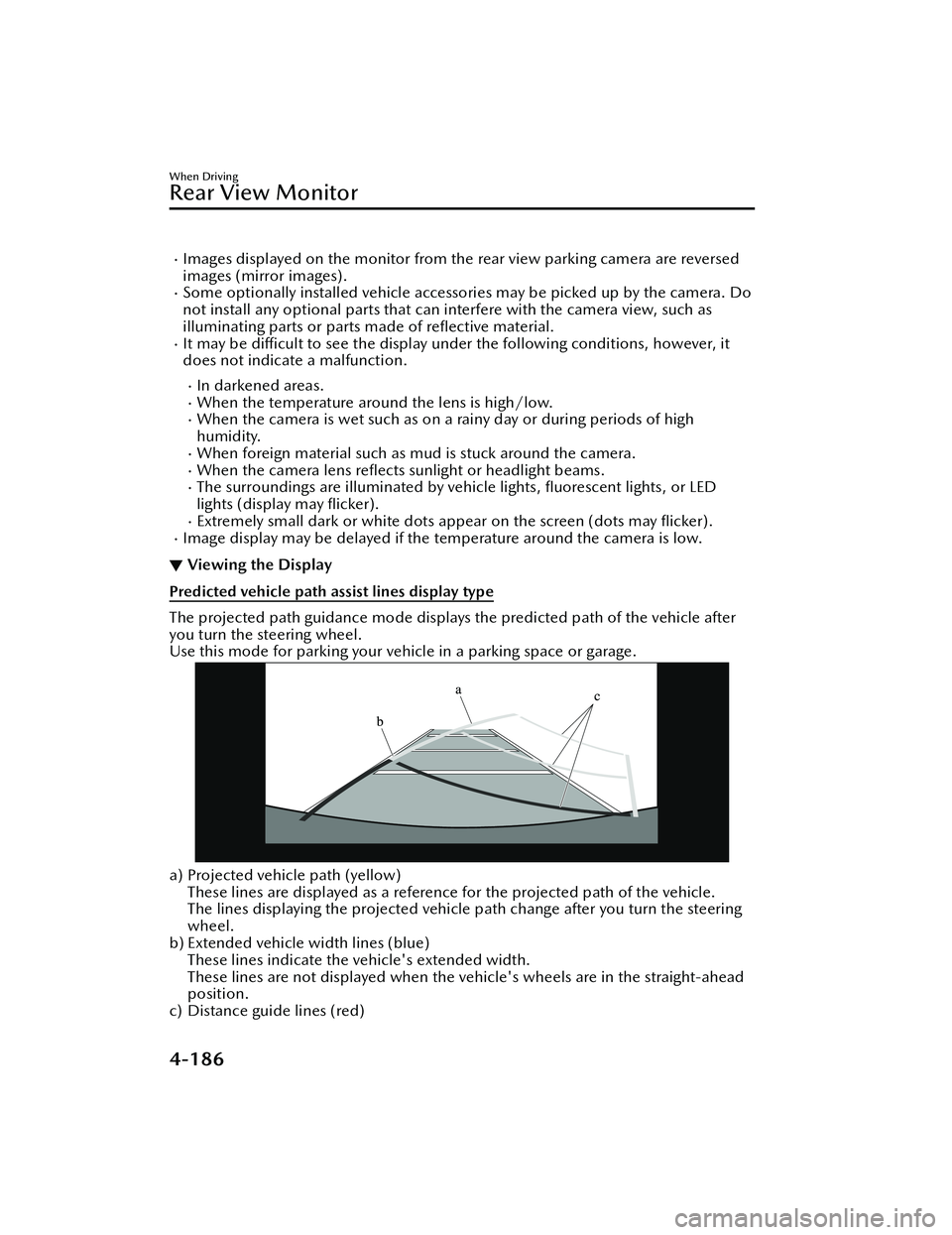
▼ Viewing the Display
Predicted vehicle path assist lines display type
The projected path guidance mode displays the predicted path of the vehicle after
you turn the steering wheel.
Use this mode for parking your vehi
cle in a parking space or garage.
a) Projected vehicle path (yellow)
These lines are displayed as a reference for the projected path of the vehicle.
The lines displaying the projected vehicle path change after you turn the steering
wheel.
b) Extended vehicle width lines (blue)
These lines indicate the vehicle's extended width.
These lines are not displayed when the vehicle's wheels are in the straight-ahead
position.
c) Distance guide lines (red)
When Driving
Rear View Monitor
4-186
MX -30_8JD4-EA -21G_Edition2_new 2021-5-18 14:38:07
Page 348 of 547

NOTE
When the power switch is switched OFF, the system status before it was turned off
is maintained. For example, if the power switch is switched OFF while the parking
sensor is activated, the system will be activated when the power switch is switched
ON the next time.
The system may not operate normally under the following conditions:
Mud, ice, or snow is adhering to the sensor area (Returns to normal operation
when removed).
The sensor area is frozen (Returns to normal operation when the ice is thawed).The sensor is covered by a hand.The sensor is excessively shocked.The vehicle is excessively tilted.Under extremely hot or cold weather conditions.The vehicle is driven on bumps, inclines, gravel, grating, or grass covered roads.Anything which generates ultrasonic wave s such as another vehicle's horn, the
engine sound of a motorcycle, the air brake sound of a large-sized vehicle, or
another vehicle's sensors approaches the vehicle.
The vehicle is driven in heavy rain or in road conditions causing water-splash.A commercially-available fender pole or an antenna for a radio transmitter is
installed to the vehicle.
The vehicle is moving towards a tall or square curbstone, or a steep grade.An obstruction is too close to the sensor.The vehicle is moving towards an uneven wall or stairs.There are multiple obstructions.The vehicle is driven in a place with low ceilings.Obstructions under the bumper cannot be detected. Obstructions which are
lower than the sensor or thin may not be detected even though they were
detected once.
The following types of obstructions may not be detected:
Thin objects such as wire, rope or polesThings which absorb sonic waves easily such as cotton or snowAngular shaped objectsVery tall objects, and those which are wide at the topSmall, short objectsAlways have the system inspected at an Authorized Mazda Dealer if any shock is
applied to the bumpers, even in a minor accident. If the sensors are deviated, they
cannot detect obstructions.
The system may have a malfunction if a sound is not activated or the detection
indication is not displayed even when th e parking sensor OFF switch is pressed
and the parking sensor is operable. Have your vehicle inspected by an Authorized
Mazda Dealer.
The system may have a malfunction if the indicator light does not turn on even
when the parking sensor OFF switch is turned on. Have your vehicle inspected by
an Authorized Mazda Dealer.
When Driving
Pa r k i n g S e n s o r Sys te m
4-199
MX -30_8JD4-EA -21G_Edition2_new 2021-5-18 14:38:07
Page 350 of 547

DisplayDistance between vehicle and obstruc-
tion
Without 360° view monitor
With 360° viewmonitor Front ultrasonic
sensor
*/Front cor-
ner ultrasonic sen-
sor
*
Rear ultrasonic sen-sor/Rear corner ul- trasonic sensor/
Rear side ultrasonic
sensor
*
Without front ul-trasonic sensor
and front corner
ultrasonic sensor With front ultra-
sonic sensor and
front corner ultra-
sonic sensor
YellowFront ultrasonic sen-
sor:
Approx. 60.0 ―45.0
cm (23.6 ―17.7 in)
Front corner ultra- sonic sensor:
Approx. 55.0 ―38.0
cm (21.6 ―14.9 in) Rear ultrasonic sen-
sor:
Approx. 60.0 ―45.0
cm (23.6 ―17.7 in)
Rear corner ultra-
sonic sensor/Rear
side ultrasonic sen-
sor:
Approx. 55.0 ―38.0
cm (21.6 ―14.9 in)
AmberFront ultrasonic sen-
sor:
Approx. 45.0 ―35.0
cm (17.7 ―13.7 in)
Front corner ultra- sonic sensor:
Approx. 38.0 ―25
cm (14.9 ―9.8 in) Rear ultrasonic sen-
sor:
Approx. 45.0 ―35.0
cm (17.7 ―13.7 in)
Rear corner ultra-
sonic sensor/Rear
side ultrasonic sen- sor:
Approx. 38.0 ―25
cm (14.9 ―9.8 in)
RedFront ultrasonic sen-
sor:
Within approx. 35.0 cm (13.7 in)
Front corner ultra- sonic sensor:
Within approx. 25 cm (9.8 in) Rear ultrasonic sen-
sor:
Within approx. 35.0 cm (13.7 in)
Rear corner ultra-
sonic sensor/Rear
side ultrasonic sen- sor:
Within approx. 25 cm (9.8 in)
▼Parking Sensor OFF Switch
When the parking sensor OFF switch is
pressed with the power switch
switched ON, the parking sensor
system is stopped and the parking
sensor OFF switch indicator light turns
on.
When Driving
Pa r k i n g S e n s o r Sys te m
*Some models.4-201
MX
-30_8JD4-EA -21G_Edition2_new 2021-5-18 14:38:07
Page 351 of 547

If the switch is pressed again, the
parking sensor becomes operational
and the indicator light turns off.
1. Indicator light
NOTE
The detection indicator and buzzer
of the front ultrasonic sensors/front
corner ultrasonic sensors do not
operate when the selector lever is in
the P position.
The detection indicator and buzzer
sound do not activate when the
parking brake is applied.
▼ Obstruction Detection Indication
The position of a sensor which has
detected an obstruction is indicated.
The gauge illuminates in
different areas
depending on the distance to an
obstruction detected by the sensor.
As the vehicle approaches closer to an
obstruction, the zone in the gauge
closer to the vehicle illuminates.
Without 360°view monitor
1. Front ultrasonic sensor gauge*
2. Right front corner ultrasonic sensor
gauge*
3. Right rear corner ultrasonic sensorgauge/Right rear side ultrasonic
sensor gauge
*
4. Rear ultrasonic sensor gauge
5. Left rear corner ultrasonic sensorgauge/Left rear side ultrasonic
sensor gauge
*
6. Left front corner ultrasonic sensor
gauge*
With 360°view monitor
1. Front ultrasonic sensor gauge
2. Right front corner ultrasonic sensorgauge
3. Right rear corner ultrasonic sensor gauge/Right rear side ultrasonic
sensor gauge
*
4. Rear ultrasonic sensor gauge
When Driving
Pa r k i n g S e n s o r Sys te m
4-202*Some models.
MX -30_8JD4-EA -21G_Edition2_new 2021-5-18 14:38:07
Page 352 of 547

5. Left rear corner ultrasonic sensorgauge/Left rear side ultrasonic
sensor gauge
*
6. Left front corner ultrasonic sensor
gauge
NOTE
The detection indicator can be
switched between display and
non-display and the buzzer volume
can be changed.
Refer to the Settings section in the
Mazda Connect Owner's Manual.
(Vehicles with 360° View Monitor)
When the detection indicator is set to
“Display”, even with the 360° view
monitor not displayed, if a front sensor
or a front corner sensor detects an
obstruction, the 360° view monitor
switches automatically to display.
When an obstruction is no longer
detected, the display switches to the
display before the obstruction was
detected. However, while the 360°
view monitor is displayed, it continues
to display no matter if an obstruction is
detected or not.
System problem noti fication
The indication displays if the system
has a malfunction.
Without 360°view monitor
With 360°view monitor
Check the reason for the indication
displaying on the center display or
multi-information display.
Refer to If a Warning Light Turns On or
Flashes on page 7-21.
When Driving
Pa r k i n g S e n s o r Sys te m
*Some models.4-203
MX -30_8JD4-EA -21G_Edition2_new 2021-5-18 14:38:07
Page 354 of 547

Front corner ultrasonic sensor*, Rear corner/Rear side* ultrasonic sensor
Distance Detectionarea Distance between vehicle and obstruction
Beeper sound*1Front corner ultrasonic sensor/Rear corner,Rear side ultrasonic sensor
Far distance Approx. 55.0
―38.0 cm (21.6 ―14.9 in)
Medium intermittent
sound
Middle distance Approx. 38.0
―25 cm (14.9 ―9.8 in)
Fast intermittent sound
Close distance Within approx. 25 cm (9.8 in)
Continuous sound
*1 The rate at which the intermittent sound beeps increases as the vehicle approaches the obstruction.
NOTE
If an obstruction in the same area excluding the close area is detected
continuously for 6 seconds or longer, on
ly the warning beeps stop activating.
(Detection is indicated) If the detection area changes to the close side, the
warning beeps resumes. (If the detection area changes to the far side, the warning
beeps remain off)
The sound volume (each of front and rear) can be changed.
Refer to the Settings section in the Mazda Connect Owner's Manual.
▼ When Warning Indicator/Beep is Activated
The system notifies the driver of an abnormality by activating the beep sound and
the indicator light.
When Driving
Pa r k i n g S e n s o r Sys te m
*Some models.4-205
MX
-30_8JD4-EA -21G_Edition2_new 2021-5-18 14:38:07
Page 356 of 547

5Interior Features
Use of various features for ride comfort, including air-
conditioning system and audio system.
Climate Control System............. 5-2 For Your Ride Comfort........... 5-2
Climate Control System
Operation Area......................5-3
Basic Climate Control System
Operation............................. 5-7
Convenient Ways to Use the
Climate Control System........ 5-10
Mazda Connect...................... 5-14 What is Mazda Connect ?.....5-14
Mazda Connect Basic
Operations.......................... 5-18
Connected Service (If
applicable).......................... 5-35
Interior Equipment.................. 5-36 Sunvisors............................. 5-36
Interior Lights...................... 5-37
Accessory Sockets................ 5-39
AC Power Outlet
*.................5-40
Cup Holder......................... 5-42
Bottle Holder.......................5-43
Assist Grips......................... 5-44
Rear Coat Hooks................. 5-44
Storage Compartments........ 5-45
*Some models.5-1
MX -30_8JD4-EA -21G_Edition2_new 2021-5-18 14:38:07
Page 357 of 547

For Your Ride Comfort
▼For Your Ride Comfort
If the vehicle has been parked in
direct sunlight during hot weather,
open the windows to let warm air
escape, then run the climate control
system.
The climate control system measures
inside and outside temperatures,
humidity and sunlight using the
sunlight/temperature sensor. It sets
temperatures inside the cabin
accordingly.
CAUTION
Do not obstruct both sensors,
otherwise the climate control system
will not operate properly.
Sunlight sensor
1. Sunlight sensor
Interior temperature sensor
1. Interior temperature sensor
Clear all obstructions such as leaves,
snow and ice from the hood and the
air inlet in the cowl grille to improve
the system e
fficiency.
NOTE
If the air flow of the climate control
system significantly decreases, the air
fi lter may be clogged. Replace the air
fi lter.
Use the climate control system to
defog the windows and dehumidify
the air.
Run the air conditioner about 10
minutes at least once a month to
keep internal parts lubricated.
Have the air conditioner checked
before the weather gets hot. Lack of
refrigerant may make the air
conditioner less
effi cient.
The refrigerant specifications are
indicated on a label attached to the
inside of the motor compartment. If
the wrong type of refrigerant is used,
it could result in a serious
malfunction of the air conditioner.
Consult a professional, government
certi fied repairer for the inspection
or repair because a special device is
required for the air conditioner
maintenance.
For details, consult an Authorized
Mazda Dealer.
1. Label
Interior Features
Climate Control System
5-2
MX -30_8JD4-EA -21G_Edition2_new 2021-5-18 14:38:07
Page 360 of 547

NOTE
AUTO switch indicator light
ON
The indicator light turns on during
auto operation.
OFF
When any switch or icon is operated
during auto operation, including the
, , , , , , , the
fan control switch, or the defroster
switch, the indicator light turns o ff.
At this time, the functions other than
the one operated operate
automatically.
▼ Temperature Control Switch/Icon
The temperature setting can be
adjusted between 15 °C (60 °F) and
29 °C (84 °F) by pressing the
temperature setting switch, or touching
the
(red) or (blue).
The temperature setting can be quickly
adjusted by pressing and holding the
temperature setting switch, or touching
and holding the
(red) or
(blue).
NOTE
When you set the temperature to the
lower or upper limit, “LO” or “HI” is
displayed.
The temperature units for the
temperature setting display can be
changed in conjunction with the
temperature units for the outside
temperature display.
When swiping the (red) or
(blue) up/down, the temperature
can be adjusted up or down in
increments of 3 °C (6 °F).
To reduce power consumption by
the climate control system, warm air flow may not be supplied when
the ambient temperature is 25 °C
(77 °F) or more.
▼ Fan Control Switch/Icon
The air
flow amount can be adjusted to
7 levels.
The air flow amount can be adjusted by
pressing the fan control switch, or by
touching the
or .
In addition, when the fan control
switch,
, or is pressed and held,
the air flow amount can be adjusted
quickly.
NOTE
When the or is swiped
upward, the air flow amount can be
increased at 3 levels. When swiped
downward, the air flow amount can
be decreased at 3 levels.
▼ Climate Control Power Switch
(System On/Off
)
The climate control system turns on
and
off each time the climate control
power switch is pressed.
▼ Rear Window Defogger Switch
Press the rear window defogger switch
to defrost the rear window.
When the defroster is operated, the
outside mirror defogger
* and the
windshield wiper de-icer* operate in
conjunction.
▼ Display Setting Icon
To u c h t h e to display the display
setting screen.
You can adjust the brightness (41
levels), select the screen from
Interior Features
Climate Control System
*Some models.5-5
MX -30_8JD4-EA -21G_Edition2_new 2021-5-18 14:38:07
Page 361 of 547
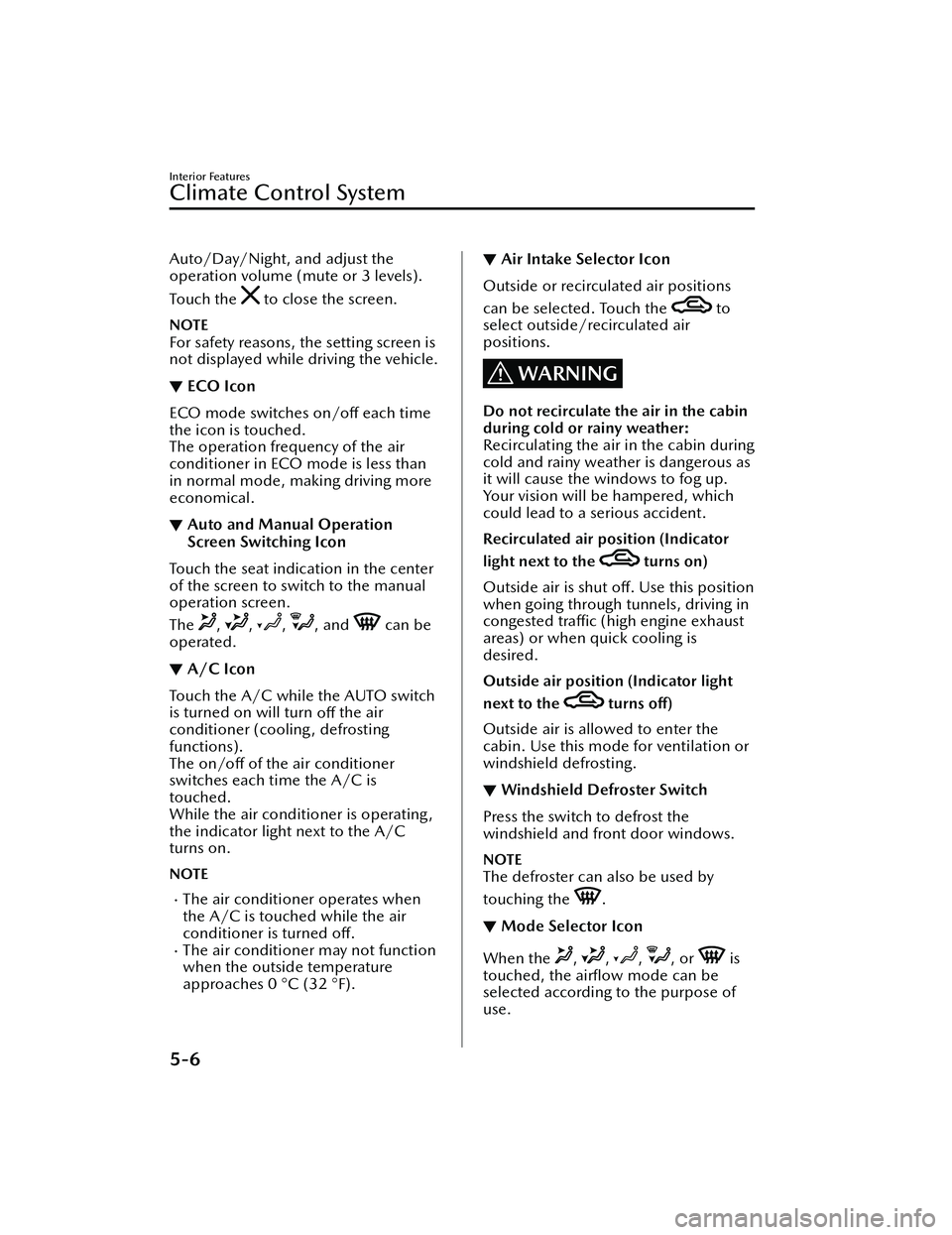
Auto/Day/Night, and adjust the
operation volume (mute or 3 levels).
To u c h t h e
to close the screen.
NOTE
For safety reasons, the setting screen is
not displayed while driving the vehicle.
▼ECO Icon
ECO mode switches on/o
ff each time
the icon is touched.
The operation frequency of the air
conditioner in ECO mode is less than
in normal mode, ma king driving more
economical.
▼ Auto and Manual Operation
Screen Switching Icon
Touch the seat indication in the center
of the screen to switch to the manual
operation screen.
The
, , , , and can be
operated.
▼ A/C Icon
Touch the A/C while the AUTO switch
is turned on will turn
off the air
conditioner (cooling, defrosting
functions).
The on/o ff of the air conditioner
switches each time the A/C is
touched.
While the air conditioner is operating,
the indicator light next to the A/C
turns on.
NOTE
The air conditioner operates when
the A/C is touched while the air
conditioner is turned o ff.
The air conditione r may not function
when the outside temperature
approaches 0 °C (32 °F).
▼ Air Intake Selector Icon
Outside or recirculated air positions
can be selected. Touch the
to
select outside/recirculated air
positions.
WARNING
Do not recirculate the air in the cabin
during cold or rainy weather:
Recirculating the air in the cabin during
cold and rainy weather is dangerous as
it will cause the windows to fog up.
Your vision will be hampered, which
could lead to a serious accident.
Recirculated air position (Indicator
light next to the
turns on)
Outside air is shut off. Use this position
when going through tunnels, driving in
congested tra ffic (high engine exhaust
areas) or when quick cooling is
desired.
Outside air position (Indicator light
next to the
turns o ff)
Outside air is allowed to enter the
cabin. Use this mode for ventilation or
windshield defrosting.
▼ Windshield Defroster Switch
Press the switch to defrost the
windshield and front door windows.
NOTE
The defroster can also be used by
touching the
.
▼Mode Selector Icon
When the , , , , or is
touched, the airfl ow mode can be
selected according to the purpose of
use.
Interior Features
Climate Control System
5-6
MX -30_8JD4-EA -21G_Edition2_new 2021-5-18 14:38:07