phone MAZDA MODEL MX-5 MIATA 2018 Owners Manual
[x] Cancel search | Manufacturer: MAZDA, Model Year: 2018, Model line: MODEL MX-5 MIATA, Model: MAZDA MODEL MX-5 MIATA 2018Pages: 576, PDF Size: 55.37 MB
Page 60 of 576
Keys
WA R N I N G
Do not leave the key in your vehicle with
children and keep them in a place where
your children will not find or play with
them:
Leaving children in a vehicle with the key is
dangerous. This could result in someone
being badly injured or even killed. Children
may find these keys to be an interesting toy
to play with and could cause the power
windows or other controls to operate, or
even make the vehicle move.
CAUTION
Because the key (transmitter) uses
low-intensity radio waves, it may not
function correctly under the following
conditions:
The key is carried with communication
devices such as cellular phones.
The key contacts or is covered by a
metal object.
The key is near electronic devices such
as personal computers.
Non-Mazda genuine electronic
equipment is installed in the vehicle.
There is equipment which discharges
radio waves near the vehicle.
The key (transmitter) may consume
battery power excessively if it receives
high-intensity radio waves. Do not place
the key near electronic devices such as
televisions or personal computers.
To avoid damage to the key
(transmitter), DO NOT:
Drop the key.
Get the key wet.
Disassemble the key.
Expose the key to high temperatures
on places such as the dashboard or
hood, under direct sunlight.
Expose the key to any kind of magnetic
field.
Place heavy objects on the key.
Put the key in an ultrasonic cleaner.
Put any magnetized objects close to
the key.
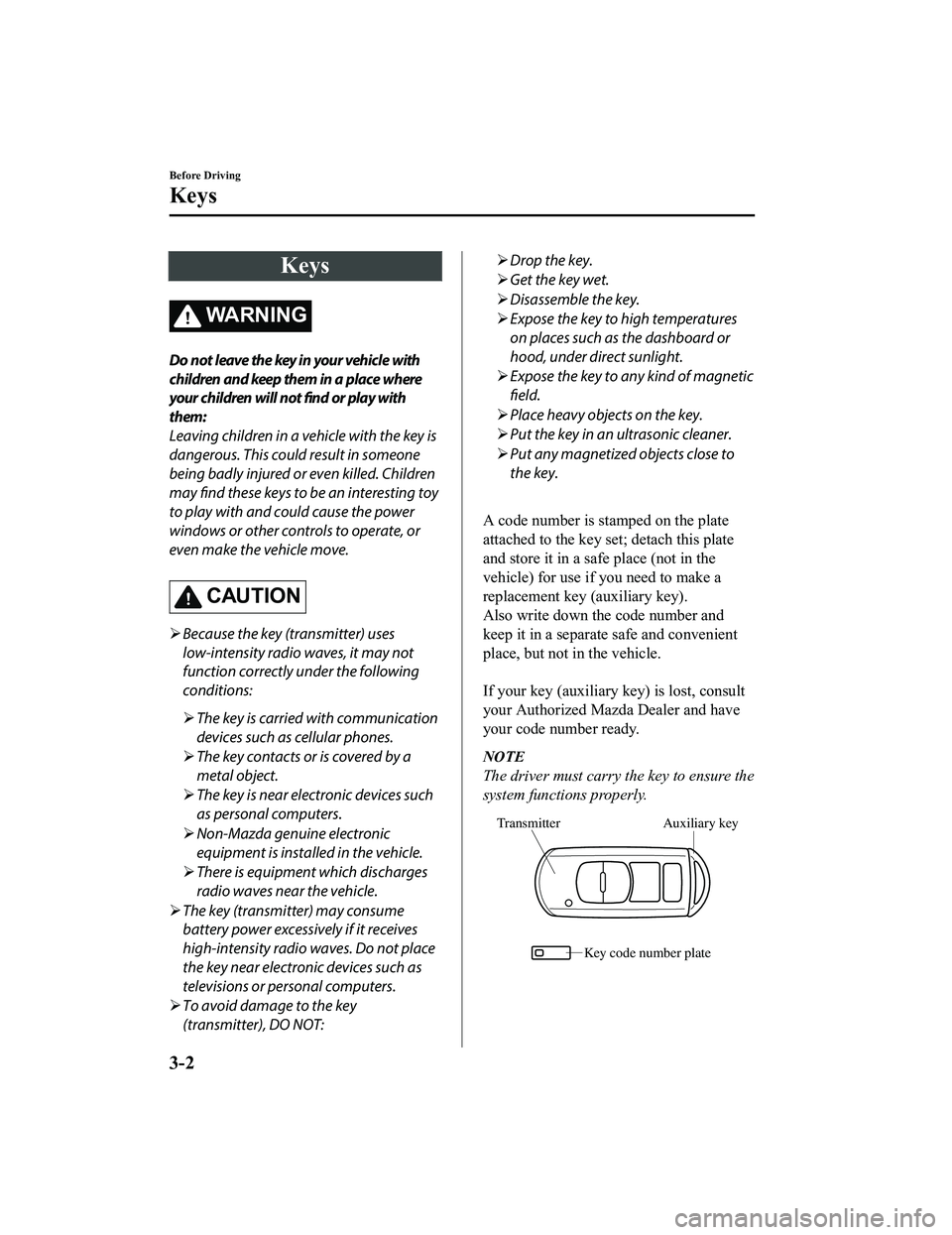
A code number is stamped on the plate
attached to the key set; detach this plate
and store it in a safe place (not in the
vehicle) for use if you need to make a
replacement key (auxiliary key).
Also write down the code number and
keep it in a separate safe and convenient
place, but not in the vehicle.
If your key (auxiliary key) is lost, consult
your Authorized Mazda Dealer and have
your code number ready.
NOTE
The driver must carry the key to ensure the
system functions properly.
Auxiliary key
Transmitter
Key code number plate
Before Driving
Keys
3-2
MX-5_8GF7-EA-17J_Edition2 2017-10-31 14:07:27
Page 68 of 576

Operational Range
The system operates only when the driver
is in the vehicle or within operational
range while the key is being carried.
NOTE
When the battery power is low, or in
places where there are high-intensity radio
waves or noise, the operational range may
become narrower or the system may not
operate. For determining battery
replacement, Refer to Keyless Entry
System on page 3-3.
▼Locking, Unlocking the Doors
80cm (31in)
80cm (31in) Exterior antenna
Operational range
NOTE
The system may not operate if you are
too close to the windows or door
handles.
If the key is left in the following areas
and you leave the vehicle, the doors may
be locked depending on the radio wave
conditions even if the key is left in the
vehicle.
Around the dashboard
In the storage compartments such as
the console box
Next to a communication device such
as a mobile phone
▼Opening the Trunk Lid
80cm (31in)
Exterior antenna
Operational range
Before Driving
Advanced Keyless Entry System
3-10
MX-5_8GF7-EA-17J_Edition2 2017-10-31 14:07:27
Page 70 of 576
If the key is left in the following areas
and you leave the vehicle, the doors may
be locked depending on the radio wave
conditions even if the key is left in the
vehicle.
Around the dashboard
In the storage compartments such as
the console box
Next to a communication device such
as a mobile phone
When the ignition is switched to ACC or
ON, the vehicle lock-out prevention
feature prevents you from locking
yourself out of the vehicle.
Both doors will automatically unlock if
they are locked using the power door
locks with any door open.
If both the doors are closed even though
the trunk lid is open, both the doors and
the fuel-filler lid will lock.
The vehicle lock-out prevention feature
does not operate while the ignition is
switched off.
When any door is opened from the
outside while the key is inside the
vehicle, the closed doors are locked.
Both the doors are automatically
unlocked by closing the open door.
(With the advanced keyless function)
The beep sound is heard for about 10
seconds to notify the driver that the key
has been left in the vehicle.
(Without the advanced keyless
function)
The horn sound is heard twice to notify
the driver that the key has been left in
the vehicle.
(Door unlock (control) system with
collision detection)
This system automatically unlocks the
doors in the event the vehicle is involved
in an accident to allow passengers to get
out of the vehicle immediately and
prevent being trapped inside. While the
ignition is switched ON and in the event
the vehicle receives an impact strong
enough to inflate the air bags, both the
doors are automatically unlocked after
about 6 seconds have elapsed from the
time of the accident.
The doors may not unlock depending on
how an impact is applied, the force of
the impact, and other conditions of the
accident.
If door-related systems or the battery is
malfunctioning, the doors will not
unlock.
When opening a door, the power
windows open a little automatically.
When closing the door, the power
windows close automatically. This is a
function for improving the sealability,
and it does not mean there is a problem.
If the vehicle battery is disconnected for
vehicle maintenance or other reasons,
the power windows will not open or
close automatically. If the power
windows do not open or close, the
automatic open/close mechanism for the
windows must be reset.
Refer to Auto-opening on page 3-34.
Before Driving
Doors and Locks
3-12
MX-5_8GF7-EA-17J_Edition2 2017-10-31 14:07:27
Page 105 of 576

NOTE
The keys carry a unique electronic code.
For this reason, and to assure your
safety, obtaining a replacement key
requires some waiting time. They are
only available through an Authorized
Mazda Dealer.
Always keep a spare key in case one is
lost. If a key is lost, consult an
Authorized Mazda Dealer as soon as
possible.
If you lose a key, an Authorized Mazda
Dealer will reset the electronic codes of
your remaining keys and immobilizer
system. Bring all the remaining keys to
an Authorized Mazda Dealer to reset.
Starting the vehicle with a key that has
not been reset is not possible.
▼ Operation
NOTE
The engine may not start and security
indicator light may illuminate or flash if
the key is placed in an area where it is
difficult for the system to detect the
signal, such as on the dashboard. Move
the key to a location within the signal
range, switch the ignition off, and then
restart the engine.
Signals from a TV or radio station, or
from a transceiver or mobile telephone
could interfere with your immobilizer
system. If you are using the proper key
and the engine fails to start, check the
security indicator light.
Arming
The system is armed when the ignition is
switched from ON to off.
The security indica
tor light in the
instrument cluster flashes every 2 seconds
until the system is disarmed.
Disarming
The system is disarmed when the ignition
is switched ON with the correct
programmed key. The security indicator
light illuminates for about 3 seconds and
then turns off. If the engine does not start
with the correct key, and the security
indicator light remains illuminated or
flashing, try the following:
Make sure the key is within the
operational range for signal transmission.
Switch the ignition off, and then restart the
engine. If the engine does not start after 3
or more tries, contact an Authorized
Mazda Dealer.
NOTE
If the security indicator light flashes
continuously while you are driving, do
not shut off the engine. Go to an
Authorized Mazda Dealer and have it
checked. If the engine is shut off while
the indicator light is flashing, you will
not be able to restart it.
Because the electronic codes are reset
when the immobilizer system is repaired,
the keys are needed. Make sure to bring
all the keys to an Authorized Mazda
Dealer so that they can be programmed.
Before Driving
Security System
3-47
MX-5_8GF7-EA-17J_Edition2 2017-10-31 14:07:27
Page 244 of 576
ALC (Automatic volume adjustment)
The automatic level control (ALC)
changes the audio volume automatically
according to the vehicle speed. The faster
the vehicle speed, the higher the volume
increases. ALC has ALC OFF and ALC
LEVEL 1 to 7 modes. At ALC LEVEL 7,
the amount that the volume can increase is
at the maximum. Select the mode
according to the driving conditions.
BEEP (Audio operation sound)
The setting for the operation sound when
pressing and holding a button can be
changed. The initial setting is ON. Set to
OFF to mute the operation sound.
BT SETUP mode
Music and other audio such as voice data
recorded on portable audio devices and
mobile phones available on the market
which are equipped with the Bluetooth
®
transmission function can be listened to
via wireless transmission over the
vehicle's speakers. Using the BT SETUP
mode, these devices can be programmed
to the Bluetooth
® unit or changed (page
5-39).
12Hr
24Hr (12 Hr/24 Hr time
adjustment)
Rotating the audio control dial switches
the display between 12 and 24-hour clock
time (page 5-23).
Interior Features
Audio Set [Type A (non-touchscreen)]
5-22
MX-5_8GF7-EA-17J_Edition2 2017-10-31 14:07:27
Page 252 of 576

How to use USB mode
Media/Scan buttonFolder down button Folder up button
Play/Pause button
Random button
Repeat button Audio display
Text button
Track down/Reverse button
Track up/Fast-forward button
Type Playable data
USB mode MP3/WMA/AAC file
This unit does not support a USB 3.0
device. In addition, other devices may not
be supported depending on the model or
OS version.
▼ Playback
1. Switch the ignition to ACC or ON.
2. Press the power/volume dial to turn the
audio system on.
3. Press the media button (
) to
switch to the USB mode and start
playback.
NOTE
Some devices such as smart phones may
require a setting change to allow
operation using a USB connection.
When the USB device is not connected,
the mode does not switch to USB mode.
When there is no playable data in the
USB device, “NO CONTENTS” is
flashed.
Playback of the USB device is in the
order of the folder numbers. Folders
which have no MP3/WMA/AAC files are
skipped.
Do not remove the USB device while in
the USB mode. The data may be
damaged.
Pause
To stop playback, press the play/pause
button (4).
Press the button again to resume playback.
Fast-forward/Reverse
Press and hold the fast-forward button ()
to advance through a track at high speed.
Press and hold the reverse button (
) to
reverse through a track at high speed.
Track search
Press the track up button () once to skip
forward to the beginning of the next track.
Press the track down button (
) within a
few seconds after playback begins to track
down to the beginning of the previous
track.
Press the track down button (
) after a
few seconds have elapsed to start playback
from the beginning of the current track.
Interior Features
Audio Set [Type A (non-touchscreen)]
5-30
MX-5_8GF7-EA-17J_Edition2 2017-10-31 14:07:27
Page 258 of 576

Bluetooth®
▼Introduction
Bluetooth® Hands-Free outline
When a Bluetooth® device (mobile phone) is connected to the vehicle's Bluetooth® unit, a
call can be made or received by pressing the talk button, pick-up button, or hang-up button
on the audio remote control switch. For example, even if a devi ce (mobile phone) is in your
coat pocket, a call can be made without taking the device (mobi le phone) out and operating
it directly.
Bluetooth
® audio outline
When a portable audio unit equipped with the Bluetooth® communication function is paired
to the vehicle, you can listen to music stored on the paired po rtable audio device from the
vehicle's speakers. It is not necessary to connect the portable audio device to the vehicle's
external input terminal. After p rogramming, operate the vehicle audio control panel to play/
stop the audio.
NOTE
For your safety, a device can be paired only when the vehicle is parked. If the vehicle
starts to move, the pairing procedure will end. Park the vehicle in a safe place before
pairing.
The communication range of a Bluetooth® equipped device is about 10 meters (32 ft) or
less.
Basic audio operation is av ailable using voice commands even if Bluetooth® is not
connected.
CAUTION
Some Bluetooth® mobile devices are not compatible wi th the vehicle. Consult an Authorized
Mazda Dealer, Mazda's call center or Web support center for information regarding
Bluetooth
® mobile device compatibility:
U.S.A.
Phone: 800-430-0153
Web: www.mazdausa.com/mazdaconnect
Canada
Phone: 800-430-0153
Web: www.mazdahandsfree.ca
Interior Features
Audio Set [Type A (non-touchscreen)]
5-36
MX-5_8GF7-EA-17J_Edition2 2017-10-31 14:07:27
Page 259 of 576
Mexico
Center of Attention to Client (CAC)
Phone: 01-800-01-MAZDA
Web: www.mazdamexico.com.mx
Applicable Bluetooth
® specification (Recommended)
Ve r . 2 . 0
▼ Component Parts
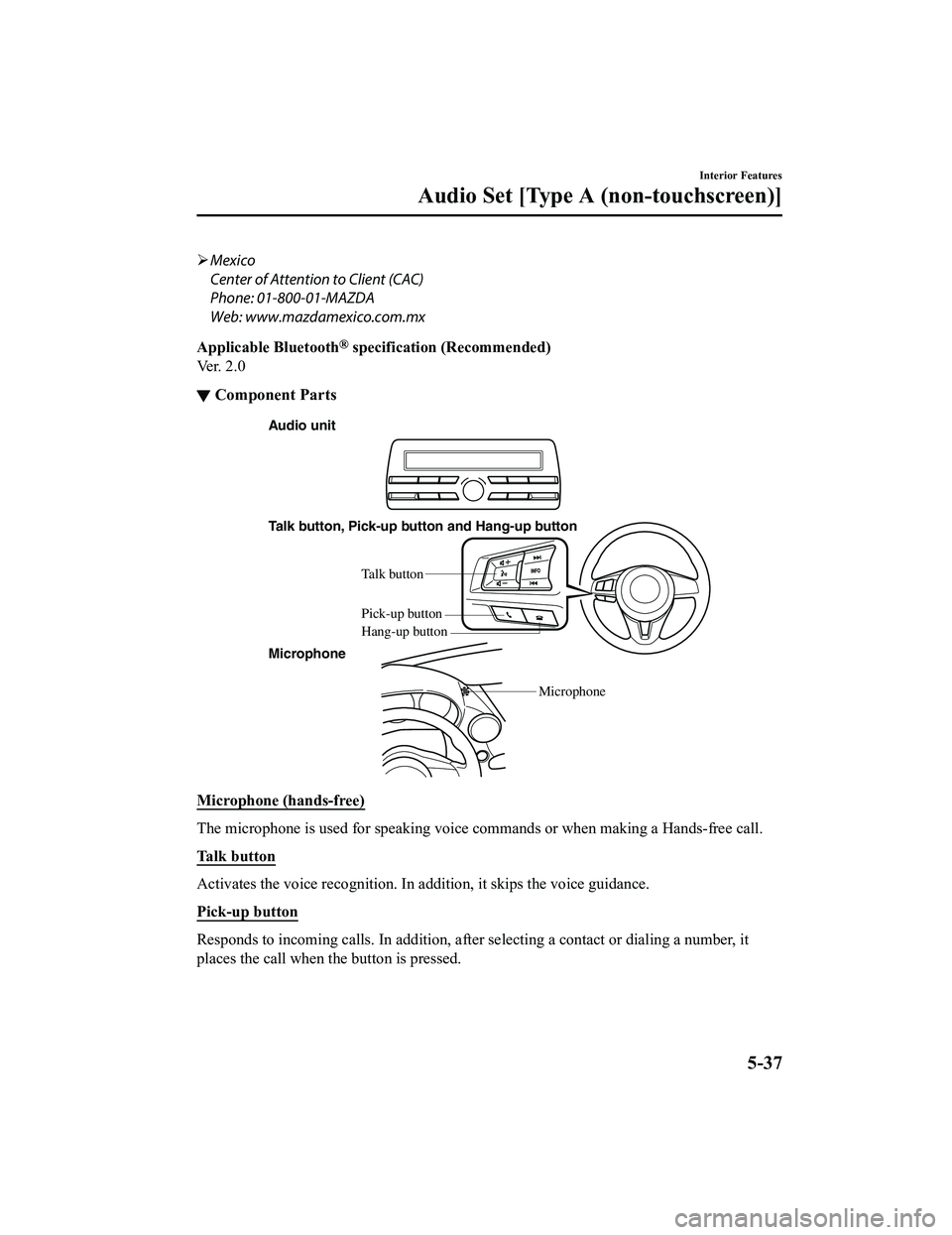
Audio unit
Talk button, Pick-up button and Hang-up button
Microphone Microphone
Talk b
utton
Hang-up b utton
Pick-up b
utton
Microphone (hands-free)
The microphone is used for speaking voice commands or when maki ng a Hands-free call.
Talk button
Activates the voice recognition. In addition, it skips the voice guidance.
Pick-up button
Responds to incoming c alls. In addition, after selecting a cont act or dialing a number, it
places the call when the button is pressed.
Interior Features
Audio Set [Type A (non-touchscreen)]
5-37
MX-5_8GF7-EA-17J_Edition2 2017-10-31 14:07:27
Page 261 of 576

Bluetooth® Preparation
▼Bluetooth® Hands-Free Preparation
Pairing code setting
The 4-digit pairing code setting for
registration of your cell phone (pairing)
can be set beforehand.
NOTE
The initial setting value is “0000”.
1. Press the pick-up
button or talk button
with a short press.
2. Say: [Beep] “Setup”
3. Prompt: “Select one of the following:
Pairing options, confirmation prompts,
language, passcode, select phone or
select music player.”
4. Say: [Beep] “Pairing options”
5. Prompt: “Select one of the following:
Pair, Edit, Delete, L ist, or Set Pairing
Code.”
6. Say: [Beep] “Set pairing code”
7. Prompt: “Your current pairing code is
XXXX. Do you want to change it to a
different pairing code?”
8. Say: [Beep] “Yes”
9. Prompt: “Please say a 4-digit pairing
code.”
10. Say: [Beep] “YYYY”
11. Prompt: “YYYY is this correct?”
12. Say: [Beep] “Yes” or “No”
13. If “Yes”, go to Step 14. If “No”, the procedure returns to Step 9.
14. Prompt: “Your new pairing code is
YYYY. Use this pairing code when
pairing devices to the Hands free
system. Do you want to pair a device
now?”
15. Say: [Beep] “Yes” or “No”
16. If “Yes”, the syste m switches to the
device registration mode. If “No”, the
system returns to standby status.
▼ Device pairing (Bluetooth®
Hands-Free)
To use Bluetooth® Hands-Free, the device
equipped with Bluetooth
® has to be paired
to the Bluetooth
® unit using the following
procedure.
A maximum of seven devices including
hands-free mobile phones and Bluetooth
®
audio devices can be paired to one vehicle.
NOTE
If a Bluetooth® device has already been
paired to the vehicle as a Bluetooth
®
audio device, it does not need to be paired
again when using the device as a
hands-free mobile phone. Conversely, it
does not need to be paired again as a
Bluetooth
® audio device if it has already
been paired as a hands-free mobile phone.
1. Activate the Bluetooth
® application of
the device.
NOTE
For the operation of the device, refer
to its instruction manual.
2. Press the pick-up button or talk button
with a short press.
3. Say: [Beep] “Setup”
4. Prompt: “Select one of the following:
Pairing options, confirmation prompts,
language, passcode, select phone or
select music player.”
5. Say: [Beep] “Pairing options”
6. Prompt: “Select one of the following:
Pair, Edit, Delete, List, or Set Pairing
Code.”
7. Say: [Beep] “Pair”
Interior Features
Audio Set [Type A (non-touchscreen)]
5-39
MX-5_8GF7-EA-17J_Edition2 2017-10-31 14:07:27
Page 262 of 576
8.Prompt: “Start the pairing process on
your Bluetooth
® device. Your pairing
code is 0000 (XXXX). Input this on
your Bluetooth
® device when
prompted on the device. See device
manual for instructions.”
9. Using the device, perform a search for
the Bluetooth
® device (Peripheral
device).
NOTE
For the operation of the device, refer
to its instruction manual.
10. Select “Mazda” from the device list
searched by the device.
11. Input the 4-digit pairing code to the
device.
12. Prompt: “Please say the name of the
device after the beep.”
13. Say: [Beep] “XXXX - - -” (Say a
“device tag”, an arbitrary name for the
device.) Example: “Stan's device.”
NOTE
Say a paired “device tag” within 10
seconds.
If more than two devices are to be
paired, they cannot be paired with the
same or similar “device tag”.
14. Prompt: “XXXXXX - - - (Ex. “Stan's
device”) (Device tag). Is this correct?”
15. Say: [Beep] “Yes”
16. Prompt: “Pairing complete”
After a device is registered, the system
automatically identifies the device. By
activating Bluetooth
® Hands-Free again,
or by activating Bluetooth
® Hands-Free
first after switching t he ignition from OFF
to ACC, the system reads out a voice
guidance, “XXXXXX - - - (Ex. “Stan's
device”) (Device tag) is connected”.
NOTE
When the pairing is completed, the
symbol is displayed.
Some Bluetooth® audio devices need a
certain amount of time before the
symbol is displayed.
Device registration can also be done by
operating the audio unit.
Depending on the device, the
registration status may be lost after a
certain period of time. If this occurs,
repeat the entire process from Step 1.
Registered device read-out
Bluetooth® Hands-Free can read-out the
devices registered to its system.
NOTE
Do this function only when parked. It is
too distracting to attempt while driving
and you may make too many errors to be
effective.
1. Press the pick-up button or talk button with a short press.
2. Say: [Beep] “Setup”
3. Prompt: “Select one of the following:
Pairing options, confirmation prompts,
language, passcode, select phone or
select music player.”
4. Say: [Beep] “Pairing options”
5. Prompt: “Select one of the following:
Pair, Edit, Delete, L ist, or Set Pairing
Code”
6. Say: [Beep] “List”
Interior Features
Audio Set [Type A (non-touchscreen)]
5-40
MX-5_8GF7-EA-17J_Edition2 2017-10-31 14:07:27