set MAZDA MODEL MX-5 MIATA PRHT 2013 User Guide
[x] Cancel search | Manufacturer: MAZDA, Model Year: 2013, Model line: MODEL MX-5 MIATA PRHT, Model: MAZDA MODEL MX-5 MIATA PRHT 2013Pages: 452, PDF Size: 5.57 MB
Page 106 of 452
Black plate (106,1)
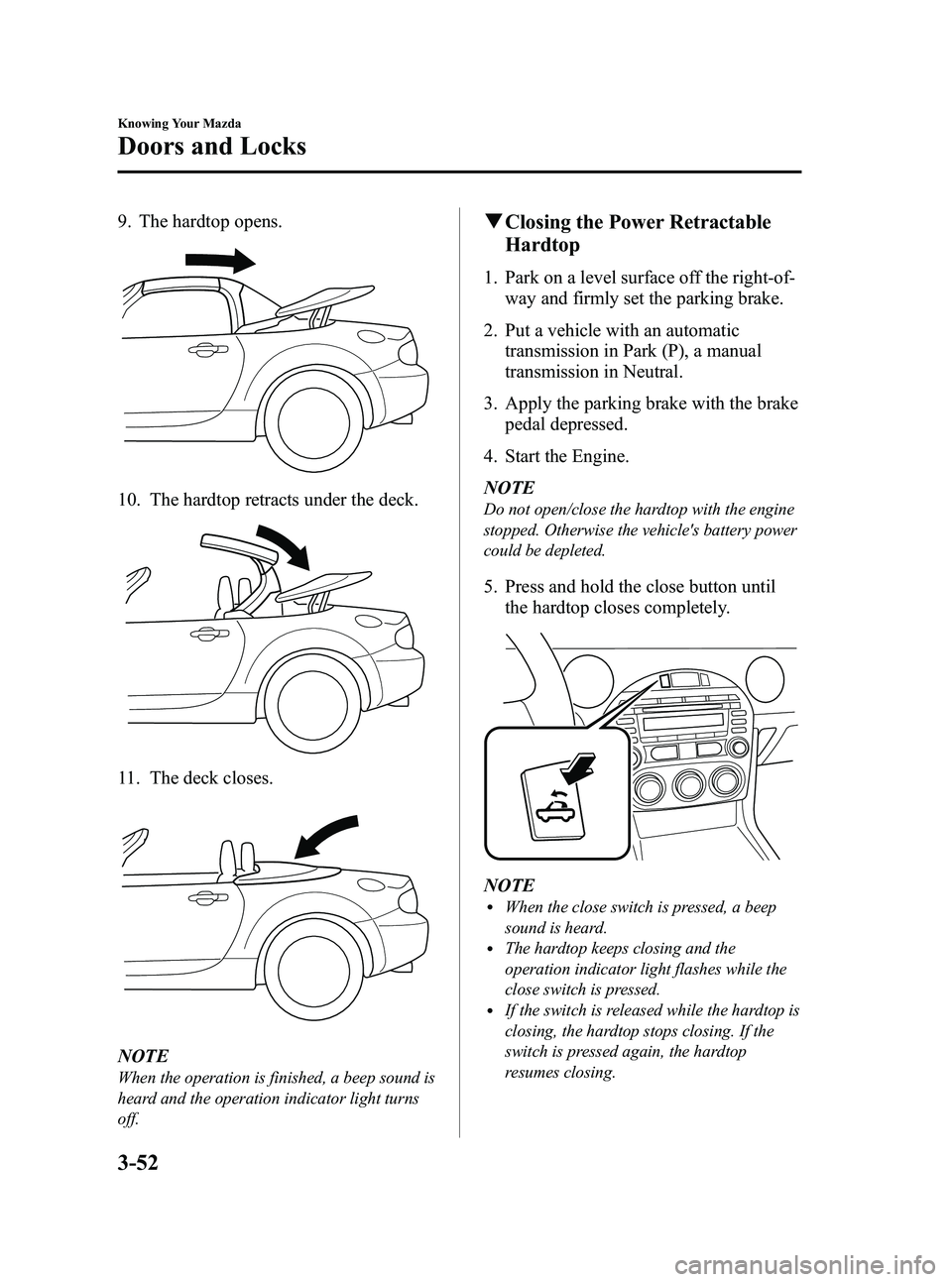
9. The hardtop opens.
10. The hardtop retracts under the deck.
11. The deck closes.
NOTE
When the operation is finished, a beep sound is
heard and the operation indicator light turns
off.
qClosing the Power Retractable
Hardtop
1. Park on a level surface off the right-of-
way and firmly set the parking brake.
2. Put a vehicle with an automatic transmission in Park (P), a manual
transmission in Neutral.
3. Apply the parking brake with the brake pedal depressed.
4. Start the Engine.
NOTE
Do not open/close the hardtop with the engine
stopped. Otherwise the vehicle's battery power
could be depleted.
5. Press and hold the close button until the hardtop closes completely.
NOTElWhen the close switch is pressed, a beep
sound is heard.
lThe hardtop keeps closing and the
operation indicator light flashes while the
close switch is pressed.
lIf the switch is released while the hardtop is
closing, the hardtop stops closing. If the
switch is pressed again, the hardtop
resumes closing.
3-52
Knowing Your Mazda
Doors and Locks
MX-5_8CM3-EA-12F_Edition2 Page106
Friday, August 31 2012 1:45 PM
Form No.8CM3-EA-12F
Page 109 of 452
Black plate (109,1)
CAUTION
ØDo not drive the vehicle with the
hardtop open halfway.
Ø Do not perform the procedure in a
strong wind as it could cause an
unexpected accident.
Ø Two adults are required to
perform the procedure, especially
when lifting up the hardtop. Do
not do it alone so as not to cause
injury or vehicle damage.
Ø Some steps in the procedure
require using multiple tools at the
same time and a certain level of
technical expertise. In addition,
holding your body extended over
the car can result in muscle strains
so Mazda recommends having the
hardtop checked at an Authorized
Mazda Dealer.
NOTE
Use a suitable means of illumination, such as a
flashlight, to improve visibility under the deck
lid when performing this task.
Before closing manually
1. Park on a level surface off the right-of- way and firmly set the parking brake.
2. Put a vehicle with an automatic transmission in Park (P), a manual
transmission in Reverse (R) or 1, and
turn off the engine.
3. Switch the ignition off while depressing the brake pedal.
4. Turn on the hazard warning flasher if it is needed.
WARNING
Verify that the ignition is switched off
before manually operating the hardtop:
Manually retracting the hardtop with
the ignition not switched off is
dangerous as the retractor motors
could turn on suddenly and cause
injury resulting from hands or fingers
being pinched in the mechanism.
Manual closing
Tool preparation
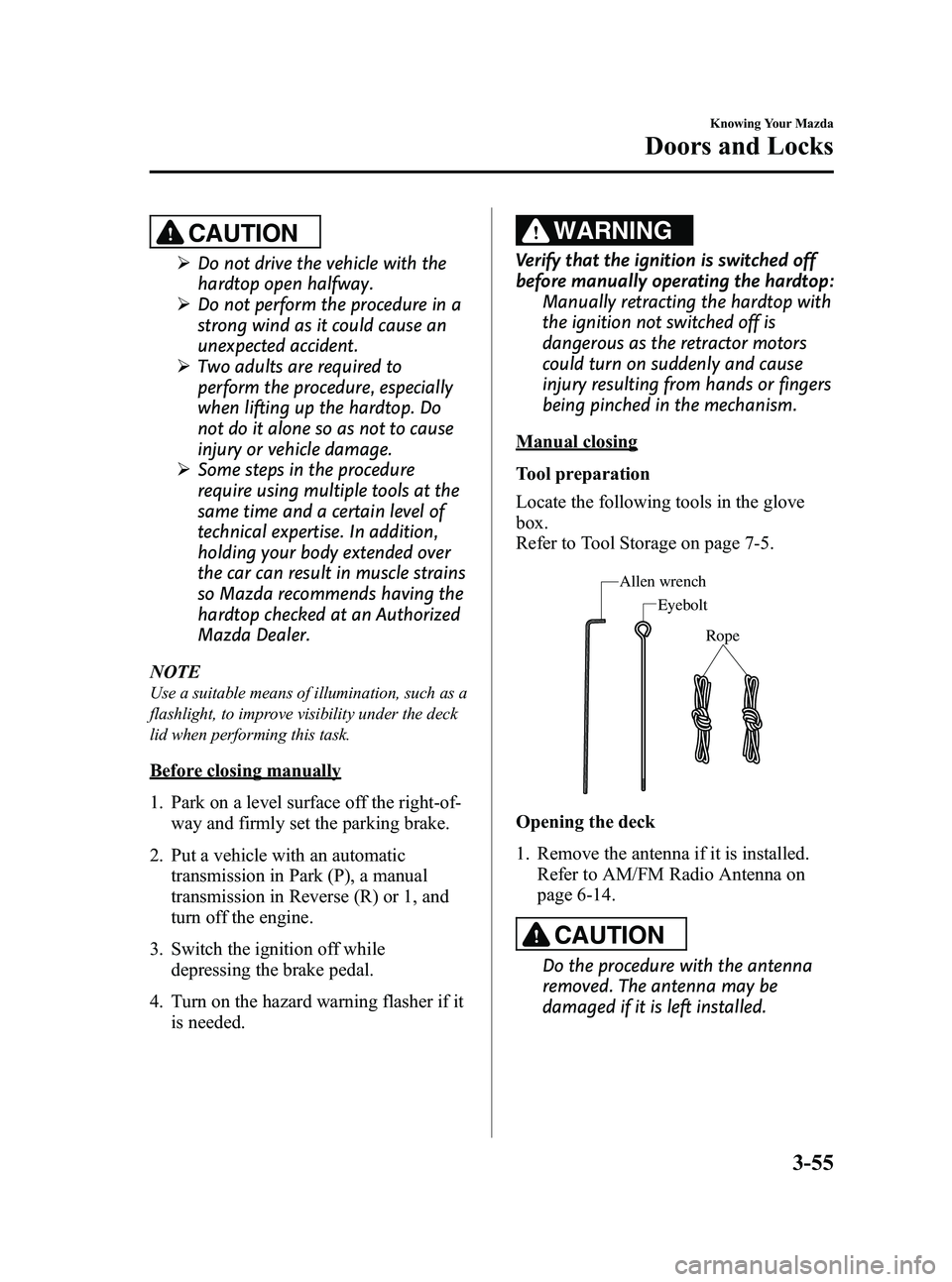
Locate the following tools in the glove
box.
Refer to Tool Storage on page 7-5.
Rope
Eyebolt
Allen wrench
Opening the deck
1. Remove the antenna if it is installed.
Refer to AM/FM Radio Antenna on
page 6-14.
CAUTION
Do the procedure with the antenna
removed. The antenna may be
damaged if it is left installed.
Knowing Your Mazda
Doors and Locks
3-55
MX-5_8CM3-EA-12F_Edition2 Page109
Friday, August 31 2012 1:45 PM
Form No.8CM3-EA-12F
Page 118 of 452

Black plate (118,1)
ØDevices for electronic purchases, or
security passage which touch or
come near the auxiliary key.
NOTE
lThe advanced keys (including auxiliary key)
carry a unique electronic code. For this
reason, and to assure your safety, obtaining
a replacement advanced key (including
auxiliary key) requires some waiting time.
They are only available through an
Authorized Mazda Dealer.
lAlways keep a spare advanced key in case
one is lost. If an advanced key is lost,
consult an Authorized Mazda Dealer as
soon as possible.
lIf you lose an advanced key (including
auxiliary key), an Authorized Mazda Dealer
will reset the electronic codes of your
remaining advanced keys (including
auxiliary keys) and immobilizer system.
Bring all the remaining advanced keys
(including auxiliary keys) to an Authorized
Mazda Dealer to reset.
Starting the vehicle with a key that has not
been reset is not possible.
3-64
Knowing Your Mazda
Security System
MX-5_8CM3-EA-12F_Edition2 Page118
Friday, August 31 2012 1:45 PM
Form No.8CM3-EA-12F
Page 120 of 452
Black plate (120,1)
qOperation
Arming
The system is armed when the ignition is
switched from ON to ACC or OFF. The
security indicator light in the instrument
cluster flashes every 2 seconds until the
system is disarmed.
Disarming
The system is disarmed when the ignition
is switched ON with the registered
advanced key.
The security indicator light illuminates for
about 3 seconds and goes out.
If the engine does not start with the
correct advanced key, and the security
indicator light keeps illuminating or
flashing, the system may have a
malfunction. Consult an Authorized
Mazda Dealer. NOTE
lThe engine may not start and the security
indicator light may illuminate or flash if the
advanced key is placed in an area where it
is difficult for the system to detect the
signal, such as on the dashboard, or in the
glove box. Move the advanced key to
another place, switch the ignition off, and
then restart the engine.
lSignals from a TV or radio station, or from
a transceiver or a mobile telephone could
interfere with your immobilizer system. If
you are using the proper advanced key and
the engine fails to start, check the security
indicator light. If the indicator light is
flashing, switch the ignition to ACC or
switch the ignition off and wait for a while,
then restart the engine. If it does not start
after 3 or more tries, contact an Authorized
Mazda Dealer.
lIf the security indicator light flashes
continuously while you are driving, do not
shut off the engine. Go to an Authorized
Mazda Dealer and have it checked. If the
engine is shut off while the indicator light is
flashing, you will not be able to restart it.
lSince the electronic codes are reset when
repairing the immobilizer system, the
advanced key (including auxiliary key) are
needed. Bring all the advanced keys
(including auxiliary keys) to an Authorized
Mazda Dealer.
3-66
Knowing Your Mazda
Security System
MX-5_8CM3-EA-12F_Edition2 Page120
Friday, August 31 2012 1:45 PM
Form No.8CM3-EA-12F
Page 122 of 452

Black plate (122,1)
CAUTION
When starting the engine do not
allow the following, as the engine
may not start due to the electronic
signal from the ignition key not being
transmitted correctly.
ØA key ring rests on the key grip.
ØMetal parts of other keys or metal
objects touch the key grip.
ØSpare keys or keys for other
vehicles equipped with an
immobilizer system touch or come
near the key grip.
ØDevices for electronic purchases, or
security passage which touch or
come near the key. NOTE
lThe keys carry a unique electronic code.
For this reason, and to assure your safety,
obtaining a replacement key requires some
waiting time. They are only available
through an Authorized Mazda Dealer.
lAlways keep a spare key, in case one is lost.
If a key is lost, contact an Authorized
Mazda Dealer as soon as possible.
lIf you lose a key, an Authorized Mazda
Dealer will reset the electronic codes of
your remaining keys and immobilizer
system. Bring all the remaining keys to an
Authorized Mazda Dealer to reset.
Starting the vehicle with a key that has not
been reset is not possible.
3-68
Knowing Your Mazda
Security System
MX-5_8CM3-EA-12F_Edition2 Page122
Friday, August 31 2012 1:45 PM
Form No.8CM3-EA-12F
Page 124 of 452
Black plate (124,1)
qOperation
Arming
The system is armed when the ignition is
switched from ON to ACC or OFF.
The security indicator light in the
instrument cluster flashes every two
seconds until the system is disarmed.
Disarming
The system is disarmed when the ignition
is switched ON with the correct ignition
key.
The security indicator light illuminates for
about three seconds and goes out.
If the engine does not start with the
correct ignition key, and the security
indicator light keeps illuminating or
flashing, the system may have a
malfunction. Consult an Authorized
Mazda Dealer. NOTE
lIf the security indicator light illuminates
and stays on or flashes when the ignition is
switched ON, the engine will not start.
lSignals from a TV or radio station, or from
a transceiver or a mobile telephone, could
interfere with your immobilizer system. If
you are using the proper key and your
engine fails to start, check the security
indicator light. If it is flashing, remove the
ignition key and wait 2 seconds or more,
then reinsert it and try starting the engine
again. If it does not start after 3 or more
tries, contact an Authorized Mazda Dealer.
lIf the security indicator light flashes
continuously while you are driving, do not
shut off the engine. Go to an Authorized
Mazda Dealer and have it checked. If you
shut off the engine while the light is
flashing you will not be able to restart it.
lSince the electronic codes are reset when
repairing the immobilizer system, the keys
are needed. Bring all the existing keys to an
Authorized Mazda Dealer.
q
Modification and Add-On
Equipment
Mazda cannot guarantee the immobilizer
system's operation if the system has been
modified or if any add-on equipment has
been installed.
CAUTION
To avoid damage to your vehicle, do
not modify the system or install any
add-on equipment to the immobilizer
system or the vehicle.
3-70
Knowing Your Mazda
Security System
MX-5_8CM3-EA-12F_Edition2 Page124
Friday, August 31 2012 1:45 PM
Form No.8CM3-EA-12F
Page 138 of 452
Black plate (138,1)
Floor Mat
WARNING
Make sure the floor mats are hooked
on the retention pins to prevent them
from bunching up under the foot
pedals:Using a floor mat that is not secured
is dangerous as it will interfere with
the accelerator and brake pedal
operation, which could result in an
accident.
Do not install two floor mats, one on
top of the other, on the driver's side: Installing two floor mats, one on top
of the other, on the driver's side is
dangerous as the retention pins can
only keep one floor mat from sliding
forward.
In using a heavy duty floor mat for
winter use always remove the
original floor mat.
Loose floor mat(s) will interfere with
the foot pedal and could result in an
accident.
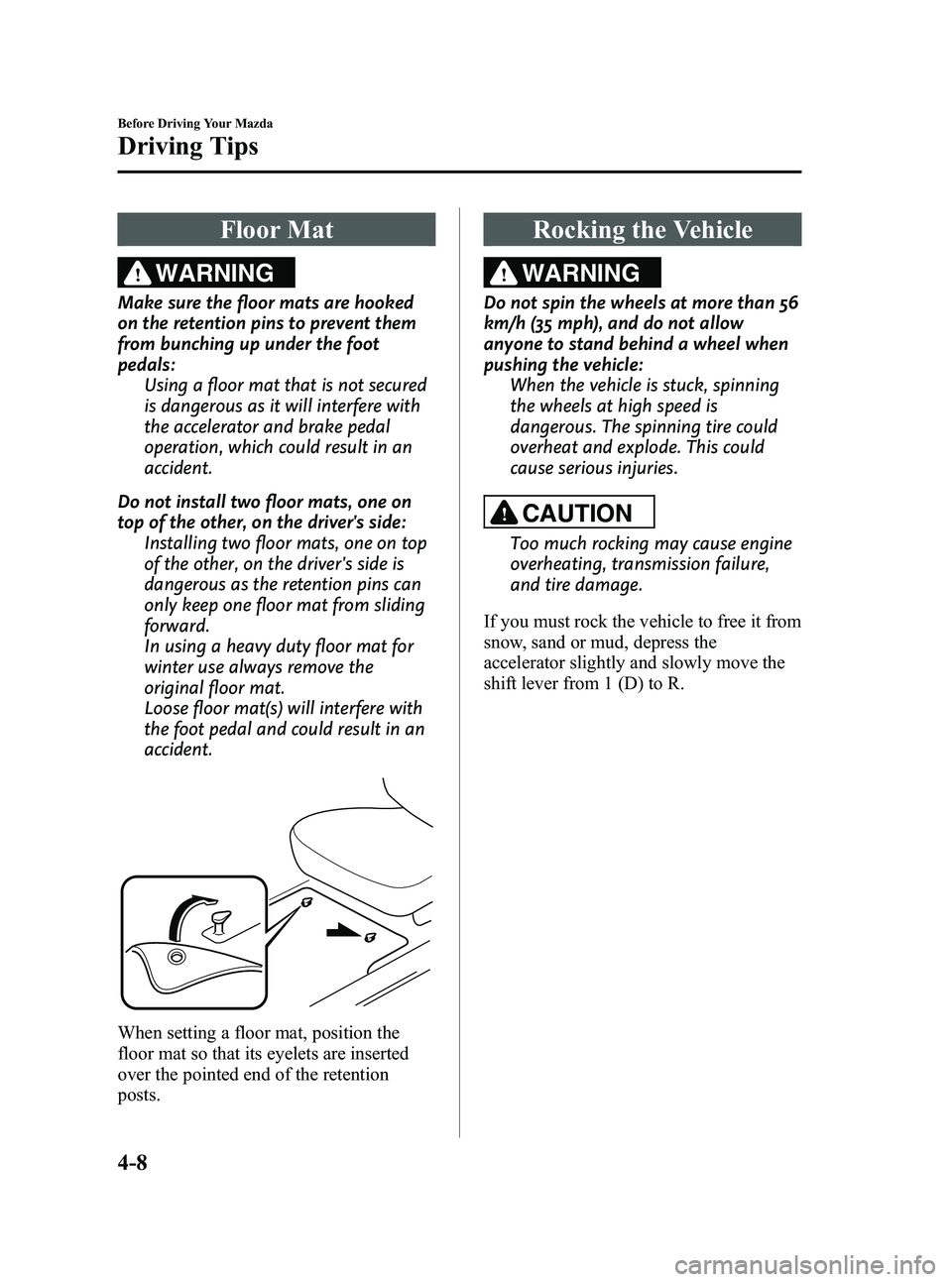
When setting a floor mat, position the
floor mat so that its eyelets are inserted
over the pointed end of the retention
posts.
Rocking the Vehicle
WARNING
Do not spin the wheels at more than 56
km/h (35 mph), and do not allow
anyone to stand behind a wheel when
pushing the vehicle:When the vehicle is stuck, spinning
the wheels at high speed is
dangerous. The spinning tire could
overheat and explode. This could
cause serious injuries.
CAUTION
Too much rocking may cause engine
overheating, transmission failure,
and tire damage.
If you must rock the vehicle to free it from
snow, sand or mud, depress the
accelerator slightly and slowly move the
shift lever from 1 (D) to R.
4-8
Before Driving Your Mazda
Driving Tips
MX-5_8CM3-EA-12F_Edition2 Page138
Friday, August 31 2012 1:45 PM
Form No.8CM3-EA-12F
Page 147 of 452
Black plate (147,1)
WARNING
Do not stop the engine while the
vehicle is moving:Stopping the engine while the vehicle
is moving for any reason other than
in an emergency is dangerous.
Stopping the engine while the vehicle
is moving will result in reduced
braking ability due to the loss of
power braking, which could cause an
accident and serious injury.
Before leaving the driver's seat, always
switch the ignition to OFF, set the
parking brake and make sure the shift
lever is in P (automatic transmission) or
in 1st gear or R (manual transmission): It is important to switch the ignition
to OFF even if you are not removing
the key from the ignition or leaving
the vehicle. Leaving the key in other
positions will disable some of the
vehicle security systems and run the
battery down.
Leaving the driver's seat without
switching the ignition to OFF, setting
the parking brake and shifting the
shift lever to P (automatic
transmission) or to 1st gear or R
(manual transmission) is dangerous.
Unexpected vehicle movement could
occur. This could cause an accident.
ACC (Accessory)
In this position, some electrical
accessories will operate.
ON
This is the normal running position after
the engine is started. Some indicator
lights/warning lights should be inspected
before the engine is started (page 5-41). NOTE
When the ignition is switched ON, the sound of
the fuel pump motor operating near the fuel
tank can be heard. This does not indicate an
abnormality.
START
The engine is started in this position. It
will crank until you release the key. It
then returns to the ON position.
q
Ignition Key Reminder
If the ignition is switched off or the
ignition is switched to ACC with the key
inserted, a continuous beep sound will be
heard when the driver's door is opened.
Driving Your Mazda
Starting and Driving
5-3
MX-5_8CM3-EA-12F_Edition2 Page147
Friday, August 31 2012 1:45 PM
Form No.8CM3-EA-12F
Page 151 of 452

Black plate (151,1)
qParking Brake
WARNING
Before leaving the driver's seat, always
switch the ignition to OFF, set the
parking brake and make sure the shift
lever is in P (automatic transmission) or
in 1st gear or R (manual transmission):
It is important to switch the ignition
to OFF even if you are not removing
the key from the ignition or leaving
the vehicle. Leaving the key in other
positions will disable some of the
vehicle security systems and run the
battery down.
Leaving the driver's seat without
switching the ignition to OFF, setting
the parking brake and shifting the
shift lever to P (automatic
transmission) or to 1st gear or R
(manual transmission) is dangerous.
Unexpected vehicle movement could
occur. This could cause an accident.
CAUTION
Driving with the parking brake on
will cause excessive wear of the brake
linings or pads.
NOTE
For parking in snow, refer to Winter Driving
(page 4-9) regarding parking brake use.
Setting the parking brake
Depress the brake pedal and then firmly
pull the parking brake lever fully upwards
with sufficient force to hold the vehicle in
a stationary position.
Releasing the parking brake
Depress the brake pedal and pull the
parking brake lever upwards, then press
the release button. While holding the
button, lower the parking brake lever all
the way down to the released position.
Driving Your Mazda
Starting and Driving
5-7
MX-5_8CM3-EA-12F_Edition2 Page151
Friday, August 31 2012 1:45 PM
Form No.8CM3-EA-12F
Page 155 of 452

Black plate (155,1)
Manual Transmission
Operation
qManual Transmission Shift Pattern
5-speed transmission
6-speed transmissionNeutral position
Neutral position
The vehicle is equipped with either a 5-
speed or 6-speed manual transmission.
The shift pattern for each is shown above.
Depress the clutch pedal all the way down
while shifting; then release it slowly.
(5-speed transmission)
A safety feature prevents accidental
shifting from 5 to R (reverse). The shift
lever must be put in neutral before being
shifted to R. (6-speed transmission)
Vehicles with 6-speed transmission are
equipped with a device to prevent shifting
to R (reverse) by mistake. Push the shift
lever downward and shift to R.WARNING
Do not use sudden engine braking on
slippery road surfaces or at high
speeds:
Shifting down while driving on wet,
snowy, or frozen roads, or while
driving at high speeds causes sudden
engine braking, which is dangerous.
The sudden change in tire speed
could cause the tires to skid. This
could lead to loss of vehicle control
and an accident.
Be sure to leave the shift lever in 1 or R
position and set the parking brake
when leaving the vehicle unattended: Otherwise the vehicle could move
and cause an accident.
Driving Your Mazda
Starting and Driving
5-11
MX-5_8CM3-EA-12F_Edition2 Page155
Friday, August 31 2012 1:45 PM
Form No.8CM3-EA-12F