set MAZDA MODEL MX-5 MIATA PRHT 2013 Service Manual
[x] Cancel search | Manufacturer: MAZDA, Model Year: 2013, Model line: MODEL MX-5 MIATA PRHT, Model: MAZDA MODEL MX-5 MIATA PRHT 2013Pages: 452, PDF Size: 5.57 MB
Page 225 of 452

Black plate (225,1)
WARNING
Set the temperature control to hot or
warm position when using the
position:Using the
position with the
temperature control set to the cold
position is dangerous as it will cause
the outside of the windshield to fog
up. Your vision will be hampered,
which could lead to a serious
accident.
NOTE
Use the temperature control dial to increase
the air flow temperature and defog the
windshield more quickly.
q Sunlight/Temperature Sensor
The automatic air conditioner function
measures inside and outside temperatures,
and sunlight. It then sets temperatures
inside the passenger compartment
accordingly.
CAUTION
Do not obstruct either sensor,
otherwise the automatic air
conditioner will not operate properly.
Sunlight sensor
Interior temperature
sensor
Interior Comfort
Climate Control System
6-13
MX-5_8CM3-EA-12F_Edition2 Page225
Friday, August 31 2012 1:45 PM
Form No.8CM3-EA-12F
Page 230 of 452

Black plate (230,1)
lThe CD revolves at high speed within
the unit. Defective (cracked or badly
bent) CDs should never be used.
lDo not use non-conventional discs
such as heart-shaped, octagonal discs,
etc. The disc may not eject resulting in
a malfunction.
lIf the memory portion of the CD is
transparent or translucent, do not use
the disc.
Transparent
lA new CD may have rough edges on
its inner and outer perimeters. If a disc
with rough edges is used, proper
setting will not be possible and the CD
player/In-dash CD changer will not
play the CD. In addition, the disc may
not eject resulting in a malfunction.
Remove the rough edges in advance by
using a ball-point pen or pencil as
shown below. To remove the rough
edges, rub the side of the pen or pencil
against the inner and outer perimeter of
the CD.
lWhen driving over uneven surfaces,
the sound may jump.
6-18
Interior Comfort
Audio System
MX-5_8CM3-EA-12F_Edition2 Page230
Friday, August 31 2012 1:45 PM
Form No.8CM3-EA-12F
Page 231 of 452
Black plate (231,1)
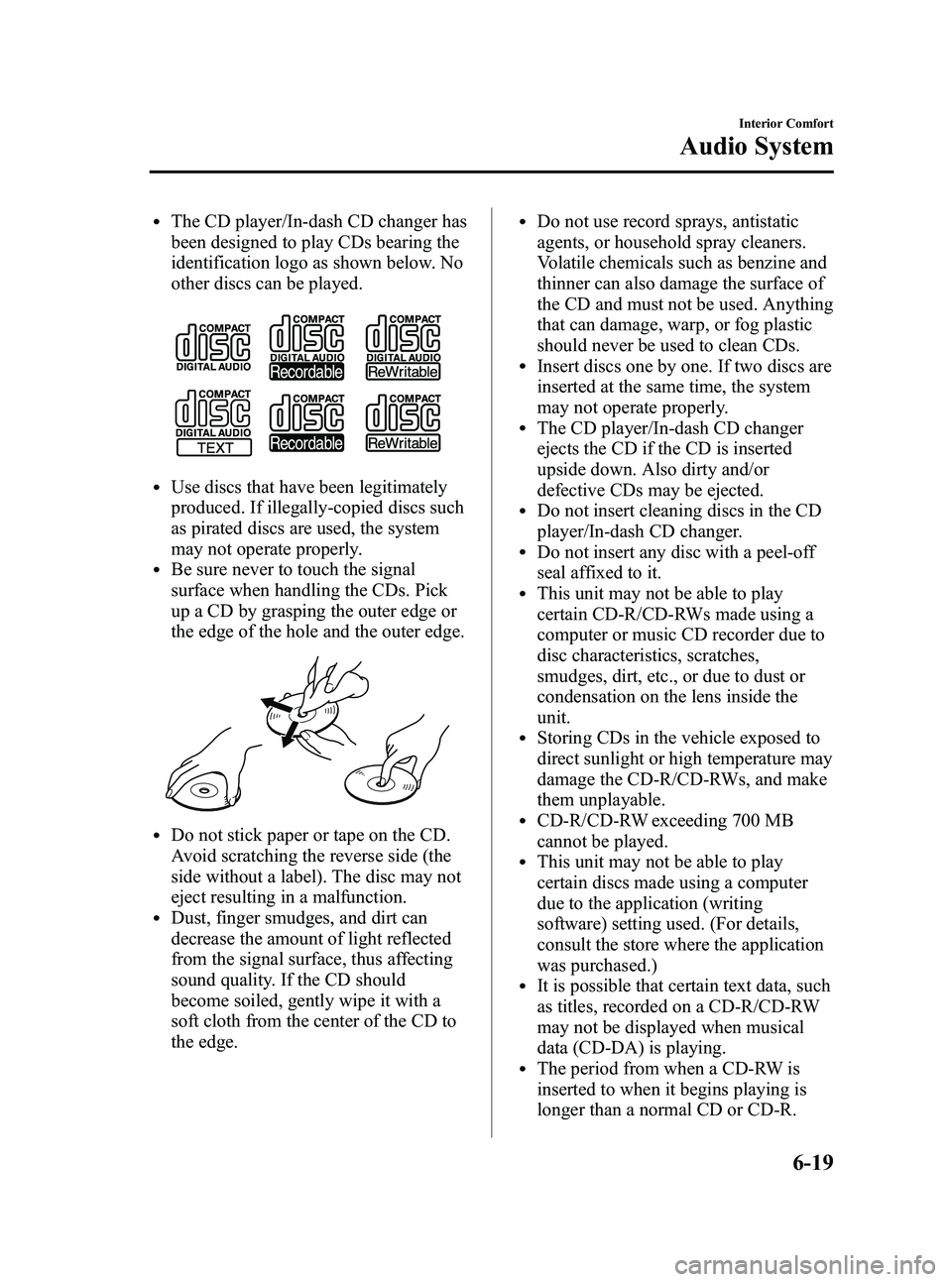
lThe CD player/In-dash CD changer has
been designed to play CDs bearing the
identification logo as shown below. No
other discs can be played.
lUse discs that have been legitimately
produced. If illegally-copied discs such
as pirated discs are used, the system
may not operate properly.
lBe sure never to touch the signal
surface when handling the CDs. Pick
up a CD by grasping the outer edge or
the edge of the hole and the outer edge.
lDo not stick paper or tape on the CD.
Avoid scratching the reverse side (the
side without a label). The disc may not
eject resulting in a malfunction.
lDust, finger smudges, and dirt can
decrease the amount of light reflected
from the signal surface, thus affecting
sound quality. If the CD should
become soiled, gently wipe it with a
soft cloth from the center of the CD to
the edge.
lDo not use record sprays, antistatic
agents, or household spray cleaners.
Volatile chemicals such as benzine and
thinner can also damage the surface of
the CD and must not be used. Anything
that can damage, warp, or fog plastic
should never be used to clean CDs.
lInsert discs one by one. If two discs are
inserted at the same time, the system
may not operate properly.
lThe CD player/In-dash CD changer
ejects the CD if the CD is inserted
upside down. Also dirty and/or
defective CDs may be ejected.
lDo not insert cleaning discs in the CD
player/In-dash CD changer.
lDo not insert any disc with a peel-off
seal affixed to it.
lThis unit may not be able to play
certain CD-R/CD-RWs made using a
computer or music CD recorder due to
disc characteristics, scratches,
smudges, dirt, etc., or due to dust or
condensation on the lens inside the
unit.
lStoring CDs in the vehicle exposed to
direct sunlight or high temperature may
damage the CD-R/CD-RWs, and make
them unplayable.
lCD-R/CD-RW exceeding 700 MB
cannot be played.
lThis unit may not be able to play
certain discs made using a computer
due to the application (writing
software) setting used. (For details,
consult the store where the application
was purchased.)
lIt is possible that certain text data, such
as titles, recorded on a CD-R/CD-RW
may not be displayed when musical
data (CD-DA) is playing.
lThe period from when a CD-RW is
inserted to when it begins playing is
longer than a normal CD or CD-R.
Interior Comfort
Audio System
6-19
MX-5_8CM3-EA-12F_Edition2 Page231
Friday, August 31 2012 1:45 PM
Form No.8CM3-EA-12F
Page 233 of 452

Black plate (233,1)
05
06
010204
03
15 4 2 3
Folder
No.
Level1
Level2 Level3
Level4
Playback may not occur in the above
hierarchy depending on the audio unit. : Track (File)
: Folder
lThe folder order is automatically
assigned and this order cannot be
optionally set.
lAny folder without an MP3 file will be
ignored. (It will be skipped and the
folder number will not be displayed.)
lMP3 files not conforming to the MP3
format containing both header frames
and data frames will be skipped and
not played.
lThis unit will play MP3 files that have
up to eight levels. However, the more
levels a disc has, the longer it will take
to initially start playing. It is
recommended to record discs with two
levels or less.
lA single disc with up to 512 files can
be played and a single folder with up to
255 files can be played.
lWhen naming an MP3 file, be sure to
add an MP3 file extension (.mp3) after
the file name.
lThe maximum number of characters
that can be used for file names is as
follows. However, this unit will only
display up to 32 characters, including
the file extension (.mp3).
Maximum number of
characters in a file name
(including a separator “.”
and the three letters of the file extension)
ISO9660 level 1 12
*
ISO9660 level 231*
Joliet extended
format 64
Romeo extended
format 128
* English one-byte characters (capitalized only) and underbar “_ ” are available.
CAUTION
This unit can only play MP3 files that
have an MP3 file extension (.mp3)
attached. Do not attach an MP3 file
extension to any other type file as it
could cause noise to be emitted or a
malfunction in the unit.
About ID3 Tag display
lThis unit can only display ID3 Tag
album, track and artist names that have
been input using Ver.1.0/1.1/2.2/2.3
formats. Any other data that may have
been input cannot be displayed.
lThis unit can only display English
(including numerals) one-byte
characters. Use only English (including
numerals) one-byte characters when
inputting ID3 tags. Two-byte characters
and some special symbols cannot be
displayed.
Interior Comfort
Audio System
6-21
MX-5_8CM3-EA-12F_Edition2 Page233
Friday, August 31 2012 1:45 PM
Form No.8CM3-EA-12F
Page 235 of 452

Black plate (235,1)
Playable WMA file specification
CD-R and CD-RW including WMA files
can be played with this unit. Discs which
conform to the following formats can be
played.
Playable WMA files are as follows:
ItemContent
Specification Windows Media
Audio Version 7.0,
8.0, 9.0
Sampling
frequency Bit rate 32kHz.
......32,40,
48 kbps
44.1kHz .....32,48,
64, 80, 96, 128, 160,
192 kbps
48kHz. ......64,96,
128, 160, 192 kbps
VBR (Variable Bit Rate) Supported
Channel mode Stereo/Monaural
WMA tag Title, artist name,
album name
CAUTION
This unit plays files with the (.wma)
file extension as a WMA file. Do not
use the WMA file extension for files
other than WMA files. It may cause
noise or a malfunction.
lIn a WMA file, the track name, artist
name and album name are recorded
with data called
“WMA-Tag ”, and the
information can be displayed.
lWMA files which do not comply with
the specific standard may not be played
correctly or its file and folder name
may not be displayed correctly.
lThe file extension may not be provided
depending on the computer operating
system, version, software, or settings.
In this case, add the file extension
“ .wma ”to the end of the file name, and
then write the disc.
Interior Comfort
Audio System
6-23
MX-5_8CM3-EA-12F_Edition2 Page235
Friday, August 31 2012 1:45 PM
Form No.8CM3-EA-12F
Page 237 of 452
Black plate (237,1)
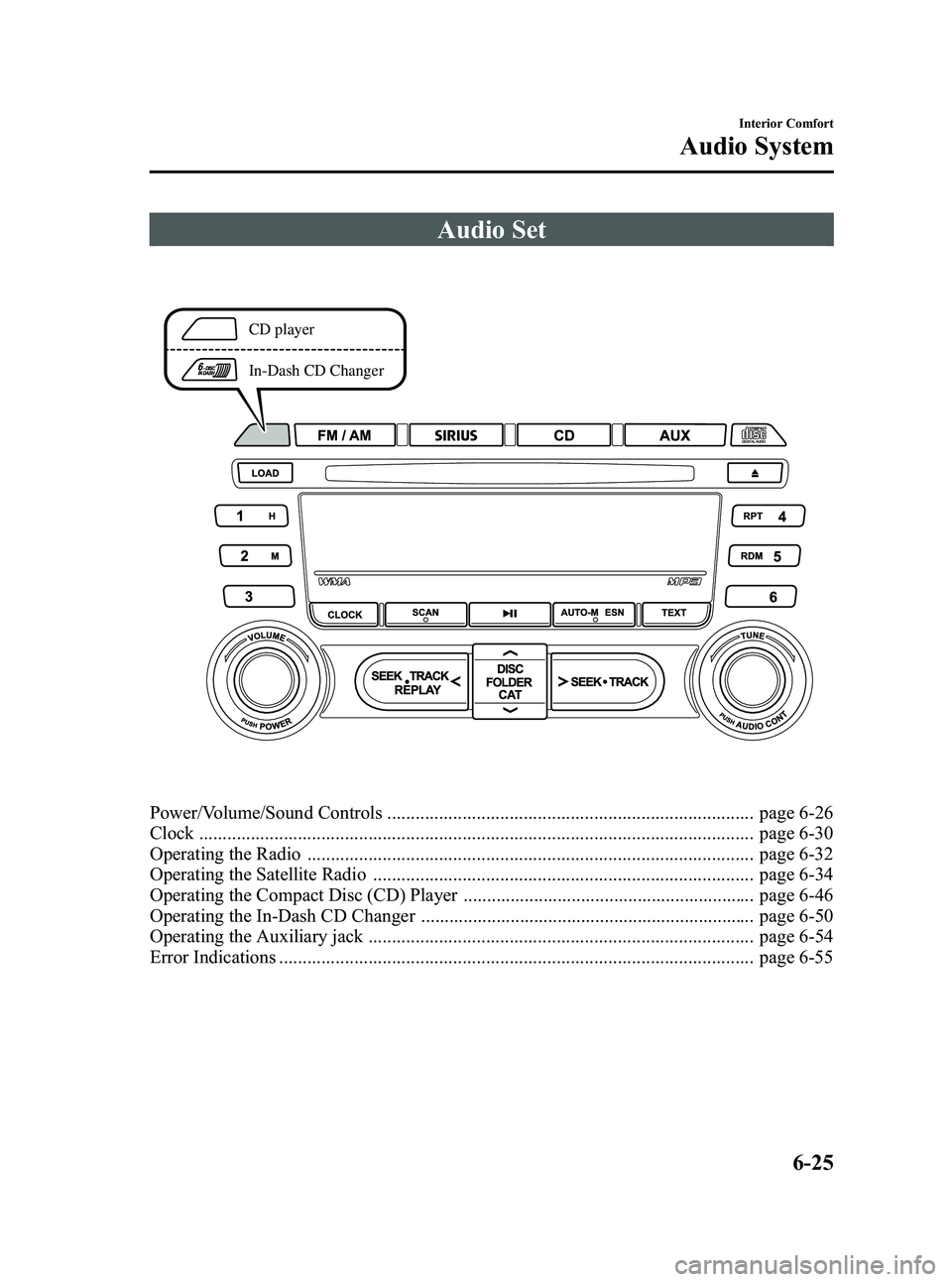
Audio Set
CD player
In-Dash CD Changer
Power/Volume/Sound Controls .............................................................................. page 6-26
Clock ...................................................................................................................... page 6-30
Operating the Radio ............................................................................................... page 6-32
Operating the Satellite Radio ................................................................................. page 6-34
Operating the Compact Disc (CD) Player .............................................................. page 6-46
Operating the In-Dash CD Changer ....................................................................... page 6-50
Operating the Auxiliary jack .................................................................................. page 6-54
Error Indications ..................................................................................................... page 6-55
Interior Comfort
Audio System
6-25
MX-5_8CM3-EA-12F_Edition2 Page237
Friday, August 31 2012 1:45 PM
Form No.8CM3-EA-12F
Page 239 of 452

Black plate (239,1)
Standard audio-equipped model
*
*
Bose Sound System-equipped model
*
*
* Depending on the mode selected, the indication changes.
2. Turn the audio control dial to adjust the selected functions as follows:
Standard audio-equipped model
Indication Turn Left Turn Right
Select mode
Decrease bass Increase
bass
Decreasetreble Increase
treble
Shift the
sound to the
front Shift the
sound to the
rear
Shift the
sound to the left Shift the
sound to the right
off on
12Hr
(Flashing) 24Hr
(Flashing)
Bose®Sound System-equipped model
Indication Turn Left Turn Right
off on
Decrease bass Increase
bass
Decreasetreble Increase
treble
Shift the
sound to the front Shift the
sound to the rear
Shift the
sound to the left Shift the
sound to the right
off on
12Hr
(Flashing) 24Hr
(Flashing)
Interior Comfort
Audio System
6-27
MX-5_8CM3-EA-12F_Edition2 Page239
Friday, August 31 2012 1:45 PM
Form No.8CM3-EA-12F
Page 240 of 452

Black plate (240,1)
NOTElDepending on the type of audio unit, the
order in which the functions appear differs.
lAbout 5 seconds after selecting any mode,
the volume function will be automatically
selected. To reset bass, treble, fade, and
balance, press the audio control dial for 2
seconds. The unit will beep and“CLEAR ”
will be displayed.
Automatic Level Control (ALC)
(Standard audio-equipped model)
The automatic level control (ALC) is a
feature that automatically adjusts audio
volume and sound quality according to
the vehicle speed.
The volume increases in accordance with
the increase in vehicle speed, and
decreases as vehicle speed decreases.
Select the desired ALC mode.
Mode Volume change
No change
Minimum
Medium
Maximum
Turn the audio control dial to select ALC
OFF or ALC LEVEL1― 7 modes. The
selected mode will be indicated.
*AudioPilot®2 (Bose®Sound System-
equipped model)
AudioPilot
®2 automatically adjusts audio
volume and sound quality in accordance
with the level of noise entering the vehicle
interior while driving. When AudioPilot
®
2 is turned on, the system automatically
calculates the conditions for optimum
hearing of sound which may be difficult
to hear depending on exterior noise.
6-28
Interior Comfort
Audio System
MX-5_8CM3-EA-12F_Edition2 Page240
Friday, August 31 2012 1:45 PM
Form No.8CM3-EA-12F
Page 241 of 452

Black plate (241,1)
The system is also equipped to optimally
adjust the acoustic characteristics
automatically while the roof is open or
closed. The acoustic adjustment occurs
with the lock/unlock operation of the top
latch on the roof, and while the
adjustment is being done, the audio is
muted for about 1.5 sec, and then fades in.
* AudioPilot
®2 is a registered trademark
of Bose Corporation.
BEEP setting
The beep-sound when operating the audio
system can be set on or off.
Time adjustment
Rotating the audio control dial switches
the display between 12 and 24-hour clock
time (page 6-30).
Interior Comfort
Audio System
6-29
MX-5_8CM3-EA-12F_Edition2 Page241
Friday, August 31 2012 1:45 PM
Form No.8CM3-EA-12F
Page 242 of 452
Black plate (242,1)
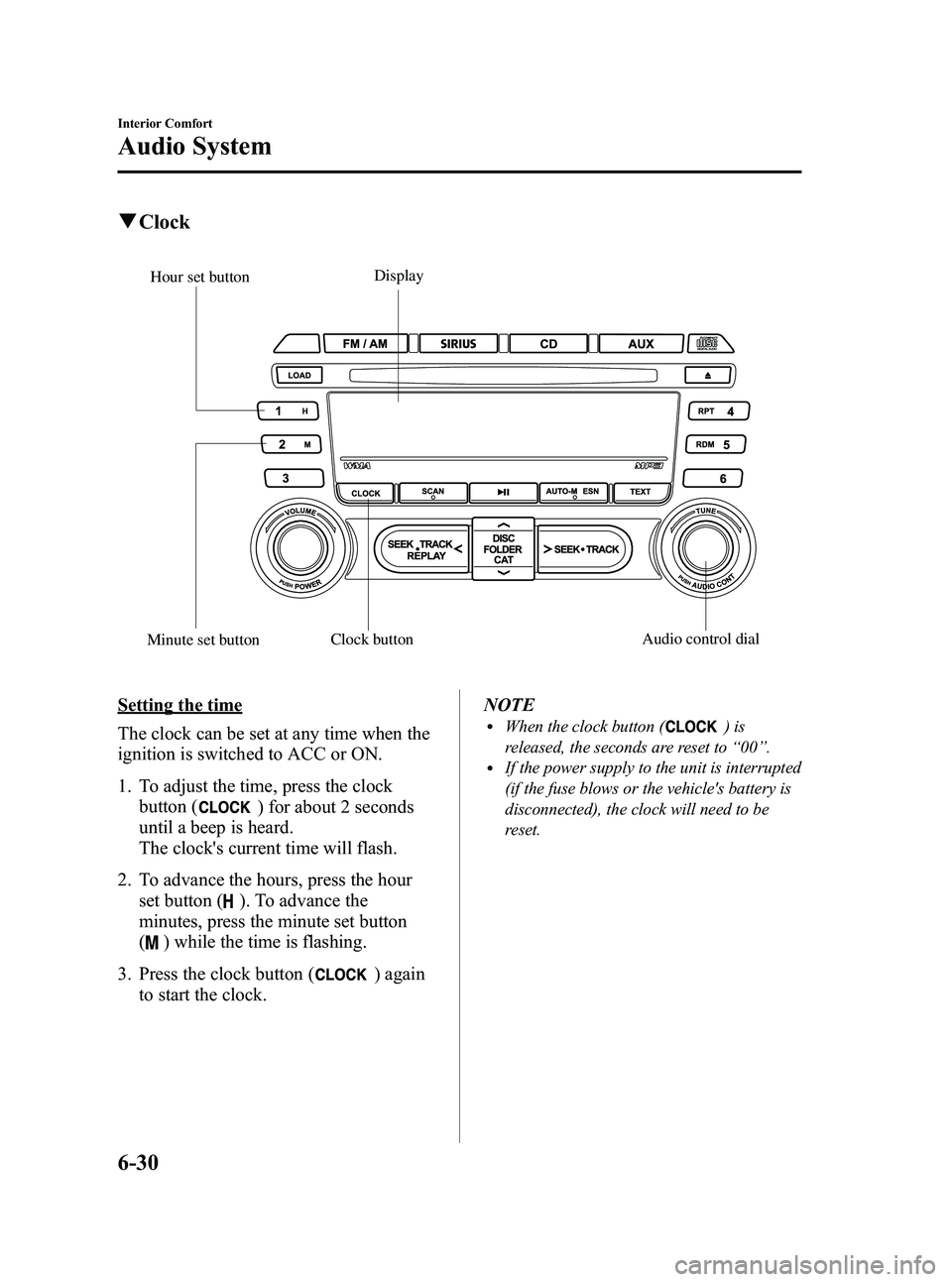
qClock
Display
Minute set button Hour set button
Clock button Audio control dial
Setting the time
The clock can be set at any time when the
ignition is switched to ACC or ON.
1. To adjust the time, press the clock
button (
) for about 2 seconds
until a beep is heard.
The clock's current time will flash.
2. To advance the hours, press the hour set button (
). To advance the
minutes, press the minute set button
(
) while the time is flashing.
3. Press the clock button (
) again
to start the clock. NOTE
lWhen the clock button ()is
released, the seconds are reset to “00 ”.
lIf the power supply to the unit is interrupted
(if the fuse blows or the vehicle's battery is
disconnected), the clock will need to be
reset.
6-30
Interior Comfort
Audio System
MX-5_8CM3-EA-12F_Edition2 Page242
Friday, August 31 2012 1:45 PM
Form No.8CM3-EA-12F