set MAZDA MODEL MX-5 MIATA PRHT 2013 Owner's Guide
[x] Cancel search | Manufacturer: MAZDA, Model Year: 2013, Model line: MODEL MX-5 MIATA PRHT, Model: MAZDA MODEL MX-5 MIATA PRHT 2013Pages: 452, PDF Size: 5.57 MB
Page 192 of 452
Black plate (192,1)
Adjust the tire pressure to the correct tire
pressure. Refer to the specification charts
(page 10-7).
CAUTION
When replacing/repairing the tires or
wheels or both, have the work done
by an Authorized Mazda Dealer, or
the tire pressure sensors may be
damaged.NOTE
lPerform tire pressure adjustment when the
tires are cold. Tire pressure will vary
according to the tire temperature, therefore
let the vehicle stand for 1 hour or only drive
it 1.6 km (1 mile) or less before adjusting
the tire pressures. When pressure is
adjusted on hot tires to the cold inflation
pressure, the TPMS warning light/beep may
turn on after the tires cool and pressure
drops below specification.
Also, an illuminated TPMS warning light,
resulting from the tire air pressure dropping
due to cold ambient temperature, may turn
off if the ambient temperature rises. In this
case, it will also be necessary to adjust the
tire air pressures. If the TPMS warning
light illuminates due to a drop in tire air
pressure, make sure to check and adjust the
tire air pressures.
lAfter adjusting the tire air pressures, it may
require some time for the TPMS warning
light to turn off. If the TPMS warning light
remains illuminated, drive the vehicle at a
speed of at least 25 km/h (16 mph) for 10
minutes, and then verify that it turns off.
lTires lose air naturally over time and the
TPMS cannot tell if the tires are getting too
soft over time or you have a flat. However,
when you find one low tire in a set of four-
that is an indication of trouble; you should
have someone drive the vehicle slowly
forward so you can inspect any low tire for
cuts and any metal objects sticking through
tread or sidewall. Put a few drops of water
in the valve stem to see if it bubbles
indicating a bad valve. Leaks need to be
addressed by more than simply refilling the
trouble tire as leaks are dangerous - take it
to an Authorized Mazda Dealer which has
all the equipment to fix tires, TPMS systems
and order the best replacement tire for your
vehicle.
5-48
Driving Your Mazda
Warning/Indicator Lights and Beep Sounds
MX-5_8CM3-EA-12F_Edition2 Page192
Friday, August 31 2012 1:45 PM
Form No.8CM3-EA-12F
Page 195 of 452
Black plate (195,1)
NOTE
The advanced key can be set so that the KEY
indicator light (green) does not flash even if
the battery power is low.
Refer to Setting Change (Function
Customization) on page 3-21.
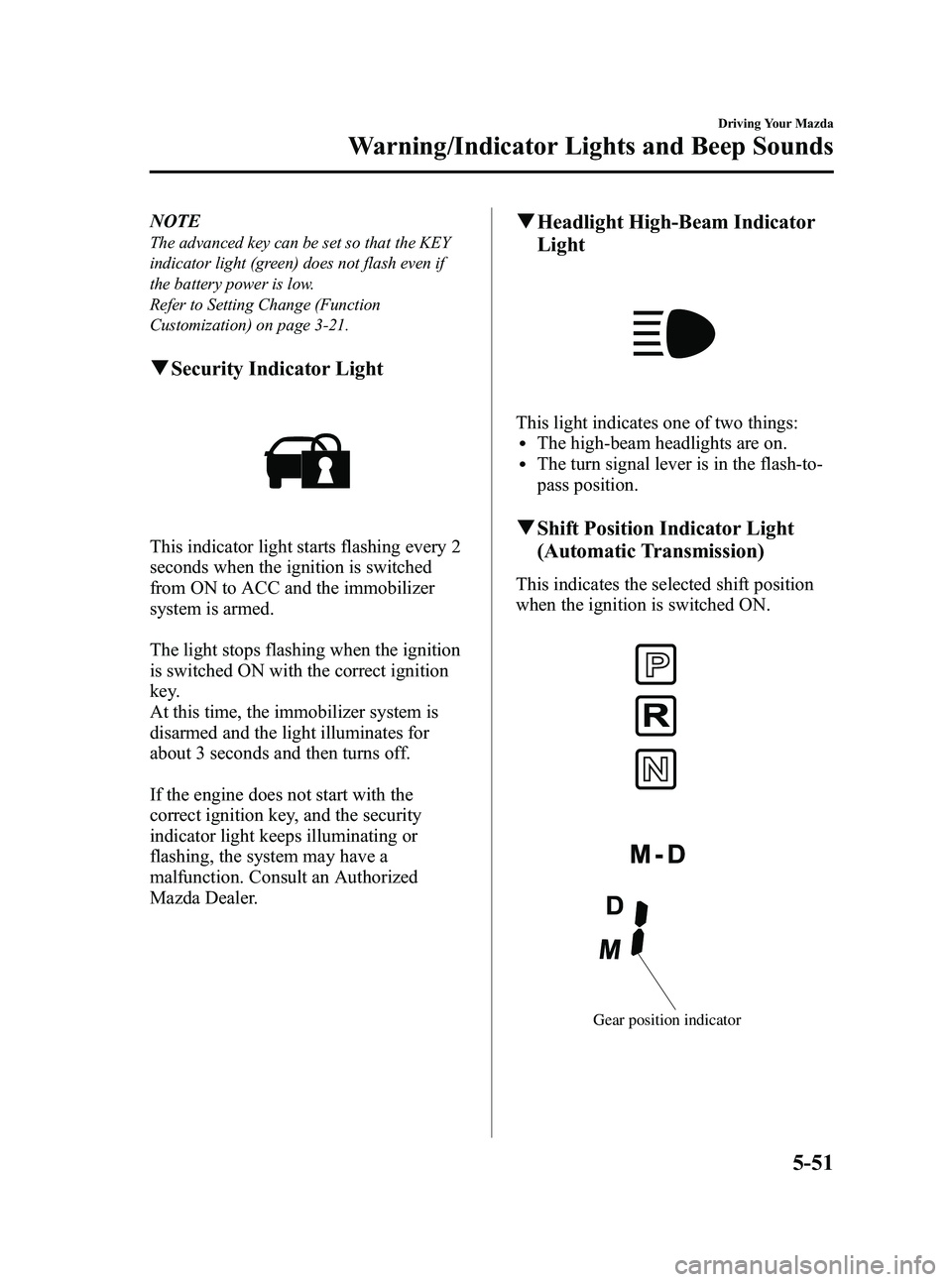
qSecurity Indicator Light
This indicator light starts flashing every 2
seconds when the ignition is switched
from ON to ACC and the immobilizer
system is armed.
The light stops flashing when the ignition
is switched ON with the correct ignition
key.
At this time, the immobilizer system is
disarmed and the light illuminates for
about 3 seconds and then turns off.
If the engine does not start with the
correct ignition key, and the security
indicator light keeps illuminating or
flashing, the system may have a
malfunction. Consult an Authorized
Mazda Dealer.
qHeadlight High-Beam Indicator
Light
This light indicates one of two things:lThe high-beam headlights are on.lThe turn signal lever is in the flash-to-
pass position.
qShift Position Indicator Light
(Automatic Transmission)
This indicates the selected shift position
when the ignition is switched ON.
Gear position indicator
Driving Your Mazda
Warning/Indicator Lights and Beep Sounds
5-51
MX-5_8CM3-EA-12F_Edition2 Page195
Friday, August 31 2012 1:45 PM
Form No.8CM3-EA-12F
Page 197 of 452

Black plate (197,1)
qCruise Main Indicator Light
(Amber)/Cruise Set Indicator
Light (Green)
í
The indicator light has two colors.
Cruise Main Indicator Light (Amber)
The indicator light illuminates amber
when the ON/OFF switch is pressed and
the cruise control system is activated.
Cruise Set Indicator Light (Green)
The indicator light illuminates green when
a cruising speed has been set.
qTurn-Signal/Hazard Warning
Indicator Lights
When operating the turn signal lights, the
left or right turn signal indicator light
flashes to indicate which turn signal light
is operating (page 5-57).
When operating the hazard warning
lights, both turn signal indicator lights
flash (page 5-60).
NOTE
If an indicator light remains illuminated (does
not flash) or if it flashes abnormally, one of the
turn signal bulbs may be burned out.
Beep Sounds
qSeat Belt Warning Beep
If the driver's seat belt is not fastened
when the ignition is switched ON, a beep
sound will be heard for about 6 seconds.
If the driver's seat belt is not fastened and
the vehicle is driven at a speed faster than
about 20 km/h (12 mph), a beep sound
will be heard again for a specified period
of time.
Refer to Seat Belt Reminder on page
2-17.
qIgnition Key Reminder
If the ignition is switched off or the
ignition is switched to ACC with the key
inserted, a continuous beep sound will be
heard when the driver's door is opened.
qLights-On Reminder
If lights are on and the key is removed
from the ignition switch, a continuous
beep sound will be heard when the
driver's door is opened.
NOTE
When the advanced keyless function is used
and the start knob is in the ACC position, the
Start Knob Not in Lock Warning Beep (page
3-19) overrides the lights-on reminder.
Driving Your Mazda
Warning/Indicator Lights and Beep Sounds
5-53íSome models.
MX-5_8CM3-EA-12F_Edition2 Page197
Friday, August 31 2012 1:45 PM
Form No.8CM3-EA-12F
Page 201 of 452
Black plate (201,1)
Turn and Lane-Change
Signals
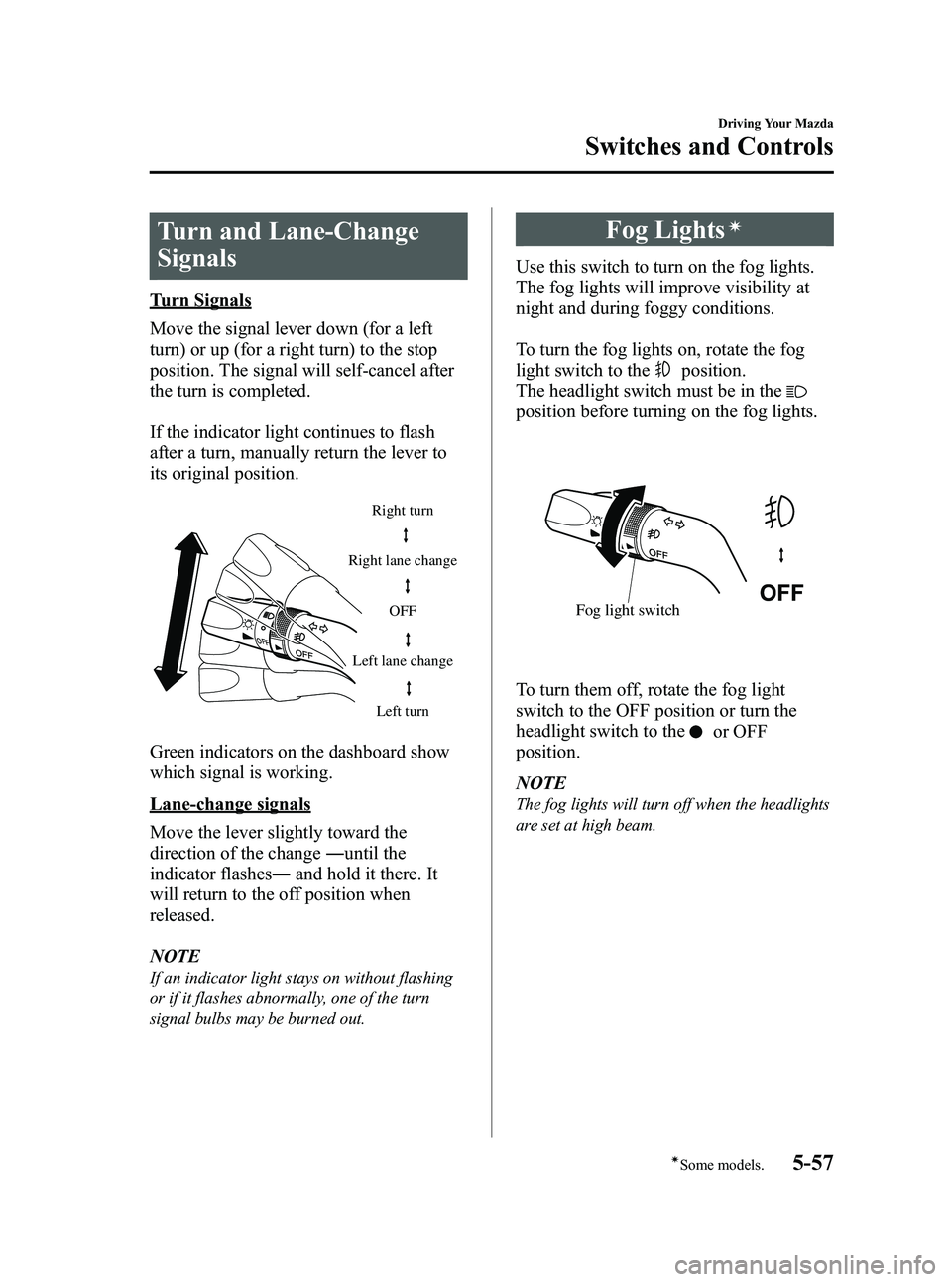
Turn Signals
Move the signal lever down (for a left
turn) or up (for a right turn) to the stop
position. The signal will self-cancel after
the turn is completed.
If the indicator light continues to flash
after a turn, manually return the lever to
its original position.
Right turnLeft turn
Right lane change
Left lane change OFF
Green indicators on the dashboard show
which signal is working.
Lane-change signals
Move the lever slightly toward the
direction of the change
―until the
indicator flashes ―and hold it there. It
will return to the off position when
released.
NOTE
If an indicator light stays on without flashing
or if it flashes abnormally, one of the turn
signal bulbs may be burned out.
Fog Lightsí
Use this switch to turn on the fog lights.
The fog lights will improve visibility at
night and during foggy conditions.
To turn the fog lights on, rotate the fog
light switch to the
position.
The headlight switch must be in the
position before turning on the fog lights.
Fog light switch
To turn them off, rotate the fog light
switch to the OFF position or turn the
headlight switch to the
or OFF
position.
NOTE
The fog lights will turn off when the headlights
are set at high beam.
Driving Your Mazda
Switches and Controls
5-57íSome models.
MX-5_8CM3-EA-12F_Edition2 Page201
Friday, August 31 2012 1:45 PM
Form No.8CM3-EA-12F
Page 213 of 452
Black plate (213,1)
6Interior Comfort
Use of various features for drive comfort, including air-conditioning and audio
system.
Climate Control System ............................................................... 6-2Operating Tips ........................................................................... 6-2
Vent Operation .......................................................................... 6-3
Types of the Climate Control System ....................................... 6-5
Manual Type
í.......................................................................... 6-6
Automatic Typeí.................................................................... 6-10
Audio System ............................................................................... 6-14 Antenna ................................................................................... 6-14
Operating Tips for Audio System ........................................... 6-15
Audio Set ................................................................................ 6-25
Audio Control Switch Operation
í......................................... 6-56
AUX Mode (Auxiliary input) ................................................. 6-58
Safety Certification ................................................................. 6-61
Bluetooth® Hands-Free .............................................................. 6-62 Bluetooth® Hands-Free
í....................................................... 6-62
Basic Bluetooth® Hands-Free Operation ................................ 6-65
Convenient Use of the Hands-Free System ............................. 6-69
Hands-Free Telephone Setting ................................................ 6-74
When Bluetooth® Hands-Free cannot be used ....................... 6-79
Safety Certification ................................................................. 6-79
Mazda Bluetooth® Hands-Free Customer Service ................. 6-80
Interior Equipment ..................................................................... 6-81 Sunvisors ................................................................................. 6-81
Interior Lights ......................................................................... 6-81
Cup Holder .............................................................................. 6-82
Multi-Pocket ........................................................................... 6-82
Storage Compartments ............................................................ 6-83
Accessory Socket .................................................................... 6-84
Windblocker ............................................................................ 6-85
6-1íSome models.
MX-5_8CM3-EA-12F_Edition2 Page213
Friday, August 31 2012 1:45 PM
Form No.8CM3-EA-12F
Page 218 of 452

Black plate (218,1)
Manual Typeí
Mode selector dialTemperature control dial Fan control dial
Air intake selector
Rear window defroster switch *A/C switch
*Some models
qControl Switches
Temperature control dial
Hot
Cold
This dial controls temperature. Turn it
clockwise for hot and counterclockwise
for cold. NOTE
When the mode is set to,orwith
the fan control dial in a position other than 0
and the temperature control dial in the
maximum cold position, the air intake selector
switches to the recirculated air mode and the
A/C turns on automatically.
If A/C is not desired, press the A/C switch to
turn it off.
Fan control dial
Slow Fast
6-6
Interior Comfort
íSome models.
Climate Control System
MX-5_8CM3-EA-12F_Edition2 Page218
Friday, August 31 2012 1:45 PM
Form No.8CM3-EA-12F
Page 220 of 452

Black plate (220,1)
WARNING
Do not use the recirculated air mode in
cold or rainy weather:Using the recirculated air mode in
cold or rainy weather is dangerous as
it will cause the windows to fog up.
Your vision will be hampered, which
could lead to a serious accident.
qHeating
1. Set the mode selector dial to theor
position.
2. Set the temperature control dial to the hot position.
3. Set the fan control dial to the desired speed.
NOTE
lIf the windshield fogs up easily, set the
mode selector dial to the
position.lIf cooler air is desired at face level, set the
mode selector dial at the
position and
adjust the temperature control dial to
maintain maximum comfort.
lThe air to the floor is warmer than air to
the face (except when the temperature
control dial is set at the extreme hot or cold
position).
lIn the,,orposition, the air
conditioner is automatically turned on
(however, the indicator light does not
illuminate) and the outside air mode is
automatically selected to defrost the
windshield.
In the
orposition, the outside air
mode cannot be changed to the recirculated
air mode.
q Cooling (With Air Conditioner)í
1. Set the mode selector dial to theor
position.
2. Set the temperature control dial to the cold position.
3. Set the fan control dial to the desired speed.
4. Turn on the air conditioner by pressing the A/C switch.
5. Adjust the fan control dial and temperature control dial to maintain
maximum comfort.
CAUTION
When using the air conditioner while
driving up long hills or in heavy
traffic, closely monitor the
temperature gauge (page 5-39).
The air conditioner may cause engine
overheating. If the gauge indicates
overheating, turn the air conditioner
off (page 7-19).
NOTE
lWhen maximum cooling is desired, set the
temperature control dial to the extreme cold
position and set the air intake selector to
the recirculated air mode, then turn the fan
control dial fully clockwise.
lIf warmer air is desired at floor level, set
the mode selector dial at the
or
position and adjust the temperature control
dial to maintain maximum comfort.
lThe air to the floor is warmer than air to
the face (except when the temperature
control dial is set at the extreme hot or cold
position).
6-8
Interior Comfort
íSome models.
Climate Control System
MX-5_8CM3-EA-12F_Edition2 Page220
Friday, August 31 2012 1:45 PM
Form No.8CM3-EA-12F
Page 221 of 452

Black plate (221,1)
qVentilation
1. Set the mode selector dial to theor
position.
2. Set the air intake selector to the outside air mode.
3. Set the temperature control dial to the desired position.
4. Set the fan control dial to the desired speed.
qWindshield Defrosting and Defogging
1. Set the mode selector dial to the
position.
2. Set the temperature control dial to the desired position.
3. Set the fan control dial to the desired speed.
WARNING
Do not defog the windshield using the
position with the temperature
control set to the cold position:
Using the
position with the
temperature control set to the cold
position is dangerous as it will cause
the outside of the windshield to fog
up. Your vision will be hampered,
which could lead to a serious
accident. Set the temperature control
to the hot or warm position when
using the
position. NOTE
lFor maximum defrosting, set the
temperature control dial to the extreme hot
position and turn the fan control dial fully
clockwise.
lIf warm air is desired at the floor, set the
mode selector dial to the
position.lIn the,,orposition, the air
conditioner is automatically turned on
(however, the indicator light does not
illuminate) and the outside air mode is
automatically selected to defrost the
windshield.
In the
orposition, the outside air
mode cannot be changed to the recirculated
air mode.
q Dehumidifying (With Air
Conditioner)í
Operate the air conditioner in cool or cold
weather to help defog the windshield and
side windows.
1. Set the mode selector dial to the
desired position.
2. Set the air intake selector to the outside air mode.
3. Set the temperature control dial to the desired position.
4. Set the fan control dial to the desired speed.
5. Turn on the air conditioner by pressing the A/C switch.
NOTE
One of the functions of the air conditioner is
dehumidifying the air and, to use this function,
the temperature does not have to be set to cold.
Therefore, set the temperature control dial to
the desired position (hot or cold) and turn on
the air conditioner when you want to
dehumidify the cabin air.
Interior Comfort
Climate Control System
6-9íSome models.
MX-5_8CM3-EA-12F_Edition2 Page221
Friday, August 31 2012 1:45 PM
Form No.8CM3-EA-12F
Page 223 of 452

Black plate (223,1)
qControl Switches
Temperature control dial
Hot
Cold
This dial controls temperature. Turn it
clockwise for hot and counterclockwise
for cold.
NOTE
lTurn the dial completely left to set the
temperature to maximum cooling, and
completely right for maximum heating.
lWhen the mode is set to,or
with the fan control dial in a position other
than 0 and the temperature control dial in
the maximum cold position, the air intake
selector switches to the recirculated air
mode and the A/C turns on automatically. If
A/C is not desired, press the A/C switch to
turn it off.
Fan control dial
Fast
Slow
This dial allows variable fan speeds.
AUTO position
The amount of airflow will be
automatically controlled in accordance
with the set temperature. Except AUTO position
The airflow amount can be adjusted to the
desired level by turning the dial.
OFF position
To turn off the system, set the dial to OFF.
Mode selector dial
Turn the mode selector dial to select
airflow mode (page 6-4).
AUTO position
The airflow mode automatically adjusts to
the selected temperature.
Except AUTO position
The desired airflow position can be
selected by turning the dial.
NOTE
With the airflow mode set toposition and
the temperature control dial set at a medium
temperature, heated air is directed to the feet
and a comparably lower air temperature will
flow through the central, left and right vents.
A/C switch
Interior Comfort
Climate Control System
6-11
MX-5_8CM3-EA-12F_Edition2 Page223
Friday, August 31 2012 1:45 PM
Form No.8CM3-EA-12F
Page 224 of 452

Black plate (224,1)
With the fan control dial ON, press the
A/C switch to select the air conditioning
(cooling/dehumidifying functions) on or
off.
NOTE
The air conditioner may not function when the
outside temperature approaches 0 °C(32 °F).
Air intake selector
Outside or recirculated air positions can
be selected. Press the switch to select
outside/recirculated air positions.
Recirculated air position (indicator
light illuminated)
Use this position when going through
tunnels, driving in congested traffic (high
engine exhaust areas) or when quick
cooling is desired.
Outside air position (indicator light
turned off)
Use this position for normal conditions
and defogging.
WARNING
Do not use theposition in cold or
rainy weather:
Using the
position in cold or
rainy weather is dangerous as it will
cause the windows to fog up. Your
vision will be hampered, which could
lead to a serious accident.
q Operation of Automatic Air
Conditioning
1. Set the mode selector dial to the AUTO
position.
2. Set the air intake selector to the outside air position (indicator light turned off).
3. Set the temperature control dial to the desired position.
4. Set the fan control dial to the AUTO position.
5. Turn on the air conditioner.
To turn off the system, set the fan control
dial to OFF.
NOTE
lSetting the temperature to maximum high
or low will not provide the desired
temperature at a faster rate.
lTo prevent cool air blowing from the vents
when heating right after starting the
engine, the amount of airflow is reduced
until the air warms up.
lTurn the mode selector dial to an OPEN
MODE position for maximum comfort
while the roof is open. When the mode
selector dial is turned to the AUTO
position, OPEN MODE (
) and ()
vents will not be selected automatically.
Select them manually.
qWindshield Defrosting and Defogging
Set the mode selector dial to the
position and turn the fan control dial to
the desired speed.
The outside air position is automatically
selected. The air conditioner will
automatically turn on and direct
dehumidified air to the front windshield
and side windows.
6-12
Interior Comfort
Climate Control System
MX-5_8CM3-EA-12F_Edition2 Page224
Friday, August 31 2012 1:45 PM
Form No.8CM3-EA-12F