set MAZDA MODEL MX-5 MIATA PRHT 2013 Repair Manual
[x] Cancel search | Manufacturer: MAZDA, Model Year: 2013, Model line: MODEL MX-5 MIATA PRHT, Model: MAZDA MODEL MX-5 MIATA PRHT 2013Pages: 452, PDF Size: 5.57 MB
Page 262 of 452

Black plate (262,1)
qOperating the In-Dash CD Changer
Disc up/Folder up button
Track down/Reverse button
Channel preset buttons
Text button
Scan button
Random button
Disc down/Folder down button Track up/Fast-forward buttonPlay/Pause button
Load button
CD slot
Channel
preset buttons
Display
CD play button
CD eject button
Repeat button
Type
Playable data
Music/MP3/WMA CD
player
lMusic data (CD-DA)lMP3/WMA file
NOTE
If a disc has both music data (CD-DA) and
MP3/WMA files, playback of the two or three
file types differs depending on how the disc
was recorded.
Inserting the CD
The CD must be label-side up when
inserting. The auto-loading mechanism
will set the CD and begin play. NOTE
The CD will begin playback automatically
after insertion.
A CD cannot be inserted while the display
reads
“WAIT ”. A beeping sound can be heard
during this waiting time.
There will be a short lapse before play begins
while the player reads the digital signals on
the CD.
Normal insertion
1. Press the load button (
).
2. When “IN ”is displayed, insert the CD.
Inserting CDs into desired tray number
1. Press and hold the load button (
)
for about 2 seconds until a beep sound
is heard.
6-50
Interior Comfort
Audio System
MX-5_8CM3-EA-12F_Edition2 Page262
Friday, August 31 2012 1:46 PM
Form No.8CM3-EA-12F
Page 263 of 452

Black plate (263,1)
2. Press the channel preset button for thedesired tray number while “WAIT ”is
displayed.
3. When “IN ”is displayed, insert the CD.
NOTE
The CD cannot be inserted to the desired tray
number if the number is already occupied.
Multiple insertion
1. Press and hold the load button (
)
for about 2 seconds until a beep sound
is heard.
2. When “IN ”is displayed, insert the CD.
3. When “IN ”is displayed again, insert
the next CD.
NOTE
The first-inserted CD will be played
automatically when:
lNo other CD is inserted within 15 seconds
after “IN ”is displayed.
lThe CD trays are full.
Ejecting the CD
Normal ejection
1. Press the CD eject button (
). The
disc number and “DISC OUT ”will be
displayed.
2. Pull out the CD.
NOTE
When the CD is ejected during play, the next
CD will be played automatically.
Ejecting CDs from desired tray number
1. Press and hold the CD eject button (
)
for about 2 seconds until a beep sound
is heard.
The “DISC OUT ”display flashes. 2. Press the channel preset button for the
desired CD number for less than 5
seconds after the beep sound is heard.
3. Pull out the CD.
Multiple ejection
1. Press and hold the CD eject button (
)
for about 2 seconds until a beep sound
is heard.
The “DISC OUT ”display flashes.
2. Pull out the CD, then the next CD will be ejected.
NOTE
lCDs will be ejected starting with the one
with the lowest number.
lAll CDs in the tray will be ejected
continuously.
lCDs can be ejected when the ignition is
switched off. Press and hold the CD eject
button (
) for about 2 seconds and all
CDs will eject.
Playback
Press the CD play button (
) to start
play when a CD is in the unit.
If a CD is not in the unit when the CD
play button (
) is pressed, “NO DISC ”
will flash on and off.
Pause
To stop playback, press the Play/Pause
button (
).
Press the button again to resume
playback.
Fast-forward/Reverse
Press and hold the fast-forward button
(
) to advance through a track at high
speed.
Press and hold the reverse button (
)to
reverse through a track at high speed.
Interior Comfort
Audio System
6-51
MX-5_8CM3-EA-12F_Edition2 Page263
Friday, August 31 2012 1:46 PM
Form No.8CM3-EA-12F
Page 272 of 452
Black plate (272,1)
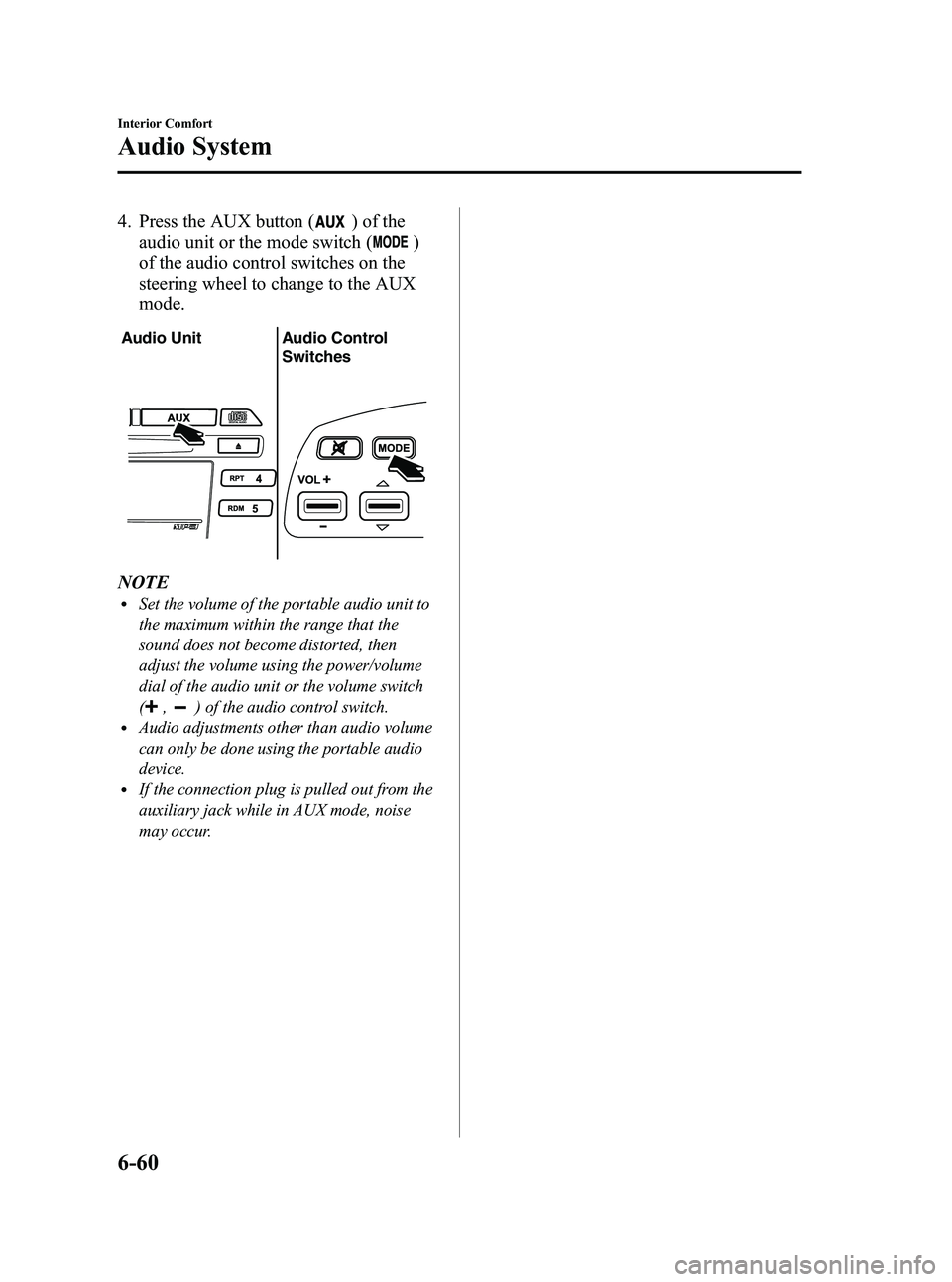
4. Press the AUX button () of the
audio unit or the mode switch (
)
of the audio control switches on the
steering wheel to change to the AUX
mode.
Audio Unit Audio Control
Switches
NOTElSet the volume of the portable audio unit to
the maximum within the range that the
sound does not become distorted, then
adjust the volume using the power/volume
dial of the audio unit or the volume switch
(
,) of the audio control switch.lAudio adjustments other than audio volume
can only be done using the portable audio
device.
lIf the connection plug is pulled out from the
auxiliary jack while in AUX mode, noise
may occur.
6-60
Interior Comfort
Audio System
MX-5_8CM3-EA-12F_Edition2 Page272
Friday, August 31 2012 1:46 PM
Form No.8CM3-EA-12F
Page 277 of 452
Black plate (277,1)
Bluetooth®Hands-Free Activation
Method
1. Program the mobile telephone (Pairing)Refer to Bluetooth® Hands-Free
Preparation on page 6-65.
2. Press the voice recognition/hands-free switch with a short press.
The hands-free system is activated.
Functions of the hands-free telephone,
such as making and receiving calls, can be
used after the activation. (For details on
the telephone functions, refer to “Basic
Bluetooth
®Hands-Free Operation ”or
“ Convenient Use of the Hands-Free
System ”.)
Basic Bluetooth® Hands-
Free Operation
qBluetooth® Hands-Free Preparation
Language setting
The available languages are English,
Spanish, and Canadian French. If the
language setting is changed, all of the
voice guidance and voice input
commands are done in the selected
language.
NOTE
lIf the language setting is changed, phone
registration is maintained.
Phonebook records are not cleared, but
each language has a separate phonebook.
Therefore, entries created in one language
will need to be re-entered in the phonebook
of the new language.
lDo these steps before you start driving.
These less used functions are too
distracting to undertake while driving until
you are fully familiar with the system.
Method 1
1. Press the voice recognition/hands-free
switch with a short press.
2. Say: [Beep] “Setup ”
3. Prompt: “Select one of the following:
Pairing options, confirmation prompts,
select phone, language, or passcode, or
say “cancel ”to return to the main
menu. ”
4. Say: [Beep] “Language ”
5. Prompt: “Select a language: English,
French, or Spanish. ”
6. Say: [Beep] “French ”(Speak the
desired language: “English ”, “French ”
or “Spanish ”)
Interior Comfort
Bluetooth® Hands-Free
6-65
MX-5_8CM3-EA-12F_Edition2 Page277
Friday, August 31 2012 1:46 PM
Form No.8CM3-EA-12F
Page 278 of 452
Black plate (278,1)
NOTE
Other language settings can also be made
while in the current setting by saying the name
of the language in the native pronunciation.
7.Prompt: “French (Desired language)
selected. Is this correct? ”
8. Say: [Beep] “Ye s ”
9. Prompt: “French (Desired language)
selected, returning to main menu ”
(Spoken in the newly selected
language).
Method 2
1. Press the voice recognition/hands-free switch with a short press.
2. Say: [Beep] “French ”(Say the desired
language: “English ”, “French ”,or
“ Spanish ”.)
NOTE
Other language settings can also be made
while in the current setting by saying the name
of the language in the native pronunciation.
3. Prompt: “Would you like to change
the language to French (Desired
language)? ”
4. Say: [Beep] “Ye s ”
5. Prompt: “Please wait. Switching to
French phone book. French selected,
returning to main menu ”(Spoken in
the newly selected language).
Mobile telephone programming
(Pairing)
To use Bluetooth
®Hands-Free, a mobile
phone equipped with Bluetooth®has to be
programmed to the hands-free unit using
the following procedure. Up to seven Bluetooth
®equipped mobile
telephones can be programmed to the
vehicle.
NOTE
lA mobile telephone can be programmed
only when the vehicle is parked. If the
vehicle starts to move, the pairing
procedure will end. Programming is
dangerous while driving - pair up your
device before you start driving. Park the
car in a safe place before programming.
lSince the communication range of a
Bluetooth®equipped mobile telephone is
about 10 meters (32 ft), if a mobile
telephone is placed within a 10-meter (32
ft) radius of the vehicle, it may be detected/
programmed unintentionally while another
telephone is being programmed.
1. Activate the Bluetooth®application of
the mobile telephone.
NOTE
For the operation of the mobile telephone,
refer to its instruction manual.
2. Press the voice recognition/hands-free switch with a short press.
3. Say: [Beep] “Setup ”
4. Prompt: “Select one of the following:
Pairing options, confirmation prompts,
select phone, language, or passcode, or
say “cancel ”to return to the main
menu. ”
5. Say: [Beep] “Pairing options ”
6. Prompt: “Do you want to pair a
phone, delete a phone, or list paired
phones? ”
7. Say: [Beep] “Pair a phone ”
8. Prompt: “Please say a 4-digit pairing
code. ”
6-66
Interior Comfort
Bluetooth® Hands-Free
MX-5_8CM3-EA-12F_Edition2 Page278
Friday, August 31 2012 1:46 PM
Form No.8CM3-EA-12F
Page 279 of 452
![MAZDA MODEL MX-5 MIATA PRHT 2013 Repair Manual Black plate (279,1)
9.Say: [Beep] “XXXX ”(Speak an
arbitrary 4-digit pairing code. This can
be any combination of 4 numbers.)
NOTE
lSome devices accept only a particular
pairing code (Usually, “](/img/28/41006/w960_41006-278.png "MAZDA MODEL MX-5 MIATA PRHT 2013 Repair Manual Black plate (279,1)
9.Say: [Beep] “XXXX ”(Speak an
arbitrary 4-digit pairing code. This can
be any combination of 4 numbers.)
NOTE
lSome devices accept only a particular
pairing code (Usually, “")
Black plate (279,1)
9.Say: [Beep] “XXXX ”(Speak an
arbitrary 4-digit pairing code. This can
be any combination of 4 numbers.)
NOTE
lSome devices accept only a particular
pairing code (Usually, “0000 ”or “1234 ”).
If pairing cannot be completed, refer to the
owner's manual of your mobile device, and
try those numbers if necessary.
lRecord the code as it will be used to
program your phone in Step 16.
10. Prompt: “Pairing code XXXX (4-
digit number). Is this correct? ”
11. Say: [Beep] “Ye s ”or “No ”
12. If “Ye s ”, go to Step 13.
If “No” , the procedure returns to Step
8.
13. Prompt: “Start pairing procedure on
phone. See phone's manual for
instructions. ”
14. Using the mobile telephone, perform a search for the Bluetooth
®device
(Peripheral device).
NOTE
For the operation of the mobile telephone,
refer to its instruction manual.
15. Select “Mazda ”from the device list
searched by the mobile phone.
16. Input the 4-digit pairing code set in Step 9 to the mobile telephone.
17. Prompt: “Please say the name of the
phone after the beep. ”
18. Say: [Beep] “XXXX - - - ”(Speak a
“ phone tag ”, an arbitrary name for the
phone.)
Example: “Stan's phone. ” NOTE
Speak a programmed
“phone tag ”within 10
seconds.
If more than two mobile telephones are to be
programmed, they cannot be programmed with
the same or similar “phone tag ”.
19. Prompt: “Adding XXXXXX - - -
(Ex. “Stan's phone ”) (Phone tag). Is
this correct? ”
20. Say: [Beep] “Ye s ”
21. Prompt: “Assign a priority for this
phone between 1 and 7, where 1 is
the phone used most often.”
22. Say: [Beep] “1 ” (Speak a number of
the desired priority from 1 to 7.)
NOTE
lNormally, “1” is to be input (Highest
priority).
lIf more than two mobile telephones are
registered, input the priority order from 1 to
7.
23. Prompt: “XXXXXX - - - (Ex.
“ Stan's phone ”) (Phone tag) set to
priority X (Priority number). Is this
correct? ”
24. Say: [Beep] “Ye s ”
25. Prompt: “Pairing complete ”
After a mobile telephone is registered, the
system automatically identifies the phone.
By pressing the voice recognition/hands-
free switch again, or by pressing the voice
recognition/hands-free switch first after
switching the ignition from OFF to ACC,
the system reads out a voice guidance,
“ XXXXXX - - - (Ex. “Stan's phone ”)
(Phone tag) is connected ”. If two or more
telephones are registered, the one with the
highest priority is selected.
Interior Comfort
Bluetooth® Hands-Free
6-67
MX-5_8CM3-EA-12F_Edition2 Page279
Friday, August 31 2012 1:46 PM
Form No.8CM3-EA-12F
Page 282 of 452
![MAZDA MODEL MX-5 MIATA PRHT 2013 Repair Manual Black plate (282,1)
13.Prompt: “Number, please. ”
14. Say: [Beep] “XXXXXXXXXXX
(Ex. “555-1234 ”)” (Say the phone
number to be registered.)
15. Prompt: “XXXXXXXXXXX (Ex.
“ 555-1234 ”)](/img/28/41006/w960_41006-281.png "MAZDA MODEL MX-5 MIATA PRHT 2013 Repair Manual Black plate (282,1)
13.Prompt: “Number, please. ”
14. Say: [Beep] “XXXXXXXXXXX
(Ex. “555-1234 ”)” (Say the phone
number to be registered.)
15. Prompt: “XXXXXXXXXXX (Ex.
“ 555-1234 ”)")
Black plate (282,1)
13.Prompt: “Number, please. ”
14. Say: [Beep] “XXXXXXXXXXX
(Ex. “555-1234 ”)” (Say the phone
number to be registered.)
15. Prompt: “XXXXXXXXXXX (Ex.
“ 555-1234 ”) (Phone number
registration). Is this correct? ”
16. Say: [Beep] “Ye s ”
17. Prompt: “Number saved. Would you
like to add another number for this
entry? ”
18. Say: [Beep] “Ye s ”or “No ”.
19. If “Ye s ”, an additional phone number
registration can be made for the same
entry.
If “No” , the procedure proceeds to
Step 20.
20. Prompt: “Returning to main menu. ”
Making calls using the phone book
Telephone calls can be made by saying
the name of a person (voice tag) whose
phone number has been registered in
Bluetooth
®Hands-Free in advance.
For the phone book setting method, refer
to (page 6-71).
1. Press the voice recognition/hands-free switch with a short press.
2. Say: [Beep] “Call ”
3. Prompt: “Name please. ”
4. Say: [Beep] “XXXXX... (Ex. “John's
phone ”)” (Say a voice tag registered in
the phone book.)
5. Prompt: “Calling XXXXX... (Ex.
“ John's phone ”) XXXX (Ex. “at
home ”). Is this correct? ”(Voice tag and
phone number location registered in
phone book). 6.
Say: [Beep] “Ye s ”
7. Prompt: “Dialing ”
NOTE
The “Call ”command and the voice tag can be
combined.
Ex. In Step 2, say, “Call John's phone ”, then,
Steps 3 and 4 can be skipped.
q Redialing function
Redialing the number of the person
previously dialed using the phone is
possible.
1. Press the voice recognition/hands-free
switch with a short press.
2. Say: [Beep] “Redial ”
3. Prompt: “Dialing ”
qEmergency calls
A call can be made to the emergency
phone number (911) using the voice input
command.
1. Press the voice recognition/hands-free
switch with a short press.
2. Say: [Beep] “Emergency ”
3. Prompt: “Calling “911 ”, is this
correct? ”
4. Say: [Beep] “Ye s ”
5. Prompt: “Dialing ”
qRefusing an incoming call
For incoming call refusal, refer to
“Receiving an incoming call ”(page 6-68).
6-70
Interior Comfort
Bluetooth® Hands-Free
MX-5_8CM3-EA-12F_Edition2 Page282
Friday, August 31 2012 1:46 PM
Form No.8CM3-EA-12F
Page 283 of 452
![MAZDA MODEL MX-5 MIATA PRHT 2013 Repair Manual Black plate (283,1)
qMute
The microphone can be muted during a
call.
1. Press the voice recognition/hands-free
switch with a short press.
2. Say: [Beep] “Mute ”
3. Prompt: “Microphone muted ”](/img/28/41006/w960_41006-282.png "MAZDA MODEL MX-5 MIATA PRHT 2013 Repair Manual Black plate (283,1)
qMute
The microphone can be muted during a
call.
1. Press the voice recognition/hands-free
switch with a short press.
2. Say: [Beep] “Mute ”
3. Prompt: “Microphone muted ”")
Black plate (283,1)
qMute
The microphone can be muted during a
call.
1. Press the voice recognition/hands-free
switch with a short press.
2. Say: [Beep] “Mute ”
3. Prompt: “Microphone muted ”
Canceling mute
1. Press the voice recognition/hands-free
switch with a short press.
2. Say: [Beep] “Mute off ”
3. Prompt: “Microphone unmuted ”
qTransferring a call
Transferring a call from Hands-Free to
a mobile phone
Communication between the hands-free
unit and a mobile phone is canceled, and
the line can be switched to a standard call
using a mobile phone.
1. Press the voice recognition/hands-free
switch with a short press.
2. Say: [Beep] “Transfer call ”
3. Prompt: “Transferred call to phone ”
Transferring a call from a mobile
phone to Hands-Free
Communication between mobile phones
can be switched to the Bluetooth
®Hands-
Free system.
1. Press the voice recognition/hands-free switch with a short press.
2. Say: [Beep] “Transfer call ”
3. Prompt: “Transferred call to Hands
Free system ”
Call waiting
A call can be interrupted to receive an
incoming call from a third party.
Call interrupt
A call can be switched to a new incoming
call.
Press the voice recognition/hands-free
switch with a short press.
NOTE
lTo refuse an incoming call, press the voice
recognition/hands-free switch with a long
press.
lAfter receiving a new incoming call, the
previous call is placed on hold.
Switching calls
Switching back to the previous call can
also be done.
Press the voice recognition/hands-free
switch with a short press.
Ending the current call
Press the voice recognition/hands-free
switch during the call with a long press.
qVoice guidance interrupt operation
Voice guidance can be stopped by
pressing the voice recognition/hands-free
switch with a short press while it is being
heard. A new voice input command can
then be spoken by the user.
· Press the voice recognition/hands-free
switch with a short press.
q Phonebook Settings
Editing phone book
The data registered to the Bluetooth
®
Hands-Free phone book can be edited.
Interior Comfort
Bluetooth® Hands-Free
6-71
MX-5_8CM3-EA-12F_Edition2 Page283
Friday, August 31 2012 1:46 PM
Form No.8CM3-EA-12F
Page 286 of 452
![MAZDA MODEL MX-5 MIATA PRHT 2013 Repair Manual Black plate (286,1)
6.Prompt: “End of list, would you like
to start from the beginning?”
7. Say: [Beep] “No ”
8. Prompt: “Returning to main menu. ”Hands-Free Telephone Setting
qMobile phon](/img/28/41006/w960_41006-285.png "MAZDA MODEL MX-5 MIATA PRHT 2013 Repair Manual Black plate (286,1)
6.Prompt: “End of list, would you like
to start from the beginning?”
7. Say: [Beep] “No ”
8. Prompt: “Returning to main menu. ”Hands-Free Telephone Setting
qMobile phon")
Black plate (286,1)
6.Prompt: “End of list, would you like
to start from the beginning?”
7. Say: [Beep] “No ”
8. Prompt: “Returning to main menu. ”Hands-Free Telephone Setting
qMobile phone
Mobile phone registration
For the registration of a Bluetooth
®
equipped mobile telephone to Bluetooth®
Hands-Free.
Refer to Bluetooth® Hands-Free
Preparation on page 6-65.
Registered mobile phone read-out
Bluetooth
®Hands-Free can read-out the
mobile phones registered to its system.
NOTE
Do this function only when parked. It is too
distracting to attempt while driving and you
may make too many errors to be effective.
1. Press the voice recognition/hands-free switch with a short press.
2. Say: [Beep] “Setup ”
3. Prompt: “Select one of the following:
pairing options, confirmation prompts,
select phone, language, or passcode...,
or say “cancel ”to return to main
menu. ”
4. Say: [Beep] “Pairing options ”
5. Prompt: “Do you want to pair a
phone, delete a phone, or list paired
phones? ”
6. Say: [Beep] “List phones ”
7. Prompt: “XXXXX..., XXXXX...,
XXXXX... (Ex. Phone A, phone B,
phone C) ”(The voice guidance reads
out the phone tags registered to the
hands-free system.)
6-74
Interior Comfort
Bluetooth® Hands-Free
MX-5_8CM3-EA-12F_Edition2 Page286
Friday, August 31 2012 1:46 PM
Form No.8CM3-EA-12F
Page 287 of 452

Black plate (287,1)
Press the voice recognition/hands-free
switch during the read-out at the desired
phone, and then say one of the following
voice commands to execute it.
l“Select ”: Programmed the mobile
phone when the voice recognition/
hands-free switch was pressed.
l“ Continue ”: Continues the voice
guidance.
l“ Delete ”: Deletes the registered mobile
phone.
l“ Previous ”: Returns to the previous
mobile phone.
8. Prompt: “End of list, would you like
to start from the beginning?”
9. Say: [Beep] “No ”
10. Prompt: “Returning to main menu. ”
Mobile phone selection
This function is for switching to a
different mobile phone which has been
registered beforehand. The selected
mobile phone will remain in effect until
the ignition is switched off.
1. Press the voice recognition/hands-free
switch with a short press.
2. Say: [Beep] “Setup ”
3. Prompt: “Select one of the following:
pairing options, confirmation prompts,
select phone, language, or passcode...,
or say “cancel ”to return to main
menu. ”
4. Say: [Beep] “Select phone ”
5. Prompt: “Please say 1 (priority 1) for
XXXXX... (Ex. phone A), 2 (priority
2) for XXXXX... (Ex. phone B...) ”
6. Say: [Beep] “2 ” (Say the priority
number for the mobile phone to be
used as first priority.) 7.
Prompt: “XXXXX... (Ex. phone B...)
(Registered phone tag) selected, is this
correct? ”
8. Say: [Beep] “Ye s ”
9. Prompt: “XXXXX... (Ex. phone B...)
(Phone tag) will temporarily override
phone priorities, returning to main
menu. ”
Registered mobile phone deletion
Registered mobile phones can be deleted
individually or collectively.
NOTE
Do this function only when parked. It is too
distracting to attempt while driving and you
may make too many errors to be effective.
1. Press the voice recognition/hands-free
switch with a short press.
2. Say: [Beep] “Setup ”
3. Prompt: “Select one of the following:
pairing options, confirmation prompts,
select phone, language, or passcode...,
or say “cancel ”to return to main
menu. ”
4. Say: [Beep] “Pairing options ”
5. Prompt: “Do you want to pair a
phone, delete a phone, or list paired
phones? ”
NOTE
A registered mobile phone can be deleted
using the registration list.
6. Say: [Beep] “Delete phone ”
7. Prompt: “Please say 1 (priority 1) for
XXXXX... (Ex. phone A), 2 (priority
2) for XXXXX... (Ex. phone B...) ”
(The voice guidance reads out each
phone in the order of priority and the
phone tag).
Interior Comfort
Bluetooth® Hands-Free
6-75
MX-5_8CM3-EA-12F_Edition2 Page287
Friday, August 31 2012 1:46 PM
Form No.8CM3-EA-12F