light MAZDA MODEL TRIBUTE 2002 (in English) Owner's Manual
[x] Cancel search | Manufacturer: MAZDA, Model Year: 2002, Model line: MODEL TRIBUTE, Model: MAZDA MODEL TRIBUTE 2002Pages: 256, PDF Size: 2.66 MB
Page 60 of 256

Replacing brake/tail/turn/backup lamps bulbs
The brake/tail/turn/backup lamp bulbs are located in the tail lamp
assembly, one just below the other. Follow the same steps to replace
either bulb:
1. Open the liftgate to expose the
lamp assemblies.
2. Remove the two screws from
the lamp assembly.
3. Carefully remove the lamp
assembly by pulling it rearward.
4. Twist the bulb socket
counterclockwise and remove
from lamp assembly.
5. Pull the bulb straight out of the
socket and push in the new
bulb.
6. To complete installation, follow
the removal procedure in
reverse order.
Replacing front parking/turn lamp bulbs
1. Make sure that the headlamp control is in the OFF position.
2. Open the hood. The position lamps are located on the bottom half of
each headlamp.
3. Disconnect the electrical connector from the bulb by pulling
rearward.
4. Remove the bulb socket from the lamp assembly by turning
counterclockwise.
Lights
60
Page 61 of 256

5. Pull the bulb straight out of the
socket and push in the new
bulb.
6. To complete installation, follow
the removal procedure in
reverse order.
Replacing fog lamp bulbs (if equipped)
1. Remove the bulb socket from
the fog lamp by turning
counterclockwise.
2. Disconnect the electrical
connector from the fog lamp
bulb.
3. Connect the electrical connector to the new fog lamp bulb.
4. Install the bulb socket in the fog lamp turning clockwise.
Replacing license plate lamp bulbs
1. Remove two screws and the
license plate lamp assembly
(located above the license
plate) from the liftgate.
2. Remove bulb socket from lamp
assembly by turning
counterclockwise.
3. Pull the bulb out from the
socket and push in the new
bulb.
4. Install the bulb socket in lamp assembly turning it clockwise,
5. Install the lamp assembly on liftgate with two screws.
Replacing front parking lamp/turn signal bulbs
For bulb replacement, see an authorized Mazda dealer.
Replacing high-mount brake lamp bulbs
For bulb replacement, see an authorized Mazda dealer.
Lights
61
Page 66 of 256

Storage compartment (if equipped)
Press the OPEN control to open the
storage compartment. The door will
open slightly and can be moved to
full open.
Installing a garage door opener (if equipped)
The storage compartment can be converted to accommodate a variety of
aftermarket garage door openers:
²Remove the Velcro pad from the
storage compartment door.
²Place Velcro on aftermarket
transmitter opposite of actuator
control.
²Install the transmitter on to
storage compartment door
aligning the actuator control with
the rubber plunger.
²Close the door and press the
storage compartment door to activate the transmitter.
AUXILIARY POWER POINT
WARNING: Power outlets are
designed for accessory plugs
only. Do not hang any type of
accessory or accessory bracket
from the plug. Improper use of
the power outlet can cause
damage not covered by your
warranty.
Driver Controls
66
Page 67 of 256

The auxiliary power point is located on the instrument panel below the
radio.
Do not plug optional electrical accessories into the cigarette
lighter. Use the power point.
CARGO AREA AUXILIARY POWER POINT
An additional auxiliary power point
is located in the cargo area.
WARNING: Power outlets are
designed for accessory plugs
only. Do not hang any type of
accessory or accessory bracket
from the plug. Improper use of
the power outlet can cause
damage not covered by your
warranty.
POWER WINDOWS
Press and hold the rocker switches to open and close windows.
²Press the top portion of the
rocker switch to close.
Driver Controls
67
Page 81 of 256
Programming remote transmitters
It is necessary to haveall(maximum of four Ð original and/or new) of
your remote transmitters available prior to beginning this procedure.
NOTE:This procedure must be completed within the specified times. If
not completed within the specified time period, reprograming procedures
must be restarted from the beginning.
To program the transmitters yourself:
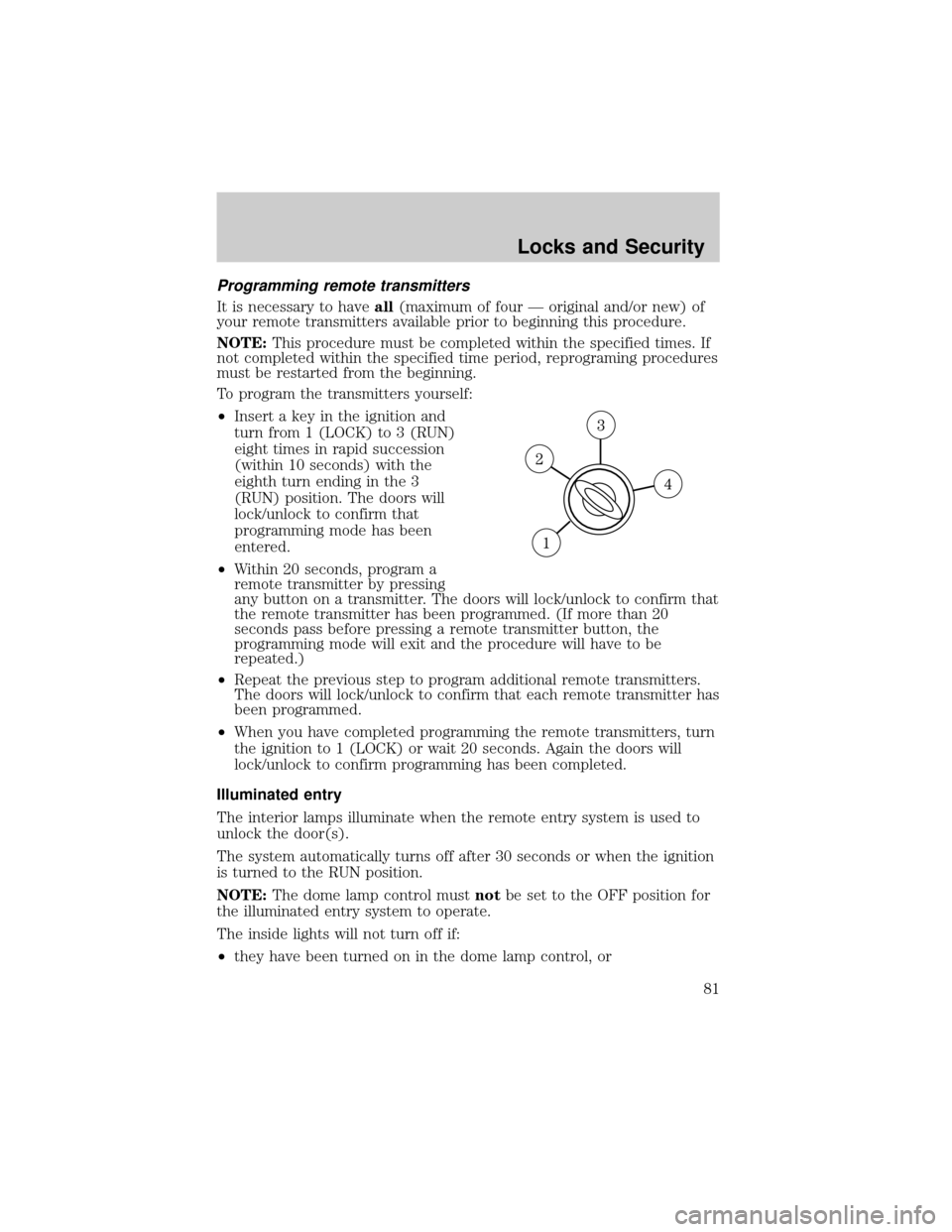
²Insert a key in the ignition and
turn from 1 (LOCK) to 3 (RUN)
eight times in rapid succession
(within 10 seconds) with the
eighth turn ending in the 3
(RUN) position. The doors will
lock/unlock to confirm that
programming mode has been
entered.
²Within 20 seconds, program a
remote transmitter by pressing
any button on a transmitter. The doors will lock/unlock to confirm that
the remote transmitter has been programmed. (If more than 20
seconds pass before pressing a remote transmitter button, the
programming mode will exit and the procedure will have to be
repeated.)
²Repeat the previous step to program additional remote transmitters.
The doors will lock/unlock to confirm that each remote transmitter has
been programmed.
²When you have completed programming the remote transmitters, turn
the ignition to 1 (LOCK) or wait 20 seconds. Again the doors will
lock/unlock to confirm programming has been completed.
Illuminated entry
The interior lamps illuminate when the remote entry system is used to
unlock the door(s).
The system automatically turns off after 30 seconds or when the ignition
is turned to the RUN position.
NOTE:The dome lamp control mustnotbe set to the OFF position for
the illuminated entry system to operate.
The inside lights will not turn off if:
²they have been turned on in the dome lamp control, or
Locks and Security
81
Page 82 of 256
²any door is open.
NOTE:The battery saver will shut off the interior lamps 40 minutes
after the ignition has been turned to the OFF position.
SECURILOCKYPASSIVE ANTI-THEFT SYSTEM
SecuriLockypassive anti-theft system is an engine immobilization
system. This system is designed to prevent the engine from being started
unless acoded keyis used.
NOTE:The SecuriLockypassive anti-theft system is not compatible
with non-Mazda aftermarket remote start systems. Use of these systems
may result in vehicle starting problems and a loss of security protection.
THEFT INDICATOR
The theft indicator is located on top of the instrument panel.
²When the ignition is in the OFF position, the indicator will flash once
every 2 seconds to indicate the SecuriLockysystem is functioning as
a theft deterrent.
²When the ignition is in the ON position, the indicator will glow for 3
seconds to indicate normal system functionality.
If a problem occurs with the SecuriLockysystem, the indicator will flash
rapidly or glow steadily when the ignition is in the ON position. If this
occurs, the vehicle should be taken to an authorized dealer for service.
Automatic arming
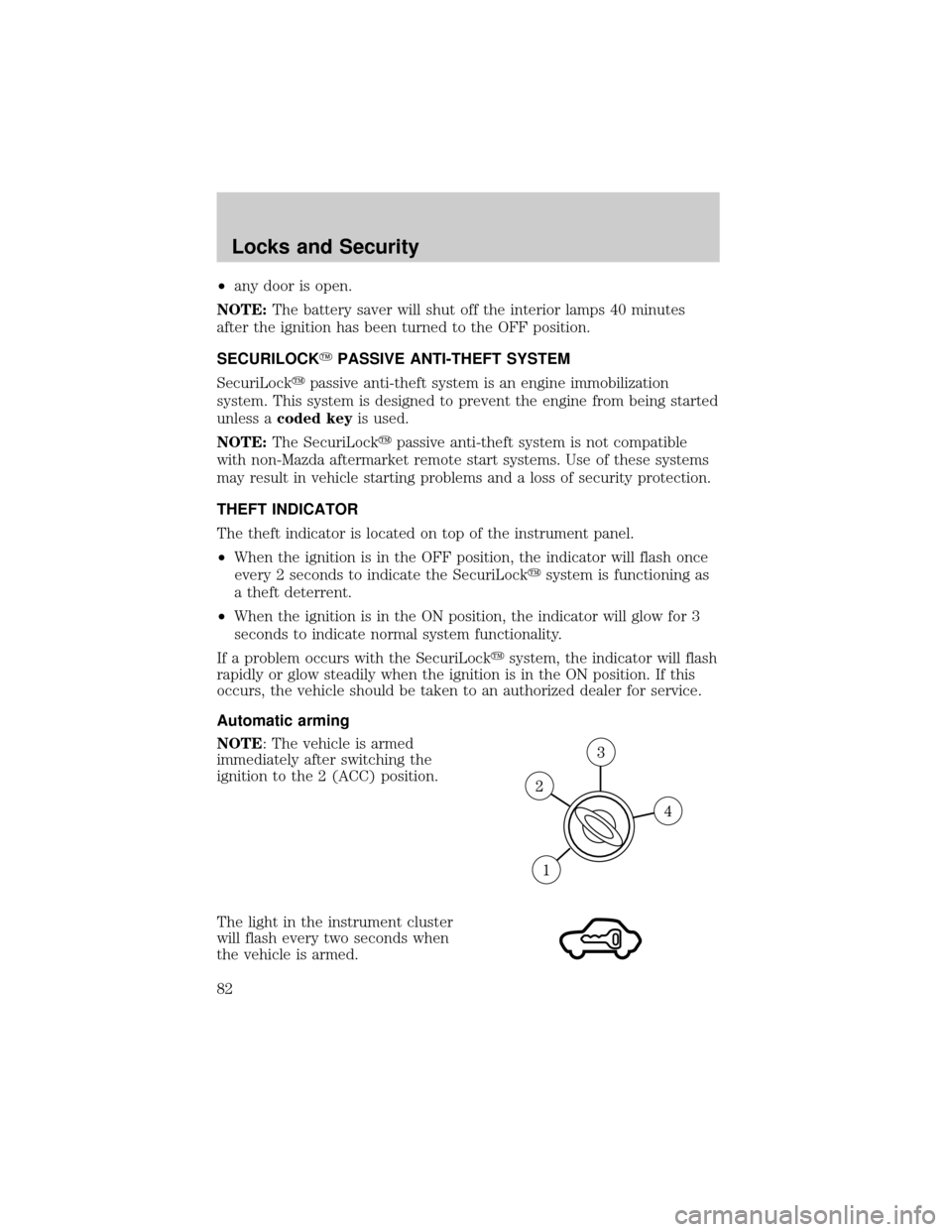
NOTE: The vehicle is armed
immediately after switching the
ignition to the 2 (ACC) position.
The light in the instrument cluster
will flash every two seconds when
the vehicle is armed.
Locks and Security
82
Page 83 of 256

Automatic disarming
Switching the ignition to the 3 (ON)
position with acoded keydisarms
the vehicle. The theft light will
illuminate for three seconds and
then go out. If the light stays on for an extended period of time or
flashes rapidly, have the system serviced by your authorized Mazda
dealership.
Key information
Your vehicle is supplied withtwo coded keys.Only acoded keywill
start your vehicle. Spare coded keys can be purchased from your
authorized Mazda dealership. Your dealership can program your key or
you can ªdo it yourself.º Refer toProgramming spare keys.
The SecuriLockypassive anti-theft system is not compatible with
aftermarket remote start systems. Use of these systems may
result in vehicle starting problems and a loss of security
protection.
NOTE:Large metallic objects, electronic devices on the key chain that
can be used to purchase gasoline or similar items, or a second key on the
same key ring as thecoded keymay cause vehicle starting issues.
NOTE:If present, you need to keep these objects from touching the
coded keywhile starting the engine.
NOTE:These objects and devices cannot damage thecoded key,but
can cause a momentary issue if they are too close to the key during
engine start.
NOTE:If a problem occurs, turn ignition OFF and restart the engine
with all other objects on the key ring held away from the ignition key.
Check to make sure the encoded ignition key is an approved Mazda
encoded ignition key.
If your keys are lost or stolen you will need to do the following:
²Use your spare key to start the vehicle. or
²Have your vehicle towed to an authorized Mazda dealership. . The key
codes will need to be erased from your vehicle and new key codes will
need to be re-coded.
Replacingcoded keycan be very costly and you may want to store an
extra programmed key away from the vehicle in a safe place to prevent
an unforeseen inconvenience.
Locks and Security
83
Page 105 of 256

Insert the tongue into the correct
buckle (the buckle closest to the
direction the tongue is coming
from). To lengthen the belt, turn the
tongue at a right angle to the belt
and pull across your lap until it
reaches the buckle. To tighten the
belt, pull the loose end of the belt
through the tongue until it fits
snugly across the hips.
Shorten and fasten the belt
when not in use to keep the belt
away from door openings and
available after unfolding the
seats.
Safety belt warning light and indicator chime
The seat belt warning light illuminates in the instrument cluster and a
chime sounds to remind the occupants to fasten their safety belts.
Seating and Safety Restraints
105
Page 106 of 256
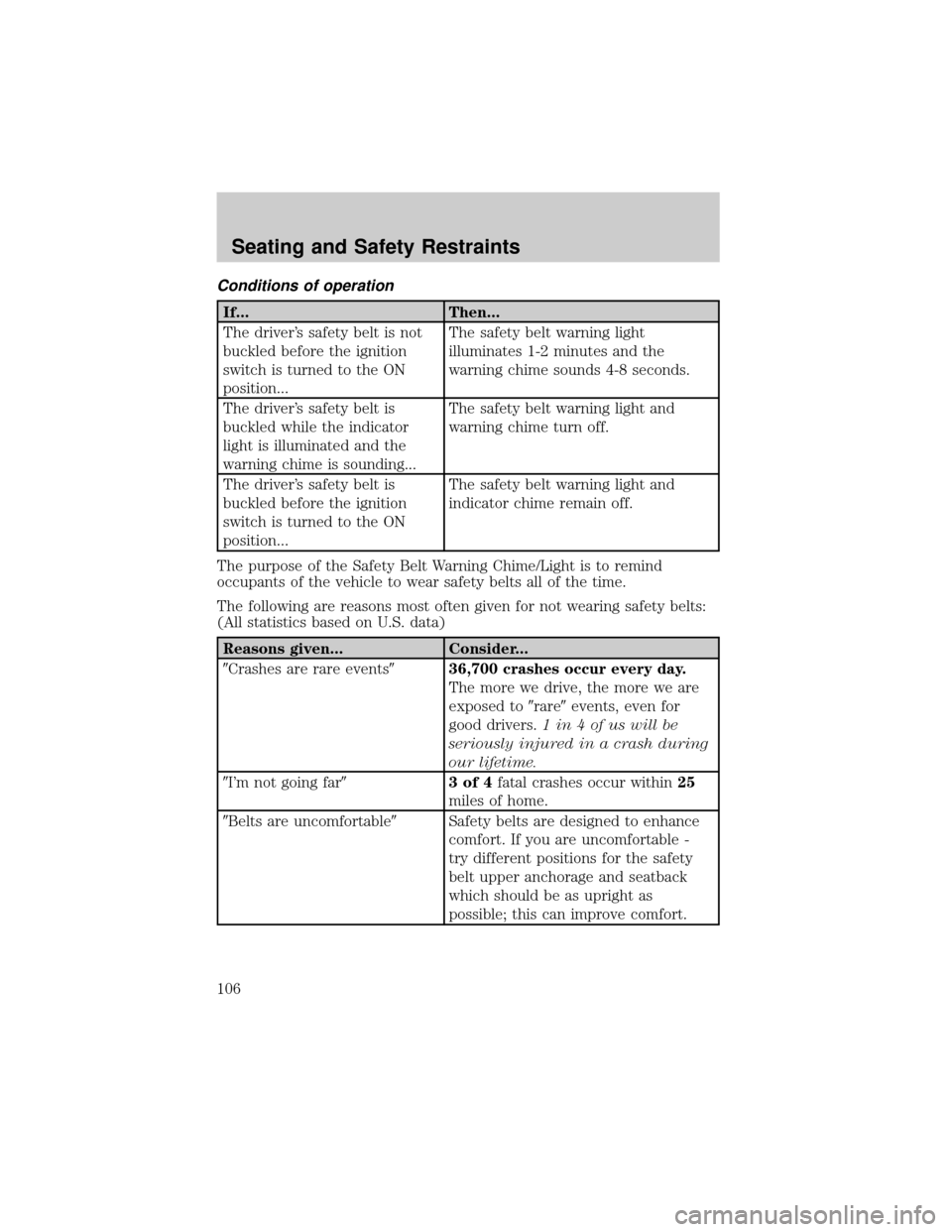
Conditions of operation
If... Then...
The driver's safety belt is not
buckled before the ignition
switch is turned to the ON
position...The safety belt warning light
illuminates 1-2 minutes and the
warning chime sounds 4-8 seconds.
The driver's safety belt is
buckled while the indicator
light is illuminated and the
warning chime is sounding...The safety belt warning light and
warning chime turn off.
The driver's safety belt is
buckled before the ignition
switch is turned to the ON
position...The safety belt warning light and
indicator chime remain off.
The purpose of the Safety Belt Warning Chime/Light is to remind
occupants of the vehicle to wear safety belts all of the time.
The following are reasons most often given for not wearing safety belts:
(All statistics based on U.S. data)
Reasons given... Consider...
9Crashes are rare events936,700 crashes occur every day.
The more we drive, the more we are
exposed to9rare9events, even for
good drivers.1 in 4 of us will be
seriously injured in a crash during
our lifetime.
9I'm not going far93of4fatal crashes occur within25
miles of home.
9Belts are uncomfortable9Safety belts are designed to enhance
comfort. If you are uncomfortable -
try different positions for the safety
belt upper anchorage and seatback
which should be as upright as
possible; this can improve comfort.
Seating and Safety Restraints
106
Page 107 of 256

Reasons given... Consider...
9I was in a hurry9Prime time for an accident.Belt
Minder reminds us to take a few
seconds to buckle up.
9Seat belts don't work9Safety belts,when used properly,
reduce risk of deathto front seat
occupants by45% in cars,and by
60% in light trucks.
9Traffic is light9Nearly 1 of 2 deaths occur in
single-vehicle crashes,many when
no other vehicles are around.
9Belts wrinkle my clothes9Possibly, but a serious crash can do
much more than wrinkle your clothes,
particularly if you are unbelted.
9The people I'm with don't
wear belts9Set the example, teen deaths occur 4
times more often in vehicles with
TWO or MORE people. Children and
younger brothers/sisters imitate
behavior they see.
9I have an air bag9Air bags offer greater protection when
used with safety belts. Frontal airbags
are not designed to inflate in rear and
side crashes or rollovers.
9I'd rather be thrown clear9Not a good idea.Peoplewho are
ejected are 40 times more likely
to DIE.Safety belts help prevent
ejection, WE CAN'T9PICK OUR
CRASH9.
WARNING: Do not sit on top of a buckled safety belt to avoid
the Safety Belt Warning Light. Sitting on the safety belt will
increase the risk of injury in an accident.
Seating and Safety Restraints
107