light MAZDA MODEL TRIBUTE 2002 (in English) User Guide
[x] Cancel search | Manufacturer: MAZDA, Model Year: 2002, Model line: MODEL TRIBUTE, Model: MAZDA MODEL TRIBUTE 2002Pages: 256, PDF Size: 2.66 MB
Page 47 of 256

CD TIPS- CONDENSATION PHENOMENON
Immediately after turning on the heater when the vehicle is cold, the CD
or optical components (prism and lens) in the CD player/changer may
become clouded with condensation. When this happens, the CD will eject
immediately when placed in the unit. A clouded CD can be corrected
simply by wiping it with a soft cloth. Clouded optical components will
clear naturally in about an hour. Wait for normal operation to return
before attempting to use the unit.
HANDLING THE IN-DASH CD PLAYER
²Do not spill any liquid on the audio system.
²Do not insert any objects, other than CDs, into the slot.
²The CD revolves at a high speed within the unit. Defective (cracked or
badly bent) CDs should never be used.
²Do not use non-conventional discs such as heart-shaped, octagonal
discs, etc. The CD player could be damaged.
²A new CD may have rough edges on its inner and outer perimeters. If
a disc with rough edges is used, proper setting will not be possible
and the CD player will not play the CD. Remove the rough edges in
advance by using a ball-point pen or pencil as shown above. To
remove the rough edges, rub the side of the pen or pencil against the
inner and outer perimeter of the CD.
²When driving over rough or uneven surfaces, the audio sound may
jump.
²The CD player has been designed to play CDs bearing the
identification logo as shown. No other discs can be played.
²Do not stick paper or tape on the CD. Avoid scratching the reverse
side of the CD (the side without a label).
²Dust, finger smudges, and dirt can decrease the amount of light
reflected from the signal surface, thereby effecting sound quality.
Gently wipe a soiled CD with a soft cloth from the center to the edge.
²Do not use record sprays, antistatic agents, or household spray
cleaners. Volatile chemicals such as benzine and thinner can also
damage the surface of the CD and must not be used. Do not use
anything that can damage, warp or fog CDs.
Entertainment Systems
47
Page 48 of 256

²Keep CDs in their cases and avoid direct sunlight to avoid warping.
²The CD player ejects the CD is inserted upside down. Also dirty
and/or defective CDs may be ejected.
²Do not insert cleaning discs into the CD player.
CD units are designed to play commercially pressed 12 cm (4.75
in) audio compact discs only. Due to technical incompatibility,
certain recordable and re-recordable compact discs may not
function correctly when used in Mazda CD players. Irregular
shaped CDs, CDs with a scratch protection film attached, and CDs
with homemade paper (adhesive) labels should not be inserted
into the CD player. The label may peel and cause the CD to
become jammed. It is recommended that homemade CDs be
identified with permanent felt tip marker rather than adhesive
labels. Ball point pens may damage CDs. Please contact your
dealer for further information.
CD AND CD CHANGER CARE
²Handle discs by their edges only. Never touch the playing surface.
²Do not expose discs to direct sunlight or heat sources for extended
periods of time.
RADIO FREQUENCY INFORMATION
The Federal Communications Commission (FCC) and the Canadian Radio
and Telecommunications Commission(CRTC) establish the frequencies
AM and FM stations may use for their broadcasts. Allowable frequencies
are:
AM 530, 540±1600, 1610 kHz
FM 87.7, 87.9±107.7, 107.9 MHz
Not all frequencies are used in a given area.
Entertainment Systems
48
Page 49 of 256
Radio reception factors
Three factors can affect radio reception:
²Distance/strength.The further an FM signal travels, the weaker it is.
The listenable range of the average FM station is approximately 40 km
(24 miles). This range can be affected by ªsignal modulation.º Signal
modulation is a process radio stations use to increase their
strength/volume relative to other stations.
²Terrain.Hills, mountains and tall buildings between your vehicle's
antenna and the radio station signal can cause FM reception problems.
Static can be caused on AM stations by power lines, electric fences,
traffic lights and thunderstorms. Moving away from an interfering
structure (out of its ªshadowº) returns your reception to normal.
²Station overload.Weak signals are sometimes captured by stronger
signals when you pass a broadcast tower. A stronger signal may
temporarily overtake a weaker signal and play while the weak station
frequency is displayed.
The audio system automatically switches to single channel reception if it
will improve the reception of a station normally received in stereo.
AUDIO SYSTEM WARRANTIES AND SERVICE
Refer to the ªWarranty Guideº for audio system warranty information.
If service is necessary, see your dealer.
Entertainment Systems
49
Page 51 of 256

NOTE:In snowy or dirty conditions, leave the mode selector in the OFF
position.
²MAX A/C- Uses recirculated air to cool the vehicle. MAX A/C is noisier
than A/C but more economical and will cool the inside of the vehicle
faster. Airflow will be from the instrument panel registers. This mode
can also be used to prevent undesirable odors from entering the
vehicle.
²A/C-Uses outside air to cool the vehicle. It is quieter than MAX A/C
but not as economical. Airflow will be from the instrument panel
registers.
²
(Panel)-Distributes outside air through the instrument panel
registers. However, the air will not be cooled below the outside
temperature because the air conditioning does not operate in this
mode.
²OFF-Outside air is shut out and the fan will not operate. For short
periods of time only, use this mode to prevent undesirable odors from
entering the vehicle.
²
(Panel and floor)-Distributes outside air through the instrument
panel registers and the floor ducts. Heating capabilities are provided in
this mode. For added customer comfort, when the temperature
control knob is anywhere in between the full hot and full cold
positions, the air distributed through the floor ducts will be slightly
warmer than the air sent to the instrument panel registers. However,
the air will not be cooled below the outside temperature because the
air conditioning does not operate in this mode.
²
(Floor)-Allows for maximum heating by distributing outside air
through the floor ducts. However, the air will not be cooled below the
outside temperature because the air conditioning does not operate in
this mode.
²
(Floor and defrost)-Distributes outside air through the windshield
defroster ducts and the floor ducts. Heating and air conditioning
capabilities are provided in this mode. For added customer comfort,
when the temperature control knob is anywhere in between the full
hot and full cold positions, the air distributed through the floor ducts
will be slightly warmer than the air sent to the windshield defrost
ducts. If the temperature is about 6ÉC (43ÉF) or higher, the air
conditioner will automatically dehumidify the air to reduce fogging.
Climate Controls
51
Page 54 of 256

HEADLAMP CONTROL
Rotate the headlamp control to the
first position to turn on the parking
lamps.
Rotate to the second position to
turn on the headlamps.
Daytime running lamps (DRL) (if equipped)
Turns the headlamps on with a reduced output.
To activate:
²the ignition must be in the ON position and
²the headlamp control is in the OFF or Parking lamps position.
WARNING: Always remember to turn on your headlamps at
dusk or during inclement weather. The Daytime Running Lamp
(DRL) system does not activate with your tail lamps and
generally may not provide adequate lighting during these
conditions. Failure to activate your headlamps under these
conditions may result in a collision.
High beams
Push the lever toward the
instrument panel to activate. Pull
the lever towards you to deactivate.
OFF
OFF
Lights
54
Page 55 of 256
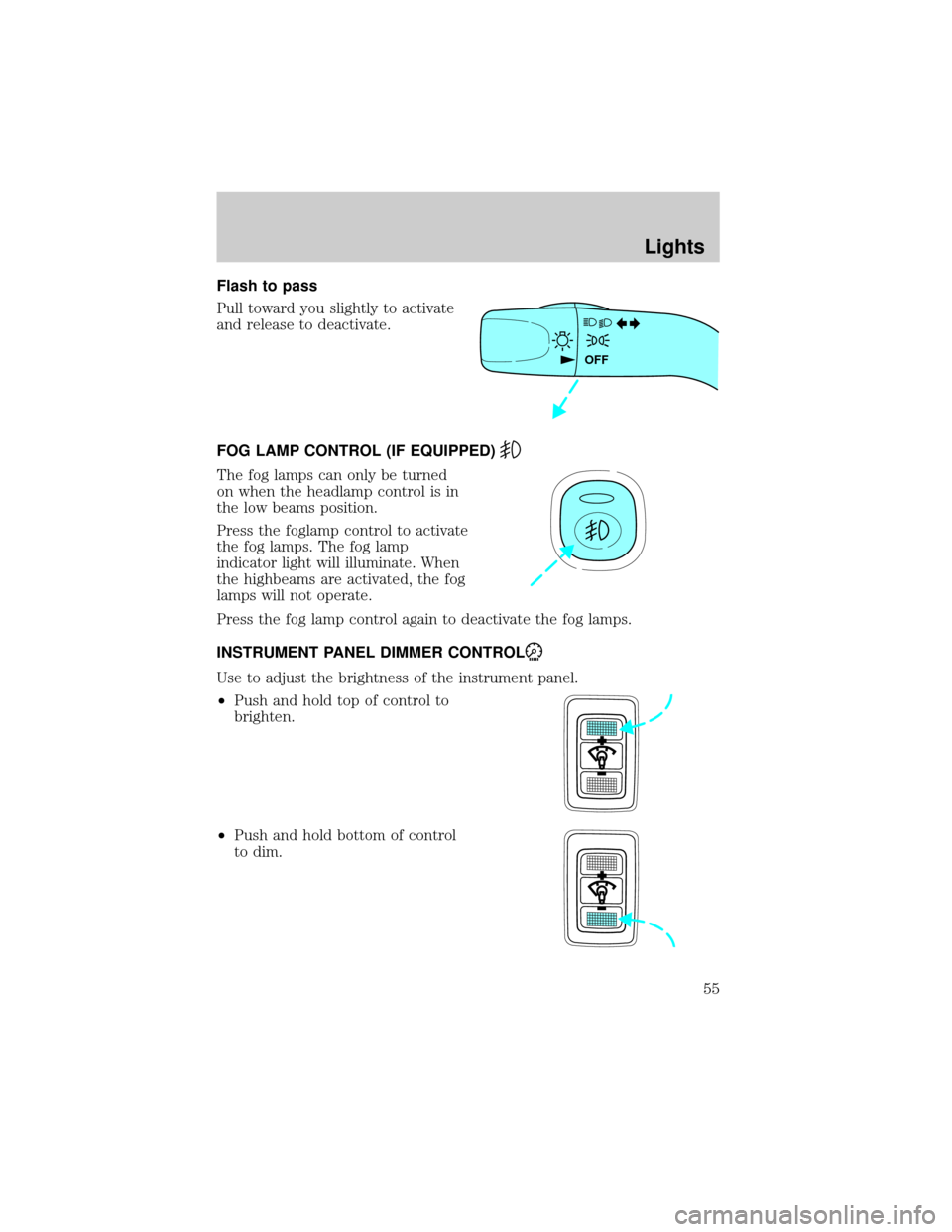
Flash to pass
Pull toward you slightly to activate
and release to deactivate.
FOG LAMP CONTROL (IF EQUIPPED)
The fog lamps can only be turned
on when the headlamp control is in
the low beams position.
Press the foglamp control to activate
the fog lamps. The fog lamp
indicator light will illuminate. When
the highbeams are activated, the fog
lamps will not operate.
Press the fog lamp control again to deactivate the fog lamps.
INSTRUMENT PANEL DIMMER CONTROL
Use to adjust the brightness of the instrument panel.
²Push and hold top of control to
brighten.
²Push and hold bottom of control
to dim.
OFF
Lights
55
Page 56 of 256

AIMING THE HEADLAMPS
The headlamps on your vehicle are properly aimed at the assembly plant.
If your vehicle has been in an accident the alignment of your headlamps
should be checked by your authorized Mazda dealer.
TURN SIGNAL CONTROL
²Push down to activate the left
turn signal.
²Push up to activate the right turn
signal.
INTERIOR LAMPS
Cargo and dome lamp
Rear cargo lamp equipped with an
ON/OFF/DOOR control will light
when:
²the doors are closed and the
control is in the ON position.
²the control is in the DOOR
position and any door is open.
²the headlamp control is rotated
fully counterclockwise.
When the control is in the OFF
position, it will not illuminate when you open the doors or fully rotate
the headlamp control.
Dome lamps and map lamps
The front dome lamp is located overhead between the driver and
passenger seats.
OFF
Lights
56
Page 57 of 256
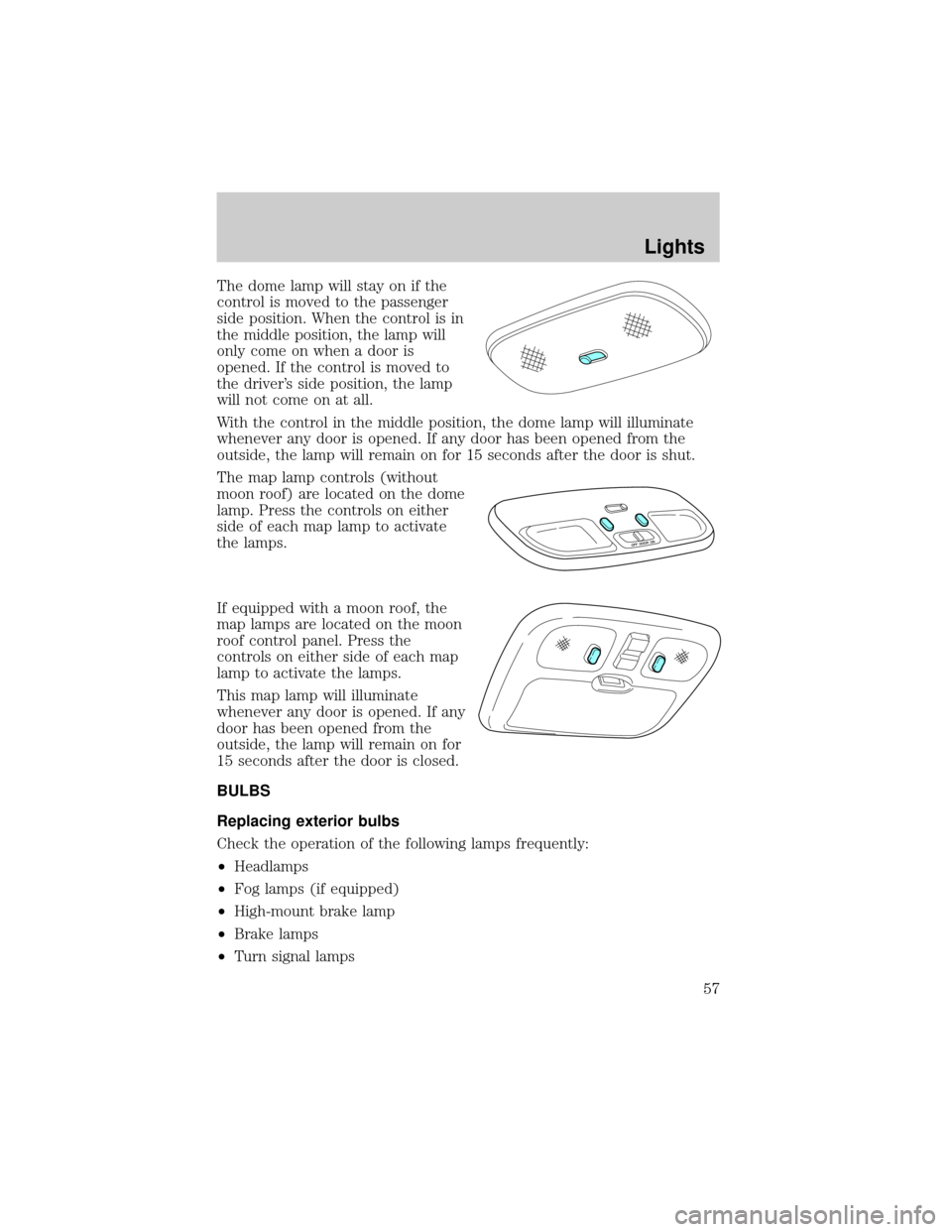
The dome lamp will stay on if the
control is moved to the passenger
side position. When the control is in
the middle position, the lamp will
only come on when a door is
opened. If the control is moved to
the driver's side position, the lamp
will not come on at all.
With the control in the middle position, the dome lamp will illuminate
whenever any door is opened. If any door has been opened from the
outside, the lamp will remain on for 15 seconds after the door is shut.
The map lamp controls (without
moon roof) are located on the dome
lamp. Press the controls on either
side of each map lamp to activate
the lamps.
If equipped with a moon roof, the
map lamps are located on the moon
roof control panel. Press the
controls on either side of each map
lamp to activate the lamps.
This map lamp will illuminate
whenever any door is opened. If any
door has been opened from the
outside, the lamp will remain on for
15 seconds after the door is closed.
BULBS
Replacing exterior bulbs
Check the operation of the following lamps frequently:
²Headlamps
²Fog lamps (if equipped)
²High-mount brake lamp
²Brake lamps
²Turn signal lamps
Lights
57
Page 58 of 256

²License plate lamp
²Tail lamps
²Back-up lamps
Do not remove lamp bulbs unless they can be replaced immediately with
new ones. If a bulb is removed for an extended period of time,
contaminants may enter the lamp housings and affect lamp performance.
Replacing the interior bulbs
Check the operation of the following interior bulbs frequently:
²interior overhead lamp
²map lamp
For bulb replacement, see an authorized Mazda dealer.
Using the right bulbs
Replacement bulbs are specified in the chart below. Headlamp bulbs
must be marked with an authorized ªD.O.T.º for North America to assure
lamp performance, light brightness and pattern and safe visibility.
NOTE:The correct bulbs will not damage the lamp assembly or void the
lamp assembly warranty and will provide quality bulb burn time.
Function Number of bulbs Trade number
Park/turn lamps
(front)2
3157 AK (amber)
Headlamps 2 9003
Rear stop/tail lamps 2 3157K
Rear turn lamps 2 3156K
Rear license plate
lamps2
3156K/168
Backup lamp 2 3156K
Rear/turn/sidemarker 2 916NA (amber)
Fog lamp (if
equipped)2
899
Cargo lamp 1 211-2
Interior overhead lamp 1 912 (906)
Lights
58
Page 59 of 256
Function Number of bulbs Trade number
Front door courtesy
lamp1
168
Map lamps 2 168 (T10)
Ashtray lamp 1 161
All replacement bulbs are clear in color except where noted.
To replace all instrument panel lights - see your dealer.
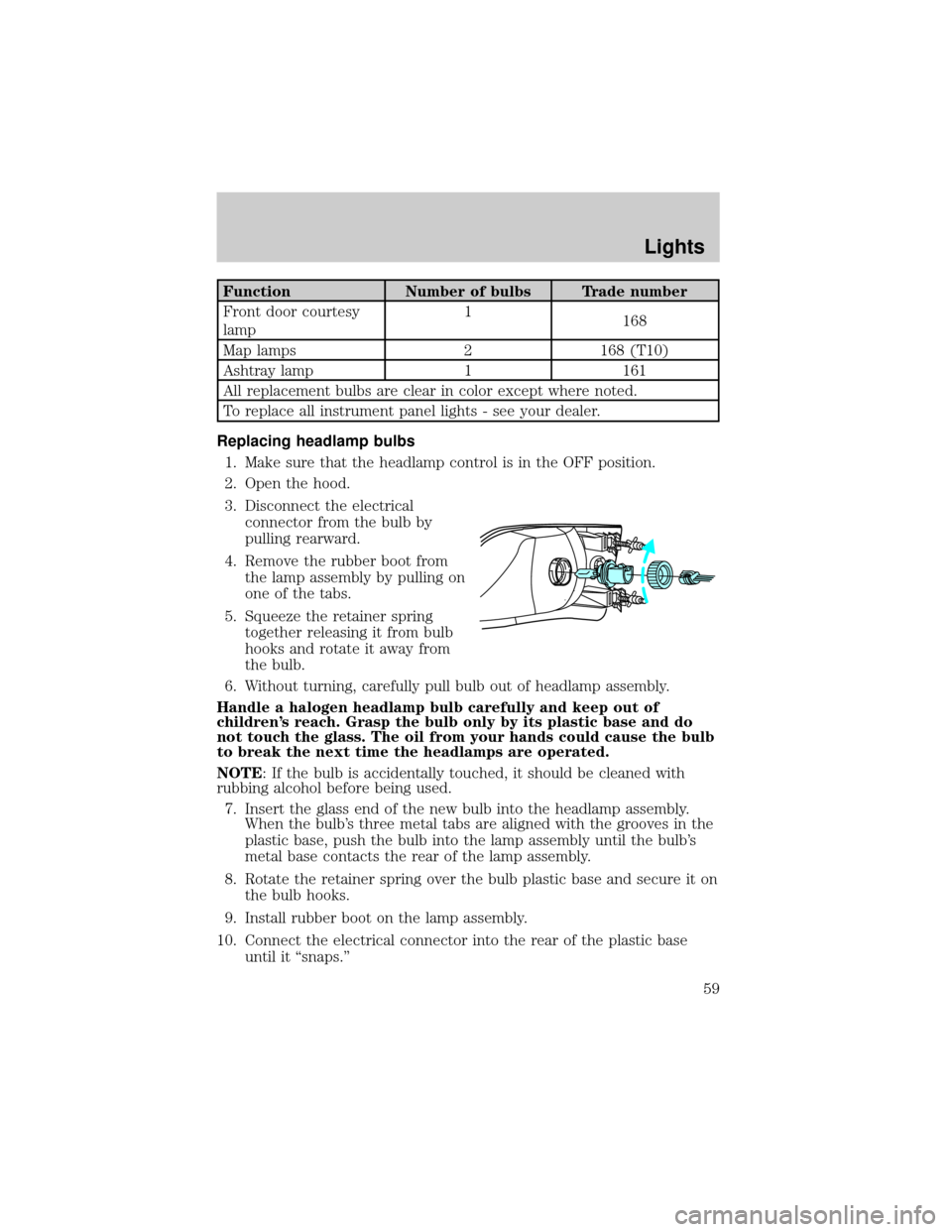
Replacing headlamp bulbs
1. Make sure that the headlamp control is in the OFF position.
2. Open the hood.
3. Disconnect the electrical
connector from the bulb by
pulling rearward.
4. Remove the rubber boot from
the lamp assembly by pulling on
one of the tabs.
5. Squeeze the retainer spring
together releasing it from bulb
hooks and rotate it away from
the bulb.
6. Without turning, carefully pull bulb out of headlamp assembly.
Handle a halogen headlamp bulb carefully and keep out of
children's reach. Grasp the bulb only by its plastic base and do
not touch the glass. The oil from your hands could cause the bulb
to break the next time the headlamps are operated.
NOTE: If the bulb is accidentally touched, it should be cleaned with
rubbing alcohol before being used.
7. Insert the glass end of the new bulb into the headlamp assembly.
When the bulb's three metal tabs are aligned with the grooves in the
plastic base, push the bulb into the lamp assembly until the bulb's
metal base contacts the rear of the lamp assembly.
8. Rotate the retainer spring over the bulb plastic base and secure it on
the bulb hooks.
9. Install rubber boot on the lamp assembly.
10. Connect the electrical connector into the rear of the plastic base
until it ªsnaps.º
Lights
59