radio MAZDA MX5 MIATA 2017 User Guide
[x] Cancel search | Manufacturer: MAZDA, Model Year: 2017, Model line: MX5 MIATA, Model: MAZDA MX5 MIATA 2017Pages: 568, PDF Size: 16.58 MB
Page 174 of 568

4 –60 When Driving
Switches and Controls 9. Return to the vehicle and firmly press,
hold for two seconds and release the
programmed HomeLink button. Repeat
the “ press/hold/release ” sequence a
second time, and, depending on the
brand of the garage door opener (or
other rolling code equipped device),
repeat this sequence a third time to
complete the programming process.
HomeLink should now activate your
rolling code equipped device.
NOTE
To program the remaining two HomeLink
buttons, begin with “Programming” —
step 1
For questions or comments, please contact
HomeLink at www.homelink.com or 1-
800-355-3515 .
Gate operator/Canadian
ProgrammingCanadian radio-frequency laws require
transmitter signals to “time-out” (or quit)
after several seconds of transmission
— which may not be long enough for
HomeLink to pick up the signal during
programming. Similar to this Canadian
law, some U.S. gate operators are designed
to “time-out” in the same manner.
If you live in Canada or you are having
difficulties programming a gate operator
by using the “Programming” procedures
(regardless of where you live), replace
“Programming HomeLink” step 3 with
the following:
NOTE
If programming a garage door opener or
gate operator, it is advised to unplug the
device during the “cycling” process to
prevent possible overheating. Continue to press and hold the HomeLink
button while you press and release
— every two seconds (“cycle”) your
hand-held transmitter until the frequency
signal has successfully been accepted by
HomeLink. (The indicator light will flash
slowly and then rapidly.)
Proceed with “Programming” step 4 to
complete.
Operating the HomeLink System Press the programmed HomeLink button
to operate a programmed device. The
code will continue being transmitted for a
maximum of 20 seconds.
Reprogramming the HomeLink
system To program a device to HomeLink using
a HomeLink button previously trained,
follow these steps:
1. Press and hold the desired HomeLink
button. DO NOT release the button.
2. The indicator light will begin to flash
after 20 seconds. Without releasing
the HomeLink button, proceed with
“Programming” - step 1.
Erasing Programmed HomeLink
Buttons
To erase the existing programming from
all three operating channels, press and
hold the two outside buttons (
, ) on
the auto-dimming mirror until the
HomeLink indicator light begins to flash
after approximately 10 seconds.
Verify that the programming has been
erased when you resell the vehicle.
MX-5_8FR4-EA-16J_Edition1.indb 60 2016/08/11 20:28:56
Page 188 of 568
4 –74 When Driving
i-ACTIVSENSE
*Some models. i-ACTIVSENSE *
i-ACTIVSENSE is a collective term covering a series of advanced safety and driver support
systems which make use of a Forward Sensing Camera (FSC) and ra dar sensors.
Because each system has its limitations, always drive carefully and do not rely solely on the
systems.
Driver awareness support systems
Nighttime visibility
Adaptive Front Lighting System (AFS)
.............................................................................. 4-75
High Beam Control System (HBC)
.................................................................................... 4-76
Left/right side and rear side detection
Lane Departure Warning System (LDWS) ......................................................................... 4-79
Blind Spot Monitoring (BSM) System
............................................................................... 4-85
Rear obstruction detection when leaving a parking space
Rear Cross Traffic Alert (RCTA) ........................................................................................ 4-92
Camera and SensorsForward sensing camera (FSC)
The Forward Sensing Camera (FSC) determines the conditions ahea d of the vehicle while
traveling at night and detects traffic lanes. The following systems also use the Forward
Sensing Camera (FSC).
High Beam Control system (HBC)
Lane Departure Warning System (LDWS)
The Forward Sensing Camera (FSC) is installed at the top of the windshield near the
rearview mirror.
Refer to Forward Sensing Camera (FSC) on page 4-95 .
Radar sensors (rear)
The radar sensors (rear) function by detecting the radio waves reflected off a vehicle
approaching from the rear or an obstruction sent from the radar sensors. The following
systems also use the radar sensors (rear).
Blind Spot Monitoring (BSM) System
Rear Cross Traffic Alert (RCTA)
The radar sensors (rear) are installed inside the rear bumper, one each on the left and right
sides.
Refer to Radar Sensors (Rear) on page 4-98 .
MX-5_8FR4-EA-16J_Edition1.indb 74 2016/08/11 20:29:00
Page 201 of 568
4 –87 When Driving
i-ACTIVSENSE
In the following cases, the activation of the Blind Spot Monitoring (BSM) warning lights
and the warning beep may not occur or they may be delayed.
A vehicle makes a lane change from a driving lane two lanes over to an adjacent lane.
Driving on steep slopes.
Crossing the summit of a hill or mountain pass.
The turning radius is small (making a sharp turn, turning at intersections).
When there is a difference in the height between your driving lane and the adjacent
lane.
Directly after pressing the Blind Spot Monitoring (BSM) switch and the system
becomes operable.
If the road width is extremely narrow, vehicles two lanes over may be detected.
The detection area of the radar sensors (rear) is set according to the road width of
expressways.
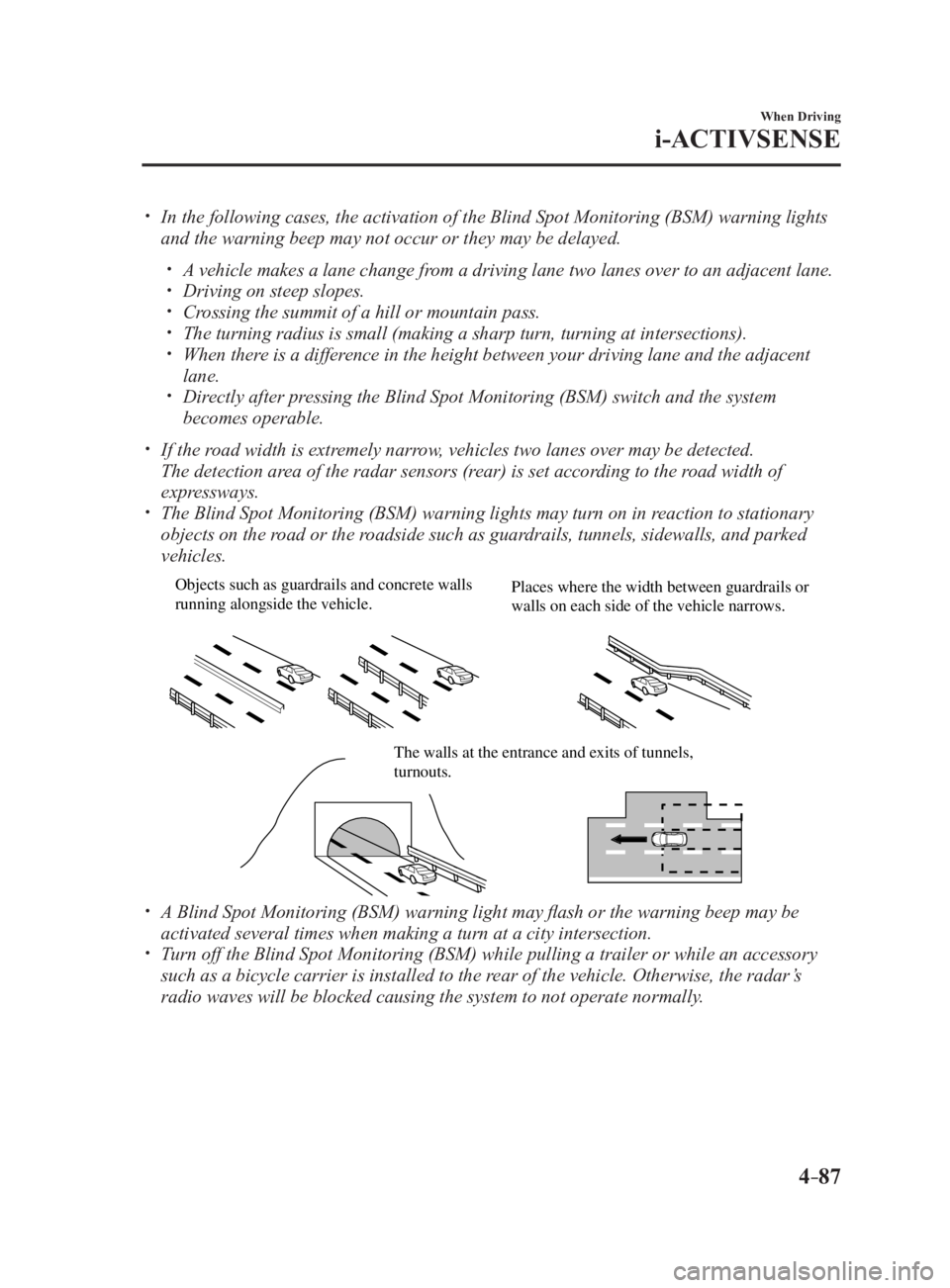
The Blind Spot Monitoring (BSM) warning lights may turn on in reaction to stationary
objects on the road or the roadside such as guardrails, tunnels, sidewalls, and parked
vehicles. Objects such as guardrails and concrete walls
running alongside the vehicle. Places where the width between guardrails or
walls on each side of the vehicle narrows.
The walls at the entrance and exits of tunnels,
turnouts.
A Blind Spot Monitoring (BSM) warning light may flash or the warning beep may be
activated several times when making a turn at a city intersection.
Turn off the Blind Spot Monitoring (BSM) while pulling a trailer or while an accessory
such as a bicycle carrier is installed to the rear of the vehicle. Otherwise, the radar’s
radio waves will be blocked causing the system to not operate normally.
MX-5_8FR4-EA-16J_Edition1.indb 87 2016/08/11 20:29:02
Page 208 of 568
4 –94 When Driving
i-ACTIVSENSE
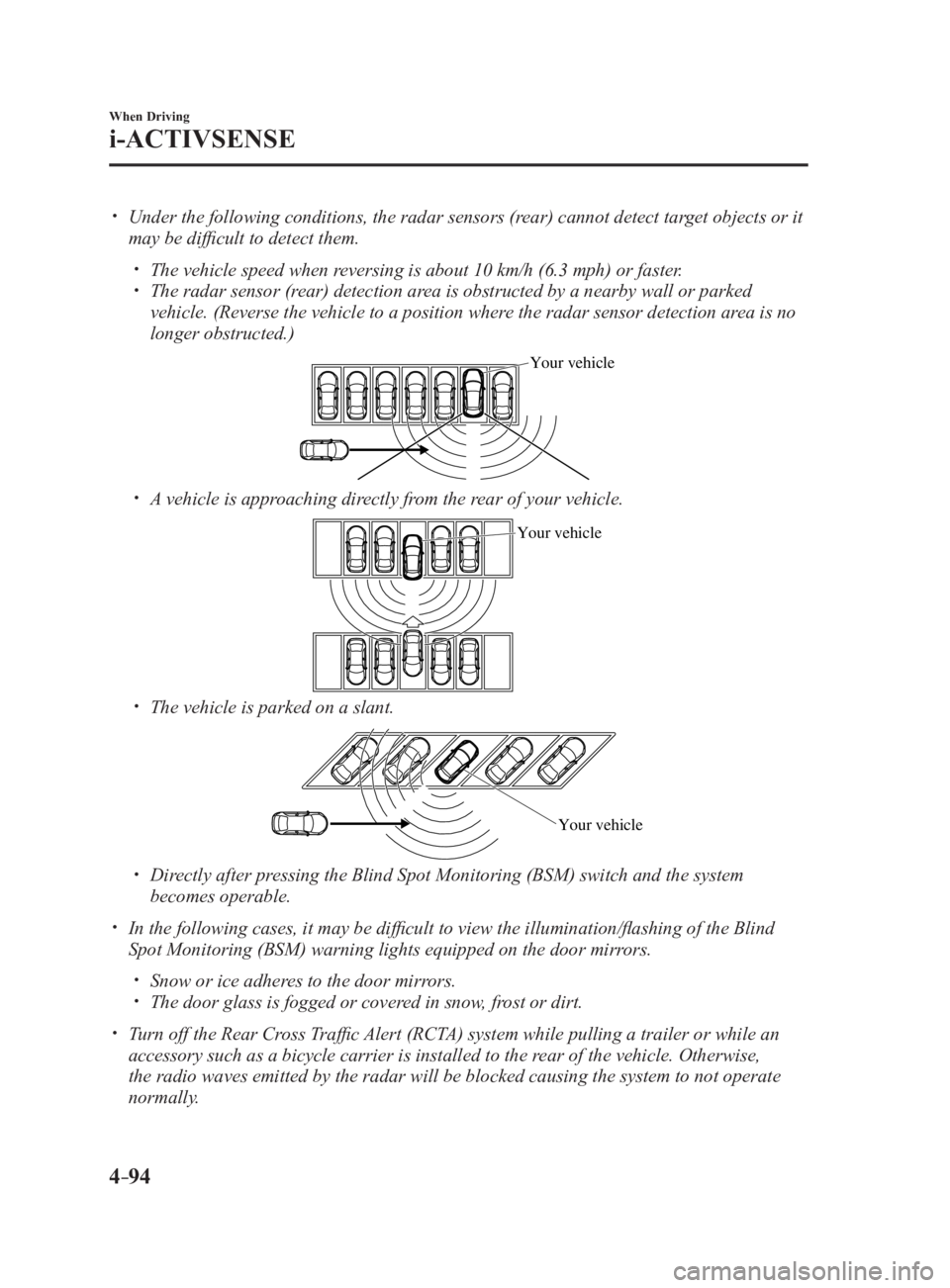
Under the following conditions, the radar sensors (rear) cannot detect target objects or it
may be difficult to detect them.
The vehicle speed when reversing is about 10 km/h (6.3 mph) or faster.
The radar sensor (rear) detection area is obstructed by a nearby wall or parked
vehicle. (Reverse the vehicle to a position where the radar sensor detection area is no
longer obstructed.) Your vehicle
A vehicle is approaching directly from the rear of your vehicle. Your vehicle
The vehicle is parked on a slant.
Your vehicle
Directly after pressing the Blind Spot Monitoring (BSM) switch and the system
becomes operable.
In the following cases, it may be difficult to view the illumina tion/flashing of the Blind
Spot Monitoring (BSM) warning lights equipped on the door mirrors.
Snow or ice adheres to the door mirrors.
The door glass is fogged or covered in snow, frost or dirt.
Turn off the Rear Cross Traffic Alert (RCTA) system while pulling a trailer or while an
accessory such as a bicycle carrier is installed to the rear of the vehicle. Otherwise,
the radio waves emitted by the radar will be blocked causing the system to not operate
normally.
MX-5_8FR4-EA-16J_Edition1.indb 94 2016/08/11 20:29:03
Page 212 of 568

4 –98 When Driving
i-ACTIVSENSE
*Some models.Radar Sensors (Rear) *
Your vehicle is equipped with radar sensors (rear). The following systems also use the radar
sensors (rear).
Blind Spot Monitoring system (BSM)
Rear Cross Traffic Alert (RCTA)
The radar sensors (rear) function by detecting the radio waves reflected off a vehicle
approaching from the rear or an obstruction sent from the radar sensor. Radar sensors (rear)
The radar sensors (rear) are installed inside the rear bumper, one each on the left and right
sides.
Always keep the surface of the rear bumper near the radar sensors (rear) clean so that the
radar sensors (rear) operate normally. Also, do not apply items such as stickers.
Refer to Exterior Care on page 6-59 .
CAUTION If the rear bumper receives a severe impact, the system may no longer operate normally.
Stop the system immediately and have the vehicle inspected at an Authorized Mazda
Dealer.
MX-5_8FR4-EA-16J_Edition1.indb 98 2016/08/11 20:29:04
Page 213 of 568
4 –99 When Driving
i-ACTIVSENSENOTE
The detection ability of the radar sensors (rear) has limitations. In the following cases,
the detection ability may lower and the system may not operate normally.
The rear bumper near the radar sensors (rear) has become deformed.
Snow, ice or mud adheres to the radar sensors (rear) on the rear bumper.
Under bad weather conditions such as rain, snow and fog.
Under the following conditions, the radar sensors (rear) cannot detect target objects or it
may be difficult to detect them.
Stationary objects on a road or a road side such as small, two-wheeled vehicles,
bicycles, pedestrians, animals, and shopping carts.
Vehicle shapes which do not reflect radar waves well such as empty trailers with a low
vehicle height and sports cars.
Vehicles are shipped with the direction of the radar sensors (rear) adjusted for each
vehicle to a loaded vehicle condition so that the radar sensors (rear) detect approaching
vehicles correctly. If the direction of the radar sensors (rear) has deviated for some
reason, have the vehicle inspected at an Authorized Mazda Dealer.
For repairs or replacement of the radar sensors (rear), or bumper repairs, paintwork,
and replacement near the radar sensors, consult an Authorized Mazda Dealer.
Turn off the system while pulling a trailer or while an accessory such as a bicycle carrier
is installed to the rear of the vehicle. Otherwise, the radio waves emitted by the radar will
be blocked causing the system to not operate normally.
The radar sensors are regulated by the relevant radio wave laws of the country in which
the vehicle is driven. If the vehicle is driven abroad, authorization from the country in
which the vehicle is driven may be required.
MX-5_8FR4-EA-16J_Edition1.indb 99 2016/08/11 20:29:04
Page 235 of 568

5 –13 Interior Features
Audio System
*Some models.AntennaAM/FM Radio Antenna
The AM/FM radio antenna receives both
AM and FM signals.
To remove the antenna, turn it
counterclockwise.
To install the antenna, turn it clockwise.
Make sure the antenna is securely
installed. Install
Rem ove
CAUTION To prevent damage to the antenna,
remove it before passing beneath a
low overhead clearance.
NOTE
When leaving your vehicle unattended, we
recommend that you remove the antenna
and store it inside the vehicle. Satellite Radio Antenna *
The satellite radio antenna receives
SiriusXM signals. Satellite radio antenna
MX-5_8FR4-EA-16J_Edition1.indb 13 2016/08/11 20:29:09
Page 236 of 568

5 –14 Interior Features
Audio System
Operating Tips for Audio
System WARNINGAlways adjust the audio while the
vehicle is stopped:
Do not adjust the audio control
switches while driving the vehicle.
Adjusting the audio while driving
the vehicle is dangerous as it could
distract your attention from the vehicle
operation which could lead to a
serious accident.
Even if the audio control switches are
equipped on the steering wheel, learn
to use the switches without looking
down at them so that you can keep
your maximum attention on the road
while driving the vehicle.
CAUTION For the purposes of safe driving,
adjust the audio volume to a level that
allows you to hear sounds outside of
the vehicle including car horns and
particularly emergency vehicle sirens.
NOTE
To prevent the battery from being
discharged, do not leave the audio
system on for a long period of time
when the engine is not running.
If a cellular phone or CB radio is used
in or near the vehicle, it could cause
noise to occur from the audio system,
however, this does not indicate that the
system has been damaged. Do not spill any liquid on the audio
system.
Do not insert any objects, other than CDs,
into the slot.
Radio Reception AM characteristics
AM signals bend around such things as
buildings or mountains and bounce off the
ionosphere.
Therefore, they can reach longer distances
than FM signals.
Because of this, two stations may
sometimes be picked up on the same
frequency at the same time.
Station 2Station 1 Ionosphere
MX-5_8FR4-EA-16J_Edition1.indb 14 2016/08/11 20:29:09
Page 238 of 568

5 –16 Interior Features
Audio System Weak signal noise
In suburban areas, broadcast signals
become weak because of distance from the
transmitter. Reception in such fringe areas
is characterized by sound breakup.
Strong signal noise
This occurs very close to a transmitter
tower. The broadcast signals are extremely
strong, so the result is noise and sound
breakup at the radio receiver.
Station drift noise
When a vehicle reaches the area of two
strong stations broadcasting at similar
frequencies, the original station may be
temporarily lost and the second station
picked up. At this time there will be some
noise from this disturbance. Station 2
88.3 MHzStation 1
88.1 MHz Operating Tips for CD Player Condensation phenomenon
Immediately after turning on the heater
when the vehicle is cold, the CD or
optical components (prism and lens) in
the CD player may become clouded with
condensation. At this time, the CD will
eject immediately when placed in the unit.
A clouded CD can be corrected simply by
wiping it with a soft cloth. Clouded optical
components will clear naturally in about
an hour. Wait for normal operation to
return before attempting to use the unit.
Handling the CD player
The following precautions should be
observed.
Do not use deformed or cracked CDs.
The disc may not eject resulting in a
malfunction.
Do not use non-conventional discs such
as heart-shaped, octagonal discs, etc.
The disc may not eject resulting in a
malfunction.
MX-5_8FR4-EA-16J_Edition1.indb 16 2016/08/11 20:29:10
Page 242 of 568

5 –20 Interior Features
Audio System Operating Tips for OGGOGG is the audio compression format for
Xiph. Org Foundation.
Audio data can be created and stored at a
higher compression ratio than MP3.
This unit plays files with the extension
(.ogg) as OGG files.
CAUTION Do not use an audio file extension on
files other than audio files. In addition,
do not change the audio file extension.
Otherwise, the unit will not recognize
the file correctly resulting in noise or a
malfunction.
OGG files written under specifications
other than the indicated specification
may not play normally or files or folder
names may not display correctly.
The file extension may not be provided
depending on the computer operating
system, version, software, or settings. In
this case, add the file extension “.ogg” to
the end of the file name, and then write
it to the memory.
Operating Tips for USB device
This unit plays audio files as follows: Extension Playback with this unit
.mp3 MP3
.wma WMA
.aac *1
AAC
.m4a
.wav *1
WAV
.ogg *1
OGGCAUTION Do not use an audio file extension on
files other than audio files. In addition,
do not change the audio file extension.
Otherwise, the unit will not recognize
the file correctly resulting in noise or a
malfunction.
NOTE
Playback may not be possible
depending on the type and condition of
the USB flash memory even if the audio
file complies with the standard.
A copyright protected WMA/AAC file
cannot be played in this unit.
(Type B)
If a file name in the USB memory is too
long, it could cause operation problems
such as not being able to playback the
song.
(Recommended: Within 80 characters)
The order of the music data stored in
the device may differ from the playback
order.
To prevent loss or damage of stored
data, we recommend that you always
back up your data.
If a device exceeds the maximum
electric current value of 1,000 mA,
it may not operate or recharge when
connected.
Do not pull out the USB device while in
the USB mode (only pull it out while in
FM/AM radio or CD mode).
The device will not operate if the data is
password protected.
MP3/WMA/AAC/OGG *1
files written
under specifications other than the
indicated specification may not play
normally or files/folder names may not
display correctly.
*1 Type B
MX-5_8FR4-EA-16J_Edition1.indb 20 2016/08/11 20:29:11