lock MAZDA MX5 MIATA 2017 Workshop Manual
[x] Cancel search | Manufacturer: MAZDA, Model Year: 2017, Model line: MX5 MIATA, Model: MAZDA MX5 MIATA 2017Pages: 568, PDF Size: 16.58 MB
Page 106 of 568

3 –50 Before Driving
Security System NOTE
The theft-deterrent system can also be
armed by activating the auto relock
function with both the doors, the trunk
lid and the hood closed.
Refer to Transmitter on page 3-4 .
The system will disarm if one of the
following operations takes place within
20 seconds after pressing the lock
button:
Unlocking any door.
Opening any door.
Opening the hood.
Switching the ignition ON.
To rearm the system, do the arming
procedure again.
When the doors are locked by pressing
the lock button on the transmitter
or using the auxiliary key while the
theft-deterrent system is armed, the
hazard warning lights will flash once to
indicate that the system is armed.
To Turn Off an Armed SystemAn armed system can be turned off using
any one of the following methods:
Pressing the unlock button on the
transmitter.
Starting the engine with the push button
start.
(With the advanced keyless function)
Pressing a request switch on the doors.
The hazard warning lights will flash twice.
NOTE
When the doors are unlocked by pressing
the unlock button on the transmitter while
the theft-deterrent system is turned off, the
hazard warning lights will flash twice to
indicate that the system is turned off. To Stop the Alarm A triggered alarm can be turned off using
any one of the following methods:
Pressing the unlock button on the
transmitter.
Starting the engine with the push button
start.
(With the advanced keyless function)
Pressing a request switch on the doors.
Pressing the electric trunk lid opener
while the key is being carried.
The hazard warning lights will flash twice.
Theft-Deterrent Labels
A label indicating that your vehicle is
equipped with a Theft-Deterrent System is
in the console box.
Mazda recommends that you affix it to the
lower rear corner of a front door window.
MX-5_8FR4-EA-16J_Edition1.indb 50 2016/08/11 20:28:38
Page 108 of 568
3 –52 Before Driving
Driving Tips
Hazardous Driving WARNINGBe extremely careful if it is necessary to
downshift on slippery surfaces:
Downshifting into lower gear
while driving on slippery surfaces is
dangerous. The sudden change in tire
speed could cause the tires to skid. This
could lead to loss of vehicle control
and an accident.
When driving on ice or in water, snow,
mud, sand, or similar hazards:
Be cautious and allow extra distance for
braking.
Avoid sudden braking and sudden
maneuvering.
Do not pump the brakes. Continue to
press down on the brake pedal.
Refer to Antilock Brake System (ABS)
on page 4-65 .
If you get stuck, select a lower gear and
accelerate slowly. Do not spin the rear
wheels.
For more traction in starting on slippery
surfaces such as ice or packed snow,
use sand, rock salt, chains, carpeting,
or other nonslip material under the rear
wheels.
NOTE
Use snow chains only on the rear wheels. Floor Mat We recommend the use of Genuine
Mazda floor mats.
WARNING Make sure the floor mats are hooked on
the retention pins to prevent them from
bunching up under the foot pedals:
Using a floor mat that is not secured is
dangerous as it will interfere with the
accelerator and brake pedal operation,
which could result in an accident.
Do not install two floor mats, one on top
of the other, on the driver's side:
Installing two floor mats, one on top
of the other, on the driver's side is
dangerous as the retention pins can
only keep one floor mat from sliding
forward.
Loose floor mat(s) will interfere with
the foot pedal and could result in an
accident.
If using an all weather mat for winter
use always remove the original floor
mat.
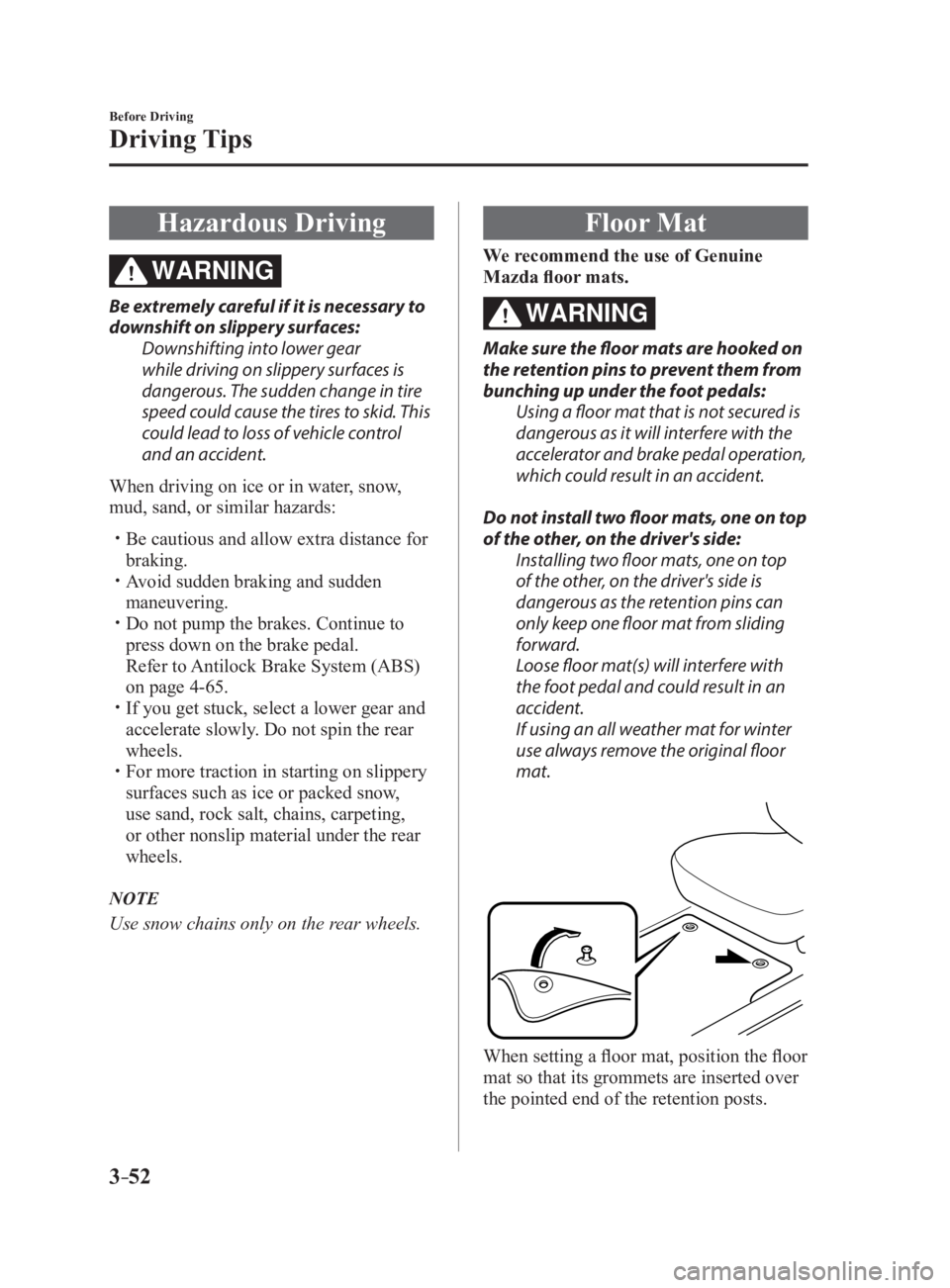
When setting a floor mat, position the floor
mat so that its grommets are inserted over
the pointed end of the retention posts.
MX-5_8FR4-EA-16J_Edition1.indb 52 2016/08/11 20:28:39
Page 109 of 568

3 –53 Before Driving
Driving Tips
Rocking the Vehicle WARNING Do not spin the wheels at more than
56 km/h (35 mph), and do not allow
anyone to stand behind a wheel when
pushing the vehicle:
When the vehicle is stuck, spinning the
wheels at high speed is dangerous.
The spinning tire could overheat and
explode. This could cause serious
injuries.
CAUTION Too much rocking may cause engine
overheating, transmission failure, and
tire damage.
If you must rock the vehicle to free it from
snow, sand or mud, depress the accelerator
slightly and slowly move the shift lever
from 1 (D) to R. Winter Driving Carry emergency gear, including tire
chains, window scraper, flares, a small
shovel, jumper cables, and a small bag of
sand or salt.
Ask an Authorized Mazda Dealer to check
the following:
Have the proper ratio of antifreeze in the
radiator.
Refer to Engine Coolant on page
6-29 .
Inspect the battery and its cables. Cold
reduces battery capacity.
Use an engine oil appropriate for the
lowest ambient temperatures that the
vehicle will be driven in (page 6-27 ).
Inspect the ignition system for damage
and loose connections.
Use washer fluid made with antifreeze—
but do not use engine coolant antifreeze
for washer fluid (page 6-31 ).
NOTE
Do not use the parking brake in freezing
weather as it may freeze. Instead, shift
to P with an automatic transmission and
to 1 or R with a manual transmission.
Block the rear wheels.
Remove snow before driving. Snow left
on the windshield is dangerous as it
could obstruct vision.
Do not open or close the soft top when
the temperature is 5 °C (41 °F) or less.
The material of the soft top could be
damaged by freezing.
Do not apply excessive force to a
window scraper when removing ice or
frozen snow on the mirror glass and
windshield.
Never use warm or hot water for
removing snow or ice from windows and
mirrors as it could result in the glass
cracking.
MX-5_8FR4-EA-16J_Edition1.indb 53 2016/08/11 20:28:39
Page 110 of 568
3 –54 Before Driving
Driving Tips
Drive slowly. Braking performance
can be adversely affected if snow or
ice adheres to the brake components. If
this situation occurs, drive the vehicle
slowly, releasing the accelerator pedal
and lightly applying the brakes several
times until the brake performance
returns to normal.
Snow TiresUse snow tires on all four wheels
Do not go faster than 120 km/h (75 mph)
while driving with snow tires. Inflate snow
tires 30 kPa (0.3 kgf/cm 2
, 4.3 psi) more
than recommended on the tire pressure
label (driver's door frame), but never
more than the maximum cold-tire pressure
shown on the tires.
The vehicle is originally equipped with
summer tires designed for optimum
traction on wet and dry roads. If your
vehicle is to be used on snow and ice
covered roads, Mazda recommends that
you replace the tires originally equipped
on your vehicle with snow tires during the
winter months.
WARNINGUse only the same size and type tires
(snow, radial, or non-radial) on all four
wheels:
Using tires different in size or type is
dangerous. Your vehicle's handling
could be greatly affected and result in
an accident.
CAUTION Check local regulations before using
studded tires. Tire Chains Check local regulations before using tire
chains.
CAUTION
Chains may affect handling.
Do not go faster than 50 km/h (30
mph) or the chain manufacturer's
recommended limit, whichever is lower.
Drive carefully and avoid bumps, holes,
and sharp turns.
Avoid locked-wheel braking.
Do not use chains on roads that are free
of snow or ice. The tires and chains could
be damaged.
Chains may scratch or chip aluminum
wheels.
NOTE
If your vehicle is equipped with the tire
pressure monitoring system, the system
may not function correctly when using tire
chains.
Install the chains on the rear tires only.
Do not use chains on the front tires.
Please consult an Authorized Mazda
Dealer.
Installing the chains
1. Secure the chains on the rear tires as
tightly as possible.
Always follow the chain manufacturer's
instructions.
2. Retighten the chains after driving
1/2—1 km (1/4—1/2 mile).
MX-5_8FR4-EA-16J_Edition1.indb 54 2016/08/11 20:28:39
Page 115 of 568

4 –1 *Some models.4 When Driving Information concerning safe driving and stopping.
Start/Stop Engine ................................ 4-4
Ignition Switch
............................... 4-4
Starting the Engine
......................... 4-5
Turning the Engine Off
................ 4-10
Instrument Cluster and Display ...... 4-11
Meters and Gauges
....................... 4-11
Multi-information Display and INFO
Switch *
......................................... 4-18
Warning/Indicator Lights
............. 4-26
Transmission ...................................... 4-31
Manual Transmission
Operation
...................................... 4-31
Automatic Transmission
Controls
........................................ 4-34
Switches and Controls ...................... 4-45
Lighting Control
........................... 4-45
Turn and Lane-Change Signals
.... 4-50
Windshield Wipers and Washer
... 4-51
Rear Window Defogger
............... 4-55
Horn
............................................. 4-56
Hazard Warning Flasher
............... 4-57
HomeLink Wireless Control
System *
......................................... 4-57
Brake .................................................. 4-61
Brake System
............................... 4-61
Hill Launch Assist (HLA) *
........... 4-63 ABS/TCS/DSC ................................... 4-65
Antilock Brake System (ABS)
..... 4-65
Traction Control System (TCS)
... 4-66
Dynamic Stability Control (DSC) ... 4-67
Fuel Economy Monitor ..................... 4-69
Fuel Economy Monitor *
............... 4-69
Drive Selection ................................... 4-71
Drive Selection *
........................... 4-71
Power Steering ................................... 4-73
Power Steering ............................. 4-73
i-ACTIVSENSE ................................. 4-74
i-ACTIVSENSE *
.......................... 4-74
Adaptive Front Lighting System
(AFS) *
.......................................... 4-75
High Beam Control System
(HBC) *
.......................................... 4-76
Lane Departure Warning System
(LDWS) *
...................................... 4-79
Blind Spot Monitoring (BSM)
System *
......................................... 4-85
Rear Cross Traffic Alert
(RCTA) *
....................................... 4-92
Forward Sensing Camera
(FSC) *
........................................... 4-95
Radar Sensors (Rear) *
.................. 4-98
Cruise Control ................................. 4-100
Cruise Control *
........................... 4-100
MX-5_8FR4-EA-16J_Edition1.indb 1 2016/08/11 20:28:40
Page 118 of 568
4 –4 When Driving
Start/Stop Engine
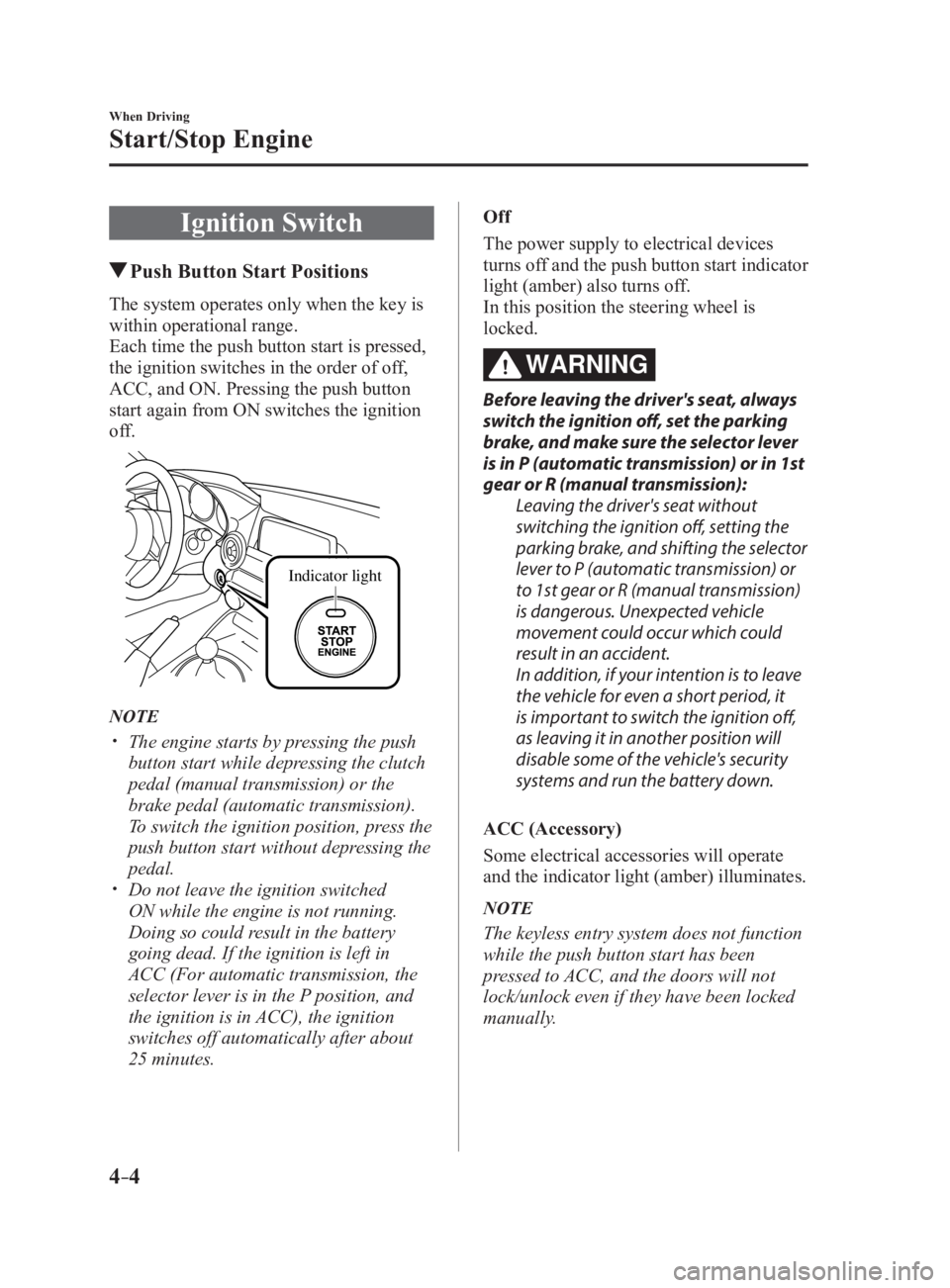
Ignition Switch Push Button Start PositionsThe system operates only when the key is
within operational range.
Each time the push button start is pressed,
the ignition switches in the order of off,
ACC, and ON. Pressing the push button
start again from ON switches the ignition
off.
Indicator light
NOTE
The engine starts by pressing the push
button start while depressing the clutch
pedal (manual transmission) or the
brake pedal (automatic transmission).
To switch the ignition position, press the
push button start without depressing the
pedal.
Do not leave the ignition switched
ON while the engine is not running.
Doing so could result in the battery
going dead. If the ignition is left in
ACC (For automatic transmission, the
selector lever is in the P position, and
the ignition is in ACC), the ignition
switches off automatically after about
25 minutes. Off
The power supply to electrical devices
turns off and the push button start indicator
light (amber) also turns off.
In this position the steering wheel is
locked.
WARNING Before leaving the driver's seat, always
switch the ignition off, set the parking
brake, and make sure the selector lever
is in P (automatic transmission) or in 1st
gear or R (manual transmission):
Leaving the driver's seat without
switching the ignition off, setting the
parking brake, and shifting the selector
lever to P (automatic transmission) or
to 1st gear or R (manual transmission)
is dangerous. Unexpected vehicle
movement could occur which could
result in an accident.
In addition, if your intention is to leave
the vehicle for even a short period, it
is important to switch the ignition off,
as leaving it in another position will
disable some of the vehicle's security
systems and run the battery down.
ACC (Accessory)
Some electrical accessories will operate
and the indicator light (amber) illuminates.
NOTE
The keyless entry system does not function
while the push button start has been
pressed to ACC, and the doors will not
lock/unlock even if they have been locked
manually.
MX-5_8FR4-EA-16J_Edition1.indb 4 2016/08/11 20:28:41
Page 123 of 568

4 –9 When Driving
Start/Stop EngineNOTE
When touching the push button start using
the backside of the key as shown in the
illustration, touch the push button start
with the lock switch side of the key facing
up.
5. Verify that the push button start
indicator light (green) turns on.
6. Press the push button start to start the
engine.
NOTE
The engine cannot be started unless the
clutch pedal is fully depressed (manual
transmission) or the brake pedal is fully
depressed (automatic transmission).
If there is a malfunction with the push
button start function, the push button
start indicator light (amber) flashes.
In this case, the engine may start,
however, have the vehicle checked at an
Authorized Mazda Dealer as soon as
possible.
If the push button start indicator light
(green) does not illuminate, perform the
operation from the beginning again. If
it does not illuminate, have the vehicle
checked at an Authorized Mazda Dealer.
To switch the ignition position without
starting the engine, perform the
following operations after the push
button start indicator light (green) turns
on.
1. Release the clutch pedal (manual
transmission) or brake pedal
(automatic transmission).
2. Press the push button start to switch
the ignition position. The ignition
switches in the order of ACC, ON,
and off each time the push button
start is pressed. To switch the
ignition position again, perform the
operation from the beginning. Emergency Operation for Starting
the Engine If the KEY warning light (red) illuminates,
or the push button start indicator light
(amber) flashes, this could indicate that
the engine may not start using the usual
starting method. Have your vehicle
inspected at an Authorized Mazda Dealer
as soon as possible. If this occurs, the
engine can be force-started. Press and hold
the push button start until the engine starts.
Other procedures necessary for starting
the engine such as having the key in the
cabin, and depressing the clutch pedal
(manual transmission) or the brake pedal
(automatic transmission) are required.
MX-5_8FR4-EA-16J_Edition1.indb 9 2016/08/11 20:28:42
Page 148 of 568

4 –34 When Driving
Transmission
Automatic Transmission Controls Lock-release button
Indicates the selector lever can be shifted freely into any position.
Indicates that you must hold in the lock-release button to shift.Indicates that you must depress the brake pedal and hold in the lock-release
button to shift (The ignition must be switched ON). V arious Lockouts:
NOTE
The Sport AT has an option that is not included in the traditional automatic transmission
that gives the driver the option of selecting each gear instead of leaving it to the
transmission to shift gears. Even if you intend to use the automatic transmission functions
as a traditional automatic, you should also be aware that you can inadvertently shift
into manual shift mode and an inappropriate gear may be retained as the vehicle speed
increases. If you notice the engine speed going higher or hear the engine racing, confirm
you have not accidentally slipped into manual shift mode (page 4-37 ).
MX-5_8FR4-EA-16J_Edition1.indb 34 2016/08/11 20:28:50
Page 149 of 568

4 –35 When Driving
Transmission Shift Position Indication
The selector position is indicated when the
ignition is switched ON.
Gear position indication
In manual shift mode, the “M” of the shift
position indication illuminates and the
numeral for the selected gear is displayed.
Warning LightThe warning light turns on when the
system has a malfunction.
Refer to Warning Indication/Warning
Lights on page 4-26 .
Transmission Ranges
The shift position indicator light in the
instrument cluster illuminates. Refer to
Warning/Indicator Lights on page
4-26 .
The selector lever must be in P or N to
operate the starter.
P (Park)
P locks the transmission and prevents the
rear wheels from rotating.
WARNING Always set the selector lever to P and set
the parking brake:
Only setting the selector lever to the
P position without using the parking
brake to hold the vehicle is dangerous.
If P fails to hold, the vehicle could move
and cause an accident. CAUTION
Shifting into P, N or R while the vehicle is
moving can damage your transmission.
Shifting into a driving gear or reverse
when the engine is running faster than
idle can damage the transmission.
R (Reverse)
In position R, the vehicle moves only
backward. You must be at a complete
stop before shifting to or from R, except
under rare circumstances as explained in
Rocking the Vehicle (page 3-53 ).
N (Neutral)
In N, the wheels and transmission are not
locked. The vehicle will roll freely even
on the slightest incline unless the parking
brake or brakes are on.
WARNING If the engine is running faster than idle,
do not shift from N or P into a driving
gear:
It's dangerous to shift from N or P
into a driving gear when the engine
is running faster than idle. If this is
done, the vehicle could move suddenly,
causing an accident or serious injury.
Do not shift into N when driving the
vehicle:
Shifting into N while driving is
dangerous. Engine braking cannot
be applied when decelerating which
could lead to an accident or serious
injury.
MX-5_8FR4-EA-16J_Edition1.indb 35 2016/08/11 20:28:50
Page 150 of 568

4 –36 When Driving
Transmission
CAUTION Do not shift into N when driving
the vehicle. Doing so can cause
transmission damage.
NOTE
Apply the parking brake or depress the
brake pedal before moving the selector
lever from N to prevent the vehicle from
moving unexpectedly.
D (Drive)
D is the normal driving position. From a
stop, the transmission will automatically
shift through a 6-gear sequence.
M (Manual)
M is the manual shift mode position. Gears
can be shifted up or down by operating the
selector lever. Refer to Manual Shift Mode
on page 4-37 .
Active Adaptive Shift (AAS)Active Adaptive Shift (AAS)
automatically controls the transmission
shift points to best suit the road conditions
and driver input. This improves driving
feel. The transmission may switch to AAS
mode when driving up and down slopes,
cornering, driving at high elevations,
or depressing the accelerator pedal
quickly while the selector lever is in the
D position. Depending on the road and
driving conditions/vehicle operations, gear
shifting could be delayed or not occur,
however, this does not indicate a problem
because the AAS mode will maintain the
optimum gear position. Shift-Lock System The shift-lock system prevents shifting out
of P unless the brake pedal is depressed.
To shift from P:
1. Depress and hold the brake pedal.
2. Start the engine.
3. Press and hold the lock-release button.
4. Move the selector lever.
NOTE
When the ignition is switched to ACC or
the ignition is switched off, the selector
lever cannot be shifted from P.
The ignition cannot be switched to OFF
if the selector lever is not in P.
Shift-Lock Override If the selector lever will not move from P
using the proper shift procedure, continue
to hold down the brake pedal.
1. Remove the shift-lock override cover
using a cloth-wrapped flat head
screwdriver.
2. Insert a screwdriver and push it down.
C ove r
3. Press and hold the lock-release button.
4. Move the selector lever.
MX-5_8FR4-EA-16J_Edition1.indb 36 2016/08/11 20:28:51