lock MAZDA MX5 MIATA 2017 Repair Manual
[x] Cancel search | Manufacturer: MAZDA, Model Year: 2017, Model line: MX5 MIATA, Model: MAZDA MX5 MIATA 2017Pages: 568, PDF Size: 16.58 MB
Page 163 of 568

4 –49 When Driving
Switches and Controls Leaving Home LightThe leaving home light turns on the lights
when the transmitter unlock button is
pressed while away from the vehicle.
The following lights turn on when the
leaving home light is operated.
Low beams, Parking lights, Taillights,
License lights.
To turn on the lights
When the ignition switch and the headlight
switch are in the following conditions,
the headlights will illuminate when the
transmitter unlock button is pressed and
the vehicle receives the transmitter signal.
The headlights turn off after a certain
period of time has elapsed (30 seconds).
Ignition switch: off
Headlight switch: or Lock button
Unlock
b
utton NOTE
Operation of the leaving home light can
be turned on or off.
Refer to Personalization Features on
page 9-9 .
When the transmitter lock button is
pressed and the vehicle receives the
transmitter signal, the headlights turn
off.
When the headlight switch is in a
position other than or , the
headlights turn off.
Headlight Leveling The number of passengers and weight of
cargo in the luggage compartment change
the angle of the headlights.
The angle of the headlights will be
automatically adjusted when turning on
the headlights.
Daytime Running Lights Some countries require moving vehicles
to have their lights on (daytime running
lights) during the daytime.
The daytime running lights turn on
automatically when the vehicle starts
moving.
They turn off when the parking brake is
operated or the shift lever is shifted to
the P position (automatic transmission
vehicle).
NOTE
(Except Canada)
The daytime running lights can be
deactivated.
Refer to Personalization Features on page
9-9 .
MX-5_8FR4-EA-16J_Edition1.indb 49 2016/08/11 20:28:53
Page 165 of 568

4 –51 When Driving
Switches and Controls
Windshield Wipers and
Washer The ignition must be switched ON to use
the wipers.
WARNING Use only windshield washer fluid or
plain water in the reservoir:
Using radiator antifreeze as washer
fluid is dangerous. If sprayed on the
windshield, it will dirty the windshield,
affect your visibility, and could result in
an accident.
Only use windshield washer fluid mixed
with anti-freeze protection in freezing
weather conditions:
Using windshield washer fluid without
anti-freeze protection in freezing
weather conditions is dangerous as
it could freeze on the windshield and
block your vision which could cause
an accident. In addition, make sure
the windshield is sufficiently warmed
using the defroster before spraying the
washer fluid. NOTE
If the windshield wipers are operated
under cold weather conditions or
during snowfall, they could stop due to
accumulated snow on the windshield.
If the windshield wipers stop due to
accumulated snow on the windshield,
park the vehicle in a safe place, turn the
wiper switch off, and then remove the
accumulated snow. If the wiper switch is
turned to another position other than OFF,
the wipers will operate. If the wipers do
not operate even though the wiper switch
is turned to a position other than OFF,
consult an Authorized Mazda Dealer as
soon as possible.
MX-5_8FR4-EA-16J_Edition1.indb 51 2016/08/11 20:28:54
Page 179 of 568

4 –65 When Driving
ABS/TCS/DSC
Antilock Brake System
(ABS) The ABS control unit continuously
monitors the speed of each wheel. If
one wheel is about to lock up, the ABS
responds by automatically releasing and
reapplying that wheel's brake.
The driver will feel a slight vibration in
the brake pedal and may hear a chattering
noise from the brake system. This is
normal ABS system operation. Continue to
depress the brake pedal without pumping
the brakes.
The warning light turns on when the
system has a malfunction.
Refer to Warning Indication/Warning
Lights on page 4-26 .
WARNING Do not rely on ABS as a substitute for
safe driving:
The ABS cannot compensate for unsafe
and reckless driving, excessive speed,
tailgating (following another vehicle
too closely), driving on ice and snow,
and hydroplaning (reduced tire friction
and road contact because of water on
the road surface). You can still have an
accident. NOTE
Braking distances may be longer on
loose surfaces (snow or gravel, for
example) which usually have a hard
foundation. A vehicle with a normal
braking system may require less
distance to stop under these conditions
because the tires will build up a wedge
of surface layer when the wheels skid.
The sound of the ABS operating may
be heard when starting the engine
or immediately after starting the
vehicle, however, it does not indicate a
malfunction.
MX-5_8FR4-EA-16J_Edition1.indb 65 2016/08/11 20:28:58
Page 196 of 568

4 –82 When Driving
i-ACTIVSENSE When the System Operates1. The system goes on operation standby
when the LDWS switch is pressed and
the LDWS OFF indicator light in the
instrument cluster turns off.
2. Drive the vehicle in the center of the
driving lane while the LDWS OFF
indicator light is turned off. The system
becomes operational when all of the
following conditions are met.
The vehicle is driven in the center
of the driving lane with the white or
yellow lines on the left and right sides,
or on either side.
The vehicle speed is 65 km/h (41 mph)
or faster.
The vehicle is driven on a straight road
or road with gentle curves.
The LDWS does not operate in the
following cases:
The system cannot detect white or
yellow lines.
The vehicle speed is less than 60 km/h
(37 mph).
The vehicle is making a sharp turn.
The vehicle is making a curve at an
inadequate speed. NOTE
The LDWS does not operate until the
system detects a white or yellow line on
either the left or right.
When the system detects a white or
yellow line on one side only, the system
will activate the warning only when the
vehicle deviates on the side where the
white or yellow line is being detected.
The distance and warning sensitivity
(likelihood of a warning) which the
system uses to determine the possibility
of a lane departure can be changed.
Refer to Personalization Features on
page 9-9 .
Auto cancel
In the following cases, the LDWS cancels
automatically and the LDWS warning
light in the instrument cluster turns on.
The temperature inside the camera is
high or low.
The windshield around the camera is
foggy.
The windshield around the camera is
blocked by an obstruction, causing poor
forward visibility.
The LDWS is enabled automatically when
the operation conditions are met, and the
LDWS warning light turns off.
MX-5_8FR4-EA-16J_Edition1.indb 82 2016/08/11 20:29:01
Page 201 of 568
4 –87 When Driving
i-ACTIVSENSE
In the following cases, the activation of the Blind Spot Monitoring (BSM) warning lights
and the warning beep may not occur or they may be delayed.
A vehicle makes a lane change from a driving lane two lanes over to an adjacent lane.
Driving on steep slopes.
Crossing the summit of a hill or mountain pass.
The turning radius is small (making a sharp turn, turning at intersections).
When there is a difference in the height between your driving lane and the adjacent
lane.
Directly after pressing the Blind Spot Monitoring (BSM) switch and the system
becomes operable.
If the road width is extremely narrow, vehicles two lanes over may be detected.
The detection area of the radar sensors (rear) is set according to the road width of
expressways.
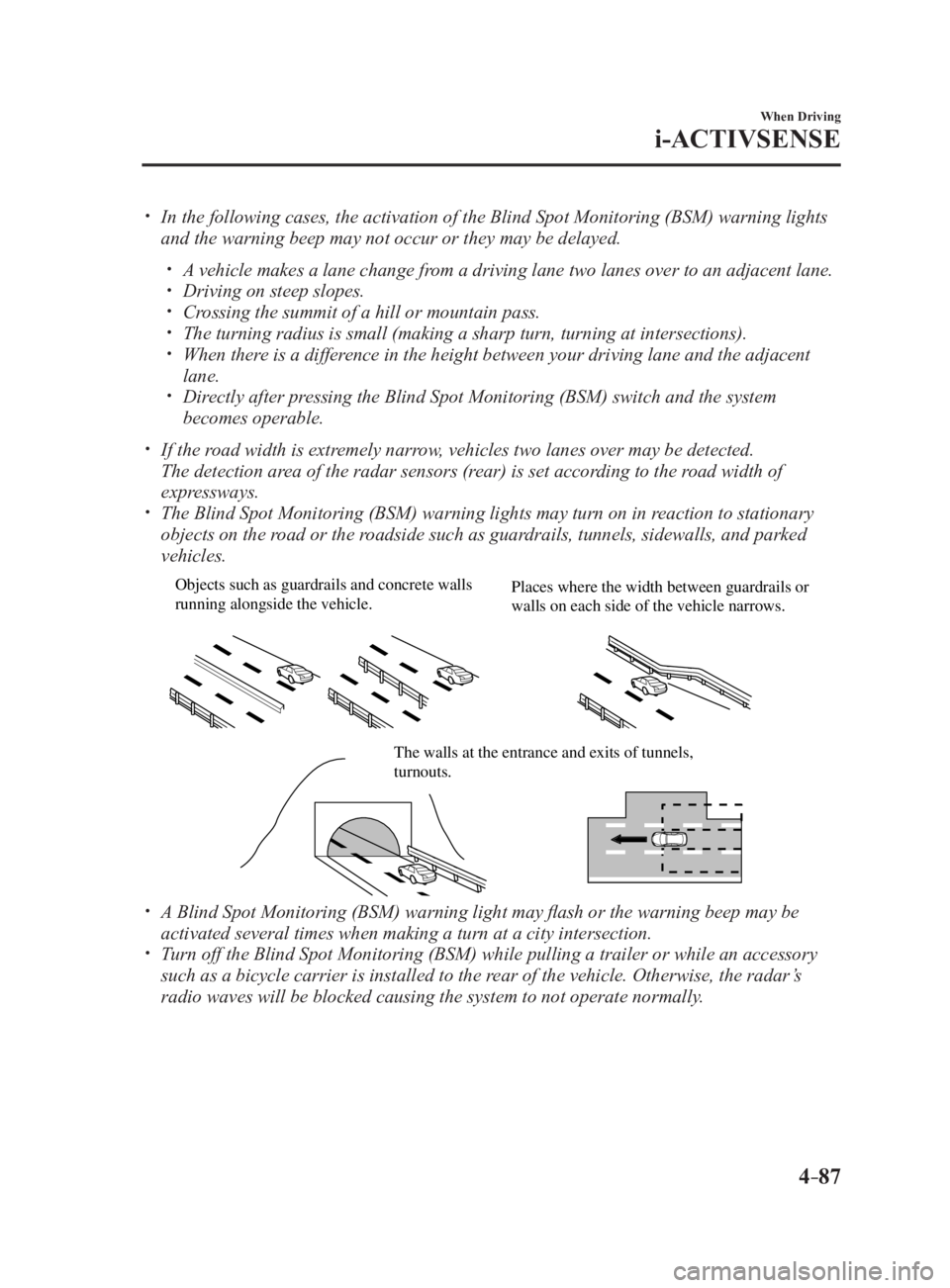
The Blind Spot Monitoring (BSM) warning lights may turn on in reaction to stationary
objects on the road or the roadside such as guardrails, tunnels, sidewalls, and parked
vehicles. Objects such as guardrails and concrete walls
running alongside the vehicle. Places where the width between guardrails or
walls on each side of the vehicle narrows.
The walls at the entrance and exits of tunnels,
turnouts.
A Blind Spot Monitoring (BSM) warning light may flash or the warning beep may be
activated several times when making a turn at a city intersection.
Turn off the Blind Spot Monitoring (BSM) while pulling a trailer or while an accessory
such as a bicycle carrier is installed to the rear of the vehicle. Otherwise, the radar’s
radio waves will be blocked causing the system to not operate normally.
MX-5_8FR4-EA-16J_Edition1.indb 87 2016/08/11 20:29:02
Page 208 of 568
4 –94 When Driving
i-ACTIVSENSE
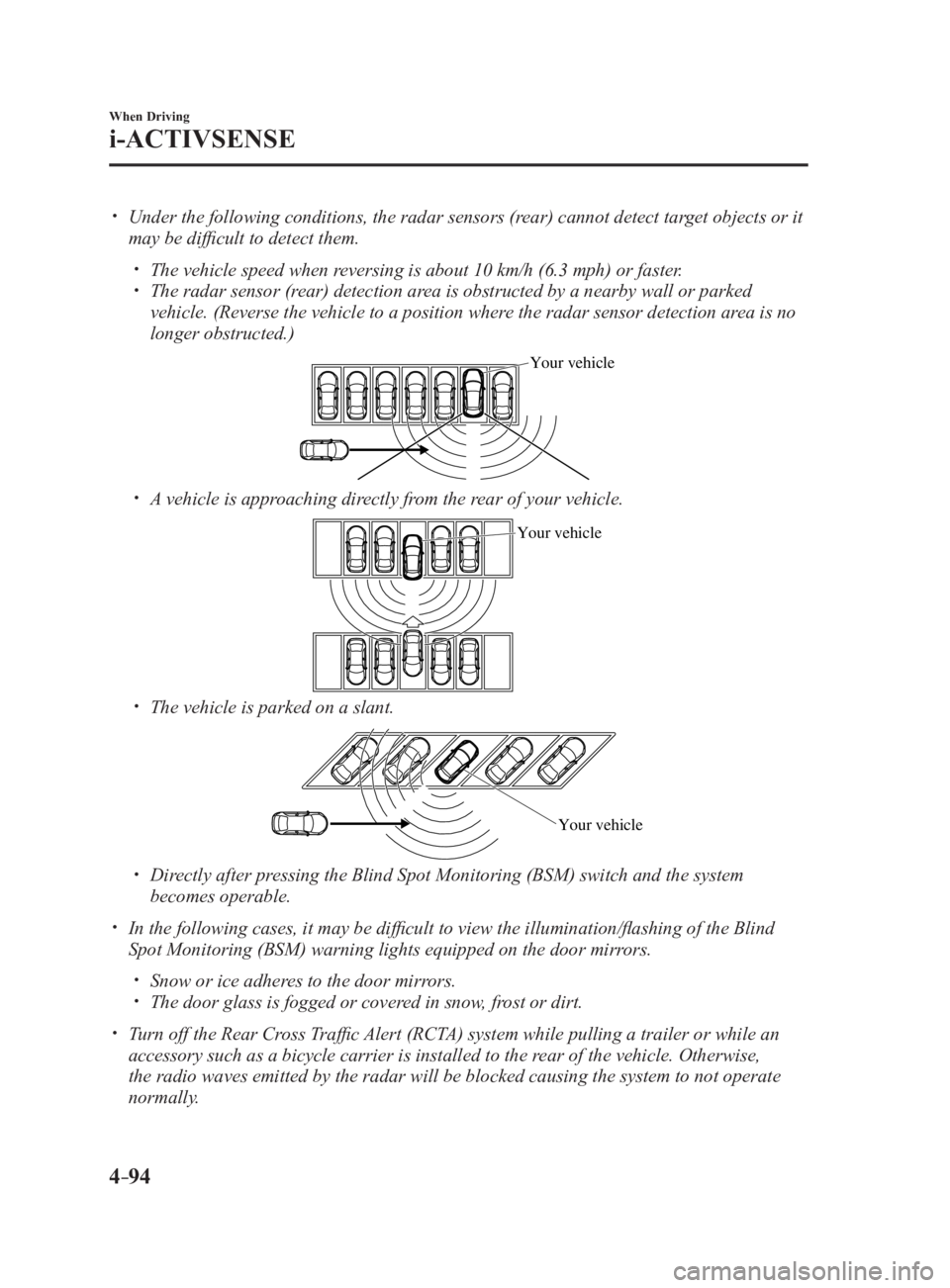
Under the following conditions, the radar sensors (rear) cannot detect target objects or it
may be difficult to detect them.
The vehicle speed when reversing is about 10 km/h (6.3 mph) or faster.
The radar sensor (rear) detection area is obstructed by a nearby wall or parked
vehicle. (Reverse the vehicle to a position where the radar sensor detection area is no
longer obstructed.) Your vehicle
A vehicle is approaching directly from the rear of your vehicle. Your vehicle
The vehicle is parked on a slant.
Your vehicle
Directly after pressing the Blind Spot Monitoring (BSM) switch and the system
becomes operable.
In the following cases, it may be difficult to view the illumina tion/flashing of the Blind
Spot Monitoring (BSM) warning lights equipped on the door mirrors.
Snow or ice adheres to the door mirrors.
The door glass is fogged or covered in snow, frost or dirt.
Turn off the Rear Cross Traffic Alert (RCTA) system while pulling a trailer or while an
accessory such as a bicycle carrier is installed to the rear of the vehicle. Otherwise,
the radio waves emitted by the radar will be blocked causing the system to not operate
normally.
MX-5_8FR4-EA-16J_Edition1.indb 94 2016/08/11 20:29:03
Page 213 of 568
4 –99 When Driving
i-ACTIVSENSENOTE
The detection ability of the radar sensors (rear) has limitations. In the following cases,
the detection ability may lower and the system may not operate normally.
The rear bumper near the radar sensors (rear) has become deformed.
Snow, ice or mud adheres to the radar sensors (rear) on the rear bumper.
Under bad weather conditions such as rain, snow and fog.
Under the following conditions, the radar sensors (rear) cannot detect target objects or it
may be difficult to detect them.
Stationary objects on a road or a road side such as small, two-wheeled vehicles,
bicycles, pedestrians, animals, and shopping carts.
Vehicle shapes which do not reflect radar waves well such as empty trailers with a low
vehicle height and sports cars.
Vehicles are shipped with the direction of the radar sensors (rear) adjusted for each
vehicle to a loaded vehicle condition so that the radar sensors (rear) detect approaching
vehicles correctly. If the direction of the radar sensors (rear) has deviated for some
reason, have the vehicle inspected at an Authorized Mazda Dealer.
For repairs or replacement of the radar sensors (rear), or bumper repairs, paintwork,
and replacement near the radar sensors, consult an Authorized Mazda Dealer.
Turn off the system while pulling a trailer or while an accessory such as a bicycle carrier
is installed to the rear of the vehicle. Otherwise, the radio waves emitted by the radar will
be blocked causing the system to not operate normally.
The radar sensors are regulated by the relevant radio wave laws of the country in which
the vehicle is driven. If the vehicle is driven abroad, authorization from the country in
which the vehicle is driven may be required.
MX-5_8FR4-EA-16J_Edition1.indb 99 2016/08/11 20:29:04
Page 223 of 568

5 –15 Interior Features Use of various features for ride comfort, including air-conditioning and
audio system.
Climate Control System ..................................................................... 5-2
Operating Tips ............................................................................... 5-2
Vent Operation
.............................................................................. 5-3
Manual Type
................................................................................. 5-5
Fully Automatic Type
.................................................................... 5-9
Audio System .................................................................................... 5-13
Antenna
....................................................................................... 5-13
Operating Tips for Audio System
............................................... 5-14
Audio set [Type A (non-touchscreen)]
........................................ 5-22
Audio set [Type B (touchscreen)]
............................................... 5-34
Audio Control Switch Operation
................................................ 5-55
AUX/USB mode
......................................................................... 5-57
Bluetooth ®
......................................................................................... 5-74
Bluetooth ®
................................................................................... 5-74
Bluetooth ®
Hands-Free (Type A) ................................................ 5-97
Bluetooth ®
Hands-Free (Type B) .............................................. 5-103
Bluetooth ®
Audio (Type A) ....................................................... 5-113
Bluetooth ®
Audio (Type B) ....................................................... 5-115
Troubleshooting
........................................................................ 5-129
Interior Equipment ........................................................................ 5-132
Sunvisors
................................................................................... 5-132
Interior Lights
........................................................................... 5-132
Accessory Sockets
.................................................................... 5-134
Cup Holder
................................................................................ 5-135
Storage Compartments
.............................................................. 5-138
Windblocker
.............................................................................. 5-140
MX-5_8FR4-EA-16J_Edition1.indb 1 2016/08/11 20:29:06
Page 228 of 568

5 –6 Interior Features
Climate Control System Control SwitchesTemperature control dial
This dial controls temperature. Turn it
clockwise for hot and counterclockwise
for cold.
NOTE
(Type A)
When the mode is set to
, or a position
in between them with the fan control dial
in a position other than 0 and the
temperature control dial in the maximum
cold position, the air intake selector
switches to the recirculated air position
and the A/C turns on automatically.
If A/C is not desired, press the A/C switch
to turn it off.
Fan control dial
This dial allows variable fan speeds.
The fan has seven speeds.
Mode selector dial
Turn the mode selector dial to select
airflow mode (page 5-4 ).
NOTE
The mode selector dial can be set at the
intermediate positions ( ) between
each mode. Set the dial to an
intermediate position if you want to split
the airflow between the two modes.
For example, when the mode selector
dial is at the position between the
and positions, airflow from the floor
vent is less than that of the position. A/C switch
Press the A/C switch to turn the air
conditioner on. The indicator light on the
switch will illuminate when the fan control
dial is in any position except OFF.
Press the switch once again to turn the air
conditioner off.
NOTE
The air conditioner may not function when
the outside temperature approaches 0 °C
(32 °F).
Air intake selector
This switch controls the source of air
entering the vehicle.
Outside or recirculated air positions can be
selected. Press the switch to select outside/
recirculated air positions.
Recirculated air position (indicator light
illuminated)
Outside air is shut off. Use this position
when going through tunnels, driving in
congested traffic (high engine exhaust
areas) or when quick cooling is desired.
Outside air position (indicator light
turned off)
Outside air is allowed to enter the
cabin. Use this mode for ventilation or
windshield defrosting.
WARNING Do not use the position in cold or
rainy weather:
Using the
position in cold or rainy
weather is dangerous as it will cause
the windows to fog up. Your vision will
be hampered, which could lead to a
serious accident.
MX-5_8FR4-EA-16J_Edition1.indb 6 2016/08/11 20:29:07
Page 229 of 568

5 –7 Interior Features
Climate Control SystemRear window defogger switch
Press the rear window defogger switch to
defrost the rear window.
Refer to Rear Window Defogger on page
4-55 .
Heating1. Set the mode selector dial to the
position.
2. Set the air intake selector to the outside
air position (indicator light turns off).
3. Set the temperature control dial to the
hot position.
4. Set the fan control dial to the desired
speed.
5. If dehumidified heating is desired, turn
on the air conditioner.
NOTE
If the windshield fogs up easily, set the
mode selector dial to the position.
If cooler air is desired at face level, set
the mode selector dial at the position
and adjust the temperature control dial
to maintain maximum comfort.
The air to the floor is warmer than air
to the face (except when the temperature
control dial is set at the extreme hot or
cold position).
Cooling (With air conditioner)
1. Set the mode selector dial to the
position.
2. Set the temperature control dial to the
cold position.
3. Set the fan control dial to the desired
speed.
4. Turn on the air conditioner by pressing
the A/C switch.
5. After cooling begins, adjust the fan
control dial and temperature control
dial as needed to maintain maximum
comfort. CAUTION If the air conditioner is used while
driving up long hills or in heavy
traffic, monitor the engine coolant
temperature warning light to see if it is
illuminated or flashing (page 4-18 ).
The air conditioner may cause engine
overheating. If the warning light is
illuminated or flashing, turn the air-
conditioning off (page 7-27 ).
NOTE
When maximum cooling is desired,
set the temperature control dial to the
extreme cold position and set the air
intake selector to the recirculated air
position, then turn the fan control dial
fully clockwise.
If warmer air is desired at floor level,
set the mode selector dial at the
position and adjust the temperature
control dial to maintain maximum
comfort.
The air to the floor is warmer than air
to the face (except when the temperature
control dial is set at the extreme hot or
cold position).
Ventilation
1. Set the mode selector dial to the
position.
2. Set the air intake selector to the outside
air position (indicator light turns off).
3. Set the temperature control dial to the
desired position.
4. Set the fan control dial to the desired
speed.
MX-5_8FR4-EA-16J_Edition1.indb 7 2016/08/11 20:29:08