lock MAZDA MX5 MIATA 2017 Manual PDF
[x] Cancel search | Manufacturer: MAZDA, Model Year: 2017, Model line: MX5 MIATA, Model: MAZDA MX5 MIATA 2017Pages: 568, PDF Size: 16.58 MB
Page 230 of 568

5 –8 Interior Features
Climate Control System Windshield Defrosting and
Defogging1. Set the mode selector dial to the
position.
2. Set the temperature control dial to the
desired position.
3. Set the fan control dial to the desired
speed.
4. If dehumidified heating is desired, turn
on the air conditioner.
WARNINGDo not defog the windshield using the
position with the temperature
control set to the cold position:
Using the
position with the
temperature control set to the cold
position is dangerous as it will cause
the outside of the windshield to fog up.
Your vision will be hampered, which
could lead to a serious accident. Set
the temperature control to the hot or
warm position when using the
position.
NOTE
For maximum defrosting, turn on the air
conditioner, set the temperature control
dial to the extreme hot position, and
turn the fan control dial fully clockwise.
If warm air is desired at the floor, set the
mode selector dial to the position.
When the fan control dial is ON, and the
mode selector dial is in the or
position, the air conditioner is
automatically turned on and the outside
air position is automatically selected to
defrost the windshield. In the
or
position, the outside air position cannot
be changed to the recirculated air
position. Dehumidifying (With air
conditioner) Operate the air conditioner in cool or cold
weather to help defog the windshield and
side windows.
1. Set the mode selector dial to the desired
position.
2. Set the air intake selector to the outside
air position (indicator light turns off).
3. Set the temperature control dial to the
desired position.
4. Set the fan control dial to the desired
speed.
5. Turn on the air conditioner by pressing
the A/C switch.
NOTE
One of the functions of the air conditioner
is dehumidifying the air and, to use
this function, the temperature does not
have to be set to cold. Therefore, set the
temperature control dial to the desired
position (hot or cold) and turn on the air
conditioner when you want to dehumidify
the cabin air.
MX-5_8FR4-EA-16J_Edition1.indb 8 2016/08/11 20:29:08
Page 232 of 568

5 –10 Interior Features
Climate Control System Control SwitchesTemperature control dial
This dial controls temperature. Turn it
clockwise for hot and counterclockwise
for cold.
Fan control dial
The fan has seven speeds.
AUTO position
The amount of airflow will be
automatically controlled in accordance
with the set temperature.
Except AUTO position
The airflow amount can be adjusted to the
desired level by turning the dial.
0 position
To turn off the system, set the dial to 0
position.
Mode selector dial
Turn the mode selector dial to select
airflow mode (page 5-4 ).
AUTO position
The airflow mode automatically adjusts to
the selected temperature.
Except AUTO position
The desired airflow position can be
selected by turning the dial. NOTE
With the airflow mode set to the
position and the temperature control
dial set at a medium temperature,
heated air is directed to the feet and air
at a comparably lower temperature will
flow through the central, left and right
vents.
When the fan control dial is ON, and the
mode selector dial is in the or
position, the air conditioner is
automatically turned on and the outside
air position is automatically selected to
defrost the windshield. In the
or
position, the outside air position cannot
be changed to the recirculated air
position.
A/C switch
The air-conditioning (cooling/
dehumidifying functions) can be turned on
or off by pressing the switch while the fan
control dial is at a position other than 0.
The indicator light turns on while the air-
conditioning is operating.
NOTE
The air conditioner may not function when
the outside temperature approaches 0 °C
(32 °F).
Air intake selector
Outside or recirculated air positions can be
selected. Press the switch to select outside/
recirculated air positions.
Recirculated air position (indicator light
illuminated)
Outside air is shut off. Use this position
when going through tunnels, driving in
congested traffic (high engine exhaust
areas) or when quick cooling is desired.
MX-5_8FR4-EA-16J_Edition1.indb 10 2016/08/11 20:29:08
Page 235 of 568

5 –13 Interior Features
Audio System
*Some models.AntennaAM/FM Radio Antenna
The AM/FM radio antenna receives both
AM and FM signals.
To remove the antenna, turn it
counterclockwise.
To install the antenna, turn it clockwise.
Make sure the antenna is securely
installed. Install
Rem ove
CAUTION To prevent damage to the antenna,
remove it before passing beneath a
low overhead clearance.
NOTE
When leaving your vehicle unattended, we
recommend that you remove the antenna
and store it inside the vehicle. Satellite Radio Antenna *
The satellite radio antenna receives
SiriusXM signals. Satellite radio antenna
MX-5_8FR4-EA-16J_Edition1.indb 13 2016/08/11 20:29:09
Page 244 of 568
![MAZDA MX5 MIATA 2017 Manual PDF 5 –22 Interior Features
Audio System
Audio set [Type A (non-touchscreen)] Power/Volume/Sound Controls ............................................................................. page 5-24
Cl](/img/28/59019/w960_59019-243.png "MAZDA MX5 MIATA 2017 Manual PDF 5 –22 Interior Features
Audio System
Audio set [Type A (non-touchscreen)] Power/Volume/Sound Controls ............................................................................. page 5-24
Cl")
5 –22 Interior Features
Audio System
Audio set [Type A (non-touchscreen)] Power/Volume/Sound Controls ............................................................................. page 5-24
Clock ..................................................................................................................... page 5-26
Operating the Radio .............................................................................................. page 5-28
Operating the Compact Disc (CD) Player ............................................................. page 5-30
How to use Auxiliary jack/USB port .................................................................... page 5-33
Error Indications ................................................................................................... page 5-33
MX-5_8FR4-EA-16J_Edition1.indb 22 2016/08/11 20:29:11
Page 246 of 568

5 –24 Interior Features
Audio System Power/Volume/Sound Controls
Power/Volume/Audio control dial Menu buttonAudio display
Power ON/OFF
Switch the ignition to ACC or ON. Press
the power/volume dial to turn the audio
system on. Press the power/volume dial
again to turn the audio system off.
Volume adjustment
To adjust the volume, turn the power/
volume dial. Turn the power/volume
dial clockwise to increase volume,
counterclockwise to decrease it.
Audio sound adjustment
1. Press the menu button ( ) to select
the function. The selected function will
be indicated. 2. Turn the audio control dial to adjust the
selected functions as follows: Indication Setting value
Turn
CounterclockwiseTurn
Clockwise
ALC
(Automatic volume
adjustment) Level decrease Level
increase
BASS
(Low pitch sound) Decrease bass Increase
bass
TREB
(Treble sound) Decrease treble Increase
treble
FADE
(Front/back volume
balance) Shift the sound
to the front Shift the
sound to
the rear
BAL
(Left/right volume
balance) Shift the sound
to the left Shift the
sound to
the right
BEEP
(Audio operation
sound) Off On
BT SETUP *
Select mode
12Hr
24Hr
(12 Hr/24 Hr time
adjustment) 12Hr (Flashing) 24Hr
(Flashing)
* Depending on the model, this function may not be
available.
MX-5_8FR4-EA-16J_Edition1.indb 24 2016/08/11 20:29:12
Page 247 of 568

5 –25 Interior Features
Audio System
*Some models.NOTE
If not operated for several seconds, the
display returns to the previous display. To
reset bass, treble, fade, and balance, press
the menu button (
) for 2 seconds.
The unit will beep and “CLEAR” will be
displayed.
ALC (Automatic volume adjustment)
The automatic level control (ALC)
changes the audio volume automatically
according to the vehicle speed. The faster
the vehicle speed, the higher the volume
increases. ALC has ALC OFF and ALC
LEVEL 1 to 7 modes. At ALC LEVEL 7,
the amount that the volume can increase
is at the maximum. Select the mode
according to the driving conditions.
BEEP (Audio operation sound)
The setting for the operation sound when
pressing and holding a button can be
changed. The initial setting is ON. Set to
OFF to mute the operation sound.
BT SETUP mode *
Music and other audio such as voice data
recorded on portable audio devices and
mobile phones available on the market
which are equipped with the Bluetooth ®
transmission function can be listened to
via wireless transmission over the vehicle's
speakers. Using the BT SETUP mode,
these devices can be programmed to the
Bluetooth ®
unit or changed (page 5-77 ).
12Hr 24Hr (12 Hr/24 Hr time
adjustment)
Rotating the audio control dial switches
the display between 12 and 24-hour clock
time (page 5-26 ).
MX-5_8FR4-EA-16J_Edition1.indb 25 2016/08/11 20:29:12
Page 248 of 568
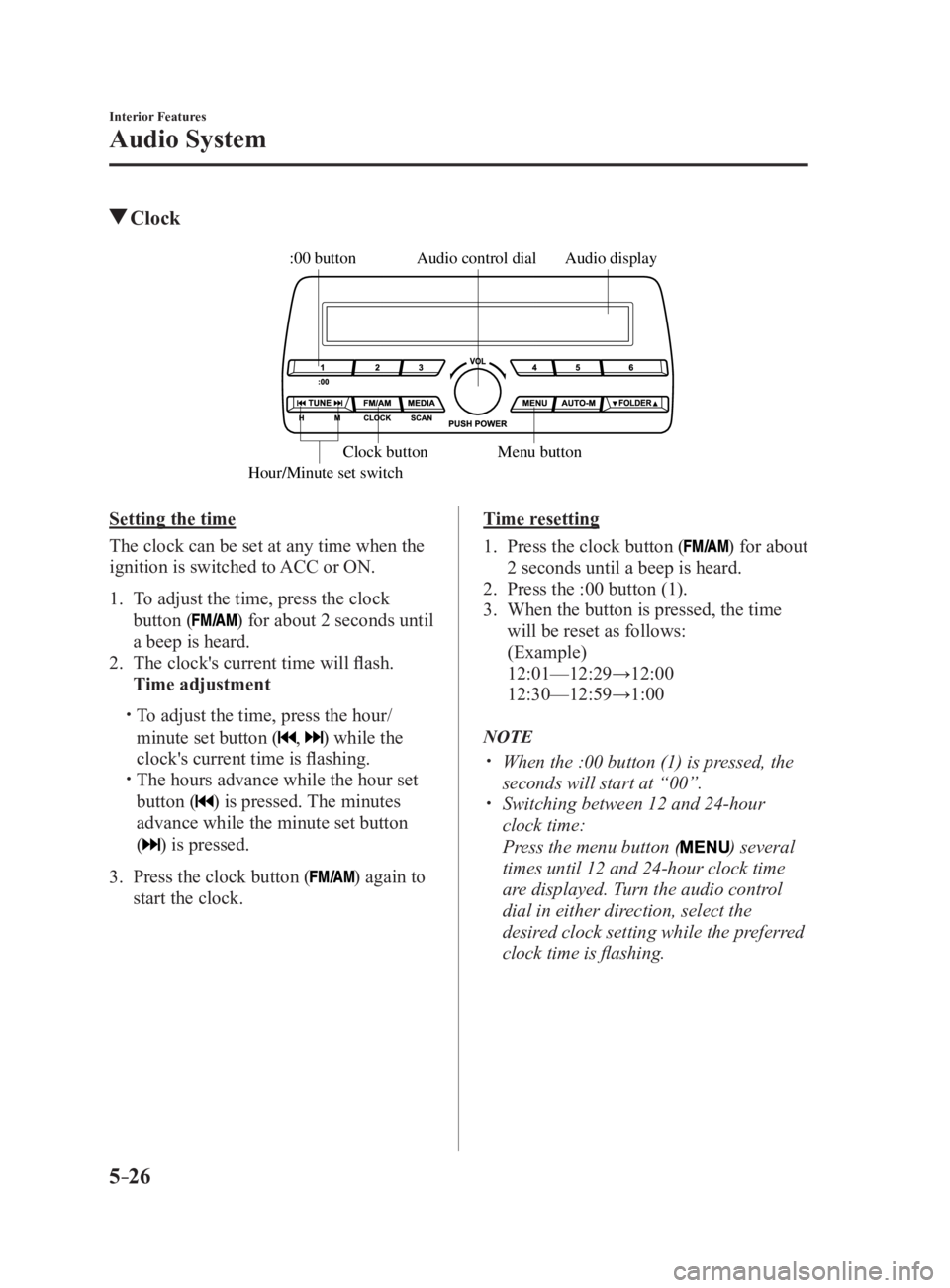
5 –26 Interior Features
Audio System Clock Audio displayAudio control dial
Hour/Minute set switch :00 button
Menu buttonClock button
Setting the time
The clock can be set at any time when the
ignition is switched to ACC or ON.
1. To adjust the time, press the clock
button ( ) for about 2 seconds until
a beep is heard.
2. The clock's current time will flash.
Time adjustment
To adjust the time, press the hour/
minute set button ( , ) while the
clock's current time is flashing.
The hours advance while the hour set
button ( ) is pressed. The minutes
advance while the minute set button
(
) is pressed.
3. Press the clock button ( ) again to
start the clock. Time resetting
1. Press the clock button ( ) for about
2 seconds until a beep is heard.
2. Press the :00 button (1).
3. When the button is pressed, the time
will be reset as follows:
(Example)
12:01—12:29→12:00
12:30—12:59→1:00
NOTE
When the :00 button (1) is pressed, the
seconds will start at “00”.
Switching between 12 and 24-hour
clock time:
Press the menu button ( ) several
times until 12 and 24-hour clock time
are displayed. Turn the audio control
dial in either direction, select the
desired clock setting while the preferred
clock time is flashing.
MX-5_8FR4-EA-16J_Edition1.indb 26 2016/08/11 20:29:12
Page 256 of 568
![MAZDA MX5 MIATA 2017 Manual PDF 5 –34 Interior Features
Audio System
Audio set [Type B (touchscreen)]NOTE
The explanation of functions described in this manual may differ from the actual
operation, and the shapes of screens and b](/img/28/59019/w960_59019-255.png "MAZDA MX5 MIATA 2017 Manual PDF 5 –34 Interior Features
Audio System
Audio set [Type B (touchscreen)]NOTE
The explanation of functions described in this manual may differ from the actual
operation, and the shapes of screens and b")
5 –34 Interior Features
Audio System
Audio set [Type B (touchscreen)]NOTE
The explanation of functions described in this manual may differ from the actual
operation, and the shapes of screens and buttons and the letters and characters displayed
may also differ from the actual appearance.
Additionally, depending on future software updates, the content may successively change
without notice.
Audio Set (Type B) has three different human interfaces.
Commander switch
Touch panel
Voice recognition with steering switch and microphone
Commander switch operation
NOTE
For safety reasons, some operations are disabled while the vehicle is being driven.
Volume dial operation
Volume dial
Press the volume dial to switch the audio MUTE on and off.
Turn the volume dial to adjust the volume. The volume increases by turning the dial
clockwise, and decreases by turning it counterclockwise.
MX-5_8FR4-EA-16J_Edition1.indb 34 2016/08/11 20:29:14
Page 262 of 568

5 –40 Interior Features
Audio System Volume/Display/Sound Controls
Volume dialCommander switc hA udio control switch
Volume switch
Volume adjustment
Turn the commander switch volume dial.
The volume switch on the steering switch
can also be pressed.
Display setting
Select the
icon on the home screen to
display the Settings screen.
Select the
tab to select the item you
would like to change.
Display OFF/Clock
The center display can be turned off.
Select
to turn the display off.
When is
selected the center display turns off and
the clock is displayed.
The center display can be turned back on
as follows:
Touch the center display.
Operate the commander switch. Daytime/nighttime (System) screen
setting
The daytime or nighttime screen can be
selected.
: Switches screen automatically
according to headlight illumination
condition *1
: Daytime screen setting
: Nighttime screen setting
*1 The display is constantly on daytime
screen when the illumination dimmer is
cancelled.
Brightness adjustment
Adjust the center display brightness using
the slider.
Contrast adjustment
Adjust the center display contrast using
the slider.
Display setting reset
All of the screen setting values can be
reset to their initial settings.
1. Select .
2. Select .
MX-5_8FR4-EA-16J_Edition1.indb 40 2016/08/11 20:29:14
Page 263 of 568

5 –41 Interior Features
Audio SystemAudio sound adjustment
Select the icon on the home screen to
display the Settings screen.
Select the
tab to select the item you
would like to change. Indication Setting value
Bass
(Low pitch sound) Side: Low pitch
enhancement
Side: Low pitch
reduction
Treble
(Treble sound) Side: Treble
enhancement
Side: Treble reduction
Fade
(Front/Rear volume
balance) Front: Front speaker
volume
enhancement
Rear: Rear speaker
volume
enhancement
Balance
(Left/right volume
balance) Right: Right speaker
volume
enhancement
Left: Left speaker
volume
enhancement
ALC *1
(Automatic volume
adjustment) Off—Adjustment at
seven levels
Bose ®
AudioPilot *2
(Automatic volume
adjustment) On/Off
Beep
(Audio operation sound) On/Off
*1 Standard audio
*2 Bose ®
Sound System
ALC (Automatic volume adjustment)
The automatic level control (ALC) is a
feature that automatically adjusts audio
volume and sound quality according to
the vehicle speed. The volume increases
in accordance with the increase in vehicle
speed, and decreases as vehicle speed
decreases. Bose ®
AudioPilot (Automatic volume
adjustment)
When driving, background noise can
interfere with enjoying music.
AudioPilot ® *3
noise compensation
technology continuously adjusts the music
to compensate for background noise and
vehicle speed.
It reacts only to sustained noise sources
and not intermittent ones, such as speed
bumps.
An enhanced DSP algorithm allows faster
and more effective compensation for
unusual situations, such as driving on a
very rough road or at high speeds.
In addition, a system is equipped which
switches the audio to the optimum
acoustics corresponding to the opening
and closing of the soft top/roof.
The acoustic switching function is linked
to the operation of the top lock lever/
retractable fastback switch and audio
playback is muted for about 1 second
while switching.
*3 AudioPilot ®
is a registered trademark of
Bose Corporation.
MX-5_8FR4-EA-16J_Edition1.indb 41 2016/08/11 20:29:15