ignition MERCEDES-BENZ A-CLASS HATCHBACK 2008 Owner's Manual
[x] Cancel search | Manufacturer: MERCEDES-BENZ, Model Year: 2008, Model line: A-CLASS HATCHBACK, Model: MERCEDES-BENZ A-CLASS HATCHBACK 2008Pages: 305, PDF Size: 5.43 MB
Page 87 of 305
Side windows
84
&
To switch on intermittent wiping
( To switch off intermittent wiping
) To wipe with washer fluid
X Turn the key to position 1or 2in the ignition
lock.
X Turn the combination switch to the corre-
sponding position.
When the rear window wiper is switched on
the icon appears in the instrument cluster. Side windows
Opening/closing the side windows
G
Risk of injury
Make sure that nobody can become trap-
ped between the side window and the door
frame when a side window is opened. Do
not touch or lean against the side window
during the opening procedure. You could
become trapped between the side window
and the door frame as the side window
moves down. If there is a risk of becoming
trapped, release the switch or pull the
switch upwards to close the side window
again. G
Risk of injury
Make sure that nobody can become trap-
ped when closing the side windows. If there
is a risk of becoming trapped, release the
switch or push the switch again to reopen
the side window. G
Risk of injury
Children may injure themselves if they
operate the side windows.
Never leave children unsupervised in the
vehicle. Always take the key with you when leaving the vehicle, even if you are only
leaving it for a short time.
G
Risk of injury
Do not leave children unsupervised in the
vehicle, even if they are secured in a child
restraint system. The children could:
R be seriously or even fatally injured on
parts of the vehicle
R be seriously or even fatally injured by
prolonged exposure to extremely high or
extremely low temperatures
If children open a door, they could:
R seriously or even fatally injure other peo-
ple
R get out of the vehicle, thereby injuring
themselves or be seriously or even fatally
injured by a passing vehicle
Activate the child-proof locks if children are
travelling in the vehicle. They could other-
wise open doors or windows while the vehi-
cle is in motion and thereby injure them-
selves or others. Controls
169_AKB; 2; 4, en-GB
wdomann,
Version: 2.10.6
2008-07-16T08:52:06+02:00 - Seite 84 Dateiname: 6515_0315_02_buchblock.pdf; preflight
Page 88 of 305
Side windows
85
i
Related topics:
R convenience opening (Y page 86)
R convenience closing (Y page 86)
R override controls in the rear compart-
ment (Y page 54)
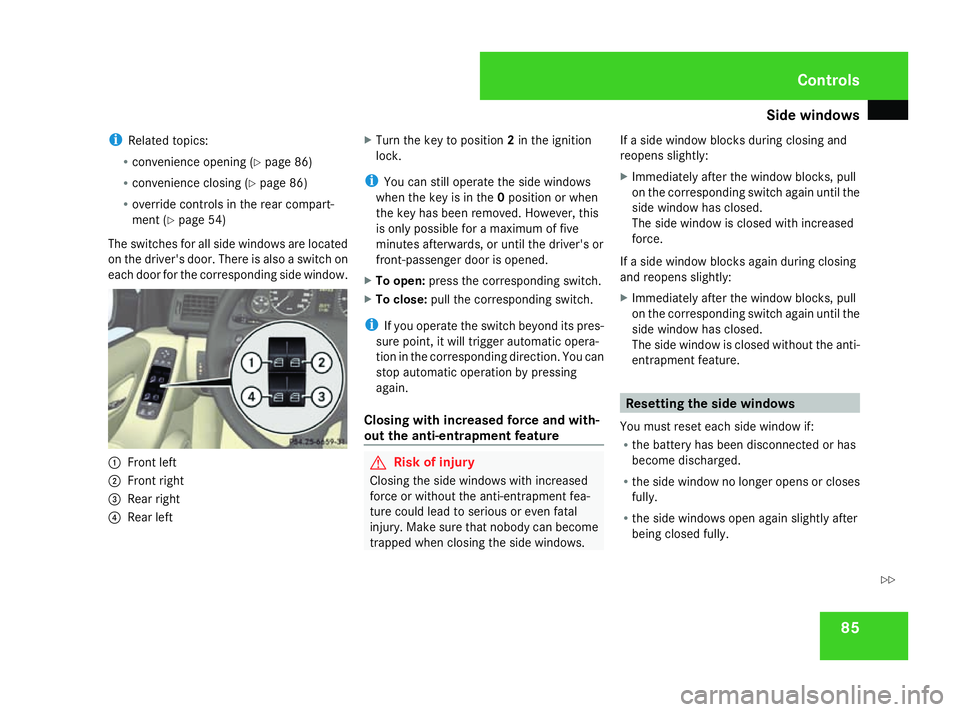
The switches for all side windows are located
on the driver's door. There is also a switch on
each door for the corresponding side window. 1
Front left
2 Front right
3 Rear right
4 Rear left X
Turn the key to position 2in the ignition
lock.
i You can still operate the side windows
when the key is in the 0position or when
the key has been removed. However, this
is only possible for a maximum of five
minutes afterwards, or until the driver's or
front-passenger door is opened.
X To open: press the corresponding switch.
X To close: pull the corresponding switch.
i If you operate the switch beyond its pres-
sure point, it will trigger automatic opera-
tion in the corresponding direction. You can
stop automatic operation by pressing
again.
Closing with increased force and with-
out the anti-entrapment feature G
Risk of injury
Closing the side windows with increased
force or without the anti-entrapment fea-
ture could lead to serious or even fatal
injury. Make sure that nobody can become
trapped when closing the side windows. If a side window blocks during closing and
reopens slightly:
X
Immediately after the window blocks, pull
on the corresponding switch again until the
side window has closed.
The side window is closed with increased
force.
If a side window blocks again during closing
and reopens slightly:
X Immediately after the window blocks, pull
on the corresponding switch again until the
side window has closed.
The side window is closed without the anti-
entrapment feature. Resetting the side windows
You must reset each side window if:
R the battery has been disconnected or has
become discharged.
R the side window no longer opens or closes
fully.
R the side windows open again slightly after
being closed fully. Controls
169_AKB; 2; 4, en-GB
wdomann,
Version: 2.10.6
2008-07-16T08:52:06+02:00 - Seite 85 ZDateiname: 6515_0315_02_buchblock.pdf; preflight
Page 89 of 305
Side windows
86
X
Turn the key to position 2in the ignition
lock.
X Pull the corresponding switch until the side
window is closed.
X Hold the switch for an additional second.
If the side window opens again slightly:
X Pull the corresponding switch again imme-
diately and hold it for approx. one second. Convenience opening*
You can ventilate the vehicle before a journey.
To do this, you can use the key to simultane-
ously:
R open the side windows
R open the panorama louvred sliding sun-
roof* or move it to the ventilation position
i The "Convenience opening" feature can
only be operated using the key. X
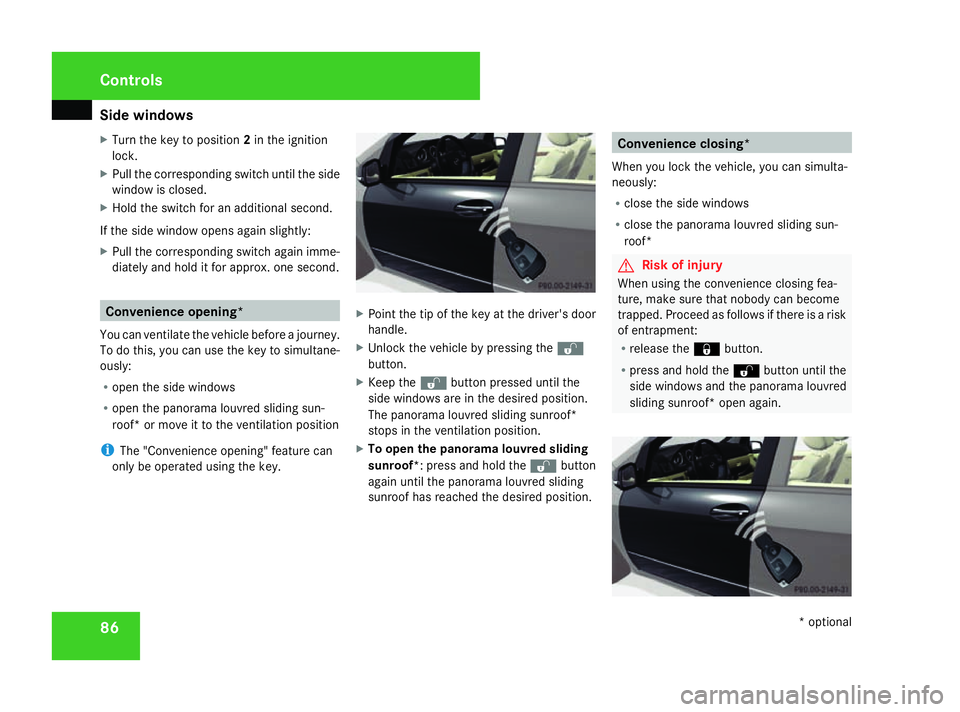
Point the tip of the key at the driver's door
handle.
X Unlock the vehicle by pressing the k
button.
X Keep the kbutton pressed until the
side windows are in the desired position.
The panorama louvred sliding sunroof*
stops in the ventilation position.
X To open the panorama louvred sliding
sunroof*: press and hold the kbutton
again until the panorama louvred sliding
sunroof has reached the desired position. Convenience closing*
When you lock the vehicle, you can simulta-
neously:
R close the side windows
R close the panorama louvred sliding sun-
roof* G
Risk of injury
When using the convenience closing fea-
ture, make sure that nobody can become
trapped. Proceed as follows if there is a risk
of entrapment:
R release the jbutton.
R press and hold the kbutton until the
side windows and the panorama louvred
sliding sunroof* open again. Controls
* optional
169_AKB; 2; 4, en-GB
wdomann,
Version: 2.10.6
2008-07-16T08:52:06+02:00 - Seite 86 Dateiname: 6515_0315_02_buchblock.pdf; preflight
Page 91 of 305
Driving and pa
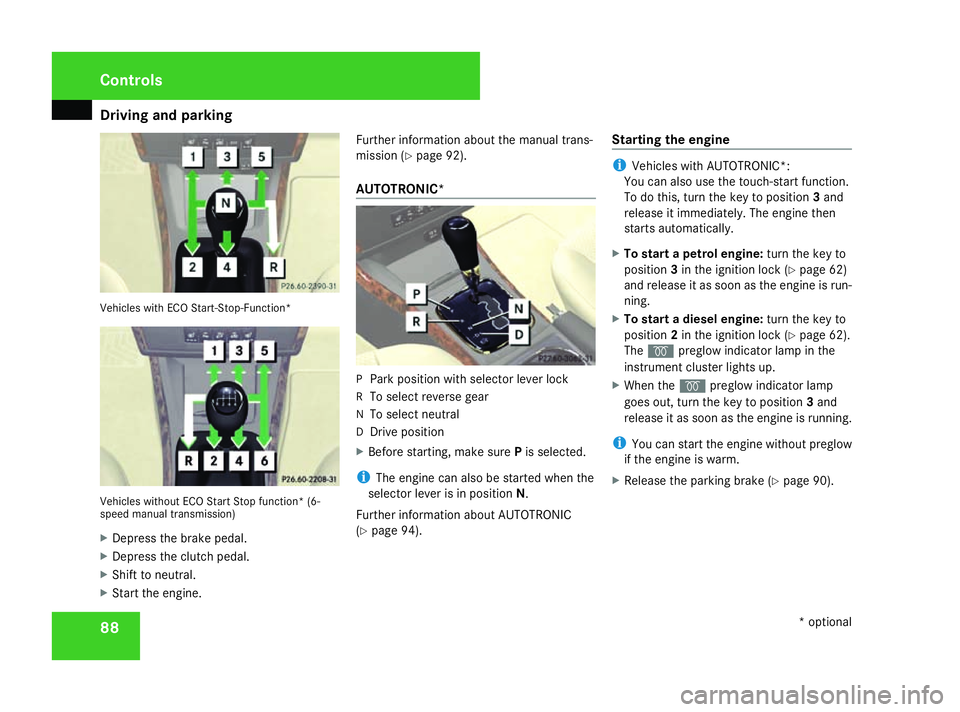
rking 88Vehicles with ECO Start-Stop-Function*
Vehicles without ECO Start Stop function* (6-
speed manual transmission)
X Depress the brake pedal.
X Depress the clutch pedal.
X Shift to neutral.
X Start the engine. Further information about the manual trans-
mission (Y
page 92).
AUTOTRONIC* P
Park position with selector lever lock
R To select reverse gear
N To select neutral
D Drive position
X Before starting, make sure Pis selected.
i The engine can also be started when the
selector lever is in position N.
Further information about AUTOTRONIC
(Y page 94). Starting the engine i
Vehicles with AUTOTRONIC*:
You can also use the touch-start function.
To do this, turn the key to position 3and
release it immediately. The engine then
starts automatically.
X To start a petrol engine: turn the key to
position 3in the ignition lock (Y page 62)
and release it as soon as the engine is run-
ning.
X To start a diesel engine: turn the key to
position 2in the ignition lock (Y page 62).
The q preglow indicator lamp in the
instrument cluster lights up.
X When the qpreglow indicator lamp
goes out, turn the key to position 3and
release it as soon as the engine is running.
i You can start the engine without preglow
if the engine is warm.
X Release the parking brake (Y page 90).Controls
* optional
169_AKB; 2; 4, en-GB
wdomann,
Version: 2.10.6
2008-07-16T08:52:06+02:00 - Seite 88 Dateiname: 6515_0315_02_buchblock.pdf; preflight
Page 93 of 305
Driving and pa
rking 90
Hill start assist Hill start assist helps you when pulling away
on uphill gradients. It holds the vehicle for a
short time after you have removed your foot
from the brake pedal. This gives you enough
time to move your foot from the brake pedal
to the accelerator pedal and depress it before
the vehicle begins to roll. G
Risk of accident
Never leave the vehicle when it is held by
hill start assist. After approximately one
second, hill start assist will no longer brake
your vehicle and it could roll away.
X Remove your foot from the brake pedal.
i Once you have taken your foot off the
brake pedal, the vehicle is held for around
one second.
X Pull away.
Hill start assist does not function if:
R you are pulling away on a level road or a
downhill gradient.
R on vehicles with AUTOTRONIC *,the selec-
tor lever is in the Nposition. R
the vehicle is secured with the parking
brake.
R ESP ®
is malfunctioning. Parking
G
Risk of accident
Only remove the key from the ignition lock
when the vehicle is stationary as you can-
not steer the vehicle with the key removed.
Never leave children unsupervised in the
vehicle. They could release the parking
brake. This could lead to a serious or fatal
accident. G
Risk of fire
Make sure that the exhaust system does
not under any circumstances come into
contact with easily ignitable material such
as dry grass or petrol. The material could
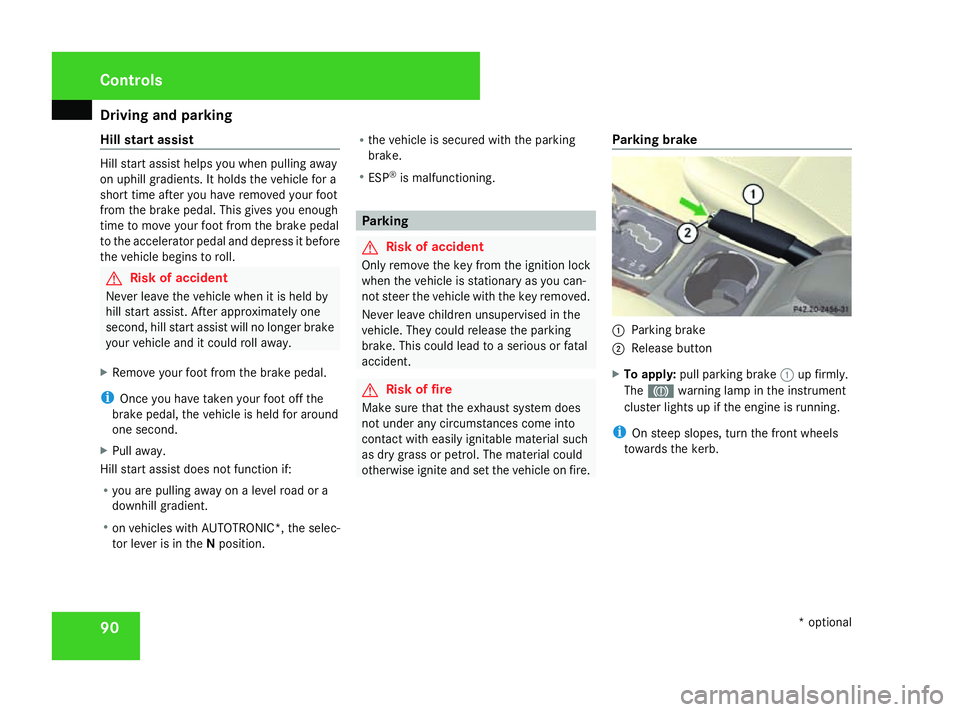
otherwise ignite and set the vehicle on fire. Parking brake 1
Parking brake
2 Release button
X To apply: pull parking brake 1up firmly.
The 3 warning lamp in the instrument
cluster lights up if the engine is running.
i On steep slopes, turn the front wheels
towards the kerb. Controls
* optional
169_AKB; 2; 4, en-GB
wdomann,
Version: 2.10.6
2008-07-16T08:52:06+02:00 - Seite 90 Dateiname: 6515_0315_02_buchblock.pdf; preflight
Page 94 of 305
Driving and pa
rking 91
X
To release: depress the brake pedal and
keep it depressed.
On vehicles with AUTOTRONIC*, the selec-
tor lever lock is released.
X Press release button 2on parking brake
1 and move the parking brake down to the
stop.
The 3 warning lamp in the instrument
cluster goes out. Switching off the engine
G
Risk of accident
If the engine is not running, there is no
power assistance for the steering and
brakes. Steering and braking then takes
much more effort.
As a result, you might lose control of the
vehicle, cause an accident and injure your-
self and others.
Do not switch off the engine while driving.
Vehicles with manual transmission X
Shift to either first or reverse gear.
X Turn the key to position 0(Y page 62) in
the ignition lock and remove it.
The immobiliser is activated. Vehicles with AUTOTRONIC* X
Move the selector lever to P.
X Turn the key to position 0(Y page 62) in
the ignition lock and remove it.
The immobiliser is activated. Automatic engine switch-off (ECO
start/stop function*)
The ECO start/stop function automatically
switches off the engine as soon as you stop
the vehicle, e.g. at traffic lights.
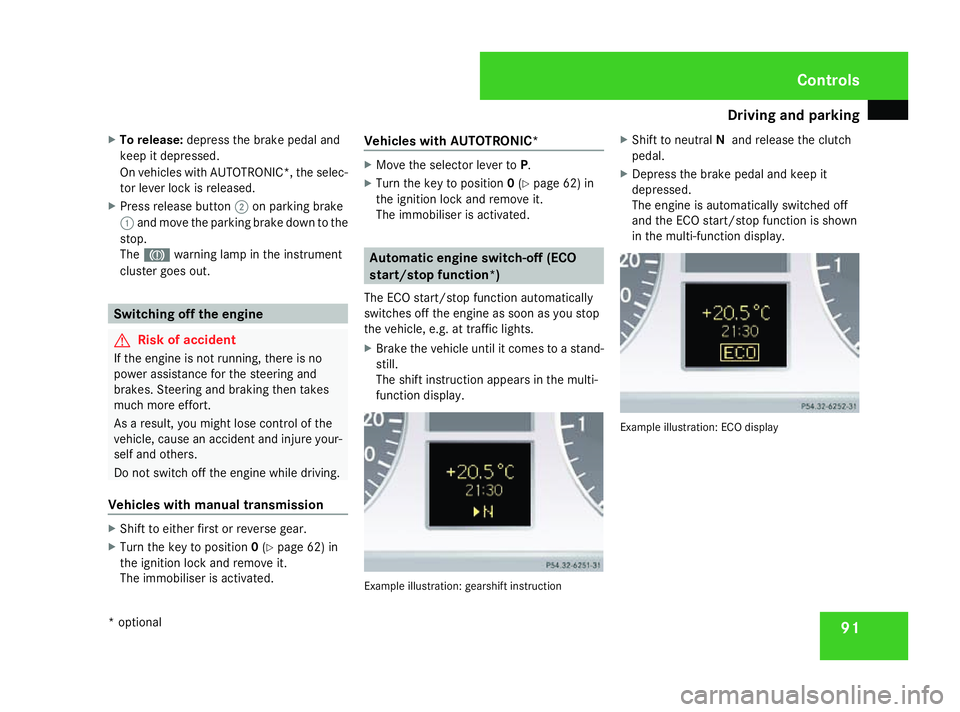
X Brake the vehicle until it comes to a stand-
still.
The shift instruction appears in the multi-
function display. Example illustration: gearshift instructionX
Shift to neutral Nand release the clutch
pedal.
X Depress the brake pedal and keep it
depressed.
The engine is automatically switched off
and the ECO start/stop function is shown
in the multi-function display. Example illustration: ECO display Controls
* optional
169_AKB; 2; 4, en-GB
wdomann,
Version: 2.10.6 2008-07-16T08:52:06+02:00 - Seite 91 ZDateiname: 6515_0315_02_buchblock.pdf; preflight
Page 100 of 305

Instrument cluster
97Instrument cluster
Points to remember
You will find an illustration of the instrument
cluster in the "At a glance" section
(Y page 26). G
Risk of accident
No further messages can be displayed if the
instrument cluster and/or the multi-func-
tion display fails.
This means that you will not see information
about the driving situation, such as the
speed, outside temperature, warning/indi-
cator lamps, display messages or system
failures. The vehicle's handling character-
istics may be affected. Adjust your driving
style and speed accordingly.
Immediately consult a qualified specialist
workshop which has the necessary special-
ist knowledge and tools to carry out the
work required. Mercedes-Benz recom-
mends that you use a Mercedes-Benz
Service Centre for this purpose. In particu-
lar, work relevant to safety or on safety-
related systems must be carried out at a
qualified specialist workshop. Activating the multi-function display
X Switch on the ignition. The multi-function display is also activated
when you:
R
switch on the lights
R press reset button 1
R open the driver's door Adjusting the instrument cluster
ligh
ting
X Brighter or dimmer: briefly turn reset but-
ton 1clockwise or anti-clockwise to the
stop and release.
The brightness of the instrument cluster
lighting changes by one level. There are
several possible levels. Coolant temperature gauge
The coolant temperature gauge is in the
instrument cluster on the left-hand side.
Under normal operating conditions and with
the specified coolant level, the coolant tem-
perature may rise to 120 †. The coolant tem-
perature may rise to the top end of the scale
at high outside temperatures and on long
uphill stretches. Controls
169_AKB; 2; 4, en-GB
wdomann, Version: 2.10.6 2008-07-16T08:52:06+02:00 - Seite 97 ZDateiname: 6515_0315_02_buchblock.pdf; preflight
Page 101 of 305
On-board computer
98 Resetting the trip meter
X Select the Standard display menu
(Y page 103).
X Press and hold the reset button on the left-
hand side of the instrument cluster until the
trip meter is reset. Rev counter
The red band in the rev counter indicates the
engine's overrevving range. The fuel supply is
interrupted to protect the engine when the
red band is reached.
! Do not drive in the overrevving range.
Doing so will damage the engine. H
Environmental note
Avoid driving at high engine speeds, as this
increases your vehicle's consumption
unnecessarily and pollutes the environ-
ment through increased emissions. Clock
On vehicles without an audio system or with
Audio 5*/Audio 20*, you can set the time
using the on-board computer (Y page 109). Outside temperature display
G
Risk of accident
The road surface may be icy, especially in
wooded areas or on bridges, even if tem-
peratures are just above freezing point. The
vehicle could skid if you fail to adapt your
driving style. You should therefore always
adapt your driving style and speed to suit
the weather conditions.
Changes in the outside temperature are dis-
played after a short delay. On-board computer
Points to remember
The on-board computer is activated as soon
as you turn the key to position 1in the ignition
lock. You can use the on-board computer to
call up information relating to your vehicle
and to make and adjust settings. G
Risk of accident
Only use the on-board computer when road
and traffic conditions permit. You would
otherwise be distracted and unable to con-
centrate properly on driving, and could
cause an accident. Multi-function steering wheel
You can control the multi-function display and
the settings in the on-board computer using
the buttons on the multi-function steering
wheel. Controls
* optional
169_AKB; 2; 4, en-GB
wdomann,
Version: 2.10.6
2008-07-16T08:52:06+02:00 - Seite 98 Dateiname: 6515_0315_02_buchblock.pdf; preflight
Page 109 of 305

On-board computer
106
The direction of travel
1appears in the multi-
function display.
Route guidance active The multi-function display shows navigation
instructions, for example: Message memory menu
Previous display messages can be called up
in the Message memory menu. TheMes-
sage memory menu is visible only when
there is a display message.
i Please refer to the menu overview
(Y page 101). G
Risk of accident
The on-board computer only records and
displays messages and warnings from cer-
tain systems. For this reason, you should
always make sure that your vehicle is safe
to drive. You could otherwise cause an acci-
dent by driving an unsafe vehicle.
i All possible display messages are
explained in the "Practical advice" section
(Y page 202).
Switching off the ignition clears all display
messages except for the highest priority dis-
play messages. When the causes of the high-
priority display messages are rectified, these
display messages will be erased.
Displaying messages Use the buttons on the multi-function steer-
ing wheel.X
Press the èor· button repeatedly
until either the original menu or the Mes-
sage memory menu appears.
When there are display messages, 2 mes-
sages appears in the multi-function dis-
play, for example.
X Use the jork button to scroll
through the display messages. Settings menu
In the Settings menu, you will find the Set-
tings To reset Press reset button for
3 seconds function, with which you can
restore most settings to the factory settings.
You will also find submenus with which you
can make individual settings for your vehicle.
i Please refer to the menu overview
(Y page 101).
Use the buttons on the multi-function steer-
ing wheel.
Resetting to factory settings For safety reasons, not all functions will be
reset: permanent Speedtronic* can only be
set in the
Vehiclesubmenu. The Settings
Headlamps function in the Lightingsub- Controls
* optional
169_AKB; 2; 4, en-GB
wdomann,
Version: 2.10.6
2008-07-16T08:52:06+02:00 - Seite 106 Dateiname: 6515_0315_02_buchblock.pdf; preflight
Page 113 of 305

On-board computer
110
X
Press the æorç button to select the
Lighting submenu.
X Press the jbutton to select Headlamp
mode.
X Press the æorç button to set the
switch-on mode for the headlamps to Man-
ual orConstant (constant headlamp
mode).
X Press the j,èorÿ button to
select a different display.
Switching the surround lighting*on/off If the surround lighting is switched on, the
following lights will be switched on automat-
ically in the dark after you have unlocked the
vehicle using the key:
R the side lamps
R the licence plate lighting
R the front foglamps*
The surround lighting switches off automati-
cally after 40 seconds or when the driver's
door is opened.
X Press the èor· button to select the
Settings menu.
X Press the jbutton to select submenus. X
Press the æorç button to select the
Lighting submenu.
X Press the jbutton to select Surround
lighting.
X Press the æorç button to switch
the Surround lighting on or off.
X Press the j,èorÿ button to
select a different display.
Activating or deactivating the exterior
lighting delayed switch-off* When you activate the
Headl. delayed
switch-off function, the exterior lighting
remains on for another 15 seconds after clos-
ing the doors when it is dark. If the engine is
switched off and then none of the doors are
opened, or if an open door is not closed, the
exterior lighting goes out after 60 seconds.
If you have activated the delayed switch-off
function and switched off the engine, the fol-
lowing remain lit:
R the side lamps
R the licence plate lighting
R the front foglamps* X
Press the èor· button to select the
Settings menu.
X Press the jbutton to select submenus.
X Press the æorç button to select the
Lighting submenu.
X Press the jbutton to select Headl.
delayed switch-off .
X Press the æorç button to activate
or deactivate the Headl. delayed
switch-off function.
X Press the j,èorÿ button to
select a different display.
To temporarily deactivate the switch-off
delay:
X Before leaving the vehicle, turn the key to
position 0in the ignition lock.
X Turn the key to position 2in the ignition
lock and back to position 0.
Delayed switch-off is deactivated.
When you start the engine again, the switch-
off delay is reactivated.
Activating/deactivating the interior
lighting delayed switch-off If you remove the key from the ignition lock
while the
Interior lighting delayed Controls
* optional
169_AKB; 2; 4, en-GB
wdomann,
Version: 2.10.6
2008-07-16T08:52:06+02:00 - Seite 110 Dateiname: 6515_0315_02_buchblock.pdf; preflight