fog light MERCEDES-BENZ A-CLASS HATCHBACK 2008 Owners Manual
[x] Cancel search | Manufacturer: MERCEDES-BENZ, Model Year: 2008, Model line: A-CLASS HATCHBACK, Model: MERCEDES-BENZ A-CLASS HATCHBACK 2008Pages: 305, PDF Size: 5.43 MB
Page 7 of 305
4
Axle load, maximum permissible
.................................................... .287, 289 B
Backrest Removing/fitting. ........................... 152
Bag hook............................................. 158
Ball coupling Fitting ............................................. 186
Removing....................................... .190
BAS (Brake Assist)............................... 55
Battery Changing (key).. .............................. 244
Charging. ........................................ 265
Checking (key). ............................... 244
Check lamp (key). ........................... 244
Disconnecting ................................. 265
Display message ............................. 213
Jump starting. ................................. 266
Maintenance (vehicle)..................... 263
Reconnecting.................................. 266
Removing/fitting. ........................... 265
Vehicle battery. .............................. 263
Belt force limiters
Activation.......................................... 37
Belt height adjustment........................ 75
Belt tensioners Activation.......................................... 37
Belt warning.......................................... 75 Bonnet
Bonnet catch .................................. 172
Opening/closing ............................ 171
Bonnet release lever
Release leve r.................................. 171
Brake Assist
see BAS
Brake fluid.......................................... 300
Display message ............................. 214
Brake lamps
Adaptive............................................ 56
Display message ............................. 217
Brakes
Parking brake................................... .90
Warning lamp..................................2 26
Brake system
Display message ............................. 213
Bulbs
Brake lamp. .................................... 250
Cornering light. ............................... 248
Dipped-beam headlamps ................247
Display messages ........................... 216
Licence plate lamp.......................... 250
Main-beam headlamps ...................248
Overview. ........................................ 245
Parking lamp.................................. .248
Rear foglamp. ................................. 250
Replacing............................... .247, 249
Reversing lamp. .............................. 250
Side lamp........................................ 248 Tail lamp
......................................... 250
Turn signal lamp. ....................249, 250 C
Calling up a malfunction see Message memory menu
Care..................................................... 192
Automatic car wash. .......................193
Exhaust tail pipes............................ 196
Headlamps. .................................... 194
High-pressure cleaners. ..................193
Parktronic. ...................................... 196
Plastic trim. .................................... 195
Rear window. .................................. 194
Side windows.................................. 194
Trailer tow hitch. ............................. 196
CD player/CD changer
Operating (on-board computer)
....................................................... 104
Central locking
Automatic locking (on-board com-
puter). ............................................. 111
Key. .................................................. 60
Central locking/unlocking button...... 61
Central unlocking Key. .................................................. 60
Centre console
Lower section. .................................. 32
Upper section. .................................. 31Index
169_AKB; 2; 4, en-GB
wdomann,
Version: 2.10.6
2008-07-16T08:52:06+02:00 - Seite 4 Dateiname: 6515_0315_02_buchblock.pdf; preflight
Page 10 of 305
7F
Fastening seat belts Childre n............................................ 51
Fire extinguisher................................ 201
First-aid kit......................................... 200
Flat tyre Equipment. ..................................... 253
MOExtended run-flat system ..........262
Preparing the vehicle. .....................253
TIREFIT kit....................................... 253
Floormat............................................. .165
Foglamps Display message ............................. 218
Fording................................................ 185
Frequencies Telephone. ...................................... 276
Front airbag .......................................... 40
Front-passenger airbag........................ 40
Front-passenger seat Folding the backrest forward/
back................................................ 158
Removing/fitting. ........................... 156
Fuel...................................................... 292
Diesel. ............................................ 170
Gauge. .............................................. 26
Loss. ............................................... 232
Petrol .............................................. 169
Fuel consumption...................... 293, 294Fuel filler flap
Emergency release. ........................242
Opening/closing ............................ 168
Fuel filter
Display message ............................. 214
Fuel level
Calling up the range (on-board
computer). ...................................... 113
Fuel line
Malfunction..................................... 232
Fuel tank
Defect ............................................. 232
Fuse allocation chart......................... 271
Fuse box............................................. .271
Fuses................................................... 271 G
Genuine Mercedes-Benz parts.......... 274
Glove compartment........................... 160
Gross vehicle weight, maximum
permissible................................. 287, 288 H
Handbrake Display message ............................. 214
Head/thorax airbags........................... 41Headlamps
Cleaning. ........................................ 194
Cleaning system. .............................. 81
Misting up. ...................................... 237
Headlamps delayed switch-off
see Exterior lighting delayed switch-off
Head restraint
Active head restraint......................... 42
Adjusting (front).......................... 64, 65
Adjusting (rear). ................................ 66
Removing (rear). ............................... 66
Heating
see Air conditioning
High-pressure cleaners..................... 193
Hill start assist..................................... 90 I
Immobiliser........................................... 57
Indicator and warning lamp Air conditioning (malfunction) .........222
Automatic child seat recognition
(malfunction). ................................. 223
Brakes (red). ................................... 226
Engine diagnostics ..........................227
PASSENGER AIRBAG OFF .........45, 223
Reserve fuel. ................................... 229
Seat belt. ........................................ 228
SRS........................................... 37, 226
Thermotronic (malfunction) ............222
Indicator and warning lamps............ 224 Index
169_AKB; 2; 4, en-GB
wdomann,
Version: 2.10.6 2008-07-16T08:52:06+02:00 - Seite 7Dateiname: 6515_0315_02_buchblock.pdf; preflight
Page 11 of 305
8
Indicator lamps
see Warning and indicator lamps
Instrument cluster............................... 97
Overview. .......................................... 26
Selecting the language (on-board
computer). ...................................... 108
Instrument lighting.............................. 97
Integrated child seat............................ 50
Interior lighting Automatic control system .................82
Delayed switch-off (on-board
computer). ...................................... 110
Emergency lighting. ..........................83
Manual control.................................. 82
Reading lamp .................................... 82
Interior motion sensor......................... 58
ISOFIX child seat securing system..... 48J
Jack...................................................... 200 Operation........................................ 259
Jump-starting ...................................... 266
Jump leads ...................................... 266K
Key......................................................... 60 Changing the battery ......................244
Checking the battery ......................244
Display message ............................. 220Loss.
............................................... 239
Malfunction..................................... 239
Modifying the programming. .............60
Key positions
Key. .................................................. 62
Kickdown.............................................. 96 L
Lamps see Warning and indicator lamps
Lashing eyelets.................................. 146
Licence plate lighting Display message ............................. 218
Light bulbs
see Bulbs
Lighting
see Lights
Lights
Automatic headlamp mode. ..............78
Constant headlamp mode. ................78
Cornering light function ....................81
Dipped-beam headlamps ..................78
Display messages ........................... 216
Foglamps. ......................................... 79
Hazard warning lamps. .....................80
Headlamp flasher.............................. 80
Headlamp range. .............................. 80
Light switch. ..................................... 77
Main-beam headlamps..................... .80
Rear fog lamp ................................... 79Switching off (display message)...... 218
Turn signals.
..................................... 79
LIM indicator lamp
Cruise control. ................................ 116
Variable Speedtronic. .....................118
Load compartment load, maximum
..................................................... 288, 289
Loading guidelines............................. 145
Locking Automatic. ........................................ 61
Emergency locking .........................242
From the inside (central locking
button) .............................................. 61
Luggage compartment enlarge-
ment.................................................... 150
Luggage compartment floor Adjusting the height .......................155
stowage well, unde r........................ 154
Luggage cover.................................... 159
Luggage net........................................ 145
Lumbar support.................................... 68 M
Main-beam headlamps Display message ............................. 218
Main fuse box..................................... 271
Maintenance Battery ............................................ 263Index
169_AKB; 2; 4, en-GB
wdomann,
Version: 2.10.6
2008-07-16T08:52:06+02:00 - Seite 8 Dateiname: 6515_0315_02_buchblock.pdf; preflight
Page 13 of 305
10 P
Padded table Integrated child seat. ........................51
Paint code number............................. 276
Park Assist Display messages ........................... 210
Parking .................................................. 90
Parking aid Active parking assist. ......................123
Display message ............................. 210
Parktronic. ...................................... 120
Parking brake....................................... 90
Display message ............................. 214
Parking lamps
Display message ............................. 218
Parking lock
Releasing manually (AUTO-
TRONIC)......................................... .243
Parktronic........................................... 120
Activating/deactivating ..................122
Malfunction..................................... 236
Range of the sensors. .....................121
Trailer towing. ................................. 123
Warning displa y.............................. 121
PASSENGER AIRBAG OFF warning
lamp.............................................. 45, 223
Performance....................................... 280
Permanent Speedtronic .....................120Petrol
Minimum grade............................... 169
Plastic trim
Cleaning. ........................................ 195
Power supply (trailer)........................ 190
Power window switch see Side windows
Program selector button
Automatic transmission ....................96
Pulling away.......................................... 89 R
Radio Changing a station (on-board
computer). ...................................... 103
Setting for station selection (on-
board computer). ............................ 111
see separate operating instructions
Range (on-board computer).............. 113
Rear bench seat Folding forward.............................. .150
Rear-compartment seat belt sta-
tus indicator......................................... 76
Rear foglamp Display message ............................. 218
Rear-view mirror
Adjusting .......................................... 70
Anti-dazzle (manual). ........................70
Anti-dazzle mode (automatic). ..........70Rear window
Cleaning. ........................................ 194
Rear window heating .........................140
Malfunction indicator lamp. ............223
Rear window wiper.............................. 83
Replacing the wiper blade.............. .251
Refuelling............................................ 168
Replacing the wiper blades ...............251
Reserve Warning lamp.................................. 229
Reserve fuel........................................ 292
Display message ............................. 220
Fuel tank......................................... 292
Warning lamp. .......................... 26, 229
Reset button......................................... 97
Restraint system see SRS
see SRS (Supplemental Restraint
System)
Restraint systems
For children. ..................................... 43
Rev counter........................................... 98
Reverse gear
Engaging (automatic transmission) ...94
Engaging (manual transmission)
................................................... 92, 93
Reversing lamp
Display message ............................. 219
Roof load, maximum.................. 288, 289
Roof rack............................................. 144Index
169_AKB; 2; 4, en-GB
wdomann,
Version: 2.10.6
2008-07-16T08:52:06+02:00 - Seite 10 Dateiname: 6515_0315_02_buchblock.pdf; preflight
Page 81 of 305

Lights
78$
a
Left-hand parking lamp
% g
Right-hand parking lamp 8
& M
Lights off/constant headlamp mode
( U
Automatic headlamp mode/con-
stant headlamp mode
) C
Side lamps, licence plate and instru-
ment lighting
* B
Dipped-beam headlamps or main-
beam headlamps
, ¥
foglamps*
. †
Rear foglamp
i The exterior lighting (except for side
lamps and parking lamps) automatically
switches off when you remove the key from
the ignition lock or open the driver's door while the ignition is switched off (ignition
key in position
0).
! Switch off the side lamps and parking
lamp when you leave the vehicle. This pre-
vents the battery from discharging.
Dipped-beam headlamps X
Turn the ignition key to position 2in the
ignition lock or start the engine.
X To switch on: turn the light switch to
B.
Constant headlamp mode In countries in which constant headlamp
mode is not a legal requirement, you can
make this a setting using the on-board com-
puter.
You can activate or deactivate "constant
headlamp mode" using the on-board com-
puter (Y
page 109).
X To switch on: turn the light switch to
M orU.
The dipped-beam headlamps are switched
on when the engine is running. i
When you turn the light switch to any
position other than MorU, the cor-
responding light goes on.
Automatic headlamp mode G
Risk of accident
When the light switch is set to U, the
lights are not switched on automatically in
foggy conditions. This could endanger you
and others. Therefore, turn the light switch
to B in darkness and fog.
Automatic headlamp mode is only a driving
aid. You are responsible for the vehicle
lighting at all times. G
Risk of accident
When it is dark or foggy, turn the light
switch from UtoB in good time.
Otherwise, the headlamps could switch off
temporarily and you could cause an acci-
dent.
X To switch on: turn the light switch to
U.
Key in position 1in the ignition lock: the
side lamp is switched on or off automati-
cally, depending on the brightness of the
ambient light.
8 You must turn the light switch beyond its resistance point when turning it from the Mposition to the gposition. Controls
* optional
169_AKB; 2; 4, en-GB
wdomann
, Version: 2.10.6
2008-07-16T08:52:06+02:00 - Seite 78 Dateiname: 6515_0315_02_buchblock.pdf; preflight
Page 82 of 305
Lights
79
Starting the engine: the dipped-beam head-
lamps are also switched on or off automat-
ically, depending on the brightness of the
ambient light.
When the dipped-beam headlamps are
switched on, the Bindicator lamp in the
instrument cluster lights up.
Front foglamps*/Rear foglamp G
Risk of accident
If you suspect that driving conditions will be
foggy, turn the light switch to Bbefore
you start your journey. Otherwise, your
vehicle may not be visible and you could
endanger yourself and others.
When the light switch is set to Uyou can-
not switch on the front *or rear foglamps.
X Turn the key to position 2in the ignition
lock.
X To switch on the front foglamps*: turn
the light switch to the BorC posi-
tion.
X Pull the light switch out to the first detent.
The ¥ green indicator lamp next to the
light switch lights up. X
To switch on the rear foglamp: turn the
light switch to BorC.
X On vehicles with front foglamps*, pull the
light switch out to the second detent.
On vehicles without front foglamps*, pull
the light switch out to the detent.
The † yellow indicator lamp next to the
light switch lights up.
X To switch off the front foglamps*/rear
foglamp: push in the light switch to the
stop.
The corresponding indicator lamp goes out. Combination switch (turn signals,
main-beam headlamps and headlamp
flasher)
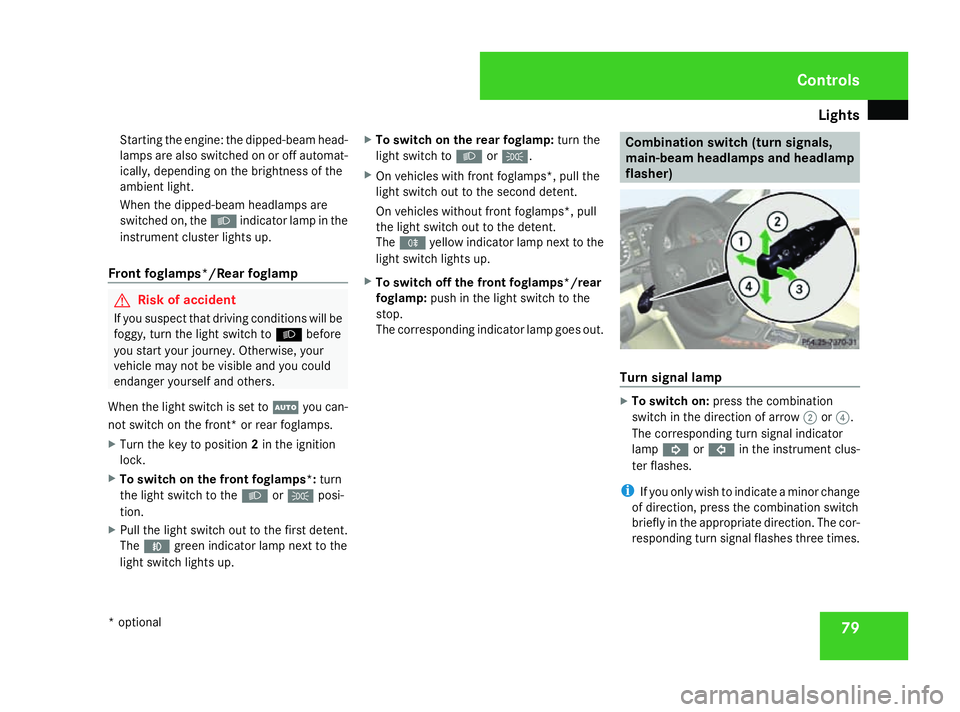
Turn signal lamp
X
To switch on: press the combination
switch in the direction of arrow 2or?.
The corresponding turn signal indicator
lamp K orL in the instrument clus-
ter flashes.
i If you only wish to indicate a minor change
of direction, press the combination switch
briefly in the appropriate direction. The cor-
responding turn signal flashes three times. Controls
* optional
169_AKB; 2; 4, en-GB
wdomann,
Version: 2.10.6 2008-07-16T08:52:06+02:00 - Seite 79 ZDateiname: 6515_0315_02_buchblock.pdf; preflight
Page 84 of 305

Lights
81Position Load
2
Driver's seat, front passenger
seat and rear seats occupied,
luggage compartment laden
3
Not required
X
Turn headlamp range control 1to the
position which corresponds to the load in
your vehicle. Headlamp cleaning system*
The headlamps are cleaned automatically if
the "Wipe with windscreen washer fluid" func-
tion is operated five times while the lights are
on and the engine is running. When you
switch off the ignition, the automatic head-
lamp cleaning system is reset and counting is
resumed from 0. Cornering light function* (bi-xenon
headlamps*)
Specially designed headlamps light up the
area into which you are driving when turning
corners.
If you are driving at speeds below 40 km/h,
the cornering light function is activated either
by the turn signals or when the steering wheel
is turned. If you are driving at speeds above
40 km/h the cornering light function is deac-
tivated.
Activating X
Start the engine.
X Switch on the dipped-beam headlamps.
X Switch off the foglamps*.
X Switch on the turn signal.
The cornering lamp on the same side as the
turn signal comes on, even if you turn the
steering wheel in the opposite direction
after indicating.
or
X Turn the steering wheel in the desired
direction.
When in a forwards gear: the cornering
lamp on the inside of the bend comes on. When in reverse gear: the cornering lamp
on the outside of the bend comes on.
Deactivating X
Turn the steering wheel back to the straight
ahead position.
The turn signal goes off. The cornering lamp
may remain lit for a short time.
or
X Switch off the turn signal.
The cornering lamp may remain lit for a
short time.
The cornering light will go out after a maxi-
mum of three minutes. Controls
* optional
169_AKB; 2; 4, en-GB
wdomann,
Version: 2.10.6 2008-07-16T08:52:06+02:00 - Seite 81 ZDateiname: 6515_0315_02_buchblock.pdf; preflight
Page 113 of 305

On-board computer
110
X
Press the æorç button to select the
Lighting submenu.
X Press the jbutton to select Headlamp
mode.
X Press the æorç button to set the
switch-on mode for the headlamps to Man-
ual orConstant (constant headlamp
mode).
X Press the j,èorÿ button to
select a different display.
Switching the surround lighting*on/off If the surround lighting is switched on, the
following lights will be switched on automat-
ically in the dark after you have unlocked the
vehicle using the key:
R the side lamps
R the licence plate lighting
R the front foglamps*
The surround lighting switches off automati-
cally after 40 seconds or when the driver's
door is opened.
X Press the èor· button to select the
Settings menu.
X Press the jbutton to select submenus. X
Press the æorç button to select the
Lighting submenu.
X Press the jbutton to select Surround
lighting.
X Press the æorç button to switch
the Surround lighting on or off.
X Press the j,èorÿ button to
select a different display.
Activating or deactivating the exterior
lighting delayed switch-off* When you activate the
Headl. delayed
switch-off function, the exterior lighting
remains on for another 15 seconds after clos-
ing the doors when it is dark. If the engine is
switched off and then none of the doors are
opened, or if an open door is not closed, the
exterior lighting goes out after 60 seconds.
If you have activated the delayed switch-off
function and switched off the engine, the fol-
lowing remain lit:
R the side lamps
R the licence plate lighting
R the front foglamps* X
Press the èor· button to select the
Settings menu.
X Press the jbutton to select submenus.
X Press the æorç button to select the
Lighting submenu.
X Press the jbutton to select Headl.
delayed switch-off .
X Press the æorç button to activate
or deactivate the Headl. delayed
switch-off function.
X Press the j,èorÿ button to
select a different display.
To temporarily deactivate the switch-off
delay:
X Before leaving the vehicle, turn the key to
position 0in the ignition lock.
X Turn the key to position 2in the ignition
lock and back to position 0.
Delayed switch-off is deactivated.
When you start the engine again, the switch-
off delay is reactivated.
Activating/deactivating the interior
lighting delayed switch-off If you remove the key from the ignition lock
while the
Interior lighting delayed Controls
* optional
169_AKB; 2; 4, en-GB
wdomann,
Version: 2.10.6
2008-07-16T08:52:06+02:00 - Seite 110 Dateiname: 6515_0315_02_buchblock.pdf; preflight
Page 118 of 305
Driving sys
tems 115Driving systems
Overview of driving systems
The vehicle's driving systems are described
on the following pages:
R Cruise control* and Speedtronic*, which
are used to control the speed of the vehicle
R Parktronic * and active parking assist*,
which can help you to find a parking space,
to manoeuvre and park
R ECO Start-Stop function*, helps you to
save fuel
The ABS, BAS, adaptive brake lights, ESP ®
and STEER CONTROL driving safety systems
are described in the "Driving safety systems"
section ( Ypage 55). Cruise control*
Cruise control maintains a constant road
speed for you. You must select a low gear in
good time on long and steep downhill gradi-
ents, especially if the vehicle is laden or tow-
ing a trailer. By doing so you will make use of
the braking effect of the engine, which
relieves the load on the brake system and
prevents the brakes from overheating and
wearing too quickly. G
Risk of accident
Never depress the brake pedal continu-
ously while the vehicle is in motion, e.g.
never cause the brakes to rub by applying
constant slight pedal pressure. This causes
the brake system to overheat, increases
the braking distance and can lead to the
brakes failing completely. G
Risk of accident
Do not change down for additional engine
braking on a slippery road surface. This
could cause the drive wheels to lose their
grip and the vehicle could skid.
Use cruise control only if road and traffic con-
ditions make it appropriate to maintain a
steady speed for a prolonged period. You can
store any road speed above 30 km/h. G
Risk of accident
Cruise control cannot take account of road
and traffic conditions.
Always pay attention to traffic conditions
even when cruise control is activated.
Cruise control is only an aid designed to
assist driving. You are responsible for the
vehicle's speed and for braking in good
time. G
Risk of accident
Do not use cruise control:
R in road and traffic conditions which do
not allow you to maintain a constant
speed (e.g. heavy traffic or winding
roads). You could otherwise cause an
accident.
R on slippery roads. Braking or accelerat-
ing could cause the drive wheels to lose
traction and the vehicle could then skid.
R when there is poor visibility, e.g. due to
fog, heavy rain or snow
Cruise control lever You can operate cruise control and variable
Speedtronic with the cruise control lever. Controls
* optional
169_AKB; 2; 4, en-GB
wdomann,
Version: 2.10.6 2008-07-16T08:52:06+02:00 - Seite 115 ZDateiname: 6515_0315_02_buchblock.pdf; preflight
Page 187 of 305
Driving
tips 184 the braking distance and can lead to the
brakes failing completely.
If the brakes have been used only moderately,
you should occasionally test their effective-
ness. To do this, brake more firmly from a
higher speed. This improves the grip of the
brakes.
Wet roads If driving in heavy rain for a prolonged period
of time without braking, there may be a
delayed reaction from the brakes, when brak-
ing for the first time. You must brake harder.
You must therefore maintain a greater dis-
tance from the vehicle in front.
Brake firmly after driving on a wet road. This
way the brake discs will become warm, drying
more quickly, which will protect them against
corrosion.
Limited braking performance on salted
roads G
Risk of accident
The layer of salt on the brake discs and the
brake pads/linings may cause a delay in
the braking effect, resulting in a signifi- cantly longer braking distance, which could
lead to an accident.
To avoid this danger, you should:
R occasionally brake carefully, without put-
ting other road users at risk, when you
are driving on salted roads. This helps to
remove any salt that may have started to
build up on the brake discs and the brake
pads/linings.
R maintain a greater distance to the vehicle
ahead and drive with particular care.
R carefully apply the brakes at the end of a
trip and immediately after commencing a
new trip, so that salt residues are
removed from the brake disc.
New brake pads/linings For safety reasons, Mercedes-Benz recom-
mends that you only have brake pads/linings
fitted to your vehicle which have been
approved for Mercedes-Benz vehicles or
which correspond to an equivalent quality
standard. Brake pads/linings which have not
been approved for Mercedes-Benz vehicles or
which are not of an equivalent quality could
affect your vehicle's operating safety. G
Risk of accident
New brake pads/linings only reach their
optimum braking effect after several hun-
dred kilometres of driving. Before this opti-
mum braking effect is reached, you should
compensate for the reduced braking effect
by applying greater pressure when braking.
This also applies after the brake discs or the
brake pads/linings have been replaced. Tyre grip
G
Risk of accident
Whereas the vehicle can be fully controlled
at a certain speed on dry roads, you must
reduce your speed on wet or icy roads to
achieve the same road safety. Otherwise,
you could cause an accident.
Pay particular attention to the road condi-
tions at temperatures around freezing
point.
If ice has formed on the road surface (e.g.
from fog), a light film of water rapidly forms
on the ice when you brake, considerably
reducing tyre grip. Drive with particular
care in such weather conditions. Operation
169_AKB; 2; 4, en-GB
wdomann,
Version: 2.10.6
2008-07-16T08:52:06+02:00 - Seite 184 Dateiname: 6515_0315_02_buchblock.pdf; preflight