change time MERCEDES-BENZ A-CLASS HATCHBACK 2018 Owner's Guide
[x] Cancel search | Manufacturer: MERCEDES-BENZ, Model Year: 2018, Model line: A-CLASS HATCHBACK, Model: MERCEDES-BENZ A-CLASS HATCHBACK 2018Pages: 609, PDF Size: 10.73 MB
Page 324 of 609
#
Select a run time.
The selected programme will start. ENERGIZING comfort
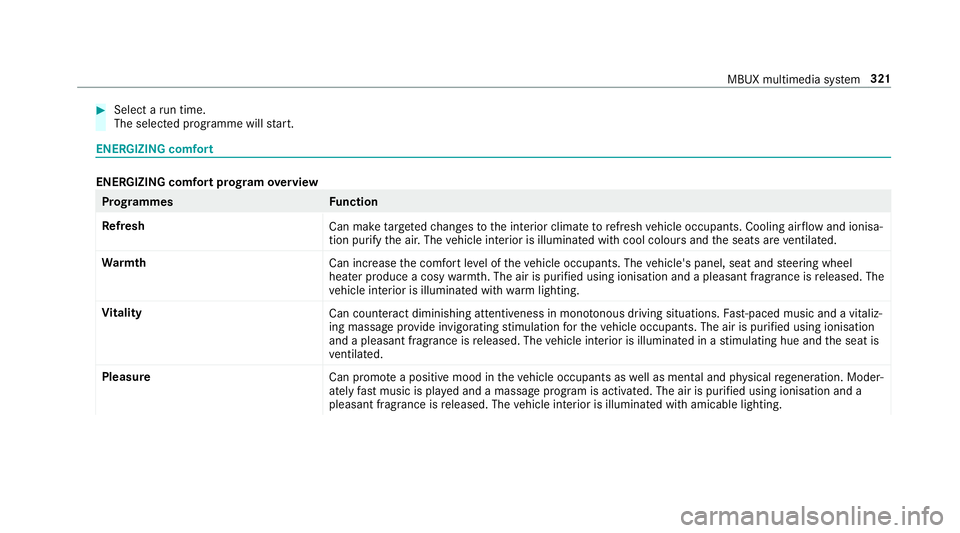
ENERGIZING comfort prog
ram ove rview Prog
rammes Function
Re fresh
Can maketargeted changes tothe interior climate torefresh vehicle occupants. Cooling air flow and ionisa‐
tion purify the air. The vehicle interior is illuminated with cool colours and the seats are ventilated.
Wa rmth
Can increase the comfort le vel of theve hicle occupants. The vehicle's panel, seat and steering wheel
heater produce a cosy warmth. The air is pu rified using ionisation and a pleasant fragrance is released. The
ve hicle interior is illuminated with warm lighting.
Vi tality
Can countera ct diminishing attentiveness in mono tonous driving situations. Fast-paced music and a vitaliz‐
ing massa geprov ide invigorating stimulation forth eve hicle occupants. The air is purified using ionisation
and a pleasant fragrance is released. The vehicle interior is illuminated in a stimulating hue and the seat is
ve ntilated.
Pleasure Can promotea positive mood in theve hicle occupants as well as men tal and ph ysical rege neration. Moder‐
ately fastmusic is pla yed and a massage program is activated. The air is purified using ionisation and a
pleasant fragrance is released. The vehicle interior is illuminated with amicable lighting. MBUX multimedia sy
stem 321
Page 331 of 609
re
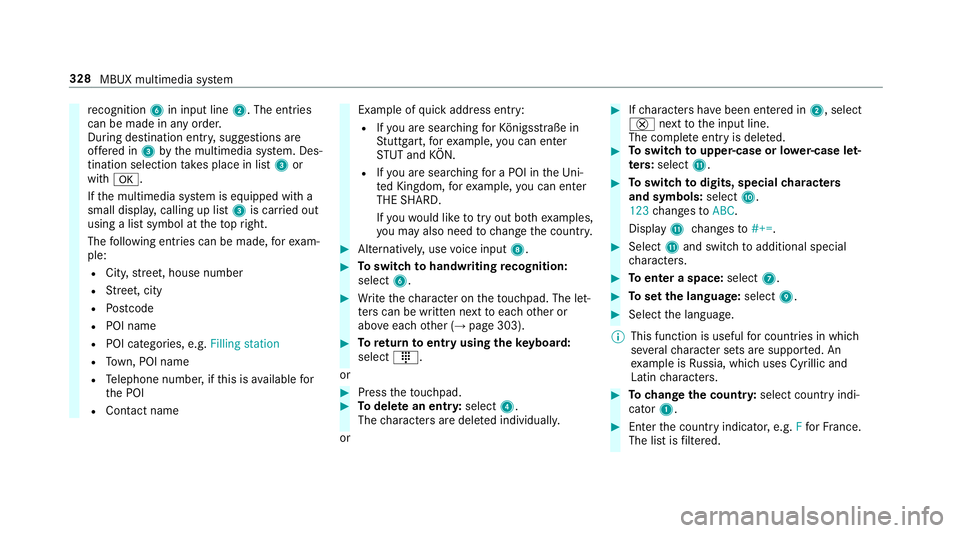
cognition 6in input line 2. The entries
can be made in any order.
During destination entr y,suggestions are
of fere d in 3bythe multimedia sy stem. Des‐
tination selection take s place in list 3or
with a.
If th e multimedia sy stem is equipped with a
small displa y,calling up li st3 is car ried out
using a list symbol at theto pright.
The following ent ries can be made, forex am‐
ple:
R City, stre et, house number
R Street, city
R Postcode
R POI name
R POI catego ries, e.g. Filling station
R Town, POI name
R Telephone number, if this is available for
th e POI
R Contact name Example of
quick address ent ry:
R Ifyo u are sear ching forKö nigsstraße in
St utt gart,fo rex ample, you can en ter
ST UT and KÖN.
R Ifyo u are sear ching for a POI in theUn i‐
te d Kingdom, forex ample, you can en ter
THE SHARD.
If yo uwo uld like totry out bo thexamples,
yo u may also need tochange the count ry. #
Alternati vely, use voice input 8. #
Toswitch tohandwriting recognition:
select 6. #
Write thech aracter on theto uchpad. The let‐
te rs can be written next toeach other or
abo veeach other (→ page 303). #
Toreturn toentry using theke yboard:
select _.
or #
Press theto uchpad. #
Todel ete an entr y:select 4.
The characters are dele ted individually.
or #
Ifch aracters ha vebeen entered in 2, select
£ nexttothe input line.
The comple teentry is dele ted. #
Toswitch toupper-case or lo wer-case let‐
ters :select B. #
Toswitch todigits, special characters
and symbols: selectA.
123 changes toABC.
Displ ayB changes to#+=. #
Select Band switch toadditional special
ch aracters. #
Toenter a space: select7. #
Toset the language: select9. #
Select the language.
% This function is useful for countries in which
se veralch aracter sets are suppo rted. An
ex ample is Russia, which uses Cyrillic and
Latin characters. #
Tochange the count ry:select country indi‐
cator 1. #
Enter the count ryindicator, e.g. Ffo rFr ance.
The list is filtered. 328
MBUX multimedia sy stem
Page 333 of 609
R
Personal POIs with the GPS Ex change form at
(.gpx) ha vebeen sa ved in the "PersonalPOI"
fo lder on the USB device.
Multimedia sy stem:
, © .
Navigation .
ª Where
to? .
POIS
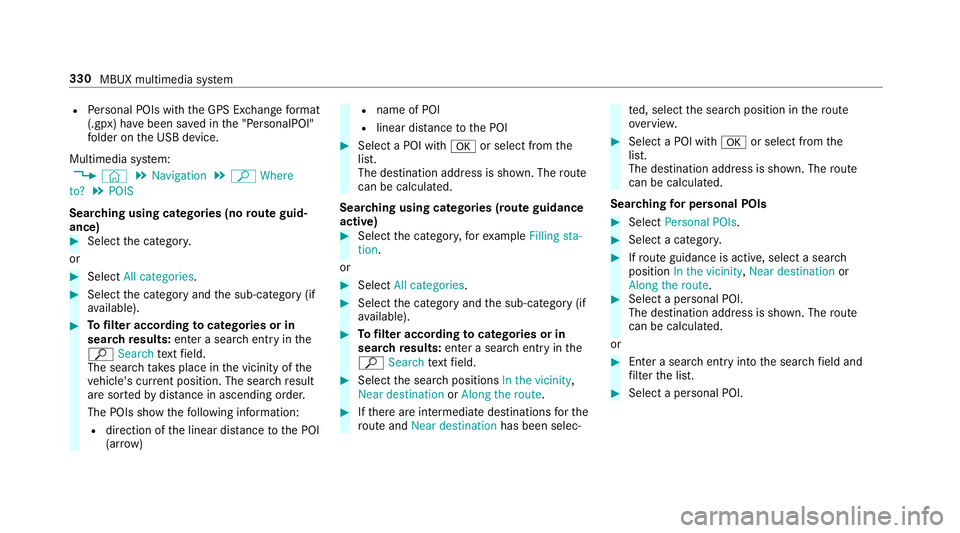
Sear ching using categories (no route guid‐
ance) #
Select the categor y.
or #
Select All categories. #
Select the category and the sub-category (if
av ailable). #
Tofilter according tocategories or in
sear chresults: enter a sear chentry inthe
ª Search text field.
The sear chtake s place in the vicinity of the
ve hicle's cur rent position. The sea rchre sult
are sor tedby distan ce in ascending order.
The POIs show thefo llowing information:
R direction of the linear dis tance tothe POI
(ar row) R
name of POI
R linear dis tance tothe POI #
Select a POI with aor select from the
list.
The destination address is shown. The route
can be calculated.
Sea rching using categories (route guidance
active) #
Select the categor y,forex ample Filling sta-
tion.
or #
Select All categories. #
Select the category and the sub-category (if
av ailable). #
Tofilter according tocategories or in
sear chresults: enter a sear chentry inthe
ª Search text field. #
Select the sear chpositions In the vicinity,
Near destination orAlong the route. #
Ifth ere are intermediate destinations forthe
ro ute and Near destination has been selec‐ te
d, select the sear chposition in thero ute
ove rview. #
Select a POI wi tha or select from the
list.
The destination address is shown. The route
can be calculated.
Sea rching for personal POIs #
Select Personal POIs. #
Select a categor y. #
Ifro ute guidance is active, select a sear ch
position In the vicinity, Near destination or
Along the route. #
Select a personal POI.
The destination address is shown. The route
can be calculated.
or #
Enter a sear chentry intothe sear chfield and
fi lter the list. #
Select a personal POI. 330
MBUX multimedia sy stem
Page 334 of 609
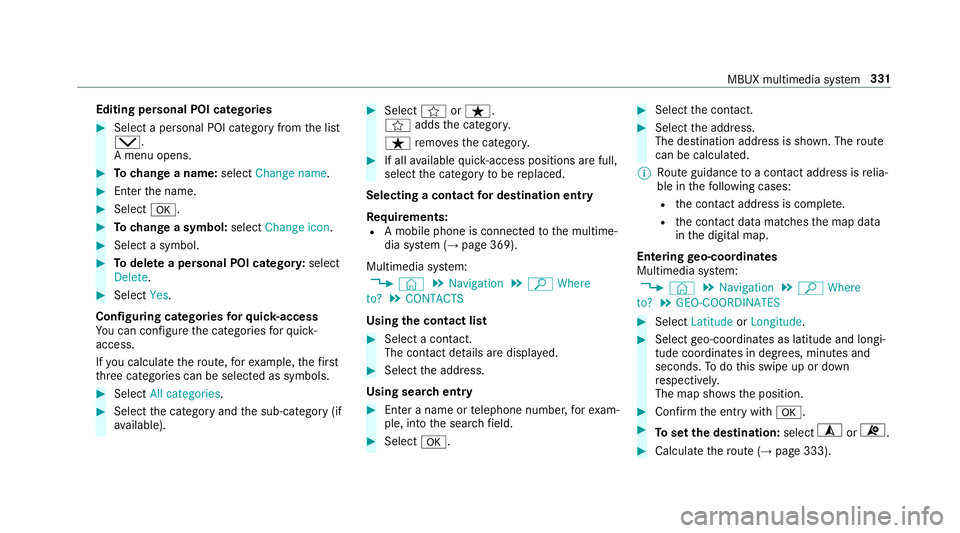
Editing personal POI categories
#
Select a personal POI category from the list
s.
A menu opens. #
Tochange a name: selectChange name. #
Enter the name. #
Select a. #
Tochange a symbol: selectChange icon. #
Select a symbol. #
Todel ete a personal POI categor y:select
Delete. #
Select Yes.
Configuring categories forqu ick- access
Yo u can configure the categories forqu ick-
access.
If yo u calculate thero ute, forex ample, thefirst
th re e categories can be selected as symbols. #
Select All categories. #
Select the category and the sub-category (if
av ailable). #
Select forß.
f addsthe categor y.
ß remo vesth e categor y. #
If all available quick- access positions are full,
select the category tobe replaced.
Selecting a contact for destination entry
Re quirements:
R A mobile phone is connec tedto the multime‐
dia sy stem (→ page 369).
Multimedia sy stem:
, © .
Navigation .
ª Where
to? .
CONTACTS
Using the contact list #
Select a con tact.
The contact de tails are displa yed. #
Select the address.
Using sear chentry #
Enter a name or telephone number, forex am‐
ple, into the sear chfield. #
Select a. #
Select the conta ct. #
Select the address.
The destination address is shown. The route
can be calculated.
% Route guidance toa con tact address is relia‐
ble in thefo llowing cases:
R the conta ct address is compl ete.
R the conta ct datamatches the map data
in the digital map.
Entering geo-coordina tes
Multimedia sy stem:
, © .
Navigation .
ª Where
to? .
GEO-COORDINATES #
Select Latitude orLongitude. #
Select geo-coordinates as latitude and longi‐
tude coordinates in degrees, minutes and
seconds. Todo this swipe up or down
re spectivel y.
The map sho ws the position. #
Confirm the entry witha. #
Toset the destination: select¥or¦. #
Calculate thero ute (→ page 333). MBUX multimedia sy
stem 331
Page 341 of 609
The
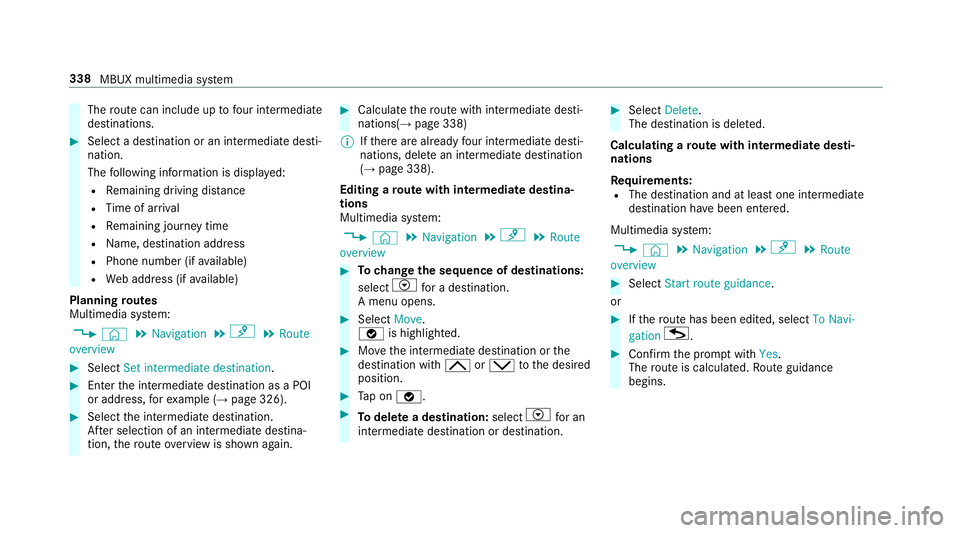
route can include up tofour intermediate
destinations. #
Select a destination or an intermediate desti‐
nation.
The following information is displa yed:
R Remaining driving dis tance
R Time of ar rival
R Remaining journey time
R Name, destination addre ss
R Phone number (if available)
R Web address (if available)
Planning routes
Multimedia sy stem:
, © .
Navigation .
¡ .
Route
overview #
Select Set intermediate destination. #
Ente rth e intermediate destination as a POI
or address, forex ample (→ page 326). #
Select the intermediate destination.
Af ter selection of an intermedia tedestina‐
tion, thero ute overview is shown again. #
Calculate thero ute with intermediate desti‐
nations(→ page 338)
% Ifth ere are already four intermediate desti‐
nations, dele tean intermediate destination
(→ page 338).
Editing a route with intermediate destina‐
tions
Multimedia sy stem:
, © .
Navigation .
¡ .
Route
overview #
Tochange the sequence of destinations:
select Vfor a destination.
A menu opens. #
Select Move.
ø is highlighted. #
Movethe intermediate destination or the
destination with 4ors tothe desired
position. #
Tap on ø. #
Todel ete a destination: selectVfor an
intermedia tedestination or destination. #
Select Delete.
The destination is dele ted.
Calculating a route with intermediate desti‐
nations
Re quirements:
R The destination and at least one intermediate
destination ha vebeen entered.
Multimedia sy stem:
, © .
Navigation .
¡ .
Route
overview #
Select Start route guidance.
or #
Ifth ero ute has been edited, select To Navi-
gation G. #
Con firm the prom ptwith Yes.
The route is calculated. Route guidance
begins. 338
MBUX multimedia sy stem
Page 343 of 609
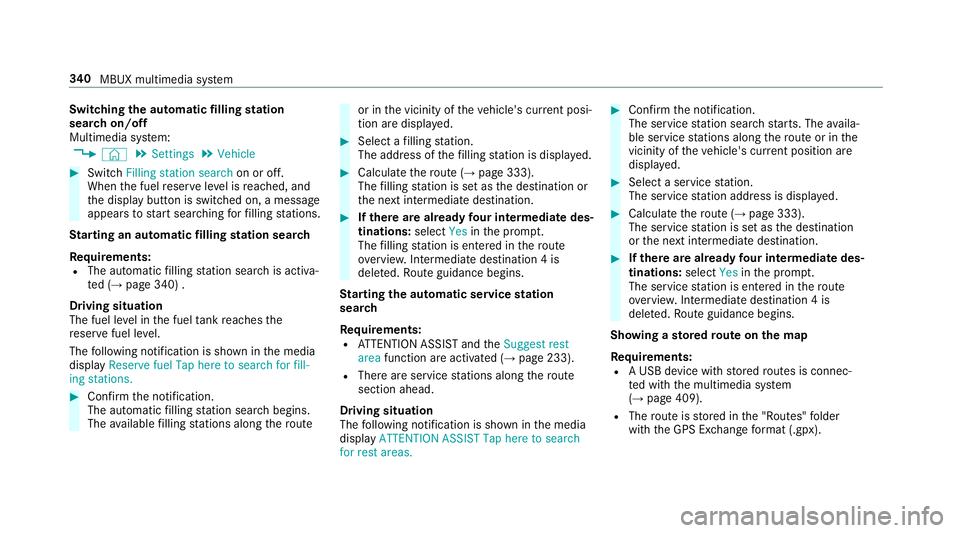
Switching
the automatic filling station
sear chon/off
Multimedia sy stem:
, © .
Settings .
Vehicle #
Switch Filling station search on or off.
When the fuel reser veleve l is reached, and
th e display button is switched on, a message
appears tostart sear ching forfilling stations.
St arting an automatic filling station sear ch
Re quirements:
R The automatic filling station sear chis activa‐
te d (→ page 340) .
Driving situation
The fuel le vel in the fuel tankre aches the
re ser vefuel le vel.
The following notification is shown in the media
display Reserve fuel Tap here to search for fill-
ing stations. #
Confirm the notification.
The automatic filling station sear chbegins.
The available filling stations along thero ute or in
the vicinity of theve hicle's cur rent posi‐
tion are displ ayed. #
Select a filling station.
The address of thefilling station is displa yed. #
Calculate thero ute (→ page 333).
The filling station is set as the destination or
th e next intermediate destination. #
Ifth ere are already four intermediate des‐
tinations: selectYesinthe prom pt.
The filling station is entered in thero ute
ove rview. Intermediate destination 4 is
dele ted. Ro ute guidance begins.
St arting the automatic service station
sear ch
Re quirements:
R ATTENTION ASSIST and theSuggest rest
area function are activated (→ page 233).
R There are service stations along thero ute
section ahead.
Driving situation
The following notification is shown in the media
display ATTENTION ASSIST Tap here to search
for rest areas. #
Confirm the notification.
The service station sear ch starts. The availa‐
ble service stations along thero ute or in the
vicinity of theve hicle's cur rent position are
displ ayed. #
Select a service station.
The service station address is displa yed. #
Calculate thero ute (→ page 333).
The service station is set as the destination
or the next intermediate destination. #
Ifth ere are already four intermediate des‐
tinations: selectYesinthe prom pt.
The service station is entered in thero ute
ove rview. Intermediate destination 4 is
dele ted. Ro ute guidance begins.
Showing a stored route on the map
Re quirements:
R A USB device with stored routes is connec‐
te d with the multimedia sy stem
(→ page 409).
R The route is stored in the "Routes" folder
with the GPS Ex change form at (.gpx). 340
MBUX multimedia sy stem
Page 344 of 609
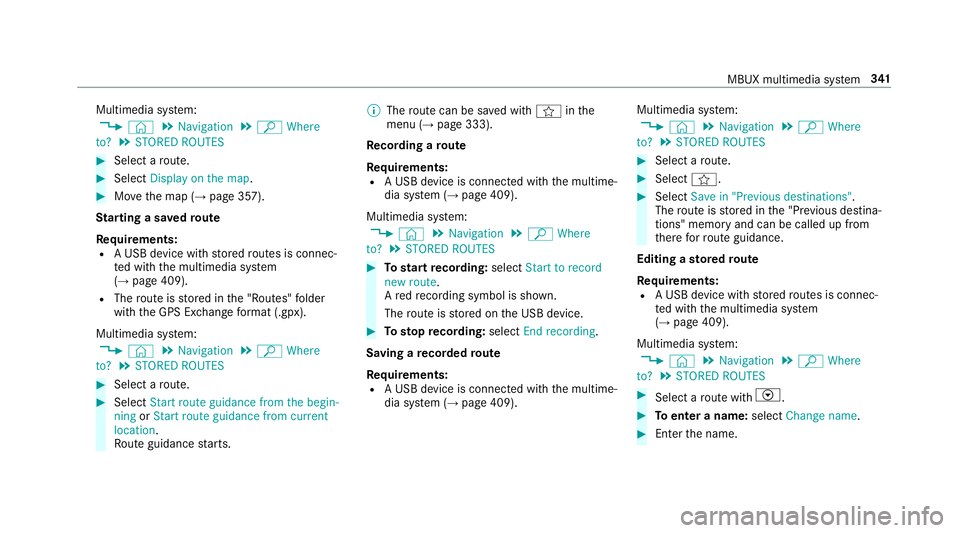
Multimedia sy
stem:
, © .
Navigation .
ª Where
to? .
STORED ROUTES #
Select a route. #
Select Display on the map .#
Movethe map (→ page 357).
St arting a sa vedro ute
Re quirements:
R A USB device with stored routes is connec‐
te d with the multimedia sy stem
(→ page 409).
R The route is stored in the "Routes" folder
with the GPS Ex change form at (.gpx).
Multimedia sy stem:
, © .
Navigation .
ª Where
to? .
STORED ROUTES #
Select a route. #
Select Start route guidance from the begin-
ning orStart route guidance from current
location.
Ro ute guidance starts. %
The route can be sa ved with finthe
menu (→ page 333).
Re cording a route
Re quirements:
R A USB device is connec ted with the multime‐
dia sy stem (→ page 409).
Multimedia sy stem:
, © .
Navigation .
ª Where
to? .
STORED ROUTES #
Tostart recording: selectStart to record
new route.
A redre cording symbol is shown.
The route is stored on the USB device. #
Tosto pre cording: selectEnd recording.
Saving a recorded route
Re quirements:
R A USB device is connec ted with the multime‐
dia sy stem (→ page 409). Multimedia sy
stem:
, © .
Navigation .
ª Where
to? .
STORED ROUTES #
Select a route. #
Select f. #
Select Save in "Previous destinations" .
The route is stored in the "Pr evious destina‐
tions" memo ryand can be called up from
th ere forro ute guidance.
Editing a storedro ute
Re quirements:
R A USB device with stored routes is connec‐
te d with the multimedia sy stem
(→ page 409).
Multimedia sy stem:
, © .
Navigation .
ª Where
to? .
STORED ROUTES #
Select a route with V. #
Toenter a name: selectChange name . #
Enterth e name. MBUX multimedia sy
stem 341
Page 345 of 609
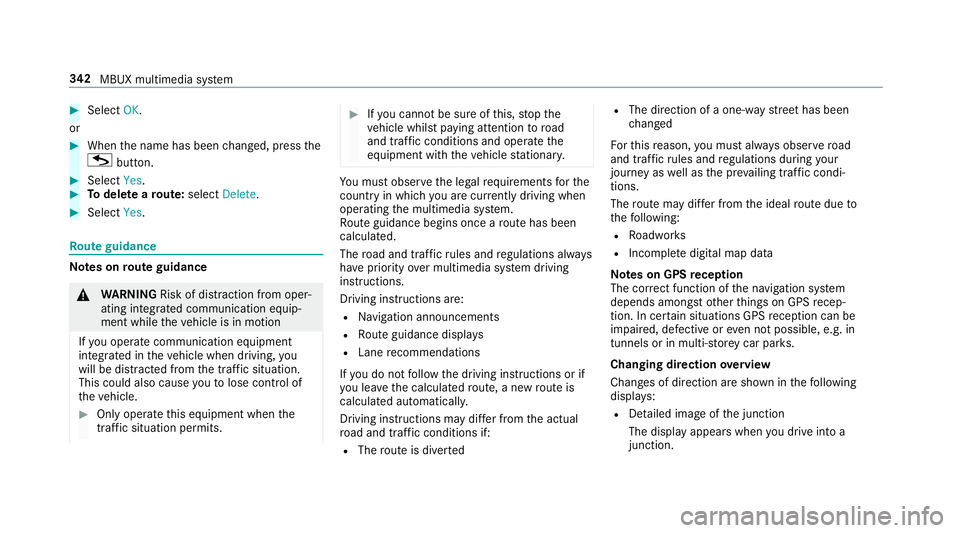
#
Select OK.
or #
When the name has been changed, press the
G button. #
Select Yes. #
Todel ete a route: select Delete. #
Select Yes. Ro
ute guidance Note
s onroute guidance &
WARNING Risk of di stra ction from oper‐
ating integrated communication equip‐
ment while theve hicle is in motion
If yo u operate communication equipment
integrated in theve hicle when driving, you
will be distracted from the tra ffic situation.
This could also cause youto lose control of
th eve hicle. #
Only operate this equipment when the
traf fic situation permits. #
Ifyo u cannot be sure of this, stop the
ve hicle whilst paying attention toroad
and traf fic conditions and ope rate the
equipment with theve hicle stationar y. Yo
u must obse rveth e legal requirements forthe
country in whi chyou are cur rently driving when
operating the multimedia sy stem.
Ro ute guidance begins once a route has been
calculated.
The road and traf fic ru les and regulations alw ays
ha ve priority over multimedia sy stem driving
instructions.
Driving instructions are:
R Navigation announcements
R Route guidance displ ays
R Lane recommendations
If yo u do not follow the driving instructions or if
yo u lea vethe calculated route, a new route is
calculated automaticall y.
Driving instructions may di ffer from the actual
ro ad and traf fic conditions if:
R The route is diver ted R
The direction of a one-w aystre et has been
ch anged
Fo rth is reason, you must alw ays obser veroad
and traf fic ru les and regulations during your
journey as well as the pr evailing traf fic condi‐
tions.
The route may dif fer from the ideal route due to
th efo llowing:
R Roadwor ks
R Incomple tedigital map data
Note s on GPS reception
The cor rect function of the navigation sy stem
depends amongst other things on GPS recep‐
tion. In cer tain situations GPS reception can be
impaired, defective or even not possible, e.g. in
tunnels or in multi-s torey car par ks.
Changing direction overview
Changes of direction are shown in thefo llowing
displa ys:
R Detailed image of the junction
The display appears when you drive into a
junction. 342
MBUX multimedia sy stem
Page 346 of 609
R
3D ima ge
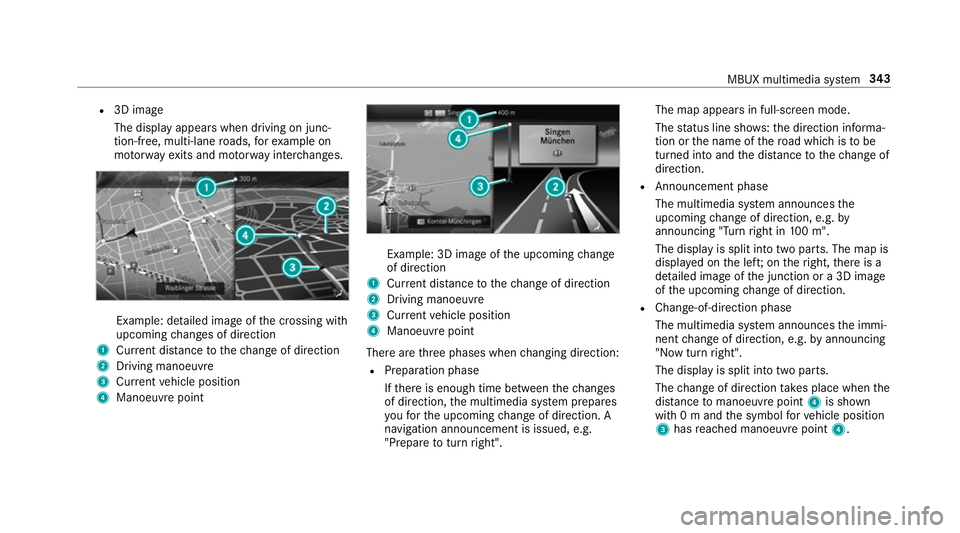
The display appears when driving on junc‐
tion-free, multi-lane roads, forex ample on
mo torw ay ex its and mo torw ay inter changes. Example: detailed image of
the crossing with
upcoming changes of direction
1 Current di stance tothech ange of direction
2 Driving manoeuv re
3 Current vehicle position
4 Manoeuvre point Example: 3D image of
the upcoming change
of direction
1 Current di stance tothech ange of direction
2 Driving manoeuv re
3 Current vehicle position
4 Manoeuvre point
There are thre e phases when changing direction:
R Preparation phase
Ifth ere is enough time between thech anges
of direction, the multimedia sy stem prepares
yo ufo rth e upcoming change of direction. A
navigation announcement is issued, e.g.
"Prepare toturn right". The map appears in full-screen mode.
The status line sho ws:th e direction informa‐
tion or the name of thero ad which is tobe
turned into and the dis tance tothech ange of
direction.
R Announcement phase
The multimedia sy stem announces the
upcoming change of direction, e.g. by
announcing "Turn right in 100 m".
The display is split into two parts. The map is
displa yed on the lef t;on theright, there is a
de tailed image of the junction or a 3D image
of the upcoming change of direction.
R Chan ge-of-direction phase
The multimedia sy stem announces the immi‐
nent change of direction, e.g. byannouncing
"N ow turn right".
The display is split into two parts.
The change of direction take s place when the
dis tance tomanoeuvre point 4is shown
with 0 m and the symbol forve hicle position
3 has reached manoeuvre point 4. MBUX multimedia sy
stem 343
Page 347 of 609
When
thech ange of direction is comple te,
th e map appears in full-screen mode.
% Changes of direction are also shown in the
Instrument Displa y.
Lane recommendations overview
This display appears for multi-lane roads.
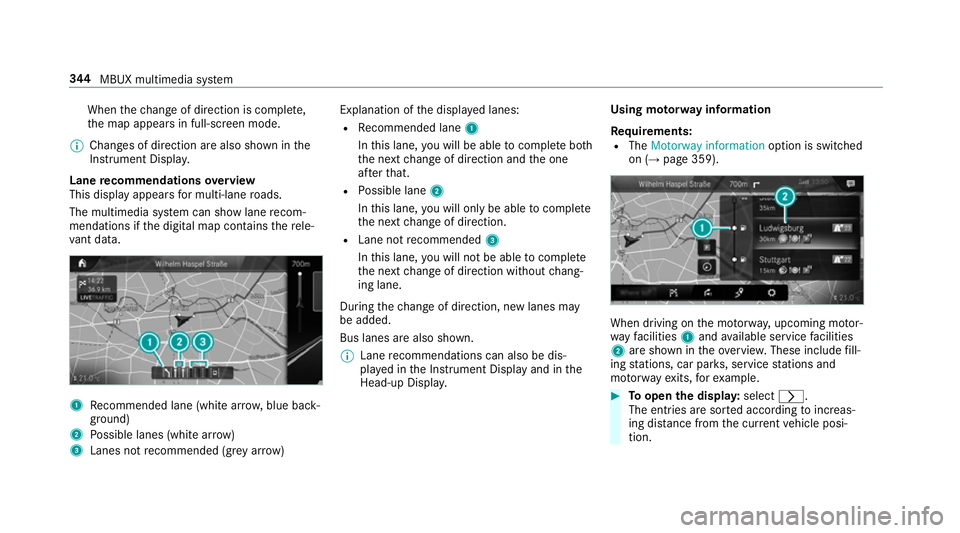
The multimedia sy stem can show lane recom‐
mendations if the digital map conta insthere le‐
va nt da ta. 1
Recommended lane (white ar row, blue back‐
ground)
2 Possible lanes (white ar row)
3 Lanes not recommended (gr eyarro w) Explanation of
the displa yed lanes:
R Recommended lane 1
In this lane, you will be able tocompl ete bo th
th e next change of direction and the one
af te rth at.
R Possible lane 2
In this lane, you will on lybe able tocompl ete
th e next change of direction.
R Lane not recommended 3
In this lane, you will not be able tocompl ete
th e next change of direction without chang‐
ing lane.
During thech ange of direction, new lanes may
be added.
Bus lanes are also shown.
% Lane recommendations can also be dis‐
pl ay ed in the Instrument Display and in the
Head-up Displa y. Using mo
torw ay information
Re quirements:
R The Motorway information option is switched
on (→ page 359). When driving on
the mo torw ay, upcoming mo tor‐
wa yfa cilities 1and available service facilities
2 are shown in theove rview. These include fill‐
ing stations, car par ks, service stations and
mo torw ay ex its,forex ample. #
Toopen the displa y:select r.
The entries are sor ted according toinc reas‐
ing dis tance from the cur rent vehicle posi‐
tion. 344
MBUX multimedia sy stem