navigation MERCEDES-BENZ A-CLASS SALOON 2018 Service Manual
[x] Cancel search | Manufacturer: MERCEDES-BENZ, Model Year: 2018, Model line: A-CLASS SALOON, Model: MERCEDES-BENZ A-CLASS SALOON 2018Pages: 621, PDF Size: 10.5 MB
Page 347 of 621
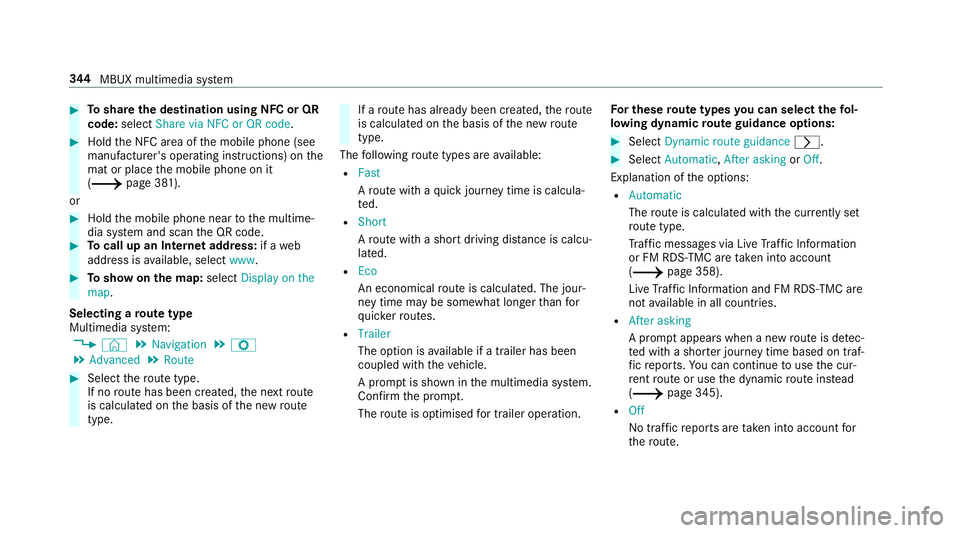
#
Toshare the destination using NFC or QR
code: select Share via NFC or QR code .#
Hold the NFC area of the mobile phone (see
manufacturer's operating instructions) on the
mat or place the mobile phone on it
(/ page 381).
or #
Hold the mobile phone near tothe multime‐
dia sy stem and scan the QR code. #
Tocall up an Internet address: if aweb
address is available, select www. #
Toshow on the map: selectDisplay on the
map .
Selecting a route type
Multimedia sy stem:
4 © 5
Navigation 5
Z
5 Advanced 5
Route #
Select thero ute type.
If no route has been created, the next route
is calculated on the basis of the new route
type. If a
route has already been created, thero ute
is calculated on the basis of the new route
type.
The following route types are available:
R Fast
Aro ute with a quick journey time is calcula‐
te d.
R Short
Aro ute with a sho rtdriving dis tance is calcu‐
la te d.
R Eco
An economical route is calculated. The jour‐
ney time may be som ewhat longer than for
qu icke rro utes.
R Trailer
The option is available if a trailer has been
coupled with theve hicle.
A prom ptis shown in the multimedia sy stem.
Confirm the prom pt.
The route is optimised for trailer operation. Fo
r these route types you can select thefo l‐
lowing dynamic route guidance options: #
Select Dynamic route guidance r. #
Select Automatic, After asking orOff.
Explanation of the options:
R Automatic
The route is calculated with the cur rently set
ro ute type.
Tr af fic messages via Live Traf fic Information
or FM RDS-TMC are take n into account
(/ page 358).
Live Traf fic Information and FM RDS-TMC are
not available in all countries.
R After asking
A prom ptappears when a new route is de tec‐
te d with a shor ter journey time based on traf‐
fi c re ports. You can continue touse the cur‐
re nt route or use the dynamic route ins tead
(/ page 345).
R Off
No tr affic re ports are taken into account for
th ero ute. 344
MBUX multimedia sy stem
Page 348 of 621
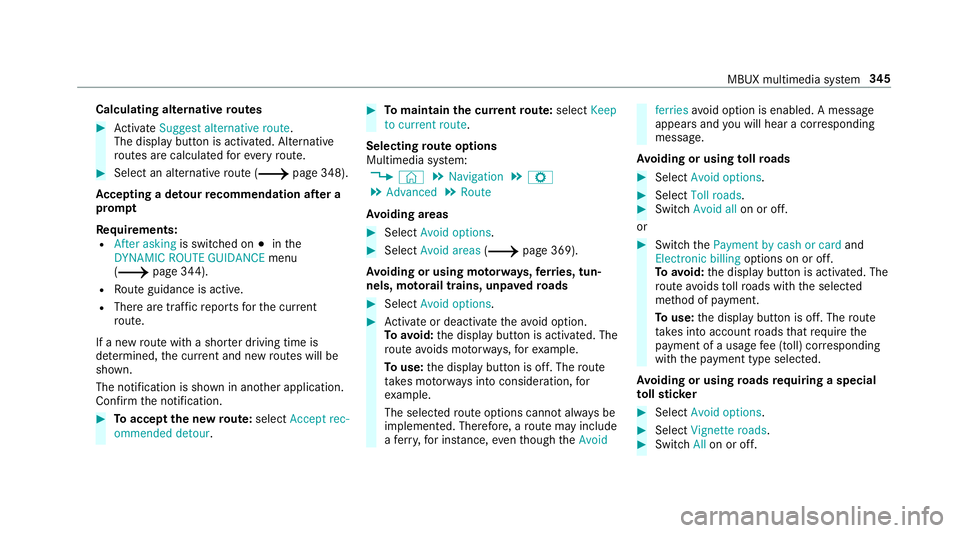
Calculating alternative
routes #
Activate Suggest alternative route.
The display button is acti vated. Alternative
ro utes are calculated foreve ryroute. #
Select an alternative route (/ page 348).
Ac cepting a de tour recommendation af ter a
prom pt
Requ irements:
R After asking is switched on #inthe
DYNAMIC ROUTE GUIDANCE menu
(/ page 344).
R Route guidance is active.
R There are traf fic re ports forth e cur rent
ro ute.
If a new route with a sho rter driving time is
de term ined, the cur rent and new routes will be
shown.
The notification is shown in ano ther application.
Confirm the notification. #
Toaccept the new route: select Accept rec-
ommended detour. #
Tomaintain the cu rrentroute: select Keep
to current route .
Selecting route options
Multimedia sy stem:
4 © 5
Navigation 5
Z
5 Advanced 5
Route
Av oiding areas #
Select Avoid options. #
Select Avoid areas (/page 369).
Av oiding or using mo torw ays, ferries, tun‐
nels, mo torail trains, unpa vedro ads #
Select Avoid options. #
Activate or deacti vate theavo id option.
To avoid: the display button is activated. The
ro ute avoids mo torw ays, forex ample.
To use: the display button is off. The route
ta ke s mo torw ays into consideration, for
ex ample.
The selec tedro ute options cannot alw ays be
implemented. Therefore, a route may include
a fe rry, for ins tance, eventh ough theAvoid ferries
avoid option is enabled. A message
appears and you will hear a co rresponding
message.
Av oiding or using tollro ads #
Select Avoid options. #
Select Toll roads. #
Switch Avoid all on or off.
or #
Switch thePayment by cash or card and
Electronic billing options on or off.
To avoid: the display button is activated. The
ro ute avoids tollro ads with the selected
me thod of payment.
To use: the display button is off. The route
ta ke s into account roads that requ irethe
payment of a usage fee (toll) cor responding
with the payment type selected.
Av oiding or using roads requ iring a special
to llst icker #
Select Avoid options . #
Select Vignette roads . #
Switch Allon or off. MBUX multimedia sy
stem 345
Page 349 of 621
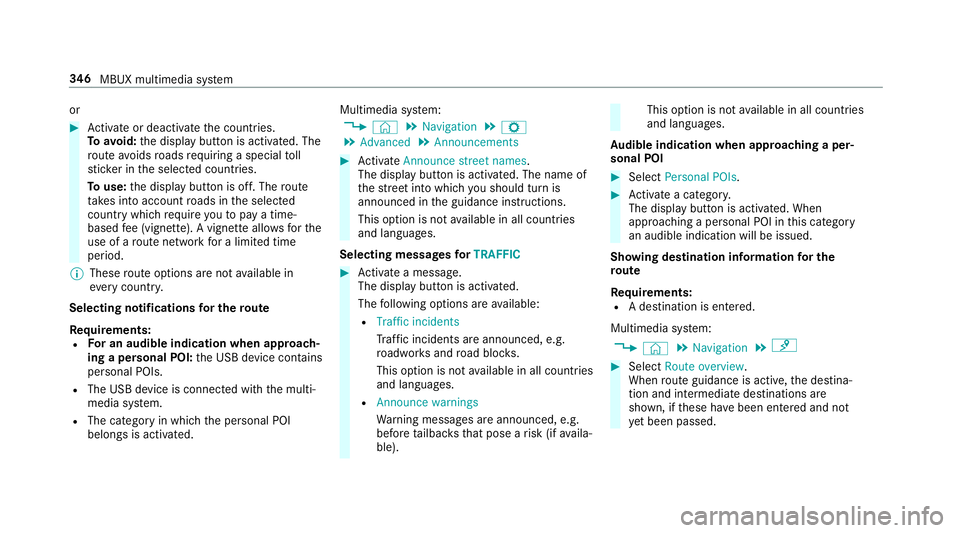
or
#
Activate or deacti vate the count ries.
To avoid: the display button is activated. The
ro ute avoids roads requ iring a special toll
st icke r in the selected count ries.
To use: the display button is off. The route
ta ke s into account roads in the selected
count rywhich requireyouto pay a time-
based fee (vignette). A vignette allo wsforthe
use of a route network for a limi ted time
period.
% These route options are not available in
eve rycountr y.
Selecting notifications for the route
Re quirements:
R For an audible indication when approach‐
ing a personal POI: the USB device conta ins
personal POIs.
R The USB device is connec ted with the multi‐
media sy stem.
R The category in which the personal POI
belongs is activated. Multimedia sy
stem:
4 © 5
Navigation 5
Z
5 Advanced 5
Announcements #
Activate Announce street names .
The display button is acti vated. The name of
th est re et into which you should turn is
announced in the guidance instructions.
This option is not available in all countries
and languages.
Selecting messages forTRAFFIC #
Activate a messa ge.
The display button is activated.
The following options are available:
R Traffic incidents
Traf fic incidents are announced, e.g.
ro adwor ksand road bloc ks.
This option is not available in all countries
and languages.
R Announce warnings
Warning messages are announced, e.g.
before tailbac ksthat pose a risk (if availa‐
ble). This option is not
available in all countries
and languages.
Au dible indication when approaching a per‐
sonal POI #
Select Personal POIs . #
Activate a categor y.
The display button is activated. When
approaching a personal POI in this category
an audible indication will be issued.
Showing destination information for the
ro ute
Re quirements:
R A destination is entered.
Multimedia sy stem:
4 © 5
Navigation 5
¡ #
Select Route overview .
When route guidance is active, the destina‐
tion and intermediate destinations are
shown, if these ha vebeen entered and not
ye t been passed. 346
MBUX multimedia sy stem
Page 350 of 621
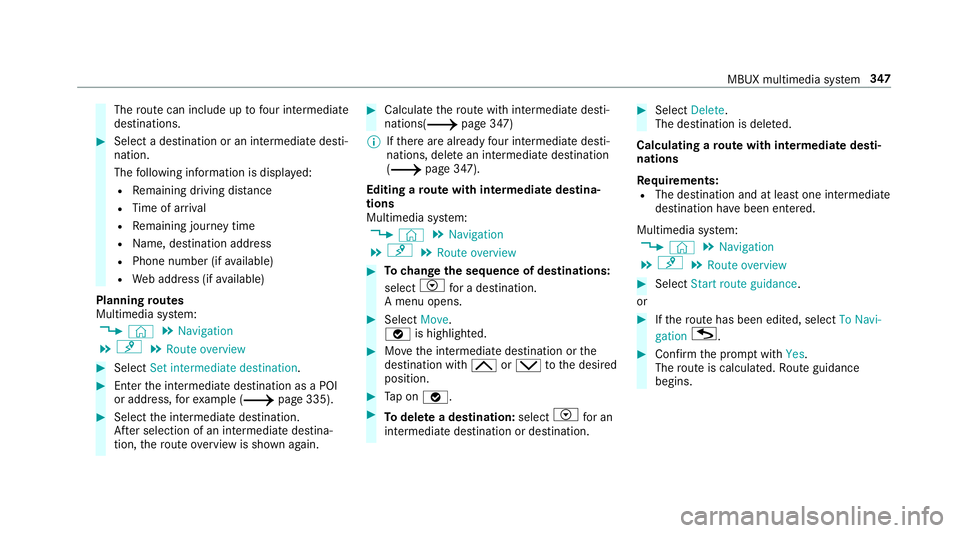
The
route can include up tofour intermediate
destinations. #
Select a destination or an intermediate desti‐
nation.
The following information is displa yed:
R Remaining driving dis tance
R Time of ar rival
R Remaining journey time
R Name, destination addre ss
R Phone number (if available)
R Web address (if available)
Planning routes
Multimedia sy stem:
4 © 5
Navigation
5 ¡ 5
Route overview #
Select Set intermediate destination. #
Ente rth e intermediate destination as a POI
or address, forex ample (/ page 335). #
Select the intermediate destination.
Af ter selection of an intermedia tedestina‐
tion, thero ute overview is shown again. #
Calculate thero ute with intermediate desti‐
nations(/ page 347)
% Ifth ere are already four intermediate desti‐
nations, dele tean intermediate destination
(/ page 347).
Editing a route with intermediate destina‐
tions
Multimedia sy stem:
4 © 5
Navigation
5 ¡ 5
Route overview #
Tochange the sequence of destinations:
select Vfor a destination.
A menu opens. #
Select Move.
ø is highlighted. #
Movethe intermediate destination or the
destination with 4ors tothe desired
position. #
Tap on ø. #
Todel ete a destination: selectVfor an
intermedia tedestination or destination. #
Select Delete.
The destination is dele ted.
Calculating a route with intermediate desti‐
nations
Re quirements:
R The destination and at least one intermediate
destination ha vebeen entered.
Multimedia sy stem:
4 © 5
Navigation
5 ¡ 5
Route overview #
Select Start route guidance.
or #
Ifth ero ute has been edited, select To Navi-
gation G. #
Con firm the prom ptwith Yes.
The route is calculated. Route guidance
begins. MBUX multimedia sy
stem 347
Page 351 of 621
Displaying
thero ute list
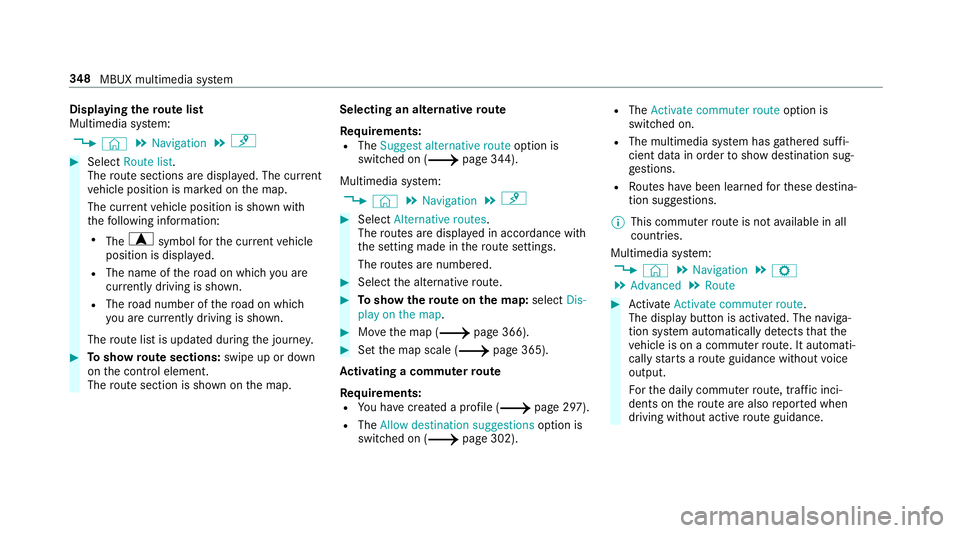
Multimedia sy stem:
4 © 5
Navigation 5
¡ #
Select Route list.
The route sections are displ ayed. The cur rent
ve hicle position is mar ked on the map.
The cur rent vehicle position is shown with
th efo llowing information:
R The a symbol forth e cur rent vehicle
position is displa yed.
R The name of thero ad on which you are
cur rently driving is shown.
R The road number of thero ad on which
yo u are cur rently driving is shown.
The route list is updated during the journe y. #
Toshow route sections: swipe up or down
on the control element.
The route section is shown on the map. Selecting an alternative
route
Re quirements:
R The Suggest alternative route option is
switched on (/ page 344).
Multimedia sy stem:
4 © 5
Navigation 5
¡ #
Select Alternative routes.
The routes are displ ayed in accordance with
th e setting made in thero ute settings.
The routes are numbered. #
Select the alternative route. #
Toshow thero ute on the map: selectDis-
play on the map . #
Movethe map (/ page 366). #
Set the map scale (/ page 365).
Ac tivating a commuter route
Requ irements:
R You ha vecrea ted a profile (/ page 297).
R The Allow destination suggestions option is
switched on (/ page 302). R
The Activate commuter route option is
switched on.
R The multimedia sy stem has gathered suf fi‐
cient da tain order toshow destination sug‐
ge stions.
R Routes ha vebeen learned forth ese destina‐
tion suggestions.
% This commuter route is not available in all
countries.
Multimedia sy stem:
4 © 5
Navigation 5
Z
5 Advanced 5
Route #
Activate Activate commuter route .
The display button is acti vated. The naviga‐
tion sy stem automatically de tects that the
ve hicle is on a commuter route. It automati‐
cally starts a route guidance without voice
output.
Fo rth e daily commuter route, traf fic inci‐
dents on thero ute are also repor ted when
driving without active route guidance. 348
MBUX multimedia sy stem
Page 353 of 621
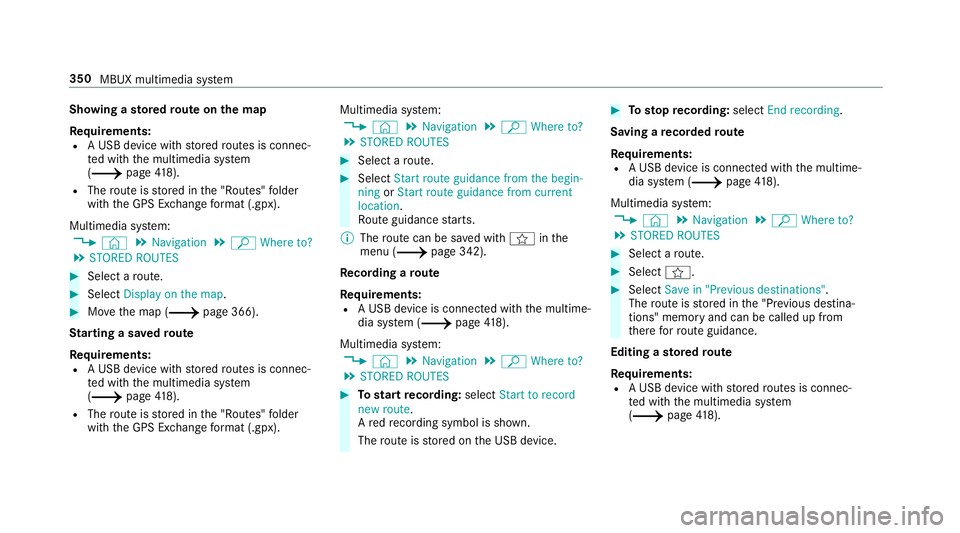
Showing a
stored route on the map
Re quirements:
R A USB device with stored routes is connec‐
te d with the multimedia sy stem
(/ page418).
R The route is stored in the "Routes" folder
with the GPS Ex change form at (.gpx).
Multimedia sy stem:
4 © 5
Navigation 5
ª Where to?
5 STORED ROUTES #
Select a route. #
Select Display on the map .#
Movethe map (/ page 366).
St arting a sa vedro ute
Requ irements:
R A USB device with stored routes is connec‐
te d with the multimedia sy stem
(/ page418).
R The route is stored in the "Routes" folder
with the GPS Ex change form at (.gpx). Multimedia sy
stem:
4 © 5
Navigation 5
ª Where to?
5 STORED ROUTES #
Select a route. #
Select Start route guidance from the begin-
ning orStart route guidance from current
location.
Ro ute guidance starts.
% The route can be sa ved with finthe
menu (/ page 342).
Re cording a route
Requ irements:
R A USB device is connec ted with the multime‐
dia sy stem (/ page418).
Mul timedia sy stem:
4 © 5
Navigation 5
ª Where to?
5 STORED ROUTES #
Tostart recording: selectStart to record
new route.
A redre cording symbol is shown.
The route is stored on the USB device. #
Tosto pre cording: selectEnd recording.
Saving a recorded route
Re quirements:
R A USB device is connec ted with the multime‐
dia sy stem (/ page418).
Multimedia sy stem:
4 © 5
Navigation 5
ª Where to?
5 STORED ROUTES #
Select a route. #
Select f. #
Select Save in "Previous destinations" .
The route is stored in the "Pr evious destina‐
tions" memo ryand can be called up from
th ere forro ute guidance.
Editing a storedro ute
Re quirements:
R A USB device with stored routes is connec‐
te d with the multimedia sy stem
(/ page418). 350
MBUX multimedia sy stem
Page 354 of 621
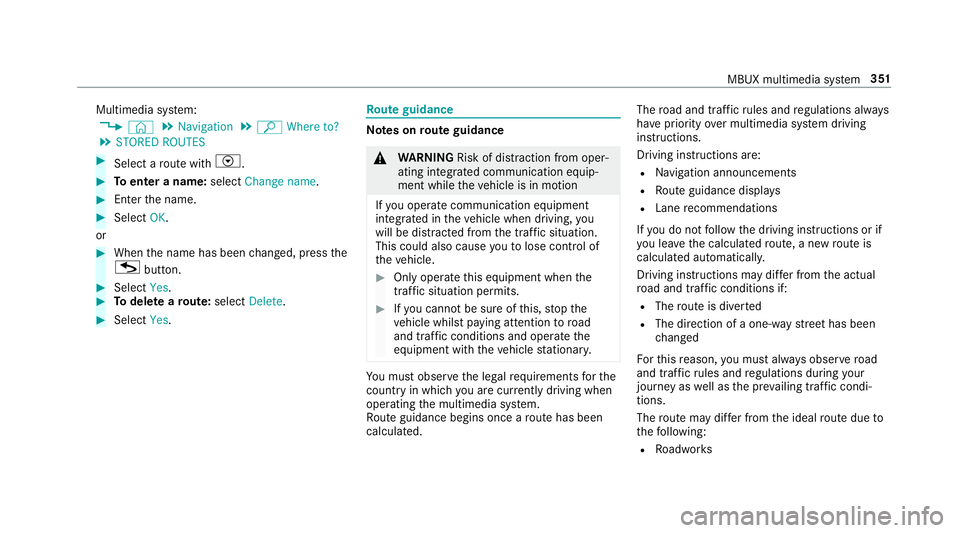
Multimedia sy
stem:
4 © 5
Navigation 5
ª Where to?
5 STORED ROUTES #
Select a route with V. #
Toenter a name: selectChange name . #
Enterth e name. #
Select OK.
or #
When the name has been changed, press the
G button. #
Select Yes. #
Todel ete a route: select Delete. #
Select Yes. Ro
ute guidance Note
s onroute guidance &
WARNING Risk of di stra ction from oper‐
ating integrated communication equip‐
ment while theve hicle is in motion
If yo u operate communication equipment
integrated in theve hicle when driving, you
will be distracted from the tra ffic situation.
This could also cause youto lose control of
th eve hicle. #
Only operate this equipment when the
traf fic situation permits. #
Ifyo u cannot be sure of this, stop the
ve hicle whilst paying attention toroad
and traf fic conditions and ope rate the
equipment with theve hicle stationar y. Yo
u must obse rveth e legal requirements forthe
country in whi chyou are cur rently driving when
operating the multimedia sy stem.
Ro ute guidance begins once a route has been
calculated. The
road and traf fic ru les and regulations alw ays
ha ve priority over multimedia sy stem driving
instructions.
Driving instructions are:
R Navigation announcements
R Route guidance displ ays
R Lane recommendations
If yo u do not follow the driving instructions or if
yo u lea vethe calculated route, a new route is
calculated automaticall y.
Driving instructions may di ffer from the actual
ro ad and traf fic conditions if:
R The route is diver ted
R The direction of a one-w aystre et has been
ch anged
Fo rth is reason, you must alw ays obser veroad
and traf fic ru les and regulations during your
journey as well as the pr evailing traf fic condi‐
tions.
The route may dif fer from the ideal route due to
th efo llowing:
R Roadwor ks MBUX multimedia sy
stem 351
Page 355 of 621
R
Incomple tedigital map data
Note s on GPS reception
The cor rect function of the navigation sy stem
depends amongst other things on GPS recep‐
tion. In cer tain situations GPS reception can be
impaired, defective or even not possible, e.g. in
tunnels or in multi-s torey car par ks.
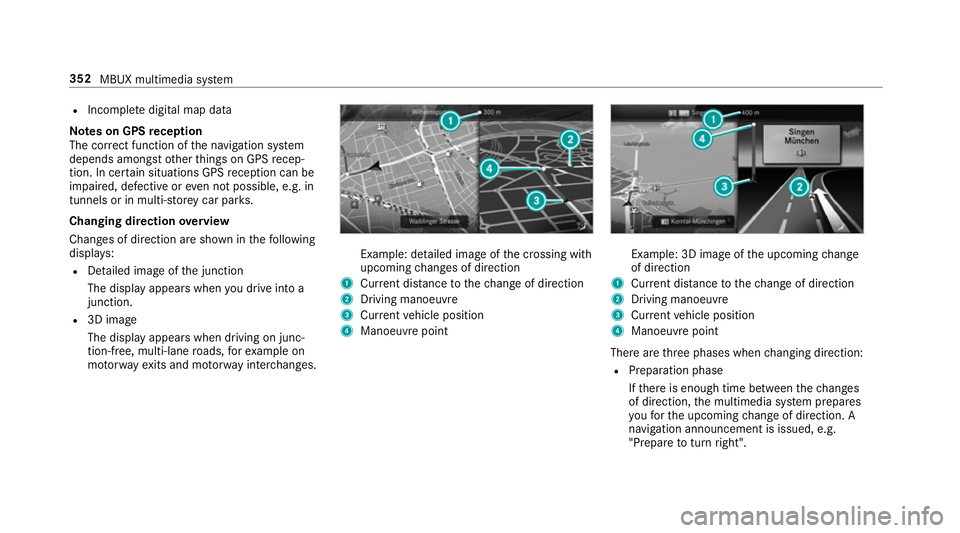
Changing direction overview
Changes of direction are shown in thefo llowing
displa ys:
R Detailed image of the junction
The display appears when you drive into a
junction.
R 3D image
The displ ayappears when driving on junc‐
tion-free, multi-lane roads, forex ample on
mo torw ay ex its and mo torw ay inter changes. Example: de
tailed image of the crossing with
upcoming changes of direction
1 Current di stance tothech ange of direction
2 Driving manoeuv re
3 Current vehicle position
4 Manoeuvre point Example: 3D image of
the upcoming change
of direction
1 Current di stance tothech ange of direction
2 Driving manoeuv re
3 Current vehicle position
4 Manoeuvre point
There are thre e phases when changing direction:
R Preparation phase
Ifth ere is enough time between thech anges
of direction, the multimedia sy stem prepares
yo ufo rth e upcoming change of direction. A
navigation announcement is issued, e.g.
"Prepare toturn right". 352
MBUX multimedia sy stem
Page 358 of 621
#
Select a POI from the list.
The selection take s place on thero ute. The
destination address is shown. The route can
be calculated. #
Touse POI catego ries forqu ick- access:
select a sea rch position In the vicinity, Near
destination orAlong the route. #
Select a POI from the list.
or #
Ente r a sear chentry intothe sear chfield and
fi lter the list. #
Select a POI from the list.
The destination address is shown. The route
can be calculated.
Saving the cur rent vehicle position #
Select Store position .
The cur rent vehicle position is sa vedto the
"Pr evious destinations" memo ry.
Destination reached
Once the destination is reached, you will see the
Í chequered flag. Route guidance is finished.
The Navigation menu is shown. When an intermediate destination has been
re
ached, you will see the intermediate destina‐
tion flag with the number of your Î inter‐
mediate destination. Route guidance is contin‐
ued.
Swit ching navigation announcements on/off #
Toswitch off: turnthevo lume control on
th esteering wheel or next totheto uchpad
during a navigation announcement
(/ page 308).
The Spoken driving recommendations have
been deactivated. message appears.
or #
Show the navigation menu (/ page 333). #
Select !.
The symbol changes to# . #
Toactivate: select#.
The cur rent navigation announcement is
pl ay ed.
The symbol changes to! .
% This function can be added and called up
from thefa vo urites within the navigation cat‐
egor y. Switching navigation announcements on/off
during a phone call #
Press the© button on thesteering wheel
or on theto uchpad.
or #
Tap on © inthe media displa y. #
Select Settings . #
Select System . #
Select Audio. #
Select Navigation and traffic announce-
ments . #
Switch Driving recommendations during call
on or off.
When the option is switched on, the display
button is activated. #
Tolea vethe menu: selectq.
Ad justing the volume of navigation
announcements
Multimedia sy stem:
4 © 5
Settings 5
System 5
Audio
5 Navigation and traffic announcements #
Select Driving recommendation vol. . MBUX multimedia sy
stem 355
Page 359 of 621
#
Set thevo lume. #
Tolea vethe menu: selectq.
Ro ute guidance is active #
Turn thevo lume control on thesteering
wheel or next totheto uchpad during a navi‐
ga tion announcement.
Switching audio fadeout on or off during nav‐
igation announcements #
Press the© button on thesteering wheel
or on theto uchpad.
or #
Tap on © inthe media displa y.#
Select Settings . #
Select System . #
Select Audio. #
Switch Audio fadeout on or off.
When the option is switched on, the display
button is activated. #
Tolea vethe menu: selectq. Re
peating navigation announcements
Re quirements:
R aro ute has already been created.
R route guidance is active.
Multimedia sy stem:
4 Navigation (Navigation) #
Select !. #
Select #.
The cur rent navigation announcement is
re peated.
% This function can be added and called up
from thefa vo urites within the navigation cat‐
egor y.
Cancelling route guidance
Re quirements:
R aro ute has already been created.
R route guidance is active. #
Show the navigation menu. #
Select ¤inthe navigation menu
(/ page 334). Overview of
route guidance toan off-road
destination
An off-road destination is within the digital map.
The map conta ins noroads that lead tothe des‐
tination.
Yo u can en terge o-coordinates or a thre ewo rd
address for off-road destinations on the map.
Ro ute guidance guides youfo r as long as possi‐
ble with navigation announcements and displa ys
on roads that are kn ownto the multimedia sys‐
te m.
Shortly before youre ach the last know n position
on the map, you will hear the "Please follow the
direction ar row" announcement, forex ample.
The display sho wsa direction ar row and the lin‐
ear dis tance tothe destination.
Overview of route guidance from an off-road
location toa destination
In an off-road position, the cur rent vehicle posi‐
tion is located within the digital map on roads
th at are not available. 356
MBUX multimedia sy stem