window MERCEDES-BENZ AMG GT R-ROADSTER 2020 User Guide
[x] Cancel search | Manufacturer: MERCEDES-BENZ, Model Year: 2020, Model line: AMG GT R-ROADSTER, Model: MERCEDES-BENZ AMG GT R-ROADSTER 2020Pages: 441, PDF Size: 7.76 MB
Page 73 of 441
The
reve rsing function cannot pr event some‐
one from becoming trapped in these situa‐
tions. #
During the closing process, make sure
th at no body parts are in the closing
area. #
If someone becomes trapped, press the
W button toopen the side window
again. Con
venience opening (ventilating theve hicle
before starting a journey) &
WARNING Risk of entrapment when
opening a side window
When opening a side windo w,parts of the
body could be dr awn in or become trapped
between the side window and window frame. #
When opening, make sure that nobody
is touching the side windo w. #
Release the button immediately if
somebody becomes trapped. #
Press and hold theÜ button on thekey.
The following functions are per form ed:
R The vehicle is unloc ked.
R The side windo wsare opened. #
Tointer rupt convenience opening: release
th eÜ button. #
Tocontinue con venience opening: press
and hold theÜ button again. Con
venience closing (closing theve hicle
from outside) &
WARNING Risk of entrapment due tonot
paying attention duri ng convenience
closing
When the con venience closing feature is
operating, parts of the body could become
trapped in the closing area of the side win‐
do ws. #
When the con venience closing feature
is operating, monitor the entire closing process and make sure
that no body
parts are in the closing area. #
Press and hold theß button on thekey.
The following functions are per form ed:
R The vehicle is loc ked.
R The side windo wsare closed. #
Tointer rupt convenience closing: release
th eß button.
% Con venience closing can also be operated
wi th KEYLESS-GO (/ page64). Problems with
the side windo ws &
WARNING Risk of becoming trapped or
fa ta lly injured if reve rsing pr otection is
not activated
If yo u close a side wind owagain immediately
af te r it has been bloc ked, the side window
will close with increased or maximum forc e.
The reve rsing function is then not active and
body parts may become trapped. 70
Opening and closing
Page 74 of 441
#
Make sure that no parts of the body are
in the closing area. #
Tostop the closing process, release the
button or press the button again to
re open the side windo w. A side wind
owcann otbe closed and you can‐
not see the cause. #
Check tosee whe ther any objects are in the
window guide. #
Adjust the side windo ws.
Ad justing the side windo ws
If a side window is obstructed during closing and
re opens again immediately: #
Immediately af terth is, pull the cor respond‐
ing button again until the side window has
closed and hold the button for at least one
more second (re-adjustment).
The side window will be closed without the
automatic reve rsing function.
If th e side window is obstructed again and
re opens again immediately: #
Immediately af terth is, pull the cor respond‐
ing button again until the side window has
closed and hold the button for at least one
more second (follo w-up adjustment).
The side wind owwill be closed without the
automatic reve rsing function.
The side windo wscann otbe opened or
closed using the con venience opening fea‐
ture.
R The key bat tery iswe ak or dischar ged. #
Check the battery using the indicator lamp
and replace if necessary (/ page 62). Anti-theft pr
otection Fu
nction of the immobiliser The immobiliser pr
events your vehicle from
being star ted without the cor rect key.
The immobiliser is automatically activated when
th e ignition is switched off and deactivated when
th e ignition is switched on. ATA
(Anti-Theft Alarm sy stem) Fu
nction of theATA system
If th eATA system is primed, a visual and audible
alarm is triggered in thefo llowing situations:
R when a door is opened
R when theta ilgate is opened
R when the bonn etis opened
R when interior pr otection is triggered
(/ page 73)
R when tow- aw ay protection is triggered
(/ page 72)
The ATA sy stem is primed automatically af ter
appr oximately ten seconds in thefo llowing situa‐
tions:
R afte r locking theve hicle with thekey
R afte r locking theve hicle using KEYLESS-GO Opening and closing
71
Page 76 of 441
Priming/deactivating
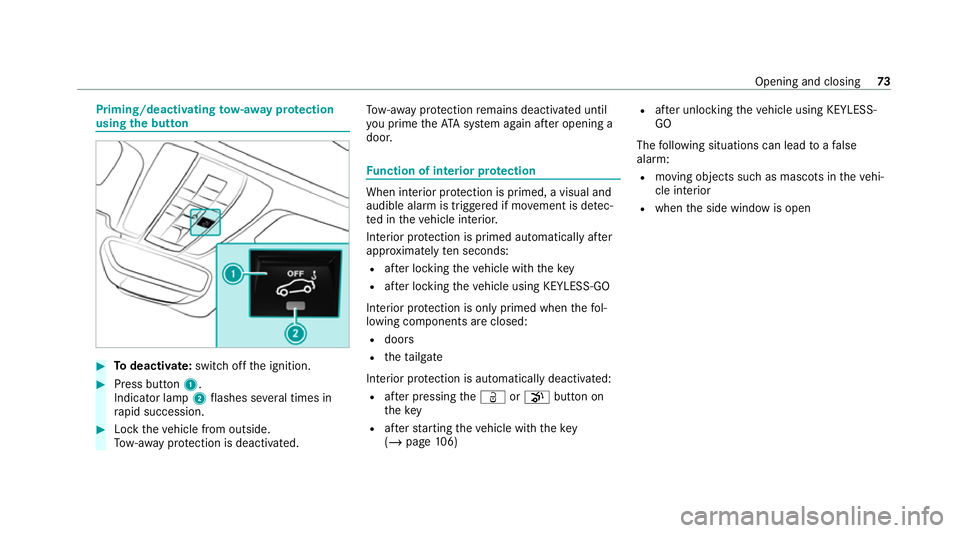
tow- aw ay protection
using the but ton #
Todeactivate: switch offthe ignition. #
Press button 1.
Indicator lamp 2flashes se veral times in
ra pid succession. #
Lock theve hicle from outside.
To w- aw ay protection is deactivated. To
w- aw ay protection remains deactivated until
yo u prime theAT A sy stem again af ter opening a
door. Fu
nction of interior pr otection When interior pr
otection is primed, a visual and
audible alarm is triggered if mo vement is de tec‐
te d in theve hicle interior.
Interior pr otection is primed automatically af ter
appr oximately ten seconds:
R afte r locking theve hicle with thekey
R afte r locking theve hicle using KEYLESS-GO
Interior pr otection is only primed when thefo l‐
lowing components are closed:
R doors
R theta ilgate
Interior pr otection is automatically deactivated:
R afte r pressing theÜ orp button on
th ekey
R afte rst arting theve hicle with thekey
( / page 106) R
afte r unlocking theve hicle using KEYLESS-
GO
The following situations can lead toafa lse
alarm:
R moving objects such as masc ots in theve hi‐
cle interior
R when the side window is open Opening and closing
73
Page 112 of 441
#
Open a window on the side of theve hi‐
cle facing away from the wind toensure
an adequate supply of fresh air. &
WARNING Risk of accident due tothe
brake sy stem overheating
If yo u lea veyour foot on the brake pedal
when driving, the brake sy stem may over‐
heat.
This increases the braking dis tance and the
brake sy stem may evenfa il. #
Never use the brake pedal as a foot re st. #
Do not depress the brake pedal and the
accelerator pedal at the same time
while driving. &
WARNING Risk of accident due toincor‐
re ct gearshifting
If th e engine speed is higher than the idle
speed and you en gage the transmission posi‐
tion hork, theve hicle may accelerate
sharply. #
Ifyo u en gage the transmission position
h ork when theve hicle is at a
st andstill, alw ays depress the brake
pedal firm lyand do not accelerate at
th e same time. *
NO
TEEngine damage duetoexcessively
high engine speeds The engine will be damaged if
you drive with
th e engine in theov errevving range. #
Do not drive wi th the engine in theove r‐
re vving range. *
NO
TECausing wearto the brake linings
by permanently depressing the brake
pedal #
Do not permanently depress the brake
pedal while driving. #
Touse braking ef fect of the engine,
shift toa lo werge ar in good time. *
NO
TEDama getothe driv etra in and
engine when pulling away #
Do not warm upthe engine while the
ve hicle is stationar y.Pull away immedi‐
atel y. #
Avoid high engine speeds and driving at
full thro ttle until the engine has reached
its operating temp erature. *
NO
TEDama getothe catalytic con verter
due tonon-combu sted fuel The engine is not
running smo othly and is
misfiring.
Non-combus ted fuel may get into the cata‐
lytic con verter. #
Only depress the accelera tor pedal
slightl y. #
Have the cause rectified immediately at
a qu alified specialist workshop. Note
s on driving on salt-treated roads
The braking ef fect is limited on salt-trea ted
ro ads. Driving and parking
109
Page 155 of 441
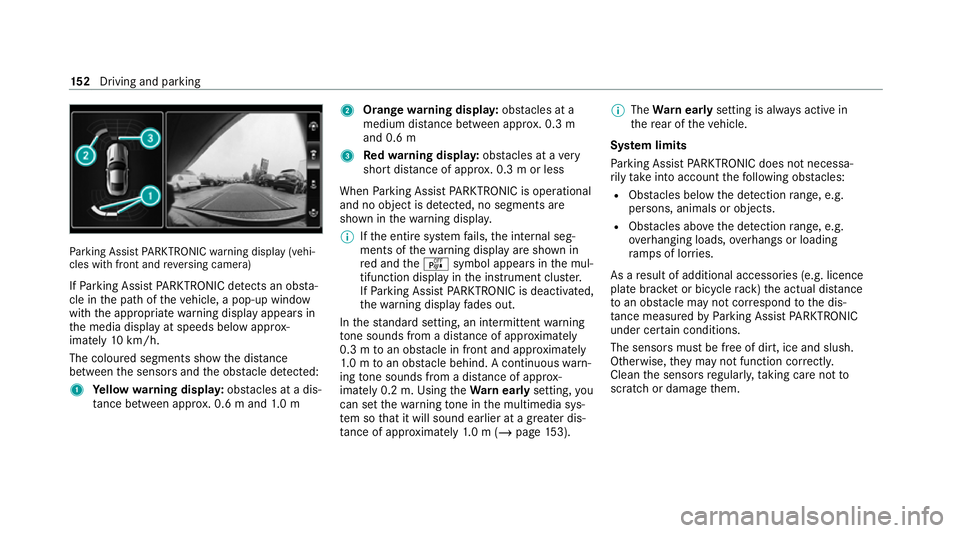
Pa
rking Assist PARKTRONIC warning display (vehi‐
cles with front and reve rsing camera)
If Pa rking Assist PARKTRONIC de tects an obs ta‐
cle in the path of theve hicle, a pop-up window
with the appropriate warning display appears in
th e media display at speeds below appr ox‐
imately 10km/h.
The colou red segments show the dis tance
between the sensors and the obs tacle de tected:
1 Yellow warning displa y:obs tacles at a dis‐
ta nce between appr ox. 0.6 m and 1.0 m 2
Orange warning displa y:obs tacles at a
medium di stance between appr ox. 0.3 m
and 0.6 m
3 Redwa rning displa y:obs tacles at a very
short dis tance of appr ox. 0.3 m or less
When Parking Assist PARKTRONIC is operational
and no object is de tected, no segments are
shown in thewa rning displa y.
% Ifth e entire sy stem fails, the internal seg‐
ments of thewa rning display are shown in
re d and theé symbol appears in the mul‐
tifunction display in the instrument clus ter.
If Pa rking Assist PARKTRONIC is deacti vated,
th ewa rning display fades out.
In thest andard setting, an intermit tent wa rning
to ne sounds from a di stance of appr oximately
0.3 m toan obs tacle in front and appr oximately
1. 0 m toan obs tacle behind. A continuous warn‐
ing tone sounds from a di stance of appr ox‐
imately 0.2 m. Using theWa rnear lysetting, you
can set thewa rning tone in the multimedia sys‐
te m so that it will sound earlier at a greater dis‐
ta nce of appr oximately 1.0 m (/ page153). %
The Warnear lysetting is alw ays active in
th ere ar of theve hicle.
Sy stem limits
Pa rking Assist PARKTRONIC does not necessa‐
ri ly take into account thefo llowing obs tacles:
R Obs tacles bel ow the detection range, e.g.
pe rsons, animals or objects.
R Obs tacles ab oveth e de tection range, e.g.
ove rhanging loads, overhangs or loading
ra mp s of lor ries.
As a result of additional accessories (e.g. licence
plate brac ket or bicycle rack )th e actual dis tance
to an obs tacle may not cor respond tothe dis‐
ta nce measu redby Parking Assist PARKTRONIC
under ce rtain conditions.
The sensors must be free of dirt, ice and slush.
Otherwise, they may not function cor rectly.
Clean the sensors regularly, taking care not to
scratch or damage them. 15 2
Driving and pa rking
Page 351 of 441
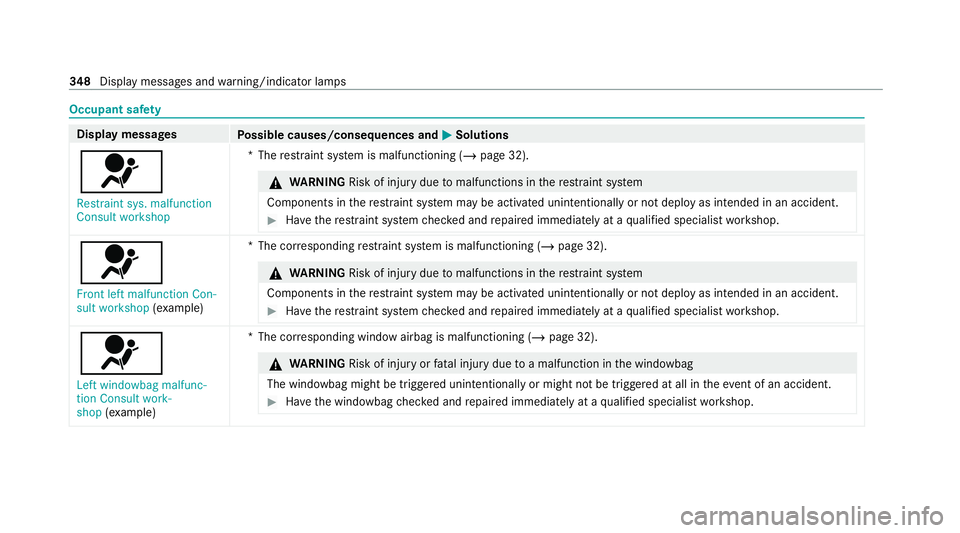
Occupant saf
ety Display messages
Possible causes/consequences and M MSolutions
6 Restraint sys. malfunction
Consult workshop *T
herestra int sy stem is malfunctioning (/ page 32). &
WARNING Risk of injury duetomalfunctions in there stra int sy stem
Components in there stra int sy stem may be activated unintentionally or not deploy as intended in an accident. #
Have there stra int sy stem checked and repaired immediately at a qualified specialist workshop. 6
Front left malfunction Con-
sult workshop (exa mp le) *T
he cor responding restra int sy stem is malfunctioning (/ page 32). &
WARNING Risk of injury duetomalfunctions in there stra int sy stem
Components in there stra int sy stem may be activated unintentionally or not deploy as intended in an accident. #
Have there stra int sy stem checked and repaired immediately at a qualified specialist workshop. 6
Left windowbag malfunc-
tion Consult work-
shop (exa mp le) *T
he cor responding window airbag is malfunctioning (/ page 32). &
WARNING Risk of injury orfata l injury due toa malfunction in the windowbag
The windowbag might be triggered unintentionally or might not be triggered at all in theeve nt of an accident. #
Have the windowbag checked and repaired immediately at a qualified specialist workshop. 348
Displaymessa ges and warning/indicator lamps