ESP MERCEDES-BENZ AMG GT R-ROADSTER 2020 Owner's Guide
[x] Cancel search | Manufacturer: MERCEDES-BENZ, Model Year: 2020, Model line: AMG GT R-ROADSTER, Model: MERCEDES-BENZ AMG GT R-ROADSTER 2020Pages: 441, PDF Size: 7.76 MB
Page 135 of 441
Some driving and driving safe
ty systems use
cameras and sensors tomonitor the area in
front of, behind or next totheve hicle.
Ke ep the areas around the sensors and cameras
free of dirt, ice or slush (/ page 299). The cam‐
eras and sensors must not be co vered, forex am‐
ple bybicycle rack s, overhanging loads, sticke rs,
fo il or foils toprotect against stone chipping.
Ad ditional licence plate brac kets can impair the
function of the ultrasonic sensors, in particular.
In theeve nt of damage or a severe impact in the
area of the sensors, ha vethe function of the
sensors checked at a qualified specialist work‐
shop. Ha vedamage or stone chipping in the area
of the cameras repaired at a qualified specialist
wo rkshop. If the sensors or cameras are dam‐
aged, some driving sy stems and driving saf ety
sy stems may no longer function proper ly.Overview of driving sy
stems and driving
saf ety sy stems R
ABS (Anti-lo ckBra king System)
(/ page 132)
R BAS (Bra keAssist System) (/ page132) R
ESP ®
(Electronic Stability Program)
(/ page 133)
R EBD ( Electronic Brakeforc eDistribution)
(/ page 135)
R Active Brake Assi st (/ page 135)
R Adaptive Brake Lights (/ page138)
R Cruise control (/ page 138)
R Limi ter (/ page139)
R Active Dis tance Assi stDISTRONIC
(/ page 141)
R Hill Start Assist (/ page144)
R HOLD function (/ page145)
R RACE START (/ page 146)
R AMG RIDE CONTROL (/ page150)
R Front and reve rsing camera (/ page154)
R ATTENTION ASSIST (/ page156)
R Traf fic Sign Assi st (/ page 157)
R Blind Spot Assi st (/ page 159)
R Lane Keeping Assist (/ page160) Fu
nction of ABS The Anti-lock Brake Sy
stem (ABS) regulates the
brake pressure in critical driving situations:
R During braking, e.g. at full brake application
or insuf ficient tyre traction, the wheels are
pr eve nted from lock ing.
R Vehicle steerability while braking is ensured.
If ABS inter venes when braking, you will feel a
pulsing in the brake pedal. The pulsating brake
pedal can be an indication of hazardous road
conditions and can ser veas a reminder totake
ex tra care while driving. Fu
nction of BAS The Brake Assist Sy
stem (BAS) supports your
eme rgency braking situation with additional
brake forc e.
If yo u depress the brake pedal quickl y,BA S is
acti vated:
R BAS au tomatically boosts the brake pres‐
sure.
R BAS can sho rten the braking dis tance. 13 2
Driving and pa rking
Page 136 of 441
R
ABS pr events the wheels from locking.
The brakes will function as usual once you
re lease the brake pedal. BAS is deactivated. Fu
nctions of ESP ®
(Electronic Stability Pro‐
gr am) &
WARNING Risk of skidding if ESP ®
is
malfunctioning
If ESP ®
is malfunctioning, ESP ®
cannot car ry
out vehicle stabilisation. In addition, other
driving saf ety sy stems are switched off. #
Drive on carefull y. #
Have ESP ®
ch ecked at a qualified spe‐
cialist workshop. Yo
u can select between thefo llowing modes of
ESP ®
:
R ESP ®
ON
R ESP ®
SPO RT
R ESP ®
OFF Charac
terist ics when ESP ®
is activated
ESP ®
monitors and impr oves driving stability and
traction, particular ly inthefo llowing situations:
R When pulling away on wet or slippe rycar ria‐
ge wa ys.
R When braking.
ESP ®
can stabilise theve hicle byinter vening in
th efo llowing ways:
R One or more wheels are braked.
R The engine output is adap ted according to
th e situation.
ESP ®
is activated every time the engine is star‐
te dre ga rdless of whe ther ESP ®
wa s in ESP ®
SPORT or deactivated before the engine was
switched off.
If th e÷ ESP®
wa rning lamp flashes in the
instrument clus ter,one or se veralve hicle wheels
has reached its grip limit:
R Adapt the driving style to suit the pr evailing
ro ad and weather conditions. R
Do not deactivate ESP ®
under any circum‐
st ances.
R Onlydepress the accelera tor pedal as far as
is necessar y.
Cha racteristics of ESP ®
SPORT &
WARNING Risk of skidding if ESP ®
SPORT is used incor rectly
When you activate ESP ®
SPOR T,there is an
increased risk of skidding and having an acci‐
dent. #
Activate ESP ®
SPO RTonly in the cir‐
cums tances described belo w. When ESP
®
SPORT is activated, theå and
Æ warning lamps light up continuously in the
instrument clus ter.
Select ESP ®
SPORT when theve hicle's own
ove rste ering and under steering characteristics
are desired, e.g. on designated roads.
Driving with ESP ®
SPO RTor with ESP ®
deactiva‐
te dre qu ires an extreme ly qualified and experi‐
enced driver. Driving and parking
13 3
Page 137 of 441

If ESP
®
SPORT is activated and one or more
wheels start tospin, the÷ ESP®
wa rning
lamp on the instrument clus terflashes. ESP ®
th en only stabilises theve hicle toa limited
deg ree.
ESP ®
SPORT also has thefo llowing characteris‐
tics:
R ESP ®
on ly impr oves driving stability toa limi‐
te d degree.
R ETS/4ETS traction control is still active.
R The engine's torque is on lyrestricted to a
limited degree and the drive wheels can spin.
The spinning of the wheels results in a cut‐
ting action for better traction on loose sur fa‐
ces.
R ESP ®
continues toprov ide assis tance when
th e brakes are firm lyapplied. Cha
racteristics when ESP ®
is deactivated &
WARNING Risk of skidding if ESP ®
is
deactivated
If yo u deactivate ESP ®
, ESP ®
cannot car ry
out vehicle stabilisation. #
ESP ®
should on lybe deactivated in the
fo llowing situations. When ESP
®
is deactivated, theå and¤
wa rning lamps light up continuously in the
instrument clus ter.
Deactivating ESP ®
has thefo llowing ef fects:
R Driving stability will no lon ger be impr oved.
R The drive wheels could spin.
R ETS/4ETS traction control is still active.
% Even when ESP ®
is deactivated, you are still
assis tedby ESP ®
when braking ha rd.
It may be best toactivate ESP ®
SPO RTor deacti‐
va te ESP ®
in thefo llowing situations:
R When using snow chains. R
In deep snow.
R On sand or gr avel.
% Spinning the wheels results in a cutting
action, which enhances traction.
% Activate ESP ®
as soon as the situations
described abo veno longer apply. ESP ®
will
ot herwise not be able tostabilise theve hicle
if th eve hicle starts toskid or a wheel starts
to spin.
If th e÷ ESP®
wa rning lamp lights up continu‐
ously even when ESP ®
is acti vated, ESP ®
is not
av ailable due toa malfunction.
Obse rve any information which may be displa yed
in the instrument clus ter:
R Indicator and warning lamps (/ page 387)
R Display messages
ETS/4ETS (Electronic Traction Sy stem)
ETS/4ETS traction control is pa rtof ESP ®
.
ETS/4ETS can impr ovetheve hicle's traction by
inter vening in thefo llowing ways:
R The drive wheels are braked individually if
they spin. 134
Driving and pa rking
Page 138 of 441
R
More drive torque is transferred tothe wheel
or wheels with traction. Ac
tivating/deactivating ESP ®
(Electronic Sta‐
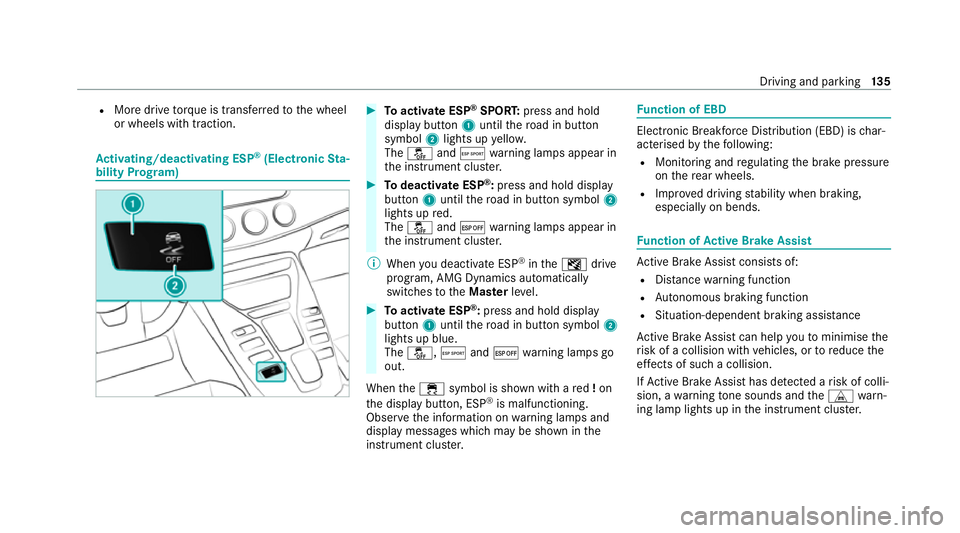
bility Prog ram) #
Toactivate ESP ®
SPORT: press and hold
display button 1until thero ad in button
symbol 2lights up yello w.
The å andÆ warning lamps appear in
th e instrument clus ter. #
Todeactivate ESP ®
:press and hold displ ay
button 1until thero ad in button symbol 2
lights up red.
The å and¤ warning lamps appear in
th e instrument clus ter.
% When you deactivate ESP ®
in theI drive
prog ram, AMG Dynamics auto matically
switches totheMas terleve l. #
Toactivate ESP ®
:press and hold display
button 1until thero ad in button symbol 2
lights up blue.
The å, Æand¤ warning lamps go
out.
When the÷ symbol is shown with a red!on
th e display button, ESP ®
is malfunctioning.
Obser vethe information on warning lamps and
display messages which may be shown in the
instrument clus ter. Fu
nction of EBD Elect
ronic Breakforce Distribution (EBD) is char‐
acterised bythefo llowing:
R Monitoring and regulating the brake pressure
on there ar wheels.
R Impr oved driving stability when braking,
especially on bends. Fu
nction of Active Brake Assi st Ac
tive Brake Assi stconsi sts of:
R Distance warning function
R Autonomous braking function
R Situation-dependent braking assi stance
Ac tive Brake Assi stcan help youto minimise the
ri sk of a collision with vehicles, or toreduce the
ef fects of such a collision.
If Ac tive Brake Assi sthas de tected a risk of colli‐
sion, a warning tone sounds and theL warn‐
ing lamp lights up in the instrument clus ter. Driving and pa
rking 13 5
Page 139 of 441
If
yo u do not react tothe visual or acoustic warn‐
ing, autonomous braking can be initiated in criti‐
cal situations.
In especially critical situations, Active Brake
Assi stcan initia teautonomous braking direct ly.
In this case, thewa rning lamp and warning tone
occur simultaneously wi th the braking applica‐
tion.
If yo u apply the brake yourself in a situation
de tected as critical byActive Brake Assi st, or
apply the brake during autonomous braking, sit‐
uation-dependent braking assis tance occu rs.
The brake pressure increases up tomaximum
full-s top braking if necessar y.
If th e autonomous braking function or the situa‐
tion-dependent braking assis tance is trig gered,
additional pr eventive measu resfo r occupant
pr otection (PRE-SAFE ®
) may also be initiated, if
th eve hicle is equipped with these. &
WARNING Risk of an accident caused by
limited de tection per form ance of Active
Brake Assi st
Ac tive Brake Assi stcannot al ways clear ly
identify objects and complex traf fic situa‐
tions. #
Alw ays pay careful attention tothe traf‐
fi c situation; do not rely on Active Brake
Assi stalone. Active Brake Assi stis only
an aid. The driver is responsible for
maintaining a suf ficiently safe di stance
to theve hicle in front, vehicle speed
and for braking in good time. #
Be prepare dto brake or swer veif nec‐
essar y. %
Ifth e sy stem is una vailable, theæ display
appears in the multifunction displa y.
Obser vethe sy stem limitations of Active Brake
Assi st.
The individual subfunctions are available in
th efo llowing speed ranges:
Distance warning function The dis
tance warning function issues a warning
at speeds:
R From appr oximately 30 km/h, if over se veral
seconds the dis tance maintained totheve hi‐
cle tr avelling in front is insuf ficient forthe
driven speed. The Ldistance warning
lamp then lights up in the instrument clus ter.
R From appr oximately 7 km/h, if your vehicle
is critically close toave hicle or pedestrian.
An intermittent warning tone sounds and the
L distance warning lamp lights up in the
instrument clus ter.
Brake immediately or take evasive action, pr ovi‐
ded it is safe todo so and the traf fic situation
allo wsthis.
The dis tance warning function can aid you in the
fo llowing situations:
R Vehicles tr avelling in front: uptoappr ox‐
imately 250 km/h
R Stationary vehicles: uptoappr oximately
70 km/h 13 6
Driving and pa rking
Page 141 of 441
Setting
Active Brake Assi stMultimedia sy
stem:
4 Vehicle 5
k Assistance
5 Active Brake Assist #
Activate or deacti vate the function.
% It is recommended that you alw ays lea ve
Ac tive Brake Assi stactivated.
% IfAc tive Brake Assi stis deactivated, the
æ symbol appears inthest atus bar of the
multifunction displa y.Fu
nction of Adaptive Brake Lights Ad
aptive Brake Lights warnfollowing traf fic in an
emergency braking situation with th efo llowing
actions:
R Byflashing the brake lamps
R By activating the hazard warning lights
If th eve hicle is braked sharply from speeds
abo ve50 km/h, the brake lamps flash rapidl y.
This pr ovides traf fic tr avelling behind you with an
ev en more noticeable warning. If
th eve hicle is tr avelling at speeds of more than
70 km/h at the beginning of the brake applica‐
tion, the hazard warning lights switch on once
th eve hicle is stationar y.When you pull away
again, the hazard warning lights will switch off
automatically at appr oximately 10km/h. Yo u
can also switch off the hazard warning lights
using the hazard warning button. Cruise control and limiter
Fu
nction of cruise control
Cruise contro lre gulates the speed totheva lue
selec tedby the driver.
If yo u accelerate toove rtake, forex ample, the
st ored speed is not dele ted. If youre mo veyour
fo ot from the accelera tor pedal af terov ertak ing,
cruise control will resume speed regulation back
to thestored speed.
Cruise contro l is operated using the cor respond‐
ing steering wheel buttons. You can store any
speed abo ve30 km/h up tothe maximum
design speed or up tothe set winter tyre limit. Obser
vethe no tes on driving sy stems and your
re sponsibility; you may otherwise failto recog‐
nise dangers (/ page 131).
Displa yson the multifunction display
R h (grey): cruise control is selected but
not yet acti vated.
R h (green): cruise control is active.
A stored speed appears along with theh dis‐
pla y.
% The segments extending from the cur rent
st ored speed tothe end of the scale, or to
th e set winter tyre limit, light up in the
speedome ter.
Sy stem limits
Cruise control may be unable tomaintain the
st ored speed on uphill gradients. The stored
speed is resumed when the gradient evens out.
Change into a lo werge ar in good time on long
and steep downhill gradients. Take particular
no te ofthis when driving a laden vehicle. By
doing so, you will make use of the engine's brak‐
ing ef fect. This relie vesth e load on the brake 13 8
Driving and pa rking
Page 142 of 441
sy
stem and pr events the brakes from overheat‐
ing and wearing tooqu ickl y.
Do not use cruise control in thefo llowing situa‐
tions:
R In traf fic situations whi chrequ ire frequent
ch anges of speed, e.g. in heavy traf fic, on
winding roads.
R On slippe ryroads. Accelerating can cause
th e drive wheels tolose traction and the
ve hicle could then skid.
R Ifyo u are driving when visibility is poor.
Fu nction of the limiter
The limiter restricts the speed of theve hicle. To
re duce the speed tothe set speed, the limiter
applies the brakes automaticall y.
Yo u can limit the speed as follo ws:
R Variable: for speed restrictions, e.g. in built-
up areas.
R Perm anen t:for long-term speed restrictions,
e.g. when driving in winter tyre mode.
The variable limiter is operated using the cor re‐
sponding steering wheel buttons. You can store any
road speed from 30 km/h to250 km/h or
up tothe set winter tyre limit. You can also per‐
fo rm settings while theve hicle is stationary if
th eve hicle has been star ted.
Obser vethe no tes on driving sy stems and your
re sponsibility; you may otherwise failto recog‐
nise dangers (/ page 131).
Dis playson the multifunction display
R È (gre y): variable limiter is selec ted but
not yet acti vated.
R È (flashes gr ey):va riable limiter is temp o‐
ra rily passive.
R È (green): variable limiter is activated.
A stored speed appears along with theÈ dis‐
pla y.The segments in the speedome ter light up,
up tothe cur rently stored speed.
% When the driving speed is greater than the
st ored speed, display Èflashes.
Kickd own
If yo u depress the accelerator pedal be yond the
pressure point (kickdown), theva riable limiter
swit ches topassive mode. The Limiter passive
message appears in the multifunction displa y.Af
ter completion of kickdown, theva riable lim‐
iter is activated again in thefo llowing situations:
R Ifth e driven speed drops below thestored
speed.
R Ifth estored speed is called up.
R Ifyo ustore a new speed.
Operating cruise control or theva riable lim‐
iter &
WARNING Risk of accident due tostored
speed
If yo u call up thestored speed and this is
lo we rth an your cur rent speed, theve hicle
decelerates. #
Take into account the tra ffic situation
before calling up thestored speed. Re
quirements:
Cruise control
R Cruise control is selected.
R ESP ®
must be activated, but not inter vening.
R The driven speed is at least 30 km/h. Driving and pa
rking 13 9
Page 143 of 441
R
The transmission is in position h.
Va riable limiter
R The variable limiter is selec ted. #
Tooperate cruise control or theva riable
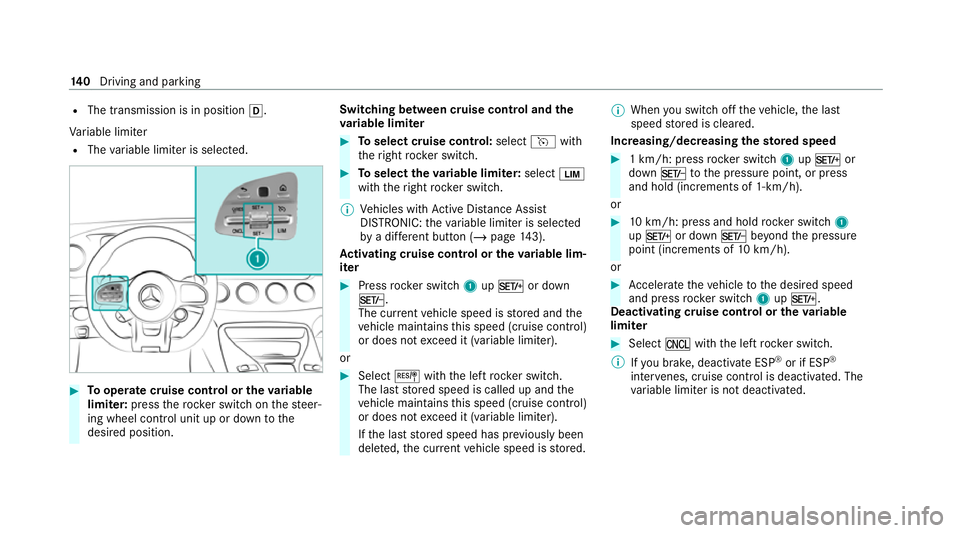
limi ter: press thero ck er switch on thesteer‐
ing wheel control unit up or down tothe
desired position. Switching between cruise control and the
va
riable limi ter #
Toselect cruise control: selecthwith
th eright rock er switch. #
Toselect theva riable limi ter: select È
with theright rock er switch.
% Vehicles with Active Dis tance Assi st
DISTRONIC: theva riable limiter is selec ted
by a dif fere nt button (/ page 143).
Ac tivating cruise control or the variable lim‐
iter #
Press rocker switch 1upM or down
N.
The cur rent vehicle speed is stored and the
ve hicle maintains this speed (cruise control)
or does not exceed it (variable limiter).
or #
Select Jwiththe left rock er switch.
The last stored speed is called up and the
ve hicle maintains this speed (cruise control)
or does not exceed it (variable limiter).
If th e last stored speed has pr eviously been
dele ted, the cur rent vehicle speed is stored. %
When you swit choff theve hicle, the last
speed stored is cleared.
Increasing/decreasing thesto red speed #
1 km/h: press rocker switch 1upM or
down Ntothe pressure point, or press
and hold (increments of 1-km/h).
or #
10km/h: press and hold rock er switch 1
up M or down Nbeyond the pressure
point (increments of 10km/h).
or #
Accelerate theve hicle tothe desired speed
and press rocker switch 1upM.
Deactivating cruise control or theva riable
limi ter #
Select Owith th e left rock er switch.
% Ifyo u brake, deactivate ESP ®
or if ESP ®
inter venes, cruise control is deacti vated. The
va riable limiter is not deactivated. 14 0
Driving and pa rking
Page 146 of 441
&
WARNING Risk of accident due toinsuf‐
fi cient decele ration byActive Dis tance
Assi stDISTRONIC
Ac tive Dis tance Assi stDISTRONIC brakes
yo ur vehicle with up to50% of the possible
deceleration. If this decele ration is not su ffi‐
cient, Active Dis tance Assi stDISTRONIC
alerts you with a visual and acoustic warning. #
Adjust your speed and main tain a suita‐
ble dis tance from theve hicle in front. #
Brake theve hicle yourself and/or take
ev asive action. &
WARNING Risk of accident if de tection
function of Active Dis tance Assi st
DISTRONIC is impaired
Ac tive Dis tance Assi stDISTRONIC does not
re act or has a limited reaction:
R when driving on a dif fere nt lane or when
ch anging lanes R
topedestrians, animals, bicycles or sta‐
tionary vehicles, or unexpected obs tacles
R tocompl extraf fic conditions
R tooncoming vehicles and crossing traf fic
As a result, Active Dis tance Assi st
DISTRONIC may nei ther give warnings nor
inter vene in su chsituations. #
Alw ays obser vethe tra ffic conditions
carefully and react accordin gly. Operating
Active Di stance Assist DIST RONIC
Re quirements:
R The elect ric pa rking brake is released.
R ESP ®
is activated and is not inter vening.
R The transmission is in position h.
R The driver's door is closed.
R Check of thera dar sensor sy stem has been
successfully comple ted.
R Parking Assist PARKTRONIC is not being
used topark theve hicle or toexit from a
parking space. #
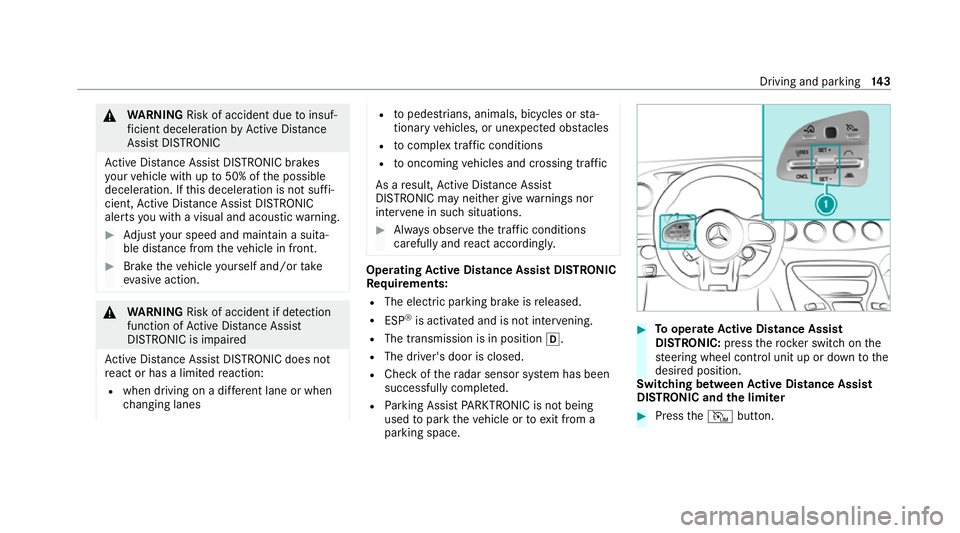
Tooperate Active Di stance Assist
DISTRO NIC:press thero ck er switch on the
st eering wheel control unit up or down tothe
desired position.
Switching between Active Di stance Assist
DISTRO NIC and the limiter #
Press theI button. Driving and parking
14 3
Page 147 of 441
Ac
tivating the variable limi ter or Active Dis‐
tance Assi stDISTRONIC #
Toactivate with out astored speed: press
rock er switch 1upM or down N, or
select Jwiththe left rocker switch.
or #
Toactivate with ast ored speed: select
J withthe left rocker switch. #
Active Di stance Assist DISTRO NIC:remo ve
yo ur foot from the accelerator pedal.
The cur rent vehicle speed is stored and
maintained (Active Dis tance Assi st
DISTRONIC) or limited (variable limiter) by
th eve hicle.
Pulling away with Active Di stance Assist
DISTRO NIC #
Activate Active Dis tance Assi stDISTRONIC
and remo veyour foot from the brake pedal. #
Select Jwiththe left rock er switch.
or #
Depress the accelerator pedal briefly and
fi rm ly.
The functions of Active Dis tance Assi st
DISTRONIC continue tobe car ried out.
Deactivating Active Di stance Assist
DISTRO NIC &
WARNING Risk of accident due toActive
Dis tance Assi stDISTRONIC still being
activated when you lea vethe driver's
seat
If yo u lea vethe driver's seat while theve hicle
is being braked byActive Dis tance Assi st
DISTRONIC only, theve hicle can rollaw ay. #
Alw ays deactivate Active Dis tance
Assi stDISTRONIC and secure theve hi‐
cle topreve nt it from rolling away
before you lea vethe driver's seat. #
Select Owiththe left rock er switch.
% Ifyo u brake, deactivate ESP ®
or if ESP ®
inter venes, Active Dis tance Assi st
DISTRONIC is deacti vated.
Increasing/decreasing thesto red speed #
1 km/h: press rocker switch 1upM or
down Ntothe pressure point, or press
and hold (increments of 1 km/h).
or #
10km/h: press rock er switch 1upM or
down Nbeyond the pressure point, or
press and hold (increments of 10km/h).
or #
Accelerate theve hicle tothe desired speed
and press rocker switch 1upM.
Changing the specified distance totheve hi‐
cle in front #
Toreduce the speci fied distance: press
th eright rock er switch up (Ñ). #
Toincrease the specified distance: press
th eright rock er switch down (Ò). Fu
nction of Hill Start Assist Hill
Start Assist holds theve hicle for a short
time when pulling away on a hill under thefo l‐
lowing conditions:
R The transmission is in position hork. 14 4
Driving and pa rking