audio MERCEDES-BENZ B-CLASS HATCHBACK 2011 Owners Manual
[x] Cancel search | Manufacturer: MERCEDES-BENZ, Model Year: 2011, Model line: B-CLASS HATCHBACK, Model: MERCEDES-BENZ B-CLASS HATCHBACK 2011Pages: 329, PDF Size: 7.91 MB
Page 7 of 329
1, 2, 3 ...
12 Vsocket
see Socket A
ABS (Anti-lock Braking System) Display message ............................ 206
Function/notes ................................ 63
Important safety notes ....................63
Warning lamp ................................. 233
Activating/deactivating air-recir-
culation mode .................................... 121
Activating/deactivating cooling
with air dehumidification .................117
Active light function .........................100
Active Park Assist Display message ............................ 224
Active Parking Assist
Function/notes ............................. 166
Important safety notes ..................166
Towing atrailer .............................. 169
ADAPTIVE BRAKE ................................. 68
Adaptive brake lamps .........................66
Adaptive Highbeam Assist Display message ............................ 219
Function/notes ............................. 101
Adaptive Main-beam Assist
Switching on/off (on-board com-
puter) ............................................. 202
Additional speedometer ...................200
Additives (engine oil) ........................315
Adjusting the headlamp range ...........98
Airbags Front airbag (driver, front
passenger )....................................... 41
Important safety guidelines .............40
Kneebag .......................................... .42
Sidebag ............................................ 42
Triggering ......................................... 39
Windowba g...................................... 43
Air-conditioning system
see Climate control
Airf ilter (white display message) ....221
Air pressure see Tyre pressure Airv
ents
Important safet ynotes .................. 122
Rea r............................................... 123
Setting ........................................... 122
Setting the centre air vents ...........123
Setting the side air vents ...............123
Alarm system
see ATA (Anti-Theft Alarm system)
Anti-glare film .................................... 260
Anti-loc kBraking System
see ABS (Anti-lock Braking System)
Anti-Theft Alarm system
see ATA (Anti-Theft Alarm system)
Aquaplaning ....................................... 148
Ashtray ............................................... 256
Assistance menu (on-board com-
puter) ................................................. .198
ASSYST PLUS see ASSYST PLUS service interval
display
ASSYST PLUS service interval dis-
play
Displaying service messages .........266
Hiding service messages ...............266
Notes ............................................. 266
Service messages ..........................266
ATA (Anti-Theft Alarm system)
Activating/deactivating ...................68
Function .......................................... .68
Interior motion sensor .....................69
Switching off the alarm ....................68
Tow-away protection ........................ 69
ATTENTIO NASSIST
Activating/deactivating .................199
Display message ............................ 221
Function/notes ............................. 175
Audio menu (on-board computer) ....195
Authorised workshop see Qualified specialist workshop
AUTO lights
Display message ............................ 218
see Lights
Automatic engine start (ECO start/
stop function) .................................... 130
Automatic engine switch-off (ECO
start/stop function) ..........................129
Automatic headlamp mode ................97 4
Index
Page 12 of 329
Lane Keeping Assist
......................180
Lane package ................................ 177
PARKTRONI C................................. 163
Reversing camera ..........................170
Speed Limi tAssist ......................... 176
Driving tips
Aquaplaning ................................... 148
Automatic transmission .................137
Brakes ........................................... 146
DISTRONI CPLUS ........................... 160
Downhill gradient ........................... 147
Driving abroad ................................. 96
Driving in winter ............................ .148
Driving on flooded road s................ 148
Driving on wet road s...................... 148
General .......................................... 146
Icy road surfaces ........................... 149
Limited braking efficiency on sal-
ted road s....................................... 147
New brake pads/linings ................148
Running-in tips ............................... 126
Snow chains .................................. 295
Symmetrical dipped bea m............... 96
Towing atrailer .............................. 181
Tyr egrip ........................................ 148
Wet road surface ........................... 147
DVD audio (on-board computer) ......196 E
EASY-VARIO-PLUS system Luggage compartment enlarge-
ment .............................................. 248
EBD (electronic brake force distri-
bution)
Display message ............................ 208
Function/notes ................................ 67
ECO start/stop function
Deactivating/activating .................131
General information .......................129
Electrical fuses
see Fuses
Electronic Stability Program
see ESP ®
(Electroni cStability Program)
Emergenc ykey
Unlocking the driver's door ..............77Emergency key element
Function/notes ................................ 73
Locking vehicle ................................ 78
Emergency release
Driver's door .................................... 77
Emergency spare wheel
Important safety notes ..................304
Points to remember .......................305
Removing ....................................... 305
Technical data ............................... 305
Emergency unlocking
Tailgate ............................................ 79
Vehicle ............................................. 77
Engine
Display message ............................ 219
ECO start/stop function ................129
Engine number ............................... 311
Jump-starting ................................. 283
Running irregularl y......................... 132
Starting problems ..........................132
Starting the engine with the key ....127
Stopping ........................................ 144
Tow-starting (vehicle) ..................... 287
Warning lamp (engine diagnos-
tics) ............................................... 238
Engine electronics
Notes ............................................. 309
Problem (fault) ............................... 132
Engine oil
Additives ........................................ 315
Checking the oil level ..................... 263
Checking the oil level using the
dipstick .......................................... 264
Display message ............................ 221
Filling capacity ............................... 315
Notes about oil grades ................... 314
Notes on oil level/consumption ....263
Topping up ..................................... 264
Viscosity ........................................ 315
Environmental protection
Note ................................................ .20
Returning an end-of-life vehicle .......20
ESP ®
(Electronic Stability Pro-
gram) Deactivating/activating .................198
Deactivating/activating (notes) .......66
Display message ............................ 206 Index
9
Page 16 of 329
M
M+S tyres .......................................... .294
Main-beam headlamps Changing bulbs .............................. 106
Display message ............................ 217
Switching Adaptive Highbeam
Assist on/off ................................. 101
Switching on/off .............................. 99
Manual transmission
Engaging revers egear ................... 134
Gea rlever ...................................... 133
Pulling away ................................... 128
Shifting to neutra l.......................... 134
Shift recommendatio n................... 134
Starting the engine ........................127
Matt finish (cleaning instructions) ..269
Memory card (audio) .........................196
Memory function ................................. 94
Mercedes-Benz Service Centre see Qualified specialist workshop
Message memory (on-board com-
puter) ................................................. .205
Messages see Display messages
Mirrors
see Exterior mirrors
see Rear-view mirror
see Vanity mirror
Mobile phone
Frequencies ................................... 309
Installatio n..................................... 309
Menu (on-board computer) ............196
Notes/placing in the bracket ......... 258
Transmission output (maximum) .... 309
see Telephone
Modifying the programming (key) .....73
MOExtended tyres .............................276
Motorway mode ................................ 100
MP3 Operating ...................................... .196
see Separate operating instructions
Multifunction display
Function/notes ............................. 190
Permanent displa y......................... 201
Multifunction steering wheel
Operating the on-board computer .189
Overview .......................................... 31 N
Navigation Menu (on-board computer) ............194
see separate operating instructions
Notes on running in anew vehicle ..126 O
Occupant safety Childre ninthe vehicle ..................... 47
Important safety notes ....................38
Odometer ........................................... 193
see Total distance recorder
see Trip meter
Oil
see Engine oil
On-board computer
Assistance menu ........................... 198
Convenience submenu ..................204
Displaying a service message ........266
Display messages ..........................205
Factory setting submenu ...............204
Important safety notes ..................188
Ligh tsubmenu ............................... 201
Menu overview .............................. 192
Message memory .......................... 205
Navigation menu ............................ 194
Operating vide oDVD ..................... 196
Operation ....................................... 189
Service menu ................................. 200
Settings menu ............................... 200
Standard displa y............................ 193
Telephone menu ............................ 196
Vehicle submenu ........................... 203
Opening and closing the side trim
panels ................................................. 107
Operating safety Diagnostics connection ...................22
Operating system
see On-board computer
Outside temperature display ...........188
Overhead control panel ......................34
Override feature Rea rside windows ........................... 62 Index
13
Page 34 of 329
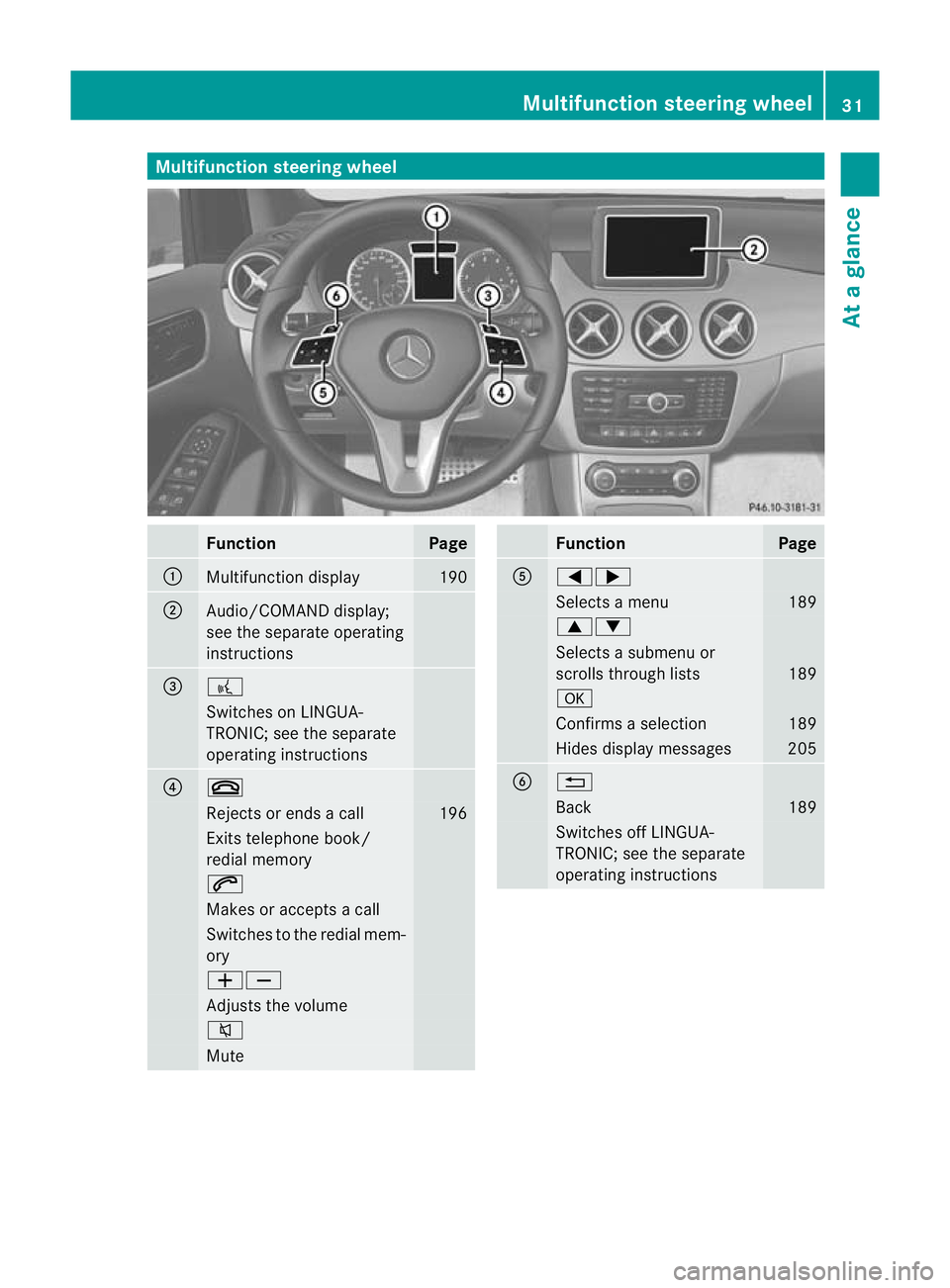
Multifunction steering wheel
Function Page
:
Multifunction display 190
;
Audio/COMAND display;
see the separate operating
instructions
=
?
Switches on LINGUA-
TRONIC; see the separate
operating instructions
?
~
Rejects or ends a call 196
Exits telephone book/
redial memory
6
Makes or accepts a call
Switches to the redial mem-
ory
WX
Adjusts the volume
8
Mute Function Page
A
=;
Selects a menu 189
9:
Selects a submenu or
scrolls through lists
189
a
Confirms a selection 189
Hides display messages 205
B
%
Back 189
Switches off LINGUA-
TRONIC; see the separate
operating instructionsMultifunction steering wheel
31At a glance
Page 35 of 329
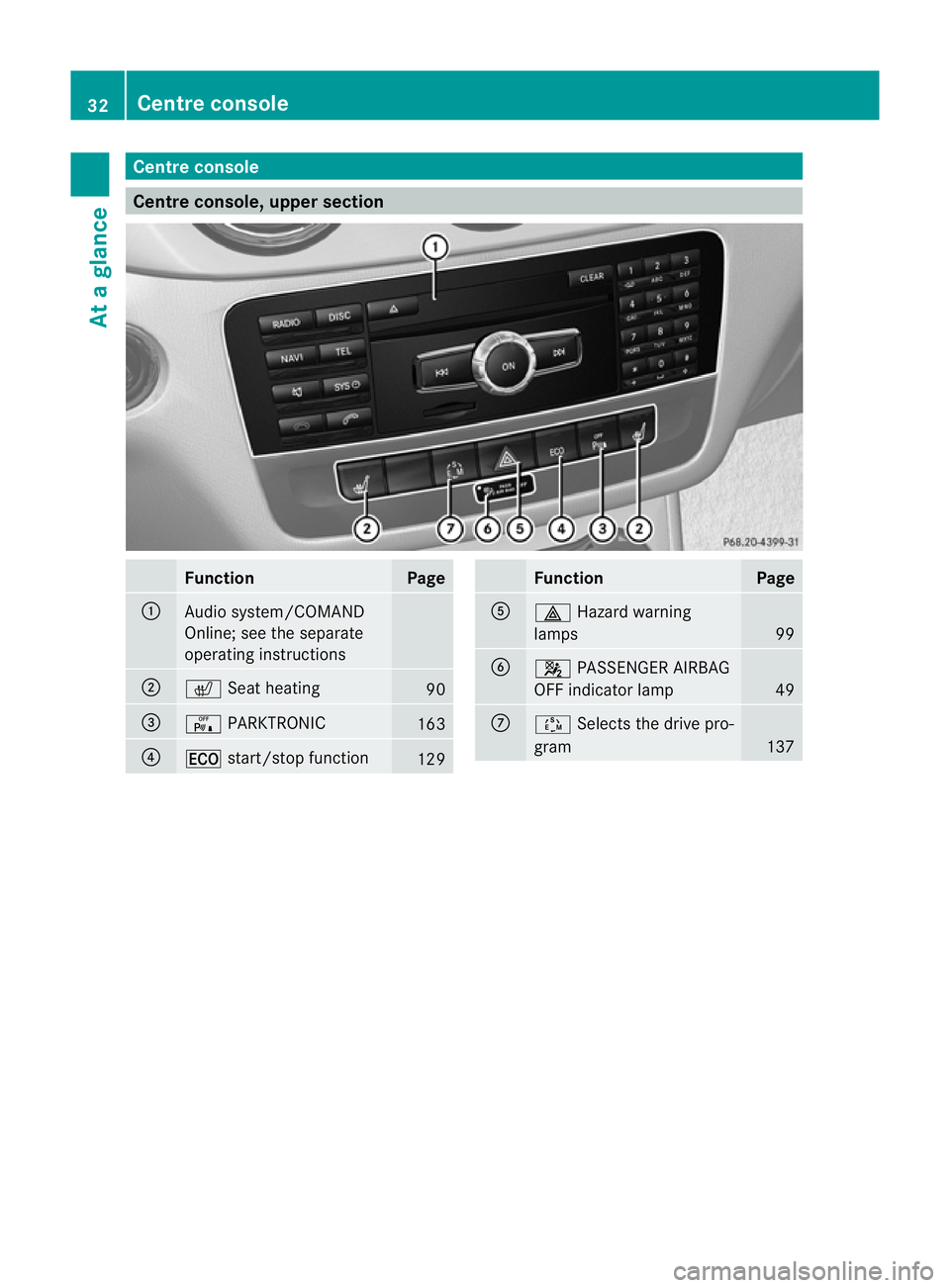
Centre console
Centre console, upper section
Function Page
:
Audio system/COMAND
Online; see the separate
operating instructions
;
c
Seat heating 90
=
c
PARKTRONIC 163
?
¤
start/stop function 129 Function Page
A
£
Hazard warning
lamps 99
B
4
PASSENGER AIRBAG
OFF indicator lamp 49
C
Ú
Selects the drive pro-
gram 13732
Centre consoleAt a glance
Page 36 of 329
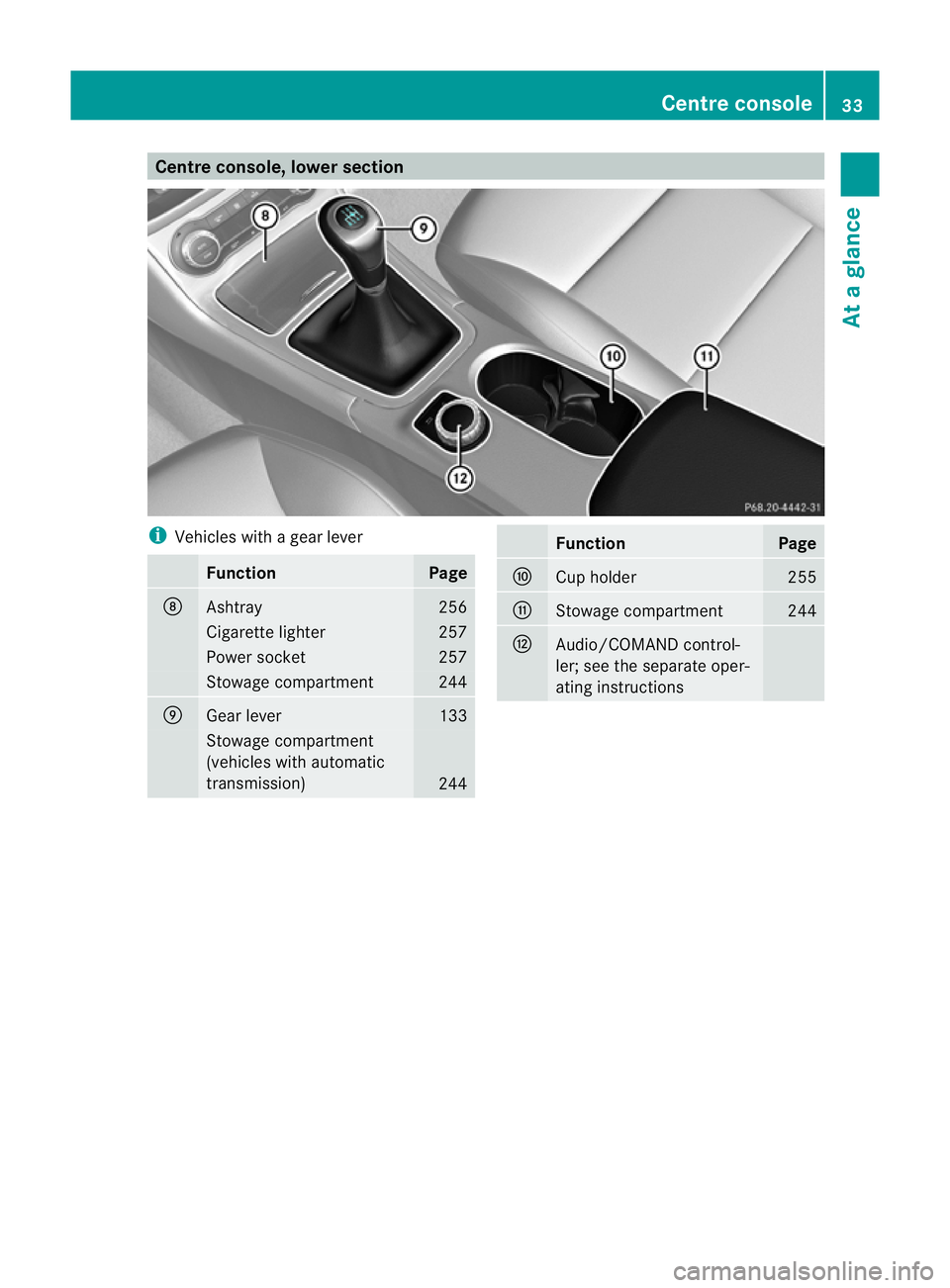
Centre console, lower section
i
Vehicles with a gear lever Function Page
D
Ashtray 256
Cigarette lighter 257
Power socket 257
Stowage compartment 244
E
Gear lever 133
Stowage compartment
(vehicles with automatic
transmission)
244 Function Page
F
Cup holder 255
G
Stowage compartment 244
H
Audio/COMAND control-
ler; see the separate oper-
ating instructions Centre console
33At a glance
Page 173 of 329
If you have attached a traile
rto your vehicle,
you should not use Active Parking Assist.
Once the electrical connection is established
between your vehicle and the trailer, Active
Parking Assist is no longer available. Reversing camera
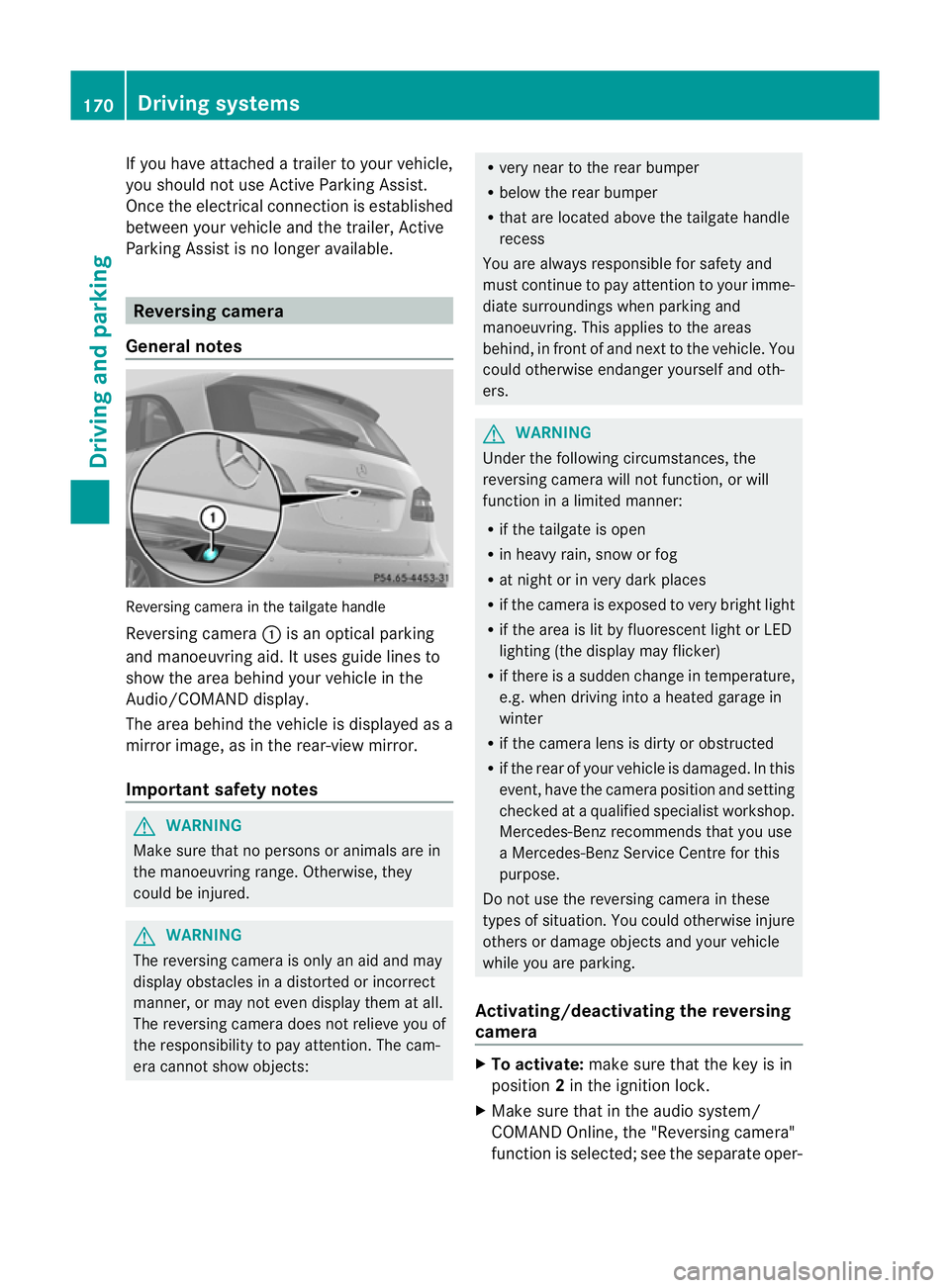
General notes Reversing camera in the tailgate handle
Reversing camera :is an optical parking
and manoeuvring aid. It uses guide lines to
show the area behind your vehicle in the
Audio/COMAND display.
The area behind the vehicle is displayed as a
mirror image, as in the rear-view mirror.
Important safety notes G
WARNING
Make sure that no persons or animals are in
the manoeuvring range. Otherwise, they
could be injured. G
WARNING
The reversing camera is only an aid and may
display obstacles in a distorted or incorrect
manner, or may not even display them at all.
The reversing camera does not relieve you of
the responsibility to pay attention. The cam-
era cannot show objects: R
very near to the rear bumper
R below the rear bumper
R that are located above the tailgate handle
recess
You are always responsible for safety and
must continue to pay attention to your imme-
diate surroundings when parking and
manoeuvring. This applies to the areas
behind, in front of and next to the vehicle. You
could otherwise endanger yourself and oth-
ers. G
WARNING
Under the following circumstances, the
reversing camera will not function, or will
function in a limited manner:
R if the tailgate is open
R in heavy rain, snow or fog
R at night or in very dark places
R if the camera is exposed to very bright light
R if the area is lit by fluorescent light or LED
lighting (the display may flicker)
R if there is a sudden change in temperature,
e.g. when driving into a heated garage in
winter
R if the camera lens is dirty or obstructed
R if the rear of your vehicle is damaged. In this
event, have the camera position and setting
checked at a qualified specialist workshop.
Mercedes-Benz recommends that you use
a Mercedes-Benz Service Centre for this
purpose.
Do not use the reversing camera in these
types of situation. You could otherwise injure
others or damage objects and your vehicle
while you are parking.
Activating/deactivating the reversing
camera X
To activate: make sure that the key is in
position 2in the ignition lock.
X Make sure that in the audio system/
COMAND Online, the "Reversing camera"
function is selected; see the separate oper- 170
Driving systemsDriving and parking
Page 174 of 329
ating instructions for the audio system/
COMAND Online.
X Engage reverse gear.
Guide lines are used to show the area
behind the vehicle in the Audio/COMAND
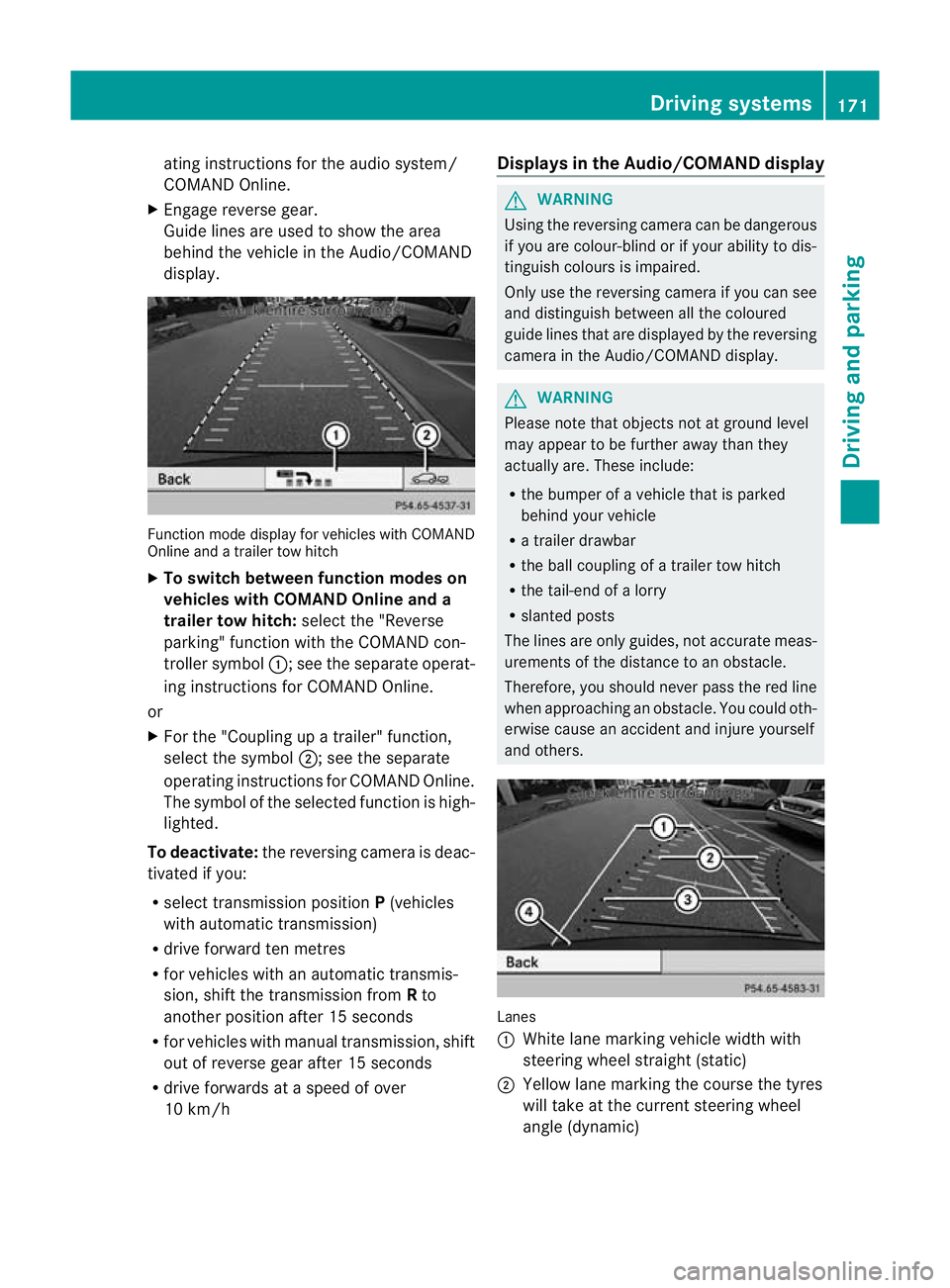
display. Function mode display for vehicles with COMAND
Online and a trailer tow hitch
X
To switch between function modes on
vehicles with COMAND Online and a
trailer tow hitch: selectthe "Reverse
parking" function with the COMAND con-
troller symbol :; see the separate operat-
ing instructions for COMAND Online.
or
X For the "Coupling up a trailer" function,
select the symbol ;; see the separate
operating instructions for COMAND Online.
The symbol of the selected function is high-
lighted.
To deactivate: the reversing camera is deac-
tivated if you:
R select transmission position P(vehicles
with automatic transmission)
R drive forward ten metres
R for vehicles with an automatic transmis-
sion, shift the transmission from Rto
another position after 15 seconds
R for vehicles with manual transmission, shift
out of reverse gear after 15 seconds
R drive forwards at a speed of over
10 km/h Displays in the Audio/COMAND display G
WARNING
Using the reversing camera can be dangerous
if you are colour-blind or if your ability to dis-
tinguish colours is impaired.
Only use the reversing camera if you can see
and distinguish between all the coloured
guide lines that are displayed by the reversing
camera in the Audio/COMAND display. G
WARNING
Please note that objects not at ground level
may appear to be further away than they
actually are. These include:
R the bumper of a vehicle that is parked
behind your vehicle
R a trailer drawbar
R the ball coupling of a trailer tow hitch
R the tail-end of a lorry
R slanted posts
The lines are only guides, not accurate meas-
urements of the distance to an obstacle.
Therefore, you should never pass the red line
when approaching an obstacle. You could oth-
erwise cause an accident and injure yourself
and others. Lanes
:
White lane marking vehicle width with
steering wheel straight (static)
; Yellow lane marking the course the tyres
will take at the current steering wheel
angle (dynamic) Driving systems
171Driving and parking Z
Page 175 of 329
=
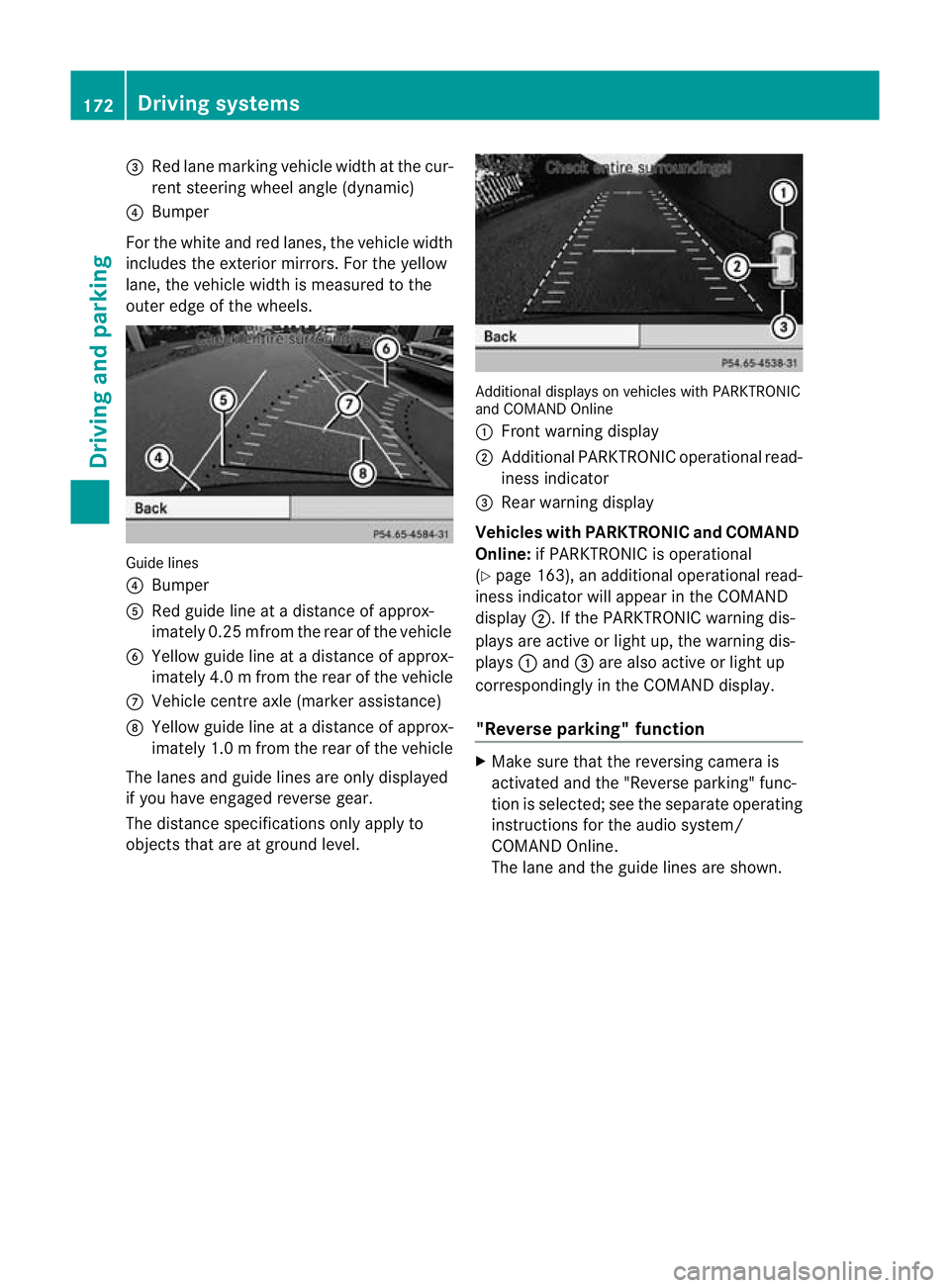
Red lane marking vehicle width at the cur-
ren tsteering wheel angle (dynamic)
? Bumper
For the white and red lanes, the vehicle width
includes the exterior mirrors. For the yellow
lane, the vehicle width is measured to the
outer edge of the wheels. Guide lines
? Bumper
A Red guide line at a distance of approx-
imately 0.25 mfrom the rear of the vehicle
B Yellow guide line at a distance of approx-
imately 4.0 mfrom the rear of the vehicle
C Vehicle centre axle (marker assistance)
D Yellow guide line at a distance of approx-
imately 1.0 mfrom the rear of the vehicle
The lanes and guide lines are only displayed
if you have engaged reverse gear.
The distance specifications only apply to
objects that are at ground level. Additional displays on vehicles with PARKTRONIC
and COMAND Online
:
Front warning display
; Additional PARKTRONIC operational read-
iness indicator
= Rearw arning display
Vehicles with PARKTRONIC and COMAND
Online: if PARKTRONIC is operational
(Y page 163), an additional operational read-
iness indicator will appear in the COMAND
display ;. If the PARKTRONIC warning dis-
plays are active or light up, the warning dis-
plays :and =are also active or light up
correspondingly in the COMAND display.
"Reverse parking" function X
Make sure that the reversing camera is
activated and the "Reverse parking" func-
tio nis selected; see the separate operating
instructions for the audio system/
COMAND Online.
The lane and the guide lines are shown. 172
Driving systemsDriving and parking
Page 177 of 329
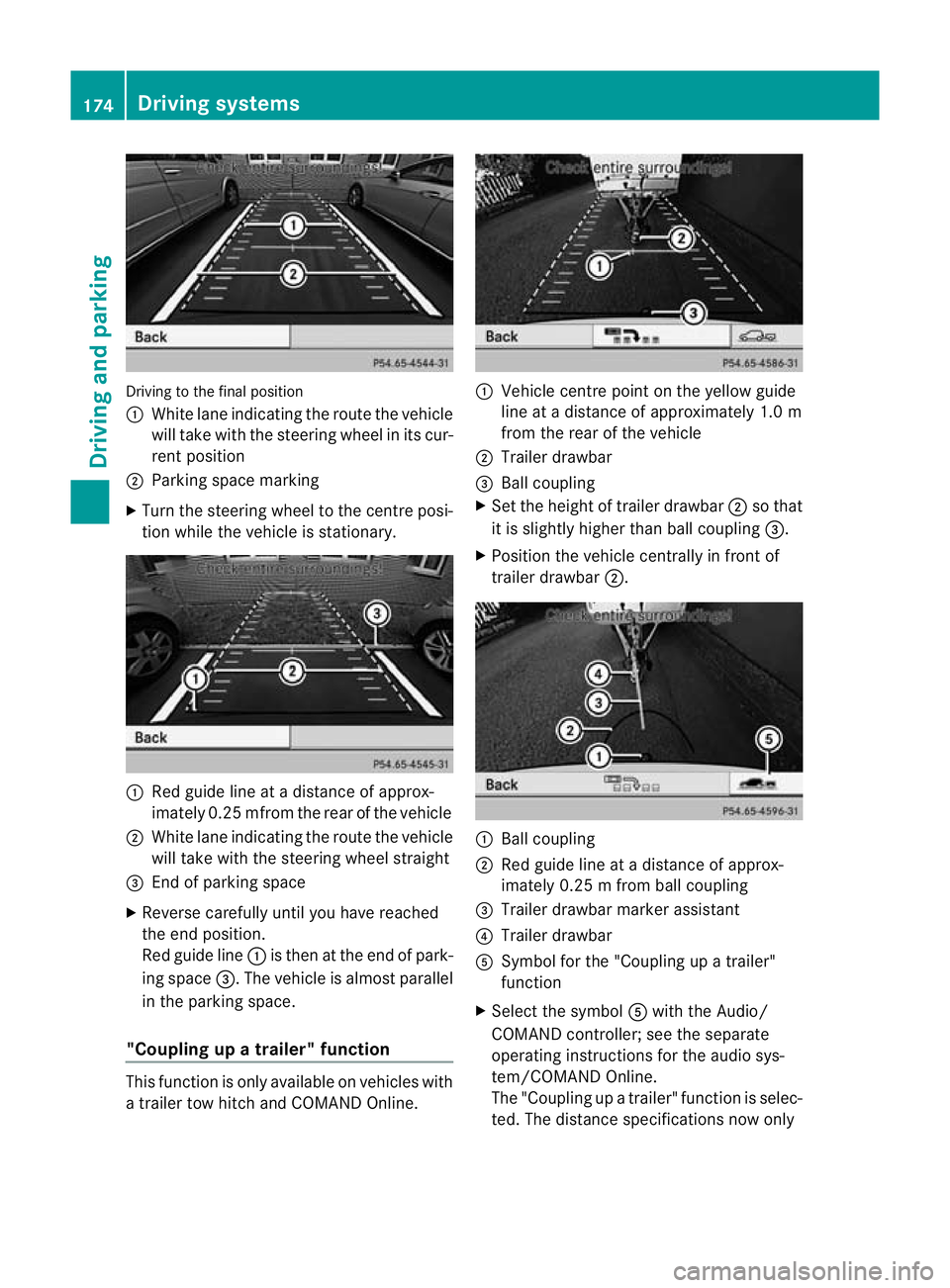
Driving to the final position
:
White lane indicating the route the vehicle
will take with the steering wheel in its cur-
rent position
; Parking space marking
X Turn the steering wheel to the centre posi-
tio nw hile the vehicle is stationary. :
Red guide line at a distance of approx-
imately 0.25 mfrom the rear of the vehicle
; White lane indicating the route the vehicle
will take with the steering wheel straight
= End of parking space
X Reverse carefully until you have reached
the end position.
Red guide line :is then at the end of park-
ing space =.The vehicle is almost parallel
in the parking space.
"Coupling up a trailer" function This function is only available on vehicles with
a trailer tow hitch and COMAND Online. :
Vehicle centre point on the yellow guide
line at a distance of approximately 1.0 m
from the rear of the vehicle
; Trailer drawbar
= Ball coupling
X Set the height of trailer drawbar ;so that
it is slightly higher than ball coupling =.
X Position the vehicle centrally in front of
trailer drawbar ;. :
Ball coupling
; Red guide line at a distance of approx-
imately 0.25 m from ball coupling
= Trailer drawbarm arker assistant
? Trailer drawbar
A Symbol for the "Coupling up a trailer"
function
X Select the symbol Awith the Audio/
COMAND controller; see th eseparate
operating instructions for the audio sys-
tem/COMAND Online.
The "Coupling up a trailer" function is selec-
ted. The distance specifications now only 174
Driving systemsDriving and parking