light MERCEDES-BENZ C-CLASS 2002 User Guide
[x] Cancel search | Manufacturer: MERCEDES-BENZ, Model Year: 2002, Model line: C-CLASS, Model: MERCEDES-BENZ C-CLASS 2002Pages: 399, PDF Size: 16.95 MB
Page 52 of 399
49
Seats
Te ch n i c a l
data
Instruments
and controls Operation
DrivingInstrument
cluster display Practical hints Car care Index
Power seat
(optional)
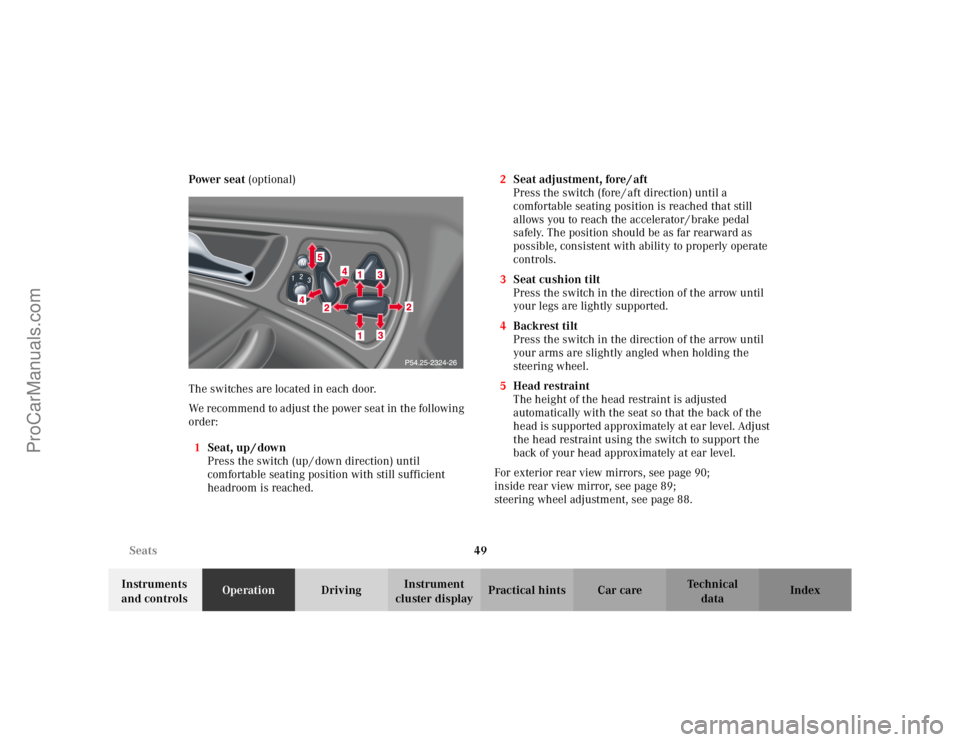
The switches are located in each door.
We recommend to adjust the power seat in the following
order: 1 Seat, up / down
Press the switch (up / down direction) until
comfortable seating position with still sufficient
headroom is reached. 2
Seat adjustment, fore / aft
Press the switch (fore / aft direction) until a
comfortable seating position is reached that still
allows you to reach the accelerator / brake pedal
safely. The position should be as far rearward as
possible, consistent with ability to properly operate
controls.
3 Seat cushion tilt
Press the switch in the direction of the arrow until
your legs are lightly supported.
4 Backrest tilt
Press the switch in the direction of the arrow until
your arms are slightly angled when holding the
steering wheel.
5 Head restraint
The height of the head restraint is adjusted
automatically with the seat so that the back of the
head is supported approximately at ear level. Adjust
the head restraint using the switch to support the
back of your head approximately at ear level.
For exterior rear view mirrors, see page 90;
inside rear view mirror, see page 89;
steering wheel adjustment, see page 88.
ProCarManuals.com
Page 54 of 399
51
Seats
Te ch n i c a l
data
Instruments
and controls Operation
DrivingInstrument
cluster display Practical hints Car care Index
Manual seat
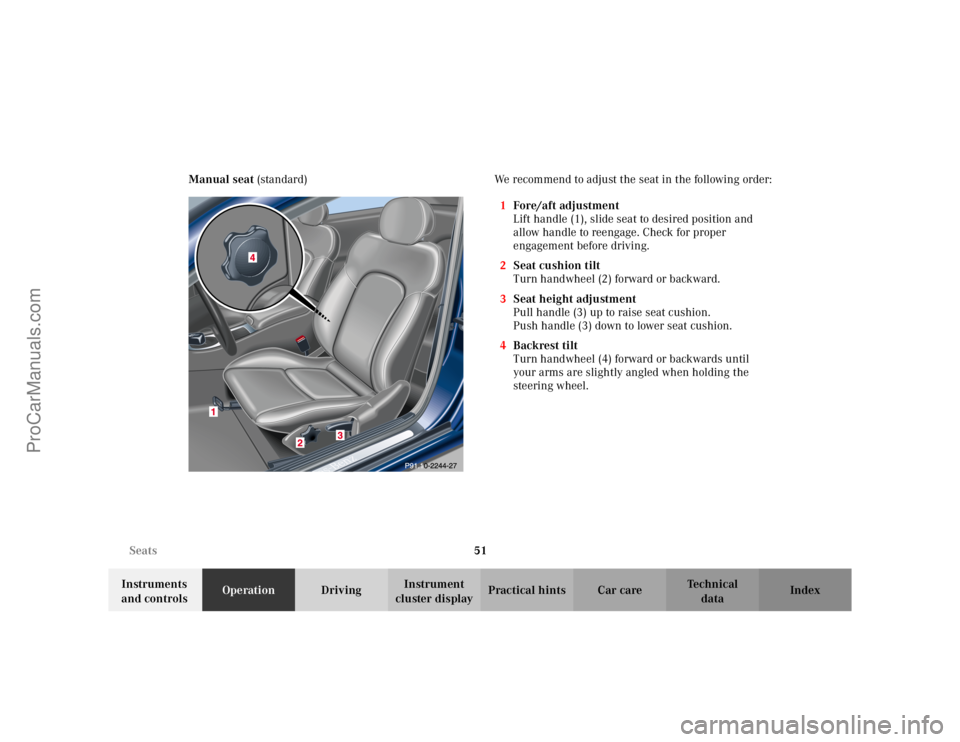
(standard) We recommend to adjust the seat in the following order:
1Fore/aft adjustment
Lift handle (1), slide seat to desired position and
allow handle to reengage. Check for proper
engagement before driving.
2 Seat cushion tilt
Turn handwheel (2) forward or backward.
3 Seat height adjustment
Pull handle (3) up to raise seat cushion.
Push handle (3) down to lower seat cushion.
4 Backrest tilt
Turn handwheel (4) forward or backwards until
your arms are slightly angled when holding the
steering wheel.
ProCarManuals.com
Page 61 of 399
58
Seats
Te ch n i c a l
data
Instruments
and controls Operation
DrivingInstrument
cluster display Practical hints Car care Index
Heated seats (optional)
The front seat heaters can be switched on with the
electronic key in starter switch position 1 or 2.
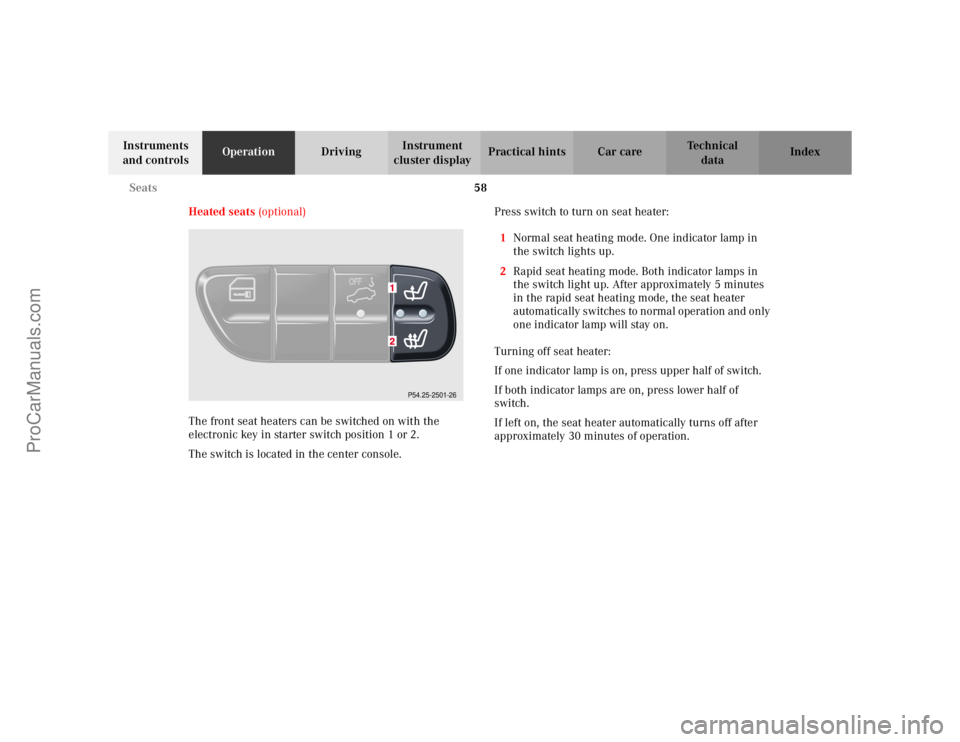
The switch is located in the center console. Press switch to turn on seat heater:
1 Normal seat heating mode. One indicator lamp in
the switch lights up.
2 Rapid seat heating mode. Both indicator lamps in
the switch light up. After approximately 5 minutes
in the rapid seat heating mode, the seat heater
automatically switches to normal operation and only
one indicator lamp will stay on.
Turning off seat heater:
If one indicator lamp is on, press upper half of switch.
If both indicator lamps are on, press lower half of
switch.
If left on, the seat heater automatically turns off after
approximately 30 minutes of operation.
P54.25-2501-26
ProCarManuals.com
Page 72 of 399
69
Restraint systems
Te ch n i c a l
data
Instruments
and controls Operation
DrivingInstrument
cluster display Practical hints Car care Index
BabySmart
TM airbag deactivation system
Special BabySmart
TM compatible child seats, designed
for use with the Mercedes-Benz system and available at
any authorized Mercedes-Benz Center are required for
use with the BabySmart
TM airbag deactivation system.
With the special child seat properly installed, the
passenger front airbag will not deploy.
The ü indicator lamp located in the center console
will be illuminated, except with electronic key removed
or in starter switch position 0. The system does not
deactivate the door mounted side impact airbag.
Self-test BabySmart
TM without special child seat
installed
After turning electronic key in starter switch to
position 1 or 2, the ü indicator lamp located in the
center console comes on for approximately 6 seconds
and then extinguishes.
If the indicator lamp should not come on or is
continuously lit, the system is not functioning. You must
see an authorized Mercedes-Benz Center before seating
any child on the front passenger seat. See page 289 for
notes on the ü indicator lamp.
BabySmart
TM is a trademark of Siemens Automotive Corp.
Wa r n i n g !
The BabySmart
TM airbag deactivation system will
ONLY work with a special child seat designed to
operate with it. It will not work with child seats
which are not BabySmart
TM compatible.
Never place anything between seat cushion and
child seat (e.g. pillow), since it reduces the
effectiveness of the deactivation system. The
bottom of the child seat must make full contact
with the passenger seat cushion. An incorrectly
mounted child seat could cause injuries to the
child in case of an accident instead of protecting
the child.Follow the manufacturer’s instructions for
installation of special child seats.The passenger front airbag will not deploy only if
the ü indicator lamp remains illuminated.Please be sure to check the indicator every time
you use the special system child seat. Should the
light go out while the restraint is installed, please
check installation. If the light remains out, do not
use the BabySmart
TM restraint to transport children
on the front passenger seat until the system has
been repaired.
ProCarManuals.com
Page 92 of 399
89
Rear view mirrors
Te ch n i c a l
data
Instruments
and controls Operation
DrivingInstrument
cluster display Practical hints Car care Index
Rear view mirrors
Inside rear view mirror
Manually adjust the mirror.
Inside rear view mirror, automatic antiglare
With the electronic key in starter switch position 2, the
mirror reflection brightness responds to changes in
light sensitivity.
With the gear selector lever in position “R”, or with the
interior light switched on, the mirror brightness does
not respond to changes in light sensitivity.
Note:
The automatic antiglare function does not react, if
incoming light is not aimed directly at sensors in the
mirror.
Wa r n i n g !
In the case of an accident liquid electrolyte may
escape the mirror housing when the mirror glass
breaks.Electrolyte has an irritating effect. Do not allow the
liquid come into contact with eyes, skin, clothing,
or respiratory system. In cases it does, immediately
flush affected area with water, and seek medical
help if necessary.
ProCarManuals.com
Page 95 of 399

92
Rear view mirrors
Te ch n i c a l
data
Instruments
and controls Operation
DrivingInstrument
cluster display Practical hints Car care Index
Driver’s side exterior rear view mirror,
antiglare mode
With the electronic key in starter switch position 2, the
mirror reflection brightness responds to changes in
light sensitivity.
With the gear selector lever in position “R”, or with the
interior light switched on, the mirror brightness does
not respond to changes in light sensitivity.
Note:
The automatic antiglare function does not react, if
incoming light is not aimed directly at sensors in the
inside rear view mirror. Important!
Electrolyte drops coming into contact with the vehicle
paint finish can only be completely removed while in
their liquid state, by applying plenty of water.
Wa r n i n g !
In the case of an accident liquid electrolyte may
escape the mirror housing when the mirror glass
breaks.Electrolyte has an irritating effect. Do not allow the
liquid come into contact with eyes, skin, clothing,
or respiratory system. In cases it does, immediately
flush affected area with water, and seek medical
help if necessary.
ProCarManuals.com
Page 102 of 399
99
Instrument cluster
Te ch n i c a l
data
Instruments
and controls Operation
DrivingInstrument
cluster display Practical hints Car care Index
Activating instrument cluster display
The instrument cluster is activated by:
• Opening the door
1.
• Pressing button (1) on the instrument cluster
1.
• Turning the electronic key in starter switch to
position 1 or 2.
• Switching on the exterior lamps.
Instrument cluster illumination
The instrument cluster illumination is dimmed or
brightened automatically to suit daylight lighting
conditions.
The instrument cluster illumination will also be
adjusted when the vehicle’s exterior lamps are switched
on.
1 The instrument cluster is activated for approximately 30 seconds.
Display illumination, changing basic settings for driving
at dusk or in darkness:
Rotate adjusting knob (1) clockwise – instrument lamp
intensity increases.
Rotate adjusting knob (1) counterclockwise –
instrument lamp intensity decreases.
Note:
It is not possible to select a basic brightness setting in
daylight – the intensity is adjusted automatically.
ProCarManuals.com
Page 124 of 399
121
Multifunction steering wheel, multifunction display
Te ch n i c a l
data
Instruments
and controls Operation
DrivingInstrument
cluster display Practical hints Car care Index
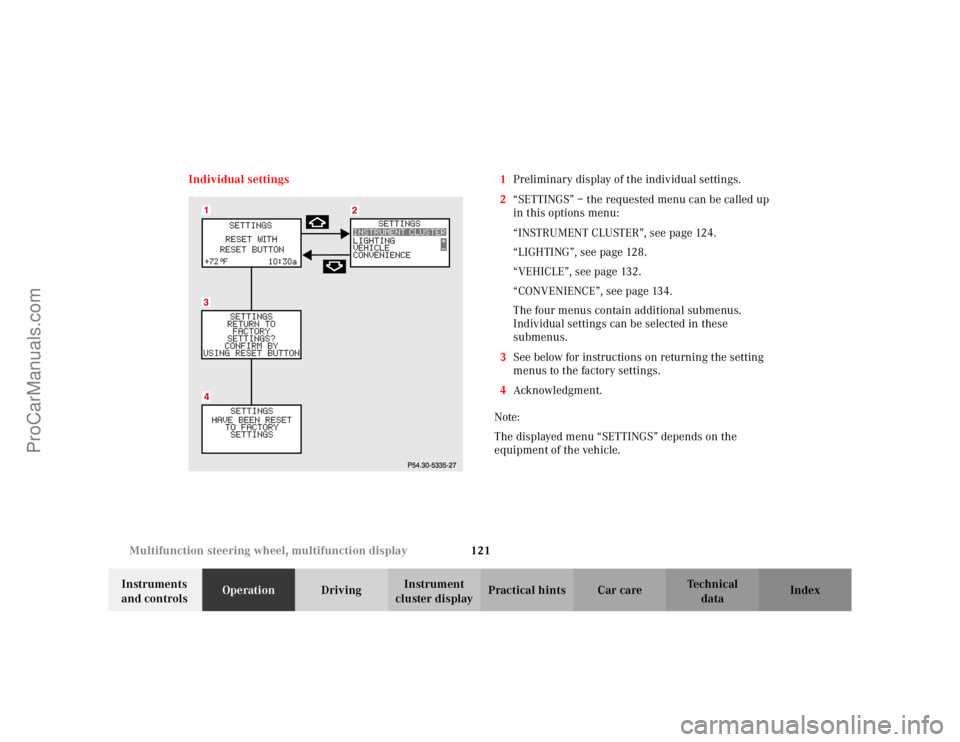
Individual settings 1
Preliminary display of the individual settings.
2 “SETTINGS” – the requested menu can be called up
in this options menu:
“INSTRUMENT CLUSTER”, see page 124.
“LIGHTING”, see page 128.
“VEHICLE”, see page 132.
“CONVENIENCE”, see page 134.
The four menus contain additional submenus.
Individual settings can be selected in these
submenus.
3 See below for instructions on returning the setting
menus to the factory settings.
4 Acknowledgment.
Note:
The displayed menu “SETTINGS” depends on the
equipment of the vehicle.
ProCarManuals.com
Page 125 of 399
122
Multifunction steering wheel, multifunction display
Te ch n i c a l
data
Instruments
and controls Operation
DrivingInstrument
cluster display Practical hints Car care Index
Press the è or ÿ button repeatedly until the
individual setting preliminary display (1) appears.
Press the j or k button until the setting menu
“SETTINGS” (2) is displayed.
Pressing the æ or ç button controls the selection
marker in the setting menu.
“INSTRUMENT CLUSTER”, see page 124.
“LIGHTING”, see page 128.
“VEHICLE”, see page 132.
“CONVENIENCE”, see page 134
Pressing the è or ÿ button displays the next or
previous system. Note:
These settings may only be performed with the
electronic key in starter switch position 1 or 2.
ProCarManuals.com
Page 126 of 399

123
Multifunction steering wheel, multifunction display
Te ch n i c a l
data
Instruments
and controls Operation
DrivingInstrument
cluster display Practical hints Car care Index
To return menu “SETTINGS” (2) to its factory
setting:
• Call up the individual setting preliminary
display (1) or display (2).
• Press the reset knob on the instrument cluster
(see page 96) for approximately 3 seconds.
Display (3) will appear.
• Press the reset knob on the instrument cluster once
more. The menu “SETTINGS” is reset to factory
settings, acknowledged by display (4).
The individual setting preliminary display (1) will
appear if you do not press the reset knob on the
instrument cluster within about 5 seconds. The
setting menus will not be reset. Note:
For safety reasons, the individual setting “LIGHT
CIRCUIT HEADLAMP MODE” in menu “LIGHTING”
cannot be reset while driving, see page 131. If an
attempt is made, the message “LIGHTING” – “CANNOT
BE COMPLETELY RESET TO FACTORY SETTINGS
WHILE DRIVING” will be displayed.
ProCarManuals.com