light MERCEDES-BENZ C-CLASS 2002 Owner's Manual
[x] Cancel search | Manufacturer: MERCEDES-BENZ, Model Year: 2002, Model line: C-CLASS, Model: MERCEDES-BENZ C-CLASS 2002Pages: 399, PDF Size: 16.95 MB
Page 131 of 399
128
Multifunction steering wheel, multifunction display
Te ch n i c a l
data
Instruments
and controls Operation
DrivingInstrument
cluster display Practical hints Car care Index
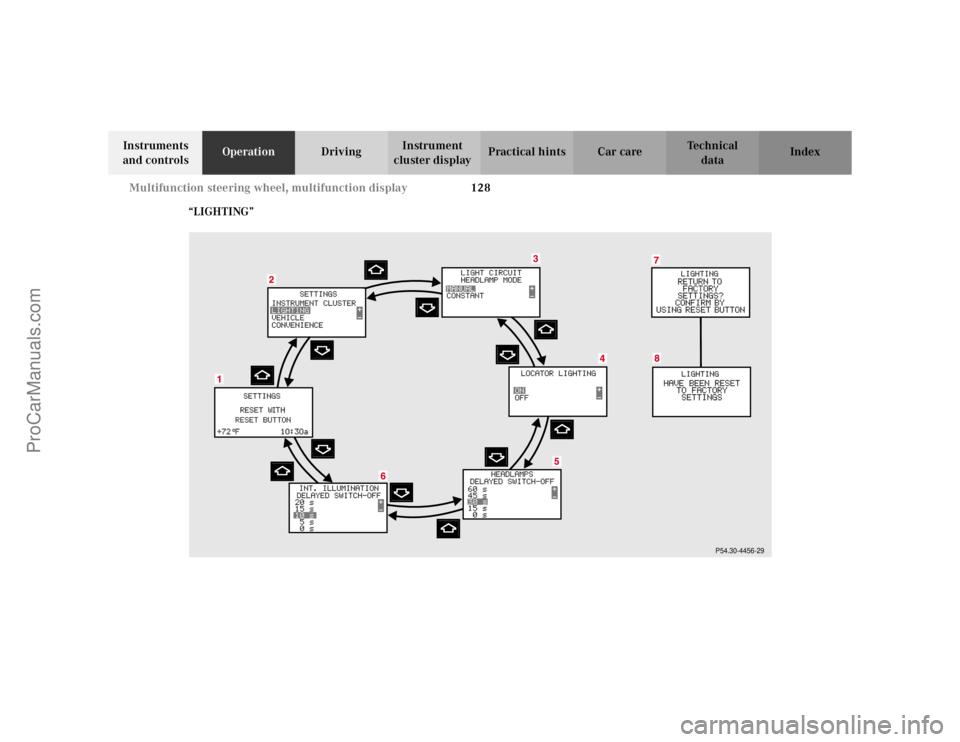
“LIGHTING”
P54.30-4456-29
ProCarManuals.com
Page 132 of 399
129
Multifunction steering wheel, multifunction display
Te ch n i c a l
data
Instruments
and controls Operation
DrivingInstrument
cluster display Practical hints Car care Index
1
Preliminary display of the individual settings
2 “SETTINGS” – in this options menu you can call up
the individual setting menu “LIGHTING”.
Pressing button æ orç on the multifunction
steering wheel controls the selection marker.
3 “LIGHT CIRCUIT HEADLAMP MODE”
1,2,
seepage144.
4 “LOCATOR LIGHTING”, see page 147. 5
“HEADLAMPS DELAYED SWITCH-OFF”, see “Night
security illumination” on page 146.
6 “INT. ILLUMINATION DELAYED SWITCH-OFF”, see
“Interior lighting” on page 203.
7 Returning the individual setting menu “LIGHTING”
to the factory setting.
8 Acknowledgment.
1Except Canada
2 For safety reasons, setting only possible while vehicle is standing
still.
ProCarManuals.com
Page 133 of 399
130
Multifunction steering wheel, multifunction display
Te ch n i c a l
data
Instruments
and controls Operation
DrivingInstrument
cluster display Practical hints Car care Index
Press the è or ÿ button repeatedly until the
individual setting menu preliminary display (1)
appears.
Press the j or k button until the individual
setting menu “SETTINGS” (2) is displayed.
Press button æ orç until the menu “LIGHTING”
is selected by the selection marker. Press the
j or k button until the required
display (3 to 6) is displayed. Pressing the æ orç
button controls the selection marker. The settings made
are stored and applied immediately.
The individual setting preliminary display (1) will
appear again after you have run through all the setting
menus. Pressing the è or ÿ button displays the
next or previous system.
ProCarManuals.com
Page 134 of 399

131
Multifunction steering wheel, multifunction display
Te ch n i c a l
data
Instruments
and controls Operation
DrivingInstrument
cluster display Practical hints Car care Index
To return menu “LIGHTING” (3 to 6) to its factory
setting:
• Call up menu (3 to 6).
• Press the reset knob on the instrument cluster (see
page 96) in the instrument cluster for approximately
3 seconds. Display (7) will appear.
• Press the reset knob on the instrument cluster once
more. The individual setting menu “LIGHTING” is
reset to factory settings, acknowledged by
display (8).
The individual setting display “SETTINGS” (2) will
appear if you do not press the reset knob on the
instrument cluster within about 5 seconds. The
setting menus will not be reset. Note:
For safety reasons, the individual setting “LIGHT
CIRCUIT HEADLAMP MODE” in menu “LIGHTING”
cannot be reset while driving. If an attempt is made, the
message “LIGHTING” – “CANNOT BE COMPLETELY
RESET TO FACTORY SETTINGS WHILE DRIVING” will
be displayed.
ProCarManuals.com
Page 147 of 399

144
Exterior lamp switch
Te ch n i c a l
data
Instruments
and controls Operation
DrivingInstrument
cluster display Practical hints Car care Index
Headlamp mode
Manual headlamp mode
The low beam headlamps and parking lamps can be
switched on and off with the exterior lamp switch. For
exterior lamp switch, see above.
Note:
With the daytime running lamp mode activated and the
engine running, the low beam headlamps cannot be
switched off manually. Automatic headlamp mode
Turn exterior lamp switch to position
U.
• Electronic key in starter switch position 1:
The parking lamps switch on and off automatically
depending on the brightness of the ambient light.
• Electronic key in starter switch position 2 and the
engine running:
The low beam headlamps and parking lamps are
switched on and off automatically depending on the
brightness of the ambient light.
The low beam headlamps and parking lamps can
still be switched on and off manually using the
exterior lamp switch.
Note:
With the daytime running lamp mode activated, the low
beam headlamps cannot be switched off manually.
The headlamps will not be automatically switched on
under foggy conditions.
Front fog lamps and rear fog lamp cannot be switched
on manually with exterior lamp switch in position U.
To activate the fog lamps turn exterior switch to
position B.
Wa r n i n g !
The driver is responsible for the operation of the
vehicle’s lights at all times. The automatic
headlamp feature is only an aid to the driver.
Switch on the vehicle lights by hand when driving
or traffic conditions require you to do so.
ProCarManuals.com
Page 148 of 399
145
Exterior lamp switch
Te ch n i c a l
data
Instruments
and controls Operation
DrivingInstrument
cluster display Practical hints Car care Index
Daytime running lamp mode
Turn exterior lamp switch to position
M orU .
When the engine is running, the low beam headlamps
are automatically switched on. In low ambient light
conditions the parking lamps will also switch on. • Canada only:
When shifting from a driving position to
position “N” or “P”, the low beam switches off
(3 minutes delay).
For nighttime driving the exterior lamp switch
should be turned to position B to permit
activation of the high beam headlamps. •
USA only:
The high beam headlamps can also be activated
when driving with the daytime running lamp mode
activated and exterior lamp switch in position M.
To activate the daytime running lamp mode, see the
individual setting menu “LIGHTING” – “LIGHT
CIRCUIT HEADLAMP MODE” on page 128.
Note:
See page 143 for notes on the exterior lamp switch.
ProCarManuals.com
Page 149 of 399

146
Exterior lamp switch
Te ch n i c a l
data
Instruments
and controls Operation
DrivingInstrument
cluster display Practical hints Car care Index
Night security illumination
At low ambient light conditions and with the engine
having been switched off, the exterior lamps (fog lamps
and parking lamps) switch on for added illumination,
(except in daytime running mode). After the last door
has been closed the lamp-on time period commences.
See the individual setting menu “LIGHTING” –
“HEADLAMPS DELAYED SWITCH–OFF” on page 128,
for instructions on how to activate the function.
The lamp-on time period for night security illumination
can be set at several different timed levels from 0 (off) to
60 seconds, see the individual setting menu
“LIGHTING” – “HEADLAMPS DELAYED SWITCH–OFF”
on page 128. Notes:
Within 10 minutes after closing the last door the night
security illumination can be reactivated by opening a
door.
If after switching the engine off, no doors are opened or
if after opening the doors they are not closed, the night
security illumination will switch off automatically
after 60 seconds.
Deactivating night security illumination temporarily:
Turn the electronic key in starter switch to position 0
then to position 2 and back to position 0 again before
getting out of the vehicle. The night security
illumination will not be activated when the door is
opened.
ProCarManuals.com
Page 150 of 399
147
Exterior lamp switch
Te ch n i c a l
data
Instruments
and controls Operation
DrivingInstrument
cluster display Practical hints Car care Index
Locator lighting
After unlocking the vehicle with the electronic key
during darkness the fog lamps and parking lamps
switch on for approximately 40 seconds.
The exterior lamps will be switched off when opening
the driver’s door.
See the individual setting menu “LIGHTING” –
“LOCATOR LIGHTING” on page 128, for instructions on
how to activate the function.
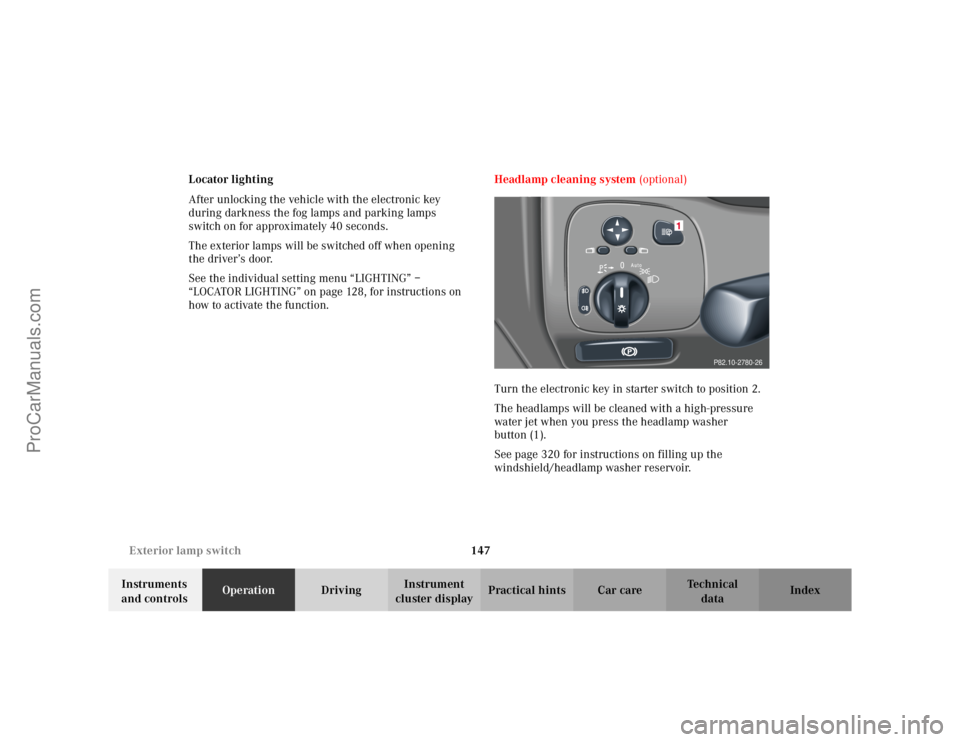
Headlamp cleaning system
(optional)
Turn the electronic key in starter switch to position 2.
The headlamps will be cleaned with a high-pressure
water jet when you press the headlamp washer
button (1).
See page 320 for instructions on filling up the
windshield/headlamp washer reservoir.
P82.10-2780-26
ProCarManuals.com
Page 158 of 399

155
Climate control
Te ch n i c a l
data
Instruments
and controls Operation
DrivingInstrument
cluster display Practical hints Car care Index
Climate control
The system is always at operational readiness, except
when manually switched off.
The climate control only operates with the engine
running.
The temperature selector should be left at the desired
temperature setting. The temperature selected is
reached as quickly as possible.
The system will not heat or cool any quicker by setting a
higher or lower temperature.
The desired interior temperature can be selected
separately for the left and right side of the passenger
compartment. Adjust the temperature settings in small
increments.
The climate control removes considerable moisture from
the air during operation in the cooling mode. It is
normal for water to drip on the ground through ducts in
the underbody.
The air conditioning will not engage (no cooling) if the
economy mode S
is selected, see page 159. Notes:
Do not obstruct the air flow by placing objects on the air
flow-through exhaust slots below the rear window.
Also keep the air intake grill in front of the windshield
free of snow and debris.
The storage compartment between the front seats can be
ventilated. See page 171 for notes on ventilating the
storage space under the armrest in the center console.
The air conditioner switches itself off for its own
protection if refrigerant is lost. No cooling will then take
place. Economy mode
S cannot be switched off. Have
the air conditioner checked by a Mercedes-Benz Center
should this happen.
If the vehicle interior has been heated by direct sunlight
and is very hot, ventilate the interior (open door or
windows for a short period) before driving off.
Dust filter
Nearly all dust particles and pollen are filtered out
before outside air enters the passenger compartment
through the air distribution system.
ProCarManuals.com
Page 167 of 399
164
Automatic climate control
Te ch n i c a l
data
Instruments
and controls Operation
DrivingInstrument
cluster display Practical hints Car care Index
Notes:
Do not obstruct the air flow by placing objects on the air
flow-through exhaust slots below the rear window.
Also keep the air intake grill in front of the windshield
free of snow and debris.
The storage compartment between the front seats can be
ventilated. See page 171 for notes on ventilating the
storage space under the armrest in the center console.
The air conditioner switches itself off for its own
protection if refrigerant is lost. No cooling will then take
place. Economy mode S cannot be switched off. Have
the air conditioner checked by a Mercedes-Benz Center
should this happen.
If the vehicle interior has been heated by direct sunlight
and is very hot, ventilate the interior (open door or
windows for a short period) before driving off.
Dust filter
Nearly all dust particles and pollen are filtered out
before outside air enters the passenger compartment
through the air distribution system. Basic setting – automatic mode
In the automatic mode the automatic climate control
cools or heats the interior depending on the direction
and strength of the sunlight, outside temperature and
the selected interior temperature of the vehicle. With
the automatic mode switched off, the air volume and
distribution can still be set manually.
Briefly press left or right
U button. The h, j
and k symbols will no longer be visible.
The economy mode and air recirculation functions will
be switched off. The automatic blower will be activated
at the same time.
We recommend to set the temperature switches on the
left and right to 72
°F (22
°C). Please make changes from
this setting to suit your personal requirements.
Heating mode:
To lower headroom temperature, use thumbwheel
(4, page 160).
Air conditioning mode:
Open air outlets at dashboard top center (7, page 160)
for an even air distribution.
ProCarManuals.com