eco MERCEDES-BENZ C-Class 2012 W204 Comand Manual
[x] Cancel search | Manufacturer: MERCEDES-BENZ, Model Year: 2012, Model line: C-Class, Model: MERCEDES-BENZ C-Class 2012 W204Pages: 234, PDF Size: 6.74 MB
Page 20 of 234
Funct
ion Pag
e F
Numb
erpad •
Sel ect sst atio nsvia the
st atio npresets 146
•
Stores stations manually 146
•
Mobi lephone
au thorizatio n 117
•
Tele phone number entry 121
•
Sends DTMFtones 124
•
Cha racter entry 28
•
Selects aloca tion forthe
wea ther forecast fromthe
memory 199
z
Displaysthe current
track being played 162
g
Selects stations by
entering thefrequ ency
manua lly 146
g
Selects atrack 160
G
Switches
COMAND on/off 33
Adjusts
thevolu me 33 Func
tion Page
H
SD
memory cardslot 157
I
Ca
lls up the system menu 27
J
Accepts
acall 121
Dial
sa number 121
Red
ials 122
Accepts
awa iting call 123
K
Mute 33
Switches
thehands-free
micropho neon/off 123
Ca
ncels thetext messa ge
read -alou dfunction 133
Switches
offnaviga tion
announcements 33
L
Rejects
acall 121
Ends
anactive call 123
Rejects
awa iting call 123
COMA
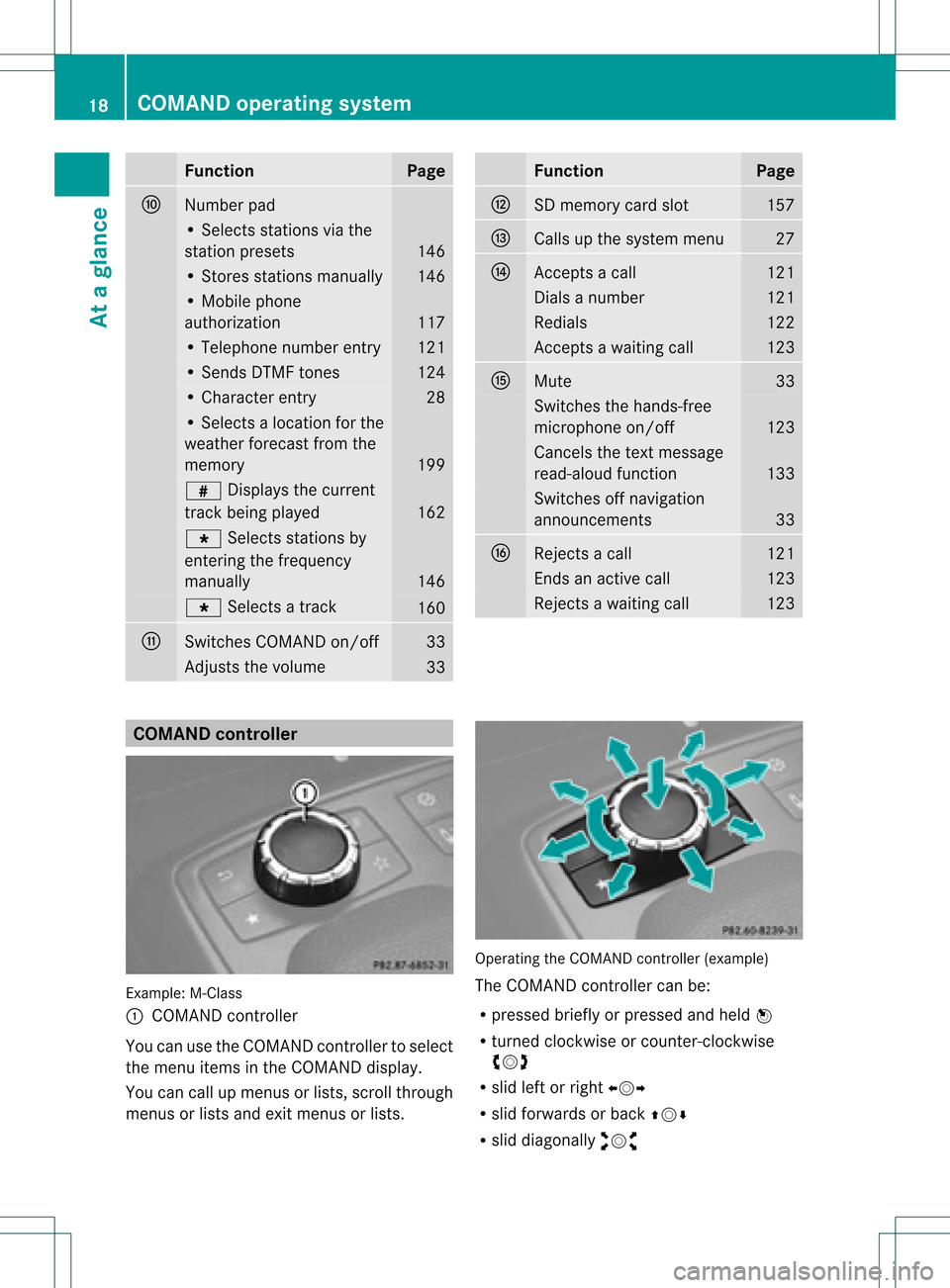
NDcontrolle r Example
:M-Class
: COMAND controller
Yo ucan usethe COMAND control lert oselect
the menu itemsinthe COMAND display.
You cancallupmenus orlists, scroll through
menus orlists andexitmenus orlists. Operating
theCOMAND controller (example)
The COMAND controller canbe:
R pressed brieflyorpressed andheld W
R turned clockwiseorcount er-clockwise
cVd
R slid leftorright XVY
R slid forwards orback ZVÆ
R slid diagonally aVb 18
COMAND
operatingsystemAtaglance
Page 21 of 234
In
the instructions, operatingsequ ences are
describe das follo ws:
X Press the$ button.
Ra dio mode isactivated.
X Select Radio by
slid ing VÆ andturning
cVd theCOMAND controller andpress
W toconfirm.
X Confirm Station List by
pressi ngW.
The station listapp ears. Butt
onsonthe COMA NDcontroller
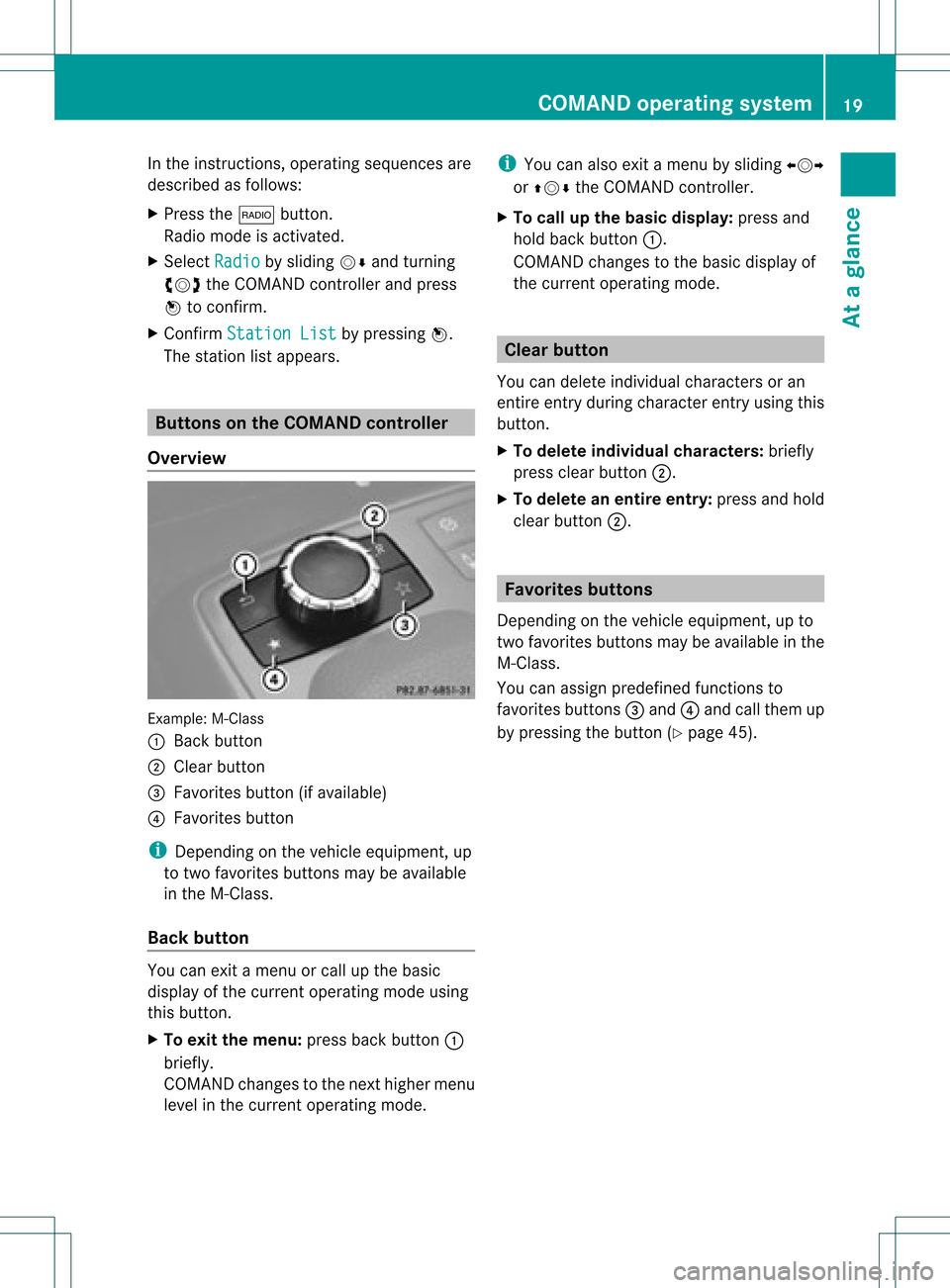
Overvie w Example:
M-Class
: Back button
; Clearbutton
= Favorites button(ifavai lable)
? Favorites button
i Depending onthe vehicle equipment, up
to two favorites buttonsmaybeavai lable
in the M-Cla ss.
Back button You
canexit amenu orcall upthe basi c
disp layofthe current operatingmode using
this button.
X To exit themenu: pressbackbutton :
briefl y.
COMAND changestothe next highe rmenu
level inthe curren toperatin gmode. i
You canalso exitamenu bysliding XVY
or ZVÆ theCOMAND controller.
X To call upthe basic displa y:press and
hold back button:.
COMAND changestothe basic display of
the curren toperatin gmode. Clear
button
You candelete individual charactersoran
ent ireent ryduring characterentryusing this
butt on.
X To delete individu alchar acter s:briefly
press clearbutton;.
X To delete anentir eentr y:press andhold
clear button;. Favorit
esbutt ons
Depen dingonthe vehicle equipment ,up to
two favorit esbutt ons may beavailable inthe
M-Class.
You canassign predefin edfunc tionsto
favorit esbutt ons =and ?and callthem up
by pressin gthe butt on(Ypage 45). COMAND
operatingsystem
19Ataglance
Page 24 of 234
Settings Time Consumption Display
off Rear
viewcamera Act
ivating/deact ivating
Bluetooth ® Resetting
COMAND
i Delete yourpersonal data
using thisfunct ion,for
example beforesellingyour
vehicle. If
equipped withtherear view camera: ifthe funct ionisactivated andCOMAND is
switched on,the image fromtherear view camera isautomatically showninthe COMAND
display whenreverse gearisengaged. Cleaning
instructions
! Donot touch theCOMAND display.The
displa yhas avery sensitive high-gloss
surface; thereisarisk ofscratc hing.Ifyou
have toclean thescreen, however, usea
mild cleaning agentandasoft, lint-free
cloth.
The displa ymust beswitched offand cooled
down before youstart cleaning. Cleanthe
displa yscreen, whennecessary, witha
commerc iallyavaila blemicrofiber clothand
cleaning agentforTFT/LCD displays.Donot
apply pressure tothe displa ysurface when
cleaning it,as this could cause irreversible
damage. Then,drythe surface withadry
microfiber cloth.
Avoid usingalcoholic thinners,gasoline or
abrasive cleaningagents.Thesecould
damage thedispla ysurface. Multifunction
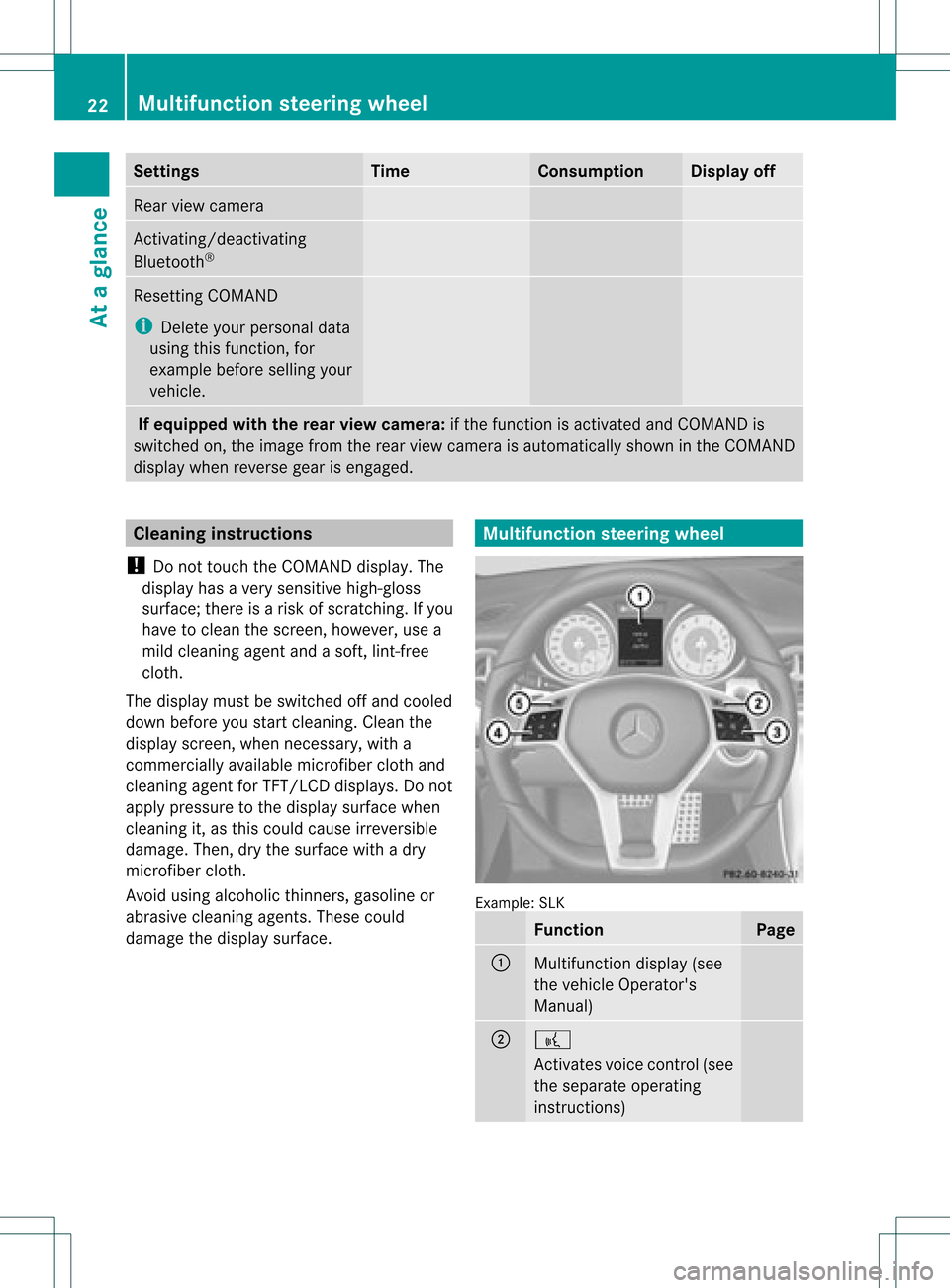
steeringwheel Example:
SLK Function Page
:
Multifunction
display(see
the vehicle Operator's
Manual) ;
?
Act
ivates voicecontrol(see
the separate operating
instruct ions) 22
Multifunction
steeringwheelAtaglance
Page 25 of 234
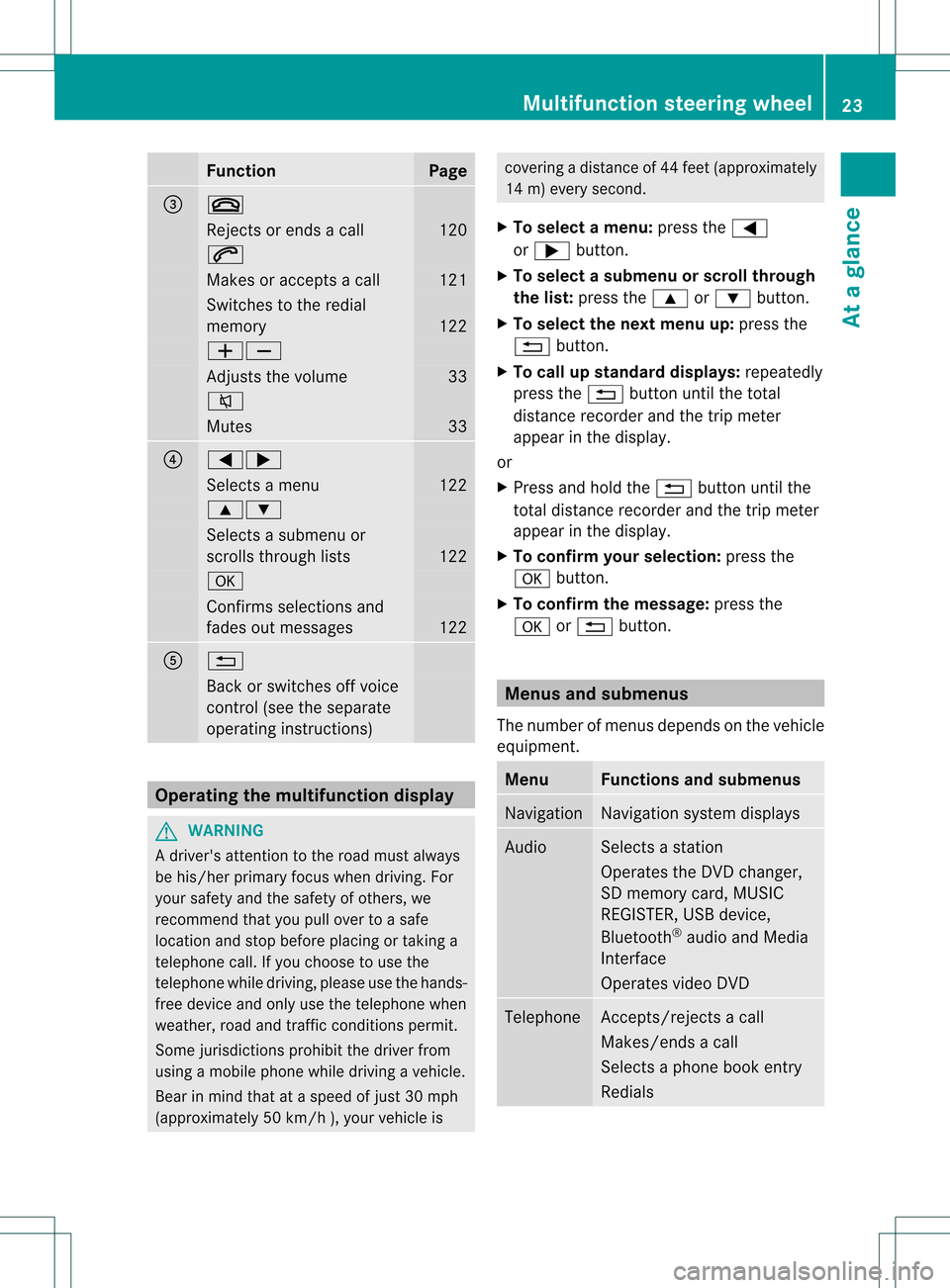
Funct
ion Pag
e =
~
Rej
ectsor ends acall 12
0 6
Mak
esoracc eptsa call 12
1 Swit
ches tothered ial
mem ory 12
2 WX
Ad
jus tsthevolum e 33
8
Mut
es 33
?
=;
Sel
ect sa men u 12
2 9:
Sel
ect sa subm enuor
sc roll sth roug hlist s 12
2 a
Con
firms sele ction sand
fade sout mes sages 12
2 A
%
Bac
kor swit ches off voic e
co ntrol (see thesepar ate
oper atingins truct ions) Ope
ratin gth emu ltifu nct ion displa y G
WAR
NING
A driv er'satt entio nto theroad must always
be his/ herprim aryfocuswhen driving.For
your safety andthesafety ofothers, we
recommen dthat youpull over toasafe
location andstop before placing ortaking a
telephone call.Ifyou choose touse the
telephone whiledriving, pleaseusethehands-
free device andonly usethetelephone when
weather, roadandtraffic conditionspermit.
Some jurisdiction sprohibit thedriver from
using amobile phonewhiledriving avehicle.
Bear inmind thatataspeed ofjust 30mph
(approximately 50km/ h),your vehic leis cove
ringadistan ceof44 feet (approxim ately
14 m)every second.
X To select amenu: pressth e=
or ; button.
X To select asubm enuorscrol lth rou gh
th elist :pres sth e9 or: button.
X To select thenext menu up:pres sth e
% button.
X To call upsta nda rddisp lays:repeat edly
pres sth e% buttonunt ilth eto tal
dist ancerec orde rand thetrip met er
appear inthedisplay.
or
X Pres sand hold the% buttonunt ilth e
to tal dist ancerec orde rand thetrip met er
appear inthedisplay.
X To confir myour selecti on:pres sth e
a button.
X To confir mthemessag e:press the
a or% button. Menus
andsubmen us
The numbe rofm enus depends onthe vehicle
equipment. Menu Functions
andsubmenu s Navigation Navigation
systemdisplays Audio Select
sa stat ion
Operates theDVD changer ,
SD memory card,MUSIC
REGISTE R,USB device,
Bluetoot h®
audio andMedia
Int erface
Operates videoDVD Telephone Ac
cept s/rej ectsa call
Makes/ endsacall
Select sa phone bookentry
Redials Mult
ifunction steeringwheel
23Ataglance Z
Page 26 of 234
Navi
gationsyste mm enu
Rou teguid ance inactive The
display showstheroad onwhic hth e
veh icle iscur ren tlytravelin g,prov ided the
digit almap contain sit.
Rou teguid ance active The
display shows:
R thedist anceto thedest ination
R thedist anceto thenex tchange ofdirection
R current street
R the travel direction arrow
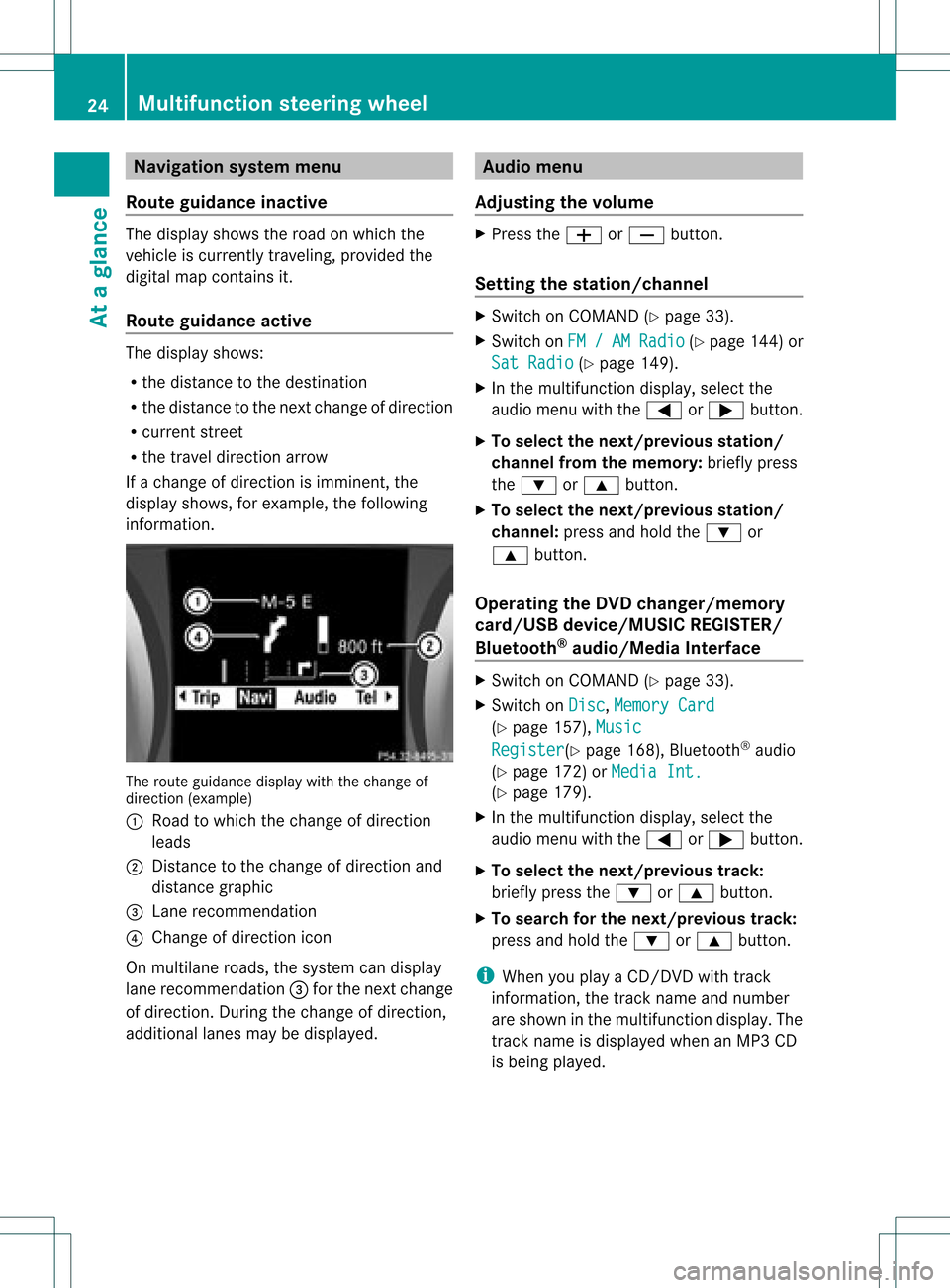
If achange ofdirection isimminent ,the
displa yshows, forexample, thefollowing
information . The
route guidance displaywiththechange of
direction (example)
: Road towhich thechange ofdirection
leads
; Distanc eto the change ofdirection and
distance graphic
= Lane recommen dation
? Change ofdirection icon
On multilane roads,thesystem candispla y
lane recommen dation=for the next change
of direction. Duringthechange ofdirection,
additional lanesmaybedispla yed. Audio
menu
Adjust ingthe volume X
Press theW orX button.
Setting thestat ion/c hannel X
Switch onCOMAND (Ypage 33).
X Switch onFM / AM Radio (Y
page 144)or
Sat Radio (Y
page 149).
X In the multifunction display,select the
audi omenu withthe= or; button.
X To selec tthe nex t/previo usstation /
chann elfrom thememory: brieflypress
the : or9 button.
X To selectthe nex t/previo usstation /
chann el:press andhold the: or
9 button.
Operating theDVD chang er/memo ry
card/US Bdevice/MU SICREG ISTER /
Blu etoot h®
au dio/M ediaInterface X
Swit chon COMA ND(Ypage 33).
X Swit chon Dis c ,
Mem ory Card (Y
page 157), Mus ic Reg
ister (Y
page 168), Bluet ooth®
audio
(Y page 172)or Med iaInt. (Y
page 179).
X In themult ifunction display, selectthe
audi omenu withthe= or; button.
X To selec tthe nex t/previo ustrack:
brie flypress the: or9 button.
X To searc hfor the next/previo ustrack:
press andhold the: or9 button.
i When youplaya CD/DVD withtrack
informa tion,thetrack name andnumbe r
are show nint he multifunction display.The
track name isdispla yedwhen anMP3 CD
is being played. 24
Multifunction
steeringwheelAtaglance
Page 27 of 234
Opera
tingvideo DVD X
Switc hon COMAND (Ypage 33).
X Switc hon DVD-Vid eo (Y
page 187).
X In the multifunc tiondisplay, selectthe
audio menu withthe= or; button .
X To select thenext/pr eviousscene:
briefly pressthe: or9 button . Telephone
menu G
WARN
ING
A driver's attentiontothe road must alway s
be his/her primary focuswhendriving. For
your safety andthesafety ofother s,we
recom mendthatyoupull over toasafe
location andstop before placing ortakin ga
telephon ecall. Ifyou choose touse themobile
phone whiledriving, pleaseusethehandsfr ee
device andonly usethemobile phonewhen
weather, road,andtrafficcon ditions permit.
Some jurisdict ionsprohibit thedriver from
using acellular mobilephonewhiledriving a
vehicle.
Bear inmind thatataspeed ofjust 30mph
(approximat ely50km/ h),your vehicle is
cover ingadistanc eof 44 feet (approximat ely
14 m)every second.
Opera tingthetelephone X
Switc hon COMAND (Ypage 33).
X Call upthe telephon ebasic menu
(Y page 119).
If the telephon ehas notyetbeen authorized,
the Bluetoo thReady message
appearsin
the multifunc tiondisplay.
If the telephon eis switched onand
authorized, thePhone Ready message
appears inthe multifunc tiondisplay.
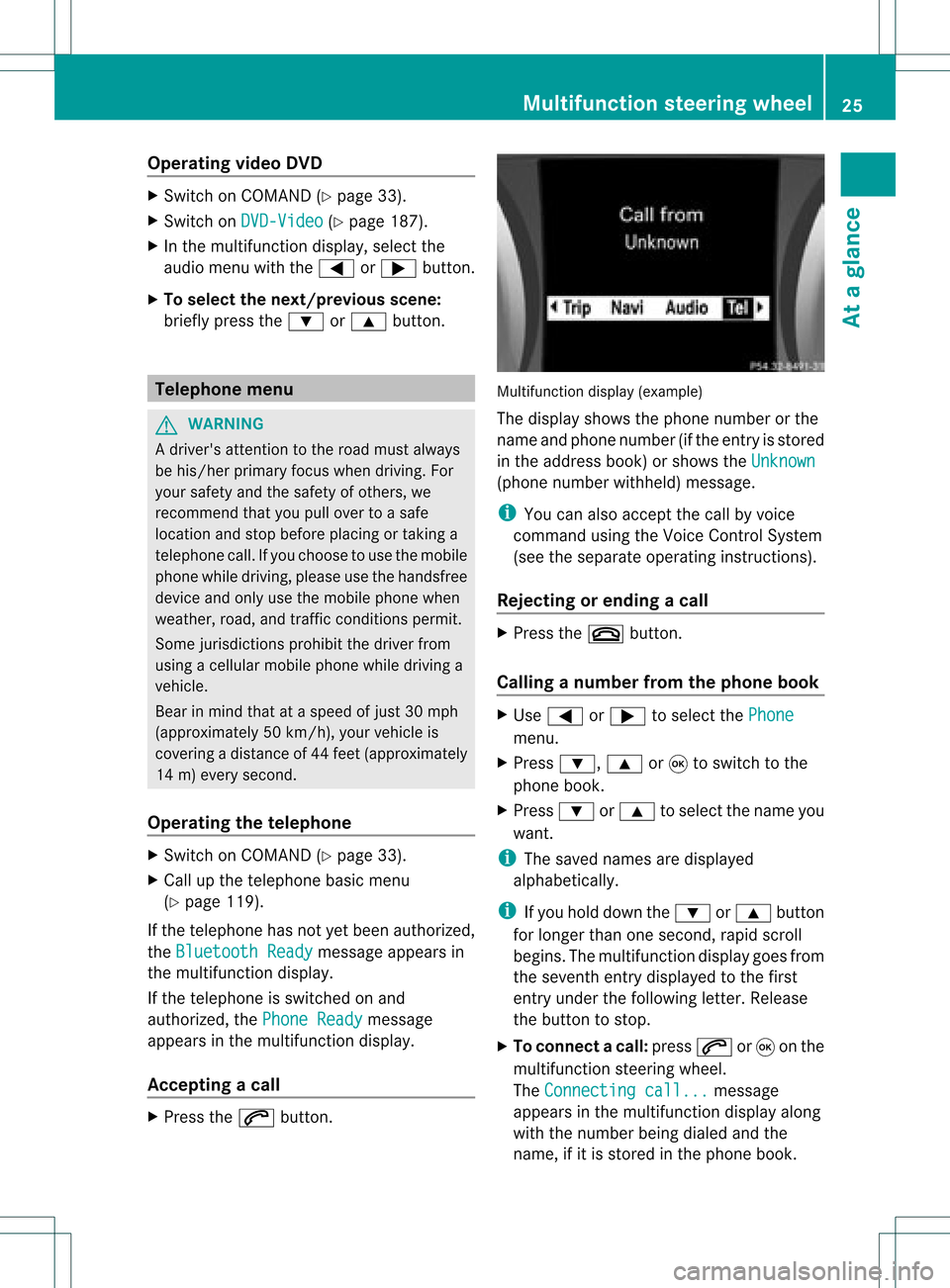
Acce pting acall X
Press the6 button. Mul
tifunctio ndisplay (example)
The display showsthephon enumbe rorthe
name andphone number (ifthe entr yis stored
in the address book)orshows theUnknown (phone
number withheld) message.
i You canalso accept thecall byvoice
command usingtheVoice Control System
(see theseparate operating instructions).
Rejecting orending acall X
Press the~ button.
Cal linganumbe rfrom thephone book X
Use = or; tosel ect the Phone menu.
X Press :, 9or9 toswi tch tothe
phone book.
X Press :or9 tosel ect the name you
wa nt.
i The save dnames aredispla yed
al pha betica lly.
i Ifyou holddow nthe : or9 button
for longer thanonesecond, rapidscroll
begins. Themultifunction displaygoes from
the seventh entrydispla yedtothe first
entr yunder thefollowing letter.Release
the button tostop.
X To conne ctac all: press 6or9 onthe
mul tifunctio nstee ring wheel.
Th eCon nectingcal l... mes
sage
ap pe arsin the multifu nctio ndisplay along
with thenumb erbeing dialed andthe
name ,if it is stored inthe phon ebook . Mult
ifunction steeringwheel
25Ataglance Z
Page 28 of 234
The
number dialedisstored inthe
correspon dingcalllist.
i Ifthere areseveral numbers forthis
name, youseealist ofsub-ent ries.
X Press :or9 toselect the
phone number youwant.
X Press the6 or9 button againto
place thecall.
Redialing COMAND
savesthelast phone numbers or
names dialed.
X Press the=; buttonsto select the
Phone menu.
X Press the; button toopen thelistof
dialed numbers.
X Press the:9 buttonsto select the
desired nameorphone number.
X To connec tacall:press 6or9 onthe
mul tifunctio nstee ring wheel. Ope
ratin gCO MA ND Se
lecti ng am ainfunc tion
Ini tial situatio n You
wouldlike toswi tch from navigation
mode (addre ssentry menu) tothe system
settings, forexamp le.
X To switch onnavi gatio nmode: pressthe
Ø function button.
X To show themenu: pressW the COM AND
controll er.
X Sele ctDesti nation by
sliding VÆand
turning cVdtheCOM AND controll erand
pres sW toconfirm.
X Sele ctAddre ssEntry and
pres sW to
confirm.
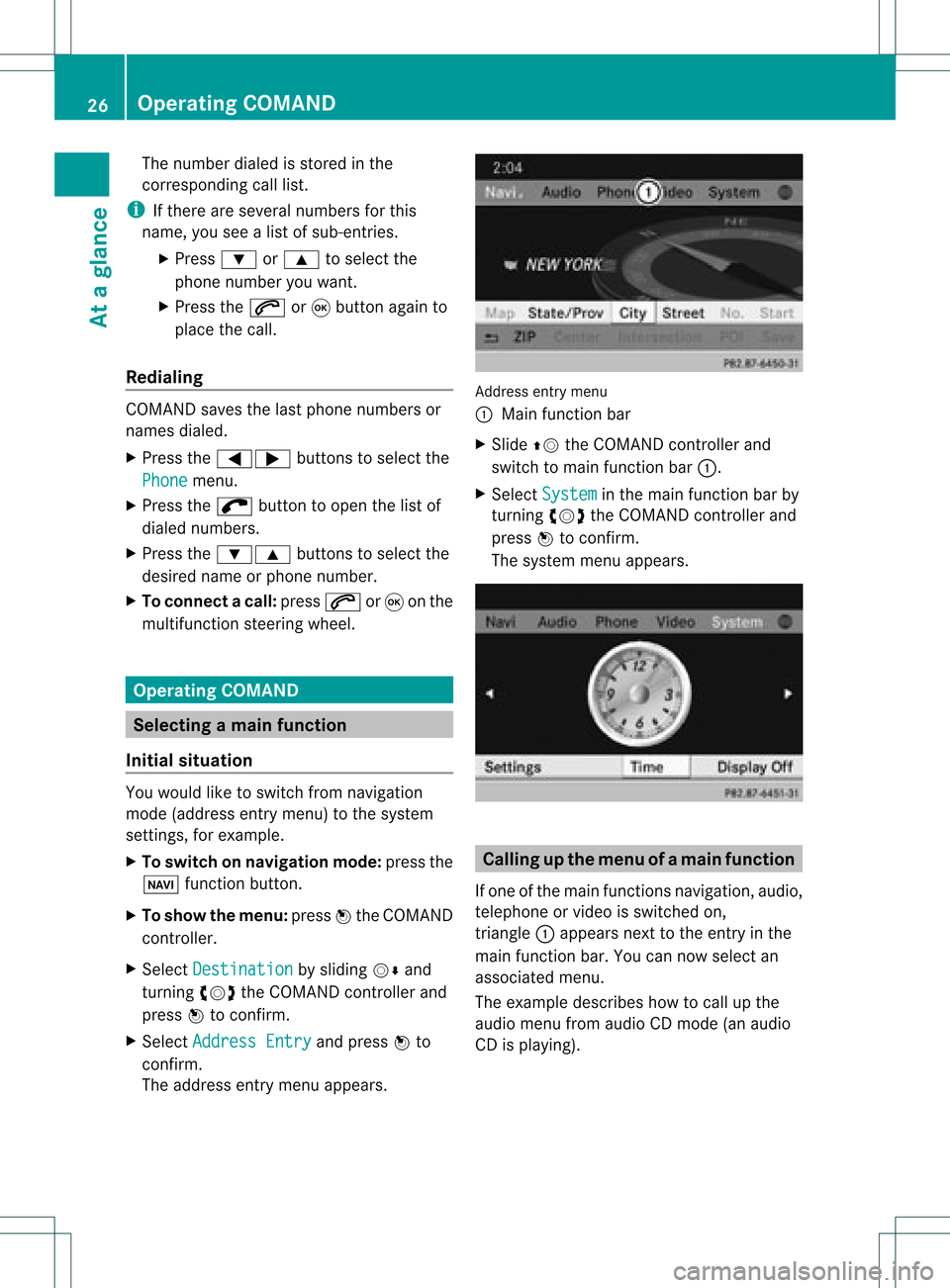
The address entry menu appears. Addre
ssentry menu
: Mai nfunc tion bar
X Sli de ZV theCOMA NDcontrol ler and
swit chtomain function bar :.
X Se lec tSys tem in
themain function bar by
tur nin gcVd theCOMA NDcontrol ler and
pre ssW toconfirm .
The systemmen uappear s. Calli
ngup themen uofam ainfunc tion
If one ofthe mainfunc tion snav igat ion,audio,
te leph oneor vide ois swit ched on,
tr iang le: appear sne xt to theen try in the
main function bar. Youcannowsele ctan
asso ciatedmen u.
The example describeshow tocall upthe
audio menufrom audio CDmod e(an audio
CD isplayin g). 26
Op
era ting COMAN DAtaglan ce
Page 29 of 234
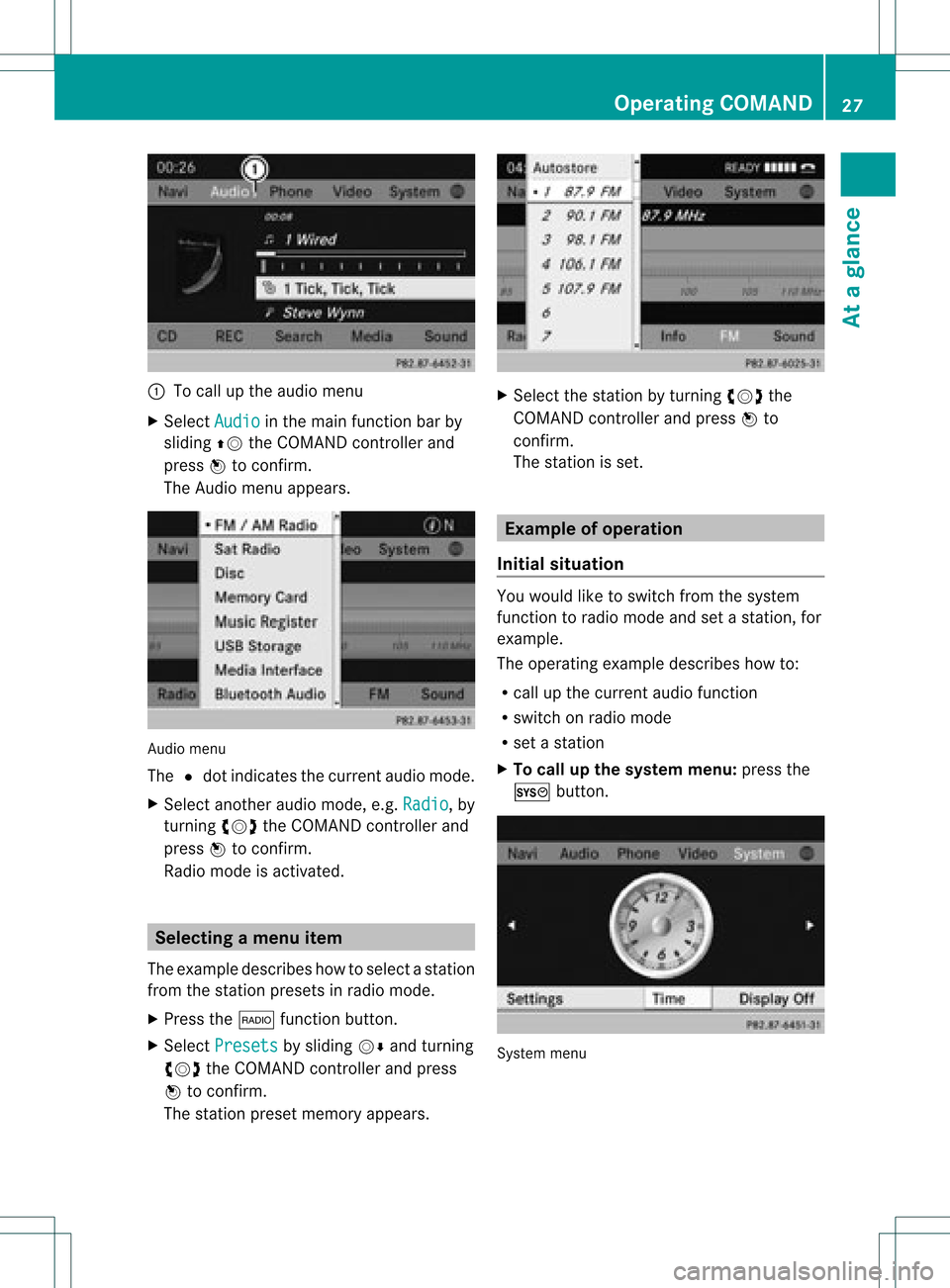
:
Tocall upthe audio menu
X Select Audio in
the main functionbar by
sliding ZVtheCOMAND controller and
press Wtoconf irm.
The Audio menuappears. Audio
menu
The #dot indicates thecurren taudio mode.
X Se lec tanothe raudio mode,e.g. Rad io ,
by
tur nin gcVd theCOMA NDcontrol ler and
pre ssW toconfirm .
Radio modeis act ivat ed. Select
ingam enu item
The exam pledesc ribes howtoselec tastation
from thestation presets inradio mode.
X Press the$ function button.
X Select Presets by
sliding VÆandturning
cVd theCOMAND controller andpress
W toconfirm.
The station presetmemory appears. X
Select thestation byturning cVdthe
COMAND controller andpress Wto
confirm.
The station isset. Example
ofoperation
Initial situation You
woul dlike toswitch fromthesystem
function toradio mode andsetastation, for
example.
The operating exampledescribes howto:
R call upthe current audiofunction
R switch onradio mode
R set astation
X To call upthe system menu:pressthe
W button. System
menu Operat
ingCOMAND
27Ataglanc e Z
Page 30 of 234
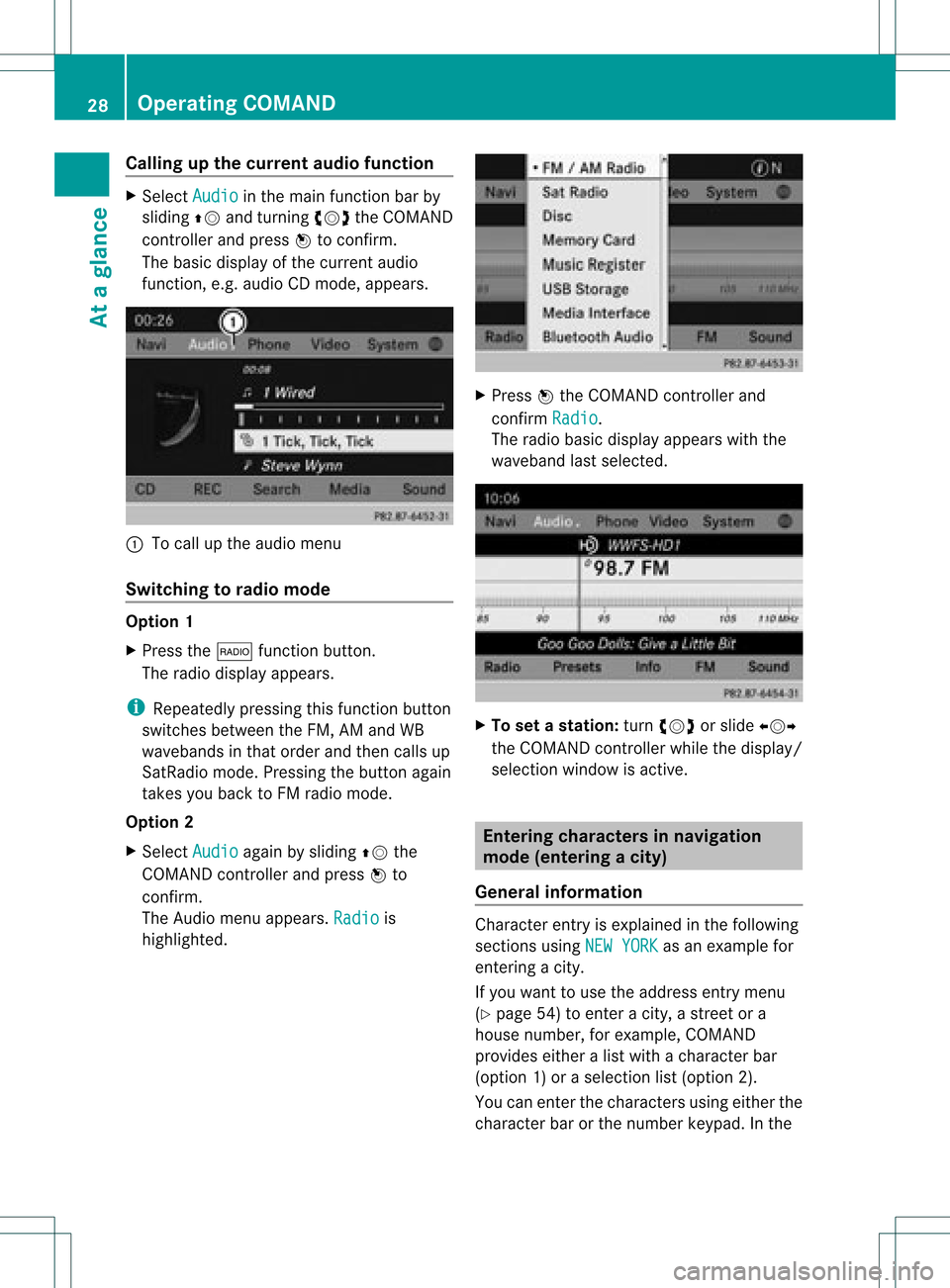
Callin
gup thecur ren tau dio funct ion X
Sel ect Audio in
themain function bar by
slidin gZV andturnin gcVd theCOMA ND
co ntroll erand pres sW toconfirm .
The basic displayofthecur ren taudio
fun ction ,e. g. audio CDmod e,appear s. :
Tocall uptheaudio menu
Swit chingto radio mod e Op
tion1
X Pre ssthe$ function button.
The radio displayappear s.
i Repeat edlypressin gth is fun ction button
swit ches bet ween theFM ,AM and WB
waveb andsin that ord erand then call sup
Sat Radio mode.Pre ssin gth ebut tona gain
takes youback toFM radio mode.
Option 2
X Select Audio again
bysliding ZVthe
COMAND controller andpress Wto
conf irm.
The Audio menuappears. Radio is
highlighted. X
Press Wthe COMAND controller and
conf irmRadio .
The radio basic display appears withthe
waveband lastselected. X
To set astat ion: turn cVd orslide XVY
the COMAND controller while thedisplay /
selection windowisactive. Entering
characters innavigation
mode (entering acity)
Gener alinfor mation Charact
erent ryisexplain edinthe followin g
sect ions using NEWYORK as
an exam plefor
ent erin gacit y.
If you want touse theaddress entrymen u
(Y page 54)toent eracit y,astr eet ora
house numbe r,for exam ple,COMAN D
prov ides eitheralist with achar acterbar
(optio n1)or aselect ionlist(option 2).
You canenterthe charac tersusing either the
charac terbar orthe number keypad. Inthe 28
Oper
ating COMANDAtaglance
Page 32 of 234
X
Enter E ,
W ,
sp ace ,Y wi
th the corr espo ndi ng
key s.
i Thesp ace isente redusing num berk ey
9.
Furt herfunctions inthe listwith
char acter bar X
To delete character s:select 2by
sliding VÆandturningcVd theCOMAND
con troller andpress Wtocon firm.
or
X Press the2 button nextto the
COMAND controller .
X To delete anentry :select the2 icon
by sliding VÆandturningcVd the
COMAND controller, andthen press Wand
hold until theentireent ryisdeleted.
or
X Press andhold the2 button nextto the
COMAND controller untiltheentireent ryis
deleted.
X To cancel anentry :select the& icon in
the bott omleft ofthe charact erbar and
press Wtocon firm.
or
X Press the% backbutton .
The address entrymenu appears.
X To accept thefirst listentry :press Wand
hold theCOMAND controller untilthe
address entrymenu appears.
The accept edlist entryisshown there.
Calling upthe listasas election list Sele
ctthedesir edcityfrom theselec tionlist .
If the reare sever alent ries foracit yor if
sever alcit ies ofthe same name arestored,
the n¬ ishighligh tedinthe char acterbar.
X Press Wthe COMA NDcontroller. It
is also possible toswitc hthe citylist tothe
selec tionlistatany timedurin gchar acter
input .
X Slide ZVtheCOMA NDcontroller
repeat edlyuntilthe citylist appears asa
selec tionlist.
or
X Selec t¬ inthe char acterbar byturnin g
cVd theCOMA NDcontroller andpress
W tocon firm .
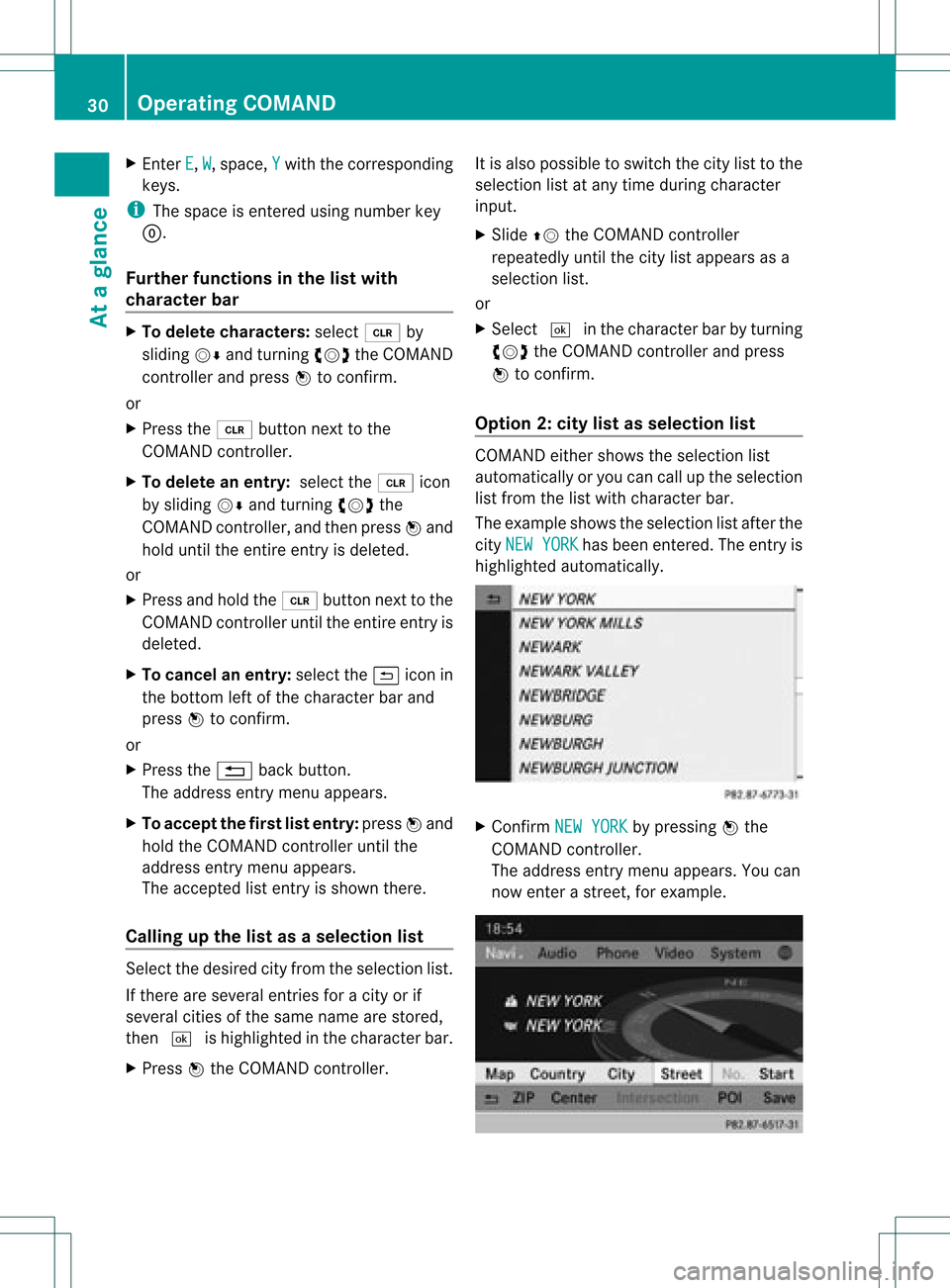
Opt ion 2:city listasselection list COMA
NDeith ershows theselec tionlist
autom atically oryou can callupthe selec tion
list fromthe listwith characterbar.
The exam pleshows theselec tionlistafterthe
cit yNEW YORK has
been entered. Theentryis
highligh tedautom atically. X
Conf irmNEW YORK by
press ingWthe
COMA NDcontroller.
The address entrymen uappears. Youcan
now enterast reet ,for exam ple. 30
Oper
ating COMANDAtaglance